Overview

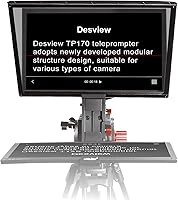
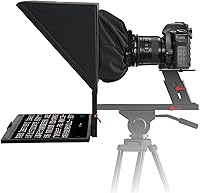
The Desview TP170 17-inch Teleprompter sits comfortably in the mid-range bracket, offering a noticeably larger reading surface than the compact 10- or 12-inch prompters that dominate the budget end of the market. That 17-inch glass panel makes a real difference when you are standing a few feet back from the camera — you can actually read full sentences without squinting or bumping up the font to an absurd size. The aluminum alloy construction and included carry case signal that Desview built this for repeated use, not just occasional tinkering. It works with iPads, Android tablets, DSLRs, mirrorless cameras, and camcorders. Just keep in mind this prompter performs best in controlled lighting conditions — direct, harsh sunlight will still test its limits.
Features & Benefits

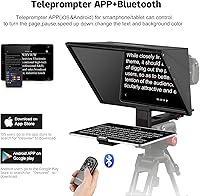
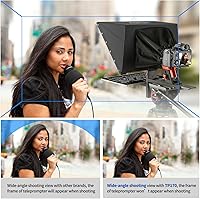
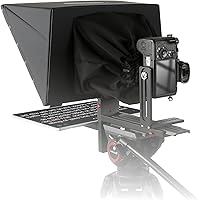
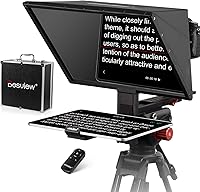
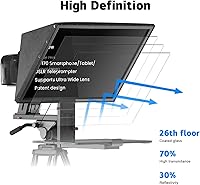
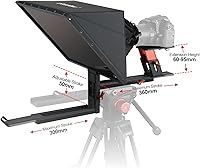
The liftable aluminum frame is one of those details you appreciate most once you are on set — raising or lowering the glass to match your lens height saves a surprising amount of fussing with tripod legs and camera plates. The 70/30 light transmission ratio keeps the reflected text readable for most indoor and overcast outdoor shoots. A Bluetooth remote is included out of the box, so you can start and stop scrolling without touching your phone or laptop. The free Desview app handles scroll speed and font size control right from your tablet, while studios running dedicated software on a PC can use the included USB drive. The detachable sun hood helps manage glare, and the frame supports wide-angle shooting down to 24mm without vignetting issues.

Best For

This prompter is an obvious fit for solo YouTubers and video podcasters who regularly deliver long, scripted content and need to maintain natural eye contact with the camera without memorizing every line. It is also well-suited for corporate trainers and HR teams producing internal videos or webinar content where confident delivery matters. Educators and online course creators will find the larger glass particularly helpful — there is real comfort in reading at a relaxed pace without hunting for your place mid-sentence. Anyone upgrading from a smaller prompter will notice the difference immediately. The included carry case makes it a practical option for small production teams that regularly move between shoot locations.

User Feedback

Across more than 400 reviews and a 4.3-star average, the pattern is consistent: most buyers are impressed by the overall build quality and report getting up and running much faster than expected. Glass clarity draws frequent praise, and first-time teleprompter users specifically mention how approachable the whole setup feels out of the box. On the critical side, the weight — just over 7 pounds — comes up repeatedly as a concern for creators working with lighter rigs or traveling frequently. A handful of users note the Desview app works reliably but carries a steeper learning curve than anticipated. The carry case, however, is consistently called out as a genuine value-add that keeps everything protected between shoots.

Pros

  • The 17-inch glass panel makes on-camera text genuinely readable at real shooting distances without oversized fonts.
  • Aluminum alloy construction gives the TP170 a solid, professional feel that cheaper plastic prompters simply cannot match.
  • A Bluetooth remote is included in the box — no separate accessory purchase needed to get hands-free scrolling working.
  • The liftable frame adjusts to different lens heights, which saves a lot of awkward tripod repositioning between setups.
  • Broad device compatibility covers iPads, Android tablets, DSLRs, mirrorless cameras, and camcorders without adapters in most cases.
  • The included carry case is well-designed and genuinely protective — buyers who travel with it consistently praise how it holds up.
  • First-time teleprompter users report getting fully operational in under 20 minutes, which is a low barrier for a tool this size.
  • Wide-angle shooting down to 24mm works cleanly without vignetting, which matters for creators using modern mirrorless setups.
  • The free Desview app handles scroll speed and font adjustments reliably on iOS for creators who prefer a tablet-based workflow.

Cons

  • At over 7 pounds, this prompter adds serious load to a tripod — lightweight rigs may struggle to stay balanced.
  • The Desview app has a steeper learning curve than most users expect, particularly on Android devices.
  • Android users have reported occasional Bluetooth dropout and app instability on non-flagship phones and tablets.
  • PC-based prompting via USB is functional but poorly documented, and getting it working reliably requires extra troubleshooting.
  • Some small adjustment knobs and plastic clips show wear after repeated assembly cycles over several months of use.
  • Direct sunlight renders the prompter nearly unusable — the sun hood helps marginally but does not solve the core limitation.
  • Full breakdown and careful repacking into the carry case takes longer than expected, which frustrates shooters on tight schedules.
  • The instruction manual lacks detail, particularly for users who need guidance on mounting heavier or larger tablets securely.
  • Certain specialty mirrorless rig configurations require additional mounting adapters that are not included with the unit.

Ratings

The Desview TP170 17-inch Teleprompter has been scored across 12 performance categories by our AI rating system, which analyzed verified global buyer reviews while actively filtering out incentivized, bot-generated, and duplicate feedback. The result is an honest, weighted snapshot of how this prompter performs in real-world creator and corporate environments — strengths and frustrations included.
Build Quality
88%
The aluminum alloy frame consistently earns praise from buyers who have handled cheaper plastic prompters before. Users describe it as noticeably rigid during operation, with no flex or wobble even when a heavier tablet is mounted. For a mid-range tool, the physical finish exceeds expectations.
A small but vocal group of reviewers noted that certain connecting joints and locking knobs feel less refined than the main frame suggests. Over repeated assembly cycles, some users reported minor loosening in the height-adjustment mechanism that required occasional re-tightening.
Glass Clarity & Readability
84%
The 17-inch beam-splitter glass draws consistent praise for producing sharp, ghost-free text at typical shooting distances of 4 to 6 feet. Buyers transitioning from smaller prompters specifically mention being able to use a comfortable font size without crowding the script, which noticeably improved their on-camera delivery.
In bright indoor lighting with overhead fixtures directly above the setup, a few users reported mild secondary reflections that required repositioning. The glass performs well in overcast outdoor conditions but struggles in direct sunlight, which is a known physics limitation of 70/30 transmission glass rather than a manufacturing flaw.
Ease of Assembly
82%
18%
Most first-time users report getting the TP170 fully assembled and camera-ready in under 20 minutes without needing to watch a tutorial. The component count is manageable, and the liftable frame mechanism clicks into position intuitively. For solo creators who set up and break down frequently, this matters.
The instruction manual has been flagged by a handful of buyers as sparse, with diagrams that do not clearly indicate torque points or cable routing for the tablet holder. Users with larger hands also mentioned that tightening certain small bolts in tight recesses was awkward without the right tool.
Remote Control Functionality
79%
21%
Having a Bluetooth remote included at this price point is genuinely useful — buyers appreciate not having to budget separately for scroll control. The remote pairs quickly and covers a workable range for most solo shooting setups, allowing presenters to adjust scroll speed mid-take without breaking composure.
The remote is functional but basic. Users looking for fine-grained speed adjustment or the ability to jump between script sections will find it limited. A few Android users also reported occasional Bluetooth dropout requiring a re-pair, which is disruptive mid-session.
App Performance (Desview App)
71%
29%
The free Desview app handles the core workflow — loading a script, adjusting scroll speed, and tweaking font size — reliably enough for regular studio use. iOS users in particular report a stable experience, and the app is available on both platforms with no subscription required.
The app interface has a noticeable learning curve that catches new users off guard, especially compared to more polished third-party teleprompter apps. Android users have reported intermittent sync issues and occasional crashes on non-flagship devices, and updates to improve UI intuitiveness have been slow.
Compatibility & Versatility
86%
The broad device compatibility is a genuine selling point for creators who work across multiple setups. It accommodates iPads and Android tablets up to 17 inches, and the lens support down to 24mm horizontal means wide-angle shooters can use it without cropped edges creeping into frame.
Mounting a very large tablet — particularly 12.9-inch iPads in landscape orientation — requires careful balancing and can shift the rig's center of gravity on lighter tripods. A few users with specialty mirrorless rigs noted that the mounting plate required additional adapters not included in the box.
Portability & Weight
63%
37%
The included hard carry case is genuinely well-regarded — buyers who travel between corporate shoots or take the prompter to client locations praise it for keeping everything organized and protected. The case design accommodates all components without requiring disassembly beyond what feels natural.
At just over 7 pounds, this prompter adds meaningful load to a travel kit. Run-and-gun shooters and videographers who work out of backpacks find the bulk impractical. Even for studio creators who only move it occasionally, the combined weight of the prompter, carry case, and tablet is something to plan around.
Outdoor Performance
58%
42%
In overcast conditions or shaded outdoor environments, the 70/30 glass provides enough reflectivity for readable text at normal shooting distances. The detachable sun hood helps reduce ambient glare coming from above, and several users confirmed usable performance during cloudy-day exterior shoots.
Under direct sunlight, readability drops considerably — this is a common constraint of beam-splitter technology at this price tier, not unique to the TP170. Buyers who primarily shoot outdoors in sunny climates should calibrate expectations carefully, as no sun hood fully compensates for high ambient light.
PC & Studio Integration
74%
26%
The included USB drive adds real utility for studio operators running dedicated teleprompter software on a PC or laptop. It removes the dependency on a tablet entirely for more complex productions, which suits corporate video departments and small agencies that already have a laptop in their setup.
The USB-based PC prompting workflow is less intuitive than the app-based approach and requires compatible software that Desview does not clearly document for all platforms. Users who expected plug-and-play PC functionality out of the box often needed to troubleshoot before achieving a stable workflow.
Value for Money
77%
23%
At its price point, the combination of 17-inch glass, aluminum construction, Bluetooth remote, carry case, and cross-platform compatibility represents solid overall value. Buyers upgrading from sub-100-dollar prompters consistently describe it as a meaningful step up that produces visibly better on-camera results.
Compared to a few competitors at a similar price, some users feel the app experience and remote precision fall slightly short of justifying the full asking price without improvement. Those who primarily need a basic prompter for occasional use may find the feature set larger than their actual needs.
Setup Speed (Session-to-Session)
76%
24%
Creators who leave the TP170 partially assembled between shoots report that getting from storage to camera-ready is a quick process. The height-adjustment mechanism is accessible without tools once familiar, and the sun hood attaches and detaches without much friction.
Full breakdown and repacking into the carry case takes longer than users initially expect — getting everything seated correctly without forcing components typically takes 10 to 15 minutes. For daily-use studio setups this is a non-issue, but for on-location shooters on tight schedules it adds up.
Long-Term Durability
72%
28%
The majority of long-term reviewers — those who have used the TP170 for six months or more — report no structural failures or glass degradation. The aluminum body handles minor bumps and the case protects the glass reliably during transit, which gives regular users reasonable confidence in the investment.
Some users report that plastic adjustment knobs and small clips show wear after repeated use cycles, particularly on the tablet-holder arms. While the core frame holds up well, a few consumable-grade components feel like they were value-engineered in a way that may require replacement over a longer ownership period.

Suitable for:

The Desview TP170 17-inch Teleprompter is a strong match for solo video creators — YouTubers, online educators, and video podcasters — who record scripted content regularly and want to maintain natural eye contact with their audience without memorizing every line. The larger glass surface pays dividends for anyone who has wrestled with tiny text on a 10-inch prompter; at a comfortable shooting distance, you can use a readable font size without sacrificing script density. Corporate trainers and HR professionals producing internal video content will also find it well-suited to their needs, since the setup is repeatable and professional enough to justify keeping it in a dedicated studio corner. Small production teams that move between client locations can manage the weight and bulk with the included carry case, making it a viable travel option when the shoot schedule is not breakneck. Educators delivering online courses or coaching programs will particularly appreciate how the 17-inch reading surface reduces the cognitive load of tracking your place mid-sentence, which translates directly to more confident, fluid delivery on camera.
Not suitable for:

The Desview TP170 17-inch Teleprompter is not the right tool for run-and-gun videographers or documentary-style shooters who need to move fast and keep their kit light — at over 7 pounds before you add a tablet, it introduces meaningful load onto a tripod and adds real setup time in fast-turnaround environments. Creators who shoot primarily outdoors in sunny climates should also think carefully before committing; the 70/30 beam-splitter glass helps under overcast skies but does not overcome the physics of direct sunlight, and no sun hood fully solves that problem at this price tier. If you only record video occasionally — a few times a month at most — the size and assembly process may feel like overkill for what is essentially a part-time workflow need. Budget-conscious buyers who just need a basic prompting solution for short scripts should also consider whether a smaller, lighter, and cheaper unit would serve them just as well without the bulk. Finally, anyone expecting a plug-and-play PC experience or a polished consumer-grade app interface may find the software side of the TP170 requires more patience than anticipated.
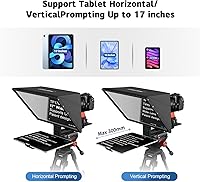
Specifications

  • Glass Size: The beam-splitter display glass measures 17 inches diagonally, providing a large reading surface suitable for extended scripts at typical shooting distances.
  • Glass Hardness: The optical glass carries a 7H hardness rating, which offers meaningful scratch resistance during regular handling and transport.
  • Light Transmission: The glass uses a 70/30 transmission ratio, reflecting 30% of the tablet display back toward the camera lens while allowing 70% of light to pass through.
  • Frame Material: The main structural frame is constructed from aluminum alloy, providing a rigid build with a premium physical feel without excessive bulk.
  • Height Adjustment: The frame features a liftable design that allows the glass panel height to be repositioned to align with different camera lens heights on a tripod.
  • Item Weight: The complete unit weighs 7.09 pounds, which is a meaningful consideration when selecting a tripod or planning location-based shoots.
  • Package Dimensions: The packaged unit measures 17 x 16 x 7.5 inches, reflecting the size of the included carry case rather than the prompter frame alone.
  • Remote Control: A Bluetooth remote control is included in the box, enabling hands-free scroll start, stop, and basic speed adjustments without touching a phone or laptop.
  • App Compatibility: The free Desview companion app is available for download on both the iOS App Store and Google Play, supporting script loading, font sizing, and scroll speed control.
  • PC Connectivity: A USB drive is included to support PC-based prompting workflows when used alongside compatible desktop teleprompter software.
  • Device Support: The tablet holder accommodates iPads and Android tablets up to 17 inches, and the rig is compatible with DSLR, mirrorless, and camcorder camera systems.
  • Min. Focal Length: The optical design supports horizontal shooting at focal lengths of 24mm or wider without vignetting appearing in the captured frame.
  • Vertical Shooting: For vertical orientation shooting, the minimum supported focal length is 35mm before vignetting becomes a concern at the frame edges.
  • Sun Hood: A detachable sun hood is included to reduce ambient glare from overhead light sources and improve on-screen text contrast in bright environments.
  • Carry Case: A purpose-built aluminum carry case is included with the unit, designed to house all components securely during transport and storage.
  • Manufacturer: The TP170 is designed and manufactured by Desview, a brand focused on teleprompter and on-camera monitoring accessories for video production.
  • Market Ranking: The unit holds a top-5 ranking in the Teleprompters category on Amazon, based on sales performance data at the time of review compilation.
  • User Rating: The product carries a 4.3 out of 5 star average rating derived from over 416 verified buyer reviews across global Amazon marketplaces.

Related Reviews
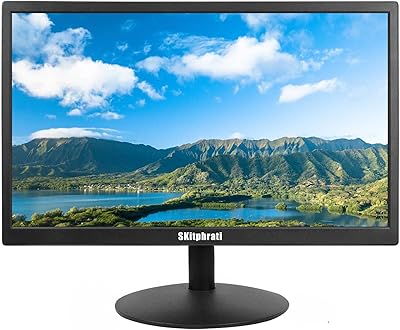
SKitphrati S-17-W 17-inch LED Monitor 1440x900
81%
91%
Value for Money
80%
Display Quality
85%
Connectivity
78%
Build Quality
90%
Ease of Setup
More
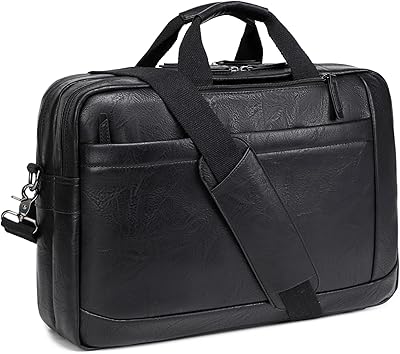
STUERY Faux Leather Messenger Bag for Men 17-17.3 Inch
85%
93%
Versatility of Design
88%
Build Quality
85%
Water Resistance
81%
Comfort and Ease of Carrying
90%
Organization and Compartments
More
HP 17 Essential 17.3-inch Laptop, Core i7, 64GB RAM, 1TB SSD
83%
92%
Performance
88%
Display Quality
80%
Battery Life
65%
Portability
95%
Multitasking Ability
More
HP Laptop 17-cp2199nr
70%
83%
Value for Money
61%
Display Quality
78%
Performance & Speed
87%
Storage Performance
84%
RAM & Multitasking
More
KiuLoam 17 Inch Backpack
86%
88%
Comfort and Ergonomics
85%
Storage Capacity
92%
Build Quality and Durability
90%
Design and Aesthetics
80%
Weight and Portability
More
Boavan 17-inch Rolling Backpack
80%
88%
Conversion Mechanism
84%
Wheel Performance
91%
Storage Organization
86%
Laptop Protection
79%
Build Quality & Materials
More
Saiyin DS6301 17-inch Soundbar
86%
85%
Sound Quality
70%
Bass Performance
91%
Ease of Setup
88%
Design and Build Quality
90%
Bluetooth Connectivity
More
ZOSHING 17-inch Security Monitor
83%
91%
Value for Money
85%
Display Quality
88%
Setup & Installation
90%
Connectivity Options
82%
Audio Performance
More
Ponhog 17-Inch Laptop Backpack
86%
91%
Comfort & Ergonomics
84%
Build Quality & Durability
89%
USB Charging Feature
88%
Water Resistance
90%
Laptop Protection
More
Pink Kawaii Backpack 17-inch
83%
92%
Capacity & Organization
88%
Comfort & Ergonomics
85%
Design & Aesthetics
75%
Durability & Build Quality
80%
Waterproof Performance
More

FAQ

Most users report being fully assembled and camera-ready in 15 to 20 minutes on their first attempt. The component count is manageable, and the frame mechanism is fairly intuitive once you have the parts laid out. The instruction manual is a bit sparse, so watching a short setup video online beforehand is worth the five minutes.

Yes, the tablet holder is designed to accommodate devices up to 17 inches, so a 12.9-inch iPad Pro fits without issue. Just be aware that larger, heavier tablets shift the rig's center of gravity slightly, so make sure your tripod head is locked down firmly before shooting.

It works reasonably well in shaded outdoor conditions or on overcast days, and the detachable sun hood helps reduce glare from overhead ambient light. That said, if you are shooting in direct sunlight, readability drops considerably — this is a physics limitation of beam-splitter glass at this price point, not a defect. Plan your outdoor shoots for golden hour or shaded locations if possible.

No — the Desview app is completely free on both iOS and Android, and it covers the essentials: loading scripts, controlling scroll speed, and adjusting font size. If you prefer using a PC instead, the included USB drive works with compatible desktop teleprompter applications, some of which are free and some paid depending on what you need.

iOS users generally report solid, stable pairing with the remote. Android users have occasionally noted dropout issues, particularly on older or mid-range Android devices. Keeping the remote within a reasonable distance — roughly 10 to 15 feet — and ensuring Bluetooth is not competing with other paired devices helps maintain a stable connection.

At just over 7 pounds before adding a tablet, the TP170 is on the heavier side for a prompter, and it will stress a lightweight travel tripod, especially when the glass extends forward from the camera. A tripod rated for at least 10 to 12 pounds of payload is a safer choice to avoid any tipping or slow drift during a take.

Yes, it is compatible with Sony A7 series and similar mirrorless cameras. The mounting system attaches to a standard tripod head rather than directly to the camera body, so as long as your lens clears the glass hood — which it should at focal lengths of 24mm or longer — you are good to go. Just double-check that your specific lens diameter fits within the hood opening.

The most immediate difference is how much more comfortable it is to read at a normal shooting distance. With a 10 or 12-inch prompter, you often have to bump up the font size so aggressively that you can only see a few words at a time, which leads to a choppy reading pace on camera. The 17-inch glass lets you use a natural font size, keep more of your script in view, and maintain a much smoother, more conversational delivery.

The carry case is designed to hold all included components — the frame, glass, sun hood, remote, and USB drive — without needing a separate bag. Multiple buyers specifically praise how well-organized it is. It is not a soft pouch but a structured case, which gives the glass real protection during travel.

The aluminum frame itself holds up well with regular use. The components most likely to show wear over time are the smaller plastic adjustment knobs and the tablet holder arm clips, which can loosen or show fatigue after many assembly and disassembly cycles. Tightening hardware periodically and handling those joints carefully will extend their useful life. The core glass and frame construction have not drawn significant durability complaints from long-term users.