Overview

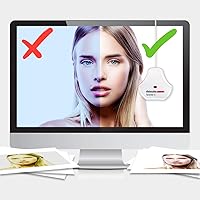
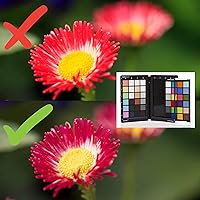
The Datacolor Spyder X Capture Pro Color Kit is a professional-grade bundle built for photographers who are serious about color accuracy throughout their entire workflow. Color calibration — the process of ensuring your camera captures true-to-life tones and your monitor displays them faithfully — is something many photographers overlook until a client complains or a print comes back wrong. This color management kit addresses that problem at every stage, from shooting with a color reference card to calibrating your monitor during post-processing. Datacolor has been in the color science industry long enough to be taken seriously by working pros. This is not a beginner purchase — it carries a learning curve to match its professional ambitions.

Features & Benefits

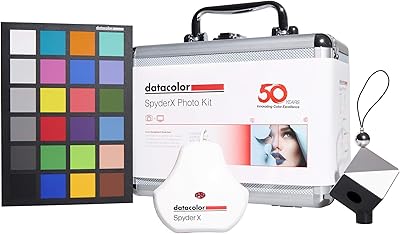
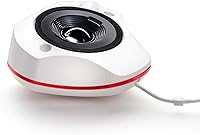
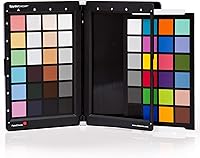
The SpyderX Pro calibrator at the heart of this bundle uses a lens-based color engine that handles accurate white points and shadow detail far better than older sensor-based designs — you notice the difference in your very first calibration session. Alongside it, the Spyder Checkr Photo card offers 48 measured color patches to build custom in-camera profiles inside Lightroom or Capture One, so your RAW files start from a more accurate baseline before you touch a single slider. The companion software walks you through both processes step by step, which helps considerably if you are new to color management. A protective carry case keeps everything organized and makes the Spyder X bundle genuinely practical for location work.

Best For

This calibration toolkit earns its keep most clearly in professional and semi-professional contexts. Portrait and product photographers who deliver edited files directly to clients will appreciate having predictable, repeatable color — no more guessing whether a skin tone looks different on a client's screen than on yours. Studio photographers juggling multiple monitors or camera bodies benefit greatly, since consistent calibration removes a major variable from quality control. Location shooters will find the bundled case makes the kit easy to pack. It also suits retouchers working with print labs or external color standards where accuracy is non-negotiable. If you are just starting out, this toolkit may be more than your current workflow demands.

User Feedback

Among verified buyers, the most consistent praise centers on how noticeably monitor consistency improves after that first calibration run — many users describe it as a wake-up call about how far their display had drifted. The bundled approach also earns appreciation; photographers who priced out the components separately recognize real value in buying them together. That said, the feedback is not uniformly positive. A recurring criticism is that the software feels dated compared to rivals, and some experienced users feel the calibration controls lack the depth they want. First-time color management users also report a steeper learning curve than they expected. Long-term owners, though, tend to settle into the workflow and find the investment pays off steadily over time.

Pros

  • Covers the full color workflow from in-camera profiling to monitor calibration in a single purchase.
  • The SpyderX Pro calibrator produces noticeably more accurate whites and shadow detail than older sensor-based hardware.
  • 48 scientifically measured color patches on the reference card allow genuinely precise custom camera profiles.
  • Direct integration with Lightroom and Capture One means profiles slot into most photographers existing editing software.
  • The bundled carry case makes this calibration toolkit practical for location and travel work, not just studio use.
  • Buying components together offers real cost efficiency compared to sourcing the calibrator and color checker separately.
  • Step-by-step software guidance lowers the barrier for photographers entering color management for the first time.
  • Long-term users consistently report the investment pays off once the workflow becomes routine.
  • Color consistency across camera, monitor, and output removes a major guesswork variable from client deliverables.

Cons

  • The software interface feels dated compared to competing calibration platforms and has not kept pace visually.
  • Advanced users frequently report a lack of deep manual controls for those who want more than automated calibration.
  • First-time color management users face a steeper learning curve than the packaging might suggest.
  • The kit is a significant financial investment that is difficult to justify for non-commercial or casual photographers.
  • The bundle format means paying for components you may already own, with no obvious modular purchasing option.
  • Calibration results can degrade over time and require periodic recalibration, adding ongoing time commitment.
  • The physical kit is bulkier than standalone travel-focused calibrators, which may matter for minimalist packers.

Ratings

The scores below reflect an AI-driven analysis of verified global buyer reviews for the Datacolor Spyder X Capture Pro Color Kit, with spam, bot-generated, and incentivized feedback actively filtered out before scoring. Each category is rated on a 0–100 scale, balancing genuine praise from working photographers against the real frustrations that surfaced repeatedly across review sources. Both strengths and pain points are reflected transparently — no category has been artificially inflated.

Color Accuracy
91%
This is where the Spyder X bundle earns its reputation. Photographers report that after running through both the monitor calibration and camera profiling steps, the consistency between what they capture, what they see on screen, and what comes out of a print lab improves dramatically. Portrait and product shooters in particular highlight how much more confident they feel delivering files to clients.
A small number of users note that accuracy can drift if ambient lighting conditions in the workspace change significantly between calibration sessions, requiring more frequent recalibration than they anticipated. The system performs best in a controlled lighting environment, which is not always practical for photographers who edit in multiple locations.
Monitor Calibration Performance
88%
The lens-based color engine in the SpyderX Pro calibrator draws consistent praise for handling whites and shadow detail more accurately than older colorimeter designs. Most users notice a visible difference in their monitor's output after the very first calibration run, which builds immediate confidence in the hardware.
Some users who have worked with higher-end calibration tools, such as those from X-Rite's professional lineup, feel the SpyderX Pro falls slightly short in absolute precision for the most demanding print-production workflows. It is excellent for photography, but users with extremely critical output standards occasionally flag minor delta E discrepancies.
Software Usability
61%
39%
The step-by-step guided workflow in Datacolor's software is genuinely helpful for photographers entering color management for the first time. The interface walks users through each stage clearly enough that most people can complete a monitor calibration successfully on their first attempt without consulting external tutorials.
The software's visual design and overall interface feel noticeably dated compared to competitors, and this criticism appears consistently across reviews from experienced users. Advanced photographers frequently express frustration at the lack of manual control options — there is no straightforward way to set custom targets or adjust calibration parameters beyond what the automated workflow allows.
Camera Profiling Workflow
78%
22%
The 48-patch Spyder Checkr Photo card gives photographers a solid foundation for building accurate custom camera profiles in Lightroom and Capture One. Users working under consistent studio lighting report that a well-built profile meaningfully reduces the time they spend correcting color casts on large batches of RAW files.
The profiling workflow requires a reasonable understanding of how custom profiles work within editing software, and first-time users frequently report needing additional research beyond what the included documentation provides. Those who shoot primarily in variable natural light also find that profiles built under one condition do not transfer cleanly to other lighting scenarios.
Value for Money
69%
31%
Buyers who needed both a monitor calibrator and a color reference card consistently report that the bundle pricing represents genuine savings compared to sourcing those components separately. Long-term users also describe the ongoing value as strong — once the workflow is established, the investment continues to pay dividends across every client job.
For photographers who only need one of the two core components, the bundle structure forces them to pay for hardware they may already own or may not use. The overall price point sits firmly in professional territory, and casual or hobbyist photographers who do not regularly deliver color-critical work to external clients are unlikely to recoup that investment in any practical sense.
Build Quality
83%
The SpyderX Pro calibrator feels solid in hand, and the Spyder Checkr Photo card is printed on durable, matte stock that holds up well to repeated studio handling. Users who travel frequently for location work appreciate that neither component feels fragile or prone to damage under normal professional use conditions.
The color reference card, like all physical targets, is vulnerable to long-term UV fading if stored carelessly in sunlight, and some users have flagged that the card's surface can pick up fingerprints or dust that affect profiling results if not handled carefully. Datacolor does not include replacement patches or a card sleeve, which some buyers feel is an oversight at this price tier.
Portability
81%
19%
The included carry case is one of the more appreciated practical details in this color management kit — it keeps both the calibrator and reference card protected and organized without adding significant bulk. Location photographers and those who split time between a studio and on-site work report that the case makes it genuinely easy to bring the full calibration toolkit along without it becoming a hassle.
The overall package is not ultracompact — at 2.5 pounds and nearly 16 inches in its longest dimension, it is more of a camera bag addition than a pocket-friendly accessory. Photographers who travel light with a minimalist kit may find the combined footprint of both components and the case adds more to their load than they would prefer.
Setup & Onboarding
66%
34%
The calibration software does a reasonable job of guiding new users through an unfamiliar process, and most photographers report being able to complete their first monitor calibration within 15 to 20 minutes of opening the box. Datacolor also provides online resources that supplement the in-box documentation for users who want more context.
The camera profiling side of the workflow requires significantly more time and patience than the monitor calibration step, and the gap between what the documentation explains and what users actually need to know to integrate profiles correctly into Lightroom or Capture One catches many buyers off guard. Several reviewers specifically mention wishing for better onboarding video content from Datacolor.
Software Integration
76%
24%
Compatibility with both Adobe Lightroom and Capture One covers the two most widely used RAW processing platforms in professional photography, which means this calibration toolkit fits neatly into the existing workflows of most target users without requiring software changes. Profile export is straightforward once the initial setup is complete.
Users working outside of Lightroom or Capture One — for example, those using Affinity Photo or Skylum Luminar as their primary RAW editors — will find the profile integration process significantly less smooth and may need third-party tools or workarounds. The software does not offer native support for a wider range of editing platforms, which limits flexibility for photographers with less conventional toolchains.
Calibration Consistency Over Time
74%
26%
Users who commit to a regular recalibration schedule — roughly every three to four weeks — report that the Spyder X bundle maintains a reliably consistent color baseline across their editing setup over months of use. Studio professionals managing multiple monitors particularly value this consistency when color-matching displays side by side.
Display calibration profiles do degrade over time as monitors age, and several long-term users note that the hardware itself may eventually need replacement or recertification to maintain accuracy claims. There is also no built-in reminder or scheduling system in the software to prompt users when recalibration is due, which means the discipline of maintaining accuracy falls entirely on the user.
Packaging & Presentation
77%
23%
The kit arrives well-packaged and clearly organized, with each component having a designated position in the carry case that makes it immediately clear what you are working with. Buyers who have purchased this as a professional tool report that the unboxing experience matches the premium market position the product occupies.
A handful of reviewers note that the documentation included in the box is fairly sparse for a kit at this price point, relying more heavily on users self-directing to online resources. Some buyers also feel the carry case, while functional, does not feel quite as premium in material quality as the hardware it holds.
Repeat Usability
86%
Once the initial learning curve is behind them, most users describe the recalibration process as fast and low-friction — the SpyderX Pro can run through a full monitor calibration in well under 15 minutes on subsequent sessions. This makes routine maintenance genuinely easy to sustain rather than something that gets postponed indefinitely.
The camera profiling workflow is less amenable to quick repetition — building a new profile for a changed shooting environment still requires a deliberate setup process that takes meaningful time. Users who expected the camera profiling side to be as quick as the monitor calibration process report some disappointment at the time investment required.

Suitable for:

The Datacolor Spyder X Capture Pro Color Kit was built for photographers who treat color accuracy as a professional requirement, not an optional nicety. Portrait photographers delivering skin-tone-sensitive edits to clients, product photographers shooting for e-commerce catalogs, and retouchers submitting files to commercial print labs will all find this calibration toolkit directly addresses real, recurring pain points in their work. Studio professionals who operate multiple monitors or switch between camera bodies will particularly appreciate the ability to establish a consistent, trusted color baseline across their entire setup. Location shooters benefit from the compact, case-protected bundle — having both a color reference card and a monitor calibrator in one organized kit means color management does not get skipped when working on the road. Photographers who are moving from casual, instinct-based editing into a structured, color-managed workflow will also find the step-by-step software guidance genuinely useful as they build good habits.

Not suitable for:

The Datacolor Spyder X Capture Pro Color Kit is a hard sell for hobbyists who shoot casually and edit for personal enjoyment rather than client delivery. If you are not regularly exporting files to clients, print labs, or color-critical output destinations, the level of precision this toolkit provides is likely more than your workflow will ever demand. Photographers who are brand new to post-processing altogether may find the concept of color calibration — let alone a two-stage hardware-and-software process — overwhelming before they have mastered the basics of editing. Budget-conscious buyers looking for a simple monitor calibration solution will find this bundle carries a significant premium that only makes sense if you genuinely need and will use every component. Advanced colorists or technical users who want granular manual control over calibration parameters may also find the software limiting compared to more specialized professional tools on the market.

Specifications

  • Brand: Manufactured by Datacolor, a company specializing in color management hardware and software for photography and design professionals.
  • Model Number: The official model identifier for this kit is SXCAP100.
  • Dimensions: The packaged kit measures 6.1 x 10.24 x 16.4 inches, sized to accommodate all included components in one carry case.
  • Weight: The complete kit weighs 2.5 pounds, making it manageable for transport to location shoots or client studios.
  • Calibrator: Includes the SpyderX Pro monitor calibrator, which uses a lens-based color engine to measure and correct display white point, brightness, and shadow detail.
  • Color Reference: Includes the Spyder Checkr Photo card featuring 48 scientifically measured color patches used to build custom in-camera color profiles.
  • Carry Case: A protective carry case is included to store and transport all components safely without risk of damage to calibration surfaces.
  • Software: Comes with the Datacolor color management software suite, which guides users through both monitor calibration and camera profiling workflows step by step.
  • Compatibility: The software and color reference card workflow are compatible with Adobe Lightroom and Capture One for generating custom camera profiles.
  • OS Support: The SpyderX Pro calibrator and companion software support both Windows and macOS operating systems, though users should verify current version requirements on Datacolor's website.
  • Connection Type: The SpyderX Pro calibrator connects to a computer via USB for data transfer during the monitor calibration process.
  • Color Patches: The Spyder Checkr Photo reference card contains 48 individually measured color patches spanning a broad tonal and hue range for accurate profiling.
  • Target User: Designed for professional photographers and serious hobbyists who require precise, repeatable color accuracy across their capture and editing workflow.
  • Release Date: This kit was first made available on June 18, 2019.
  • Avg. Rating: The kit holds an average customer rating of 4.1 out of 5 stars based on 75 ratings on Amazon.
  • Category Rank: Ranked #72 in the Photographic Light Meter Color Calibration Charts category on Amazon at time of review.
  • Workflow Stage: The kit addresses two distinct workflow stages: in-camera color capture accuracy and post-capture monitor display calibration.
  • Profile Output: Camera profiles generated with the Spyder Checkr Photo card can be saved and applied as a starting point for RAW file processing in supported software.

Related Reviews
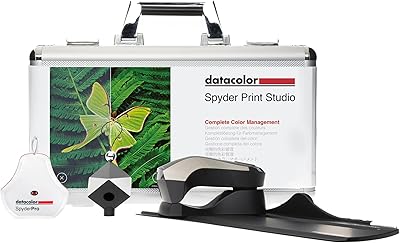
Datacolor Spyder Checkr Color Calibration Tool
86%
93%
Color Accuracy
88%
Ease of Use
90%
Build Quality
85%
Software Integration
92%
Durability
More
Datacolor Spyder Print Studio Color Management Kit
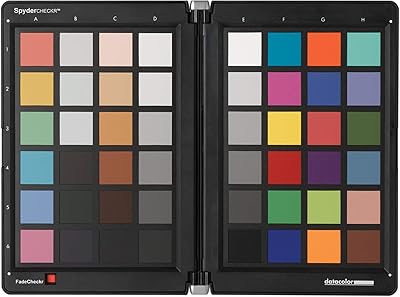
76%
91%
Print Color Accuracy
88%
Monitor Calibration Quality
61%
Software Usability
84%
Bundle Value
89%
Printer Profiling Flexibility
More
X&D Poly Gel Nail Kit 5 Colors
85%
88%
Ease of Use for Beginners
84%
Color Variety
91%
Long-Lasting Wear
75%
Curing Time
79%
Gel Flexibility
More
SXC Cosmetics French Tip Press On Nails Brown Series, Medium Almond X-Pro Tips Starter Kit
86%
88%
Ease of Application
92%
Customizable Fit
81%
Durability
93%
Design & Aesthetic
76%
Adhesive Quality
More
IGK Color Bright One Step Bleach & Color Kit ICE BREAKER - Cool Blonde, 4 Oz
83%
88%
Lightening Effectiveness
92%
Ease of Use
85%
Hair Texture Compatibility
76%
Moisture Retention
79%
Nourishment & Hydration
More
KZ ZS12 PRO X
KZ ZS12 PRO X
89%
95%
Sound Clarity
91%
Bass Response
93%
Treble Detail
90%
Midrange Accuracy
88%
Noise Isolation
More
Gigi Mini Pro Kit
Gigi Mini Pro Kit
83%
88%
Ease of Use
85%
Effectiveness
90%
Suitability for Sensitive Skin
87%
Portability
84%
Waxing Results
More
PRO Brow Lamination Kit
83%
87%
Ease of Use
90%
Effectiveness of Results
85%
Long-Lasting Effect
88%
Precision of Tools
82%
Brow Health and Conditioning
More
Datacolor SpyderX Photo Kit Color Calibration Kit
79%
91%
Monitor Calibration Accuracy
88%
Calibration Speed
83%
Color Chart Usability
86%
Spyder Cube Performance
63%
Software Experience
More
beyerdynamic DT 990 Pro X Over-Ear Headphones
78%
91%
Sound Quality
93%
Soundstage & Imaging
88%
Comfort & Fit
86%
Build Quality
82%
Cable & Connectivity
More

FAQ

The Spyder Checkr Photo color reference card works with any camera system that can shoot RAW files, including mirrorless bodies. The profiling process happens in software after the shoot, so the camera type itself does not limit compatibility — what matters is whether your editing software, such as Lightroom or Capture One, supports custom camera profiles.

Most professionals recalibrate their monitors every two to four weeks, since display output shifts gradually over time due to backlight aging and ambient changes. If your monitor is older or used heavily, monthly recalibration is a reasonable routine. The SpyderX Pro makes each session fast enough that it does not feel like a burden once you have done it a few times.

Yes, the SpyderX Pro calibrator works with external monitors, laptop displays, and desktop monitors alike. You simply run the calibration software for whichever display is active. Many photographers use it on both their laptop screen and an external color-accurate monitor to maintain consistency across environments.

Yes, the kit supports both macOS and Windows. That said, software version requirements and OS compatibility can change with updates, so it is worth checking Datacolor's current system requirements page before purchasing if you are running an older or very recent operating system version.

You do not need to reshoot every session. Once you have built a camera profile for a specific camera body and lighting condition, you can reuse that profile whenever you shoot under similar conditions. That said, if your lighting changes significantly — for example, switching from daylight to tungsten — creating a separate profile for that condition will give you more accurate results.

Yes, both Adobe Lightroom and Capture One are supported for generating and applying custom camera profiles using the Spyder Checkr Photo card. The workflow differs slightly between the two applications, but the Datacolor software guides you through the process for each.

The Spyder Checkr Photo card is available separately from Datacolor, so if you already have a capable monitor calibrator, you are not forced to buy the full bundle. That said, many photographers who price both components individually find the bundle offers meaningful savings, so it is worth comparing before deciding.

If you have ever edited a photo on your computer and then been surprised by how different it looked on another screen, in print, or on a client's display, your monitor likely needed calibration. Displays drift from their factory settings over time, and without calibration, what you see while editing may not reflect what your output actually looks like.

Honestly, yes — especially for the camera profiling side of things. The monitor calibration process is fairly guided and approachable, but understanding how to integrate custom camera profiles into your Lightroom or Capture One workflow takes some initial setup and reading. Most users get comfortable within a few sessions, and the step-by-step software helps considerably, but you should expect to invest some time upfront.

The included case is designed to keep all components organized and protected during storage and transport. For long-term accuracy, you should store the Spyder Checkr Photo card away from direct sunlight when not in use, since prolonged UV exposure can cause the color patches to fade over time, which would reduce the accuracy of profiles built from it.