Overview

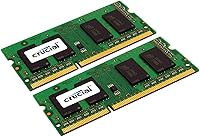
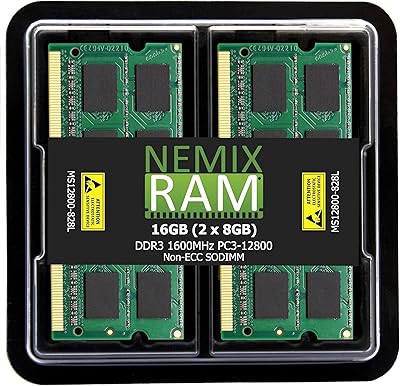
The Crucial 16GB DDR3-1600 SODIMM Laptop RAM Kit has been a go-to memory upgrade for laptop owners since its release in 2012, and its staying power says a lot. Backed by Crucial — a brand operating under Micron Technology — this memory upgrade brings 16GB of total capacity via two matched 8GB sticks running at 1600 MHz. The low-voltage design at 1.35V is a practical bonus for laptop users who care about heat and battery life. Priced accessibly, it sits firmly in the budget-to-mid-range tier without cutting corners on quality. With a Best Sellers rank of #102 in computer memory and over 13,000 ratings, sustained buyer trust is hard to argue with.
Features & Benefits

What makes this RAM kit worth considering comes down to a few practical design choices. The dual-channel configuration — two matched 8GB modules working in tandem — can improve memory bandwidth compared to a single larger stick. Running at PC3-12800 speed, these SODIMM sticks hit the sweet spot for compatibility across a wide range of older laptop motherboards. Installation is genuinely simple: pop open the panel, slide in the modules, and you are done — no drivers, no configuration software needed. Crucial also offers a compatibility checker tool that takes the guesswork out of ordering. Low heat output from the 1.35V design is a small but appreciated advantage in cramped laptop chassis.

Best For

This memory upgrade is a strong fit for anyone running an older laptop that still has solid CPU muscle but struggles with multitasking. If you find yourself juggling too many browser tabs, switching between a spreadsheet and a video call, or occasionally spinning up a lightweight virtual machine, more RAM genuinely helps in those scenarios. It is not a fix for a slow processor or aging storage — but for machines that bottleneck specifically on memory, the difference is real and immediate. Budget-conscious buyers will appreciate getting a trusted brand name without paying a premium. Just confirm your laptop supports DDR3 and has two open SODIMM slots before ordering.

User Feedback

With over 13,000 ratings averaging 4.8 out of 5 stars, the reception for these SODIMM sticks has been consistently strong. Buyers regularly mention a noticeable improvement in day-to-day responsiveness after upgrading, particularly when switching between applications or working with multiple browser windows open. The Crucial compatibility tool earns frequent praise for simplifying the buying process. On the flip side, a handful of users have flagged the need to verify whether their specific motherboard supports dual-channel mode or the 1.35V low-voltage spec — not all older boards do. DDR3 is also an aging standard, limiting this kit to an older hardware generation. Long-term reliability appears solid, though, based on feedback from buyers who have run it for years.

Pros

  • Straightforward installation requires no special tools or technical expertise — most users finish in under 15 minutes.
  • Running as a matched dual-channel pair can improve memory bandwidth compared to a single-stick setup.
  • The 1.35V low-voltage design generates less heat, which matters in compact, thermally limited laptops.
  • Over 13,000 ratings averaging 4.8 out of 5 stars reflects genuinely consistent real-world reliability.
  • Crucial's free online compatibility checker significantly reduces the risk of ordering the wrong memory.
  • This memory upgrade delivers a noticeable multitasking improvement on machines that were genuinely RAM-limited.
  • Micron-manufactured modules carry a strong reputation for long-term durability that budget-brand alternatives often lack.
  • Priced accessibly, this RAM kit offers trusted brand quality without the premium typically associated with enthusiast memory.
  • The 204-pin SODIMM form factor is the standard across a wide range of older laptop models.

Cons

  • DDR3 is a legacy standard — incompatible with any modern laptop requiring DDR4 or DDR5 memory.
  • Not all older motherboards support dual-channel mode, so the performance pairing benefit is not universal.
  • Some boards do not fully support the 1.35V low-voltage spec, which can require running modules at 1.5V instead.
  • Buyers must verify slot availability beforehand — laptops with only one SODIMM slot cannot use both modules together.
  • No performance improvement will be felt on machines also bottlenecked by a slow CPU or mechanical hard drive.
  • DDR3 memory is increasingly harder to find in stores, limiting easy local replacement if a module ever fails.
  • The kit has no heat spreader, which is typical for laptop SODIMMs but may concern buyers used to desktop memory aesthetics.

Ratings

The scores below were generated by AI after analyzing thousands of verified global buyer reviews for the Crucial 16GB DDR3-1600 SODIMM Laptop RAM Kit, with spam, bot activity, and incentivized feedback actively filtered out. Both the consistent strengths and the recurring pain points are reflected transparently across every category — no whitewashing, no inflation. If real users raised a concern at meaningful volume, it shows up here.

Reliability & Stability
93%
Buyers across years of reviews consistently report that these SODIMM sticks work flawlessly right out of the box, with no crashes, memory errors, or compatibility hiccups under normal daily workloads. The Micron manufacturing heritage appears to translate into real-world consistency — very few users report early failures even after extended use.
A small but notable group of buyers encountered instability issues traced back to motherboards that do not cleanly support the 1.35V low-voltage spec, causing occasional boot failures until the BIOS was updated or the voltage was manually set. These edge cases are hardware-dependent rather than a defect in the modules themselves.
Compatibility Range
78%
22%
For laptops built during the DDR3 era — roughly 2009 through 2015 — this memory upgrade fits a remarkably wide range of machines, and Crucial's online compatibility checker gives buyers a reliable way to confirm fit before committing. Many users praised how smoothly it slotted into popular models from Dell, HP, Lenovo, and Apple of that generation.
DDR3 is a legacy standard, which means the compatible hardware pool shrinks every year as older laptops age out of active use. Buyers with machines from 2016 onward will almost certainly need a DDR4 solution, and a non-trivial number of negative reviews stem directly from users who purchased this kit without verifying their laptop's memory type first.
Performance Impact
81%
19%
Users upgrading from 4GB or 8GB single-stick setups frequently describe a tangible improvement in everyday multitasking — browser sessions with many tabs, background syncing, and switching between productivity apps all feel noticeably more responsive. Running both modules in dual-channel mode adds a meaningful bandwidth bump for compatible motherboards.
Performance gains are firmly real-world in nature rather than benchmark-dramatic, and buyers expecting a transformative speed boost were sometimes underwhelmed — particularly if their bottleneck was a slow hard drive or an aging CPU rather than insufficient RAM. The dual-channel benefit also disappears on single-slot laptops or boards that do not support it.
Value for Money
91%
At its price point, this RAM kit delivers genuine brand reliability — Crucial is a Micron subsidiary, not a no-name manufacturer — without the premium markup attached to enthusiast-tier memory. For older laptops that would otherwise be retired, a low-cost memory upgrade that extends productive life by several years represents strong economic value.
Some buyers shopping purely on price can find even cheaper DDR3 kits from lesser-known brands, and whether Crucial's quality premium is worth it depends on individual risk tolerance. Users who later discover their laptop was not actually RAM-limited feel the cost more acutely since the upgrade delivers minimal real benefit in those cases.
Installation Experience
89%
The plug-and-play nature of SODIMM installation means that even first-time upgraders report completing the swap in under 20 minutes with just a small screwdriver. There is no software to configure, no driver installation required, and the modules click firmly into place with a satisfying physical confirmation that they are seated correctly.
Buyers whose laptops have non-removable bottom panels or soldered memory discovered the hard way that not every machine supports user-upgradeable RAM — something that should be verified before purchasing. A handful of users also reported that stiff slot retention clips caused brief anxiety during their first installation attempt, though this is standard across all SODIMM modules.
Low-Voltage Efficiency
84%
Operating at 1.35V rather than the standard 1.5V means these sticks generate less heat inside an already thermally constrained laptop chassis, which can be a quiet but real benefit during sustained workloads. Several users noted slightly improved fan behavior after the upgrade, suggesting reduced thermal load on the system overall.
The low-voltage advantage is modest and unlikely to produce measurable battery life improvements in real-world use — it is a marginal benefit rather than a headline feature. Additionally, on boards that do not natively support DDR3L, the modules default to 1.5V operation, eliminating the efficiency benefit entirely.
Dual-Channel Implementation
76%
24%
When the motherboard supports it and both modules are installed in the correct paired slots, the dual-channel configuration provides a genuine improvement in memory throughput compared to a single 16GB stick — an advantage buyers running virtual machines or memory-intensive creative software will appreciate most.
The dual-channel benefit is not automatic or universal, and a meaningful portion of buyers did not realize their specific laptop either lacked dual-channel support or required slots to be populated in a specific order. This created confusion and some disappointment when expected performance gains did not materialize.
Build & Module Quality
88%
The modules feel solidly constructed, with no flex or cheap plasticky feel to the PCB that cheaper memory alternatives sometimes exhibit. Long-term durability reviews — from users who have run the same sticks for five or more years — consistently support the idea that Micron-manufactured memory holds up under sustained daily use.
There is no heat spreader on these modules, which is entirely normal for laptop SODIMM memory but can give pause to buyers accustomed to desktop RAM aesthetics. Practically speaking, the thermal design is appropriate for laptop use, but the bare PCB appearance does not inspire the same visual confidence as a desktop kit.
Packaging & Delivery Condition
82%
18%
The modules typically arrive in secure anti-static packaging that protects them from electrostatic discharge during shipping, and buyers report them arriving in pristine, undamaged condition in the vast majority of cases. The inclusion of both modules in a clearly labeled kit reduces confusion during installation.
The packaging is purely functional rather than premium — there is no carrying case or accessory included, which is standard for memory but leaves first-time buyers who expected a more complete kit slightly surprised. A very small number of buyers reported receiving modules with bent pins or visible shipping damage, though this appears to be rare and isolated.
Compatibility Tool Usefulness
87%
Crucial's online Advisor tool is consistently praised in reviews as a practical, trustworthy resource that removes the guesswork from the buying process — users simply input their laptop model and get a direct answer on whether this kit is supported. This is a genuine differentiator compared to brands that offer no pre-purchase compatibility support.
The tool requires buyers to actually use it before purchasing, and a significant share of negative reviews come from users who skipped this step and ordered based on the DDR3 label alone. The tool also relies on Crucial's database being current, which means very obscure or regional laptop models occasionally return incomplete results.
Long-Term Durability
91%
Multi-year ownership reviews are disproportionately positive — buyers who upgraded laptops in 2013 or 2014 frequently return to note that the same sticks are still running without issue, which is a meaningful signal of build quality in a component category where early failure can be catastrophic for stored data.
DDR3 hardware as a whole is aging, meaning that even if the modules last indefinitely, the laptops they power are approaching end-of-life status from a software support perspective. There is no hardware durability concern with the memory itself, but the long-term usefulness of the upgrade is constrained by the host laptop's lifespan.
Brand Trust & Support
86%
Crucial's backing by Micron Technology carries genuine weight in the memory market — the brand has decades of manufacturing credibility and stands behind its products with a compatibility guarantee that reduces buyer risk. Users reference the brand name as a purchase motivator more consistently than almost any competitor in this price tier.
Customer support responsiveness for post-purchase issues has received mixed feedback, with some buyers reporting slower-than-expected resolution when seeking help for compatibility problems. The brand guarantee is reassuring in principle, but exercising it requires engagement with the support process, which not all buyers found frictionless.
Documentation & Setup Guidance
71%
29%
The included documentation covers the basics of installation adequately, and Crucial's website provides supplementary guidance for first-time upgraders that many buyers found useful when the printed insert alone was not enough. The existence of the compatibility tool partly compensates for limited in-box documentation.
Several first-time upgraders noted that the included instructions are fairly minimal and assume a degree of hardware familiarity that not every buyer has. Users who needed step-by-step guidance for their specific laptop model had to rely on external YouTube tutorials rather than anything provided with the product, which created some friction.

Suitable for:

The Crucial 16GB DDR3-1600 SODIMM Laptop RAM Kit is an excellent choice for anyone with an older laptop that still runs well but has started to feel sluggish under everyday workloads. If your machine shipped with 4GB or 8GB of RAM and you find yourself waiting on tab switches, slow application loading, or choppy multitasking, a memory upgrade is often the most cost-effective fix available. This kit is particularly well-suited to students, remote workers, and light creative users who run browser-heavy workflows, spreadsheets, video calls, and occasional photo editing simultaneously. DIY-friendly buyers will appreciate how straightforward the installation process is — no special tools or technical knowledge beyond basic comfort opening a laptop panel. Budget-conscious upgraders who want a dependable brand backed by years of strong user reviews, rather than a gamble on an unknown manufacturer, will find real value here.

Not suitable for:

The Crucial 16GB DDR3-1600 SODIMM Laptop RAM Kit is not the right purchase for everyone, and being clear about that upfront saves frustration. DDR3 is a legacy memory standard, so this kit is entirely incompatible with any laptop built on a DDR4 or DDR5 platform — which covers most machines released from roughly 2015 onward. If your laptop is relatively recent, there is a strong chance it requires a different memory type altogether, and installing the wrong standard is not possible due to the different physical connector. Users whose laptops are soldered with non-upgradeable RAM, or those whose machines only support a single SODIMM slot, will also not get the dual-channel benefits this kit is designed around. Those expecting dramatic performance improvements on a machine that is also bottlenecked by an aging processor or a slow hard drive will likely be disappointed — RAM alone cannot compensate for other hardware limitations. Always use Crucial's online compatibility tool or consult your laptop's specifications before ordering.

Specifications

  • Total Capacity: This kit provides 16GB of total system memory via two matched 8GB SODIMM modules.
  • Form Factor: Both modules use the 204-pin SODIMM form factor, which is the standard physical interface for laptop memory upgrades.
  • Memory Type: The modules use DDR3 SDRAM technology, a widely supported but legacy memory standard found in laptops produced roughly between 2009 and 2015.
  • Clock Speed: Each module operates at 1600 MHz, conforming to the PC3-12800 speed specification.
  • Voltage: The kit runs at 1.35V, which is the low-voltage DDR3L specification, reducing heat output compared to the standard 1.5V DDR3 rating.
  • Configuration: The two modules are designed to operate together in dual-channel mode for improved memory bandwidth when the motherboard supports it.
  • Pin Count: Each stick has 204 pins, matching the SODIMM slot standard used in the vast majority of consumer laptops.
  • Brand: Manufactured by Crucial, a brand owned and operated by Micron Technology, one of the largest semiconductor and memory producers in the world.
  • Model Number: The official model identifier for this kit is CT2KIT102464BF160B.
  • Module Weight: Each individual module weighs approximately 0.64 ounces in total for the kit, making it negligible for weight-sensitive builds.
  • Module Dimensions: Each stick measures approximately 1.18 x 0.38 x 2.66 inches, consistent with the standard SODIMM form factor.
  • Compatibility Tool: Crucial provides a free online Advisor tool that allows buyers to confirm compatibility with their specific laptop model before purchasing.
  • Installation: No drivers or configuration software are required; installation is plug-and-play after physically seating the modules in the SODIMM slots.
  • Market Ranking: This kit has held a Best Sellers Rank of #102 in the Computer Memory category on Amazon, reflecting sustained high purchase volume.
  • User Rating: The kit carries an average rating of 4.8 out of 5 stars based on more than 13,200 verified customer ratings.
  • Release Date: This product was first made available in February 2012 and has remained in continuous production since.

Related Reviews
Crucial 16GB DDR5 5600MHz SODIMM Laptop RAM
81%
93%
Installation Experience
81%
Speed & Real-World Performance
77%
Platform Compatibility
94%
Build & Component Quality
58%
Dual-Channel Value
More
Crucial 16GB DDR3 1600 MHz CL11 Desktop Memory Kit
87%
94%
Performance
91%
Ease of Installation
89%
Compatibility
85%
Energy Efficiency
92%
Reliability
More
Crucial 8GB Kit (2x4GB) DDR3 1600 MHz Laptop Memory
88%
93%
Installation Ease
88%
Performance Boost
85%
Energy Efficiency
91%
Compatibility
86%
Build Quality
More
NEMIX RAM 32GB (2x16GB) DDR3 1600MHz SODIMM Laptop Memory Kit
85%
88%
Performance Improvement
92%
Ease of Installation
85%
Compatibility with Laptops
90%
Energy Efficiency
91%
Value for Money
More
Kingston 16GB Kit (2 x 8GB) DDR3 1600MHz SODIMM Laptop Memory
88%
88%
Performance Boost
91%
Ease of Installation
85%
Compatibility with Laptops
92%
Energy Efficiency
80%
Build Quality
More
Crucial 16GB DDR4-2400 Desktop RAM Kit
81%
96%
Ease of Installation
93%
Compatibility
94%
Reliability & Stability
88%
Value for Money
86%
Performance – Everyday Use
More
Crucial 16GB DDR4-2666 SODIMM Laptop RAM Kit
86%
92%
Performance Gain
88%
Compatibility
91%
Value for Money
86%
Installation Ease
93%
Reliability & Longevity
More
NEMIX RAM 16GB DDR3 1600MHz SODIMM
86%
88%
Performance Boost
91%
Ease of Installation
85%
Compatibility
90%
Energy Efficiency
84%
Build Quality
More
Crucial 16GB DDR5 4800MHz Laptop RAM
86%
89%
Performance Improvement
93%
Ease of Installation
88%
Multitasking Performance
91%
Compatibility with 12th Gen Intel & AMD Ryzen 7000
86%
Gaming Performance
More
Timetec 16GB DDR4 2133MHz Laptop RAM Kit
80%
93%
Value for Money
71%
Compatibility
88%
Ease of Installation
79%
Performance Impact
86%
Stability & Reliability
More

FAQ

The safest approach is to use Crucial's free online compatibility tool before buying. You enter your laptop brand and model, and it tells you exactly which memory is supported. Your laptop's manual or the manufacturer's support page will also list the memory specifications. Do not assume compatibility based on the DDR3 standard alone — slot count, maximum supported capacity, and voltage tolerances all vary between models.

Not necessarily. Dual-channel mode requires two matched modules installed in the correct paired slots, and your motherboard has to support it. Most laptops with two SODIMM slots do support dual-channel, but the slots sometimes need to be populated in a specific order. Check your laptop's documentation or manufacturer support page to confirm, and make sure you are inserting both sticks rather than just one.

In most cases, yes. DDR3L modules rated at 1.35V are generally backward compatible with boards that run at 1.5V — the module will simply operate at the higher voltage the board supplies. That said, a small number of older boards handle this differently, so it is worth verifying your specific laptop model supports DDR3L or standard DDR3 interchangeably.

For most laptops, yes — it is one of the more approachable hardware upgrades available. You typically need a small Phillips-head screwdriver to remove the access panel on the bottom of the laptop, and the modules click in at an angle before laying flat and locking into place. YouTube has step-by-step videos for almost every laptop model. The main precaution is grounding yourself to avoid static discharge before handling the modules.

The most noticeable difference tends to show up in everyday multitasking — things like switching between a browser with many open tabs, a document editor, and a video call simultaneously will feel smoother. Application load times may improve slightly too, particularly on systems that were previously using virtual memory because physical RAM was maxed out. Do not expect dramatic gains in tasks that are CPU-bound or limited by a slow hard drive.

Yes, you can install a single 8GB stick and it will work fine — the system will recognize it and run normally. The trade-off is that you lose the potential dual-channel bandwidth benefit, since that requires two modules. If your laptop only has one available slot, a single module is a practical option.

No. The 204-pin SODIMM form factor is specific to laptops and a small number of compact desktop systems such as Intel NUCs or all-in-one PCs that use laptop-style memory. Standard desktop motherboards use a larger 288-pin DIMM slot and require a completely different type of module. Using a SODIMM in a standard desktop is not physically possible without an adapter.

First, reseat the modules — remove them and reinstall them firmly to make sure they are fully clicked into the slots. Then verify through Crucial's compatibility tool or your laptop's support page that these specific modules are supported. If the system still does not boot or only recognizes part of the memory, the BIOS may need updating, or there may be a slot compatibility issue specific to your motherboard.

RAM modules are among the most durable components in a computer. Under normal use, they rarely fail — many users report running the same sticks for five to ten or more years without issue. The more likely scenario is that your laptop becomes obsolete before the memory does. The volume of long-term positive reviews for this kit suggests reliability holds up well over time.

DDR3 is absolutely a legacy standard at this point, but that does not make it irrelevant. If your laptop requires DDR3, this is simply the correct type of memory for your machine — there is no DDR4 option that will slot in as a replacement. For anyone with a compatible older laptop that still serves their needs, upgrading the RAM remains a practical and cost-effective way to extend the machine's useful life.