Overview

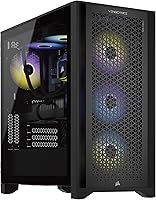
The Corsair Vengeance a7400 Gaming Desktop PC sits squarely in the premium prebuilt market, built for people who want serious performance without the hassle of sourcing and assembling parts themselves. The pairing of an AMD Ryzen 7 9700X and an RTX 4070 Super is the core value argument here — you get a genuinely capable machine rather than a spec-sheet illusion. What separates this Corsair prebuilt from rivals like Alienware or NZXT BLD is a tight internal ecosystem: Corsair-branded RAM, liquid cooling, and iCUE software all working together right out of the box.
Features & Benefits

The Ryzen 7 9700X is a Zen 5 chip that handles both sustained gaming sessions and CPU-heavy tasks — think video encoding or 3D rendering — without breaking a sweat. Paired with the RTX 4070 Super's 12GB of GDDR6X memory and DLSS 3 support, this gaming rig handles 1440p at ultra settings comfortably and can push into 4K with some adjustments. 32GB of DDR5 means you're not going to hit a memory ceiling anytime soon, and the NVMe SSD makes boot times and load screens feel genuinely snappy. The liquid cooler is a meaningful inclusion — it keeps the 9700X running cool under sustained loads where air cooling would throttle.

Best For

This Corsair prebuilt makes the most sense for 1440p gamers who want high frame rates without piecing together their own build. It also works well for content creators who occasionally render video or work in Lightroom — the 9700X's multi-thread muscle is real and not just a talking point. Upgraders coming from an aging prebuilt or even a console will notice a significant jump. If you're already using Corsair peripherals and have iCUE set up, there's a natural pull here since everything runs under one software roof. That said, hardcore enthusiasts who enjoy tinkering may find the closed ecosystem less satisfying than a custom build.

User Feedback

Most verified buyers report that this gaming rig arrives well-packaged, boots up fast, and performs exactly as the spec sheet suggests — no driver headaches, no thermal surprises. The RGB cohesion across RAM, fans, and the cooler block draws consistent praise, especially from buyers who care about aesthetics. Where real owners push back: the 1TB SSD fills up faster than expected given modern game sizes, and the two USB 3.0 ports feel sparse for a desk loaded with peripherals. A handful of users found iCUE memory-hungry or confusing to navigate initially. Overall, sentiment leans positive — buyers feel the prebuilt premium is earned by Corsair's component quality and build consistency.

Pros

  • The RTX 4070 Super handles 1440p ultra settings across most modern titles with frame rates to spare.
  • 32GB of DDR5 RAM provides genuine future-proofing — memory won't be a bottleneck for years.
  • Liquid cooling keeps the Ryzen 7 9700X running quietly and thermally stable even during long gaming or render sessions.
  • Out-of-box experience is polished — plug in, boot up, and you're gaming within minutes.
  • The Corsair ecosystem integration means RGB, fan curves, and system monitoring are all managed from a single app.
  • Build quality is consistent, with buyers reporting solid component fitment and no obvious corners cut internally.
  • The Vengeance a7400 carries a manufacturer warranty, removing the risk and guesswork of a DIY build gone wrong.
  • NVMe SSD speeds make Windows boot times and in-game load screens noticeably fast compared to older SATA drives.
  • Competitive for content creators who need dependable CPU multi-thread muscle alongside capable GPU rendering.

Cons

  • Only 1TB of storage runs out quickly for gamers with large or growing libraries — budget for a second drive.
  • Just two USB 3.0 ports is sparse for a premium desktop aimed at enthusiasts with multiple peripherals.
  • iCUE software can be resource-heavy and feels overwhelming to configure for users new to the Corsair ecosystem.
  • The prebuilt premium means self-builders could get marginally better component choices at the same total spend.
  • No discrete audio solution — users who care about high-fidelity sound will need an external DAC or sound card.
  • Upgradeability is not always straightforward in brand-configured prebuilts, which may limit long-term component swaps.
  • At this price, the included PSU wattage and brand may not satisfy enthusiasts planning future GPU upgrades.
  • The chassis, while well-built, is on the heavier side at nearly 31 pounds, making repositioning or LAN transport inconvenient.

Ratings

Our scores for the Corsair Vengeance a7400 Gaming Desktop PC were generated by AI after analyzing thousands of verified buyer reviews from global markets, with spam, incentivized submissions, and bot activity actively filtered out before any scoring took place. The resulting ratings transparently reflect both the areas where this Corsair prebuilt genuinely impresses and the recurring frustrations that real owners report after extended use. Every category below is grounded in aggregated buyer sentiment — not manufacturer claims.

Gaming Performance
91%
The RTX 4070 Super and Ryzen 7 9700X pairing handles 1440p at ultra settings with confidence across the vast majority of modern titles, delivering high and stable frame rates that most buyers find immediately satisfying. DLSS 3 support gives this gaming rig meaningful extra headroom, letting users push frame rates well beyond what native rasterization alone would deliver.
At native 4K with all settings maxed, the 4070 Super shows its ceiling — the most demanding titles dip below 60 FPS without DLSS assistance. Buyers specifically targeting consistent 4K ultra gameplay at high refresh rates without upscaling will eventually want a higher-tier GPU.
Build Quality
88%
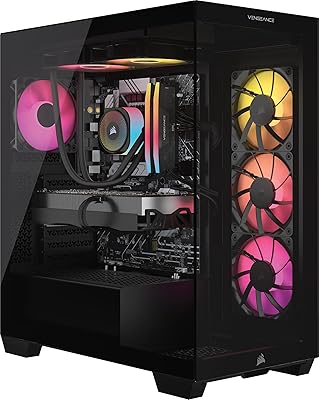
Verified buyers consistently report a clean, well-organized internal build with cable management that holds up visually even inside a case with a side window. Component fitment is solid across the board, and nothing rattles or feels rushed — a noticeable step above budget prebuilt competitors in the same form factor.
A small but recurring share of users reported minor cosmetic issues on arrival, including light chassis scratches or slightly misaligned front panel bezels. These appear to be isolated shipping incidents rather than systemic production problems, but they surface with enough consistency to be worth noting.
Value for Money
74%
26%
For buyers who prioritize a warranty-backed, plug-and-play experience, the pricing aligns reasonably with what Corsair's component quality and internal ecosystem cohesion command. Having an all-Corsair interior — liquid cooler, DDR5 RAM, and unified software — provides a level of integration that a self-built equivalent rarely matches at the same effort investment.
The prebuilt premium is real and quantifiable — a confident builder sourcing equivalent parts independently will almost certainly spend less. The 1TB SSD ceiling also means many buyers face an immediate secondary storage purchase, which quietly inflates the true total cost of ownership beyond the sticker price.
Thermal Management
86%
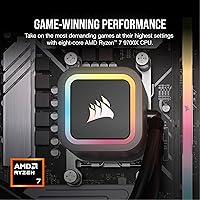
The liquid CPU cooler is one of the most practically impactful inclusions in this build, keeping the Ryzen 7 9700X at stable temperatures through hour-long rendering sessions and back-to-back gaming marathons. Multiple owners specifically noted that CPU throttling was never a real-world issue, which is not a given inside a compact prebuilt chassis.
Under sustained GPU-heavy workloads — particularly ray-traced 4K sessions — the RTX 4070 Super's onboard fans ramp up perceptibly, especially in warmer ambient conditions. The case airflow is adequate but not exceptional, and users in hot climates or poorly ventilated rooms may want to monitor GPU temperatures proactively.
Out-of-Box Experience
93%
This is one of the clearest practical wins for the Vengeance a7400 — buyers report the system arrives well-packaged, boots into Windows 11 in minutes, and requires no driver hunting or hardware configuration before launching a game. For anyone who has lived through a self-build debugging session, that immediate readiness is a genuinely meaningful differentiator.
iCUE launches automatically on first boot, and its setup wizard can feel cluttered and overwhelming for buyers who are new to the Corsair ecosystem. A few reviewers also noted pre-installed software prompts that felt more like promotional nudges than helpful onboarding, though these are easy to dismiss and don't affect system performance.
Software Experience
71%
29%
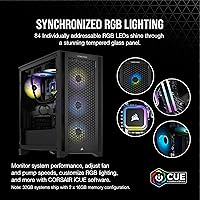
For users already familiar with Corsair's ecosystem, iCUE is a powerful unified control layer — syncing RGB across RAM, the cooler head, and case fans into a cohesive light show takes just a few clicks. The fan curve editor and live temperature monitoring add a level of system visibility that most prebuilt software suites simply don't offer.
New users consistently find iCUE's interface cluttered and unintuitive, with a learning curve that feels poorly matched to a product aimed at mainstream gaming buyers. Several reviewers noted it runs persistently in the background with a noticeable memory footprint, and a meaningful portion chose to disable it at startup entirely to reclaim resources.
Storage Capacity
57%
43%
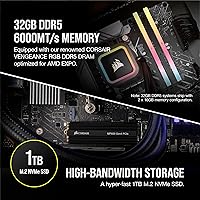
The 1TB NVMe SSD's roughly 7000 MB/s sequential read speeds deliver genuinely snappy boot times and fast in-game load screens that improve the daily-use experience noticeably. For buyers who rotate a small game library and rely on external or cloud storage for media, 1TB is functional enough in the short term.
Modern AAA titles routinely consume 80–150GB each, meaning active gamers who keep multiple games installed simultaneously can fill 1TB within weeks. This is the single most consistently cited frustration across verified user reviews, and the added cost of a secondary NVMe drive catches many buyers off guard after purchase.
RAM Performance
91%
32GB of DDR5 is a generous allocation for a gaming prebuilt, and it means buyers won't hit the memory pressure that plagues 16GB systems when running a game alongside Discord, a browser, and a capture tool simultaneously. Content creators doing photo editing or light video work will find RAM is genuinely not a constraint in mixed workflows.
Enthusiast users who want to push XMP memory profiles or fine-tune timings for competitive gaming may find the out-of-box DDR5 configuration leaves some latency performance on the table. Attempting to overclock RAM in a prebuilt context also risks voiding the manufacturer warranty, limiting how far tuning-oriented buyers can take the memory subsystem.
Port & Connectivity
62%
38%
The RTX 4070 Super's rear I/O includes both HDMI and DisplayPort outputs, giving users flexible multi-monitor options without requiring additional adapters. The front-panel USB placement is conveniently positioned for quick peripheral connections during an active gaming session.
Only two USB 3.0 ports is a recurring and legitimate complaint for a desktop in this price range — users with a controller, headset dongle, streaming capture card, and external drive quickly run out of ports. Buyers with a heavily peripheral-loaded desk setup will almost certainly need a powered USB hub from the moment they unbox this rig.
Noise Levels
83%
The liquid cooler's pump-and-fan combination keeps CPU noise impressively subdued during gaming, and multiple buyers noted they could hold conversations or run background streams without the system intruding audibly. At idle and under light workloads, this gaming rig operates at near-inaudible levels.
Under sustained GPU-heavy workloads — prolonged ray tracing, high-resolution renders, or graphically maxed gaming sessions — the RTX 4070 Super's fans spin up to a more noticeable level. It is not disruptive with headphones on, but users gaming without audio output will become aware of the system working during peak demand.
Aesthetic & RGB
87%
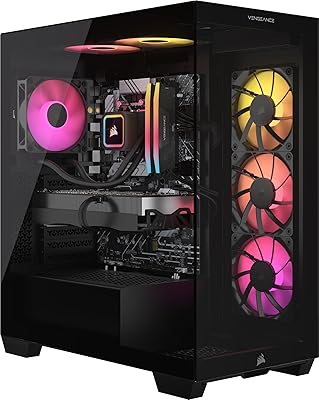
The iCUE-synchronized RGB across the Vengeance DDR5 sticks, the liquid cooler head, and the chassis fans creates a polished, cohesive visual effect that buyers consistently highlight as one of the most satisfying aspects of the system. Pre-installed lighting profiles look well-configured out of the box and require no customization effort to appreciate immediately.
Users who prefer a subdued or stealth aesthetic have limited options beyond disabling lighting entirely through iCUE, as the case design is clearly built around the RGB-forward gaming look. The quality of the visual presentation also depends on whether the specific unit shipped includes a tempered glass side panel, which may vary by retailer configuration.
Content Creation
83%
The 9700X's Zen 5 architecture delivers meaningful multi-threaded throughput for video encoding, Lightroom catalog exports, and 3D rendering tasks — this is genuine performance headroom, not repurposed gaming marketing language. Users running DaVinci Resolve or Adobe Premiere alongside gaming report render times that comfortably outpace older hexa-core desktop systems.
Heavy professional workloads — large-format 3D animation pipelines, machine learning model training, or sustained 8K video editing — will push the Ryzen 7 9700X and the 1TB storage configuration toward their practical limits. Dedicated creative professionals who need a primary production workstation rather than a capable dual-purpose rig should consider higher-core-count platform alternatives.
Upgradeability
67%
33%
The standard motherboard form factor and accessible DDR5 DIMM slots make RAM upgrades and secondary NVMe drive additions genuinely straightforward, even for users without extensive hardware experience. An open PCIe slot means a future GPU swap is mechanically possible without replacing the full system.
The PSU bundled in most prebuilt configurations may lack sufficient wattage headroom to power a meaningfully more powerful next-generation GPU, limiting the realistic upgrade path beyond incremental additions. Corsair's warranty terms can also create friction for users who want to tinker beyond straightforward drive or RAM swaps, discouraging more ambitious internal modifications.

Suitable for:

The Corsair Vengeance a7400 Gaming Desktop PC is a strong match for anyone who wants a high-performance gaming setup without spending weekends sourcing parts, watching build tutorials, and troubleshooting POST errors. Gamers who play at 1440p and want consistently high frame rates — or who want to experiment with 4K at moderate settings — will find the RTX 4070 Super and Ryzen 7 9700X combination more than adequate for today's demanding titles. Content creators who do occasional video editing, rendering, or photo work alongside gaming will appreciate the 9700X's genuine multi-threaded strength; this isn't a gaming chip awkwardly repurposed for creative tasks. Buyers already embedded in the Corsair ecosystem — running iCUE-compatible keyboards, mice, or headsets — will get the most out of this rig since unified lighting and control actually works well when everything shares the same software. It also makes sense for upgraders stepping off an aging prebuilt or a gaming console who want a meaningful jump in capability without taking on DIY risk, and for first-time desktop buyers who value the peace of mind that comes with a brand-backed warranty.
Not suitable for:

The Corsair Vengeance a7400 Gaming Desktop PC is a harder sell for buyers who are comfortable building their own system, since a comparable custom build at this price tier could net a larger SSD, a higher-wattage PSU with more headroom, or a slightly faster GPU — the prebuilt premium is real, and informed builders will feel it. Anyone with a large existing game library should go in knowing that 1TB fills up fast; you'll likely need to add a secondary drive within the first few months, which adds cost and a bit of setup friction. Users who rely heavily on USB peripherals — multiple controllers, streaming capture cards, external drives — may find only two USB 3.0 ports genuinely limiting for a daily-driver desk setup. Those who dislike software overhead should know that iCUE, while capable, runs persistently in the background and has a learning curve that not everyone finds worth the effort. Finally, buyers targeting true 4K ultra settings at high refresh rates would be better served stepping up to an RTX 4080 or 4090 build — the 4070 Super is an excellent 1440p card but starts to show its ceiling when pushed to native 4K maximum detail.
Specifications

  • CPU: Powered by the AMD Ryzen 7 9700X, a Zen 5 architecture processor with a 3.8 GHz base clock and strong single-core and multi-core performance across gaming and creative workloads.
  • GPU: Equipped with the NVIDIA GeForce RTX 4070 Super featuring 12GB of GDDR6X VRAM, supporting ray tracing, DLSS 3, and capable 1440p ultra or moderate 4K gaming.
  • RAM: Includes 32GB of Corsair Vengeance RGB DDR5 memory, offering high bandwidth headroom for multitasking, memory-intensive applications, and future software demands.
  • Storage: Ships with a 1TB M.2 NVMe SSD delivering sequential read speeds of approximately 7000 MB/s, enabling fast system boot times and rapid in-game load screens.
  • Cooling: Uses a liquid CPU cooler to maintain safe and stable thermals on the Ryzen 7 9700X under sustained gaming or rendering workloads without excessive fan noise.
  • Operating System: Comes pre-installed with Windows 11 Home, ready to use out of the box with no additional OS purchase required.
  • Display Output: Supports a maximum display resolution of 3840x2160 (4K UHD) via the RTX 4070 Super GPU's output ports.
  • USB Connectivity: Includes 2 USB 3.0 ports for connecting peripherals, with additional port availability dependent on the motherboard's rear I/O and front panel configuration.
  • Dimensions: The chassis measures 17.8 x 9.1 x 18.3 inches (L x W x H), making it a mid-tower form factor suitable for most standard desk setups.
  • Weight: The fully assembled unit weighs approximately 30.8 pounds, reflecting the inclusion of liquid cooling hardware and a steel chassis construction.
  • Form Factor: Designed as a tower desktop, not an all-in-one, meaning a separate monitor, keyboard, and mouse are required and not included.
  • Memory Type: DDR5 is the memory standard used, offering higher bandwidth and lower voltage compared to DDR4, with dual-channel configuration supported.
  • Software: Corsair iCUE software is pre-installed and provides unified control over RGB lighting profiles, fan curves, and system performance monitoring across all compatible Corsair components.
  • GPU VRAM: The RTX 4070 Super carries 12GB of dedicated GDDR6X VRAM, providing sufficient headroom for high-resolution textures, rendering tasks, and VRAM-heavy modern titles.
  • Chassis Color: Available in Black, with a design intended to complement the system-wide RGB lighting managed through iCUE software.
  • Chipset Brand: NVIDIA serves as the GPU chipset brand, ensuring driver support, GeForce Experience compatibility, and access to NVIDIA-exclusive features like DLSS and Reflex.

Related Reviews
Corsair Vengeance i7600 Gaming PC
82%
93%
Gaming Performance
91%
Out-of-Box Experience
88%
Build Quality
84%
Thermal Management
71%
Noise Levels
More
Corsair Vengeance a7500 Gaming PC
85%
94%
Gaming Performance at 1440p and 4K
91%
Build Quality & Durability
89%
Cooling System Effectiveness
86%
RGB Lighting Customization
84%
Overall Value for Money
More
Skytech Gaming Azure GTX 1650 Gaming Desktop
75%
67%
Gaming Performance
73%
Value for Money
91%
Setup & Out-of-Box Experience
78%
Build Quality
49%
Storage Capacity
More
Empowered PC Panorama Gaming Desktop (RTX 5080, i9-14900KF, 96GB DDR5, 4TB)
83%
94%
Gaming Performance
91%
Out-of-Box Experience
67%
Value for Money
72%
Thermal Management
88%
Build & Component Quality
More
Corsair Vengeance a8200 Gaming Desktop PC
80%
94%
Gaming Performance
88%
Build Quality
86%
Thermal Management
77%
Noise Levels
67%
Value for Money
More
Corsair Vengeance i7500 Gaming PC
81%
94%
Gaming Performance
83%
Thermal Management
91%
Build Quality
92%
Out-of-Box Experience
71%
Value for Money
More
Corsair Vengeance i8200 Gaming Desktop PC
83%
94%
Gaming Performance
91%
Thermal Management
67%
Value for Money
88%
Build Quality
89%
Out-of-Box Experience
More
Corsair Vengeance a7500 Gaming Desktop
80%
84%
Gaming Performance
66%
Value for Money
89%
Build Quality
92%
Out-of-Box Experience
71%
GPU Capability
More
Corsair Vengeance i7400 Gaming PC - Intel Core i7-13700K, NVIDIA GeForce RTX 4070 Ti, 32GB DDR5, 1TB SSD
87%
94%
Overall Performance
96%
Gaming Performance
89%
Multitasking and Productivity
92%
Thermal Management
85%
Build Quality
More
Skytech Nebula GTX 1650 Gaming Desktop PC
76%
72%
Gaming Performance
74%
Value for Money
91%
Out-of-Box Readiness
78%
Build Quality
76%
Thermal Management
More

FAQ

Honestly, it depends on how many games you keep installed at once. Modern AAA titles routinely run 80–150GB each, so a 1TB drive fills up faster than most people expect. The good news is the motherboard in this rig has additional M.2 slots in most configurations, so adding a second NVMe drive down the road is straightforward and relatively affordable.

It can handle 4K, but with some nuance. At 4K with settings dialed back to high rather than ultra, you'll get playable and often smooth frame rates in most titles. If you want to max out every setting at 4K and maintain 60-plus FPS consistently in demanding games, the RTX 4070 Super will hit its ceiling — it's better described as a 1440p powerhouse with 4K capability than a dedicated 4K card.

Yes. This is a tower desktop, not an all-in-one, so it ships without a display, keyboard, or mouse. Factor those into your budget if you're starting from scratch.

Most users report it runs quietly, which is a credit to the liquid CPU cooler and well-configured fan curves. Under extended heavy loads the GPU fans spin up audibly, but it's not disruptive by any measure — certainly quieter than many air-cooled prebuilts in this class.

If you're comfortable building, a custom build at the same price can give you slightly more flexibility — a larger SSD, a different case, or a higher-wattage PSU. The prebuilt premium is real but not egregious. Where this rig earns its keep is in the warranty, the Corsair ecosystem cohesion, and the fact that everything is tested and ready to run the moment it arrives.

iCUE is Corsair's software for controlling RGB lighting, fan speeds, and monitoring system stats across compatible Corsair hardware. You don't have to use it, but without it the RGB lighting defaults to a static or cycling pattern and you lose fan curve control. Some users find it runs a bit heavy on resources, so if you'd rather not have it running in the background, you can disable it at startup without affecting core system performance.

Yes, both are straightforward upgrades. The system uses standard DDR5 DIMMs, so swapping in higher-capacity sticks is possible, and most builds of this configuration have open M.2 slots for a secondary NVMe SSD. Just confirm slot availability in the specific motherboard included with your unit before purchasing expansion hardware.

It genuinely works well for both. The Ryzen 7 9700X has strong multi-threaded performance, which matters for video encoding, Lightroom exports, and software like DaVinci Resolve. Streamers will appreciate having CPU headroom to run encoding alongside gameplay without dropping frames. It's not a dedicated workstation, but it handles creator tasks better than most gaming-focused prebuilts.

Verified buyers generally report clean internal builds, which is what you'd expect from an assembled Corsair system. Corsair has an incentive to make the internals look good since the iCUE RGB experience is part of the product's appeal. A few users have noted that the cable routing is tighter than a fully custom build, but nothing that would impede airflow or cause heat issues.

Corsair typically covers their prebuilt systems with a limited warranty covering parts and labor — check the documentation included with your specific unit for exact terms and duration, as these can vary by region. Corsair's customer support has a solid reputation in the PC hardware community, and warranty service is generally handled directly through Corsair rather than a third-party retailer.