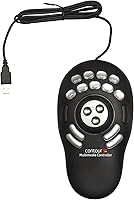
Contour Design ShuttlePRO v2 Multimedia Controller
Overview
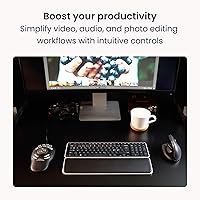
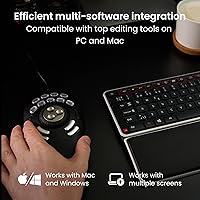
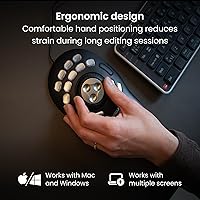
The Contour Design ShuttlePRO v2 Multimedia Controller is one of those rare editing tools that has been quietly earning its place on professional desks since 2005 — and it still makes a strong case for itself today. The core idea is simple but effective: instead of hunting for keyboard shortcuts mid-edit, you put the most-used commands under your fingers on a dedicated left-hand device. It sits comfortably in one hand, with a concentric dial system at its center and a grid of buttons surrounding it. For editors who spend hours in a timeline every day, that physical separation of controls from the keyboard can meaningfully reduce fatigue.
Features & Benefits
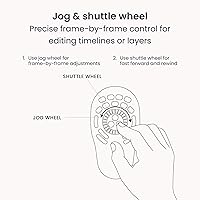
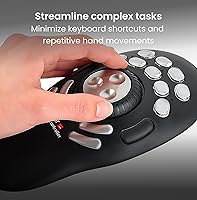
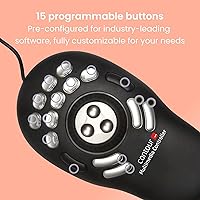
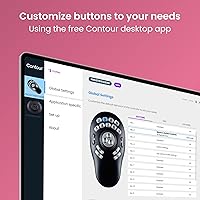
The heart of this editing controller is its dual-dial control system: the outer shuttle ring springs back to center when released, controlling playback speed, while the inner jog wheel turns freely for precise, frame-by-frame scrubbing. These two controls feel genuinely different in use, and that distinction matters when you need accuracy on a tight cut. Beyond the dials, the 15 programmable buttons can carry different macros for each application — and the device handles those profile switches automatically when you change your active window. It ships ready to work with over 100 creative apps, covering most of what professionals run daily, and setup on both Mac and PC is straightforward.
Best For
This jog wheel device makes the most sense for people who live inside editing software. Video editors doing heavy timeline work in Premiere Pro or DaVinci Resolve get the clearest benefit — the shuttle ring alone can transform how you navigate long footage. Audio engineers and podcast producers will find the transport controls intuitive for trimming and playback. Photo editors working in Lightroom or Capture One can remap buttons to their most-used adjustments, cutting down on constant mouse trips. It also suits anyone dealing with repetitive strain concerns, since shifting frequent shortcuts off the keyboard reduces cumulative stress. Multi-app users who bounce between tools throughout the day will particularly appreciate the automatic profile switching.
User Feedback
Owners of the ShuttlePRO v2 frequently point to build quality and longevity as standout qualities — it is not unusual to find five- or ten-year owners who have never considered replacing it. The jog and shuttle feel gets consistent praise from working editors who say it holds up under daily pressure. That said, the driver software draws regular criticism: it functions, but the interface feels like it has not kept pace with modern UX standards, and building custom profiles has a real learning curve. There are also scattered reports of compatibility hiccups on recent macOS versions, so Mac users should verify driver support before purchasing. Button assignments require memorization since there is no on-device labeling, which some find frustrating early on.
Pros
- The dual jog-and-shuttle dial system gives editors tactile, frame-accurate scrubbing that keyboard shortcuts simply cannot replicate.
- Automatic app profile switching means the right button mapping loads the moment you change your active window — no manual toggling needed.
- Over 100 pre-built application profiles cover most professional creative tools out of the box, making initial setup fast.
- Long-term durability is a genuine strength — many owners report using the same unit daily for five to ten years without issues.
- The compact one-handed form factor fits neatly to the left of a keyboard without demanding significant desk space.
- Cross-platform USB support means it works on both Mac and PC with no hardware changes required.
- Fifteen programmable buttons give editors enough surface area to cover a full set of frequently used shortcuts per application.
- Reducing reliance on keyboard shortcuts has real ergonomic benefits for users logging long hours in post-production work.
Cons
- The driver software feels noticeably dated and building custom profiles beyond the pre-sets requires a real time investment to learn.
- None of the 15 buttons are labeled on the device itself, so new users must rely on memorization or reference cards.
- Mac compatibility on recent macOS versions has been inconsistent, with some users reporting driver issues that are not quickly resolved.
- The learning curve for custom profile configuration is steeper than the out-of-box experience suggests.
- Casual or infrequent editors are unlikely to recoup the setup time investment needed to make this jog wheel device feel efficient.
- There is no wireless or Bluetooth option — the USB cord is the only connection method, which can limit positioning flexibility.
- The plastic construction feels functional rather than premium, which may disappoint buyers at this price point.
- Users who primarily work in a single application with well-established keyboard habits may find limited practical gain here.
Ratings
Our AI-generated scores for the Contour Design ShuttlePRO v2 Multimedia Controller were produced by analyzing verified global user reviews, actively filtering out incentivized, bot-generated, and low-signal feedback to surface what real creative professionals actually experience. Each category reflects an honest synthesis of both the genuine strengths and the recurring frustrations that shape long-term ownership satisfaction. Nothing has been smoothed over — where opinion is divided, the scores reflect that tension directly.
Jog & Shuttle Feel
Build Quality
Driver Software
Mac Compatibility
App Profile Library
Button Layout & Feel
Ergonomics
Setup & Onboarding
Value for Money
Custom Profile Creation
Desk Footprint
Long-Term Durability
Cross-Platform Consistency
Suitable for:
The Contour Design ShuttlePRO v2 Multimedia Controller is genuinely well-suited for creative professionals who spend the bulk of their working day inside editing software and feel the cumulative cost of repetitive keyboard use. Video editors cutting long-form content in Premiere Pro, DaVinci Resolve, or Final Cut Pro will get the most immediate return — the physical jog and shuttle dials make scrubbing through footage faster and more precise than any keyboard shortcut can replicate. Audio engineers and podcast producers who need reliable transport controls without lifting their hands off the mouse will find the button layout intuitive once mapped. Photo editors in Lightroom or Capture One can also put this jog wheel device to good use by assigning their most-reached-for adjustments to physical buttons. Anyone managing repetitive strain or early-stage RSI symptoms should seriously consider it, since moving high-frequency actions off the keyboard reduces cumulative stress noticeably over a full workday.
Not suitable for:
The Contour Design ShuttlePRO v2 Multimedia Controller is a harder sell for anyone who edits only occasionally or casually, since the time investment required to configure profiles and memorize button layouts only pays off with regular, committed use. Buyers expecting polished, modern companion software will likely be frustrated — the driver interface is functional but dated, and setting up custom profiles beyond the pre-built ones takes patience. Mac users on recent operating system versions should do due diligence before purchasing, as compatibility issues have been reported and are not universally resolved. This editing controller is also not a good fit for users who work exclusively in one fixed application with a stable keyboard shortcut habit already in place — the switching cost of relearning muscle memory may outweigh the efficiency gains. Finally, buyers hoping for a wireless or Bluetooth option should look elsewhere, as this device is USB-corded only.
Specifications
- Brand: Manufactured by Contour Design, Inc., a company specializing in ergonomic input devices for creative professionals.
- Model: ShuttlePRO v2, the second generation of Contour Design's professional shuttle controller line, first released in December 2005.
- Dimensions: The device measures 9.25″ x 5.25″ x 2″, providing a compact footprint suitable for most desktop workspaces.
- Weight: At 9.2 oz, the controller is light enough to reposition easily but substantial enough to remain stable during active use.
- Control System: Features a spring-loaded outer shuttle ring that returns to center on release, plus a free-spinning inner jog wheel for frame-by-frame navigation.
- Buttons: Includes 15 tactile, fully programmable buttons that can be assigned unique macros or shortcuts on a per-application basis.
- App Profiles: Ships with pre-configured profiles for over 100 applications, covering major creative suites including Adobe, Avid, Apple Logic Pro, and DaVinci Resolve.
- Auto-Detection: The companion driver software automatically detects which application is active and switches to the corresponding button profile without any manual input.
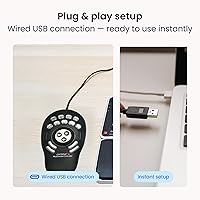
- Connectivity: Connects via a standard USB cable; no wireless or Bluetooth option is available, and the device draws power directly from the USB port.
- Platform Support: Compatible with both macOS and Windows PC; driver software must be installed for full programmability and profile-switching functionality.
- Material: The housing is constructed from black plastic, prioritizing a lightweight build over a premium tactile finish.
- Color: Available in black only, with no officially listed color variants at time of publication.
- Power Source: Bus-powered via USB connection, requiring no external power adapter or batteries.
- Driver Required: Full functionality requires installation of the Contour Design driver software, which is available for download from the manufacturer's website.
- Amazon Rating: Holds a 3.8 out of 5 rating based on 723 customer ratings on Amazon, reflecting broadly positive but not universal satisfaction.
Related Reviews
Contours Rx Lids by Design 4mm Strips
LORAC PRO Contour Palette with Brush
Clinique Chubby Stick Sculpting Contour Stick 0.35oz
Smashbox The Cali Contour Palette 6-Shade Contour Kit
AC Infinity Controller 2 Fan Speed Controller

PHOERA 3-Piece Contour Stick Makeup Kit
Razer Stream Controller Streaming Keypad
TP-Link EAP670 V2 WiFi 6 Access Point
Fractal Design Node 804