

Overview

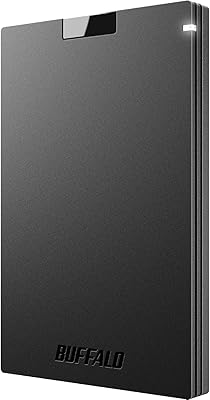
The Buffalo SSD-PG 1TB comes from Buffalo, a Japanese storage brand with decades of history — well-regarded in Asia, though less of a household name in North America than Samsung or Western Digital. That said, the brand's track record is solid, and this drive holds its own. With 1TB of capacity and broad compatibility across PS4, PS5, Windows, and Mac, it covers a wide range of everyday needs. The 2.5-inch form factor keeps things genuinely compact, slim enough to slip into a jacket pocket. Just keep expectations realistic: this is a reliable choice for gaming storage and file backup, not a workhorse for heavy video production workflows.

Features & Benefits

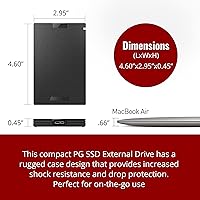
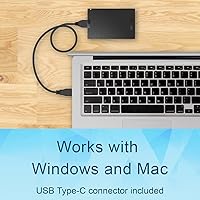
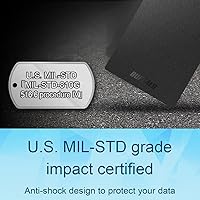
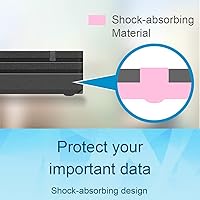
Both USB-C and USB-A cables come in the box — a small but practical touch that saves you from scrambling for an adapter on older laptops or newer MacBooks. The USB 3.2 interface delivers read speeds up to 340MB/s, which handles large game installs and media transfers noticeably faster than any spinning hard drive. The enclosure is built to take a knock; Buffalo rates it to military-spec shock standards, which matters if the drive lives in a bag day to day. At 4.6 x 3.0 x 0.5 inches and under 6 ounces, the SSD-PG drive also runs entirely off USB power — no wall adapter, no extra cables.

Best For

PS4 and PS5 owners are the most obvious fit — expanding console storage without the cost or complexity of installing an internal NVMe drive is exactly what this external drive was built for. Students and remote workers will appreciate the plug-and-play setup across Mac and Windows, with no drivers or software required. Frequent travelers benefit from the rugged build and slim profile, since it genuinely does fit in a coat pocket. And if you have been putting off replacing an aging external HDD, this Buffalo SSD offers a real speed upgrade at a price that does not take much deliberation.

User Feedback

With close to 3,900 ratings and a 4.4-star average, the consensus is solidly positive and fairly consistent. Most buyers call out build quality and compact size as standouts at this price tier, and PS5 users generally report smooth compatibility for extended game storage. Not everything is glowing, though. A recurring concern from more technical buyers is that real-world transfer speeds can fall noticeably short of the 340MB/s ceiling, especially on older USB ports. Long-term durability feedback is mixed — most units hold up fine, but a portion of users mention problems after extended daily use. One practical tip: registering the warranty bumps coverage from two years to three.

Pros

  • Both USB-C and USB-A cables are included in the box — no adapters needed for most setups.
  • Works plug-and-play on PS4, PS5, Mac, and Windows without any drivers or software.
  • The shock-resistant enclosure holds up well to daily bag carry and accidental drops.
  • At 0.5 inches thin and under 6 ounces, the SSD-PG drive genuinely fits in a jacket pocket.
  • 1TB of capacity covers a large PS4 game library or years of document and photo backups.
  • Noticeably faster than any external spinning hard drive for everyday file transfers and game loading.
  • Three-year warranty is available with registration — above average coverage for this price tier.
  • Bus-powered via USB means one less cable and no wall adapter to carry on the road.
  • Nearly 3,900 verified ratings with a 4.4-star average reflects a broad, consistent ownership experience.
  • Buffalo has a decades-long track record in storage hardware, even if the brand is quieter in North America.

Cons

  • Real-world transfer speeds regularly fall short of the advertised 340MB/s, especially through USB-A ports.
  • No carrying pouch or case is included, which feels like a missed opportunity for a portable drive.
  • The included cables are functional but short, limiting placement flexibility with desktop setups.
  • Warranty drops to two years if you forget to register — and that registration step is easy to overlook.
  • A consistent thread of reviews flags performance degradation or failure after 12 to 24 months of heavy use.
  • Sustained large transfers can cause the enclosure to warm up and trigger noticeable speed throttling.
  • The outer plastic shell scratches and scuffs with regular pocket or bag carry over time.
  • Buffalo's North American customer support is thinner and slower than larger brands like Samsung or WD.
  • Cannot run native PS5 titles — a limitation some buyers only discover after purchase.
  • During sales, competing drives occasionally undercut this price while offering faster rated speeds.

Ratings

Our scores for the Buffalo SSD-PG 1TB are generated by AI after analyzing thousands of verified global buyer reviews, with spam, bot submissions, and incentivized feedback actively filtered out. The result is an honest cross-section of real ownership experiences — from PS5 gamers and frequent travelers to students and remote workers. Both the genuine strengths and the recurring frustrations are reflected here without sugarcoating.

Value for Money
88%
At its price point, buyers consistently feel they are getting a fair deal for a genuine SSD — not a rebranded flash drive. The 1TB capacity covers a meaningful library of PS5 games or years of document and photo backups, and that combination lands well with cost-conscious shoppers who do not want to compromise on reliability.
Some buyers note that competing drives from Samsung or Crucial occasionally dip to a similar price during sales, which makes the value proposition feel less clear-cut. For buyers who prioritize peak transfer speeds, spending slightly more elsewhere starts to look reasonable.
Transfer Speed
71%
29%
For the core use cases — loading PS4 game saves, moving a batch of RAW photos, or backing up a laptop before travel — the SSD-PG drive is noticeably quicker than any spinning hard drive. Users switching from older external HDDs report the difference feels significant in daily use.
Real-world read speeds regularly fall short of the 340MB/s ceiling, particularly on USB-A ports or older host hardware. Users expecting near-rated performance for large sequential transfers — like copying full video project folders — often come away underwhelmed compared to what the spec sheet implies.
Build Quality
83%
The enclosure feels solid and purposeful, not flimsy or hollow like budget drives sometimes do. Buyers who carry it daily in a backpack or briefcase report that it holds up well to the inevitable bumps and drops, and the military-spec shock resistance claim seems to reflect genuine engineering rather than marketing language.
A segment of longer-term owners report that the matte plastic surface picks up fine scratches over time and can feel less premium after extended carry. A small but consistent group also flagged failures after 12 to 18 months of heavy daily use, which is worth keeping in mind.
Portability
92%
At under 6 ounces and roughly the footprint of a small smartphone, this external drive genuinely disappears into a jacket pocket or a small pouch. Travelers and commuters specifically call out the slim 0.5-inch profile as one of the main reasons they chose it over thicker 2.5-inch alternatives.
There is very little to criticize here, though a handful of users note the drive is slightly larger than the newer thumb-sized SSDs entering the market, which may matter for ultralight packers who want the smallest possible footprint.
PS5 Compatibility
84%
The vast majority of PS5 owners report that the drive works exactly as expected for extended game storage — it formats cleanly, registers without issues, and handles the back-and-forth transfer of PS4-era titles smoothly. For players managing a large library on a budget, this is one of the more reliable options at the price.
The drive cannot run native PS5 titles directly, which is a hardware limitation rather than a flaw, but some buyers discovered this only after purchase. A small number of users also reported intermittent disconnects when using longer or lower-quality USB-C cables not supplied in the box.
Ease of Setup
91%
Plug-and-play behavior across Mac, Windows, and PlayStation is consistently praised. There is no software to install, no drivers to hunt down, and no formatting ritual needed on most systems. For less tech-savvy buyers, this zero-friction setup is a genuine selling point.
On some Macs running newer versions of macOS, a brief format prompt appeared before first use, which confused a small number of buyers who expected it to work instantly out of the box. Nothing serious, but worth a heads-up for first-time external SSD users.
Cable & Connectivity
79%
21%
Including both USB-C and USB-A cables in the box is a practical decision that most buyers appreciate. It removes the common frustration of buying a drive and realizing you need a separate adapter for your specific device, and it covers both current-generation and legacy ports without any extra spend.
The included cables are functional but short, and a portion of buyers found the length limiting when connecting to a desktop tower or a TV-mounted PS4. Some also noted the cables feel thin and questioned how they would hold up to repeated plugging and unplugging over years.
Long-Term Reliability
67%
33%
The majority of buyers who have owned the drive for a year or more report no major issues, and the three-year warranty with registration provides a meaningful safety net. Buffalo's service reputation in the storage space, while less visible in North America, is generally regarded as competent.
A consistent thread in older reviews points to drive failures or performance degradation appearing after 12 to 24 months of intensive use. This is not an outlier — it shows up often enough to suggest the drive is better suited as a secondary backup than as a primary, heavily written-to archive.
Warranty & Support
74%
26%
Three years of coverage with registration is above average for this category, and buyers who have gone through the warranty process generally describe it as functional and without excessive friction. The two-year fallback for unregistered devices still beats many competitors at this tier.
Buffalo's North American support infrastructure is thinner than that of larger brands, and some buyers reported slower response times than expected. The registration requirement itself is easy to forget, and users who skipped it found themselves with reduced coverage — something Buffalo could make more prominent at point of sale.
Shock & Drop Resistance
81%
19%
Buyers who have accidentally dropped the drive — off desks, out of bags, onto concrete — largely report surviving the experience without data loss. The military-spec rating appears to reflect real structural protection, and this is one of the more commonly cited reasons buyers feel confident traveling with it.
There are occasional reports of physical damage to the enclosure casing after harder impacts, even if the data itself remained intact. The shock resistance applies to the mechanism inside, not the outer shell, so cosmetic damage after a bad drop is a realistic outcome.
Thermal Performance
73%
27%
Under normal workloads — routine file transfers, game loading, document access — the drive stays cool and never becomes noticeably warm to the touch. For the typical buyer using it in short to moderate bursts, thermal behavior is simply a non-issue.
During extended, continuous large-file transfers, some users noticed the enclosure getting warm and observed speed throttling kicking in. This is not unusual for drives in this form factor, but it reinforces the point that this Buffalo SSD is not ideal for sustained high-throughput workloads.
Mac Compatibility
82%
18%
MacBook users consistently report clean, stable recognition across both Intel and Apple Silicon machines. The drive shows up instantly in Finder, Time Machine recognizes it without configuration, and the USB-C cable works with modern MacBook ports directly — a small but appreciated convenience.
A few users on the latest macOS versions encountered an initial exFAT formatting prompt, and one recurring complaint is that the drive is not pre-formatted for Mac out of the box. It is a one-time, five-minute fix, but it catches some buyers off guard.
Packaging & Unboxing
69%
31%
The packaging is clean, organized, and ships with everything needed to get started immediately — the drive itself, both cables, and basic documentation. Nothing feels wasteful or excessive, and the drive arrives protected well enough that damage-in-transit complaints are rare.
The unboxing experience is purely functional, which is fine for a utility purchase but feels underwhelming to buyers who expect a more considered presentation at this price tier. There is no carrying case or pouch included, which is a miss given how portable the device is marketed to be.

Suitable for:

The Buffalo SSD-PG 1TB is a strong fit for PS4 and PS5 owners who want to offload their game library without the cost or complexity of installing an internal NVMe drive — it works cleanly with both consoles and handles the storage expansion job without any fuss. Students carrying a laptop between classes and home will find the slim, pocketable build genuinely practical, and the plug-and-play setup across both Mac and Windows means there is nothing to configure before it just works. Remote workers who need a reliable way to back up project files, photos, or documents on the go will appreciate that it runs entirely off USB power with no adapter to track down. Travelers who have lost sleep over a fragile external hard drive bouncing around in a checked bag will feel more confident with the shock-resistant enclosure. If you are upgrading from an aging external HDD and want a real speed improvement without spending a lot, this Buffalo SSD delivers a meaningful step up for everyday workloads.

Not suitable for:

The Buffalo SSD-PG 1TB is not the right tool for professional photographers, videographers, or anyone who regularly moves large batches of high-resolution files under a deadline — real-world speeds fall short of the 340MB/s ceiling often enough that faster, pricier alternatives are worth the premium for those workflows. Content creators who need sustained write performance for continuous 4K video capture or heavy editing will hit thermal throttling during long sessions, which disrupts the kind of uninterrupted throughput that demanding creative work requires. Anyone planning to use this as their sole, heavily written-to primary drive should think carefully — patterns in long-term user feedback suggest the drive performs better as a secondary backup than as a daily workhorse under constant load. Buyers who compare SSD options during major sales events may find competing drives from more established Western brands matching this price with comparable or faster specs, so it is worth a quick check before committing. Finally, anyone who needs a true pocket-sized USB stick form factor will find the 2.5-inch footprint larger than the smallest thumb-drive SSDs now available on the market.

Specifications

  • Storage Capacity: Provides 1TB of solid-state storage, sufficient for large game libraries, media collections, or multi-year document backups.
  • Interface: Uses USB 3.2 Gen 1 connectivity, delivering data transfer speeds of up to 340MB/s under optimal conditions.
  • Connectors: Ships with both a USB-C and a USB-A cable in the box, covering modern and legacy host ports without requiring a separate adapter.
  • Form Factor: Built around a 2.5-inch external SSD design, making it significantly slimmer and lighter than traditional 2.5-inch external HDDs.
  • Dimensions: Measures 4.6 x 3.0 x 0.5 inches (LxWxH), compact enough to fit in a jacket pocket or small travel pouch.
  • Weight: Weighs 5.6 ounces, light enough for daily carry without adding meaningful bulk to a laptop bag or backpack.
  • Power Source: Draws power entirely through its USB connection, requiring no external power adapter or wall outlet during operation.
  • Shock Resistance: The enclosure is rated to military-spec shock resistance standards, offering drop protection for everyday carry and travel scenarios.
  • Compatibility: Officially compatible with PlayStation 4, PlayStation 5, Windows PCs, and Mac computers, covering the major consumer platforms without additional configuration.
  • Color: Available in a matte black finish that resists obvious fingerprint buildup under normal handling conditions.
  • Warranty: Backed by a 3-year limited warranty for devices registered with Buffalo, or a 2-year warranty for unregistered units.
  • Brand Origin: Manufactured by Buffalo, a Japanese technology company with decades of experience in consumer and enterprise storage hardware.
  • File System: Ships pre-formatted in exFAT, which allows cross-platform read and write access on both Windows and macOS without reformatting for most users.
  • OS Requirements: Compatible with Windows 10 and later and macOS 10.13 High Sierra and later, covering the vast majority of current desktop operating systems.
  • Market Rank: Holds a top-20 ranking in the External Solid State Drives category on Amazon, supported by nearly 3,900 verified customer ratings averaging 4.4 out of 5 stars.

Related Reviews
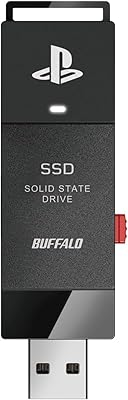
BUFFALO External SSD 1TB
88%
89%
Performance Improvement for Gaming
93%
Setup & Installation Ease
91%
Build Quality & Durability
88%
Portability & Size
90%
Shock Resistance
More
BUFFALO MiniStation SSD-PG 500GB
89%
89%
Performance
93%
Portability/Size
86%
Reliability
91%
Durability/Build Quality
85%
Compatibility
More
Buffalo SSD-SCH250U3BA/N 250GB External SSD
85%
94%
Performance (Speed)
90%
Portability & Size
87%
Build Quality & Durability
78%
Compatibility with Devices
92%
Ease of Use
More
Lenovo IdeaCentre Business Desktop | Intel Core i3-12100 | 32GB RAM | 1TB SSD + 1TB HDD
83%
88%
Performance for Business Tasks
85%
Multitasking Efficiency
91%
Storage Speed & Capacity
87%
Connectivity Options
80%
Overall Build Quality
More
Alienware Aurora R16 Gaming Desktop - Intel Core i9-13900F, 32GB RAM, 1TB SSD + 1TB HDD, RTX 4070
87%
94%
Performance
93%
Graphics Quality
89%
Cooling Efficiency
84%
Ease of Setup
88%
Software & Customization
More
BIWIN NV7400 1TB SSD
88%
94%
Performance
88%
Value for Money
92%
Read/Write Speed
85%
Cooling Efficiency
90%
Ease of Installation
More
INLAND QN450 1TB SSD
86%
94%
Performance Speed
91%
Reliability & Durability
88%
Value for Money
86%
Ease of Installation
92%
Gaming Performance
More
INLAND Platinum 1TB SSD
91%
94%
Sequential Read/Write Performance
89%
Random 4K IOPS Performance
91%
Reliability/Durability
95%
Compatibility with Laptops & Desktops
83%
Installation Ease
More
Ediloca ES106 1TB SSD
86%
88%
Performance
85%
Build Quality
90%
Compatibility
78%
Ease of Setup
91%
Value for Money
More
Lexar 1TB NQ780 SSD
Lexar 1TB NQ780 SSD
85%
93%
Performance
84%
Value for Money
88%
Durability
92%
Installation Ease
95%
Gaming Experience
More

FAQ

Yes, the Buffalo SSD-PG 1TB is compatible with PS5, but with one important caveat: it can only store and play PS4 games from external storage, not native PS5 titles. That said, for players with a large PS4 library, it is a practical and affordable way to offload games from the console's internal storage.

It depends on your use case. The drive ships in exFAT format, which works on both Mac and Windows. If you are using it exclusively with a Mac and want Time Machine compatibility, you may need to reformat it to APFS or Mac OS Extended. For general file storage, most Mac users can use it as-is right out of the box.

No adapter needed. The SSD-PG drive is entirely bus-powered, meaning it draws all the power it needs directly from the USB port on your computer or console. One less cable to pack is always a win for travel.

Both a USB-C and a USB-A cable come in the box, so most users will be covered right away. The only scenario where you might need something extra is if your specific setup requires a longer cable, since the included ones are on the shorter side.

In real-world use, expect speeds somewhere in the range of 280 to 330MB/s for reads under good conditions — which is a meaningful step up from an external HDD. That said, speeds through USB-A ports or on older machines tend to come in lower than the 340MB/s ceiling. For loading games, transferring photos, or backing up documents, the difference is still very noticeable compared to spinning drives.

Buffalo is a well-established Japanese storage manufacturer with a long track record in both consumer and business storage products. It is less visible in North American retail than Samsung or Western Digital, but that reflects marketing presence more than product quality. User feedback on reliability is broadly positive, though as with any drive at this price tier, it is worth treating it as secondary backup storage rather than your sole copy of critical files.

The enclosure is built to handle accidental drops — Buffalo rates it to military-spec shock resistance, and user reports generally back that up. Most people who have dropped it report that it survived without data loss. The outer plastic shell may scuff or crack cosmetically on a hard impact, but the drive mechanism inside tends to fare well.

You need to register the drive on Buffalo's website after purchase. Without registration, coverage defaults to 2 years. It only takes a few minutes and is worth doing immediately after you first set it up, since it is easy to forget once the drive is just quietly doing its job in a drawer or bag.

Potentially, yes, but with limitations. iPads running iPadOS 13 or later can access external drives via the Files app using the USB-C cable, provided your iPad has a USB-C port. Android tablet support varies by device and operating system version. Neither scenario is officially listed as a supported use case, so results may be inconsistent depending on your specific hardware.

For PS4 titles stored on external storage, 1TB is a solid starting point — many PS4 games run between 30GB and 60GB, so you can store 15 to 30 titles comfortably. Keep in mind that native PS5 games must stay on internal storage or a compatible internal NVMe drive, so this external drive handles the overflow of your older library rather than your entire PS5 collection.