Overview

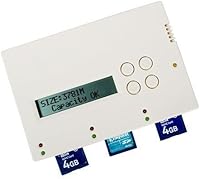
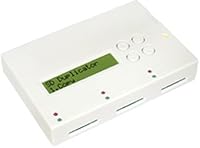
The BestDuplicator SD300 1-to-2 SD Card Duplicator is a compact, standalone device that clones one SD or MicroSD card to two targets simultaneously — no laptop, no software, no setup headaches. It handles NTFS, FAT, and ext (Linux) file systems, so it works across different operating environments without needing any format adjustments. Power it from a wall adapter at your desk or drop in four AA batteries when you're out in the field. It ships with three MicroSD-to-SD adapters and a 4GB MicroSD card, a practical touch that covers the basics straight out of the box. Standalone operation is its defining strength.
Features & Benefits

The SD300's most practical advantage is copying to two cards at once, cutting duplication time roughly in half compared to sequential copying. During the process, the unit displays real-time speed and capacity readings on-screen, so you always know where things stand. It offers two copy modes: a data-only option for recognized file systems, and a whole-media clone for formats it can't parse — handy for proprietary or embedded system cards. One important caveat worth knowing upfront: the 33 MB/s figure is a ceiling, not a guarantee. Actual copy speed depends entirely on how fast your target cards can accept writes, which varies considerably by brand and card class.

Best For

This card duplicator makes the most sense for photographers and videographers who regularly need two identical cards prepped before a shoot — think wedding photographers staging backup card sets, or event crews equipping multiple cameras. It also suits educators distributing identical content to a small group, or field technicians cloning configuration cards for embedded devices without bringing a laptop along. That said, keep the scale realistic: this is a two-target device, not a tower duplicator. If you routinely need five or ten copies at a time, look elsewhere. For small-batch duplication across Windows, Mac, or Linux setups, it fits the job cleanly.

User Feedback

Across 109 ratings, this standalone duplicator holds a 3.8 out of 5 — a score that reflects real utility alongside some genuine friction. Buyers consistently praise the plug-and-play experience: insert your cards, press a button, and the process runs itself. The battery-powered option earns particular appreciation from users working in remote locations without easy access to an outlet. Compatibility, though, is where things get complicated. A noticeable share of reviewers hit problems with off-brand or higher-capacity cards that the unit had trouble cloning reliably. These aren't universal failures, but they happen often enough to take seriously. Stick with name-brand, standard-capacity cards and your odds of a smooth experience improve considerably.

Pros

  • No computer, driver, or software required — just insert the cards and press a button.
  • Copies to two cards simultaneously, cutting small-batch duplication time roughly in half.
  • Battery-powered operation makes this card duplicator genuinely useful in remote or off-grid locations.
  • Real-time on-screen display shows read speed, write speed, and card capacity during every session.
  • Supports NTFS, FAT, and ext Linux file systems without any format adjustments needed.
  • Whole-media copy mode handles proprietary or unrecognized formats that data-only mode cannot.
  • Ships with three MicroSD-to-SD adapters and a 4GB MicroSD card, covering immediate testing needs.
  • Completely platform-agnostic — works identically regardless of your operating system.
  • Compact and light enough to pack into a camera bag or equipment case without much sacrifice.
  • The SD300 runs quietly with no cooling fan, making it office- and on-set-friendly.

Cons

  • Hard limit of two target cards per session makes it impractical for any volume duplication need.
  • Real-world copy speeds vary widely and are bottlenecked by target card write performance, not the device spec.
  • Inconsistent results with off-brand or high-capacity cards are a documented and recurring complaint.
  • No error logging or diagnostic feedback — a failed clone can be easy to miss without manual verification.
  • The physical footprint is larger than the word portable implies, especially with the AC adapter packed in.
  • Batteries are not included, which feels like an omission at this price point.
  • Mode-switching is not intuitive from the hardware alone, and the included guide does not fully bridge the gap.
  • The on-screen display is small and hard to read in bright ambient light or when viewed at an angle.
  • No firmware update path means long-term compatibility with newer card formats is uncertain.
  • The 4GB card included in the box is too small to be useful in most real production workflows today.

Ratings

The BestDuplicator SD300 1-to-2 SD Card Duplicator has been evaluated by our AI system after parsing verified buyer reviews from multiple global sources, with spam, bot-generated, and incentivized feedback actively filtered out. Scores reflect the honest distribution of real-world experiences — strengths and frustrations weighted equally. Where buyers consistently hit friction, the scores show it.
Ease of Setup
91%
Users repeatedly highlight that this card duplicator requires zero installation — no drivers, no software, no pairing process. Photographers in particular appreciate being able to hand it off to an assistant on set who has never used it before and have it working within a minute.
A small number of users found the initial button-press sequence for switching copy modes less intuitive than expected, requiring a look at the included guide. The manual itself is concise but not always clear on edge-case operations.
Duplication Reliability
72%
28%
For standard-capacity, name-brand SD and MicroSD cards, the SD300 performs its copy operations consistently and completes them without errors in the majority of reported uses. Many field technicians trust it for cloning configuration cards where accuracy matters.
A noticeable portion of buyers encountered failed or incomplete copies when using off-brand cards or higher-capacity media beyond what the unit handles well. These failures are unpredictable enough to warrant running a verification check after every clone session.
Copy Speed
67%
33%
The real-time on-screen display showing read and write speeds is genuinely useful — users know exactly what is happening during each session and can gauge whether a target card is underperforming. Copying two cards simultaneously does meaningfully reduce total duplication time.
The 33 MB/s ceiling is frequently misunderstood as a guaranteed throughput. In practice, speeds are bottlenecked by the target card's write capability, and with budget cards, real-world speeds can drop significantly. Buyers expecting consistent high-speed copies are often disappointed.
Portability & Form Factor
84%
At just over 14 ounces and powered optionally by four AA batteries, the SD300 travels well. Wedding photographers and documentary crews mention using it in vehicles, on location, and in venues without convenient power access, all without issues.
The physical footprint — nearly 9 inches long — is larger than some users expect from a portable device. It fits in a bag but does not disappear into one, and the AC adapter adds bulk when you need to pack both power options.
Card Compatibility
61%
39%
Coverage of NTFS, FAT, and ext Linux file systems means the standalone duplicator is genuinely useful across diverse workflows without reformatting cards first. Users working in mixed OS environments find this breadth practical and time-saving.
Compatibility narrows with high-capacity or proprietary-format cards, and some users report that the whole-media copy mode does not resolve every incompatibility. Cards from certain budget manufacturers trigger inconsistent behavior that is hard to diagnose without trial and error.
Build Quality
74%
26%
The housing feels solid enough for regular professional use without being unnecessarily heavy. Users who carry it frequently in equipment bags report no cracking or connector loosening after extended periods of ownership.
The plastic finish shows scuffs and handling marks quickly, and the card slots lack the satisfying resistance of premium duplicators in higher price tiers. It reads as functional rather than durable under heavy daily use.
On-Screen Display
78%
22%
Displaying live read and write speeds alongside card capacity during operation is a practical feature that saves users from guessing. It adds a layer of transparency that cheaper duplication tools completely skip.
The display itself is small, and the text can be difficult to read in bright outdoor light or at an angle. There is no audible completion alert, so users working at a distance have to check back manually.
Included Accessories
82%
18%
Shipping with three MicroSD-to-SD adapters and a 4GB MicroSD card covers immediate needs without an extra purchase. Reviewers mention appreciating that they could start a test copy right out of the box using the included card.
The included 4GB card is useful for testing but too small for most real workflows today. The adapters are functional but basic — they work, but they do not inspire confidence when handling repeatedly over months.
Value for Money
69%
31%
For users who regularly duplicate cards in small batches, the SD300 earns its price through time savings and the convenience of not tethering to a computer. Educators and small production teams find the cost justifiable given how often they use it.
Buyers who only need to clone cards occasionally may find the price hard to justify against just using a laptop and card reader. If compatibility issues arise with your card brand of choice, the value calculation shifts noticeably against it.
Power Flexibility
86%
The ability to run on either a wall adapter or four AA batteries is a genuine practical advantage for field users. Documentary crews and event photographers specifically call out battery operation as a feature that made the device useful in situations where no outlet was accessible.
Batteries are not included, which feels like an oversight at this price point. Battery life under continuous duplication has not been widely documented by users, so estimating runtime before a long session requires guesswork.
Copy Mode Options
77%
23%
Having both a data-only mode for recognized file systems and a whole-media clone mode for everything else gives users a meaningful choice. IoT and embedded system professionals in particular appreciate the whole-media option for cloning cards with non-standard partition schemes.
Switching between modes is not immediately obvious from the hardware alone, and the documentation does not walk through the distinction clearly enough for non-technical users. Some buyers used the wrong mode and only realized it after a failed copy.
Noise & Heat
83%
The SD300 runs quietly with no cooling fan, which matters during quiet on-set work or in office environments. Heat output during standard copy sessions has not been flagged as a concern by any significant portion of reviewers.
Extended back-to-back duplication sessions during warm ambient conditions have prompted a handful of users to note the unit getting warm to the touch. It does not appear to cause errors, but it is worth monitoring during heavy continuous use.
Software Independence
93%
The complete absence of any driver or software requirement is one of the most consistently praised aspects of this duplicator. It works identically regardless of whether the host environment is Windows, macOS, or Linux — there is simply no host environment involved at all.
The flip side of being entirely standalone is that there is no companion app to log copy history, flag errors in detail, or push firmware updates. Users who encounter reproducible problems have no diagnostic interface to consult.

Suitable for:

The BestDuplicator SD300 1-to-2 SD Card Duplicator is a practical tool for anyone who needs to produce two identical memory cards quickly and without tethering to a computer. Wedding and event photographers are an obvious fit — prepping a backup card set before a shoot takes minutes rather than the multi-step process of using a laptop and card reader. Educators who routinely hand out pre-loaded MicroSD cards to students, or trainers distributing identical content to field staff, will find the plug-and-play workflow a genuine time saver. Field technicians and IoT professionals who clone configuration cards for embedded devices benefit especially from the battery-powered option, since it removes the need for a nearby outlet entirely. Anyone working across mixed operating environments — Windows, Mac, and Linux — will appreciate that the SD300 handles NTFS, FAT, and ext formats without requiring reformatting or driver installation. It sits comfortably in a small-to-medium production workflow where two simultaneous copies cover the need and a full tower duplicator would simply be overkill.
Not suitable for:

The BestDuplicator SD300 1-to-2 SD Card Duplicator is not the right tool for anyone who needs to produce more than two copies at a time — its 1-to-2 architecture is a hard ceiling, and there is no workaround for higher-volume duplication runs. Buyers who rely heavily on off-brand or ultra-high-capacity cards should approach with caution, since a meaningful share of users have reported unreliable copy results with non-standard media, and there is no onboard diagnostic to help troubleshoot failures. If your workflow demands guaranteed throughput close to 33 MB/s, this standalone duplicator will likely disappoint — actual speeds are entirely dependent on how fast your target cards can accept writes, and budget cards can drag that figure down significantly. Users who want a companion app, error logging, or remote monitoring have nowhere to turn here, since the device is entirely self-contained with no software interface. Anyone who only needs to clone cards once or twice a year would be better served by a laptop and a basic dual-slot USB card reader, which costs a fraction of the price.

Specifications

  • Model Number: The unit is identified by model number BD-PS-2T-SD, manufactured by BestDuplicator.
  • Copy Ratio: Supports a 1-to-2 duplication ratio, copying one source card to two target cards simultaneously in a single session.
  • Max Read Speed: The device is rated for a maximum read speed of 33 MB/s, which represents the specification ceiling under ideal conditions.
  • Card Types: Compatible with both full-sized SD cards and MicroSD cards; MicroSD cards require the included adapters to fit the card slots.
  • File Systems: Natively supports NTFS, FAT, and ext (Linux) file systems for data-only copy mode, with whole-media copy available for unrecognized formats.
  • Copy Modes: Offers two distinct copy modes: a data-only mode for recognized file systems and a whole-media clone mode for proprietary or unrecognized formats.
  • Power Options: Operates via an included AC power adapter for desktop use or four AA batteries (not included) for portable and field use.
  • Dimensions: The unit measures 8.7 x 6.9 x 2.2 inches (LxWxH), making it compact enough for transport in an equipment bag.
  • Weight: Weighs 14.1 ounces, which is light enough for field transport but slightly heavier than pocket-sized accessories.
  • Display: Features an integrated on-screen display that shows real-time read speed, write speed, and card capacity during active duplication.
  • PC Requirement: Fully standalone operation — no computer, driver installation, or software of any kind is required to perform duplications.
  • Interface: Uses a USB 1.1 interface for connectivity when applicable; primary duplication function operates via direct card slot insertion.
  • Color: Available in black only.
  • Included Accessories: Package includes the SD300 unit, a power cord, a user guide, three MicroSD-to-full-sized-SD card adapters, and one 4GB MicroSD card.
  • Platform Support: Device operation is entirely independent of operating system, functioning without modification in Windows, macOS, and Linux environments.
  • First Available: The product was first made available for purchase in August 2013 and has not been discontinued by the manufacturer.
  • Target Capacity: Target card capacity must be equal to or greater than the source card capacity for a successful copy operation.
  • Operating Mode: Standalone embedded firmware controls all duplication functions with no user-serviceable firmware update mechanism documented publicly.

Related Reviews
Copystars DVD Duplicator Sata CD-DVD Burner 24X 1 to 1 DVD Copier Duplicator Tower
82%
85%
Performance
92%
Ease of Use
88%
Writing Speed
90%
Compatibility
84%
Reliability
More
Head & Shoulders 2-in-1 Dandruff Shampoo and Conditioner Green Apple, 32.1 Fl Oz, 2 Pack
85%
90%
Dandruff Control Effectiveness
85%
Fragrance (Green Apple)
92%
Value for Money
87%
Moisturizing Properties
88%
Ease of Use (2-in-1)
More
BestDuplicator BD-LG-2T 2-Target DVD Duplicator
83%
93%
Build Durability
91%
Ease of Use
88%
Burning Reliability
86%
Technical Support
94%
Standalone Efficiency
More
AVerMedia Live Gamer Ultra 2.1 GC553G2
83%
97%
Video Passthrough Quality
88%
Capture Resolution & Framerate
84%
Setup & Software Integration
82%
Audio Routing & Party Chat
86%
Mac Compatibility
More
Slevnyen Q3 2.5K Dash Cam with WiFi and 64GB SD Card
82%
88%
Video Quality
93%
Ease of Installation
85%
Night Vision Performance
77%
App Functionality
72%
Parking Monitor
More
TIMNUT 4K 60fps Action Camera with 64GB SD Card and 2 Batteries
83%
90%
Video Quality
88%
Build Quality
85%
Ease of Use
72%
Battery Life
91%
Waterproof Performance
More
AOKO 4-in-1 M.2 NVMe Hard Drive Duplicator
76%
88%
Ease of Use
83%
Drive Compatibility
86%
Cloning Speed
74%
Offline Cloning Reliability
81%
Build Quality
More
Waxness Spa Choice Natural Honey Gel Hard Wax Beads 2.2 lb / 1 kg Pack of 2
85%
88%
Effectiveness for Coarse Hair Removal
91%
Gentleness on Sensitive Skin
84%
Ease of Use and Application
75%
Texture Consistency
90%
Pack Size and Value for Money
More
AVIDGRAM HDMI 2.1 Switch 5-in-1
86%
91%
Performance
88%
Ease of Use
93%
Compatibility with Devices
90%
Video Quality (8K/4K)
89%
Audio Quality (Dolby TrueHD/DTS-HD)
More
BolAAzuL 2-Port HDMI 2.1 KVM Switch
84%
91%
Value for Money
94%
Video Quality
88%
Ease of Setup
85%
Build Quality
80%
Usability and Controls
More

FAQ

No, not at all. The SD300 runs entirely on its own — just insert your source card and up to two target cards, power it on, and start the copy. There are no drivers to install and no software to launch. It works the same way whether you own a Windows PC, a Mac, or a Linux machine, because it does not interact with any of them.

The honest answer is: it depends almost entirely on your target cards, not the device itself. The 33 MB/s figure is the maximum the hardware supports under ideal conditions, but if your target cards have a slow write speed — which is common with budget or older cards — the copy will slow down to match. With quality Class 10 or UHS-I cards, you can get reasonably close to the spec ceiling. With off-brand cards, expect noticeably slower sessions.

It works with both. The unit includes three MicroSD-to-SD adapters so you can insert MicroSD cards into the standard-sized slots. You can mix and match too — for example, copy from a full-sized SD source to two MicroSD targets, as long as you have the adapters in place.

The copy will fail or produce an unusable result. Your target cards need to have a capacity equal to or larger than the actual data on your source card — and ideally equal to or larger than the source card's total capacity when using whole-media copy mode. Always double-check card sizes before starting a session.

No. The BestDuplicator SD300 1-to-2 SD Card Duplicator has one source slot and two target slots — that is the hard limit. If you need to produce three or more copies, you will need to run multiple sessions. For high-volume duplication needs, a multi-target tower duplicator would be a more appropriate tool.

Yes, it runs on four AA batteries, which is genuinely useful for field work or locations without a convenient power outlet. Battery life during continuous duplication has not been officially documented, and user reports on runtime vary. As a practical precaution, bring a fresh set of batteries before any session where you cannot rely on AC power.

Yes, that is exactly what the whole-media copy mode is for. When the device encounters a file system it does not recognize — proprietary camera formats, embedded system partitions, and similar cases — it falls back to a sector-by-sector clone of the entire card. The result is a bit-for-bit copy regardless of what is on it.

Unfortunately, yes. A portion of buyers have reported inconsistent results with off-brand or high-capacity cards that fall outside the range the device handles reliably. The unit gives no detailed error output when something goes wrong, which makes troubleshooting difficult. Sticking to reputable card brands and running a verification check on each copy is the safest approach if accuracy matters for your workflow.

The device itself does not include a built-in verification step after duplication completes — it signals that the process finished, but does not confirm the copied data matches the source byte-for-byte. If you are duplicating cards for critical use, it is worth inserting the cloned card into your camera or device and confirming it works correctly before relying on it.

You get the duplicator unit itself, a power cord for AC use, a printed user guide, three MicroSD-to-full-sized-SD card adapters, and one 4GB MicroSD card. The 4GB card is mainly useful for quick testing rather than real-world duplication jobs. Batteries are not included, so if you plan to use it in battery-powered mode from the start, pick up four AA batteries beforehand.