Overview

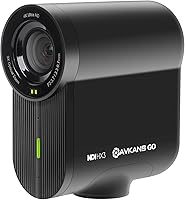
The AVKANS Go 4K NDI Streaming Camera occupies a practical niche that's easy to overlook: compact, wireless NDI cameras built specifically for live sports and event production. Sitting in the mid-range bracket, it competes with entry-level PTZ cameras and basic streaming boxes, but with one meaningful advantage — the NDI license included saves buyers a significant separate purchase. Physically, it's a small cube, about 4.3 x 4.3 x 2 inches and just over a pound and a half, with a built-in battery. One honest caveat upfront: the companion app works only on iOS right now, and Android users are explicitly advised not to buy until that changes.

Features & Benefits

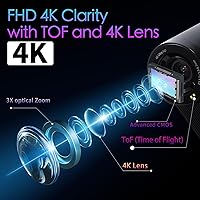
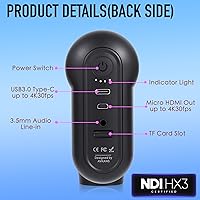
What makes the AVKANS Go worth a serious look is how much connectivity it packs into that small frame. You get NDI HX3, SRT, HDMI, USB, and PoE — each serving a different workflow. NDI and Wi-Fi handle wireless multi-camera setups; HDMI and USB are your wired fallbacks for mixing boards or laptop-based streams via OBS or vMix. The 9x total zoom, combining 3x optical with digital extension, gives real reach from a bleacher or sideline position. TOF autofocus keeps moving subjects sharp, and HDR processing helps when outdoor lighting is uneven. With up to six hours of battery plus simultaneous SD card recording, you can cover an entire event without scrambling for power or risking a lost local feed.

Best For

This wireless NDI camera is a natural fit for small volunteer production crews covering youth baseball, basketball, or softball — people who need a camera that works over Wi-Fi without dragging cables across a gym. Churches and conference venues building a low-cost multi-camera NDI system will find the included license particularly practical. Solo streamers who want clean HDMI output without paying PTZ prices will appreciate the flexibility too. If you're already running an NDI workflow and need an affordable extra angle, this compact streaming cam fills that gap well. One firm caveat: this is strictly an iOS-only setup for wireless app streaming. Android users should wait — the app simply isn't functional yet.

User Feedback

Buyers who've run this compact streaming cam through real event conditions consistently highlight how easily it drops into existing NDI pipelines and how much they appreciated not paying for a separate license. The lightweight build earns praise from operators juggling multiple cameras in tight spaces. On the critical side, the Android app is the single most recurring complaint — not just limited, but effectively unusable for most, and several reviewers felt the warning wasn't prominent enough before purchase. A setup note worth flagging: v30 A1 MicroSD cards are required for reliable recording; slower cards cause failures. The brand does push firmware updates with some regularity, though app development clearly lags behind the hardware.

Pros

  • NDI license is included in the box, saving buyers a meaningful extra cost compared to competing cameras that charge separately.
  • Supports NDI HX3, SRT, HDMI, USB, and PoE, covering a wide range of connection scenarios for different production setups.
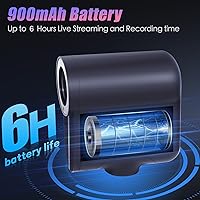
  • Up to six hours of battery life means most live events can run completely untethered without hunting for a power outlet.
  • The compact cube body, weighing just over a pound and a half, is easy to mount discreetly on bleachers, tripods, or rigs.
  • SD card recording runs simultaneously alongside the live stream output, creating a clean local backup without extra gear or steps.
  • 9x combined zoom reach gives meaningful coverage from fixed sideline or bleacher positions without needing to reposition mid-event.
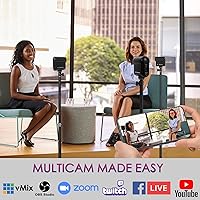
  • Works natively with OBS, vMix, Wirecast, and Propresenter, fitting into most common live production software environments without extra configuration.
  • TOF autofocus and HDR processing help hold image quality steady in challenging gym lighting or mixed outdoor conditions.
  • USB webcam mode lets operators use this wireless NDI camera as a direct desktop webcam without any additional capture hardware.

Cons

  • The Android app is effectively non-functional — a genuine dealbreaker for any operator whose on-site workflow runs on Android devices.
  • The iOS companion app is still in active beta with known bugs; certain features depend on manually applying firmware updates to work.
  • SD card recording requires a v30 A1 MicroSD card specifically — standard or slower cards frequently trigger recording failures in the field.
  • 4K output is capped at 30fps, which may fall short for operators who prioritize smoother motion in fast-action sports coverage.
  • Optical zoom tops out at 3x; anything beyond that relies on digital zoom, which noticeably degrades image quality at full extension.
  • App-based wireless streaming to YouTube or Facebook requires an iOS device; Android users are limited to wired HDMI or USB connections only.
  • The fixed lens and cube form factor make mid-event repositioning to follow action less practical compared to a proper PTZ camera.
  • An f/3 maximum aperture limits performance in genuinely low-light venues such as smaller indoor gyms or dimly lit conference halls.

Ratings

The AVKANS Go 4K NDI Streaming Camera scores below are generated by AI after analyzing verified global buyer reviews, with spam, bot activity, and incentivized feedback actively identified and excluded. Ratings reflect the real-world experience of operators who have deployed this camera at live sports events, worship services, and small multi-camera productions — not idealized test conditions. Both meaningful strengths and genuine frustrations are represented transparently, giving you an honest picture before you commit.

NDI Integration
91%
Getting this wireless NDI camera onto an existing production network is consistently described as painless by users already familiar with vMix or Wirecast. The bundled NDI license removes a friction point that catches buyers of competing cameras off guard. Operators building out multi-camera church setups particularly appreciate how quickly additional angles come online without extra licensing steps.
A handful of users on congested networks report occasional latency spikes in the NDI feed, particularly when competing with other devices on the same Wi-Fi band. NDI HX3 compression, while efficient, is not lossless, so operators in more critical broadcast environments may notice quality differences compared to a direct SDI feed.
Video Quality
83%
For live sports and event streaming at the prosumer level, buyers generally find the 4K output clean and well-detailed — particularly appreciated when framing a pitcher from across a field or tightening in on a basketball key from the bleachers. TOF autofocus tracks moving subjects without hunting excessively, and HDR processing visibly helps in mixed-light gymnasiums.
The 30fps ceiling at 4K is the most consistent complaint from sports-focused buyers — fast action like a full-court break or a baseball swing can look slightly choppy compared to cameras offering 60fps. Some users also find that app-compressed streams over mobile data fall noticeably short of the quality seen over a local wired or NDI connection.
Wireless Performance
79%
21%
In controlled environments with a dedicated Wi-Fi network — a church hall, a school gymnasium, a conference room — users consistently report reliable wireless operation with minimal dropped frames. The camera's ability to hold a stable NDI stream across a full two-to-three-hour event has earned genuine appreciation from small volunteer production teams.
In crowded outdoor environments or venues with dense Wi-Fi traffic, some users report the wireless connection becoming unstable or intermittently dropping — a real concern for operators at larger public events. There is no confirmed 5GHz-only mode referenced in user feedback, which can be a disadvantage in congested 2.4GHz environments.
Software & App
48%
52%
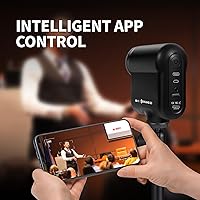
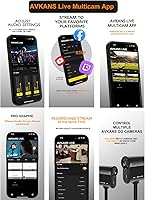
iOS users who keep the firmware current report that the core streaming functions — going live to YouTube, Facebook, or Restream — do work as intended once the app is properly configured. The iOS Multicam interface provides a reasonably capable multi-camera management experience for operators running two or three cameras simultaneously from an iPhone.
The Android app is effectively non-functional for live streaming, and the brand openly advises Android users not to purchase — a warning that unfortunately not all buyers encounter in time. Even on iOS, the app carries known bugs and certain features only activate correctly after manual firmware updates, which frustrates operators expecting out-of-the-box simplicity.
Battery Life
86%
Running a full baseball or softball doubleheader wirelessly — four-plus hours on the field — is something this compact streaming cam handles comfortably for most users, with charge to spare. Parents and coaches who set it up once and leave it running throughout an afternoon tournament particularly appreciate not having to worry about mid-game shutdowns.
Battery life figures are based on ideal conditions, and some users report shorter runtimes when simultaneously running SD card recording, streaming over NDI, and using the HDMI output at the same time. There is no user-replaceable battery, so if you deplete it during a long event day, you depend on USB charging rather than a quick swap.
Zoom & Optics
71%
29%
The 3x optical zoom gives operators a genuinely useful ability to frame tighter shots from a fixed position — particularly on a Little League field or a half-court basketball setup where repositioning during play is not an option. For streaming and online viewing purposes, the optical range alone covers most practical framing needs at amateur and youth event distances.
Once you push beyond the optical range into digital zoom, image softening is noticeable — something buyers who need to cover larger stadiums or fields from a distance find limiting. There is no optical image stabilization referenced in user feedback, which can make heavily zoomed shots appear shakier when the camera is not on a rock-solid mount.
Build & Portability
84%
The compact cube form factor earns consistent praise from operators who move this wireless NDI camera between venues frequently — it slips into a bag easily and mounts on a standard tripod without any fuss. At just over a pound and a half, it adds almost no meaningful weight to a portable streaming kit.
The fixed lens design means you cannot swap glass for different shooting scenarios, which limits flexibility compared to cameras with interchangeable optics. A small number of users also note that the plastic housing, while adequate, does not inspire the same confidence as metal-bodied alternatives available at a similar price point.
Connectivity Options
89%
The breadth of connection options on a camera at this price is genuinely impressive — NDI HX3, SRT, HDMI, USB, and PoE all in one compact body covers nearly every scenario a small production team might face. Users who need a wired HDMI fallback during a critical live event particularly appreciate having that option immediately available without extra hardware.
SDI output — the standard in professional broadcast environments — is absent, which is a real limitation for operators trying to integrate this into a traditional broadcast signal chain. SRT streaming works well but requires some technical knowledge to configure correctly, and less experienced users report a steeper learning curve with that protocol specifically.
Autofocus Performance
77%
23%
TOF autofocus is meaningfully better than contrast-based systems for tracking unpredictable motion — something users covering live basketball particularly notice when a player cuts across the frame at speed. In most indoor sports environments, the autofocus acquires and holds focus reliably without the hunting behavior that plagues cheaper action cameras.
Some users shooting in very low-light conditions — evening outdoor fields, dimly lit gymnasiums — report autofocus struggling to lock consistently, particularly at longer zoom ranges. At maximum digital zoom, autofocus accuracy declines noticeably, which compounds the image softening already present at the top of the zoom range.
SD Card Recording
73%
27%
Having a simultaneous local recording alongside the live stream output is a real operational safety net — users who have lost a stream due to network issues mid-game find a clean SD card backup invaluable. The MP4 format records cleanly and is immediately editable in standard video software without any conversion step.
The v30 A1 MicroSD card requirement is not prominently communicated at purchase, and several users have experienced recording failures simply by using a standard card they already owned. The camera does not clearly alert you to an incompatible card, meaning some operators only discover the problem when reviewing footage after the event.
Software Compatibility
82%
18%
Compatibility with major live production platforms — OBS, vMix, Wirecast, and Propresenter — is consistently described as plug-and-play for users already familiar with those environments. Church AV teams in particular report the AVKANS Go fitting naturally into existing Propresenter-based Sunday service workflows without requiring special configuration or bridge software.
Users running the camera with platforms outside the main supported list report varying compatibility, with NDI discovery occasionally requiring manual IP entry rather than automatic detection. The companion AVKANS Live app's overall feature set still trails what experienced multicam operators expect from a mature, production-ready streaming tool.
Value for Money
85%
For buyers coming from a world where NDI cameras cost significantly more and still charge separately for the license, the bundled value here registers as a genuine differentiator. Small production teams and houses of worship operating on tight budgets consistently cite this as the primary reason they chose this compact streaming cam over similarly spec'd alternatives.
The value equation tilts unfavorably for Android users who purchase without realizing the app limitation — effectively paying for a wireless camera they cannot fully use wirelessly. Buyers who factor in the cost of a proper v30 A1 MicroSD card and a firmware update session may find the real-world setup costs slightly higher than initially expected.
Setup & Ease of Use
67%
33%
For users with prior experience in NDI ecosystems or live production software, initial setup is described as straightforward — the camera appears on the network, gets discovered in vMix or OBS, and is ready to stream within minutes. The physical hardware setup is clean, with clear port labeling and a standard tripod mount that requires no adapters.
Operators new to NDI or network-based cameras consistently report a steeper-than-expected learning curve, particularly around network configuration, firmware updates, and the iOS app interface. Customer support responsiveness receives mixed reviews — some buyers report helpful guidance on firmware issues, while others describe difficulty getting timely answers on app-related problems.
Low-Light Performance
58%
42%
In moderately lit gymnasiums and indoor sports venues with standard overhead lighting, the HDR processing does a reasonable job keeping the image balanced and usable — appreciated by operators streaming evening indoor basketball or volleyball matches. For well-lit church stages and conference rooms, low-light performance is rarely a significant concern.
In genuinely dark conditions — poorly lit outdoor fields at dusk or underlit community center gymnasiums — the f/3 maximum aperture shows its limitations, producing noticeably grainy or soft footage. Users shooting evening outdoor sports report this as a real constraint, with the camera struggling to hold clean image quality once ambient light drops significantly.

Suitable for:

The AVKANS Go 4K NDI Streaming Camera is built for a specific type of operator: someone who needs wireless, multi-camera live production capability without the cost of a full broadcast rig. Small volunteer crews running video at youth or amateur sports events — baseball, basketball, softball — will find the wireless flexibility and extended zoom range genuinely useful from a fixed sideline or bleacher position. Churches and conference venues exploring a budget-friendly NDI infrastructure will appreciate that the NDI license is already bundled, removing what is often a frustrating and expensive add-on cost elsewhere. Solo content creators who want clean HDMI output into a hardware switcher, or USB connectivity for desktop-based streaming via OBS or vMix, also have a solid use case here. The six-hour battery means most events can be covered untethered, and simultaneous SD card recording provides a clean local backup without any additional hardware. If you are working in an iOS environment and already invested in an NDI ecosystem, this wireless NDI camera adds a capable, affordable extra angle.

Not suitable for:

The AVKANS Go 4K NDI Streaming Camera is a clear mismatch for anyone whose mobile workflow runs on Android — the companion app is not functional on that platform, and the manufacturer openly recommends against purchasing until further notice. This is not a minor caveat; if Android is your primary device for managing or directing streams on location, this camera simply will not work as intended wirelessly. Buyers expecting polished, out-of-the-box software should also recalibrate: the iOS app is still in active beta development, carries known bugs, and some functionality depends on keeping firmware manually updated. Professionals with zero tolerance for troubleshooting will find the setup curve frustrating compared to more mature competitors. Anyone who needs frame rates beyond 30fps at 4K — for particularly fast-motion sports where smoothness is critical — should look at other options, as this compact streaming cam is capped there. And if your production demands substantial optical reach without digital zoom degradation, the 3x optical lens will feel limiting for distant or moving subjects.

Specifications

  • Resolution: Captures and outputs video at 4K 2160p at up to 30 frames per second, with 1080p also supported as an output option.
  • Sensor: Uses a CMOS image sensor designed to handle both 4K and 1080p recording and streaming modes.
  • Zoom Range: Offers 3x optical zoom combined with 3x digital zoom for a total 9x zoom reach.
  • Autofocus: Equipped with TOF (Time of Flight) autofocus for fast subject acquisition and tracking in dynamic shooting conditions.
  • HDR: Built-in HDR processing helps balance exposure in high-contrast, backlit, or mixed-light environments.
  • Connectivity: Supports NDI HX3, SRT, HDMI output, USB, Wi-Fi, and Power over Ethernet (PoE) for a wide range of deployment scenarios.
  • Battery Life: Built-in rechargeable battery provides up to 6 hours of continuous wireless operation on a single charge.
  • Storage: Records locally to a MicroSD card in MP4 format; a v30 A1 rated card is required for stable, uninterrupted recording.
  • Dimensions: Measures 4.3 x 4.3 x 2 inches, forming a compact cube body suited for discreet tripod or pole mounting.
  • Weight: Weighs 1.55 pounds, keeping it practical for lightweight rigging setups at live events.
  • Aperture: Maximum lens aperture is f/3, which is a practical consideration when shooting in lower-light indoor venues.
  • Focal Length: Maximum focal length reaches 9.7mm, designed for a versatile mid-range field of view with optical zoom extension.
  • NDI License: A full NDI license is included at no extra cost, allowing immediate use on NDI-enabled networks and software.
  • Webcam Mode: Connects via USB to function as a standard webcam source on Windows or Mac without requiring additional drivers.
  • Software: Compatible with OBS, vMix, Propresenter, Wirecast, and MevoStars Multicam for integration into professional live production workflows.
  • Mobile App: The companion streaming app is available for iOS only; the Android version is not currently functional for live streaming use.

Related Reviews
AVKANS 4K NDI PTZ Camera with AI Tracking
85%
89%
AI Tracking Accuracy
91%
Ease of Setup (PoE & NDI Integration)
88%
Video Output Flexibility (HDMI, SDI, USB, IP)
85%
Build Quality
90%
Software Compatibility (OBS, Zoom, vMix)
More
AVKANS AV-E20-NDI PTZ Camera
79%
88%
Image Quality
91%
NDI Integration
93%
Connectivity & Output Options
82%
Low-Light Performance
74%
PTZ Motor & Movement Smoothness
More
AVKANS NDI PTZ Camera 30X
82%
91%
NDI Reliability
83%
Installation Simplicity
74%
AI Auto-Tracking Accuracy
88%
Video Output Quality
93%
Multi-Output Flexibility
More
Reolink Go PT Ultra 4G Solar Security Camera
73%
88%
Image Quality
83%
Night Vision Performance
67%
Solar Charging Reliability
74%
4G Connectivity & Signal
58%
4G Data Consumption
More
ROQIOO A9
ROQIOO A9
67%
83%
Value for Money
61%
Image Quality
58%
Video Quality
81%
Flip Screen Usability
54%
Build Quality & Durability
More
WESECUU 4CAM 4K POE Security Camera System
71%
83%
Image Clarity
78%
Night Vision Performance
71%
AI Detection Accuracy
54%
Mobile App Experience
76%
Setup & Installation
More
iuZee UHD12U-4K 4K PTZ Conference Camera
78%
88%
Image Quality
91%
PTZ Movement
86%
Zoom Performance
93%
Setup & Ease of Use
67%
Low-Light Performance
More
Hiseeu WK-8HB615-CT 8-Camera 5MP NVR Security System
76%
78%
Image Quality
83%
Night Vision
91%
Local Storage Value
71%
AI Human Detection
58%
Ease of Installation
More
ONWOTE PKA801608S 16-Channel 4K PoE Security Camera System
78%
91%
Image Clarity
83%
Night Vision
74%
AI Detection Accuracy
67%
Ease of Installation
69%
Audio Recording
More
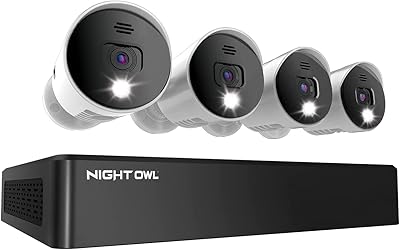
Night Owl 8-Channel 4K Security Camera System
76%
91%
Image Quality
88%
Night Vision Performance
89%
Local Storage & Privacy
54%
Ease of Installation
58%
DVR Interface & Usability
More

FAQ

Not in any meaningful way right now, and you should factor that in heavily before buying. The Android companion app is non-functional for live streaming, and the brand itself has stated Android users should hold off on purchasing. If you are on Android, your only practical option is a wired HDMI or USB connection to a laptop, rather than managing the stream wirelessly through an app.

No — the NDI license is included with the camera, which is one of the more practical advantages it has over similarly priced competitors. Many other cameras in this category require you to purchase an NDI key separately, which adds a notable extra cost. With the AVKANS Go, you can join an NDI network straight out of the box.

Through the iOS app over RTMP and RTMPS, you can push directly to platforms like YouTube, Facebook, Vimeo, Restream, and SideLine HD without needing a laptop in the chain. For OBS or vMix workflows, the wireless connection happens over NDI rather than RTMP. Android users and anyone who prefers a wired setup would use HDMI or USB into a laptop running their preferred streaming software.

You need a v30 A1 rated MicroSD card — that rating refers to the sustained write speed the card must maintain, and this camera needs it to record reliably without dropouts. Standard or budget cards that do not meet that rating frequently cause recording failures, sometimes mid-event. It is worth picking up the right card before your first shoot rather than discovering the issue during a game.

Yes, and it works cleanly in two ways. You can connect wirelessly over NDI and have the camera appear as a network source inside OBS, or plug in via USB and use it as a standard webcam input. Neither method requires exotic drivers or plugins, and most users report a straightforward setup experience in OBS specifically.

The 3x optical zoom is the portion worth relying on — it gives you a noticeably tighter frame from a sideline or bleacher position without losing meaningful sharpness. The additional digital zoom extends your reach further but softens the image, so treat it as a last resort rather than a standard setting. For most youth or high school sports venues, the optical range alone gives you a usable close-up from a realistic shooting distance.

For most users, yes. A full game or two-to-three-hour event on a single charge is achievable under normal wireless streaming conditions. Battery drain can vary depending on whether you are simultaneously recording to SD card and how strong your Wi-Fi connection is, but there is generally enough headroom to get through a standard event without needing to plug in.

Yes, that is one of the intended use cases for this camera. Because it supports NDI HX3, multiple units can be discovered and switched between using software like vMix, Wirecast, or the AVKANS Go 4K NDI Streaming Camera companion Multicam app on iOS. Just make sure your network switch or router has sufficient bandwidth headroom to handle simultaneous NDI streams from all cameras without degradation.

Absolutely — the HDMI output delivers a clean video feed that connects directly into hardware switchers like an ATEM Mini or similar devices. This is a reliable fallback if you prefer a fully wired production setup or are working in an environment where Wi-Fi is unreliable. USB also lets you use it as a webcam source plugged into any laptop running your switching software.

For those use cases specifically, this compact streaming cam holds up well. The TOF autofocus and HDR processing help it manage the variable lighting you encounter in gyms, outdoor fields, and church sanctuaries. It sits firmly in the prosumer tier rather than broadcast-grade territory, but for YouTube, Facebook Live, or a church stream viewed on phones and tablets, the output quality is more than adequate.