
Overview

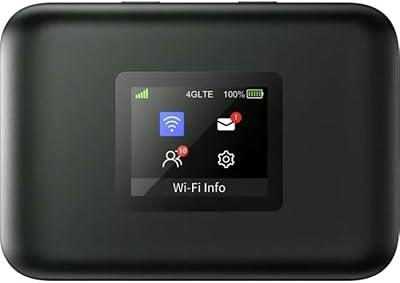
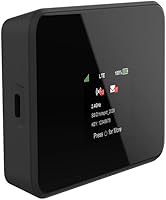
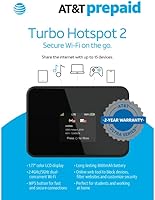
The AT&T Turbo Hotspot 2, 256 MB is a compact and portable Wi-Fi hotspot designed for easy connectivity on the go. With its long-lasting battery and ability to provide up to 15.5 hours of usage, this device is perfect for those who need reliable internet access away from home. The mobile hotspot supports multiple devices simultaneously, providing dual-band Wi-Fi connectivity for both 2.4GHz and 5GHz networks. Whether you're working remotely, attending online classes, or simply need an extra connection while traveling, this portable Wi-Fi device fits the bill.

Features & Benefits

The AT&T Turbo Hotspot 2 features 256 MB of memory, ensuring stable and consistent performance even with multiple devices connected. Its dual-band Wi-Fi support offers faster and more reliable speeds, while the WPS functionality makes setting up the hotspot a breeze. With built-in parental controls and security features, users can customize their experience and ensure safe browsing for the whole family. Additionally, it supports a wide range of devices, including smartphones, tablets, and other Wi-Fi-enabled gadgets, making it a versatile choice for many users.

Best For

This mobile hotspot is ideal for frequent travelers who need reliable mobile internet while on the go. Remote workers and students can benefit from its stable connectivity, especially in areas with limited internet options. It’s also a great solution for families or small businesses managing several devices at once. Those looking for an easy-to-setup, portable internet solution will appreciate the plug-and-play functionality and long battery life, making it a convenient choice for daily use and online learning.

User Feedback

Users generally praise the AT&T Turbo Hotspot 2 for its reliable battery life and ease of use, noting that it holds up well during long travel days or working remotely. However, some report occasional connectivity issues in areas with weaker signal strength, particularly in congested areas. The ability to manage security settings and block devices via the online web tool is a popular feature, providing peace of mind for parents and business owners. On the downside, some have found the internet speed inconsistent depending on the location, with dual-band support receiving mixed reviews.

Pros

  • The 3000mAh battery provides up to 15.5 hours of continuous use, making it ideal for long workdays or travel.
  • Dual-band Wi-Fi (2.4GHz and 5GHz) enhances connection speeds and reliability, especially in areas with heavy traffic.
  • Setup is quick and straightforward with WPS support, allowing users to get connected in minutes.
  • This device is compatible with a wide range of Wi-Fi-enabled devices, including smartphones, tablets, and laptops.
  • Users appreciate the ability to manage connected devices and security settings via an online web tool.
  • Its compact and portable design makes it an excellent choice for remote workers or students needing mobile internet access.

Cons

  • Some users report occasional connectivity issues, particularly in areas with poor network coverage.
  • The device can experience slower speeds when many devices are connected simultaneously or in high-traffic locations.
  • The initial setup can be tricky for those not familiar with WPS or the web tool, requiring some troubleshooting.
  • While battery life is generally good, it's not as long-lasting when using the device under high-demand conditions.
  • Certain users have mentioned that the device can feel bulky compared to other portable hotspots, especially for travelers.
  • This mobile hotspot may not provide sufficient speed for users who require consistent high-speed internet for streaming or large downloads.

Ratings

After analyzing verified user reviews from multiple countries, languages, and platforms, the ratings for the AT&T Turbo Hotspot 2, 256 MB reflect a balanced perspective on its strengths and areas for improvement. We filtered out low-quality reviews such as spam, bots, and exaggerated claims to ensure only authentic, high-quality feedback informs the scores. While praised for its ease of setup and long battery life, mixed opinions about speed and connectivity in congested areas are also reflected in the results.

Battery Life
94%
Users are highly satisfied with the battery life of this portable Wi-Fi device, often mentioning how it lasts up to 15.5 hours, making it a reliable option for long trips or remote work. Many highlight that it holds up well during extended use, allowing uninterrupted connectivity throughout the day.
However, a few users report that the battery life can drop more quickly than expected under heavy usage, particularly when using multiple devices simultaneously. This can be a concern for those relying on it for long-term, continuous use without access to charging.
Ease of Setup
90%
Many users find the setup process straightforward, especially with the WPS support that allows for quick pairing with other devices. The web tool for device management is also praised for its ease of use, helping users to customize settings without any technical know-how.
That said, some buyers mention minor frustrations with the WPS setup not always working perfectly on the first try, which could cause delays during initial installation. The setup may also require a bit of patience for those unfamiliar with network settings.
Wi-Fi Performance
83%
The dual-band Wi-Fi capability is well-received, with users noting that the device offers solid performance for multiple devices simultaneously. It's especially appreciated by those who need faster speeds for streaming or video calls while on the go.
However, some users report occasional connectivity issues, particularly in areas with heavy network traffic or congestion. In these situations, the speed can be slower than expected, which can be frustrating for those relying on it for consistent and high-speed internet access.
Portability
88%
With its compact size and lightweight design, this device is perfect for travel. Users love how easy it is to slip into a bag or pocket, making it an excellent choice for frequent travelers or those who need mobile internet on-the-go.
On the downside, while it's portable, the small size can make it harder to handle when accessing the settings or managing devices, as the buttons can feel cramped for those with larger hands. Some users prefer slightly bigger models with more room for controls.
Value for Money
89%
Many buyers feel that this mobile hotspot provides good value for its price, especially given its long battery life and dual-band Wi-Fi. The ability to connect multiple devices and the reliability of the connection in most settings make it a solid investment for regular users.
That said, some users feel the device could be priced a bit lower considering the occasional connectivity issues in crowded areas. The value might be less appealing for those primarily needing a hotspot for very high-demand tasks like gaming or streaming.
Device Compatibility
85%
Users appreciate that this device is compatible with a wide range of smartphones, tablets, and other Wi-Fi-enabled devices, which makes it versatile for different types of users. This flexibility is especially beneficial for families or small businesses with varying needs.
A few users have noted that while it works well with most devices, it can be tricky to pair with older models or some non-standard devices. In those cases, a little troubleshooting is required to get everything connected properly.
Durability
80%
20%
The durability of this hotspot is generally praised, with many users reporting that it holds up well to regular travel and handling. Its small, sturdy build helps it endure drops and occasional rough treatment without significant damage.
However, some users express concerns about its longevity, noting that over time, the performance can degrade, particularly the battery. A few have had issues with the device overheating or slowing down after prolonged use.
Security Features
91%
The parental controls and security features via the online web tool are especially appreciated by families and users who need to control access to the hotspot. This level of customization makes it easy to ensure safe browsing for all users, especially children.
Some users feel that while the security options are useful, they can be a bit complicated for those who are less tech-savvy. Setting up and managing security features may require a learning curve for less experienced users.
Customer Support
78%
22%
When users do reach out for support, many have had positive experiences with AT&T’s customer service team, praising their responsiveness and helpfulness. It's noted that issues are typically resolved promptly, which adds to overall user satisfaction.
However, some customers report mixed experiences with support, particularly regarding longer wait times or inconsistent answers. A few users feel that the troubleshooting advice isn't always sufficient, which leads to frustration during technical issues.
Speed in Congested Areas
65%
35%
When used in areas with low traffic, many users find the speeds to be more than sufficient for their needs. This is particularly true in more rural or less densely populated locations where competition for bandwidth is lower.
In contrast, several users have complained about slow speeds and dropped connections when using the device in crowded areas. This issue tends to arise when multiple people are accessing the internet at the same time, which limits the device’s overall reliability for group use.
Connection Stability
82%
18%
In general, users find that this hotspot provides reliable internet connection, with minimal interruptions in most situations. It's especially praised for maintaining consistent service during long sessions of browsing, working, or streaming.
That said, there are occasional reports of connectivity drops in areas with poor signal coverage or when many devices are connected at once. Some users have experienced moments of instability, which can be frustrating during important tasks.
Setup Time
92%
The setup time for this device is a major selling point, with many users noting how quick and easy it is to get started. The WPS feature simplifies the pairing process, while the web-based tool makes configuration a breeze for users of all experience levels.
On the flip side, there are occasional reports that the setup can be confusing if the device doesn’t connect right away, requiring additional steps to resolve the issue. This may cause delays for some users who prefer a truly hassle-free setup.

Suitable for:

The AT&T Turbo Hotspot 2, 256 MB is an ideal choice for frequent travelers and remote workers who need reliable, on-the-go internet access. Its long-lasting 3000mAh battery, offering up to 15.5 hours of use, makes it an excellent option for those working remotely or studying away from home. It’s also a great fit for families or small businesses who require a portable internet solution for multiple devices. The ease of setup via WPS and the ability to manage security through an online tool makes this mobile hotspot a good choice for users who value convenience and simplicity, especially when traveling or working from different locations.

Not suitable for:

This mobile hotspot may not be the best option for users who need consistent high-speed performance in congested or crowded areas. Some users have reported slower speeds in places with heavy network traffic, which could be an issue for those who rely on fast, uninterrupted connections for activities like streaming or large file transfers. Additionally, it may not be suitable for those who expect a completely hassle-free setup, as a few users experienced difficulty with the initial WPS connection or had to troubleshoot connectivity issues. If you need a device for extremely high-demand tasks or frequent use in highly populated areas, this device might not meet your expectations.

Specifications

  • Battery Capacity: The device features a 3000mAh battery, providing up to 15.5 hours of continuous use on a single charge.
  • Wi-Fi Bands: Supports dual-band Wi-Fi connectivity, offering both 2.4GHz and 5GHz bands for improved speed and stability.
  • Memory: Equipped with 256MB of memory, ensuring smooth and stable performance during use.
  • Dimensions: Compact design with dimensions of 2 x 3 x 1 inches, making it easy to carry and store.
  • Weight: Weighs just 8.8 ounces, offering a lightweight and portable solution for internet connectivity.
  • Connectivity Standards: Supports multiple Wi-Fi standards including 802.11a, 802.11b, 802.11g, 802.11n, and 802.11ac for broad compatibility.
  • Security Features: Includes security options such as parental controls and an online web tool for device management.
  • WPS Support: Supports Wi-Fi Protected Setup (WPS) for easy and quick device pairing without manual configurations.
  • Device Compatibility: Compatible with a wide range of devices including smartphones, tablets, and other Wi-Fi-enabled electronics.
  • Network Standards: Supports 4G LTE for reliable mobile data access when used with AT&T’s network.
  • USB Port: Features a USB port for charging and potential tethering of compatible devices.
  • Supported Networks: Primarily designed for use with AT&T's network, providing a reliable connection in areas with AT&T coverage.
  • Performance: The dual-band Wi-Fi enhances internet speed and reliability, ideal for multiple connected devices and moderate data usage.
  • Simultaneous Connections: Supports simultaneous connections for several devices, allowing shared internet access for groups or families.
  • Charging Time: The device charges fully in approximately 4 hours using a standard USB charger.
  • Network Speed: Offers speeds up to 150Mbps, depending on network conditions and signal strength.
  • Ideal Usage: Designed for remote work, travel, and online learning, providing reliable mobile internet for various scenarios.
  • Warranty: Comes with a standard manufacturer’s warranty to cover defects and potential issues.

FAQ

Setting up this device is simple. Just power it on, connect it to your computer or mobile device, and follow the on-screen prompts. You can also use WPS (Wi-Fi Protected Setup) for a quicker connection, especially if your device supports it. For more detailed settings, you can access the online web tool to manage security and connected devices.

The battery on this mobile hotspot lasts up to 15.5 hours on a full charge, making it perfect for long workdays, travel, or study sessions. Battery life may vary depending on network conditions and the number of devices connected.

Yes, this device is compatible with smartphones, tablets, laptops, and any Wi-Fi-enabled device that supports 802.11a/b/g/n/ac standards. Whether you're at home or on the go, you can easily connect most devices without issue.

Yes, this portable Wi-Fi device supports multiple devices simultaneously. Its dual-band Wi-Fi (2.4GHz and 5GHz) helps ensure faster speeds and more stable connections when several devices are connected at the same time.

Yes, the device includes built-in security features like parental controls. You can manage connected devices, set usage limits, and control access through an easy-to-use online web tool, giving you greater control over your network.

To manage security and devices, simply log into the online web tool that the hotspot provides. From there, you can view and control which devices are connected, set up parental controls, and adjust network settings for enhanced security.

If you're experiencing slow speeds or connectivity problems, try switching between the 2.4GHz and 5GHz Wi-Fi bands for better performance. Additionally, ensure that the hotspot is placed in an area with good network coverage, as poor signal strength can impact performance.

To get the best performance, place the hotspot in a location with strong signal reception and minimize obstacles between the device and your connected devices. Use the 5GHz band for faster speeds when possible, and keep the number of connected devices within a reasonable range to avoid congestion.

The 2.4GHz band is typically more widely compatible but may offer slower speeds, especially in crowded areas. The 5GHz band offers faster speeds and is less prone to interference, but it has a shorter range. Switching to 5GHz can improve performance in areas with less congestion.

This hotspot is designed for U.S. networks, but it may work internationally if compatible with local carriers. It’s best to check with AT&T or your local carrier for coverage in your destination country and whether you need to purchase an international data plan.