Overview

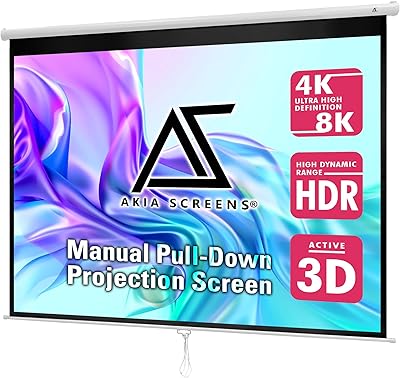
The Akia Screens Manual B 110-Inch Projector Screen sits in a practical sweet spot — big enough for a real cinematic experience, affordable enough to buy without much deliberation. Stretched across a 16:9 aspect ratio, the 110-inch diagonal gives you a proper widescreen canvas that wall-mounted TVs at that size simply can't match on price. The white alloy steel case looks tidy against most walls and mounts to either the ceiling or wall, which offers more flexibility than many rivals at this tier. What sets it apart from generic alternatives is its GreenGuard Gold certification, a safety standard that matters in schools, medical offices, or homes with young children. Akia has been manufacturing under ISO9001 standards since 2004, so the brand has real standing.
Features & Benefits

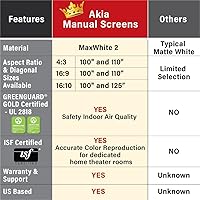
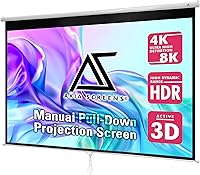
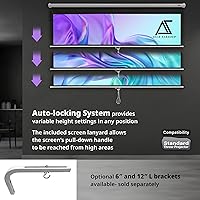
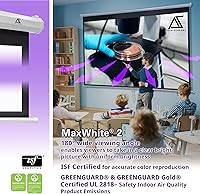
The MaxWhite 2 screen material is the real workhorse here — it handles 4K and 8K signals with a 1.1 gain that keeps images bright without washing out color, and the 180-degree viewing angle means people sitting well off-center still get a clear picture. The fully black-backed construction blocks light from coming through, which noticeably improves contrast in rooms that aren't pitch dark. ISF certification adds genuine value for home cinema enthusiasts who care about accurate color, not just raw brightness. The auto-lock system lets you stop the screen at any height in 2-inch increments, which is handy if your seating arrangement doesn't need the full drop. Cleanup is straightforward — soap and water work fine on the surface.

Best For

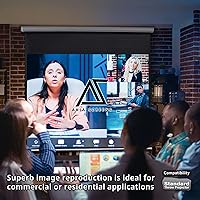
This pull-down screen makes the most sense for homeowners who want a proper movie setup without committing to a fixed-frame installation. It works equally well in a conference room or classroom — roll it down for a presentation, push it back up when you're done. The GreenGuard Gold rating is a meaningful advantage in schools or medical offices where indoor air quality is regulated or simply taken seriously. One important caveat: this retractable projector screen is only compatible with standard throw projectors. If you own an ultra short throw model, this will not work — that's a dealbreaker worth confirming before you buy. The included two-year warranty and U.S.-based lifetime support are a real comfort at this price.

User Feedback

Across nearly 1,900 ratings averaging 4.5 stars, the dominant themes are easy installation and flat, clear picture quality. Most buyers report that the screen arrives in good shape and goes up on the wall without headaches. Where feedback gets mixed is around long-term flatness — some users note the screen develops minor waves or curl near the edges after extended use, which is a common trade-off with manual pull-downs in general. The auto-lock mechanism draws mostly positive notes, though a handful of reviewers mention it loosening over time. Packaging damage during shipping comes up occasionally. Nothing in the feedback suggests a widespread defect — just the normal range of experiences you'd expect from a manual non-motorized screen at this price point.

Pros

  • The 110-inch diagonal gives you a genuinely cinematic picture size that most wall-mounted TVs cannot match at this price.
  • MaxWhite 2 material handles 4K and 8K signals well, producing bright, color-accurate images with a 1.1 gain.
  • GreenGuard Gold certification makes this retractable projector screen one of the safer choices for classrooms and family rooms.
  • ISF-certified color accuracy is a meaningful bonus for buyers who care about picture quality, not just screen size.
  • The auto-lock system lets you stop at any height in 2-inch increments, which is practical for varied room and seating setups.
  • Mounts to either the wall or ceiling, giving you real flexibility depending on your room layout.
  • Mounting hardware is included in the box — most buyers report getting it on the wall without a separate hardware run.
  • The black-backed construction meaningfully improves contrast in rooms that are not completely dark.
  • Lifetime U.S.-based tech support via phone, chat, or email is a genuine long-term safety net.
  • A two-year manufacturer warranty from a brand with over two decades of ISO9001-certified production adds purchase confidence.

Cons

  • Some users report minor edge curl or waviness developing after months of regular use, which is a known trade-off with manual pull-down designs.
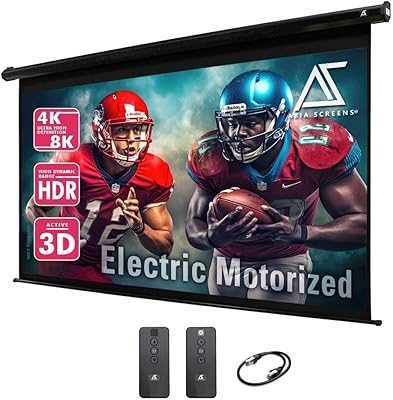
  • There is no remote or motorized option — every operation requires physically pulling and locking the screen by hand.
  • A small number of buyers have noted the auto-lock mechanism can loosen or feel less secure over extended use.
  • Packaging damage during shipping comes up often enough in reviews to be worth noting — inspect the box carefully on arrival.
  • At nearly 16 pounds and over 100 inches wide, installation is much easier with two people than attempting it solo.
  • Ultra short throw projector owners cannot use this screen at all — compatibility is limited strictly to standard throw models.
  • The white case, while clean-looking, may not blend well in darker, purpose-built home theater rooms with black or charcoal decor.
  • No built-in border or black masking edge means the screen lacks the framed, finished look of fixed-frame alternatives.

Ratings

The scores below reflect an AI-driven analysis of verified global buyer reviews for the Akia Screens Manual B 110-Inch Projector Screen, with spam, bot-generated, and incentivized feedback actively filtered out before scoring. Each category is rated independently, drawing on patterns from thousands of real purchase experiences to give you a transparent picture of where this screen genuinely delivers and where it falls short.

Image Clarity
88%
Buyers consistently report sharp, color-accurate images even when feeding 4K content through mid-range projectors. The MaxWhite 2 material and ISF certification translate into noticeably better color fidelity than similarly priced screens, with multiple reviewers singling out how natural skin tones and dark scenes look compared to cheaper alternatives.
A small segment of users note that in rooms with even moderate ambient light, the 1.1 gain is not aggressive enough to fully compensate, resulting in a washed-out picture. This is not a flaw specific to this screen, but buyers coming from higher-gain alternatives may find the image a touch dim in non-blacked-out spaces.
Screen Flatness
74%
26%
Out of the box and during the first several months of use, most buyers find the screen lies flat and taut across the full viewing surface. For weekend movie nights and occasional office presentations, the initial flatness is more than sufficient and draws frequent praise in early reviews.
Over time — particularly after a year or more of regular use — a meaningful number of reviewers report edge curl and subtle waves appearing toward the bottom and sides of the screen. This is a structural trade-off inherent to roll-up manual screens, but it does affect long-term satisfaction for daily users.
Installation Ease
86%
The included mounting hardware and straightforward bracket design mean most buyers have this pull-down screen on the wall within 30 to 45 minutes. Reviewers with no prior installation experience describe the process as manageable, especially with a second person helping to hold the unit level while fasteners are driven in.
Solo installation is genuinely awkward given the unit's width of over 100 inches and its weight approaching 16 pounds. A handful of buyers also note that the included drywall anchors feel lightweight relative to the screen's mass, prompting them to source heavier-duty anchors separately for greater peace of mind.
Auto-Lock Mechanism
71%
29%
The 2-inch interval locking system is a practical feature that most users appreciate for setting a partial drop when a full 110-inch pull is not needed. In office and classroom settings especially, being able to reliably stop the screen at a consistent mid-height position saves time and adds a layer of professional usability.
Some buyers — particularly those using the screen daily over 12 to 18 months — report that the lock begins to feel imprecise or slightly loose, occasionally allowing the screen to creep down from its set position. It is not a widespread failure, but it is consistent enough across reviews to flag as a potential durability concern for heavy-use environments.
Build Quality
78%
22%
The white alloy steel housing feels solid and looks clean against most wall finishes, and the screen rolls and unrolls without catching or binding under normal use. For a mid-range product, the overall construction is tighter than many budget competitors, and the case shows minimal wear in buyer photos even after extended use.
The housing does not feel premium up close — a few buyers describe it as feeling slightly thin or hollow when tapped, and the end caps on some units have been reported to sit slightly unevenly. It is functional and durable enough for most environments, but it would not pass for a high-end installation product.
Value for Money
91%
Relative to what you get — 110 inches of ISF-certified, GreenGuard Gold-compliant screen with lifetime U.S. support and a two-year warranty — the price point is genuinely competitive. Buyers frequently cite this retractable projector screen as the best-value purchase in their home theater setup, especially when compared to fixed-frame screens at two to three times the cost.
A small number of buyers feel the price has crept up from its original launch point and that at its current tier, the manual mechanism starts to feel like a meaningful compromise versus entry-level motorized options. If your budget can stretch a bit further, the convenience gap between manual and motorized becomes harder to ignore.
Viewing Angle
84%
The 180-degree viewing angle is not a marketing exaggeration — buyers in wider living rooms and conference settings consistently confirm that image quality holds up well for viewers seated well off to the sides. For family movie nights where seating spreads across a wide couch or for classroom rows, this is a genuine practical advantage.
While off-axis viewing is solid, there is a slight luminance drop for viewers seated at the extreme edges, which a few detail-oriented users in home theater forums have noted. It is minor enough that casual viewers will not register it, but it is worth knowing if precise uniformity across all seats matters to you.
Contrast Performance
76%
24%
The fully black-backed material makes a noticeable difference in rooms that are not completely light-controlled — shadow detail and dark scenes look more defined compared to non-backed screens at a similar price. In a basement media room with modest light control, buyers report a satisfying depth to dark content.
In truly bright rooms, no amount of black backing fully compensates for ambient light washing out the image, and this screen is no exception. Buyers hoping to use it in a sunlit living room during the day will be disappointed regardless of the backing quality.
Compatibility
63%
37%
For buyers with standard throw projectors — which covers the vast majority of consumer and prosumer models — this screen works without any adjustments or compatibility concerns. It handles everything from basic 1080p home projectors to high-end 4K laser units cleanly.
The hard incompatibility with ultra short throw projectors is the single biggest source of negative reviews for the Akia manual screen, and it catches a disproportionate number of buyers off guard. This is not a flaw in the product, but the lack of prominent warnings at point of sale leads to real frustration and returns.
Screen Size Options
79%
21%
The 110-inch diagonal hits a sweet spot that many buyers specifically search for — large enough for an immersive experience, but not so oversized that it overwhelms a typical living room or medium conference room. The 16:9 format aligns with virtually all modern content without compromise.
The product line does not offer a wide range of sizes at this specific variant tier, so buyers needing something closer to 85 or 130 inches may need to look at different models or competitors. For those who want exactly 110 inches, this is a non-issue, but it limits flexibility for buyers still deciding on size.
Shipping & Packaging
67%
33%
The majority of buyers receive the unit undamaged and report that the packaging is reasonably protective for a product of this size. Delivery timelines are generally consistent with standard expectations for a large-format item.
Packaging damage comes up with enough frequency in reviews to be a pattern rather than an anomaly — bent housing corners and creased cartons are the most common complaints. Buyers are well-advised to inspect the outer box carefully upon delivery and photograph any damage before accepting the shipment.
Maintenance & Cleaning
89%
Being able to wipe the screen down with mild soap and water is a practical advantage that buyers with kids or in dusty environments genuinely appreciate. There is no special cleaning kit required, and the surface holds up well to gentle routine cleaning without visible degradation in the material.
The screen should be fully dry before rolling it back into the housing, which requires a small amount of patience — rolling it up wet can trap moisture and potentially affect the material over time. This is a minor process note rather than a design flaw, but it is worth building into your cleaning routine.
Warranty & Support
87%
A two-year warranty backed by a U.S.-based support team reachable by phone, chat, or email is genuinely above average for a product at this price tier. Buyers who have needed to contact support describe response times as reasonable and the team as knowledgeable rather than script-driven.
A small number of warranty claim experiences in reviews describe slower resolution timelines than expected, particularly for replacement unit requests. The lifetime support offering is real, but a few buyers note that post-warranty hardware issues — like a worn lock mechanism — fall into a grey zone that is not always resolved to their satisfaction.
GreenGuard Certification
93%
For buyers in schools, pediatric environments, or households with allergy-sensitive family members, the GreenGuard Gold rating under UL 2818 is a meaningful, independently verified safety credential. It is not common at this price point and gives institutional buyers a certification they can actually document for compliance purposes.
For typical home theater use in a well-ventilated adult household, this certification is unlikely to be a deciding factor in practice. It adds real value in specific contexts, but buyers prioritizing it above screen performance specifications may be solving a problem they do not actually have.

Suitable for:

The Akia Screens Manual B 110-Inch Projector Screen is a strong match for homeowners who want a large-format viewing experience without paying for a motorized or fixed-frame setup. If you have a dedicated media room, a finished basement, or even a living room where movie nights are a regular occurrence, the 110-inch widescreen canvas delivers real impact at a mid-range price. Teachers, trainers, and small business owners will also find it practical — it pulls down cleanly for presentations and tucks away just as easily, keeping the space flexible. Families with young children or institutions with strict indoor air quality policies will appreciate the GreenGuard Gold certification, which is genuinely uncommon at this price tier. Anyone pairing it with a standard throw projector and wanting reliable U.S.-based support and a two-year warranty will feel well-covered here.
Not suitable for:

The Akia Screens Manual B 110-Inch Projector Screen is not the right choice if you own an ultra short throw projector — this is a hard incompatibility, not a minor limitation, and it is one of the most common sources of buyer frustration in the reviews. If you want motorized convenience, a smartphone-controlled drop, or a remote-operated screen for a high-end home theater, this manual pull-down will feel like a step down in comfort. People who need a truly permanent, wrinkle-free surface for critical color work or professional film grading should look at fixed-frame options instead, since manual screens can develop minor edge curl over time. Those expecting premium build quality on par with commercial or luxury installations may find the alloy steel case and manual mechanism feel utilitarian. Finally, if your ceiling height or room geometry is unusually tight, confirm the overall installed dimensions carefully before ordering — at over 67 inches tall and nearly 102 inches wide, it commands real wall space.
Specifications

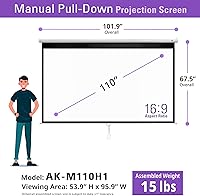
  • Diagonal Size: The screen measures 110 inches diagonally, providing a wide cinematic viewing surface suited for home theaters and large meeting rooms.
  • Aspect Ratio: Built in a 16:9 widescreen ratio, making it fully compatible with modern HD and UHD content formats without awkward cropping or black bars.
  • View Area: The active viewing surface measures 53.9″ high by 95.9″ wide, giving you a large but precisely defined picture area.
  • Overall Dimensions: The full installed unit measures 67.5″ H x 101.9″ W x 2.9″ D, including the housing case and any necessary clearance space.
  • Screen Material: Uses Akia's MaxWhite 2 fabric, a front-projection material engineered for accurate color reproduction and compatibility with high-resolution sources.
  • Gain: The screen has a 1.1 gain rating, meaning it reflects slightly more light than a neutral surface without creating hotspots or uneven brightness.
  • Viewing Angle: Offers a 180-degree viewing angle, so image quality remains consistent for viewers seated well off to either side of the screen center.
  • Resolution Support: Fully compatible with 8K, 4K Ultra HD, and active 3D projection, making it ready for current and near-future projector technology.
  • Light Blocking: The screen fabric is fully black-backed, preventing ambient light from passing through from behind and degrading on-screen contrast.
  • Certifications: Holds both GreenGuard and GreenGuard Gold certification under UL 2818, confirming low chemical emissions safe for use in schools and medical environments.
  • Color Accuracy: ISF (Imaging Science Foundation) certified for color fidelity, ensuring that projected images render with accurate, calibrated color rather than washed-out or shifted tones.
  • Case Material: The housing enclosure is constructed from white alloy steel, offering a clean appearance while providing durable protection for the rolled screen inside.
  • Mounting Options: Designed for both wall-mount and ceiling-mount installation, with the necessary hardware included in the box for a standard installation.
  • Included Hardware: Ships with two wood screws and two drywall anchors, covering the basic fasteners needed for most residential or commercial wall and ceiling installations.
  • Auto-Lock System: Features a 2-inch interval auto-lock mechanism that holds the screen at any desired height along its full drop range without requiring tools or additional hardware.
  • Weight: The complete unit weighs 15.39 pounds, which means two people are recommended for a safe and accurate ceiling or high wall installation.
  • Projector Type: Compatible exclusively with standard throw projectors; ultra short throw projectors are explicitly not supported and will produce distorted or unusable images.
  • Warranty: Backed by a two-year manufacturer warranty from an ISO9001-certified production facility that has been operating since 2004.
  • Customer Support: Lifetime technical support is available through a U.S.-based team reachable by toll-free phone, web chat, or email at no additional cost.
  • Cleaning Care: The screen surface can be cleaned gently with mild soap and water, making routine maintenance straightforward without the need for specialty cleaning products.

Related Reviews

Akia Screens 110-inch Motorized Projector Screen
79%
86%
Ease of Installation
78%
Screen Image Quality
74%
Motor & Automation
81%
Build Quality
83%
Remote & Control System
More
Akia Screens 100″ Manual Pull-Down Projector Screen
80%
88%
Image Quality
91%
Ease of Installation
86%
Screen Material & Coating
74%
Build Quality & Housing
71%
Auto-Lock Mechanism
More
Elite Screens M110H 110-inch Projector Screen
80%
88%
Image Quality
71%
Screen Flatness
78%
Build Quality
84%
Installation Experience
83%
Auto-Lock Mechanism
More
Akia Screens 110-inch Fixed Frame Projector Screen
82%
91%
Image Clarity & Color Accuracy
93%
Screen Surface Flatness
88%
Build Quality & Frame Construction
71%
Installation & Setup Experience
86%
Value for Money
More
Akia Screens 125-inch Motorized Projector Screen
81%
88%
Ease of Installation
79%
Screen Material Quality
86%
Motor & Retraction Performance
71%
Remote & Control System
83%
12V Trigger Integration
More
Elite Screens M120H 120-Inch Manual Pull-Down Projector Screen
87%
91%
Ease of Setup
87%
Image Quality
92%
Build Quality
88%
Value for Money
89%
Compatibility with 4K/8K/3D
More
Akia Screens 100-inch Fixed Frame Projector Screen
79%
88%
Image Flatness
91%
Color Accuracy
57%
Ambient Light Performance
83%
Assembly Experience
79%
Wall Mounting System
More
Elite Screens Yard Master Sport 110-inch Screen
78%
88%
Ease of Setup
83%
Portability & Storage
79%
Image Clarity & Screen Performance
71%
Outdoor Stability
58%
Aspect Ratio Suitability
More
Elite Screens QuickStand QS150HD 150-inch Manual Pull Up Projector Screen
87%
94%
Ease of Setup
88%
Portability
91%
Image Quality
85%
Build Quality
72%
Screen Tension
More
Elite Screens ezCinema 150-inch Manual Projector Screen
79%
88%
Image Quality
84%
Screen Flatness
71%
Ease of Setup
83%
Build Quality
57%
Portability
More

FAQ

No, and this is worth confirming before you buy. The Akia Screens Manual B 110-Inch Projector Screen is only compatible with standard throw projectors. Ultra short throw models project at a very different angle, and the geometry simply does not work with this screen — you will get a distorted, unusable image. Check your projector's throw ratio before ordering.

Yes, it is designed for both. The mounting bracket accommodates wall and ceiling installation, and the hardware included in the box covers a standard setup for either surface. Just make sure your ceiling structure can support just over 15 pounds, and ideally have a second person help you align and fasten it properly.

For the most part, it lies flat and taut during use, which is what most buyers report. That said, some users do notice minor edge waviness or soft curl after extended months of use — this is a common characteristic of manual pull-down screens generally, not unique to this model. It rarely affects the central viewing area, but if a perfectly rigid surface is critical to you, a fixed-frame screen is the better choice.

Generally yes — the 2-inch interval system works well for setting a partial drop, which is handy if your projector setup or seating arrangement does not need the full screen height. A small portion of long-term users have noted the lock feeling less firm after heavy daily use, but for occasional home or office use it holds up well.

It means the screen material has been independently tested and confirmed to emit very low levels of volatile organic compounds and other chemical substances indoors. In practical terms, this matters most in schools, pediatric spaces, or medical facilities where air quality standards are strict. For a typical home theater, it is a bonus rather than a necessity, but it does indicate quality material construction.

For a basic wall or ceiling installation, the included wood screws and drywall anchors are usually enough. You will need a drill, a level, and ideally a stud finder to ensure a secure mount. If you are installing into concrete or masonry, you will need appropriate anchor hardware that is not included.

It performs reasonably well in a dimly lit room thanks to the 1.1 gain and the black-backed material, which helps with contrast. It is not designed for bright ambient light environments though — if your room gets a lot of natural light during use, image quality will suffer noticeably. For best results, light control through blinds or curtains makes a real difference.

Technically possible, but not recommended. At nearly 16 pounds and over 100 inches wide, holding the unit in position while marking and drilling is genuinely awkward solo. Two people make the job straightforward. Budget about 30 to 45 minutes with a helper for a clean, level install.

Yes, the surface can be wiped down with mild soap and water on a soft cloth. Avoid abrasive materials or harsh chemical cleaners, as these can damage the screen coating. For regular dust, a dry microfiber cloth or a gentle pass with a soft brush works well without any risk to the material.

Akia offers lifetime technical support through a U.S.-based team, reachable by phone, chat, or email. The product also carries a two-year manufacturer warranty, so if there is a defect in the mechanism or material within that window, you have a documented path to resolution. The lifetime support option is a genuine differentiator for a screen at this price point.