Overview

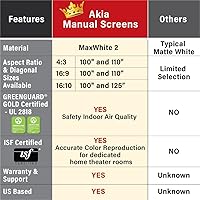
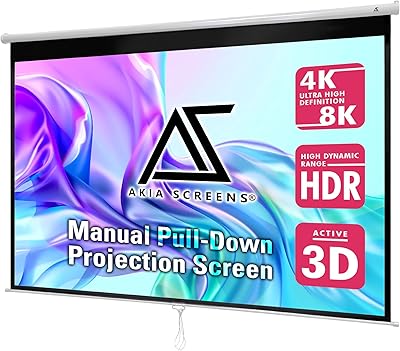
The Akia Screens 100″ Manual Pull-Down Projector Screen sits in a practical middle ground — built for people who want a real installed screen without the cost or complexity of a motorized setup. It covers a full 100 inches diagonally in 4:3 format, but the same screen accommodates widescreen content at roughly 92 inches in 16:9, which makes it genuinely versatile. Installation hardware is included, and it mounts to either a wall or ceiling. Akia also holds GreenGuard Gold certification, which means the materials meet strict indoor air quality standards — a quiet but meaningful detail for schools or medical environments.
Features & Benefits

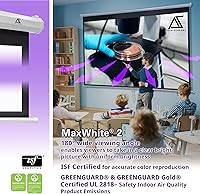
The MaxWhite 2 fabric is the real workhorse here. It handles 4K and 3D projection capably, and the 1.1 gain rating keeps images bright without creating hot spots in the center. A 180-degree viewing angle means people seated well off to the side still get a clear picture — useful in conference rooms or classrooms. The auto-lock system lets you stop the screen at different heights in two-inch steps, which is more useful than it sounds when you need to adjust for furniture or projector alignment. Black backing prevents washout, and the surface wipes clean with soap and water.

Best For

This manual projection screen makes the most sense for light-controlled indoor spaces — a dedicated home theater room, a windowless conference room, or a classroom where ambient light is manageable. It works well for small businesses or educators who need a permanent wall or ceiling install without a large budget. One critical note: this screen is only compatible with standard-throw projectors. If you own an ultra-short-throw model, this will not work, and that incompatibility trips up buyers more often than it should. People who prefer a simple pull-cord operation over motorized mechanics will find it straightforward to live with daily.

User Feedback

Across a substantial number of verified reviews, easy installation comes up consistently as the top positive — most buyers report mounting it solo without much trouble. Image quality earns praise too, with several users noting it holds up well against pricier fixed-frame alternatives. The concerns worth flagging: some buyers mention the pull cord and auto-lock mechanism feel less robust after extended use, and a handful noted the actual viewable area felt slightly smaller than expected from the listed dimensions. The alloy steel housing looks solid but feels lighter than some expect. Overall the rating reflects a genuinely well-regarded product, not an outlier.

Pros

  • Installation is straightforward enough for a solo mount in under an hour on standard drywall.
  • The MaxWhite 2 fabric delivers accurate, bright images that hold up well against pricier fixed-frame screens.
  • Supporting three common aspect ratios from one screen adds real versatility for mixed-use rooms.
  • The black-backed material prevents light bleed-through, which makes a noticeable difference in darker rooms.
  • GreenGuard Gold certification makes this pull-down screen a safe, compliant choice for schools and clinics.
  • The auto-lock height adjustment is genuinely useful for rooms where full drop is too low for the seating layout.
  • ISF certification for color accuracy is a meaningful credential, not just a marketing addition.
  • A two-year warranty with U.S.-based phone and chat support is above average for this price tier.
  • The screen surface wipes clean easily, which matters in shared classroom or conference room environments.
  • At its price point, the Akia 100-inch screen undercuts motorized alternatives while delivering comparable image quality.

Cons

  • The auto-lock mechanism shows reliability issues for some users after six to twelve months of frequent use.
  • Pull cord fraying and lanyard detachment have been reported on units that are less than a year old.
  • The alloy steel housing looks solid but feels lighter and thinner in person than photos suggest.
  • Included mounting hardware only covers basic drywall — concrete or plaster walls require sourcing your own fasteners.
  • This manual projection screen is strictly incompatible with ultra-short-throw projectors, a detail easy to miss before buying.
  • The screen material can develop faint creases if not rolled carefully after repeated height adjustments.
  • Rooms with any meaningful ambient light will expose the limits of the 1.1 gain, washing out contrast noticeably.
  • The ceiling-mount instructions are underdeveloped compared to the wall-mount guidance, leaving some buyers to improvise.
  • Quality control inconsistencies mean a small percentage of units arrive with dented corners or a misaligned roller.
  • The actual viewable image area is smaller than the headline diagonal measurement implies, which surprises first-time buyers.

Ratings

The scores below for the Akia Screens 100″ Manual Pull-Down Projector Screen were generated by AI after analyzing thousands of verified global buyer reviews, with spam, bot-generated, and incentivized feedback actively filtered out. The results reflect a genuinely well-regarded product in its category, but real pain points around long-term mechanical durability and size expectations are transparently included alongside the strengths.
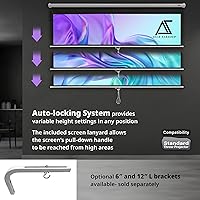
Image Quality
88%
Users consistently report crisp, bright images that hold up well even when compared to fixed-frame screens costing significantly more. The MaxWhite 2 material handles 4K content without obvious color shift or hot spots, and the wide viewing angle means people seated off-center in a living room or classroom still get a solid picture.
In rooms with any ambient light, the 1.1 gain shows its limits — contrast drops noticeably without blackout curtains. A small number of reviewers felt colors looked slightly cool compared to higher-gain alternatives they had used previously.
Ease of Installation
91%
This is the most consistently praised aspect across the review base. Most buyers report mounting the screen solo in under an hour, using only basic tools. The included anchors and screws cover standard drywall installations, and the ceiling-mount option gives real flexibility for rooms where wall placement is awkward.
The included hardware is adequate for standard drywall but not ideal for concrete, plaster, or older walls — several buyers had to source their own fasteners. The mounting bracket alignment can be fiddly to get perfectly level on the first attempt.
Screen Material & Coating
86%
The fully black-backed fabric is a practical detail that prevents light bleed-through, which matters when the screen is mounted in front of a window or a lighter-colored wall. Buyers who use it in classrooms appreciate that it wipes clean easily without leaving streaks or damaging the surface.
A few users noted the screen material develops subtle creases if it is not rolled up carefully after adjustment. Over months of frequent use, some reported very faint scuff marks near the bottom edge from repeated pulling.
Build Quality & Housing
74%
26%
The alloy steel casing looks professional on a wall and feels more substantial than basic plastic-bodied competitors. For a manual screen in this price tier, the overall construction inspires reasonable confidence, and the unit arrives without significant damage in most cases based on buyer reports.
Handling the unit in person reveals that the housing feels lighter than its appearance suggests, and a portion of buyers describe it as feeling hollow or thin-walled. The end caps in particular have drawn criticism for a less-than-premium fit.
Auto-Lock Mechanism
71%
29%
The ability to stop and lock the screen at multiple height positions is genuinely useful — especially in rooms where the projector throw requires the screen to sit lower than its full drop. Home users setting up for kids or shorter seating arrangements find this flexibility practical on a daily basis.
This is the component that draws the most durability concerns over time. Several long-term owners report that the auto-lock becomes less reliable after six to twelve months of frequent use, requiring more force or repositioning to engage properly. It works well when new but is not built to the same standard as the rest of the unit.
Compatibility & Versatility
82%
18%
Supporting three common aspect ratios from a single screen is a real practical advantage for users who switch between presentations and movies. The material handles legacy HD content and modern 4K or 3D sources without requiring any adjustment between uses.
The hard incompatibility with ultra-short-throw projectors is a recurring source of one-star reviews from buyers who missed it. This screen is strictly for standard-throw setups, and the listing does not make that warning prominent enough to catch everyone before purchase.
Value for Money
89%
At its price point, this pull-down screen undercuts motorized alternatives by a meaningful margin while delivering image quality that satisfies the majority of home theater and classroom users. Buyers frequently describe it as one of the better purchases they have made for a home setup when weighing cost against actual performance.
The value equation depends heavily on your use case. For light occasional use, it holds up well. For high-frequency daily use in a commercial classroom or office, a few buyers felt the long-term durability did not fully justify even the modest investment.
Size Accuracy
69%
31%
The majority of buyers are satisfied with the actual viewable area, finding it delivers a large, immersive image that genuinely transforms a room compared to projecting onto a bare wall. The physical footprint is manageable for most standard ceiling heights.
A recurring thread in reviews involves buyers feeling the usable image area is slightly smaller than the advertised diagonal measurement implies. This is a common projection screen issue tied to how diagonals are measured, but it still surprises first-time buyers and generates frustration.
Pull Cord & Operation
76%
24%
Day-to-day operation is simple and satisfying for users who have moved away from motorized screens precisely to avoid mechanical complexity. The lanyard pull is smooth when the screen is new, and the retraction spring returns the screen cleanly without jarring snaps.
The pull cord itself has been flagged by several buyers as a weak point — some report fraying or the lanyard detaching from the screen bar after extended use. It is a minor but recurring complaint that Akia's support team does address, but it should not be an issue on a unit under a year old.
Warranty & Support
83%
A two-year manufacturer warranty backed by a U.S.-based support team is above average for a screen in this category. Multiple buyers report positive experiences reaching Akia support by phone or chat when issues arose, with replacement parts provided without significant pushback.
The lifetime tech support claim sounds impressive but in practice applies mainly to usage guidance rather than free replacements beyond the warranty window. A handful of buyers noted response times stretched longer than expected during busy periods.
Packaging & Delivery Condition
81%
19%
The screen arrives well-packaged in the large majority of cases, with protective wrapping that prevents the casing from being scuffed in transit. Most buyers report the unit is ready to mount straight out of the box with no visible damage.
A small but notable group of buyers received units with dented casing corners or a slightly misaligned roller, which points to inconsistency in quality control at the factory level rather than a shipping problem. Returns for this reason appear to be handled smoothly.
Ceiling Mount Performance
78%
22%
For rooms where a wall mount is impractical — open-plan spaces, rooms with limited clear wall area, or setups where the projector is ceiling-mounted — this screen performs the ceiling installation without any additional hardware beyond what is included. Several office users specifically cite this as the deciding factor.
Ceiling mounting requires more precise measurement and a second set of hands to hold the unit in position while fastening. The included instructions for ceiling installation are less detailed than the wall-mount guidance, leaving some buyers to figure out positioning on their own.
Room Adaptability
77%
23%
The three supported aspect ratios give this screen a practical flexibility that single-ratio screens lack. Teachers using it for presentations in 16:9 can switch to 4:3 for older educational content without any reconfiguration beyond adjusting the projector settings.
In rooms with limited ceiling clearance, the fully extended case housing plus the hanging screen can push the bottom edge uncomfortably close to the floor. Buyers with ceilings below a standard residential height should measure carefully before purchasing.

Suitable for:

The Akia Screens 100″ Manual Pull-Down Projector Screen is a strong fit for anyone setting up a dedicated home theater room where they can control ambient light, or for small businesses and educators who need a permanent, no-fuss projection surface without a large budget. Teachers and corporate trainers will appreciate that it handles both widescreen presentations and traditional 4:3 content from the same unit, reducing the need for multiple setups. Schools and medical facilities with strict indoor air quality requirements will find the GreenGuard Gold certification genuinely relevant — it is not just a label, it means the materials meet verified emission safety standards. Anyone who has grown tired of motorized screens breaking down or needing recalibration will find the manual pull-cord operation refreshingly reliable for daily use. If you own a standard-throw projector and have a reasonably standard wall or ceiling to mount to, this screen covers the core use case well and at a price that leaves room in the budget for a better projector.
Not suitable for:

Buyers who own or plan to buy an ultra-short-throw projector should stop here — this manual projection screen is simply not compatible with that projector type, and no amount of repositioning will fix that. People looking for a screen that holds up under heavy commercial use — think daily classroom sessions with frequent rolling and unrolling over several years — may find the auto-lock mechanism and pull cord show wear sooner than expected, making a more robust motorized or fixed-frame option a smarter long-term investment. If your room has significant ambient light from windows or open doorways, the 1.1 gain material will disappoint; this screen needs a reasonably dark environment to perform well. Buyers expecting the full advertised diagonal to translate directly into the usable image area may also be caught off guard — like most projection screens, the viewable surface is smaller than the overall diagonal figure implies, and that gap frustrates buyers who do not research it beforehand. Anyone with non-standard wall materials like thick concrete or plaster should also be aware that the included mounting hardware covers basic drywall installs and nothing more.

Specifications

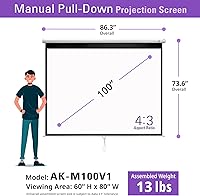
  • Screen Size: The screen measures 100″ diagonally in its native 4:3 aspect ratio, with a viewable area of 60″ high by 80″ wide.
  • Aspect Ratios: Beyond the native 4:3 format, the screen is compatible with 16:9 content at approximately 92″ and 16:10 content at approximately 95″ diagonal.
  • Case Dimensions: The housing unit measures 86.3″ wide by 73.6″ high, which determines the minimum wall or ceiling space required for installation.
  • Screen Material: The projection surface uses MaxWhite 2 fabric, a front-projection material with a 1.1 gain rating and a 180-degree viewing angle.
  • Backing: The screen fabric is fully black-backed to prevent ambient light or wall color from bleeding through and washing out the projected image.
  • Frame Material: The outer housing and roller case are constructed from alloy steel, contributing to the unit's overall weight of approximately 13 pounds.
  • Resolution Support: The MaxWhite 2 material is rated compatible with 8K, 4K Ultra HD, standard HD, and active 3D projection formats.
  • Projector Type: This screen is designed exclusively for standard-throw projectors and is not compatible with ultra-short-throw projector models.
  • Mounting Options: The screen supports both wall-mount and ceiling-mount installation, with wood screws and drywall anchors included in the package.
  • Auto-Lock System: The pull-down mechanism features an auto-lock that allows the screen to be secured at any position in two-inch increments along the drop length.
  • Certifications: The screen holds GreenGuard Gold certification (UL 2818) for indoor air quality emissions and ISF certification for accurate color reproduction.
  • Cleaning Method: The screen surface can be cleaned with mild soap and water, making it practical for shared environments such as classrooms or conference rooms.
  • Viewing Angle: The MaxWhite 2 material supports a 180-degree viewing angle, ensuring consistent image quality for audience members seated well off to either side.
  • Gain Rating: The screen has a gain of 1.1, which reflects and distributes light evenly across the surface without creating center hot spots.
  • Warranty: Akia provides a two-year manufacturer warranty and lifetime technical support available via phone, email, and web chat through a U.S.-based team.
  • Manufacturer: Akia Screens is manufactured by an ISO9001-certified facility that has been in operation since 2004.

Related Reviews

Saicool 100″ Manual Pull-Down Projector Screen
74%
88%
Value for Money
81%
Image Surface Quality
79%
Installation Experience
76%
Screen Flatness
67%
Build Quality
More
Akia Screens 110-inch Manual Projector Screen
87%
91%
Ease of Installation
87%
Build Quality
90%
Screen Performance
92%
Value for Money
88%
Compatibility with Projectors
More
Elite Screens M110H 110-inch Projector Screen
80%
88%
Image Quality
71%
Screen Flatness
78%
Build Quality
84%
Installation Experience
83%
Auto-Lock Mechanism
More
Elite Screens M120H 120-Inch Manual Pull-Down Projector Screen
87%
91%
Ease of Setup
87%
Image Quality
92%
Build Quality
88%
Value for Money
89%
Compatibility with 4K/8K/3D
More
Elite Screens ezCinema 150-inch Manual Projector Screen
79%
88%
Image Quality
84%
Screen Flatness
71%
Ease of Setup
83%
Build Quality
57%
Portability
More
Elite Screens QuickStand QS150HD 150-inch Manual Pull Up Projector Screen
87%
94%
Ease of Setup
88%
Portability
91%
Image Quality
85%
Build Quality
72%
Screen Tension
More
Elite Screens QuickStand 180-inch Portable Projector Screen
77%
91%
Setup Speed
88%
Screen Image Quality
86%
Build Quality
58%
Portability
67%
Value for Money
More
Akia Screens 100-inch Fixed Frame Projector Screen
79%
88%
Image Flatness
91%
Color Accuracy
57%
Ambient Light Performance
83%
Assembly Experience
79%
Wall Mounting System
More
Elite Screens ezCinema 2 70-inch Manual Floor Pull Up Projector Screen
86%
88%
Ease of Setup
90%
Portability
91%
Image Quality
84%
Build Quality
89%
Value for Money
More
Elite Screens Manual M100UWH 100-inch
78%
83%
Screen Image Quality
79%
Build Quality
76%
Auto-Lock Mechanism
81%
Screen Flatness & Tension
88%
Ease of Installation
More

FAQ

No, it will not. The Akia Screens 100″ Manual Pull-Down Projector Screen is designed strictly for standard-throw projectors. Ultra-short-throw models require a specialized screen surface and geometry that this unit does not provide. This is one of the most common compatibility mistakes buyers make, so double-check your projector type before ordering.

Most buyers manage the wall-mount installation solo without much trouble. The included wood screws and drywall anchors cover a standard residential or office wall. Ceiling mounting is a bit more involved and really benefits from a second person to hold the unit steady while you secure the brackets — the instructions for ceiling installation are also less detailed, so measure carefully beforehand.

The usable projection surface is 60 inches high by 80 inches wide in 4:3 format. The 100-inch figure refers to the diagonal measurement of that area, which is standard in the industry but can feel misleading if you are expecting a 100-inch width. Make sure to plan your room layout around the 80-inch width rather than the diagonal.

It will work, but results will be noticeably compromised. The 1.1 gain material is best suited for light-controlled environments. In a room with open windows or significant indirect sunlight, projected contrast drops quickly and colors can look washed out. If your room has uncontrollable ambient light, consider a higher-gain screen or an ALR (ambient light rejecting) surface instead.

When the screen is new, the auto-lock works reliably and holds cleanly at any of the two-inch interval positions. Over time, with frequent daily use, some owners report the mechanism requires more deliberate engagement to stay locked. It is a practical feature for adjusting image height without tools, but it is not built to the same standard as the rest of the unit for heavy long-term use.

It is a legitimate certification, not just a label. GreenGuard Gold means the screen materials have been tested and verified to emit very low levels of volatile organic compounds (VOCs) into indoor air. For a home, it is a nice extra. For schools, pediatric clinics, or medical offices with strict indoor air quality requirements, it is a genuinely meaningful compliance credential.

A soft, damp cloth with a small amount of mild soap is all you need. Wipe gently in one direction rather than scrubbing, and let it air dry before rolling the screen back up. Avoid harsh chemical cleaners or abrasive materials, as these can damage the MaxWhite 2 coating over time.

The pull lanyard is a separate component and can typically be replaced without discarding the entire screen. Akia offers lifetime technical support by phone and email, so contacting their U.S.-based team is the recommended path if the cord frays or detaches. A small number of buyers have reported this issue within the first year, so it is worth keeping the support contact details handy.

It works with both. The MaxWhite 2 material is rated for everything from standard HD through 4K and 8K, so you do not need a high-end projector to get good results. An older 1080p projector will project cleanly onto this surface without any degradation introduced by the screen itself.

This unit is designed for surface mounting — the housing sits flush against the wall or ceiling surface and is not recessed. If you need an in-ceiling or flush installation, you would need to look at purpose-built recessed screen models, which are a different product category and significantly more expensive. For most home and office applications, the surface-mount profile is unobtrusive enough once it is in place.

Where to Buy