Overview

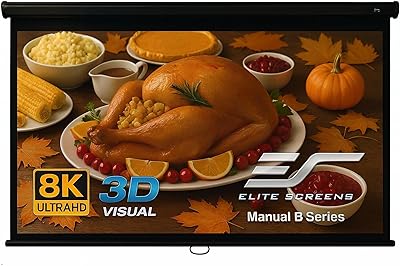
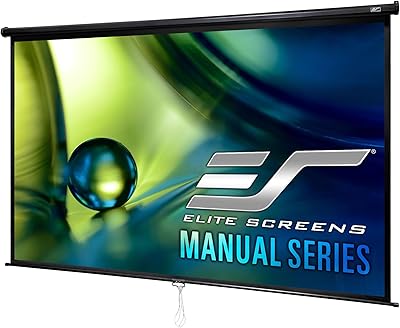
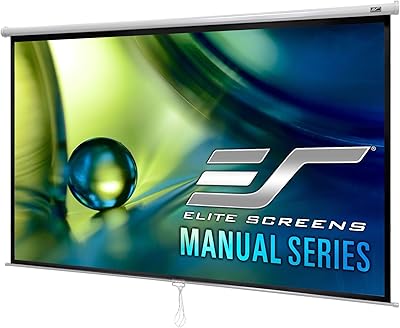
The Elite Screens Manual M100UWH 100-inch is a pull-down projection screen that has quietly held its ground in the mid-range home theater market for nearly two decades. At a full 100-inch diagonal in a standard 16:9 widescreen format, it fills a wall convincingly without demanding a premium price. The manual auto-lock mechanism is what sets it apart from basic roller screens — you can stop and hold it at any height, not just fully extended. Elite Screens has manufactured under ISO9001 standards since 2004, which lends the brand real credibility. That said, buyers expecting motorized convenience should adjust their expectations accordingly.
Features & Benefits

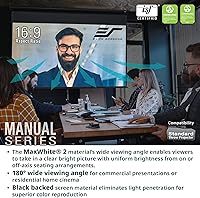
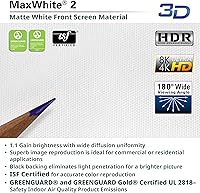
The MaxWhite 2 surface delivers a 1.1 gain — close to neutral — which means it performs well across varied room lighting without introducing hotspots. The 180-degree viewing angle is genuinely broad, so guests sitting off to the sides still get a clean picture. What really stands out is the auto-lock system: pull the screen down, release it at whatever height you need, and it holds there — no clips, no notches. The material is 4K and 3D ready, handles sharp modern projector output without losing detail, and carries GREENGUARD Gold certification, a meaningful plus for families with kids or allergy concerns. ISF certification confirms professional image fidelity standards in controlled lighting.

Best For

This pull-down screen is a natural fit for homeowners building out a dedicated media room or converting a basement without committing to a full motorized setup. It suits people who pull the screen down, watch a movie or a game, then roll it back up — straightforward, repeated use without ceremony. Renters appreciate that both wall and ceiling mounts are supported, and removal doesn't leave a dramatic footprint. If you're pairing this with a 4K or 1080p projector for regular movie nights, it handles that job well. It's less ideal for spaces where the screen needs to disappear quickly between uses — for that, a motorized option makes more practical sense.

User Feedback

Across a broad pool of owner reviews, the Elite Screens manual roller earns its 4.1-star rating with consistent praise for easy installation and a solid, well-built case. Most buyers find the screen lies flat without obvious wrinkles or sagging, even after months of regular use. On the flip side, a noticeable number of users report that the pull cord feels stiff out of the box — it does loosen with use, but it's worth knowing upfront. A more persistent complaint is that the screen occasionally doesn't retract completely flush, leaving a small gap at the bottom of the case. Not a dealbreaker for most, but worth inspecting upon first use.

Pros

  • Handles 4K projector output cleanly, with sharp detail and accurate color in a darkened room.
  • The auto-lock system lets you stop the screen at any height, not just fully extended — a genuinely practical feature.
  • GREENGUARD Gold certification makes this 100-inch projection screen a safe choice for family rooms and bedrooms.
  • Solo installation is realistic; most buyers report being fully set up in under an hour.
  • Screen flatness holds up well over months of regular use, with minimal sagging or edge curl after break-in.
  • Supports both wall and ceiling mounting, giving real flexibility across different room configurations.
  • ISF-certified material delivers consistent image fidelity that punches above the price point.
  • The broad viewing angle means guests seated off to the sides still get a clean, bright picture.
  • Elite Screens provides lifetime technical support — a meaningful reassurance for a long-term home installation.
  • The two-year warranty from an ISO9001-certified manufacturer offers more post-purchase confidence than most competitors at this price tier.

Cons

  • The pull cord is noticeably stiff out of the box and requires weeks of regular use before it feels natural.
  • The screen does not always retract completely flush into the case, leaving a small visible gap at the bottom.
  • Ambient light degrades image quality significantly — this surface needs a properly darkened room to perform well.
  • End cap padding during shipping is inconsistent, and cosmetic transit damage is a recurring complaint.
  • The extended three-year warranty requires separate registration and is not applied automatically at purchase.
  • Replacement parts for the spring roller mechanism are not widely available through third-party retailers.
  • The instruction sheet is sparse, leaving ceiling mount and extension bracket configurations underexplained.
  • No remote, smart home integration, or motorized option exists for this model — operation is purely manual.
  • Some buyers report the case sits further from the wall than expected when using standard ceiling bracket positioning.
  • Detailed off-gassing test data for the screen material is not publicly available, which may concern buyers with severe chemical sensitivities.

Ratings

The Elite Screens Manual M100UWH 100-inch has accumulated thousands of verified purchase reviews across global markets, and our AI-driven scoring system has analyzed that feedback — actively filtering out incentivized, bot-generated, and outlier submissions — to produce the balanced scorecard below. Scores reflect real ownership patterns: what buyers consistently praise, where frustrations surface after weeks of use, and which trade-offs matter most at this price tier. Both the strengths and the friction points are represented without sugar-coating.
Screen Image Quality
83%
The MaxWhite 2 surface handles 4K projector output with noticeably clean detail reproduction, and the near-neutral 1.1 gain keeps brightness even across the full viewing area. Most buyers pairing it with a mid-range 4K projector report sharp, accurate colors in a darkened room.
In rooms with ambient light, the image quality drops off more than buyers expect — this surface is not designed for lit environments. A few users with high-end laser projectors feel the material introduces a very slight texture grain at close viewing distances.
Build Quality
79%
21%
The black aluminum case feels solid and well-finished for the price point — not flimsy or plasticky. Buyers frequently mention that the casing resists minor bumps during installation and doesn't show dents or warping after months of wall-mounted use.
The end caps and internal roller components feel noticeably lighter than the case itself, which creates a slight inconsistency in perceived quality. A small but recurring group of buyers reports that the case arrives with minor cosmetic scuffs, suggesting variable packaging protection.
Auto-Lock Mechanism
76%
24%
The ability to stop and hold the screen at any point along its travel — not just at full extension — is a genuinely useful feature in rooms where ceiling height limits a full 100-inch drop. Most users find it reliable after the first few uses and appreciate not needing to fully extend the screen every time.
The locking action can feel inconsistent in the first few weeks, occasionally slipping a few inches before catching. Some users report that getting the screen to lock at a precise midpoint requires a couple of attempts until the mechanism breaks in properly.
Screen Flatness & Tension
81%
19%
For a manual pull-down at this price, screen flatness earns surprisingly consistent praise. The majority of long-term owners report that the surface stays taut and wrinkle-free even after repeated daily use over six months or more.
A notable minority of buyers receive units where the screen has a slight curl at the bottom edge out of the box. While this typically relaxes within a week of use, it can be frustrating during the first few viewings and is not universally consistent across production runs.
Ease of Installation
88%
Both wall and ceiling mounting configurations are supported, and the included hardware covers most standard stud and drywall scenarios. Solo installation is genuinely achievable — buyers frequently note they had it mounted and ready in under an hour.
The instruction sheet is functional but sparse, leaving some ambiguity around the optional extension bracket configurations. Buyers who want a ceiling-recessed look may find the default bracket placement pushes the case further from the surface than expected.
Retraction Smoothness
63%
37%
The spring tension is calibrated well enough that the screen retracts without needing to guide it manually for most of its travel. Owners using it a few times per week generally report consistent, predictable retraction behavior over time.
This is one of the more commonly cited frustrations: the screen does not always retract completely flush into the case, leaving a small visible gap at the bottom. It is not a structural defect, but it is cosmetically noticeable and affects the clean look buyers expect.
Pull Cord Feel & Usability
67%
33%
Once broken in — typically after two to three weeks of regular use — the pull cord operates smoothly and requires no awkward force to deploy the screen. The cord length is adequate for ceiling-mounted installations without requiring an extension.
Out of the box, the cord mechanism is stiff enough that several buyers initially thought something was wrong with their unit. The break-in period is real and should be set as an expectation; it does not resolve overnight.
Viewing Angle Performance
82%
18%
The 180-degree viewing angle claim holds up well in practice. Guests seated at wide angles — typical in living rooms or basement setups with multiple seating rows — report minimal color shift or brightness falloff compared to narrower-gain screens.
At extreme off-axis positions beyond roughly 70 degrees from center, there is a noticeable brightness reduction that the spec does not fully reflect. For most home theater layouts this is irrelevant, but unusually wide rooms may expose this limitation.
4K & HD Compatibility
86%
Buyers running 4K UHD projectors consistently confirm that the screen handles high pixel density output without introducing visual artifacts or diffusion blur. It also works reliably with active 3D setups, which is a bonus for buyers who still use that format.
The screen material is front-projection only, so buyers attempting rear-projection setups will be disappointed. It also lacks ambient light rejection properties, meaning 4K quality is only fully realized in a properly darkened viewing environment.
Value for Money
84%
At its price point, getting a 100-inch ISF-certified, GREENGUARD Gold-rated screen with a functional auto-lock mechanism represents strong value. Most buyers feel they received more capability than the price implied, especially compared to no-name alternatives.
Buyers stepping up from very cheap screens are satisfied, but those comparing this to mid-tier motorized options sometimes feel the price gap doesn't fully justify the manual compromise, particularly for frequent daily users who want the convenience of a remote.
GREENGUARD & Safety Certifications
89%
GREENGUARD Gold certification is a meaningful differentiator for families with young children or individuals with chemical sensitivities. Several buyers specifically cited this as a deciding factor over uncertified competitors, particularly for basement or bedroom installations.
The certification covers the screen material itself, but Elite Screens does not publicly disclose detailed off-gassing test data for consumer review. Buyers with severe sensitivities may want to air the screen out for a day or two before extended use in enclosed spaces.
Warranty & Support
77%
23%
The standard two-year warranty covers manufacturing defects, and Elite Screens offers multiple support channels including phone, email, and web chat. Buyers who have contacted support generally report responsive and knowledgeable assistance.
The extended three-year ENR-G warranty requires separate registration and is not automatic. A few buyers discovered this only after their standard warranty period lapsed, which created friction during what should have been a straightforward support interaction.
Packaging & Unboxing
61%
39%
The screen ships in a sturdy outer box with the case wrapped to prevent transit scratches. Most buyers receive the unit in good condition, and the packaging is straightforward enough that unpacking is a one-person job.
The padding around the end caps is inconsistent, and cosmetic damage to those areas appears more frequently than it should for a product in this category. A non-trivial share of negative reviews trace directly back to transit damage that better internal packaging would likely prevent.
Long-Term Durability
74%
26%
Buyers who have owned this pull-down screen for two or more years generally report no degradation in screen tension, surface quality, or mechanism reliability under normal use patterns. The ISO9001 manufacturing standard appears to translate into consistent long-term performance.
The manual spring mechanism is the most likely failure point over time, and replacement parts are not widely stocked by third-party retailers. If the roller spring weakens after the warranty period, repair options are limited outside of contacting Elite Screens directly.

Suitable for:

The Elite Screens Manual M100UWH 100-inch is a strong match for homeowners who are building out a dedicated media room or basement theater and want a large, capable screen without the cost and complexity of a motorized setup. It suits buyers who follow a predictable viewing routine — pull it down for movie night, retract it after, repeat — rather than those who need instant, hands-free operation multiple times a day. The auto-lock feature makes it particularly practical in rooms where the ceiling height or furniture layout doesn't allow a full extension, since you can stop the screen at exactly the height you need. Families with young children will appreciate the GREENGUARD Gold certification, which confirms the screen material meets strict indoor air quality standards. Renters are also well-served here: the dual wall and ceiling mount options mean you can find a configuration that works in most spaces, and uninstalling it when you move out is not a major project. If you're pairing this with a mid-range to upper-mid 4K or 1080p projector and your viewing room can be reasonably darkened, this pull-down screen will deliver results well above what its price tier suggests.
Not suitable for:

The Elite Screens Manual M100UWH 100-inch is not the right choice for buyers who want the convenience of a motorized screen — if you're the type who expects to raise and lower your screen with a remote or a smart home trigger, the manual cord operation will feel like a step backward within a week. It's also a poor fit for rooms with significant ambient light: the MaxWhite 2 surface is optimized for dark or near-dark environments, and it lacks any ambient light rejection properties, so a bright living room will wash out the image noticeably. Buyers planning a rear-projection setup should look elsewhere entirely, as this is strictly a front-projection surface. If you're a critical viewer who scrutinizes retraction aesthetics, the occasional gap at the base of the case when the screen is fully rolled up may bother you more than it should. Those who expect absolute out-of-the-box perfection should also note that the pull cord stiffness and occasional bottom-edge curl are documented break-in quirks that require patience during the first few weeks. Finally, buyers in very bright or high-traffic multi-use living spaces — where the screen needs to vanish completely and quickly between uses — will find the manual operation an ongoing inconvenience.
Specifications

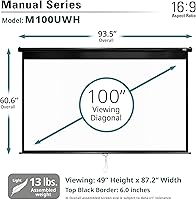
  • Screen Size: The viewable area spans 100 inches diagonally, providing a genuinely cinematic display surface for dedicated home theater rooms.
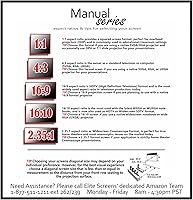
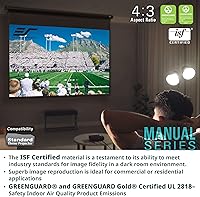
  • Aspect Ratio: The 16:9 widescreen format is natively compatible with modern HD, 4K, and UHD projector outputs without requiring cropping or letterboxing adjustments.
  • Viewing Area: The active projection surface measures approximately 49.2″ in height by 87.2″ in width, covering a substantial portion of a standard media room wall.
  • Overall Dimensions: When mounted, the full unit — including case and screen at maximum extension — occupies a footprint of roughly 66.3″ H x 94.6″ W x 2.9″ D.
  • Screen Material: The projection surface uses Elite Screens' MaxWhite 2 fabric, a multi-layer woven material with a fully black-backed construction to prevent light bleed-through.
  • Gain: A 1.1 gain rating keeps brightness distribution close to neutral, minimizing hotspots and ensuring even light reflection across the full surface area.
  • Viewing Angle: The MaxWhite 2 material supports a 180-degree viewing angle, maintaining acceptable brightness and color accuracy for viewers seated well off-center.
  • Projection Type: This screen is designed exclusively for front-projection use and is not compatible with rear-projection setups due to its opaque black-backed construction.
  • 4K & 3D Support: The screen surface is certified compatible with 4K Ultra HD projectors and supports active 3D projection formats without requiring additional surface treatment.
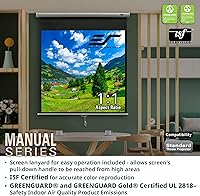
  • Certifications: The screen material carries GREENGUARD and GREENGUARD Gold certifications for low chemical emissions, as well as ISF certification confirming professional image fidelity standards.
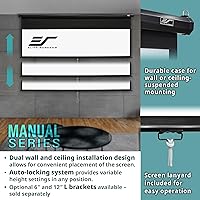
  • Mechanism: Deployment uses a manual pull-down system with an integrated auto-lock that holds the screen securely at any point along its travel range, not only at full extension.
  • Mounting Options: The unit supports both wall and ceiling installation configurations, with optional 6″ and 12″ extension brackets available separately for offset or angled placements.
  • Case Color: The enclosure is finished in matte black, designed to blend discreetly into typical home theater and media room environments.
  • Item Weight: The complete assembled unit weighs 9.25 pounds, light enough for single-person wall or ceiling installation in most standard stud configurations.
  • Warranty: A standard two-year manufacturer warranty is included, with an optional three-year ENR-G extended warranty available through separate registration at purchase.
  • Tech Support: Elite Screens provides lifetime technical support accessible via toll-free phone, email, and web chat through their in-house professional service team.
  • Manufacturer: Elite Screens has operated as an ISO9001-certified manufacturer since 2004, providing a verifiable quality management standard behind the product's construction.

Related Reviews

Akia Screens 100-inch Manual Pull Down Projector Screen
87%
87%
Ease of Setup
91%
Build Quality
88%
Image Brightness & Clarity
90%
Compatibility with Projectors
85%
Screen Size & Viewing Angle
More
Elite Screens M120H 120-Inch Manual Pull-Down Projector Screen
87%
91%
Ease of Setup
87%
Image Quality
92%
Build Quality
88%
Value for Money
89%
Compatibility with 4K/8K/3D
More
Elite Screens M110H 110-inch Manual Pull Down Projector Screen
86%
90%
Ease of Use
87%
Build Quality
92%
Image Quality
70%
Setup/Installation
89%
Durability
More
Elite Screens QuickStand QS150HD 150-inch Manual Pull Up Projector Screen
87%
94%
Ease of Setup
88%
Portability
91%
Image Quality
85%
Build Quality
72%
Screen Tension
More
Elite Screens QuickStand QS180HD 180-Inch Manual Pull-Up Projector Screen
84%
89%
Portability
92%
Ease of Setup
88%
Image Clarity
80%
Build Quality
87%
Viewing Angle
More
Elite Screens ezCinema F150NWH 150-inch Manual Pull Up Projector Screen
86%
88%
Overall Performance
90%
Image Quality
85%
Portability
91%
Ease of Setup
80%
Build Quality
More
Elite Screens M84UWH Manual Projector Screen, 84-Inch 16:9
85%
91%
Ease of Installation
88%
Image Quality
85%
Build Quality
82%
Versatility for Different Spaces
79%
Mounting Flexibility
More
Elite Screens ezCinema 2 70-inch Manual Floor Pull Up Projector Screen
86%
88%
Ease of Setup
90%
Portability
91%
Image Quality
84%
Build Quality
89%
Value for Money
More
Elite Screens Manual Series M135XWH2 135-inch 16:9 Pull Down Projector Screen
84%
88%
Ease of Installation
91%
Build Quality
85%
Screen Brightness and Clarity
75%
Manual Operation Smoothness
90%
Viewing Angle
More
Elite Screens Yard Master Plus 100-Inch
87%
94%
Portability
88%
Ease of Setup
91%
Picture Quality (Outdoor)
85%
Weather Resistance
90%
Durability
More

FAQ

It holds at any point along the full range of travel — there are no preset notches or fixed stops. You pull the screen down to whatever height you need, give the cord a slight tug to engage the lock, and it stays there. It takes a little getting used to at first, but once you get the feel for it, it works reliably.

The Elite Screens Manual M100UWH 100-inch is fully compatible with 4K UHD projectors. The MaxWhite 2 surface handles high pixel-density output without introducing visible diffusion or softness. Paired with a decent 4K projector in a darkened room, the results are genuinely impressive for the price tier.
The case itself spans just under 95 inches wide, so you need a clear wall section of at least that width with enough vertical clearance above for the mounting hardware. If you're ceiling-mounting, account for the case depth and bracket height before the screen begins to drop. Measuring twice before ordering is strongly recommended.

Most buyers manage it solo, and the 9.25-pound weight is light enough that holding the unit up while marking mount points is feasible for one person. That said, having a second person to hold the case level while you drive in the screws makes the process significantly less stressful, especially for ceiling mounts.

Almost certainly not. This is a well-documented break-in characteristic that shows up consistently across owner reports. The spring and cord mechanism loosens with regular use over the first few weeks. If it still feels abnormally resistant after a month of normal use, that would be the time to contact Elite Screens support.

Not really, and it's worth being honest about this. The MaxWhite 2 surface has no ambient light rejection properties, so even moderate daylight will wash out the projected image noticeably. This pull-down screen is designed for rooms that can be properly darkened — basements and dedicated media rooms with blackout curtains are ideal environments.

For the vast majority of buyers, yes — the screen lies flat and maintains consistent tension across the surface. A small percentage of units arrive with a slight curl at the bottom edge, but this typically self-corrects after a week or two of regular deployment. If it persists beyond that, Elite Screens support can advise on remedies.

It means the screen material has been independently tested and certified to emit very low levels of volatile organic compounds (VOCs) and other chemical off-gassing. For families with young children, allergy sufferers, or anyone setting up a screen in a bedroom or enclosed space, it provides meaningful reassurance that the material won't negatively affect indoor air quality.

No — this screen is front-projection only. The black backing on the MaxWhite 2 material is specifically designed to block light transmission, which is great for preventing bleed-through in front-projection setups but makes it completely unsuitable for rear-projection use. You would need a translucent rear-projection surface for that application.

Incomplete retraction — where the screen stops just short of fully rolling up and leaves a small gap at the bottom of the case — is the most commonly reported long-term issue with this model. In most cases it is cosmetic rather than functional. If it worsens over time, Elite Screens offers lifetime technical support and can walk you through adjustment options or warranty service if applicable.