Overview

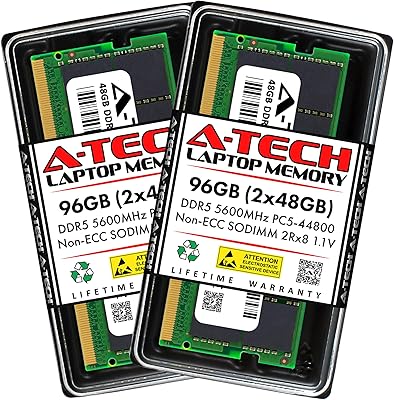
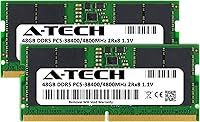
The A-Tech 96GB DDR5 4800MHz SODIMM Laptop RAM is one of the few kits on the market pushing total capacity to 96GB in a dual-module SODIMM package — a configuration that remains genuinely uncommon even as DDR5 laptop adoption accelerates. A-Tech positions itself as a compatibility-focused third-party brand rather than a premium memory label, and that shows in how this 96GB SODIMM kit is priced and marketed. The 4800MHz speed sits at the JEDEC baseline for DDR5, meaning real-world plug-and-play behavior without needing XMP or EXPO profiles. Arriving in July 2024, it landed right as late-generation Intel Core Ultra and AMD Ryzen 7000-series laptops started making DDR5 SODIMM slots mainstream.
Features & Benefits

The dual-rank 2Rx8 layout is worth understanding. Unlike single-rank modules, dual-rank memory gives the CPU controller two sets of DRAM banks to interleave requests across, which can translate to slightly better throughput under sustained workloads — useful when you're running memory-intensive tasks like large dataset processing or multi-track video exports. Operating at a standard 1.1V JEDEC voltage, the DDR5 memory upgrade avoids the thermal strain that aggressive overclocking profiles can introduce inside thin laptop chassis. Installation is entirely straightforward — no BIOS flashing, no profile activation — just seat the modules and boot. The lifetime warranty is notable for a third-party brand and provides a meaningful safety net that brands like Samsung or Crucial often don't extend to retail buyers directly.

Best For

This DDR5 memory upgrade makes the most sense for a fairly specific type of user. Video editors working with 4K or 8K timelines in DaVinci Resolve or Adobe Premiere know how quickly RAM headroom disappears when proxies, cache files, and live previews pile up. Software developers spinning up multiple Docker containers or running parallel build jobs will also get tangible value from 96GB — the kind of breathing room where you stop terminating processes to reclaim memory. Mini PC builders squeezing workstation-level performance into a compact chassis are another natural fit. That said, if your workflow is gaming, web browsing, or standard office use, the A-Tech laptop RAM kit is overkill; 32GB handles those tasks with room to spare.

User Feedback

With around 220 ratings and a 4.7-star average, the A-Tech laptop RAM kit has gathered enough real-world responses to draw some reasonable conclusions — though it's not a massive sample, so edge cases deserve attention. Buyers consistently highlight easy installation and quick system recognition as the standout positives, with most machines booting straight to 96GB without any manual configuration. Some users, however, have flagged compatibility issues on specific BIOS versions or laptop models that cap addressable RAM below 96GB — a reminder that checking your system's memory ceiling before purchasing is non-negotiable. Thermal behavior under prolonged heavy workloads doesn't appear to be a common complaint. A-Tech's support team receives generally favorable mentions when issues do arise, which adds some reassurance for a third-party brand.

Pros

  • Reaches 96GB total capacity — one of the highest SODIMM configurations currently available for DDR5 laptops.
  • Dual-rank 2Rx8 layout offers slightly better sustained memory bandwidth compared to single-rank alternatives at the same speed.
  • Runs at standard 1.1V JEDEC voltage, which is easier on thermals inside slim or fanless laptop chassis.
  • No XMP or EXPO profile setup needed — most compatible systems recognize the full capacity immediately at boot.
  • Lifetime warranty from A-Tech adds meaningful long-term protection that is uncommon for third-party memory brands.
  • Verified buyers consistently report straightforward installation and immediate system recognition without BIOS tinkering.
  • A-Tech customer support receives generally positive feedback, with responsive assistance when compatibility questions arise.
  • The 262-pin SODIMM form factor fits the vast majority of DDR5 laptop slots, covering laptops, mini PCs, and all-in-one systems.
  • Filling both SODIMM slots with 2x48GB modules maximizes memory density for machines that cannot accept additional modules.

Cons

  • Not every DDR5 laptop supports 48GB per slot — compatibility must be verified before purchase or you risk a return.
  • Some users have reported BIOS version conflicts that prevent the full 96GB from being detected on otherwise compatible machines.
  • A-Tech is a third-party brand without the established reputation of Samsung, SK Hynix, or Crucial, which may concern some buyers.
  • The 4800MHz CL40 spec is the slowest end of DDR5 — users needing tighter latency or higher bandwidth should look elsewhere.
  • Review sample size of around 220 ratings is relatively modest, meaning edge-case compatibility issues may be underreported.
  • No support for ECC error correction, which rules this kit out for any use case where memory integrity is mission-critical.
  • 48GB SODIMM modules remain a niche product, so finding alternative compatible kits from other brands at this density is limited.
  • Users with laptops that cap out at 64GB will be unable to use this DDR5 memory upgrade at full capacity, wasting two slots.

Ratings

The scores below for the A-Tech 96GB DDR5 4800MHz SODIMM Laptop RAM were generated by our AI review engine after processing verified buyer feedback from global markets, with spam, bot activity, and incentivized reviews actively filtered out. Each category reflects a balanced synthesis of real-world praise and recurring pain points — nothing is glossed over. Where buyers consistently flagged concerns, the scores reflect that honestly.
Compatibility
78%
22%
The majority of buyers report that this 96GB SODIMM kit is recognized immediately by their systems without any manual configuration — a reassuring result for users upgrading workstation laptops or mini PCs. On confirmed-compatible platforms, the detection is clean and consistent from the first boot.
A meaningful subset of buyers have encountered compatibility walls, particularly around BIOS versions that do not yet support 48GB-per-slot addressing. Some laptop models that technically use DDR5 SODIMM slots still impose a lower per-slot ceiling, making pre-purchase research non-negotiable.
Installation Ease
91%
Buyers across skill levels consistently describe installation as straightforward — seat the modules, close the panel, and boot. No firmware updates, no profile configuration, and no software tools are required on compatible systems, which removes a common friction point for first-time RAM upgraders.
The physical installation process is simple, but the surrounding homework — verifying slot support, checking BIOS version, and confirming maximum capacity — adds a layer of complexity that catches some buyers off guard after purchase rather than before.
System Stability
83%
Most buyers who install this DDR5 memory upgrade on fully compatible systems report rock-solid stability under sustained heavy workloads, including prolonged video rendering sessions and multi-VM developer environments running for hours without memory errors or unexpected crashes.
A smaller group of buyers have noted occasional instability on systems where BIOS support for 48GB modules was incomplete or where mixed memory configurations were attempted. These cases are outliers but are worth noting given the niche density of this kit.
Performance Gains
86%
Users upgrading from 32GB or 64GB configurations report tangible real-world improvements in memory-intensive workflows — particularly in DaVinci Resolve, where large project caches no longer spill to disk, and in developer environments where multiple containers can run simultaneously without memory pressure.
At 4800MHz CL40, this kit sits at the baseline end of DDR5 performance. Users expecting speed gains over faster-clocked DDR5 alternatives will be disappointed — the benefit here is capacity headroom, not raw throughput or latency improvements.
Value for Money
74%
26%
For users who genuinely need 96GB in a portable form factor, the A-Tech laptop RAM kit offers one of the more accessible entry points into this density tier. The lifetime warranty adds practical long-term value that partially offsets the premium over lower-capacity kits.
The cost jump over a 64GB kit is steep enough that buyers who cannot fully saturate 96GB in their workflows will feel the price acutely. For anyone running general productivity or light creative work, this capacity tier is a poor return on investment.
Brand Reliability
77%
23%
A-Tech has built a serviceable reputation as a third-party memory specialist, and the lifetime warranty backing this kit is a credible signal of confidence. Buyers who have needed support report that the team is responsive and willing to troubleshoot compatibility issues actively.
A-Tech does not manufacture its own DRAM chips, and some buyers remain cautious about long-term reliability compared to modules using Samsung or SK Hynix dies. Transparency around chip sourcing is limited, which leaves some technically informed buyers uneasy.
Customer Support
81%
19%
Buyers who reached out to A-Tech after encountering compatibility issues generally describe the experience positively — support agents engage with specific system details rather than offering generic scripted responses, which helps resolve edge cases more efficiently.
Response times can vary depending on volume, and a handful of buyers report needing multiple follow-ups before reaching a satisfying resolution. Support quality appears consistent but not exceptional relative to tier-one memory brands.
Speed Rating Accuracy
88%
On compatible systems, the modules consistently initialize at the advertised 4800MHz without requiring any manual profile activation. Buyers using memory diagnostic tools confirm the rated speed is accurately reflected in system readouts immediately after installation.
Since 4800MHz is the JEDEC DDR5 floor rather than an overclocked or high-performance rating, some buyers expecting cutting-edge speeds feel the specification is underwhelming compared to 5600MHz or 6400MHz kits available at similar price points.
Thermal Behavior
85%
Running at 1.1V JEDEC standard voltage, this DDR5 upgrade does not introduce meaningful additional heat into laptop chassis even during sustained workloads. Buyers running video rendering or large compilation jobs have not widely flagged thermal issues attributable to the memory modules themselves.
In ultra-thin chassis with already constrained thermal headroom, any increase in component heat can contribute to throttling scenarios. While RAM-specific heat is minimal, buyers using this kit in fanless or passively cooled mini PCs should factor total thermal budget into their decision.
Module Build Quality
82%
18%
The physical modules feel solid and fit cleanly into SODIMM slots without excessive force or alignment issues. Buyers upgrading ThinkPads and HP EliteBooks note that the modules seat properly and latch without any of the fitment concerns sometimes seen with third-party hardware.
There is no heatspreader or thermal pad on these modules, which is standard for SODIMM designs but means the bare PCB is exposed inside the chassis. For users upgrading systems with tight internal clearances, this is typical but worth being aware of.
Documentation & Guidance
63%
37%
The product listing provides core specification details that technically informed buyers will find adequate for making a compatibility assessment. The lifetime warranty terms are clearly stated, and A-Tech's support team can fill in gaps when the listing falls short.
There is no bundled compatibility checker or detailed installation guide tailored to specific laptop models, which is a real gap given how model-specific 48GB-per-slot support can be. Buyers without technical confidence are largely left to figure out compatibility independently.
Packaging & Delivery
79%
21%
Buyers generally report that modules arrive well-protected and in good physical condition. The anti-static packaging is appropriate for sensitive memory hardware, and delivery-related damage complaints are not a recurring theme in the feedback pool.
Packaging is functional rather than premium — there is no retail presentation or inclusion of accessories beyond the bare modules. For buyers spending a significant amount on this kit, the unboxing experience does not match the price tier.

Suitable for:

The A-Tech 96GB DDR5 4800MHz SODIMM Laptop RAM is built for a specific breed of power user who has genuinely outgrown what 32GB or 64GB can offer. Video editors working with high-resolution footage in DaVinci Resolve or Adobe Premiere will appreciate having enough memory to hold large project caches without constant disk swapping slowing things down. Software developers juggling multiple virtual machines, containerized environments, or parallel compilation jobs will find that 96GB removes the constant pressure of managing memory allocation manually. Mini PC enthusiasts who want workstation-level performance in a compact chassis will also benefit, since this kit maxes out dual-slot DDR5 SODIMM configurations on platforms that support 2x48GB. Workstation-class laptop owners using compatible Lenovo ThinkPads, HP EliteBooks, or ASUS ProArt machines are among the most natural buyers here, provided they have confirmed their system supports DDR5 SODIMM at this density.
Not suitable for:

The A-Tech 96GB DDR5 4800MHz SODIMM Laptop RAM is a poor fit for anyone whose workload does not genuinely push past 32GB of active memory usage. Gamers, students, and general office users will see no measurable difference in day-to-day responsiveness compared to a far less expensive 32GB or 64GB kit. Beyond workload fit, there is a compatibility barrier that cannot be ignored — not all DDR5 laptops support 48GB per slot, and some BIOS versions impose memory ceilings that prevent the full 96GB from being recognized, making pre-purchase verification essential. Buyers on tighter budgets should also weigh whether the cost premium over a 64GB kit is justified by their actual workflow. Those seeking faster-clocked DDR5 memory with tighter timings for latency-sensitive applications may want to look at kits from larger memory specialists rather than this JEDEC-baseline configuration.

Specifications

  • Total Capacity: This kit provides 96GB of total RAM via two 48GB DDR5 SODIMM modules installed together.
  • Memory Type: Uses DDR5 technology, the current-generation standard offering improved bandwidth and power efficiency over DDR4.
  • Form Factor: 262-pin SODIMM form factor designed for laptops, notebooks, mini PCs, and all-in-one systems.
  • Speed Rating: Rated at 4800MHz (PC5-38400, PC5-4800B), which is the baseline JEDEC-standard DDR5 speed.
  • Latency: Operates at CL40 primary latency, consistent with JEDEC-standard DDR5 4800MHz specifications.
  • Rank Config: Dual Rank (2Rx8) configuration, allowing the memory controller to interleave across two banks per module.
  • Voltage: Runs at the standard 1.1V JEDEC DDR5 operating voltage, with no overvoltage required for rated performance.
  • ECC Support: Non-ECC Unbuffered design, which is the correct standard for consumer laptops and is not intended for server use.
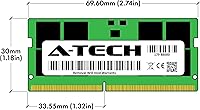
  • Module Dimensions: Each module measures 2.74 x 1.18 x 0.15 inches, fitting standard SODIMM slots without physical clearance concerns.
  • Kit Weight: The complete two-module kit weighs approximately 1 ounce total, adding negligible weight to any host system.
  • Compatibility: Compatible with DDR5 SODIMM-equipped laptops, notebooks, mini PCs, and all-in-one systems; system manual verification is required before purchase.
  • Installation: Plug-and-play at rated speed with no XMP, EXPO profile activation, or BIOS flashing needed in compatible systems.
  • Warranty: Covered by A-Tech's Limited Lifetime Warranty, with support available directly from the manufacturer.
  • Brand: Manufactured and sold by A-Tech Computer, a third-party memory specialist focused on compatibility-tested upgrade modules.
  • Release Date: First made available in July 2024, coinciding with broader DDR5 SODIMM adoption across late-generation Intel and AMD laptop platforms.
  • ASIN: The Amazon product identifier for this kit is B0DB2N6GYG, useful for cross-referencing listings or verifying the correct variant.

Related Reviews

A-Tech 48GB DDR5 4800MHz SODIMM RAM
87%
91%
Performance for Gaming
89%
Multitasking Performance
87%
Compatibility with Devices
96%
Ease of Installation
83%
Energy Efficiency
More
A-Tech 96GB DDR5 5600MHz SODIMM Laptop RAM
84%
83%
System Compatibility
91%
Installation Experience
88%
Real-World Performance
76%
Value for Money
86%
Speed & Bandwidth
More
A-Tech 16GB DDR5 4800MHz SODIMM RAM
88%
91%
Performance Boost
95%
Ease of Installation
88%
Energy Efficiency
85%
Compatibility with Laptop Systems
92%
Value for Money
More
A-Tech 32GB DDR5 4800MHz Laptop RAM Kit
87%
92%
Performance Boost
95%
Ease of Installation
89%
Energy Efficiency
84%
Compatibility
91%
Value for Money
More
A-Tech 128GB DDR5 5200MHz SODIMM Laptop RAM
88%
93%
Performance
88%
Compatibility with Laptops
91%
Ease of Installation
95%
Multitasking Performance
86%
Energy Efficiency (1.1V)
More
Crucial 8GB DDR5 4800MHz SODIMM Laptop RAM
89%
91%
Performance Boost
88%
Installation Ease
94%
Compatibility with Intel 12th Gen & AMD Ryzen 7000
85%
Power Efficiency
90%
Multitasking Support
More
A-Tech 64GB DDR5 SODIMM Laptop RAM Kit
79%
88%
Value for Money
71%
Compatibility
91%
Installation Experience
89%
System Stability
74%
Performance at 4800MHz
More
Samsung 32GB DDR5 4800MHz SODIMM Laptop RAM
79%
71%
Platform Compatibility
84%
Installation Ease
88%
Performance Stability
76%
Speed & Bandwidth
79%
Brand Trust & Chip Authenticity
More
A-Tech 64GB DDR5 4800MHz Desktop RAM Kit
74%
83%
Value for Money
88%
Installation Ease
74%
Compatibility
91%
System Stability
78%
Performance at Rated Speed
More
Crucial 16GB DDR5 4800MHz Laptop RAM
86%
89%
Performance Improvement
93%
Ease of Installation
88%
Multitasking Performance
91%
Compatibility with 12th Gen Intel & AMD Ryzen 7000
86%
Gaming Performance
More

FAQ

You need to check your laptop's official specifications page or the system manual — not just whether it has DDR5 slots. Many DDR5 laptops cap out at 32GB per slot, which means they cannot address 48GB modules at all. Searching your laptop model alongside its memory specification sheet, or checking resources like Crucial's compatibility tool, will give you a reliable answer before you buy.

In compatible systems, the modules run at 4800MHz automatically using the JEDEC standard profile — no XMP or EXPO activation needed. Just install them and power on; the system should detect the full 96GB and the correct speed without any manual BIOS adjustments.

A-Tech is a legitimate third-party memory brand that has been around for years and sells compatibility-tested modules. They are not a tier-one chip manufacturer like Samsung or SK Hynix, but they back their products with a Limited Lifetime Warranty and have a support team that buyers generally rate positively. For most users, the risk profile is acceptable, especially for a non-ECC consumer upgrade.

Technically possible in some systems, but strongly inadvisable. Mixing modules of different capacities, ranks, or manufacturers can cause instability, force the system into slower single-channel operation, or prevent proper recognition of both sticks. If you are going to 96GB, install both modules from this kit together.

First, check whether your BIOS is up to date, as some systems required firmware updates to support 48GB SODIMM modules. Second, confirm your laptop's hardware memory ceiling — some models are physically limited below 96GB regardless of the slot type. If the BIOS is current and the system still shows less, contact A-Tech support, which buyers report is responsive to these kinds of issues.

DDR5 operating at standard 1.1V is actually more power-efficient than DDR4, so the thermal increase from this upgrade is minimal under most conditions. Buyers who have reviewed this 96GB SODIMM kit have not widely reported heat-related problems. That said, sustained heavy workloads in a thin chassis will always generate more heat than light use, regardless of RAM.

Almost certainly yes, for the vast majority of gaming titles. Games rarely utilize more than 32GB of RAM even in demanding scenarios, and the performance difference between 64GB and 96GB in gaming is effectively zero. This DDR5 memory upgrade is aimed at professional workloads, not gaming.

Workstation-class laptops from Lenovo's ThinkPad P and X series, select HP EliteBook and ZBook models, and ASUS ProArt Studiobook configurations are among the more commonly cited compatible platforms. Mini PCs running on Intel Core Ultra or AMD Ryzen 7000-series with dual SODIMM slots are also candidates. Always cross-reference with your specific model's maximum supported RAM before purchasing.

No physical tools are included, but none are really needed — the modules install exactly like any other SODIMM. You typically just need a small Phillips-head screwdriver to remove your laptop's back panel. A-Tech's support team can assist if you run into any questions during setup.

A-Tech's Limited Lifetime Warranty is designed to cover defective modules, and the company has a support channel for warranty claims. In practice, individual module failures in DDR5 RAM are uncommon, but the warranty does provide a meaningful backstop. Reach out to A-Tech directly with your purchase details if you ever need to make a claim.