Overview

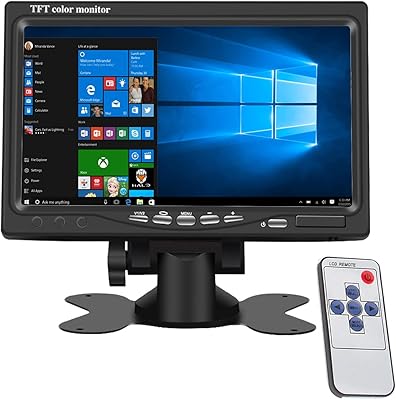
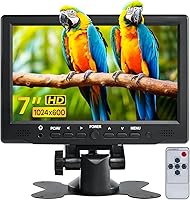
The Hosyond 7-inch TFT LCD Portable Monitor is a compact secondary display built squarely for hobbyists, makers, and budget-conscious travelers — not for anyone expecting a professional-grade workstation screen. Hosyond sits firmly at the value end of the accessories market, and the build reflects that honestly: the housing is lightweight plastic, the panel sports a glossy finish, and the included stand is functional but not particularly sturdy. At roughly the footprint of a large smartphone laid sideways, it’s impressively small. Think of this as a niche utility screen — the kind that earns its place in specific setups rather than competing with mainstream monitors.
Features & Benefits

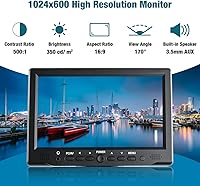
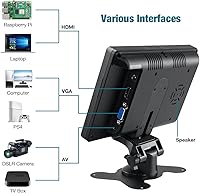
Where this compact screen earns some genuine respect is in its input versatility. Supporting HDMI, VGA, and AV simultaneously makes it compatible with a surprisingly wide range of hardware — Raspberry Pi boards, older PCs, game consoles, DSLRs, and basic CCTV systems all connect without fuss. The 1024x600 resolution is fine for menus, terminals, and standard-definition video, though anyone migrating from a high-DPI display will notice the difference immediately. Brightness holds up reasonably well in dim-to-moderate indoor lighting at 350 cd/m², but direct sunlight or bright windows expose its limits. The included infrared remote handles source switching and OSD adjustments conveniently. The built-in speaker technically works; just don’t expect anything beyond basic functional audio.

Best For

This 7-inch portable monitor finds its strongest footing in maker and hobbyist contexts. It’s practically a go-to choice as a dedicated Raspberry Pi display, where the HDMI connection and compact size are exactly what most Pi projects need. Retro gaming enthusiasts appreciate it as a secondary console screen, particularly where resolution isn’t a sticking point. For anyone running a basic DIY security setup, the AV input makes it a natural fit for a small always-on CCTV monitor. It also works well as a low-demand bedside or kitchen screen for casual video playback. Makers building portable diagnostic tools or status dashboards will find the lightweight portability genuinely useful in the field.

User Feedback

Buyers consistently highlight how easy the setup is — HDMI plug-and-play works reliably across most devices, and the included cables mean you’re not immediately hunting for extras. The value-for-size proposition lands well with the Raspberry Pi crowd in particular. On the flip side, the glossy panel draws repeated criticism from users near windows; glare is a real issue in brighter rooms. The plastic build quality is frequently described as acceptable but not reassuring — the stand, in particular, feels a little flimsy under scrutiny. A handful of Raspberry Pi users have noted needing to tweak display config settings for correct resolution output. The included remote gets mixed reviews: handy when it works, but the IR range is reportedly inconsistent.

Pros

  • Plug-and-play HDMI setup means most users are up and running in under a minute.
  • Triple input support — HDMI, VGA, and AV — covers a wider range of devices than most competing mini screens.
  • At roughly 300g, this compact screen is light enough to slip into a bag without a second thought.
  • The infrared remote makes input switching and brightness adjustments easy without touching the panel.
  • A surprisingly practical match for Raspberry Pi projects, where dedicated display options at this price point are limited.
  • Colors appear vivid and reasonably bright in typical dim-to-moderate indoor lighting conditions.
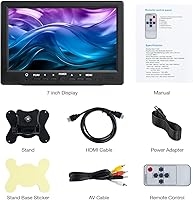
  • The included accessory bundle — HDMI cable, AV cable, remote, stand, and power adapter — eliminates common first-use friction.
  • AV input makes this mini display a cost-effective option for basic DIY CCTV or legacy camera monitoring setups.
  • Small enough to function as a secondary status or diagnostic screen on a workbench without occupying meaningful real estate.
  • The 16:9 aspect ratio displays standard video content cleanly without awkward letterboxing.

Cons

  • The glossy panel produces noticeable glare near windows or in brightly lit rooms, limiting where it can comfortably be placed.
  • At 1024x600, text and fine detail appear soft — a significant adjustment for anyone used to 1080p or higher-resolution screens.
  • The plastic stand feels flimsy; it functions, but repeated repositioning raises real durability concerns.
  • The built-in mono speaker produces thin, low-volume output that is barely adequate for basic audio cues.
  • Some Raspberry Pi users report needing manual config file edits to force the correct display resolution on first boot.
  • The infrared remote requires close, direct line-of-sight to register reliably — its effective range is inconsistent in practice.
  • Overall build quality feels budget-grade; the housing has noticeable flex that may concern buyers who handle gear frequently.
  • No USB power option means the AC adapter is always required, complicating genuinely portable or off-grid deployments.
  • Viewing angles drop off more than the rated 170 degrees suggests — color shift becomes visible at sharper off-axis positions.
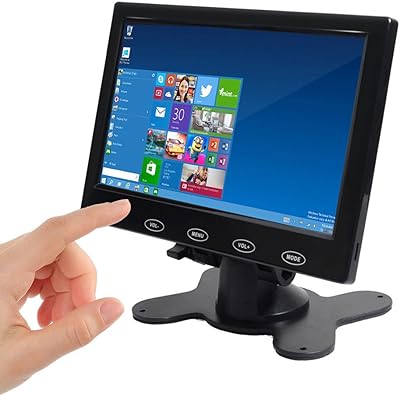
  • No touchscreen capability rules out interactive Raspberry Pi or maker project builds that would otherwise benefit from direct input.

Ratings

The Hosyond 7-inch TFT LCD Portable Monitor has been evaluated using our AI-driven scoring system, which analyzed verified buyer reviews from global marketplaces while actively filtering out incentivized, bot-generated, and outlier submissions. Scores reflect a balanced synthesis of real ownership experiences spanning Raspberry Pi project builds, retro gaming setups, vehicle-mounted screens, and DIY monitoring installations. Both the genuine strengths and the honest pain points of this compact screen are transparently represented in each category below.
Value for Money
83%
For a budget-positioned compact display, buyers consistently report getting more than they anticipated. The triple-input support, a reasonably complete accessory bundle, and reliable plug-and-play behavior for Raspberry Pi and secondary screen use cases make this mini display feel like a genuinely smart spend for its intended niche.
The value equation only holds if your expectations align with the product's actual tier. Users who treated it as a general-purpose screen quickly ran into the resolution and build quality ceiling, and a few noted that a modest additional investment would have bought a noticeably more satisfying experience overall.
Setup & Connectivity
86%
HDMI plug-and-play functionality is the most consistently praised aspect across buyer reviews. Users connecting a laptop, Raspberry Pi, or game console found the display came up correctly within seconds in the majority of cases, with no driver installation required — a genuine relief for busy makers who just want things to work.
A meaningful subset of users, particularly those on newer Raspberry Pi OS builds, reported needing to manually edit a config file to force the correct output resolution. VGA and AV input detection also occasionally requires cycling through the OSD source menu manually, which is a minor but recurring friction point.
Display Quality
61%
39%
In controlled indoor lighting, colors appear reasonably vivid for a TFT panel at this price. Users watching standard-definition content on a bedside table or kitchen counter find the image adequate for that style of low-demand ambient viewing, where pixel density is not a practical concern day-to-day.
Anyone accustomed to a 1080p or high-DPI screen will notice the 1024x600 resolution immediately — text looks soft, fine UI elements are hard to read cleanly, and the 500:1 contrast ratio cannot compete with modern IPS panels. This is a genuine limitation for productivity tasks or anything visually detailed.
Build Quality
54%
46%
The lightweight plastic housing keeps the overall unit at a manageable weight and does not feel sharp or poorly finished out of the box. For buyers who keep it in a fixed location — on a workbench or beside a Pi enclosure — the construction holds up adequately under gentle, stationary use.
Multiple reviewers described the build as noticeably budget-grade, with the stand being the most frequently cited weak point. The housing flexes under modest hand pressure, and the overall feel does not inspire confidence in longevity if the unit is bumped, dropped, or repositioned on a regular basis.
Portability & Size
88%
At roughly 300g and approximately the footprint of a paperback book, this 7-inch portable monitor is genuinely easy to pack into a travel bag or fit into tight spaces like a vehicle cabin or RV dashboard area. Users running it in kitchens and bedrooms specifically praised how little surface space it demands.
The reliance on an AC adapter for power undercuts the portability story in off-grid situations. Users who imagined taking it fully untethered — battery-powered Pi builds, outdoor project stations — quickly discovered there is no USB-power mode, which limits how genuinely mobile the setup can be in practical terms.
Input Versatility
91%
Offering HDMI, VGA, and composite AV inputs at this price is genuinely unusual and one of the most praised aspects of this compact screen. Makers appreciated being able to switch between a Raspberry Pi via HDMI and an older CCTV camera via AV without any additional adapters or workarounds.
While the input selection is broad, OSD source-switching is basic and slightly sluggish to respond. Users with multiple devices connected simultaneously noted that auto-detection does not always identify the correct active source, requiring a manual cycle through the input menu via the remote or front panel buttons each time.
Brightness & Glare Resistance
52%
48%
In dim environments — a bedroom at night, a windowless workbench, or a vehicle interior — the 350 cd/m² brightness level is sufficient and the image looks reasonably well-lit. Users running it as an always-on CCTV monitor in a low-light room or a Pi terminal in a garage found the output entirely adequate.
Positioned near natural light or overhead fluorescent lighting, the glossy panel reflects its surroundings like a mirror. Multiple reviewers specifically flagged window-adjacent placement as problematic, and the brightness ceiling is simply not high enough to overpower ambient reflections in well-lit rooms — a meaningful real-world limitation.
Viewing Angles
63%
37%
Viewed head-on or within a modest cone around center, the image holds together acceptably for the kinds of tasks this screen handles. Users monitoring a Pi project dashboard or watching a video from a fixed single-person seating position rarely had complaints about the image quality from that straightforward perspective.
Despite the 170-degree specification, real-world color shift and contrast loss set in at much less extreme angles than that figure implies. Anyone viewing from the side of the screen — common when multiple people are glancing at a shared display — will notice the image washing out or developing a visible color cast.
Audio Quality
38%
62%
The existence of a built-in speaker at all is a minor convenience — for users who need a bare-minimum alert sound or a video call notification ping in a quiet room, it technically handles that role. Having onboard audio also means fewer immediate cable connections for the most basic use cases.
Nearly every buyer who commented on the speaker described it as thin, quiet, and borderline inadequate for anything beyond minimal notification sounds. The mono output lacks depth entirely, and even at maximum volume the level is modest. Any meaningful audio use requires routing sound through an external speaker or the source device's own output.
Remote & OSD Controls
71%
29%
The inclusion of an infrared remote is a practical convenience for a screen in this category. Being able to adjust brightness, switch inputs, and modify image settings without physically reaching for the panel is especially useful when the display is mounted in a vehicle, placed on a high shelf, or at an awkward angle.
The remote requires direct line-of-sight and works reliably only at close range — several users reported it becoming unresponsive beyond roughly a meter or from a moderate angle. The OSD menu navigation is also functional but slow, requiring several button presses to complete adjustments that should be more streamlined.
Raspberry Pi Compatibility
84%
For the Raspberry Pi community, this compact screen has become a well-regarded option. Most Pi models connect via HDMI and output correctly within seconds, and the physical footprint pairs naturally with Pi enclosure builds, tabletop project stations, and educational setups where a compact dedicated display is exactly what the project calls for.
Users on newer Raspberry Pi OS versions frequently report needing to manually set the display resolution in the config.txt file, since the Pi does not always auto-negotiate 1024x600 correctly. The fix is documented and manageable, but it adds a setup step that first-time Pi users may find unexpectedly frustrating.
Accessories & Bundle
77%
23%
Arriving with an HDMI cable, AV cable, AC adapter, infrared remote, stand, and printed manual is genuinely useful for a product at this tier. The majority of buyers were able to connect their source device and get the screen running without any supplemental purchases, which is not always a given in this category.
While the bundle is broad in scope, the quality of individual items is uneven. The stand draws consistent criticism for feeling flimsy, and the included remote has the character of a budget accessory that may become unreliable with extended use. The HDMI cable, while functional, is a basic unit not suitable for longer runs.
Gaming Performance
68%
32%
For retro console gaming or casual low-demand titles, this mini display performs credibly. Users connecting older systems via AV or running emulation software on a Raspberry Pi reported that image rendering and response were entirely workable for that style of play, where the modest resolution is arguably period-appropriate for classic titles.
For modern gaming with fast motion, high visual detail, or any competitive context, the combination of limited resolution, modest contrast, and a lower-quality TFT panel quickly becomes a bottleneck. Users who connected a PS4 or Xbox One for demanding titles consistently described the visual output as constrained and unsatisfying.
Ease of Use
82%
18%
Outside of occasional Raspberry Pi configuration adjustments, day-to-day operation is simple and low-effort. The OSD menu covers all essential controls, the remote adds real convenience, and switching inputs or tweaking image settings takes a minute at most. Buyers with minimal technical background consistently rated the overall learning curve as low.
The included manual is sparse and written primarily for users already fluent in display terminology. Buyers who encountered the Raspberry Pi resolution issue without prior knowledge found the troubleshooting process confusing. The OSD layout is also not immediately intuitive for first-time users of budget monitor interfaces, requiring a short learning period.

Suitable for:

The Hosyond 7-inch TFT LCD Portable Monitor is purpose-built for a specific kind of buyer: the tinkerer, the maker, or the hobbyist who needs a no-fuss dedicated screen for a focused task. Raspberry Pi enthusiasts will find it particularly well-matched — the HDMI connection works plug-and-play with most Pi setups, and the compact footprint fits neatly on a workbench without dominating the space. Retro gaming fans who want a small secondary screen for a classic console will appreciate the AV input, and the modest resolution rarely matters for older game content at this screen size. Those building DIY security or CCTV systems on a budget will find the multi-input coverage genuinely useful for connecting older camera equipment. It also makes a sensible kitchen, bedside, or RV companion for low-demand video playback — somewhere a screen is handy but spending serious money feels unnecessary. Travelers and vehicle users who need a lightweight auxiliary display will appreciate the sub-300g panel weight and the self-contained accessory bundle that gets you running without extra shopping.
Not suitable for:

If you are shopping for a primary desktop monitor, or any display where sharpness, color accuracy, or image fidelity genuinely matters, the Hosyond 7-inch TFT LCD Portable Monitor is not the right tool. The 1024x600 resolution looks noticeably soft to anyone accustomed to modern 1080p or high-DPI screens, and prolonged text-heavy work or any kind of image editing would be uncomfortable at this pixel density. The glossy panel compounds the problem in well-lit spaces — glare near windows is a recurring real-world complaint, not an edge case, so bright offices or outdoor use are poor fits. Buyers hoping for a meaningful audio experience should also look elsewhere; the built-in mono speaker is a bare-minimum convenience feature, not a substitute for even a modest external speaker. If structural quality and a reassuring build are important to you, the lightweight plastic housing and somewhat flimsy stand will likely disappoint. This screen is a utility tool for niche scenarios, and pushing it beyond that role will lead to frustration.
Specifications

  • Screen Size: The display panel measures 7 inches diagonally, giving it a footprint comparable to a large smartphone laid flat.
  • Panel Type: The screen uses TFT (Thin-Film Transistor) LCD technology, which provides consistent backlighting uniformity across the panel surface.
  • Resolution: Native resolution is 1024x600 pixels, appropriate for menus, terminals, and standard-definition video content.
  • Aspect Ratio: The 16:9 widescreen ratio displays standard video content without pillarboxing or letterboxing artifacts.
  • Brightness: Panel brightness is rated at 350 cd/m², which performs adequately in dim to moderate indoor ambient light conditions.
  • Contrast Ratio: The 500:1 static contrast ratio produces a workable but not exceptional distinction between light and dark areas on screen.
  • Viewing Angle: The display carries a 170-degree rated viewing angle, though perceptible color shift and contrast loss occur at sharper off-axis positions in practice.
  • Video Inputs: Three input types are supported — HDMI, VGA, and composite AV — enabling connection to a broad range of modern and legacy source devices.
  • Screen Surface: The panel has a glossy finish that enhances color vibrancy in controlled indoor lighting but reflects ambient light noticeably in brighter environments.
  • Audio Output: A built-in mono speaker provides minimal onboard audio, suitable only for basic notification sounds rather than sustained media playback.
  • OSD Controls: An on-screen display menu allows manual adjustment of brightness, contrast, color, and input source via front-panel buttons or the included remote.
  • Remote Control: An infrared remote control is included for convenient OSD navigation and input switching without physically touching the monitor.
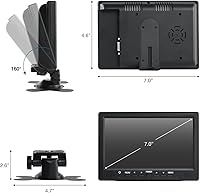
  • Dimensions: The monitor body measures 7.08″ x 4.8″ x 1.3″, compact enough for workbench, vehicle dashboard, or bedside table placement.
  • Weight: The panel weighs approximately 300g (0.68 lbs), keeping it light enough for portable or travel-oriented deployments.
  • Power Supply: Operation requires the included AC power adapter; there is no USB-bus-powered mode available for fully portable or battery-backed setups.
  • Compatible Devices: Verified compatible sources include Raspberry Pi boards, Windows and Mac PCs, PlayStation and Xbox consoles, Nintendo Switch, CCTV cameras, DSLRs, and TV boxes.
  • Housing Material: The outer casing is constructed from lightweight plastic, which keeps the overall unit weight low but contributes to a budget-grade feel in hand.

Related Reviews

SallyBest SY-305 7-Inch Headrest LCD Monitor
71%
88%
Ease of Setup
61%
Image Quality
54%
Build Quality
79%
Value for Money
83%
Input Versatility
More
LONCEVON L1098A 10.1-inch Portable Monitor
70%
88%
Input Versatility
83%
Value for Money
86%
Ease of Setup
47%
Display Resolution
58%
Build Quality
More
Wstirhy 9.7-Inch Portable Monitor
75%
91%
Port Versatility
86%
Connectivity & Setup Ease
61%
Display Resolution
67%
Build Quality
74%
Image Brightness & Clarity
More
Yasoca 7-inch Portable HD 1080P Monitor
82%
87%
Display Quality
93%
Portability
85%
Ease of Use
82%
Input Connectivity
80%
Build Quality
More
Magnavox MTFT716N 7-Inch Portable DVD Player
67%
91%
Ease of Setup
84%
Portability
57%
Battery Life
62%
Screen Quality
59%
Build Quality
More
Magnavox MTFT750-BK 7-inch Portable DVD Player
70%
81%
Value for Money
88%
Ease of Use
53%
Battery Life
67%
Picture Quality
61%
Audio Performance
More
Geimrsy GY-S75-1 7.7-inch Portable Teleprompter
73%
81%
Value for Money
88%
Portability & Form Factor
84%
Ease of Setup
67%
Beam Splitter Glass Quality
63%
Remote Control Functionality
More
AYY A15G1B 15-inch Portable Monitor
74%
91%
Setup & Plug-and-Play Ease
78%
Display Quality
93%
Portability & Form Factor
88%
Value for Money
69%
Smart Cover & Stand
More
Camecho N2012 9-Inch LCD Monitor
67%
81%
Value for Money
54%
Display Quality
72%
Input Versatility
84%
Ease of Setup
86%
Vehicle Compatibility
More
UPERFECT 16006DD 16″ 4K Portable Monitor
77%
83%
Brightness Performance
91%
Display Sharpness
74%
Color Accuracy
88%
Build Quality
76%
Portability
More

FAQ

For most Raspberry Pi setups, the HDMI connection is largely plug-and-play and the display comes up without any special steps. That said, some users running newer versions of Raspberry Pi OS have found they need to add a display resolution entry to the config.txt file to lock output at 1024x600. It is a quick fix, but worth knowing upfront so it does not catch you off guard on first boot.

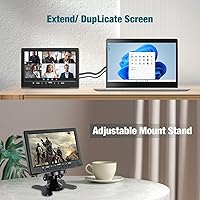
Yes, as long as your computer has a spare HDMI or VGA output it will show up as an extended or mirrored display through your operating system’s normal display settings. Just be realistic about the 1024x600 resolution — it is fine for a reference panel, a chat window, or a terminal, but not comfortable for anything that demands fine detail.

All three connect via HDMI and display without issue. For casual or retro-style gaming the screen size and resolution are perfectly serviceable. For fast-action or graphically intensive titles, the limited pixel count and modest contrast become more noticeable, but for lighter gaming sessions it holds its own.

In a dim room or away from direct light sources, it genuinely is not a problem — colors look vivid and the image is clear. Place it near a sunlit window and the reflections become distracting enough to affect usability. If your intended location is a bright room, that trade-off is worth factoring into your decision before purchasing.

Barely, and it is worth being honest about that. The mono speaker is low-volume and thin-sounding with no meaningful bass. For a quick system alert or a video call notification beep it functions, but for music, film audio, or any extended media use, you will want to route sound through external speakers or headphones connected to your source device instead.

It requires the included AC adapter and cannot be powered over USB from a Pi or any other host device. This is one of the more meaningful limitations for portable or off-grid maker projects, so if you are planning a battery-backed or fully untethered build, you will need to account for a separate power supply for the display.

It holds the screen upright on a flat, stable surface under normal conditions, but it does not feel particularly robust. A bump or a knock is likely to send it over. For a permanent or semi-permanent installation, a third-party monitor arm or bracket would be more reliable — just verify mounting compatibility before committing to that route.

The Hosyond 7-inch TFT LCD Portable Monitor ships with an HDMI cable, an AV cable, an AC power adapter, an infrared remote control, a stand with a base adhesive sticker, and a printed user manual. For most common setups you have everything you need to get started without placing a separate order for accessories.
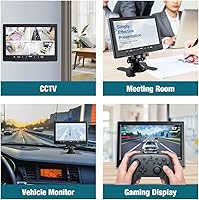
Yes, the composite AV input accepts the standard yellow video and red-and-white audio RCA signal that legacy equipment outputs. This makes this compact screen a practical small monitor for anyone working with older video hardware, analog cameras, or basic CCTV setups that do not output HDMI.

Not ideally. The 350 cd/m² brightness rating is adequate for dim or typical indoor conditions, but it struggles against strong ambient light. Paired with the reflective glossy surface, a sunny or well-lit room will produce enough glare to meaningfully reduce the viewing experience. This mini display is best suited to controlled indoor environments rather than bright or outdoor settings.