Overview

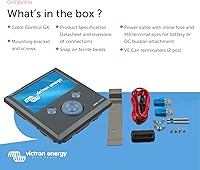
The Victron Energy Color Control GX System Monitor is, at its core, a communication hub designed to bring every component of a 12V energy system — batteries, solar panels, inverters, and generators — into one interface. Think of a GX device as the brain sitting between all your Victron hardware, giving you a single place to see what is actually happening. This isn't a budget gadget or a simple meter; it's a professional-grade tool aimed at boat owners, RV travelers, and off-grid installers already running Victron equipment. If you're new to the ecosystem, expect a real learning curve before everything clicks into place.
Features & Benefits

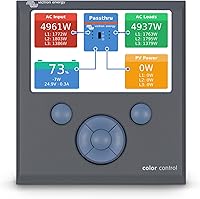
The Color Control GX puts a color LCD touchscreen front and center, showing battery charge, live solar harvest, current load, and generator status in real time. Its automatic generator control is genuinely useful — set it to start or stop based on battery thresholds, and program quiet hours so it won't fire up at 2 a.m. The VRM remote portal is where this system controller earns its keep: log in from your phone and you get a full electrical snapshot of your boat or RV from anywhere with an internet connection. It also handles ESS logic, keeping backup batteries topped up and directing excess solar to your own loads first. Connectivity spans VE.Bus, VE.Direct, and VE.Can.

Best For

This Victron GX monitor is not a universal fit — it's built for people already operating within the Victron ecosystem, or building a system around it from the ground up. Boat owners and liveaboards will find remote monitoring especially practical; checking your battery bank from shore before a weekend trip is exactly the kind of feature that justifies the investment. Off-grid cabin setups with mixed energy sources and RV travelers running solar-plus-battery rigs also benefit considerably. Professional installers use it as a client-facing display because the data depth gives customers real confidence. Running a single battery with a basic charger? This is overkill.

User Feedback

With a 3.5-star average across 54 ratings, the Color Control GX divides opinion along one clear line: how comfortable are you with technical setup? Buyers with prior Victron experience, or those who hired a qualified installer, tend to be satisfied — they praise the data depth, reliable remote access, and solid build quality. Those who expected a plug-and-play experience often walk away frustrated. The interface, while functional, looks like it hasn't been refreshed since the mid-2010s, and some users report occasional firmware hiccups and connectivity drops with certain devices. It's not a flawed product — it's a product with a specific audience, and it rewards those who fit that profile.

Pros

  • Consolidates battery, solar, load, and generator data into a single, always-visible display.
  • The VRM remote portal lets you monitor your system from anywhere with an internet connection.
  • Automatic generator start/stop with quiet-hour programming removes a genuinely tedious manual task.
  • Built-in data logging and configurable alerts help catch system issues before they become failures.
  • Supports VE.Bus, VE.Direct, and VE.Can for broad compatibility across Victron hardware.
  • ESS management diverts excess solar to self-consumption, reducing waste in off-grid setups.
  • Solid, durable plastic build that holds up well in marine and mobile environments.
  • Trusted by professional installers as a reliable, long-term system management solution.
  • Active firmware development means the device continues to receive updates and new features.

Cons

  • Setup and configuration are complex enough to frustrate buyers without prior Victron experience.
  • The user interface looks noticeably dated and lacks the polish of modern energy dashboards.
  • Essentially useless outside the Victron ecosystem — cross-brand device support is very limited.
  • Some users report intermittent firmware issues and occasional connectivity drops with specific components.
  • The touchscreen responsiveness has drawn criticism; it can feel sluggish compared to consumer-grade displays.
  • No built-in Wi-Fi on all hardware revisions — some configurations require a separate dongle for VRM access.
  • Documentation and setup guides can be dense and assume a higher level of technical knowledge than many buyers have.
  • At this price tier, the lack of a more modern, intuitive interface is a meaningful disappointment.
  • Customer support experiences through Amazon have been inconsistent for troubleshooting technical issues.

Ratings

Our AI has analyzed verified buyer reviews from around the world to generate the scores below for the Victron Energy Color Control GX System Monitor, actively filtering out incentivized, bot-generated, and low-signal feedback to surface what real owners actually experience. The results are candid — where this system controller earns genuine praise from experienced installers and off-grid enthusiasts, that is reflected; where it frustrates buyers with steep setup demands or a dated interface, those pain points are scored honestly too.

Remote Monitoring
88%
The VRM portal is the standout capability that keeps experienced users loyal to this system controller. Boat owners consistently describe checking their battery state from home before a weekend trip as genuinely useful rather than a gimmick, and the portal's data history helps diagnose intermittent issues without being on-site.
Connectivity depends entirely on the installation having a stable internet connection, which isn't guaranteed on remote moorings or off-grid cabins. Some users also report that initial VRM account setup and device pairing is more confusing than it should be at this price point.
System Integration
83%
Within the Victron ecosystem, the Color Control GX communicates fluently with inverters, MPPT solar chargers, and battery monitors over VE.Bus, VE.Direct, and VE.Can. Installers who build full Victron systems praise how quickly the device auto-detects connected hardware and begins aggregating data without manual input.
The integration story falls apart the moment a non-Victron device enters the picture. Users who have mixed-brand systems — common in retrofits and budget builds — find that this system controller offers little to nothing for components outside Victron's own product line.
Data Depth
86%
The breadth of real-time data available — battery state of charge, solar harvest, AC and DC loads, generator status, historical trends — is genuinely impressive and stands out even among professional monitoring tools. Off-grid cabin owners running complex multi-source setups describe it as the clearest picture they have ever had of their energy system.
Accessing that data depth requires navigating a menu structure that is not intuitively organized, particularly for users new to Victron's interface logic. The learning curve to understand and act on all the available data is real, and some buyers never fully unlock what the device is capable of.
Setup & Configuration
41%
59%
For buyers who hire a qualified Victron-certified installer, the setup experience is considerably smoother, and once everything is correctly configured the system runs reliably without constant intervention. Experienced users who have worked with GX devices before can get a fresh unit operational within a reasonable timeframe.
Self-installation is a genuine pain point that appears repeatedly in negative reviews. The documentation is dense, the configuration menus require prior familiarity with Victron's architecture, and several users report spending days troubleshooting issues that turned out to be minor setting mismatches. This is not a weekend DIY project for the uninitiated.
Generator Control
79%
21%
Automatic generator start/stop based on battery thresholds is a feature RV travelers and liveaboards genuinely rely on, and when it works correctly it removes a tedious daily manual task. The quiet-hour scheduling is a thoughtful touch that prevents unwanted 3 a.m. generator starts in marina environments.
The wiring and configuration required to enable generator control correctly is non-trivial, and incorrectly set parameters can cause erratic behavior. A handful of users report that the generator relay does not behave consistently across firmware versions, requiring periodic reconfiguration after updates.
Interface Design
48%
52%
The layout of the main overview screen is logical — battery, solar, load, and grid data are all visible without drilling into submenus, which makes day-to-day monitoring quick once you know where to look. The color display does make it easier to distinguish system states at a glance compared to older monochrome alternatives.
The overall interface looks and feels like it was designed in 2014, because it essentially was. Buyers accustomed to modern app interfaces or competing dashboards find the visual design underwhelming and the menu navigation sluggish. At this price tier, the dated UI is one of the most frequently mentioned disappointments.
Touchscreen Responsiveness
53%
47%
The touchscreen is accurate enough for basic navigation and correctly registers deliberate taps without significant misfires. For a device that is primarily checked periodically rather than constantly interacted with, the touch input is functional for its core purpose.
The response lag is noticeable compared to any modern consumer device, and several users describe it as frustratingly slow when navigating deeper configuration menus. Quick swipes and light taps are often missed, requiring a more deliberate press that feels unnatural after years of fluid touchscreen use on phones and tablets.
Build Quality
74%
26%
The plastic enclosure feels solid rather than cheap, and users in marine environments report that the unit holds up well when mounted in protected interior locations. The hardware itself has a reputation for longevity within the Victron community, with some installers noting units still running reliably after several years of continuous operation.
The enclosure is not waterproof or weatherproof, which limits mounting flexibility in exposed cockpit or engine bay locations. A few users also note that the plastic surround around the screen can show stress marks over time if the unit is subjected to significant vibration, as in some motorhome installations.
Value for Money
58%
42%
For a fully committed Victron system owner who uses remote monitoring regularly and relies on automated generator control, the investment makes practical sense over time. Professional installers who deploy it across multiple client systems view it as a reliable, proven tool that justifies its position in a premium installation.
For the casual buyer or anyone not running a full Victron ecosystem, the cost is very difficult to justify given the limitations. The fact that Victron's own newer Cerbo GX offers meaningfully better hardware for a comparable price makes the Color Control GX feel like a questionable choice for new builds in 2024.
Energy Storage Management
77%
23%
The ESS logic that prioritizes solar self-consumption and maintains backup battery reserves is well-implemented and genuinely reduces reliance on grid or generator power for off-grid users. Cabin owners with solar-plus-battery setups describe measurable improvements in how efficiently their system uses available energy after enabling ESS mode.
ESS configuration is one of the more complex setup tasks on this device and requires a solid understanding of how the overall system is architected. Incorrect ESS settings can lead to batteries being over-discharged or generators cycling unnecessarily, and troubleshooting these scenarios without Victron-specific knowledge is difficult.
Firmware & Updates
62%
38%
Victron has continued to release firmware updates for the Color Control GX for years after launch, which speaks to the company's long-term support commitment. Some updates have meaningfully expanded functionality, including improved VRM integration and additional device compatibility.
Firmware updates have also introduced connectivity issues and behavioral changes for some users, particularly around generator relay control and VE.Bus communication. The update process itself is not always smooth, and a small but consistent group of users report that updates broke functionality that was previously working correctly.
Documentation & Support
55%
45%
Victron's online documentation and community forums are extensive, and experienced users can usually find answers to complex configuration questions through the Victron community portal. The official manuals, while dense, are technically thorough and do cover most setup scenarios in detail.
The documentation assumes a baseline of electrical and Victron-specific knowledge that many buyers simply do not have, making it inaccessible for self-installers without prior experience. Amazon-based customer support for troubleshooting is essentially nonexistent, and buyers needing hands-on help often have to engage a Victron dealer independently.
Data Logging & Alerts
76%
24%
The built-in logging captures historical energy data that is genuinely useful for diagnosing system issues after the fact — particularly helpful when trying to identify why a battery drained unexpectedly overnight or when a generator kicked in at an unusual time. Configurable alerts via the VRM portal mean owners can receive notifications about critical events without being present.
Alert configuration requires navigating the VRM portal settings, which has its own learning curve separate from the device itself. Some users find that default alert thresholds trigger notifications too frequently, and fine-tuning them to a useful sensitivity level takes trial and error.

Suitable for:

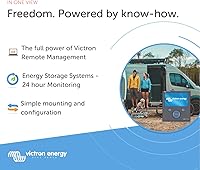
The Victron Energy Color Control GX System Monitor is purpose-built for anyone running a serious, multi-component energy setup where visibility and control actually matter. Boat owners and liveaboards who leave their vessel at dock for weeks at a time will find the remote monitoring capability genuinely valuable — being able to check battery state and system health from your phone before driving to the marina is a real, practical convenience. RV and motorhome travelers with solar-plus-battery systems benefit from the automatic generator management, especially on longer trips where manual oversight becomes tedious. Off-grid cabin owners juggling solar, battery banks, and backup generators will appreciate having everything consolidated into one interface rather than checking individual components. Professional installers also lean on this system controller as a client-facing dashboard that communicates system health clearly and builds confidence in the overall installation.
Not suitable for:

The Victron Energy Color Control GX System Monitor is a poor fit for anyone who isn't already committed to the Victron ecosystem or isn't prepared to invest real time in configuration and learning. If your setup consists of a single battery, a basic solar panel, and a simple charge controller from a different brand, this device will offer you almost nothing useful and will feel enormously overcomplicated for the task. Buyers expecting a straightforward plug-and-play experience will likely end up frustrated — the initial setup demands patience, some technical literacy, and ideally familiarity with Victron's architecture. The interface, while capable, looks visually dated and lacks the polish of modern energy monitoring apps, which can be a disappointment at this price point. If cross-brand compatibility is a requirement, look elsewhere; the Color Control GX is built to talk to Victron hardware, and integration with third-party components is limited and inconsistent.
Specifications

  • Brand: Manufactured by Victron Energy, a Dutch company specializing in professional-grade power conversion and monitoring equipment.
  • Model: Color Control GX, model number MONITOR-VTCC, part of Victron's broader GX device family.
  • Display: Color LCD touchscreen that shows live system data including battery state of charge, solar harvest, and load consumption.
  • Input Voltage: Operates on 12V DC, compatible with standard 12-volt battery systems common in marine and RV installations.
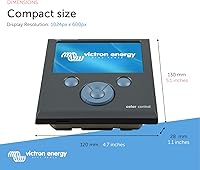
  • Dimensions: The unit measures 7.75 x 6.25 x 2.2 inches, designed for panel or bulkhead mounting in confined spaces.
  • Weight: Weighs 1.1 pounds, making it practical for mobile and marine installations where weight is a consideration.
  • Material: Housed in a plastic enclosure suited for indoor or protected installations; not rated for direct exposure to the elements.
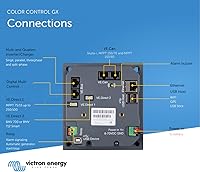
  • Connectivity: Communicates with Victron devices via VE.Bus, VE.Direct, and VE.Can protocols, covering a wide range of Victron inverters, chargers, and MPPT controllers.
  • Remote Access: Integrates with Victron's VRM (Victron Remote Management) online portal, allowing system monitoring and basic control from any internet-connected device.
  • Generator Control: Supports automatic generator start and stop based on programmable conditions, including battery voltage thresholds and configurable quiet-hour schedules.
  • Energy Management: Includes ESS (Energy Storage System) logic that keeps backup batteries at full charge, activates them during power outages, and diverts surplus solar energy to local consumption.
  • Data Logging: Records historical system data locally and via the VRM portal, with configurable alerts for anomalies such as low battery or grid failure.
  • First Available: The product was first listed in December 2016 and has been in continuous production since, with ongoing firmware support from Victron.
  • Market Rank: Ranked #1,312 in Marine Electronics on Amazon, reflecting a specialized but active buyer base within the marine and off-grid segments.
  • UPC: Registered UPC codes are 859042007436 and 724235994865, with GTIN 00859042007436 for international identification.

Related Reviews

COS Color Out System Hair Color Remover
85%
88%
Effectiveness in Color Removal
92%
Ease of Use
91%
Speed of Results (20-Minute Process)
85%
Hair Health After Use
86%
Gentleness on Hair
More
COLOR WOW Color Control Purple Toning + Styling Foam 200mL
85%
88%
Effectiveness in Reducing Brassiness
85%
Styling Results (Non-Crunchy Hold)
92%
Ease of Application
80%
Longevity of Toning Effect
87%
Heat Protection
More
Aveda Color Control Light Shampoo for Fine to Medium Color-Treated Hair
89%
94%
Color Retention
91%
Hair Softness
88%
Fragrance Enjoyment
93%
Gentleness on Hair
85%
Ease of Rinsing
More
NxN Oil Control System Kit
85%
88%
Oil Control Effectiveness
82%
Hydration Balance
85%
Soothe and Calm Sensitive Skin
91%
Shine Reduction Without Dryness
84%
Texture and Feel
More
XTUGA IEM1100
XTUGA IEM1100
86%
91%
Chassis Durability
88%
Value for Money
83%
Signal Stability
79%
Wireless Range
94%
Ease of Setup
More
Aveda Color Control Rich Shampoo 8.6oz
81%
88%
Color Protection
84%
Lather & Cleansing
86%
Moisture Retention
62%
Value for Money
79%
Texture & Application
More
AGPTEK RFID Door Access Control Kit
74%
88%
Magnetic Lock Holding Strength
63%
Ease of Installation
84%
RFID Key Fob Reliability
71%
Keypad Usability
41%
Documentation & Setup Guidance
More
Victron BMV-712 Battery Monitor with Temperature Sensor
85%
88%
Performance & Accuracy
91%
Build Quality & Durability
85%
Setup & Installation
89%
Battery Capacity Monitoring
93%
Temperature Sensor Effectiveness
More
WEILAILIFE 5MP 10″ Monitor Security Camera System
75%
84%
Image Quality
69%
Night Vision Performance
72%
Wireless Reliability
58%
App Experience
81%
Value for Money
More
Furrion Vision S+ RV Observation System with 7″ Monitor
84%
88%
Ease of Installation
91%
Camera Quality
85%
Night Vision Performance
72%
Wireless Connectivity
89%
Display Clarity
More

FAQ

Honest answer: it sits somewhere in the middle. If you are comfortable reading technical documentation and have experience with 12V electrical systems, you can work through the setup without professional help. That said, this is not a device you configure in an afternoon without preparation — Victron's own manuals are detailed but dense, and the initial network and device pairing steps trip up a lot of first-time users. Budgeting time to read the documentation thoroughly before you begin will save real frustration.

In most cases, no — not in any meaningful way. The Color Control GX is specifically designed to communicate with Victron hardware over VE.Bus, VE.Direct, and VE.Can. Non-Victron devices generally cannot integrate into the system data or be controlled through this monitor. If your setup is a mix of brands, you would need to check very carefully whether a specific third-party device has any documented compatibility before assuming it will work.

The remote monitoring runs through Victron's VRM portal, which is free to use — no subscription required. You connect the Color Control GX to your local network via Ethernet or a compatible Wi-Fi dongle, and it pushes data to the VRM cloud automatically. From there, you can log into the portal from any browser or the VRM app on your phone and see a live snapshot of your system. It works well as long as the unit has an internet connection at the installation site.

Yes, and this is one of the strongest real-world use cases for this system controller. As long as the boat has marina power or an active solar system keeping the GX unit powered, it will continue logging data and pushing updates to the VRM portal. You can check battery state, active alarms, and system health from your phone without being anywhere near the vessel. Several boat owners specifically mention this remote visibility as the feature that justified the purchase for them.

The screen is functional but not particularly impressive by current standards. It displays the right information clearly, but the touch response is slower than what most people are used to from phones or modern tablets. Navigating through menus requires deliberate, patient taps rather than quick swipes. For day-to-day glances at system status it is perfectly adequate, but if you are expecting a fluid, modern interface you will likely find it underwhelming.

Generally yes, provided your generator is compatible and properly wired into the system. You can configure start and stop conditions based on battery state of charge, voltage, or time schedules, and set quiet hours to prevent unwanted nighttime starts. Users who have it set up correctly tend to praise this feature. The caveat is that the configuration process is not simple, and incorrect wiring or settings can cause erratic behavior — this is not a feature to rush.

The Cerbo GX is Victron's newer GX device and is generally considered an upgrade over the Color Control GX — it has built-in Wi-Fi and Bluetooth, a more modern architecture, and broader connectivity options. The Color Control GX requires a separate USB Wi-Fi dongle for wireless access and lacks Bluetooth. If you are building a new system from scratch, the Cerbo GX with a touchscreen display is worth comparing directly before committing to this unit.

The mixed rating reflects a mismatch between buyer expectations and product reality more than a quality control problem. The Victron Energy Color Control GX System Monitor is a genuinely capable piece of equipment, but buyers who expected simple setup or broad cross-brand compatibility often report disappointment. Users who installed it as part of an all-Victron system and spent time on configuration tend to be satisfied. The low star average is a useful signal that this device has a steep entry point, not that it is unreliable.
It runs directly off your 12V DC system, which typically means it draws power from the battery bank it is monitoring. This is standard practice in marine and off-grid installations. Power consumption is low enough that it does not meaningfully affect your battery state under normal conditions, though like any device it should be accounted for in your overall load calculation.

The plastic enclosure is designed for protected indoor installation rather than exposure to direct sunlight, moisture, or heavy vibration over time. A sheltered dash panel, a cabin wall, or an interior electrical compartment are all appropriate locations. You would want to avoid mounting it where it might be hit by rain through an open window or exposed to prolonged direct sunlight, which can degrade both the screen and the housing over time.

Where to Buy