Overview

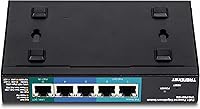
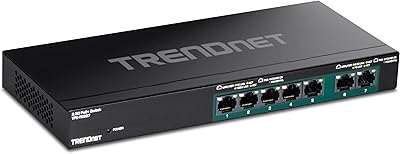
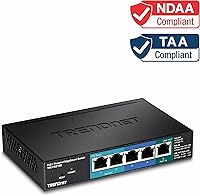
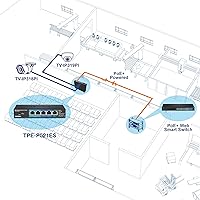
The TRENDnet TPE-P521ES 5-Port PoE+ Switch solves a specific problem that most generic switches ignore: how do you expand a PoE network into a location with no power outlet nearby? The answer is PoE pass-through — this PoE pass-through switch draws its operating power directly from an upstream PoE+ injector or switch over the incoming Ethernet cable, no wall adapter required. Its five ports break down into one PoE+ input, two PoE outputs, and two standard gigabit ports — a deliberate, practical ratio. The EdgeSmart management tier sits between basic unmanaged switches and complex enterprise gear, and the compact fanless metal housing makes it easy to tuck into a ceiling void or mount flush against a wall.
Features & Benefits

What makes this PoE pass-through switch genuinely useful in the field is the freedom it provides from needing a local outlet. Think ceilings, enclosed equipment cabinets, or the far corner of a warehouse — places where running power is expensive or impractical. The 18W total PoE budget is enough to simultaneously power two typical IP cameras or a camera and a VoIP phone, though you should verify each device's draw before assuming both will run at full tilt. The EdgeSmart web interface handles VLAN segmentation, QoS prioritization, IGMP snooping, and port mirroring without requiring any command-line knowledge. NDAA and TAA compliance, paired with a lifetime warranty and U.S.-based support, round out a strong value proposition for cautious buyers.

Best For

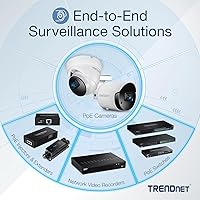
This EdgeSmart switch hits its sweet spot for two main buyer types. The first is the home or small office installer who needs to branch an existing PoE run into a new space — say, adding a couple of cameras to a garage or retail backroom where no outlet exists. The second is any organization where NDAA and TAA compliance is a hard requirement, such as government agencies or federal contractors. SMBs that want basic VLAN isolation or QoS without the overhead of a full enterprise platform will also appreciate the simplified management layer. That said, skip it if you're powering PTZ cameras or high-end access points — the 18W budget ceiling is a real constraint, not a footnote.

User Feedback

Across more than 100 verified reviews, the TPE-P521ES earns a 4.0 average — solid, but the score reflects a clear pattern worth understanding before you buy. Buyers who planned their deployment carefully, knowing their cameras draw well under 8W each, consistently report easy setup and dependable operation. Those who ran into trouble almost always underestimated device power consumption and ended up with hardware that wouldn't initialize reliably. A recurring observation is that the EdgeSmart interface, while approachable, lacks the depth of a true managed switch — a legitimate trade-off, not a defect. The compact, quiet build earns consistent praise across both camps, and the lifetime warranty has softened the frustration for more than a few disappointed users.

Pros

  • Powers itself over the incoming Ethernet cable, eliminating the need for a local power outlet entirely.
  • Compact metal housing is light enough to wall-mount cleanly in ceilings, closets, or equipment enclosures.
  • The fanless design runs completely silent — no noise, no heat vents to worry about in open office spaces.
  • Web-based EdgeSmart interface is straightforward enough that non-engineers can configure VLANs and QoS in under an hour.
  • NDAA and TAA compliant out of the box, satisfying government and federal contractor procurement requirements.
  • Lifetime manufacturer warranty in the U.S. and Canada is rare at this price tier and reduces long-term risk.
  • English-speaking tech support during business hours is a practical advantage when troubleshooting under pressure.
  • Gigabit throughput on all five ports keeps bandwidth from becoming a bottleneck for camera streams or VoIP.
  • The TPE-P521ES supports RSTP and link aggregation, adding network resilience options most basic switches skip.
  • At well under one pound, the hardware ships light and installs fast with minimal mounting hardware.

Cons

  • The 18W total PoE output budget is tight — two cameras drawing close to their rated wattage can max it out immediately.
  • Requires an upstream PoE+ source to function; buyers without one face an additional injector cost on top of the unit price.
  • The EdgeSmart interface lacks the depth of a true managed switch, with no support for advanced ACLs or granular diagnostics.
  • Only two ports deliver PoE power output, which limits the switch to very small endpoint counts by design.
  • The MAC address table holds just 2,000 entries, which could become a constraint in denser or more complex network segments.
  • Lifetime warranty and dedicated support apply only to U.S. and Canadian customers, leaving international buyers underserved.
  • No dedicated management port or out-of-band access means recovering from a misconfiguration requires physical access to the switch.
  • The 512KB RAM buffer is modest and may contribute to performance hiccups under sustained high-bandwidth workloads.
  • Operating temperature tops out at 104°F, limiting outdoor or unconditioned-space use in warmer climates.
  • With only five ports total, the switch offers almost no room to grow if your device count increases even slightly.

Ratings

The TRENDnet TPE-P521ES 5-Port PoE+ Switch earns a nuanced scorecard built from AI analysis of verified global buyer reviews, with spam, bot-generated, and incentivized submissions actively filtered out before scoring. Ratings reflect what real installers, SMB owners, and network administrators actually experienced — including the frustrations alongside the wins. Both the strong points and the genuine pain points are represented transparently below.
PoE Pass-Through Reliability
88%
Buyers who deployed this switch in ceiling runs, hallway closets, and outbuildings consistently report that the PoE pass-through function works exactly as advertised — power arrives over the cable, the switch powers on, and connected cameras or phones initialize without issue. For installers, eliminating the outlet requirement alone justifies the purchase.
A subset of users encountered instability when their upstream PoE source was marginal or borderline — older injectors that technically output PoE+ but at the low end of the spec sometimes caused intermittent resets. The switch offers no diagnostic feedback when input power is insufficient, which makes troubleshooting harder than it should be.
PoE Power Budget
58%
42%
For buyers powering two budget IP cameras or a camera and a VoIP phone, the 18W total output is adequate and the switch handles the load without throttling or thermal complaints. Users who researched their device wattage in advance report zero power-related issues in day-to-day operation.
This is the single most common source of negative reviews. Many buyers underestimate how quickly 18W disappears across two ports — one mid-range camera and one access point can hit the ceiling simultaneously. There is no per-port power monitoring visible through the interface, so users have no easy way to see what is actually being drawn until something stops working.
Ease of Setup
84%
Out of the box, the switch works as a plug-and-play device for users who never touch the EdgeSmart interface — connect the cables, and it forwards traffic immediately. Those who did log into the web UI generally found the initial setup straightforward, with a clean layout and sensible defaults that require minimal adjustment for basic camera deployments.
A handful of reviewers noted that the default IP address and login credentials are not prominently displayed on the unit itself, requiring a dig through the quick-start guide. Users on networks with non-standard subnet configurations also hit minor friction getting initial browser access to the management page.
EdgeSmart Management Interface
67%
33%
The web interface covers the features most SMB and home office users actually need — VLAN segmentation, basic QoS, IGMP snooping for multicast streams, and port mirroring for traffic inspection. For someone stepping up from an unmanaged switch for the first time, the simplified layout is less intimidating than a full CLI-based platform.
Experienced network administrators find the interface noticeably thin. There are no granular ACL controls, no detailed traffic counters per port, and no SNMP support for integration with monitoring tools. Anyone who regularly works with Cisco or Ubiquiti gear will feel constrained almost immediately, and the interface has not received significant visual or functional updates in years.
Build Quality
83%
The all-metal fanless housing feels solid for a switch in this tier — buyers noted there is no flex or plasticky rattle when handled, and the wall-mount installation feels secure once the screws are set. The unit runs cool to the touch even under continuous PoE load, which reassures installers putting it in enclosed spaces.
The port labeling is small and can be difficult to read in low-light ceiling installations without a flashlight. A few users also noted the status LEDs, while present, are dim enough that reading link and activity states from more than a couple feet away is unreliable.
Fanless & Noise Performance
93%
Zero noise is zero noise — users in open-plan offices, reception areas, and recording studio environments specifically called out the silent operation as a meaningful advantage over fan-cooled alternatives. Even under sustained PoE load the unit stays quiet and warm rather than hot, which is consistent with what the thermal design would predict at this wattage level.
There is very little to criticize here for the intended indoor use case. The only theoretical concern is long-term passive heat management in a sealed enclosure with no airflow, though no significant pattern of heat-related failures has emerged across the reviewed sample.
Physical Footprint & Mounting
89%
The compact dimensions make this one of the easier managed switches to tuck into tight installs — behind a wall plate, inside a small equipment box, or flush against a beam in a drop ceiling. At under one pound, the wall-mount hardware holds it securely without any reported sagging or loosening over time.
The mounting screw positions assume a fairly standard stud or surface spacing, and a couple of installers working with non-standard junction boxes had to improvise. The unit also has no rack-mount option, so it is firmly a desktop or wall-only device.
NDAA & TAA Compliance
91%
Government IT buyers and federal contractors rated compliance as a primary purchase driver, and the TPE-P521ES delivers on both NDAA and TAA requirements without added paperwork or third-party certification delays. Procurement teams appreciated that documentation is readily available directly from TRENDnet.
Compliance only matters to a specific buyer segment, so this category carries less weight for home or general SMB users. There have also been occasional questions in reviews about keeping documentation current as procurement rules evolve, though no compliance failures were reported in the reviewed sample.
Value for Money
74%
26%
For buyers whose use case aligns tightly with what this switch actually does — PoE pass-through, two output ports, basic management — the price-to-capability ratio is genuinely competitive. Adding the lifetime warranty into the calculation strengthens the long-term value argument further, particularly for installers who factor in support cost over the life of a deployment.
Buyers who purchased without fully understanding the 18W PoE ceiling often feel they overpaid once they realize they need more capable hardware. For that group, the value perception drops sharply. The limited port count also means buyers with even modest expansion plans will be shopping for another switch sooner than they expected.
Warranty & Support
82%
18%
A lifetime warranty is a meaningful differentiator at this price point, and buyers who needed to contact TRENDnet support generally reported positive experiences with English-speaking staff who understood the product. The no-questions-asked tone of warranty interactions came up positively in multiple detailed reviews.
The lifetime warranty is geographically restricted to the U.S. and Canada, which leaves international buyers with significantly weaker post-purchase protection. Business-hours-only support also means users troubleshooting a failed install on a weekend are effectively on their own until Monday.
Protocol & Feature Depth
63%
37%
For a switch priced and positioned below full enterprise hardware, the protocol list is respectable — 802.1Q VLAN, QoS via 802.1p, RSTP, IGMP snooping, and link aggregation cover the majority of what a small business deployment actually needs day to day. Most users in the target segment will never hit the protocol ceiling.
The absence of SNMP, RSPAN, dynamic link aggregation (LACP), and any form of CLI access is a real gap for network professionals. Anyone managing multiple switches across a distributed deployment will find the lack of centralized management or scripting capability a significant operational burden over time.
Port Count & Scalability
52%
48%
The five-port layout is intentional and works cleanly for its target scenario — one upstream run in, two powered endpoints out, two additional data connections for a nearby device or uplink. For a single-zone camera expansion, that is often exactly the right number of ports.
Five ports leave almost no headroom for growth. Users who initially planned for two cameras and later added a third found themselves needing entirely new hardware, which made the original investment feel premature. The combination of limited port count and limited PoE budget means this switch does not age gracefully as network needs expand.
Documentation & Onboarding
71%
29%
The included quick installation guide covers the basics of physical setup clearly, and TRENDnet's online knowledge base has downloadable configuration guides for the EdgeSmart features. Users with prior networking experience rated the onboarding materials as sufficient for getting up and running quickly.
The documentation assumes a level of baseline networking knowledge that not all buyers in the home-office or small-retail segment have. Step-by-step VLAN and QoS configuration walkthroughs are thin, and several reviewers noted they relied on third-party YouTube tutorials rather than official materials to complete their configuration.

Suitable for:

The TRENDnet TPE-P521ES 5-Port PoE+ Switch was built for a specific scenario, and if that scenario matches yours, it delivers real value. It is the right call for anyone extending an existing PoE+ network run into a location where running a separate power cable would be expensive, difficult, or simply impractical — think a ceiling junction above a retail floor, the far end of a hallway, or a detached garage where an electrician visit is not in the budget. Small business owners who want to add one or two IP cameras or a VoIP phone to a branch of their network without standing up an entirely new closet will find this PoE pass-through switch fits neatly into that workflow. The basic VLAN, QoS, and IGMP snooping controls make it useful for SMBs that need just enough network segmentation without the learning curve of a full managed platform. Installers working on government, education, or federal contractor projects will appreciate that the hardware meets both NDAA and TAA compliance requirements, which can otherwise be a procurement blocker. The wall-mount option and silent fanless build are genuine advantages for noise-sensitive or space-constrained environments.
Not suitable for:

The TRENDnet TPE-P521ES 5-Port PoE+ Switch has a hard ceiling on its PoE power budget — 18W total across both output ports — and buyers who overlook that number tend to end up frustrated. PTZ cameras, dual-band access points, and other power-hungry devices routinely pull more than 9W each, meaning two of them will exceed what this switch can deliver, causing devices to fail to initialize or drop power unpredictably. Anyone building a multi-device surveillance setup or a wireless coverage expansion with more than two endpoints will quickly outgrow it. The EdgeSmart management layer, while approachable, is not a substitute for a full managed switch; if your network needs granular ACLs, advanced routing features, or deep diagnostics, you will hit its limits fast. Buyers outside the U.S. and Canada also lose access to the lifetime warranty and U.S.-based support, which meaningfully changes the long-term risk calculation. If you do not already have an upstream PoE+ source to feed it, this switch requires an additional injector purchase, making the true entry cost higher than the unit price alone suggests.
Specifications

  • Total Ports: The switch provides five gigabit ports: one PoE+ input, two PoE output ports, and two standard gigabit ports.
  • PoE Budget: Total PoE power output is capped at 18W when powered by a PoE+ source, or 8W when powered by a standard PoE source.
  • Power Input: The switch draws its operating power directly from an upstream PoE+ injector or switch via the input port at 48V DC — no wall adapter is included or required.
  • Power Draw: Without any PoE load the switch consumes approximately 2.4W; under a full PoE load the total system draw reaches up to 20.4W.
  • Switching Capacity: Total non-blocking switching capacity is 10 Gbps, providing full gigabit throughput across all five ports simultaneously.
  • RAM Buffer: The switch is equipped with a 512KB packet buffer to manage temporary traffic bursts across active ports.
  • MAC Address Table: The hardware supports a MAC address table of up to 2,000 entries, suitable for small network environments.
  • Jumbo Frames: Jumbo frame support extends up to 9KB, which can improve throughput efficiency for large data transfers on compatible networks.
  • Dimensions: The unit measures 5.9″ long by 3.81″ wide by 1.12″ tall, making it one of the more compact managed switches in its class.
  • Weight: The switch weighs 0.82 pounds, light enough for secure wall mounting without heavy-duty hardware.
  • Housing: The enclosure is constructed from metal with a fully fanless design, producing zero operational noise during use.
  • Mounting Options: The switch supports both flat desktop placement and wall mounting via the included mounting hardware.
  • Operating Temp: Rated for environments between 32°F and 104°F, making it suitable for indoor conditioned spaces but not for hot outdoor enclosures.
  • Management: Network configuration is handled through TRENDnet's EdgeSmart web-based interface, which requires no command-line knowledge to operate.
  • Protocols: Supported management protocols include 802.1Q VLAN, 802.1p QoS, IGMP snooping, RSTP, port mirroring, and 802.3ad static link aggregation.
  • Compliance: The switch is certified NDAA and TAA compliant, satisfying procurement requirements for U.S. government and federal contractor purchases.
  • Warranty: TRENDnet covers this switch with a lifetime manufacturer warranty for customers in the United States and Canada.
  • Support: English-speaking technical support is available from TRENDnet during normal business hours for setup assistance and troubleshooting.

Related Reviews

TRENDnet TPE-LG50 5-Port Gigabit Long Range PoE+ Switch
86%
91%
PoE+ Performance
88%
Range/Distance
94%
Ease of Setup
85%
Build Quality
90%
Reliability
More
TRENDnet TPE-S50 6-Port PoE+ Network Switch
81%
93%
Ease of Setup
78%
PoE Performance
88%
Build Quality
97%
Noise Level
41%
Port Speed & Throughput
More
TRENDnet TPE-TG82G 8-Port Gigabit PoE+ Switch
78%
93%
Plug-and-Play Setup
78%
PoE Power Delivery
88%
Build Quality
61%
Thermal Management
91%
Network Performance
More
TRENDnet TPE-TG44G 8-Port PoE+ Gigabit Switch
82%
94%
Ease of Setup
88%
PoE Reliability
86%
Build Quality
97%
Noise Level
62%
Thermal Performance
More
TRENDnet TPE-TG80G 8-Port Gigabit PoE+ Switch
85%
91%
Build Quality
88%
PoE Reliability
97%
Noise Level
94%
Ease of Setup
67%
Thermal Management
More
TRENDnet TPE-TG82ES 8-Port Gigabit PoE+ Switch
79%
83%
Value for Money
81%
Ease of Setup
67%
PoE Power Delivery
88%
Build Quality
72%
Management Interface
More
TRENDnet TPE-TG327 7-Port Multi-Gig PoE+ Switch
86%
96%
Ease of Setup
89%
Build Quality
91%
PoE Reliability
67%
PoE Power Budget
83%
2.5G Port Performance
More
MokerLink POE-G041GO Outdoor Gigabit PoE Switch
81%
93%
Ease of Setup
84%
PoE Power Delivery
78%
Build Quality
76%
Weather Resistance
88%
Value for Money
More
YuLinca 6-Port Gigabit PoE Switch with 4 PoE+ Ports
87%
95%
Ease of Installation
88%
PoE Functionality
91%
Build Quality
87%
Performance and Speed
94%
Fanless Operation (Noise)
More
YuanLey YS100-0410TP 5-Port 10G PoE Switch
79%
91%
Value for Money
94%
Ease of Setup
78%
PoE Performance
88%
Multi-Gig Speed Performance
83%
Build Quality
More

FAQ

No, and that is the whole point of it. The TRENDnet TPE-P521ES 5-Port PoE+ Switch draws its operating power directly from whatever PoE+ switch or injector is feeding it via the input port. As long as your upstream device delivers PoE+ power over Ethernet, this switch will power on and run with no outlet needed.
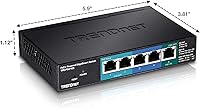
The input port is how the switch receives both its data connection and its power from your existing PoE+ infrastructure. The two output ports are where you connect your end devices — IP cameras, VoIP phones, or similar — and the switch passes PoE power to them from its 18W budget. The remaining two ports are standard gigabit only, meaning they carry data but cannot power PoE devices.

It depends entirely on how much power each camera draws. The total PoE output budget is 18W shared across both PoE ports, so if each camera pulls around 7W to 8W, you are right at the limit. Check the PoE power consumption listed in your camera's spec sheet before assuming it will work — cameras that draw 10W or more each will exceed the budget and may fail to initialize or drop out intermittently.

Standard PoE (802.3af) will power the switch itself, but in that mode the total PoE output budget drops from 18W down to 8W. For most camera setups, you really want a PoE+ (802.3at) source feeding it to get the full budget. If you are unsure what your upstream device supports, check its spec sheet — it should clearly state whether it outputs PoE or PoE+.

It is genuinely approachable for someone who has never configured a managed switch before. You connect to it via a browser, log in with the default credentials, and the interface walks you through VLAN setup, QoS prioritization, and port mirroring in a fairly logical way. That said, if you need advanced features like ACLs, detailed traffic analytics, or CLI access, this is not the right tool — EdgeSmart is deliberately simplified.

Probably not reliably. PTZ cameras and enterprise-grade access points commonly draw between 12W and 25W each, which would either max out or exceed the total 18W PoE budget on its own. This PoE pass-through switch is designed for lower-power endpoints like standard fixed IP cameras and VoIP phones. For high-draw devices, you need a switch with a larger PoE budget.

The unit itself is not weatherproofed, so it cannot be exposed to rain, moisture, or direct elements. However, its wall-mount design and PoE pass-through capability make it a good fit for installation inside an outdoor enclosure or weatherproof junction box, provided the internal temperature of that enclosure stays below 104°F. In hot climates with unventilated enclosures, the thermal ceiling could become a concern in summer.

Unfortunately, no. The lifetime warranty and access to TRENDnet's U.S.-based support team are explicitly limited to customers in the U.S. and Canada. If you are purchasing from elsewhere, you would fall under whatever standard warranty terms apply in your region, which is worth confirming before you buy.

Yes, it will work straight out of the box as a basic plug-and-play gigabit switch with PoE output. The EdgeSmart features are there if you need VLAN segmentation, traffic prioritization, or other controls, but none of them are required for basic operation. Most home users who just want to extend a PoE run and add a couple of cameras will never need to open the management interface at all.

The box contains the switch itself and a quick installation guide. Mounting hardware for wall installation is included. There is no power adapter in the box because none is needed — the switch is powered over the Ethernet cable from your upstream PoE+ device. If you do not already have a PoE+ switch or injector in your setup, you will need to source one separately.

Where to Buy