Overview

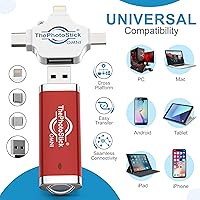
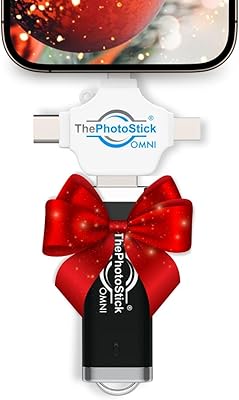
ThePhotoStick Omni 512GB USB Flash Drive is built for one specific type of person: someone who wants their photos and videos backed up without touching a cloud subscription or wrestling with file folders. The premise is simple — plug it in, run the app, and let it handle everything. That said, this backup stick does require a companion app download to function, which is worth knowing upfront. It works across Windows, Mac, iPhone, iPad, and most Android devices, which is genuinely useful. At its price point, you are paying for convenience and compatibility, not raw speed or the cheapest storage per gigabyte on the market.

Features & Benefits

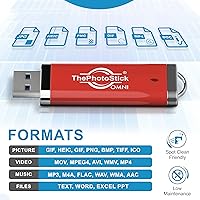
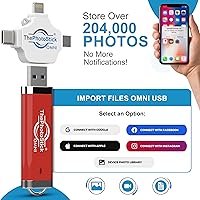
At 512GB of storage, this photo transfer device can hold somewhere north of 200,000 photos — enough for most people's entire lifetime of captured memories. The companion app automatically scans your device, finds photos and videos, and sorts them into folders without you lifting a finger beyond the initial setup. It supports a solid range of formats, including HEIC files from iPhones and MOV video clips, so you are unlikely to hit compatibility walls. Transfer speeds sit at 125 MB/s read and 80 MB/s write — adequate for casual use, though large video libraries will take a while. The stick itself is light and compact enough to toss in a bag without a second thought.

Best For

The Omni 512GB is a natural fit for less tech-savvy users — particularly older adults who want a physical, tangible backup they can hold rather than trusting files to an invisible cloud service. It also works well for anyone juggling photos across multiple devices: a work laptop, a personal iPhone, and maybe a tablet, all needing to be consolidated in one place. Travelers will appreciate how small it is. For people whose phone storage is constantly full, this photo transfer device offers a practical way to offload memories without deleting anything permanently. If you are comfortable with apps and already have a technical workflow, cheaper drives will likely serve you just as well.

User Feedback

With a 3.8-star average across 183 ratings, the reception for this backup stick is mixed but not alarming. Many buyers — especially those who describe themselves as not tech-oriented — found the setup surprisingly painless and felt genuine relief having a physical offline backup of their memories. The criticism, though, is real: some Android users ran into app glitches, and several reviewers felt the price was hard to justify given how long large transfers took. Customer support experiences appear inconsistent based on reported patterns. It is also worth noting that 183 reviews is a fairly small sample for drawing firm conclusions, so individual results may vary more than the average rating alone suggests.

Pros

  • Massive 512GB capacity handles even large family photo libraries without running out of space.
  • Works across iPhone, iPad, Android, Windows, and Mac — genuinely cross-platform without extra purchases.
  • The companion app automatically finds and organizes files, so users never have to sort folders manually.
  • No cloud subscription required — pay once and own your backup outright.
  • Supports HEIC files natively, which matters a lot for iPhone users with modern camera settings.
  • Compact and light enough to slip into a wallet or pocket for travel.
  • Covers a wide range of file formats including photos, GIFs, and common video types.
  • Setup is straightforward enough that non-technical users report getting started without help.
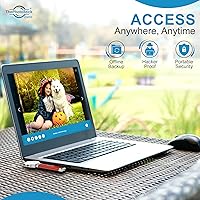
  • Physical offline backup gives a tangible sense of security that cloud-only solutions cannot match.

Cons

  • Requires a companion app download to function — it cannot be used as a standard plug-and-play drive.
  • App reliability on certain Android versions has caused frustration for a meaningful number of buyers.
  • Write speeds can make backing up a large video library a slow, patience-testing process.
  • The price is significantly higher than comparable-capacity USB drives that lack the sorting software.
  • Customer support quality appears inconsistent based on buyer-reported experiences.
  • Only 183 ratings on Amazon makes it difficult to fully trust the overall score for all use cases.
  • No native duplicate detection means some users end up with redundant copies across backup sessions.
  • The app experience on desktop feels less polished than what the price point might lead buyers to expect.
  • Not ideal for users who need to back up file types beyond standard photo and video formats.

Ratings

Our AI scoring system analyzed verified global user reviews for ThePhotoStick Omni 512GB USB Flash Drive, actively filtering out incentivized, bot-generated, and low-signal feedback to surface what real buyers actually experienced. The scores below reflect a transparent picture of both where this backup stick genuinely delivers and where it falls short — no spin, no cherry-picking. Strengths in ease of use and cross-device compatibility are weighed honestly against recurring pain points around app reliability, transfer speed, and price-to-value perception.

Ease of Setup
81%
19%
For the target audience — particularly older adults and non-technical users — the initial setup process earned consistent praise. Downloading the app, plugging in the stick, and watching it scan automatically felt manageable even for buyers who described themselves as not comfortable with technology.
Users who expected a true plug-and-play experience without any software were caught off guard by the mandatory app installation. A small but vocal group found the app onboarding unclear, especially on Android devices where permission prompts varied by manufacturer.
Cross-Device Compatibility
76%
24%
The ability to back up files from an iPhone, then plug the same stick into a Windows laptop or Mac without buying extra accessories was a genuine selling point for multi-device households. Buyers managing photos across three or four different gadgets found real value in having one physical solution.
Android compatibility was the weak link — app behavior varied noticeably across Android brands and versions, with some users on Android 10 and 11 reporting connection failures or incomplete scans. iOS support was considerably more consistent by comparison.
Transfer Speed
58%
42%
For smaller photo libraries — a few hundred JPEG files from a phone — the transfer process completed quickly enough that most casual users did not raise concerns. The 125 MB/s read speed also makes retrieving individual files reasonably fast.
Backing up a large library of 4K videos or several years of HEIC photos from an iPhone took significantly longer than buyers anticipated, given the price point. Several reviewers noted that comparable-priced external SSDs move data dramatically faster, making the 80 MB/s write speed feel like a meaningful compromise.
App Reliability
61%
39%
When the app worked without issues — which was the experience for many iPhone and Mac users — it did exactly what it promised: scanned, organized, and backed up files without requiring manual input. The automatic folder structure was particularly appreciated by users who had never organized a photo library before.
App crashes, stalled scans, and unexpected disconnections during backup were among the most frequently cited frustrations in negative reviews. Android users disproportionately reported these issues, and a subset of buyers noted that restarting the backup process from scratch after a crash was time-consuming and discouraging.
Storage Capacity
91%
At 512GB, the Omni offers enough space that the overwhelming majority of users will never come close to filling it with personal photos and videos. For a family consolidating decades of digital memories from multiple devices, this amount of headroom is genuinely reassuring.
The only capacity-related complaint that surfaced was from professional photographers or videographers who work with RAW files or large video formats — for that use case, even 512GB can fill faster than expected, and the drive is not marketed toward that audience anyway.
File Format Support
83%
Support for HEIC — the default format on modern iPhones — was a relief for many buyers who had previously struggled with format incompatibility on other drives. GIF and MOV support also meant that older media from various devices transferred without conversion steps.
Users who work with RAW image formats from dedicated cameras, or who shoot in less common video codecs, found the supported format list narrower than expected. The backup stick is clearly optimized for smartphone media, not professional camera output.
Build Quality & Portability
74%
26%
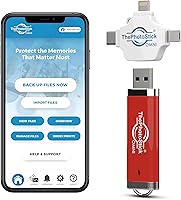
The physical drive is light, slim, and genuinely pocketable — several buyers specifically mentioned that it was small enough to attach to a keychain or keep in a travel wallet without adding bulk. The red color also made it easy to locate quickly in a bag.
The plastic housing felt less premium to some buyers than the price might suggest, with a few noting that the connector cap fit loosely. For a device meant to safeguard irreplaceable memories, a more durable or rugged casing would have been reassuring.
Automatic File Organization
69%
31%
The automatic folder sorting was a standout feature for users who had no interest in manually managing file directories. Having photos sorted by device and date without any effort made browsing the backup feel intuitive, especially for first-time users.
Duplicate detection was inconsistent for a notable portion of users — some reported ending up with multiple copies of the same image after running backups on successive days. This created confusion and required manual cleanup, which defeated the purpose of the automation.
Value for Money
53%
47%
For users who genuinely need the convenience of cross-device backup without any technical configuration, and who truly value a no-subscription model, the price can be rationalized as a one-time investment in peace of mind rather than a recurring cloud storage fee.
A significant portion of buyers felt the premium over standard USB flash drives was hard to justify once they realized the core hardware is not dramatically different from cheaper alternatives. Tech-savvy reviewers in particular noted that the app software does not add enough value to close that gap convincingly.
Customer Support
57%
43%
Some buyers who contacted support reported positive experiences, particularly when issues were straightforward — like being walked through reinstalling the app or reconnecting a device. Positive resolutions tended to involve patient step-by-step guidance.
A recurring thread in negative reviews involved slow response times and unresolved complaints, especially for buyers experiencing persistent app failures on Android. Several users felt the support team was not equipped to handle more complex device-specific issues, leaving them with a non-functional product and little recourse.
Privacy & Security
48%
52%
As an offline, physical storage device, the backup stick keeps files entirely off third-party cloud servers — a meaningful advantage for users who are specifically worried about data breaches or unauthorized cloud access to personal photos.
The drive offers no built-in encryption or password protection, meaning anyone who gets physical access to it can browse its contents freely. At this price tier, at least optional PIN or encryption support would be a reasonable expectation, and its absence was flagged by privacy-conscious buyers.
Subscription-Free Model
88%
The one-time purchase model resonated strongly with buyers who have grown frustrated with ongoing cloud storage fees. Knowing there are no renewal costs, no storage tier upgrades to purchase, and no account to manage was frequently cited as a primary reason for choosing this over cloud-based alternatives.
A few buyers noted that the lack of any cloud redundancy means that if the physical drive is lost, stolen, or damaged, the backup is gone entirely — making the subscription-free model a double-edged sword for those who do not maintain a secondary copy.
Multiport Adapter Usability
66%
34%
Having the adapters included in the box rather than sold separately was appreciated, particularly by buyers who did not want to research third-party accessories. The ability to switch between USB-A and mobile connectors without additional purchases made the out-of-box experience feel more complete.
The adapter connections felt less secure to some users than a purpose-built mobile drive would, with occasional reports of the drive disconnecting mid-transfer when the phone was moved. A more integrated connector design would reduce this friction for mobile-first use cases.

Suitable for:

ThePhotoStick Omni 512GB USB Flash Drive is best suited for people who want a no-fuss, subscription-free way to back up their photos and videos without having to understand file systems or cloud storage settings. It is a particularly strong fit for older adults or less tech-savvy users who find services like Google Photos or iCloud confusing, intimidating, or simply untrustworthy. If your household has photos scattered across an iPhone, an Android tablet, and a Windows laptop, this backup stick offers a rare single-device solution to consolidate all of it. Travelers who want an offline archive they can carry in a pocket — without paying monthly fees — will find the compact form factor genuinely practical. It also suits anyone who has experienced data loss before and wants the peace of mind that comes from holding a physical backup in their hands.
Not suitable for:

Buyers who are comfortable managing their own files, already use a cloud backup service they trust, or simply need fast raw storage should look elsewhere before committing to the Omni 512GB. ThePhotoStick Omni 512GB USB Flash Drive carries a significant price premium over standard USB drives of equivalent capacity, and if you do not need the automatic sorting software, that premium is hard to justify. The mandatory app requirement is also a real friction point — this device does not function as a normal drag-and-drop drive out of the box, which may frustrate users who expected something simpler. Android users in particular should be cautious, as app reliability issues on certain Android versions are a recurring complaint among buyers. Power users who transfer large video libraries regularly may also find the write speeds underwhelming compared to faster external SSDs in a similar price range.

Specifications

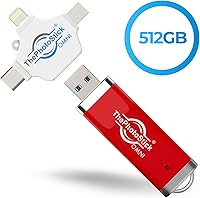
  • Storage Capacity: The drive offers 512GB of flash storage, enough to hold roughly 200,000 average-sized photos or several thousand video clips.
  • Read Speed: Rated read speed is 125 MB/s, which is adequate for viewing or copying files back to a computer without significant wait times.
  • Write Speed: Write speed is rated at 80 MB/s, meaning large transfers — especially video-heavy backups — will take noticeably longer than with a high-performance SSD.
  • Interface: The device uses a USB Type-A connector as its primary interface, with included multiport adapters for connecting to Lightning and USB-C devices.
  • Compatible OS: Supported operating systems include Android 8.0 and later, iOS and iPadOS 13.0 and later, Windows 7 SP1 and later, and Mac OS X 10.13 and later.
  • File Formats: Supported file types include JPEG, HEIC, PNG, GIF, MOV, and MPEG4, along with a broader range of additional formats recognized by the companion app.
  • Dimensions: The drive measures 4″ in length, 0.5″ in width, and 0.1″ in depth, making it slim enough to sit flat in a pocket or small bag compartment.
  • Weight: At 0.634 ounces, the device is light enough that most users will not notice it in a bag or jacket pocket during daily use.
  • Flash Memory Type: The drive uses USB flash memory — solid-state storage with no moving parts, which reduces the risk of mechanical failure during transport.
  • Special Features: The device includes a dual USB connector design and is built to be lightweight, prioritizing broad compatibility and portability over raw transfer performance.
  • Software Requirement: A companion app must be downloaded and installed on each device before the backup process can begin; the drive does not function as a standard drag-and-drop storage device without it.
  • Color: The device is finished in red, making it easy to distinguish from generic black or silver drives in a bag or drawer.
  • Device Compatibility: The backup stick is designed to work with PC and Mac computers, iPhones and iPads, and most Android smartphones and tablets sold in recent years.
  • Amazon Rating: The product holds a 3.8 out of 5 star rating based on 183 customer ratings on Amazon at the time of this review.
  • Market Rank: It ranks at number 361 in the USB Flash Drives category on Amazon, placing it in the mid-tier visibility range for its product segment.

Related Reviews

ThePhotoStick Omni 128GB USB Flash Drive
72%
88%
Multi-Device Compatibility
63%
Ease of Setup
54%
Transfer Speed
71%
Storage Capacity
61%
Build Quality & Durability
More
Corsair Flash Voyager GTX 512GB USB 3.1 Flash Drive
88%
94%
Performance
91%
Build Quality
82%
Value for Money
89%
Portability
96%
Transfer Speed
More
AOIRHLA 512GB USB Flash Drive
87%
87%
Performance
89%
Data Transfer Speed
82%
Compatibility
91%
Encryption and Security
95%
Portability and Size
More
SanDisk 512GB Creator USB-C Flash Drive
86%
93%
Performance & Speed
84%
Value for Money
88%
Portability & Design
85%
Software/Software Bundles
90%
Compatibility & Connectivity
More
Samsung Type-C USB Flash Drive 512GB
88%
91%
Performance
94%
Build Quality & Durability
93%
Portability
77%
Compatibility
89%
Ease of Use
More
GARMESE U54 512GB USB-C Flash Drive
82%
83%
Transfer Speed
88%
Build Quality
91%
Dual Connector Design
86%
Compatibility
89%
Storage Capacity
More
SSK 512GB USB 3.2 Gen 2 Flash Drive
84%
91%
Performance & Speed
88%
Build Quality & Durability
95%
Ease of Use (Plug-and-Play)
87%
Compatibility (USB-A & USB-C)
80%
Portability & Size
More
Samsung FIT Plus USB 3.2 Flash Drive 512GB
85%
89%
Performance & Speed
93%
Build Quality & Durability
91%
Portability & Design
85%
Compatibility
88%
Ease of Use
More
PNY Elite-X 512GB USB Flash Drive
82%
88%
Read Speed Performance
71%
Write Speed Performance
93%
Build Quality
58%
Cap & Connector Design
79%
Compatibility
More
PNY 512GB PRO Elite USB 3.1 Flash Drive
86%
92%
Value for Money
88%
Performance
91%
Portability
89%
Read Speed
85%
Write Speed
More
fanxiang FF952 512GB USB Flash Drive
80%
83%
Transfer Speed
88%
Build Quality
91%
Dual Connector Design
74%
iPhone Compatibility
79%
Heat Management
More

FAQ

Yes, the companion app is required before the backup process will work. Without it, the drive will not automatically scan or organize your files. The good news is that setup is designed to be straightforward — you download the app, connect the stick, and follow the on-screen prompts from there.

It does work with iPhones, and the necessary adapter is included in the box. You will use the Lightning adapter for older iPhones or USB-C for newer models. Just make sure your iPhone is running iOS 13.0 or later, which covers the vast majority of devices still in active use.

Yes, that is one of the more practical things about the Omni 512GB — you can use it across different operating systems without buying separate accessories. You will need to install the companion app on each device separately, but the same physical drive carries your files between them.

It depends heavily on how many files you have and which device you are backing up from. The write speed of 80 MB/s is decent but not blazing fast, so a library with thousands of high-resolution photos or long videos can take a while — potentially an hour or more for very large collections. It is worth doing the first backup when you can leave it running undisturbed.

The app is designed to detect and skip files it has already backed up in previous sessions, so you should not end up with endless duplicate copies piling up over time. That said, some users have reported occasional inconsistencies with this feature, so it is worth spot-checking your backup folder after the first few uses.

ThePhotoStick Omni 512GB USB Flash Drive does not offer built-in encryption or password protection out of the box, which is worth knowing if privacy is a concern. If someone else plugs it into a computer, they could potentially access your files through standard file browsing tools. For most home users this is not a pressing issue, but it is something to consider if you store sensitive images.
No, the app backs up your files but does not delete them from your device automatically. Your originals stay exactly where they are. If you want to free up phone storage afterward, you would need to delete the files from your phone manually after confirming the backup completed successfully.

As long as your Android phone is running Android 8.0 or later, it is officially supported. If your phone is older than that, compatibility is not guaranteed and you may run into issues with the app. Even within supported versions, some users have reported occasional app glitches on Android, so results can vary depending on the specific device and software version.

The companion app is focused on photo and video formats, but the underlying drive is standard USB flash storage. You can manually drag and drop other file types onto it through your computer's file explorer if you bypass the app entirely. Just keep in mind that those files will not be auto-sorted or managed by the software.

There is no subscription or recurring fee — you pay once and own the device outright. That is one of the main reasons people choose this over cloud backup services, which typically charge monthly or annually. All storage and functionality is built into the physical drive itself.