Overview

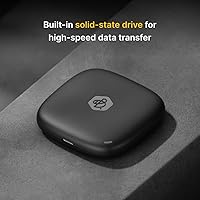
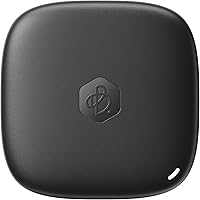
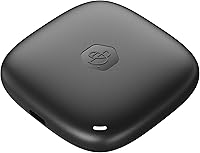
The Synology BeeDrive 2TB is Synology's first consumer-focused personal backup device, and it takes a notably different approach from the crowded external SSD market. Rather than offering raw storage alone, this wireless backup drive acts as a personal backup hub — pulling files from your PC or Mac, photos from your iPhone or Android, and content from SD cards or iCloud Photos into one place. It weighs under 1.6 ounces and fits in a shirt pocket, making it genuinely travel-friendly. No subscription is required, and all processing stays local — nothing leaves the device for a remote server, which sets it apart from most modern backup solutions.
Features & Benefits

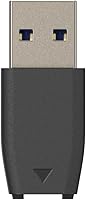
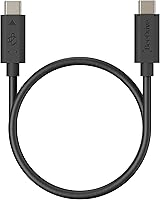
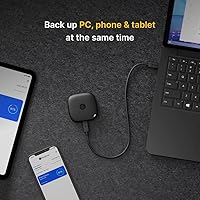
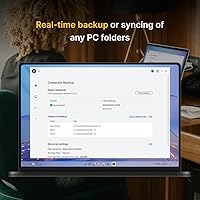
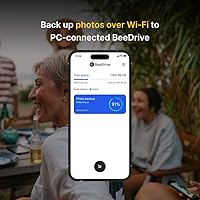
Plug the BeeDrive into your computer via USB 3.2 and the desktop app takes over, automatically syncing whichever folders you specify. Disconnect and it keeps those files accessible wirelessly from your phone. The BeeDrive app handles iOS and Android photo backups in the background, and it can pull directly from iCloud Photos too — useful for anyone trying to break free from Apple's storage tiers. The standout feature is Deep Search, an on-device AI that lets you find files by typing a description, a date range, a location, or even text visible in an image using built-in OCR. Both USB-A and USB-C cables are supported, and Wi-Fi transfer works without needing a router.

Best For

This portable SSD hub makes the most sense for people who are genuinely fed up paying monthly cloud fees, but still want something smarter than a basic external drive. If you split your time between iPhone and Android, or regularly move photos between a phone and a Windows or Mac laptop, the cross-platform support is genuinely useful rather than an afterthought. Travel photographers who need a compact, self-contained backup system — one that doesn't rely on hotel Wi-Fi to reach a remote server — will appreciate the offline access. It's less ideal for users who need raw transfer speeds, as wireless sync is noticeably slower than a direct USB connection. Privacy-focused users, though, will feel right at home.

User Feedback

Buyers consistently highlight how easy the initial setup is, with most describing the app experience as clean and intuitive compared to competing backup tools. The recurring criticism, though, is Wi-Fi transfer speed — users copying large photo libraries over wireless report it can be slow enough to be frustrating, especially if they expected something closer to wired SSD performance. A few owners were surprised how quickly 2TB fills up when pulling in years' worth of phone photos across multiple devices. Deep Search gets genuine praise, though some reviewers flag occasional errors in image recognition. Compatibility notes appear too: the drive excludes Windows 10 ARM and older Android versions, so check your OS before buying.

Pros

  • No monthly subscription required — one purchase covers all features indefinitely.
  • Deep Search finds files by description, visible text, or location without sending data to any server.
  • The BeeDrive app is consistently praised for its clean setup experience across iOS and Android.
  • Weighing just 43 grams, this portable SSD hub genuinely disappears in a pocket or travel bag.
  • Supports USB-A, USB-C, and Wi-Fi — works with virtually any laptop or phone combination.
  • Direct iCloud Photos import makes leaving Apple's paid storage tiers a realistic option.
  • SD card and external drive imports make it practical for photographers shooting in the field.
  • Cross-platform support covers Windows, macOS, iOS, and Android from a single device.
  • All AI processing runs locally, so sensitive files never leave the physical drive.
  • Wired USB 3.2 performance is solid for fast folder backups when speed matters.

Cons

  • Wireless transfer speeds are slow enough to be frustrating when moving large photo libraries.
  • 2TB fills faster than expected for users consolidating multi-year archives from several devices.
  • Deep Search image recognition produces occasional misidentification, making it unreliable as a sole organization system.
  • Windows 10 ARM and Windows Server editions are fully excluded, which surprises some business users mid-setup.
  • No higher-capacity variant exists, limiting long-term viability for heavy video shooters or multi-user households.
  • The app lacks advanced scheduling or versioning controls that power users would expect at this price tier.
  • No carrying case is included, leaving the drive unprotected during travel by default.
  • If the physical drive is lost or damaged, there is no cloud fallback or remote recovery option.
  • Some Android 10 users report intermittent sync issues that require restarting the device to resolve.
  • macOS 12 minimum excludes older Apple hardware that would otherwise be a natural pairing.

Ratings

The Synology BeeDrive 2TB earned its scores after our AI system processed verified buyer reviews from multiple global markets, actively filtering out incentivized, bot-generated, and single-use accounts to surface genuine user sentiment. The result reflects what real owners experience week-to-week — not just at unboxing — covering everything from daily wireless syncing to long-term reliability. Both the strengths that make this portable SSD hub stand out and the friction points that frustrate certain users are represented transparently in the breakdown below.
Ease of Setup
88%
Most buyers report getting the BeeDrive app installed and their first backup running within minutes, which is unusual for a device with this many features. The app walks through folder selection and mobile pairing clearly, and users switching from iCloud found the initial migration surprisingly straightforward.
A small number of users on older Windows 10 builds ran into compatibility walls before realizing ARM and Server editions are excluded. The setup experience is smooth when your system qualifies, but discovering you don't at step three is frustrating.
Wireless Transfer Speed
58%
42%
For casual photo syncing — a few hundred shots from a weekend trip — wireless transfer is genuinely convenient and works without needing a home router. Users who treat it as a background process rather than an active transfer tool tend to be satisfied with the speed.
Anyone moving large libraries wirelessly will hit a wall. Reviewers consolidating years of phone photos report multi-hour transfer sessions that feel sluggish compared to what a USB 3.2 wired connection can deliver. This is the most consistently cited frustration across verified buyer feedback.
Wired Transfer Performance
83%
Connected via USB 3.2, the drive performs solidly as a standard external SSD, handling folder backups and file access at speeds that match buyer expectations for the category. Users who plug in during a work session and let it sync in the background report no noticeable slowdown.
The wired speed advantage over wireless is significant enough that some buyers feel the wireless feature is better suited for light daily use than heavy data movement. If fast wired transfers are the primary need, there are cheaper drives that deliver similar performance.
App Experience
84%
The BeeDrive app on both iOS and Android receives consistent praise for its clean layout and the absence of the bloat common in competitor backup apps. Browsing, downloading, and sharing files remotely feels fluid, and the interface does not overwhelm less technical users.
A subset of Android users on version 10 report occasional sync hiccups, and a few reviewers mention the desktop app could offer more granular control over backup scheduling. It is polished for most users but not quite feature-complete for power users.
Deep Search AI Accuracy
71%
29%
When Deep Search works well, it genuinely impresses — finding a scanned receipt by typing visible text, or locating a photo by describing the scene, feels practical rather than gimmicky. The fact that all of this runs locally without sending files to a cloud server adds real value for privacy-minded users.
Occasional misidentification in image recognition is a documented issue in buyer reviews, particularly with visually similar photos or handwritten text. The feature is useful but not reliable enough to replace a manually organized folder structure entirely.
Privacy & Data Security
93%
Local-only AI processing is not a marketing checkbox here — no file content, metadata, or search query leaves the device. For users who have grown wary of cloud services after years of storage fee hikes and data policy changes, this is a concrete and meaningful distinction.
The privacy architecture is strong, but it also means there is no remote recovery option if the physical drive is lost or damaged. Users who want both privacy and redundancy will need to build their own secondary backup habit, which the device does not prompt or automate.
Build Quality & Portability
86%
At 43 grams and roughly the footprint of a large postage stamp, the BeeDrive slips into a jacket pocket without a second thought. The matte black casing feels solid for its size, and frequent travelers consistently describe it as one of the least intrusive backup devices they have carried.
The compact design means the body can feel slightly warm during extended USB transfers, which some users find mildly concerning even though it stays within safe operating ranges. A carrying pouch is not included, so protection during travel is the owner's responsibility.
Storage Capacity
74%
26%
Two terabytes is comfortably enough for most individual users consolidating a smartphone photo library alongside PC document backups. Buyers coming from 200GB iCloud plans in particular find the headroom generous in the early months of ownership.
Households with multiple heavy users or those pulling in photos from several years across multiple devices report the 2TB filling faster than anticipated. There is no higher-capacity variant currently available, which limits the device's longevity for prolific shooters or video creators.
Cross-Platform Compatibility
79%
21%
The combination of Windows, macOS, iOS, and Android support in a single device is genuinely useful for mixed-device households. Users who alternate between an iPhone and an Android phone, or between a Mac at home and a Windows machine at work, appreciate not needing separate solutions.
The exclusion of Windows 10 ARM and Windows Server editions is a real limitation that catches some business users off guard. macOS support starts at version 12, which similarly locks out older Mac hardware that might otherwise be a good pairing for this type of device.
iCloud Migration Experience
77%
23%
Buyers specifically purchasing the BeeDrive as a way to exit Apple's paid iCloud tiers report that the direct iCloud Photos import feature works reliably and removes most of the manual effort from the transition. For this specific use case, it delivers on its promise.
The migration works well for photos but is not a wholesale iCloud replacement — Notes, contacts, app data, and other iCloud-synced content are outside scope. Users expecting a complete cloud-exit tool may find the photo-focused migration only solves part of their problem.
Value for Money
72%
28%
Viewed as a one-time purchase replacing an ongoing cloud subscription, the long-term value proposition is strong, particularly for users paying for 1TB or 2TB cloud plans. The combination of SSD storage and local AI features in one device is genuinely hard to find at any price.
The upfront cost sits firmly in premium territory, and buyers who primarily need basic external storage will find faster, cheaper alternatives on the market. The value calculus really only tips in its favor if the wireless backup and AI search features are actively used.
Reliability Over Time
76%
24%
Early adopters who have owned the BeeDrive since its 2023 launch generally report stable operation with no major firmware failures, and Synology's track record with NAS firmware updates gives some confidence in long-term software support for the platform.
The sample size of long-term reviews is still relatively limited given the product's mid-2023 release date, so durability data beyond two years is thin. A handful of users mention occasional app disconnects that required restarting the device to resolve.
SD Card & External Drive Import
81%
19%
The ability to pull photos directly from an SD card or a connected external drive without routing through a computer is a practical time-saver for photographers in the field. Several travel photographers specifically call this out as the feature that justified the purchase.
Import speeds from SD cards via USB are dependent on the card's read speed and the connection type, and a few users note the process is less intuitive than the phone backup workflow. The feature works but lacks the same level of polish as the core mobile sync experience.

Suitable for:

The Synology BeeDrive 2TB is built for people who have grown tired of paying recurring cloud storage fees but still want a smart, low-effort backup system rather than a bare external drive. It fits naturally into the lives of mixed-device users — someone who shoots on an iPhone, edits on a Windows laptop, and occasionally borrows a Mac — because the cross-platform support genuinely covers that kind of fragmented setup without requiring separate tools. Privacy-conscious users who want AI-assisted file search without feeding their data to a cloud service will find the local processing architecture more than a marketing talking point; it is how the device actually works. Travel photographers and remote workers will appreciate the self-contained nature of this portable SSD hub: plug it in at a hotel desk to run a fast USB backup, then browse files wirelessly from a phone on the go without needing an internet connection. It also makes strong practical sense for anyone actively trying to migrate away from iCloud Photos, since the direct import feature handles the heavy lifting of that transition reliably.
Not suitable for:

If your primary need is raw transfer speed, the Synology BeeDrive 2TB will likely leave you underwhelmed — wireless transfers are noticeably slow when moving large libraries, and buyers who compare it against a standard USB 3.2 external SSD on wired speed alone will find cheaper alternatives that outperform it on that single metric. It is also not the right fit for households where multiple people need to back up simultaneously, since the 2TB ceiling can fill surprisingly fast when consolidating years of photos from several smartphones. Power users who want granular backup scheduling, versioning controls, or NAS-level configuration options will find the app's feature set too limited for their needs. Anyone running Windows 10 on ARM, an older version of macOS, or Android below version 10 should check compatibility carefully before purchasing, as these are hard exclusions rather than minor edge cases. Finally, users expecting a full iCloud replacement — one that covers contacts, notes, and app data alongside photos — will need to manage those expectations, because the BeeDrive's sync scope is focused primarily on files and photos.
Specifications

  • Storage Capacity: The drive provides 2TB of solid-state storage for backing up files, photos, and documents from multiple devices.
  • Drive Type: Uses NAND flash SSD technology rather than a spinning hard disk, offering faster access times and improved resistance to physical shock.
  • Dimensions: The unit measures 2.56 x 0.59 x 2.56 inches, making it compact enough to carry in a shirt pocket or small travel pouch.
  • Weight: At 1.52 oz (43g), the BeeDrive is among the lightest backup devices in its storage class.
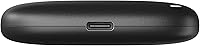
  • USB Interface: Connects via USB 3.2 for wired transfers, with both USB-A and USB-C cable compatibility supported out of the box.
  • Wireless Connectivity: Built-in Wi-Fi allows the drive to function as a local wireless access point for mobile devices without requiring a home router.
  • PC Compatibility: Supports Windows 10 64-bit (build 1809 and later) and Windows 11; Windows 10 ARM and Windows Server editions are explicitly excluded.
  • Mac Compatibility: Compatible with macOS 12 (Monterey) and newer; older macOS versions are not supported by the BeeDrive desktop software.
  • iOS Support: The BeeDrive app requires iOS 15 or later for full photo sync and wireless file access functionality on iPhone and iPad.
  • Android Support: Android 10 or later is required for the BeeDrive mobile app; devices running older Android versions cannot connect to the drive.
  • AI Search Features: Deep Search uses on-device AI to locate files by content description, visible text via OCR, image recognition, date, and GPS location metadata.
  • AI Processing: All AI indexing and search operations run entirely on the BeeDrive hardware with no data transmitted to external servers or cloud services.
  • Backup Sources: The drive can ingest content from PC folders, Mac folders, iCloud Photos libraries, iOS and Android camera rolls, SD cards, and connected external drives.
  • Mobile App: The BeeDrive app is available free of charge on both the Apple App Store and Google Play Store for remote browsing, downloading, and sharing.
  • Subscription Requirement: No recurring subscription or cloud account is required; all features are included with the one-time hardware purchase.
  • Color & Finish: Available in a single matte black finish with no other color variants currently offered.
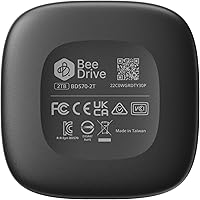
  • Model Number: The official model designation is BDS70-2T, as assigned by Synology for this specific 2TB configuration.
  • Release Date: The product was first made available for purchase in June 2023, marking Synology's entry into the consumer personal backup device market.

Related Reviews

Alienware Aurora R16 Gaming Desktop, Intel Core Ultra 9, NVIDIA RTX 5080, 64GB RAM, 2TB SSD + 2TB HDD
87%
94%
Performance
92%
Cooling System
93%
Graphics/Visuals
88%
Build Quality
80%
Value for Money
More
Synology DS220j NAS
Synology DS220j NAS
87%
88%
Performance
95%
Ease of Setup
85%
Storage Expansion
91%
Data Protection Features
87%
Build Quality
More
SanDisk 2TB Portable SSD
86%
94%
Performance
89%
Portability
90%
Build Quality
88%
Compatibility
85%
Ease of Use
More
Yottamaster S25PRO 2TB SSD
88%
88%
Performance
90%
Durability
92%
Value for Money
85%
Read Speed
76%
Write Speed
More
Kingston XS1000 2TB SSD
88%
94%
Performance
90%
Portability
93%
Speed (Read/Write)
88%
Build Quality
91%
Ease of Use (Plug & Play)
More
Lexar 2TB NM710 SSD
Lexar 2TB NM710 SSD
88%
94%
Performance
92%
Speed (Read/Write)
88%
Reliability & Durability
81%
Installation & Setup
90%
Value for Money
More
ADATA HD710 Pro 2TB
ADATA HD710 Pro 2TB
87%
93%
Durability & Protection
85%
Performance & Speed
78%
Portability & Size
90%
Waterproof Features
88%
Shock Resistance
More
Crucial BX500 2TB SSD
85%
86%
Performance
91%
Value for Money
89%
Speed (Boot-Up and File Loading)
92%
Energy Efficiency
75%
Durability (Long-Term Use)
More
Angelbird AtomX SSDmini 2TB
87%
94%
Performance in 8K Workflows
98%
Compatibility with Atomos Devices
92%
Build Quality & Durability
75%
Price Relative to Performance
89%
Ease of Use & Setup
More
INLAND Platinum 2TB SSD
89%
87%
Performance
92%
Installation Ease
89%
Read Speed
85%
Write Speed
91%
Value for Money
More

FAQ

No, and that is one of its more practical advantages. The drive creates its own local Wi-Fi connection, so your phone can back up photos and you can browse files wirelessly even in a location with no internet access, like a remote cabin or a flight layover.

It does not. The Synology BeeDrive 2TB acts as its own Wi-Fi hotspot, so your phone connects directly to the drive through the BeeDrive app. You do not need to be on your home network or any network at all for the wireless features to function.

For routine photo backups from your phone — say, a few days' worth of shots — it works fine in the background without much fuss. Where users run into frustration is when trying to move large libraries of thousands of photos or videos in one session; that process can take significantly longer wirelessly than it would over a USB connection. If speed is a priority, plugging in via USB is always the better option.

For photos and files, yes — many buyers do exactly this. The drive can import your existing iCloud Photos library directly and then take over future backups from your iPhone. Keep in mind it does not sync iCloud Notes, Contacts, Keychain, or app-specific data, so it covers the photo and file side of iCloud but not everything cloud storage touches.

It is genuinely useful for certain tasks — finding a specific photo by describing the scene, or locating a scanned document by reading text visible in the image. That said, image recognition occasionally misidentifies similar-looking photos, so it is best thought of as a helpful tool rather than a flawless filing system. Most users find it earns its keep for the moments when you cannot remember what a file was named or where you saved it.

Both platforms are supported through the same BeeDrive app, so if you have an iPhone and your partner uses Android, both devices can back up to the same drive. The app handles the cross-platform sync without requiring any special configuration on either side.

For PC backups, the drive needs to be connected via USB to sync, so it works best if you plug it in periodically or leave it docked at your desk during work hours. The desktop app handles the backup automatically once connected, so there is no manual step beyond plugging in. Wireless access to files you have already backed up works without a USB connection.

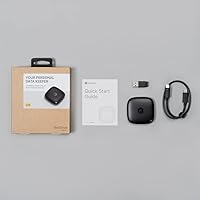
Both USB-A and USB-C connectivity are supported, and Synology includes cables for both connection types in the box, so you should be covered regardless of which port your laptop uses.

For a single user with a few years of phone photos and standard document backups, 2TB is typically comfortable. Where it gets tighter is when multiple people are backing up to the same drive, or when consolidating very large video libraries alongside photos. There is currently only one capacity option available, so if you anticipate needing more than 2TB, that is worth factoring into your decision.

Since all data is stored locally on the hardware with no cloud backup running in parallel, losing the physical drive means losing the files on it unless you have a separate backup copy elsewhere. This wireless backup drive handles the role of being a primary backup destination, but it does not automatically create a secondary copy of itself — that redundancy is something you would need to set up manually, such as periodically copying critical files to another drive.