Overview

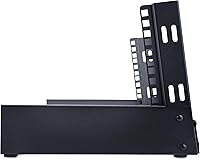
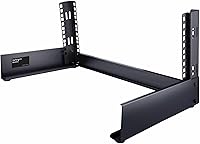
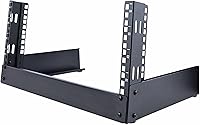
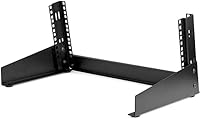
The StarTech RK4OD 4U 2-Post Desktop Server Rack is built for the kind of setup most IT guides overlook — the backroom shelf, the studio workbench, the small office corner with no dedicated wiring closet in sight. It uses a two-post open-frame design, which means your gear stays reachable from both sides without fighting cabinet doors. The rack meets EIA/ECA-310-E standards and fits standard 19″ rackmount equipment, so compatibility is rarely a concern. At under 4 lbs, it is light enough to reposition without help, and it ships with cage nuts and screws already included — a small but genuinely useful touch that saves an extra parts order.
Features & Benefits

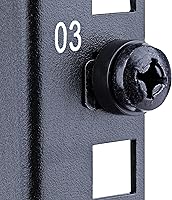
The open-frame construction is probably the most practical aspect of this compact server rack — no panels trapping heat, no doors to wrestle off when you need quick access. The two-post layout keeps cable routing cleaner than a four-post alternative, and the U-height markings on the rails make device placement straightforward. It handles around 66 lbs of gear, which is plenty for a switch, router, and patch panel sharing the same frame. The footprint sits at roughly 11.5″ deep and 9.3″ tall — compact enough for a standard workbench without crowding everything else. Alloy steel construction delivers the rigidity you need without tipping the weight scale.

Best For

This desktop rack is a natural fit for home lab setups where you want a switch, router, and maybe a small NAS organized neatly without converting a closet into a proper server room. It works equally well in small offices or recording studios that have a handful of rack-mount devices but no real wiring infrastructure to speak of. Because equipment slides in and out so easily, it suits test environments where configurations change regularly. AV installers covering multiple sites also value how light and portable it is between jobs. If budget and space are both tight, the StarTech open-frame rack handles that trade-off without much compromise.

User Feedback

Buyers consistently describe this as easy to assemble, and several mention the instructions are clearer than what you typically get with rack hardware. Build quality earns solid marks given the price point. The most common frustration, though, is capacity — four rack units disappears quickly once you mount a switch and a patch panel, and more than a few reviewers wished for a 6U or 8U version. Cable management is essentially left to you; the open frame provides no built-in routing guides, so velcro straps and zip ties become necessary. The rubber feet also drew criticism for sliding on smooth or glass surfaces. That said, a 4.6-star rating across hundreds of verified buyers reflects a product that largely does what it promises.

Pros

  • Assembly takes under 20 minutes and the instructions are genuinely clear, even for first-timers.
  • Cage nuts and mounting screws are included, so you can start racking gear straight out of the box.
  • The open-frame build means heat is never trapped — switches and routers run noticeably cooler than in enclosed cabinets.
  • At under 4 lbs, this compact server rack is light enough to carry loaded to a remote site without help.
  • U-height markings on the rails make it easy to plan device placement before you commit to mounting anything.
  • Standard 19-inch EIA/ECA-310-E compliance means virtually all common rackmount gear fits without adapters.
  • The two-post format keeps both the front and back of every device fully accessible at all times.
  • Build quality consistently surprises buyers given the price — the alloy steel frame does not flex or wobble under a typical home lab load.
  • The small footprint fits on most workbenches and shelves without reorganizing the entire workspace around it.

Cons

  • Four rack units fills up faster than most buyers anticipate — plan your device list carefully before purchasing.
  • No cage nut insertion tool is included, which makes seating the hardware awkward without one.
  • Cable management is entirely DIY — expect to buy velcro straps or zip ties separately to keep things tidy.
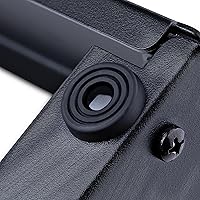
  • The rubber feet provide poor grip on smooth or glass surfaces, causing the rack to shift when cables are adjusted.
  • The rail finish scratches during assembly, particularly around cage nut mounting points, and shows wear over time.
  • Two-post mounting is not suitable for deep or heavy chassis that require four-point support.
  • No blanking panels are included, leaving open rack units exposed to dust in less-than-clean environments.
  • There is no taller variant in this same compact two-post desktop format, so outgrowing it means replacing it entirely.

Ratings

The StarTech RK4OD 4U 2-Post Desktop Server Rack earns a strong overall reception from verified buyers, and the scores below reflect what real users actually experienced — not marketing claims. Our AI analyzed hundreds of confirmed purchase reviews worldwide, actively filtering out incentivized, bot-generated, and low-signal feedback to surface honest patterns. Both the genuine strengths and the recurring frustrations are represented here without sugarcoating.
Build Quality
83%
Most buyers are pleasantly surprised by how solid this compact server rack feels given its lightweight alloy steel frame. It does not flex or wobble under a typical home lab load — a switch, a small router, and a patch panel sit securely without any creaking or shifting.
A handful of users point out that the finish on the rails shows scratches fairly easily during assembly, and the steel gauge is noticeably thinner than what you would find on a proper data center rack. For occasional movers it holds up fine, but heavy daily repositioning may show wear over time.
Ease of Assembly
91%
Assembly consistently draws praise across buyer reviews — most describe it as a straightforward 15-to-20-minute job with no special tools required. The included M5 cage nuts and screws cover what you need, and the instructions are clearer than the typical rack hardware documentation buyers have encountered elsewhere.
A small number of users found the cage nut installation fiddly without a proper insertion tool, which is not included. Those unfamiliar with rackmount hardware may need a few extra minutes and a bit of patience getting the nuts seated correctly in the rails.
Capacity & Scalability
61%
39%
For a targeted single-purpose deployment — say, a managed switch and a small patch panel in a studio or backroom — four rack units is enough to keep things organized and off the desk. The U-height markings make the most of the limited space by helping you plan device placement before you start mounting.
Four units fills up fast, and this is the single most common complaint across reviews. Buyers who add even one 2U device alongside two 1U units find themselves out of room almost immediately. StarTech does not currently offer a direct 6U or 8U equivalent in this same compact two-post desktop format, which forces some buyers to look elsewhere for more capacity.
Value for Money
88%
At its price point, this desktop rack is difficult to argue against for small-scale deployments. Buyers frequently note that it costs a fraction of enclosed cabinet alternatives while delivering enough structure and compliance for a proper rackmount setup in a home lab or small office.
If your needs grow beyond four units, the value calculation shifts — you end up buying a second rack or replacing this one entirely rather than expanding it. Buyers who anticipated future growth wish they had invested in a taller unit from the start.
Footprint & Space Efficiency
86%
The physical dimensions sit comfortably on a standard workbench or server shelf without dominating the surrounding space. AV installers and home lab users specifically mention that it occupies far less real estate than expected while still fitting full-width 19-inch rackmount gear without modification.
The depth, while compact for a rack, can still surprise buyers who have not measured carefully. In tighter under-desk or shelf installations, the roughly 11.5-inch depth may require some creative arrangement of surrounding cables and equipment.
Portability & Weight
89%
Weighing under 4 lbs empty, this compact server rack is genuinely easy to carry between sites or reposition on a bench. AV installers handling temporary setups report being able to move it loaded with lightweight gear without needing a second person or any special equipment.
The light weight is a double-edged quality — on smooth or glass-topped surfaces the rack can slide around more than expected, especially if cables are pulling at angles. A couple of reviewers added aftermarket non-slip pads to address this, which should arguably not be necessary out of the box.
Stability & Anti-Slip Performance
58%
42%
When placed on a textured surface like carpet, rubber matting, or a standard workbench surface, the rack sits reasonably still under normal cable tension. The frame itself is rigid enough that it does not tip or rock when devices are mounted evenly.
The factory rubber feet received consistent criticism for being too small and not providing adequate grip on smooth surfaces. Buyers on glass desks or polished benches reported the rack shifting noticeably when plugging or unplugging equipment, which is a real annoyance in daily use.
Cable Management
52%
48%
The open-frame format at least leaves all sides accessible, so running cables from the back or sides is not obstructed the way it would be in an enclosed cabinet. Buyers working with short patch cables in clean setups find the layout manageable enough.
There are no built-in cable management accessories — no D-rings, no velcro anchor points, no horizontal managers. Every buyer has to improvise with zip ties or velcro straps, and on a small four-unit frame with multiple devices, cable clutter builds up quickly. This is an area where the open-frame format offers less help than it theoretically could.
Compatibility & Standards Compliance
87%
EIA/ECA-310-E compliance means standard 19-inch rackmount gear fits without any adapter plates or creative shimming. Buyers report that switches, routers, 1U patch panels, and small UPS units all drop in correctly, which is exactly the promise a rackmount standard is supposed to deliver.
Two-post mounting is not appropriate for all rackmount gear — heavier or deeper equipment like most servers and some higher-end UPS units require four-post support. Buyers occasionally overlook this distinction and find certain devices incompatible with the two-post format regardless of brand.
Ventilation & Thermal Performance
93%
The open-frame design means there is effectively no enclosure to trap heat, which makes thermal management a non-issue for the gear this rack is designed to hold. Network switches and routers in a home lab or small office run notably cooler here than they would in an equivalent enclosed cabinet.
With no panels or blanking plates, there is also nothing stopping dust accumulation on mounted equipment. In dusty environments like workshops or older office buildings, the open frame means gear needs more frequent cleaning than it would behind cabinet doors.
Included Hardware & Accessories
79%
21%
Shipping with M5 cage nuts and screws already in the box is a genuine convenience — most buyers do not have to place a separate hardware order before getting started. The hardware quality is described as functional and appropriate for the size class.
A cage nut insertion tool is not included, and for buyers new to rack hardware, seating M5 cage nuts with just a screwdriver or bare fingers is genuinely awkward. Including even a basic tool would eliminate one of the few sticking points in what is otherwise a smooth assembly experience.
Aesthetics & Finish
74%
26%
The matte black finish looks clean and professional in a studio or office environment without drawing unwanted attention. Buyers using it in visible client-facing spaces like small broadcast studios or reception-area AV racks mention it presents reasonably well.
The coating scratches with moderate ease during assembly, particularly around the rail mounting points. Over time and with frequent device swaps, the finish around the cage nut holes tends to show wear that is visible up close, which bothers buyers who care about long-term appearance.
Documentation & Setup Guidance
82%
18%
Instructions are frequently described in reviews as clearer and more intuitive than competing products at this tier. Even buyers with no prior rack installation experience report successfully completing setup without needing to search for supplemental guidance online.
The documentation covers assembly well but says nothing about weight distribution guidance or best practices for mounting specific device types on a two-post frame. New buyers unfamiliar with how to balance loads on a two-post rack are left to figure that out independently.

Suitable for:

The StarTech RK4OD 4U 2-Post Desktop Server Rack is a smart pick for anyone who needs a proper rackmount solution without the footprint or cost of a full cabinet. Home lab enthusiasts running a managed switch, a small router, and a patch panel will find it hits the sweet spot between organized and affordable. Small offices, recording studios, and AV setups that lack a dedicated wiring closet benefit from the open-frame format — gear stays accessible, airflow is never a concern, and the whole thing sits neatly on a workbench without taking over the room. IT professionals managing remote or branch office deployments will also appreciate how light and easy it is to ship or carry to a site. If your rack needs are modest and unlikely to grow past four units in the near term, this compact server rack is genuinely hard to beat at its price point.
Not suitable for:

The StarTech RK4OD 4U 2-Post Desktop Server Rack is not the right tool if your equipment list is already pushing three or four devices and you expect to add more — four rack units disappears fast, and there is no upgrade path within this product line to a taller variant. Buyers planning to rack standard tower servers or deeper 2U gear should also be cautious, since two-post mounting is not designed for heavy or deep chassis that require four-point support. Anyone working in a dusty environment, like a workshop or industrial space, will find the open frame collects debris on mounted gear at a rate that becomes a maintenance burden. If you need built-in cable management — D-rings, velcro channels, or horizontal managers — this desktop rack offers none of that, and improvising on a small frame gets messy quickly. Finally, buyers who need the rack to sit firmly on a glass or polished surface without shifting may find the factory feet frustrating enough to be a dealbreaker.
Specifications

  • Form Factor: Two-post open-frame design with no enclosure panels, providing unrestricted front and rear access to all mounted equipment.
  • Rack Height: Accommodates 4U of rackmount equipment, following standard EIA rack unit sizing of 1.75″ per unit.
  • Rail Compatibility: Fits standard 19″ rackmount devices and is fully compliant with the EIA/ECA-310-E industry specification.
  • Dimensions: The assembled rack measures 11.5″ deep, 19.7″ wide, and 9.3″ tall, making it suitable for most workbench or desktop installations.
  • Load Capacity: Rated to support up to 66.1 lbs (30 kg) of mounted equipment under normal stationary use conditions.
  • Rack Weight: The empty rack weighs 3.81 lbs (1.73 kg), keeping it lightweight enough for easy transport and repositioning.
  • Material: Constructed from alloy steel with a matte black powder-coat finish for durability and a clean professional appearance.
  • Mounting Type: Free-standing stationary design intended for desktop or workbench placement; not designed for wall or ceiling mounting.
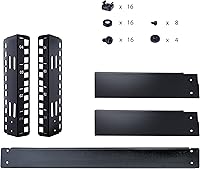
  • Included Hardware: Ships with M5 cage nuts and matching screws to support immediate device installation without requiring a separate hardware purchase.
  • U-Height Markings: Laser-etched U-height position markings on the rails help users accurately plan and align device placement before mounting.
  • Color: Available in black only; no alternative color options are offered for this model.
  • Post Configuration: Uses a two-post mounting configuration, which is appropriate for lightweight 1U and 2U networking and AV equipment.
  • Standards Compliance: Meets EIA/ECA-310-E standards for rackmount equipment sizing, ensuring broad compatibility with industry-standard 19″ devices.
  • Manufacturer: Designed and sold by StarTech.com, a Canada-based manufacturer specializing in connectivity and IT infrastructure hardware.
  • Model Number: The official manufacturer model number for this unit is RK4OD, used across StarTech documentation and support channels.
  • Availability Date: This product was first made available for purchase in February 2020 and has not been discontinued as of the latest available information.
  • Package Contents: Each package includes one assembled rack frame, a set of M5 cage nuts, and the corresponding mounting screws needed for device installation.
  • Package Dimensions: The product ships in a box measuring approximately 21.8″ long, 4.5″ wide, and 4.4″ high, with a packaged weight of roughly 4.25 lbs.

Related Reviews
StarTech 2-Post 4U Wall-Mount Server Rack with Built-In Shelf
85%
91%
Ease of Installation
88%
Build Quality
85%
Stability and Durability
84%
Adjustable Depth
93%
Space Efficiency
More
Tecmojo 8U 2-Post Desktop Server Rack
79%
78%
Build Quality
91%
Value for Money
58%
Rack Depth Compatibility
93%
Ease of Assembly
88%
Included Hardware
More
StarTech 2POSTRACK42 42U 2-Post Mobile Server Rack
78%
83%
Build Quality
88%
Mobility & Casters
79%
Weight Capacity
91%
Ease of Assembly
86%
Equipment Compatibility
More
StarTech 4-Post 15U Server Rack Cabinet
87%
94%
Build Quality
89%
Security Features
91%
Ease of Assembly
88%
Flexibility of Rack Depth
93%
Stability and Durability
More
StarTech 2-Post 15U Wall Mount Network Rack
86%
91%
Build Quality
85%
Ease of Installation
90%
Durability
88%
Adjustable Depth Flexibility
87%
Airflow/Temperature Management
More
StarTech 2POSTRACK16 16U Heavy-Duty Desktop Server Rack
87%
91%
Build Quality & Durability
95%
Assembly & Setup
88%
Compact Design & Space Efficiency
85%
Ventilation & Airflow
90%
Weight Capacity & Stability
More
NavePoint 45U 2-Post Open Frame Server Rack
75%
83%
Build Quality
88%
Assembly Experience
91%
Airflow & Thermal Performance
74%
Weight Capacity & Load Handling
89%
Footprint & Space Efficiency
More
StarTech 4-Post 8U Mobile Open Frame Server Rack
86%
89%
Build Quality
91%
Ease of Assembly
94%
Weight Capacity
85%
Adjustability
88%
Mobility (Casters & Feet)
More
StarTech.com 12U Open Frame Server Rack & 8 Outlet Rack Mount PDU
86%
92%
Build Quality
89%
Ease of Assembly
88%
Power Distribution
90%
Surge Protection
84%
Adjustable Depth
More
StarTech RK2236BKF 22U Server Rack Cabinet
79%
83%
Build Quality
91%
Depth Adjustability
88%
Assembly Experience
86%
Mobility & Casters
68%
Cooling Performance
More

FAQ

That depends entirely on how many rack units each device occupies. With 4U of total space, you could fit four 1U devices, two 2U devices, or any combination that adds up to four. In practice, a managed switch, a small router, and a 1U patch panel will fill it completely, so plan your device list before you buy.

Yes, any device built to the standard 19-inch rackmount form factor will fit this open-frame rack without modification. Unifi switches, Cisco SG series, patch panels, and similar 1U gear all mount correctly using the included M5 cage nuts and the standard rail spacing.

It holds up well as a permanent installation for lightweight networking gear. The alloy steel frame does not flex under a typical home lab or small office load, and several buyers have had it set up for years without issues. That said, it is not built to the same standard as a proper server room rack, so treat it accordingly.

It depends on the UPS. Some compact 1U rackmount UPS units will fit fine if they fall within the 66 lb load limit and are designed for two-post mounting. However, most mid-range to large UPS units are too deep or too heavy for a two-post desktop rack and require four-post support — always check the mounting requirements for your specific UPS model before purchasing.

Assembly is straightforward and most buyers complete it in under 20 minutes using just a screwdriver. The instructions are clearer than average for rack hardware. The one sticking point some users mention is seating M5 cage nuts without a dedicated insertion tool, which is not included — a pair of needle-nose pliers or a basic cage nut tool makes that step much easier.

On textured surfaces like rubber mats or standard workbench tops, it sits reasonably still. On smooth or glass surfaces, the factory rubber feet do not grip well, and the rack can shift when you plug or unplug cables. A common fix is adding aftermarket non-slip pads under the feet, which resolves the issue for most users.

No, blanking panels are not included with the StarTech RK4OD 4U 2-Post Desktop Server Rack. Since it is an open-frame design, there are no enclosure panels to begin with, so blanking panels serve mainly aesthetic purposes here. If you want to cover empty U spaces to reduce dust accumulation, you can purchase standard 1U plastic blanks separately.

It can work for compact 1U rackmount NAS enclosures, but keep in mind that two-post mounting is not ideal for heavier or deeper chassis. If your NAS requires rear support or weighs significantly, a four-post rack would be a safer choice. Lighter, shorter 1U NAS units from brands like Synology or QNAP typically mount without issue.

More so than in a closed cabinet, yes. There are no doors or panels to block airborne dust from settling on your gear. In a clean home office or studio environment this is rarely a serious issue, but in a workshop, garage, or older building with poor air filtration, plan on cleaning your mounted devices more regularly than you might otherwise.

Not natively — there are no built-in cable management mounting points on this compact server rack. However, many users attach adhesive cable management clips or small 1U horizontal cable managers in one of the four rack unit slots to bring some order to their cabling. It requires a bit of creativity, but it is workable in a small four-unit setup.