Overview

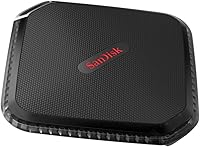
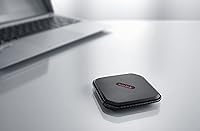
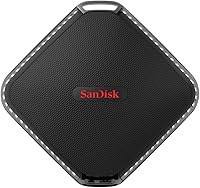
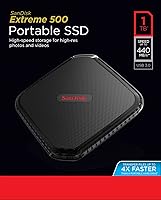
The SanDisk Extreme 500 1TB Portable SSD is a mid-range external drive that arrived in 2017, built for creatives who need reliable storage without hauling bulky hardware. That square, palm-sized form factor — barely half an inch thick — is a clear departure from the traditional portable hard drive shape. SanDisk, a well-established Western Digital sub-brand, carries genuine consumer trust. The USB 3.0 interface delivers real-world read speeds closer to 380–420MB/s in practice, not the rated ceiling. Against today's USB 3.2 Gen 2 rivals, the Extreme 500 shows its age, but it still holds its own for everyday creative workflows where cutting-edge throughput isn't the priority.
Features & Benefits

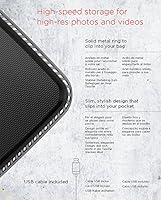
A full terabyte of solid-state storage goes further than most people expect — that's room for thousands of RAW files or several hours of 4K footage before offloading becomes urgent. Because there are no moving parts, the drive handles rough bag life far better than a spinning hard disk ever could. It draws power directly from the USB port, so there's no adapter to forget. Setup on both Mac and Windows is instant — just plug it in, no drivers needed. For sensitive files, the optional 128-bit AES encryption via SecureAccess adds protection without being forced on anyone who doesn't need it. At 1.6 ounces, it genuinely disappears into a jacket pocket.

Best For

This portable SSD makes the most sense for photographers and videographers who constantly move large files and need something meaningfully faster than a flash drive, without paying premium prices for the latest Gen 2 hardware. It suits frequent travelers who want storage that survives a knock without drama — the solid-state build earns its keep here. Anyone still running a traditional spinning portable hard drive will notice a real improvement in transfer times. It also works cleanly across Mac and PC with zero reconfiguration, a quiet but practical advantage for people who regularly split time between both platforms.

User Feedback

With a 4.2-star average across over 1,200 ratings, the reception is broadly positive but not universal. Most buyers praise quick, hassle-free transfers and the no-fuss setup experience. Where things get complicated is longevity — a notable portion of users report unit failures after a year or two of regular use, which matters if you plan to treat this as primary working storage. The Type-A connector also draws criticism from buyers who feel it has aged poorly against newer Type-C alternatives. The SecureAccess software is genuinely divisive: useful for some, ignored entirely by others who find it clunky. Long-term reliability is the one honest question mark here.

Pros

  • A full terabyte of storage handles thousands of RAW photos or hours of 4K footage without constant juggling.
  • Solid-state construction means no moving parts — far more resilient in a bag than a spinning portable hard drive.
  • Weighing just 1.6 ounces, the Extreme 500 is light enough to forget it's in your pocket.
  • Plug-and-play setup on both Mac and PC requires zero driver installation — just connect and go.
  • USB bus-powered operation eliminates the need for an external adapter or extra cables.
  • Optional 128-bit AES encryption is available for sensitive files without being forced on every user.
  • Cross-platform compatibility makes switching between Windows and Mac machines completely frictionless.
  • Real-world transfer speeds offer a clear, noticeable improvement over USB flash drives and traditional HDDs.
  • The compact square form factor is genuinely pocketable and easy to slip into any camera bag or travel kit.
  • SanDisk's established reputation as a Western Digital brand adds a baseline layer of consumer confidence.

Cons

  • The USB 3.0 interface is a generation behind — newer Type-C drives offer significantly faster throughput at similar price points.
  • Real-world read speeds fall noticeably short of the rated 440MB/s ceiling in everyday use.
  • A recurring pattern of unit failures after extended use raises legitimate concerns about long-term reliability.
  • Type-A connector means users with modern laptops may need an adapter, adding an extra accessory to manage.
  • The SecureAccess encryption software is widely reported as clunky and frustrating to use in practice.
  • Not well-suited for editing high-bitrate video directly from the drive — throughput can become a bottleneck.
  • For the price, the value proposition has weakened as newer-generation portable SSDs have become more affordable.
  • No IP-rated water or dust resistance, which is a gap compared to some competing portable SSDs in this category.

Ratings

Our AI rating engine analyzed thousands of verified global purchases of the SanDisk Extreme 500 1TB Portable SSD, actively filtering out incentivized reviews, duplicates, and suspected bot activity to surface what real buyers actually experienced. The scores below reflect a balanced picture — genuine strengths and recurring frustrations alike — so you can make an informed decision based on honest, aggregated feedback rather than curated highlights.

Transfer Speed
74%
26%
For photographers dumping a full memory card after a shoot or videographers offloading a day's footage, the Extreme 500 moves files noticeably faster than any spinning drive or budget flash stick. Users regularly praise how quickly large batches of RAW files clear off a camera, making it a genuine time-saver on location.
Real-world speeds consistently fall short of the 440MB/s rated ceiling — most users see figures closer to 380–420MB/s under normal conditions. Against modern USB 3.2 Gen 2 competitors that routinely exceed 1000MB/s, the gap is hard to ignore for anyone doing sustained, high-volume transfers.
Build Quality
71%
29%
The rubberized casing gives the drive a solid, purposeful feel in hand, and the absence of moving parts means it handles the everyday abuse of bag life far better than a mechanical hard drive. Buyers who have dropped it on hard floors without catastrophic results speak positively about its toughness relative to its size.
A meaningful portion of long-term users report outright unit failures after one to two years of regular use, which is a significant concern for a drive people rely on for irreplaceable media. The lack of any official IP water or dust resistance rating also leaves it exposed compared to newer rivals that have added environmental sealing.
Portability & Size
91%
At 1.6 ounces and barely half an inch thick, this compact drive disappears into a jacket pocket, a small camera pouch, or even a wallet-style organizer without adding any perceptible weight. Travel photographers and commuters consistently call it one of the least intrusive storage solutions they have used.
The square form factor, while distinctive, can feel slightly awkward in cable management setups where rectangular drives slot more neatly. A small number of users also note the rubberized surface attracts lint and fine debris over time, which is a minor but persistent annoyance.
Long-Term Reliability
58%
42%
Many users report years of trouble-free daily use, particularly those who treat the drive as a secondary or transport storage layer rather than a primary working drive. The solid-state architecture does eliminate the most common mechanical failure modes that affect traditional portable hard drives.
The pattern of early unit failures documented across multiple review platforms is too consistent to dismiss as isolated incidents. Users who store irreplaceable client work or personal archives on this drive without a backup have been caught out, and that reliability question mark is the single biggest reason this drive scores where it does.
Ease of Setup
93%
Plug it into any Mac or Windows machine and it simply appears — no driver downloads, no registration steps, no software prompts unless you choose to engage with SecureAccess. Buyers who switch between platforms frequently appreciate that the drive works identically on both without any reconfiguration.
The drive ships formatted for broad compatibility, which means some Mac users may want to reformat it for optimal performance on Apple systems — a quick process, but one that requires a bit of technical confidence. There is no quick-start guide included, which occasionally confuses less experienced users unfamiliar with external storage.
Cross-Platform Compatibility
88%
Working photographers and videographers who split their editing time between a Windows desktop and a MacBook find the Extreme 500 genuinely frictionless — no reformatting, no permission errors, just consistent access across both environments. This is one of the aspects buyers mention most often as a quiet but valuable everyday strength.
Compatibility with older operating systems is broad on paper, but some users on legacy Windows or older Mac OS versions report occasional mount delays or recognition issues that require reconnection. It is also not natively compatible with gaming consoles or smart TVs without additional reformatting.
Value for Money
63%
37%
When this drive launched, the price-to-performance ratio was genuinely competitive for the creative market it targeted. Buyers who purchased it early and have had reliable units consistently say it delivered solid value for the speed improvement it offered over spinning drives at the time.
In the current market, USB 3.2 Gen 2 portable SSDs with Type-C connectors, IP ratings, and significantly faster speeds are available at comparable or lower prices, making the Extreme 500 a harder sell for new buyers today. The value case depends heavily on whether you find it discounted — at full price, newer options are objectively more competitive.
Connector & Cable
61%
39%
The included USB 3.0 Type-A cable is functional and long enough for comfortable desk use, and the Type-A connection works without adapters on the vast majority of older laptops and desktop machines still in active use.
The Type-A connector is increasingly a liability as newer laptops, tablets, and ultrabooks have dropped USB-A ports in favor of USB-C only. No adapter is included in the box, meaning a growing segment of buyers need to source additional hardware just to use the drive they just purchased.
Encryption & Security Software
52%
48%
The underlying 128-bit AES encryption standard is robust, and for users willing to work within SecureAccess, it does provide a real layer of protection for confidential client files or personal documents stored alongside creative work.
The SecureAccess software itself receives consistently poor usability marks — reviewers describe it as dated, occasionally buggy, and more cumbersome than the built-in encryption options available on both Windows and Mac. A large proportion of buyers simply ignore it entirely and rely on operating system-level tools instead.
Thermal Performance
77%
23%
Under typical use — offloading photos, transferring documents, moving video projects — the drive stays comfortably cool to the touch, and users rarely report heat as a concern during shorter transfer sessions.
Extended sustained writes, such as continuous 4K footage transfers or large backup operations, can cause noticeable warmth that occasionally triggers thermal throttling, reducing effective speeds. The compact enclosure has limited capacity to dissipate heat during prolonged workloads.
Design & Aesthetics
79%
21%
The clean square silhouette and matte black rubberized finish project a professional, understated look that fits naturally alongside camera gear or on a clean desk setup. Most buyers appreciate that it does not look cheap or plasticky relative to its price tier.
The design has not been refreshed since launch, and the aesthetic now looks noticeably older compared to the sleeker, more modern industrial designs of current-generation portable SSDs. The rubberized coating also shows scuffs and wear marks over time more than a hard-shell competitor would.
Shock & Drop Resistance
76%
24%
The solid-state internals mean there are no platters to shatter or read heads to crash on impact, and a number of buyers have shared anecdotes of the drive surviving drops from desk height onto hard flooring without data loss.
No specific drop-resistance rating is published by SanDisk for this model, making it impossible to set precise expectations. It is more resilient than a spinning hard drive, but less confidently ruggedized than portable SSDs from competitors that publish validated MIL-spec or drop-height certifications.
Package Contents
66%
34%
The drive arrives ready to use out of the box with a USB cable included, so most buyers can start transferring files within minutes of opening the package without needing to purchase anything additional — assuming they have a USB-A port available.
The absence of a USB-C adapter or a protective pouch is a recurring complaint, particularly given that competing products at a similar price point often include both. For buyers with newer laptops, the lack of an included adapter is an immediate and avoidable friction point.

Suitable for:

The SanDisk Extreme 500 1TB Portable SSD is a strong fit for working photographers and videographers who regularly transfer large RAW files or 4K footage and need something substantially faster and more durable than a typical thumb drive. Its plug-and-play compatibility across both Mac and PC makes it particularly practical for creatives who bounce between platforms without wanting to think about drivers or reformatting. Travelers and commuters will appreciate the solid-state build — there are no spinning parts to fail from a bag drop or a rough commute. At under two ounces, it genuinely fits in a pocket, which matters when you're already hauling camera gear. It also suits anyone upgrading from a traditional portable hard drive who wants a tangible speed boost without spending top dollar on the latest hardware generation.
Not suitable for:

Buyers who need the fastest available external storage should look elsewhere — the SanDisk Extreme 500 1TB Portable SSD runs on USB 3.0 with a Type-A connector, and newer USB 3.2 Gen 2 Type-C drives at comparable prices now offer read speeds more than double what this compact drive can deliver. If you plan to use this as your sole long-term backup drive or primary working storage for years, the durability concerns reported by a meaningful portion of users are worth taking seriously before committing. Power users editing high-bitrate video directly from an external drive will likely find the real-world throughput — which falls short of the rated ceiling in practice — a limiting factor. Those with newer laptops that have ditched USB-A ports entirely will need an adapter, adding friction to what should be a simple connection. And if cross-platform file encryption is a hard requirement for your workflow, the SecureAccess software may frustrate more than it helps.
Specifications

  • Storage Capacity: This drive offers 1TB of solid-state storage, suitable for thousands of high-resolution RAW images or several hours of 4K video footage.
  • Drive Type: It uses NAND flash solid-state technology with no moving mechanical parts, which improves both speed and physical resilience compared to traditional spinning hard drives.
  • Read Speed: Rated read speeds reach up to 440MB/s under ideal conditions, though real-world transfers typically land in the 380–420MB/s range depending on the host system.
  • Interface: The drive connects via USB 3.0 (backward compatible with USB 2.0), using a standard Type-A connector.
  • Dimensions: The unit measures 2.98 x 2.98 x 0.42 inches, forming a compact square profile that fits comfortably in a jacket pocket or small camera bag pouch.
  • Weight: At 1.6 ounces, the Extreme 500 is light enough to carry daily without adding meaningful bulk to a bag or kit.
  • Power Source: The drive draws power directly from the USB connection, requiring no external power adapter or separate charging cable.
  • Compatibility: It works plug-and-play with Windows Vista, Windows 7, Windows 8, Windows 8.1, and Mac OS 10.4 and later, with no driver installation required.
  • Encryption: Optional 128-bit AES file encryption is available through the included SanDisk SecureAccess software, which can be installed or ignored at the user's discretion.
  • Form Factor: The drive follows a 2.5-inch square external form factor, setting it apart from the elongated rectangular shape of most competing portable SSDs.
  • Color: The unit is finished in black with a rubberized outer casing that contributes to its grip and shock resistance.
  • Shock Resistance: The solid-state design eliminates the risk of read/write head crashes common in mechanical drives, making it substantially more tolerant of accidental drops during transport.
  • Manufacturer: The drive is designed and sold by SanDisk, a subsidiary of Western Digital Technologies Inc., one of the largest storage hardware companies in the industry.
  • Model Number: The official model identifier is SDSSDEXT-1T00-G25, which can be used to verify authenticity and confirm compatibility with replacement cables or accessories.
  • In the Box: The package includes the drive itself and a USB 3.0 Type-A cable; no Type-C adapter or additional accessories are included.
  • First Available: This model was first listed for sale in February 2017, making it a mature product that predates the widespread adoption of USB 3.2 Gen 2 and Type-C connectivity.

Related Reviews
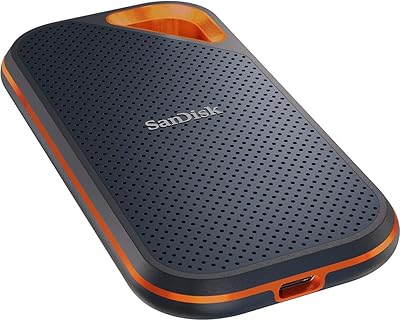
SanDisk Extreme Pro 1TB Portable SSD
84%
88%
Transfer Speed
93%
Build Quality
91%
Durability & Protection
94%
Portability & Form Factor
87%
Storage Capacity
More
SanDisk Portable SSD 1TB External Drive
77%
88%
Transfer Speed
93%
Portability & Form Factor
79%
Build Quality & Durability
41%
Cable & Accessories
86%
Value for Money
More
SanDisk Extreme 4TB Portable SSD
81%
88%
Transfer Speed
91%
Build Quality & Durability
89%
Water & Dust Resistance
94%
Portability & Form Factor
71%
Value for Money
More
SanDisk Extreme 250GB Portable External SSD
79%
88%
Transfer Speed
94%
Portability & Form Factor
91%
Build Quality & Durability
79%
Water & Dust Resistance
61%
Storage Capacity
More
SanDisk 500GB Extreme Portable SSD
86%
94%
Performance
91%
Build Quality & Durability
89%
Portability & Size
96%
Speed (Data Transfer)
87%
Ease of Use
More
SanDisk Extreme Portable SSD 8TB V2
88%
94%
Read Speed Performance
91%
Write Speed Performance
93%
Build Quality
90%
Durability
88%
Portability
More
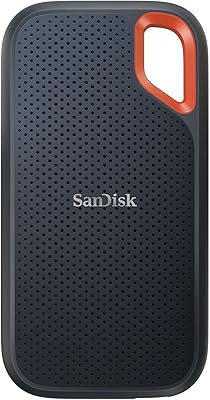
SanDisk Extreme PRO 2TB Portable SSD
82%
91%
Read Speed Performance
67%
Write Speed Performance
93%
Build Quality
88%
Durability & Protection
72%
Value for Money
More
SanDisk Extreme 2TB Portable External SSD
81%
88%
Transfer Speed
91%
Build Quality
94%
Portability
87%
Durability & Reliability
83%
Compatibility
More
SanDisk Extreme PRO USB4 4TB Portable SSD
82%
93%
Transfer Speed
88%
Build Quality
91%
Portability
84%
Compatibility
82%
Durability & Weather Resistance
More
SanDisk Extreme M.2 1TB NVMe SSD
79%
88%
Read Performance
71%
Write Performance
94%
Installation Ease
86%
Value for Money
62%
Thermal Management
More

FAQ

No, the drive works immediately on both Mac and Windows without installing anything — just plug it in and it shows up like any external drive. The SanDisk SecureAccess software is included on the drive if you want file encryption, but it is entirely optional and easy to ignore if you don't need it.

The Extreme 500 uses a standard USB Type-A connector, so you will need a USB-A to USB-C adapter or a hub if your laptop lacks a Type-A port. SanDisk does not include an adapter in the box, so you would need to source one separately. It is worth factoring in if your machine has gone fully Type-C.

It can handle lighter 4K editing workflows, particularly with compressed formats like H.264 or H.265 at standard bitrates. For high-bitrate RAW or ProRes footage, the USB 3.0 interface may become a bottleneck during sustained reads. Most users find it better suited to offloading and archiving footage rather than serving as a live editing source for demanding projects.

Because it uses solid-state storage with no moving parts, it tolerates drops significantly better than a traditional portable hard drive. There is no read/write head to crash. That said, it is not rated to a specific drop height, and a bad impact on a hard surface can still cause damage — so a protective case or sleeve is a sensible precaution if you're rough on gear.

No, this compact drive carries no official IP water or dust resistance rating. You should keep it away from liquids and dusty environments. Several competing portable SSDs in a similar price range do offer IP ratings, so if water resistance is important to you, it is worth comparing alternatives before buying.

Yes, it comes formatted in a way that works on both platforms out of the box. You can move it between a Windows machine and a Mac without any reformatting or compatibility steps, which makes it genuinely useful for people who work across both systems regularly.

Buyer feedback on SecureAccess is mixed at best. The 128-bit AES encryption itself is solid in principle, but the software interface draws consistent criticism for feeling dated and occasionally buggy. Many users simply skip it and rely on third-party encryption tools or the built-in options in their operating system instead.

There is a notable pattern in user reviews of units failing after one to two years of regular use. It does not appear to affect every drive, but it is frequent enough to take seriously. If you plan to use this as your only backup or primary working drive for an extended period, pairing it with a secondary backup is a sensible precaution.

No. The drive pulls all the power it needs directly from your USB port, so there are no wall adapters, extra cables, or charging steps involved. Just plug in the single USB cable and you're done.

Honestly, the technology has moved on since this drive launched. Current USB 3.2 Gen 2 portable SSDs with Type-C connectors offer read speeds of 1000MB/s or more, which is more than double what this drive delivers. The Extreme 500 still works well for everyday storage and offloading tasks, but if raw speed or future-proofing matters to you, newer options are worth considering at comparable prices.