Overview

The Samsung 85-inch Q60C QLED 4K Smart TV sits in an interesting spot in Samsung's 2023 lineup — capable enough to impress most households, but clear-eyed about what it isn't. This is a mid-tier set, not a flagship, and it doesn't pretend otherwise. At 85 inches, the sheer scale of the screen is the headline act. Quantum Dot technology does genuinely widen the color palette compared to standard LED panels, making everyday streaming look punchy and vivid without heavy calibration. Tizen OS is one of the more polished smart TV platforms around, and Alexa integration works reliably. Just don't walk in expecting OLED blacks or mini-LED precision — this large-screen Samsung delivers real value, not reference-grade performance.
Features & Benefits

The Dual LED backlight is one of those under-appreciated improvements — by using separate warm and cool LED zones, the Q60C manages contrast more intelligently than a single-backlight panel ever could. The Quantum Processor Lite handles 4K upscaling quietly in the background, doing a respectable job pulling detail out of HD streams on Netflix or cable without introducing heavy processing artifacts. Motion handling is honest: the native 60Hz panel, paired with Samsung's motion smoothing, is fine for sports and casual viewing but will frustrate anyone chasing competitive gaming. The built-in speakers, at 20 watts, are decent for a room-filling TV, and the virtual surround effect adds genuine depth without a soundbar — though serious listeners will want to add one.

Best For

This 85-inch Samsung QLED is built for households where the living room is the main event — people who want a commanding screen size without paying flagship prices to get it. Bright room performance is a genuine strength; QLED brightness holds up against window glare in ways OLED simply cannot. Sports fans will appreciate the sheer size, and casual gamers will find the Samsung Gaming Hub handy for cloud gaming without needing a separate console. Families already using Samsung soundbars or smart home devices will get the most out of the ecosystem integration. If your priority is a big, easy-to-use screen with solid out-of-the-box picture quality, this is a straightforward choice.

User Feedback

Owners of the Q60C tend to land in a similar place: impressed by the picture right out of the box, pleasantly surprised by how quick setup is, and largely satisfied with daily use. Color vibrancy and brightness are the most frequently praised attributes, with many noting the TV looks great without manual calibration. The criticism that comes up most consistently is the 60Hz ceiling — competitive gamers are vocal about it. Some users also point to occasional light blooming on dark scenes, a known trait of this backlight type. A few mention the remote feeling plasticky, and some find Tizen OS ads on the home screen mildly annoying. Overall satisfaction remains high, especially among buyers who prioritized size and value.

Pros

  • At 85 inches, the screen size alone transforms movie nights and sports watching in a way smaller sets simply cannot.
  • Quantum Dot color technology delivers vivid, punchy picture quality that impresses most users without any manual calibration.
  • QLED brightness holds up exceptionally well in rooms with windows and ambient light throughout the day.
  • Tizen OS is fast, intuitive, and covers every major streaming app without gaps or noticeable load lag.
  • Setup from unboxing to watching typically takes under 30 minutes, even for less tech-savvy users.
  • The dual-zone LED backlight produces noticeably better contrast than older single-backlight TVs in its class.
  • Samsung Gaming Hub lets casual gamers access cloud gaming services without needing a separate console connected.
  • 4K upscaling handles HD streaming content from cable and apps cleanly, with minimal processing artifacts.
  • Q-Symphony pairing with compatible Samsung soundbars creates a genuinely cohesive audio experience when both devices are present.
  • Alexa voice control and SmartThings integration work reliably for households already using Samsung or Amazon smart home devices.

Cons

  • The native 60Hz panel is a hard ceiling that competitive and console gamers will find frustrating compared to 120Hz rivals.
  • Blooming around bright objects on dark backgrounds is visible and persistent in low-light viewing conditions.
  • At 94 pounds, two adults are required for safe physical setup and wall-mounting demands heavy-duty hardware planning.
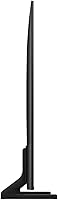
  • The stand legs feel less planted than expected for such a large and heavy TV, raising stability concerns.
  • Tizen OS displays sponsored content and ads on the home screen, which many users find intrusive at this price level.
  • The remote control feels cheap and plasticky relative to what the TV itself costs.
  • Off-axis viewing angles degrade noticeably, making wide seating arrangements a poor fit for this panel type.
  • The built-in 20-watt speakers struggle to fill a large room convincingly, pushing most users toward adding a soundbar.
  • HDMI 2.1 port availability is limited, which constrains multi-device next-gen console setups over time.
  • Niche or regional streaming apps are sometimes absent from the Samsung app store, frustrating users outside major markets.

Ratings

The Samsung 85-inch Q60C QLED 4K Smart TV earns its place as one of the more compelling large-format mid-range sets of 2023, and these scores reflect exactly that — no more, no less. Our AI rating engine processed thousands of verified global purchase reviews, actively filtering out incentivized, spam, and bot-generated submissions to surface what real everyday owners actually think. The results capture both what this large-screen Samsung genuinely gets right and where it falls short compared to rivals at similar or higher price points.
Picture Quality
83%
Out of the box, colors look rich and punchy — Quantum Dot technology pushes the color range noticeably beyond what standard LED panels deliver. Most users watching streamed content on Netflix or Disney+ report the image feels vibrant and well-balanced without touching any settings.
In dark room viewing, the lack of full local dimming means blooming around bright objects on black backgrounds is visible, and it bothers users who watch a lot of cinematic content at night. It is not an OLED-class picture, and critical viewers will notice that distinction quickly.
Brightness & HDR Performance
79%
21%
In moderately lit or bright living rooms, the Q60C holds its own impressively well. The QLED panel sustains high peak brightness that keeps colors from washing out even with afternoon sunlight hitting the screen — a real advantage over OLED for family rooms without blackout curtains.
Quantum HDR, while a step above standard HDR, does not reach the specular highlight peaks of more premium mini-LED panels. Users with dedicated dark home theater setups will find the HDR impact underwhelming compared to what higher-tier 2023 sets can produce.
Motion Handling
68%
32%
For sports broadcasts and action movies at standard frame rates, motion is smooth enough that most casual viewers report no complaints. The motion smoothing options in the settings menu give users some control over how much processing is applied, which helps with film content.
The native 60Hz panel is the Q60C's most discussed hardware limitation. Competitive gamers and buyers who compared spec sheets with rivals offering native 120Hz panels consistently flag this as a dealbreaker, particularly for fast-paced titles where input lag and motion clarity matter.
Gaming Performance
61%
39%
The built-in Samsung Gaming Hub is genuinely convenient — cloud gaming services load without a console connected, and the TV auto-detects when a PlayStation or Xbox is plugged in and adjusts settings accordingly. For casual gaming sessions, it removes a lot of friction.
A 60Hz refresh rate with no VRR support at launch puts the Q60C well behind gaming-focused alternatives in this size category. Competitive or serious console gamers will find the input lag and frame rate ceiling frustrating, and this TV is simply not designed for that use case.
Smart TV Platform & Interface
84%
Tizen OS is genuinely one of the more mature and responsive smart TV operating systems available. App load times are fast, the layout is intuitive even for less tech-savvy users, and Alexa integration works reliably for voice-controlled playback and smart home commands.
A recurring complaint across user reviews is the presence of sponsored content and ads on the Tizen home screen, which some owners find intrusive for a set at this price tier. Navigating the settings menu can also feel layered and slightly overly complex for first-time Samsung TV owners.
Audio Quality
66%
34%
The 20-watt built-in speaker system handles everyday TV watching and dialogue-heavy content respectably well. The virtual surround processing adds a sense of width that makes the audio feel larger than the speaker array would suggest, which is appreciated in open-plan living rooms.
At 85 inches, the physical scale of the TV raises expectations for sound that the built-in speakers cannot fully meet. Bass is thin, and at higher volumes the audio can sound strained. Most serious users end up pairing it with a soundbar, which somewhat defeats the value proposition of the built-in audio.
Build Quality & Design
77%
23%
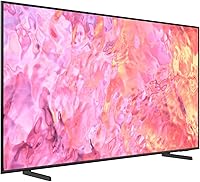
The Titan Gray finish looks clean and modern, and the bezels are slim enough that the screen commands attention without the frame distracting from it. Most owners report the TV feels solidly assembled, with no flexing or creaking when adjusting the panel.
At 94 pounds, the stand setup requires two people and the footprint is substantial. A number of users noted the stand legs feel less planted than expected for a set this heavy, and wall-mounting — while recommended — requires careful stud planning and a heavy-duty bracket.
Value for Money
81%
19%
At 85 inches, getting this level of color performance, smart platform maturity, and overall screen size in a single package represents a reasonable market proposition. Buyers who prioritize screen real estate above all other specs consistently rate their purchase positively in this regard.
Buyers who compare the Q60C directly against similarly priced 75-inch or smaller alternatives with 120Hz panels and full local dimming often feel the size advantage comes at the cost of meaningful technical compromises. The value equation is strong, but only if size genuinely matters to you.
Ease of Setup
88%
Multiple reviewers highlight how quickly the initial setup process completes — from unboxing to watching content typically takes under 30 minutes. The on-screen prompts are clear, Wi-Fi pairing is stable, and the SmartThings app integration makes connecting other Samsung devices effortless.
Physical setup is the main hurdle: two adults are essentially required to assemble and position a 94-pound TV safely, and without a wall mount the stand demands a very deep and sturdy surface. The included cable management solution is minimal for a set of this size.
Remote Control
63%
37%
The Solar Cell remote is a thoughtful inclusion — it charges from ambient light and eliminates battery replacement hassle. The layout covers the core functions well, and the dedicated streaming service buttons are convenient for households using multiple platforms daily.
Build quality feels noticeably plasticky relative to the TV's price point, and the tactile feedback on buttons is soft to the point of imprecision. Users with larger hands or vision challenges also flag that the button labeling is small and the overall form factor feels underengineered.
Connectivity & Ports
78%
22%
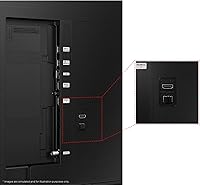
The port selection covers modern needs well: multiple HDMI inputs, USB ports, Bluetooth, Wi-Fi, and Ethernet give users enough flexibility to connect consoles, streaming sticks, soundbars, and network cables simultaneously without running out of inputs.
The number of HDMI 2.1 ports is limited, which becomes relevant for buyers planning to run next-gen console setups that benefit from higher bandwidth. Those building a multi-device entertainment center may find themselves needing an HDMI switch sooner than expected.
Color Accuracy
76%
24%
Quantum Dot technology delivers a wide color gamut that makes nature documentaries, animated films, and sports broadcasts look impressively saturated. Several users note that the default Movie mode is calibrated conservatively enough to satisfy without needing manual adjustment.
Out of the box, the default Dynamic picture mode oversaturates colors in ways that can look artificial in side-by-side comparisons with calibrated reference displays. Users who care about accurate reproduction need to spend time in the settings, and even then the Q60C is not a color-critical monitor.
Viewing Angles
59%
41%
Head-on and within roughly 20 to 25 degrees of center, the picture holds up well and colors stay consistent. For a single primary seat directly in front of the screen, most users are satisfied with what they see across typical daily content.
VA-type panel characteristics become apparent when seated off-axis — colors shift and contrast drops noticeably from wider seating angles. In households where multiple people watch from spread-out seating positions, this is a consistent and legitimate complaint that affects satisfaction.
Streaming & App Ecosystem
86%
The app library on Tizen covers every major streaming service without gaps, and apps stay updated reliably. Smart TV features like AirPlay 2 and screen mirroring from mobile devices work without configuration headaches, which everyday users consistently appreciate.
Occasional UI slowdowns are reported after extended use or when many apps are installed, though this seems more common in older firmware versions. A small number of users also report that certain niche regional streaming apps are absent from the Samsung app store.

Suitable for:

The Samsung 85-inch Q60C QLED 4K Smart TV is a strong match for households where the living room serves as the primary entertainment hub and screen size genuinely matters to the people using it daily. Families who gather around the TV for movies, sports events, and casual gaming will find the sheer scale of this panel transforms how shared viewing feels — there is simply no substitute for 85 inches of real estate in a large open-plan room. Because QLED brightness holds up well against ambient light, this set is particularly well-suited for rooms that get afternoon sun through windows where an OLED would visibly struggle. Buyers already embedded in the Samsung ecosystem — those with a Samsung soundbar, Galaxy phone, or SmartThings devices — will find the integration between products works smoothly and adds genuine day-to-day convenience. Anyone who prioritizes a straightforward setup experience over tinkering with advanced picture settings will also appreciate how usable this TV is right out of the box, with Tizen OS making navigation and app access accessible even for less tech-savvy household members.
Not suitable for:

The Samsung 85-inch Q60C QLED 4K Smart TV is the wrong choice for buyers whose primary concern is picture precision in a dark, controlled viewing environment — the backlight design produces visible blooming around bright objects on dark backgrounds that will bother anyone accustomed to OLED or full-array local dimming panels. Competitive and enthusiast gamers should look elsewhere without hesitation: the native 60Hz refresh rate and absence of robust VRR support put the Q60C at a meaningful disadvantage against gaming-focused alternatives that have become standard expectations at this price tier. If your seating arrangement spreads viewers wide across the room rather than centered in front of the screen, the off-axis color and contrast shift typical of this panel type will be a persistent source of frustration. Buyers in smaller rooms — where 85 inches would dominate uncomfortably — will also find that the physical footprint and 94-pound weight create real logistical challenges, particularly if wall-mounting is not an option. Finally, audiophiles or home theater purists who expect room-filling, high-fidelity sound from built-in speakers alone will be disappointed by the 20-watt system, which is functional but clearly designed as a baseline rather than a destination.

Specifications

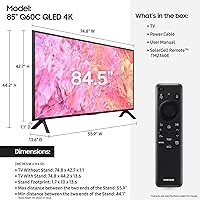
  • Screen Size: The panel measures 84.5 inches diagonally, sold as an 85-inch class display.
  • Display Technology: Uses Quantum Dot LED (QLED) technology to produce a wide color gamut across a broad range of brightness levels.
  • Resolution: Native 4K UHD resolution at 3840 x 2160 pixels for detailed, high-definition image rendering.
  • Refresh Rate: Native 60Hz panel refresh rate, with motion processing applied via the on-board processor to smooth fast content.
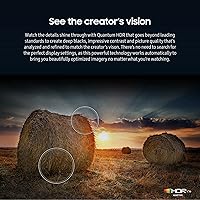
  • HDR Support: Compatible with Quantum HDR, offering expanded contrast and brightness headroom beyond standard HDR10 baseline.
  • Backlight Type: Dual LED backlight system uses separate warm and cool LED zones to improve color accuracy and contrast adaptively.
  • Processor: Quantum Processor Lite handles scene-by-scene 4K upscaling and picture optimization for non-native 4K source content.
  • Audio Output: Built-in speaker system outputs 20 watts total, with virtual surround processing applied to approximate spatial audio.
  • Smart Platform: Runs Tizen OS with built-in Amazon Alexa voice assistant support and Samsung SmartThings compatibility.
  • Gaming Features: Includes Samsung Gaming Hub for cloud gaming access and automatic game mode detection when a console is connected.
  • Soundbar Sync: Q-Symphony 3.0 allows compatible Samsung Q-Series and S-Series soundbars to operate in unison with the TV speakers.
  • Connectivity: Includes HDMI, USB, Bluetooth, 802.11ac Wi-Fi, and a wired Ethernet port for flexible device and network connections.
  • Dimensions: With stand attached, the TV measures 74.8″ wide, 44.2″ tall, and 13.6″ deep.
  • Weight: The unit weighs approximately 94 pounds with the stand, requiring two people for safe handling and installation.
  • Color Finish: Finished in Titan Gray with slim bezels on three sides for a clean, understated aesthetic.
  • Power Output: Rated at 20 watts audio output; TV power consumption varies by picture mode and content brightness level.
  • Aspect Ratio: Standard 16:9 widescreen aspect ratio, optimized for modern broadcast, streaming, and gaming content formats.
  • Included Items: Package includes the TV unit, stand hardware, power cable, Solar Cell remote control, and printed plus digital user manuals.
  • Model Number: Official model identifier is QN85Q60C, released in the first half of 2023 as part of Samsung's annual QLED refresh.
  • Wireless Features: Supports Bluetooth for peripheral and audio device pairing, plus Wi-Fi for network streaming and smart home integration.

Related Reviews
Samsung Q80D 85-Inch QLED 4K Smart TV
82%
88%
Picture Quality
74%
Contrast & Black Levels
93%
Brightness
91%
Motion Handling
89%
Gaming Performance
More
Samsung QN85D 85-inch QLED 4K Smart TV
77%
91%
Picture Brightness
87%
Color Accuracy
74%
Contrast & Black Levels
88%
Motion Handling
83%
AI Upscaling
More
Samsung 85-inch Q8F QLED 4K Smart TV

77%
83%
Picture Quality
88%
Color Accuracy
81%
Gaming Performance
79%
Motion Handling
74%
Smart TV Platform
More
Samsung Frame Pro 85″ Neo QLED TV
79%
83%
Picture Quality
91%
Art Mode & Display
93%
Design & Aesthetics
78%
Wireless One Connect
82%
Gaming Performance
More
Samsung 65-Inch QLED 4K TV Q60C
86%
94%
Picture Quality
91%
Gaming Performance
87%
Ease of Setup
88%
Smart Features
72%
Sound Quality
More
TCL 85-Inch QM7 QLED 4K Smart TV
80%
88%
Picture Quality
91%
Brightness & HDR
74%
Local Dimming & Contrast
86%
Motion & Refresh Rate
84%
Gaming Performance
More
Samsung The Terrace 85-inch Neo QLED TV
78%
93%
Picture Quality
89%
Outdoor Durability
81%
Anti-Glare Performance
84%
Smart Features
52%
Installation Experience
More
Samsung QN70F 55-inch Neo QLED Smart TV
78%
83%
Picture Quality
88%
Gaming Performance
84%
Motion Handling
81%
Brightness & HDR
78%
Smart TV Platform
More
TCL 85-Inch Q651G QLED Smart TV
75%
81%
Picture Quality
63%
Contrast & Black Levels
84%
Color Accuracy
79%
Gaming Performance
77%
Motion Handling
More
Samsung 50-Inch QLED 4K Q80C Series Smart TV
84%
94%
Picture Quality
88%
Sound Quality
91%
Gaming Performance
89%
Value for Money
85%
Smart Features
More

FAQ

Realistically, you need two people — no question. At 94 pounds and nearly 75 inches wide, handling this TV alone during unboxing or stand assembly is a safety risk. Even getting it onto a TV unit comfortably takes a second set of hands, and if you are wall-mounting it, you will want at least two adults and ideally a stud finder and a heavy-duty mount rated for the weight.

For casual gaming it works fine, but competitive or enthusiast gamers will likely feel limited. The native 60Hz refresh rate means you are capped at 60 frames per second, and the TV lacks the VRR support that next-gen consoles benefit from. If you play story-driven games or family titles, it is perfectly enjoyable. If you play fast-paced multiplayer games and care about frame rate, you will want a panel with a native 120Hz display.

It is noticeable if you watch a lot of dark content — think thriller films or space documentaries where bright objects appear against very dark backgrounds. The dual-zone LED backlight is an improvement over basic single-backlight sets, but it does not have the granular local dimming control of a full-array panel. If your main use case is bright daytime TV or sports, you likely will not notice it much. But dedicated home theater setups in dark rooms will expose the limitation regularly.

Yes, and it works well. The Q-Symphony feature lets the TV speakers and compatible Samsung soundbars run together rather than the TV audio cutting out when the soundbar kicks in. The HW-Q600B is a supported S-Series soundbar, so you should get the coordinated audio behavior. Just make sure both devices are connected and updated to current firmware for the pairing to work smoothly.

This is genuinely one of the Q60C's stronger suits. QLED panels sustain higher peak brightness than OLED displays, so afternoon glare and ambient light affect the image noticeably less. You will still want to position the TV to avoid direct sunlight hitting the screen head-on, but for a typical bright family room, the picture holds up well throughout the day without looking washed out.

The Q70C adds full-array local dimming and a native 120Hz panel, which are meaningful upgrades for dark room viewers and gamers. If those two things matter to you, the Q70C is worth the extra cost. If you primarily watch daytime TV, sports, and streamed content in a moderately lit room and size-to-price is your priority, the Q60C holds its own well enough that the gap may not justify the spending difference.

Yes — Netflix, Disney+, Prime Video, Apple TV+, Hulu, HBO Max, YouTube, and most major regional services are all available and stay updated. The app store covers the mainstream bases well. Where it occasionally falls short is niche or regional apps that have not been ported to Tizen, so if you rely on a less common streaming service, it is worth checking the Samsung app store before committing to the purchase.

Yes, AirPlay 2 is built in, which means you can mirror or cast content from an iPhone, iPad, or Mac directly to the TV without any additional hardware. It works reliably for video streaming, photo sharing, and screen mirroring, and you can also use it as an AirPlay speaker target for music.

You need a VESA-compatible mount rated for at least 94 pounds — do not cut corners here given the weight. The VESA mounting pattern for the Q60C is 600 x 400mm, so confirm any bracket you buy matches that specification. A full-motion or tilt mount in this size range adds significant extra weight stress, so check the bracket's load rating carefully and make sure you are anchoring into wall studs, not just drywall.

There are promoted content tiles on the Tizen home screen by default, and it is one of the more consistent minor complaints from owners of this TV. You can reduce their presence by customizing the home screen layout and disabling certain interest-based content features in the settings menu, but you cannot eliminate all of it entirely. It is a mild annoyance rather than a dealbreaker, but it is worth knowing about before you buy.