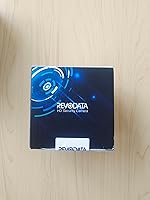
Overview

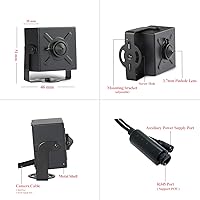
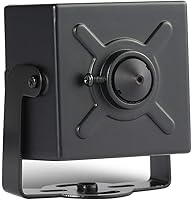
The REVODATA I706-2-P 5MP POE Mini IP Camera is a compact, wired indoor camera built for anyone who wants reliable surveillance without the clutter of wireless setups. Its metal housing feels surprisingly sturdy for something this small — the body is barely larger than a matchbox. Power and data run over a single Cat5/6 cable via 48V POE, so there is no separate power adapter needed if you have a POE switch handy. One important note upfront: the desktop software only runs on Windows. Mac and Linux users are limited to the mobile app, which catches quite a few buyers off guard after purchase.
Features & Benefits

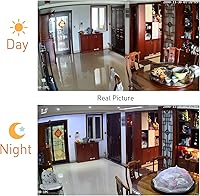
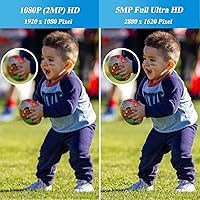
The jump from 1080p to 5MP resolution is genuinely noticeable — faces and fine details hold up much better when you zoom into recorded footage. H.265 encoding keeps file sizes manageable, cutting storage requirements roughly in half compared to older H.264 recordings, which matters a lot when running multiple cameras on one NVR. The 3.7mm pinhole lens covers about 70 degrees, well-suited for hallways or smaller rooms rather than wide-open spaces. Motion detection triggers email alerts so you are not sorting through hours of idle footage. At 0.1 lux minimum illumination, this pinhole IP camera handles dimly lit environments reasonably well, though it lacks dedicated infrared night vision.

Best For

This mini POE camera fits best into setups where a POE switch is already in place. Small offices, reception areas, and retail back rooms are natural fits — existing wired infrastructure makes installation clean, and the discreet form factor lets it tuck into a ceiling corner without drawing attention. Home users frustrated with Wi-Fi cameras dropping connections will appreciate the rock-solid reliability of a fully wired link. It also works well as a secondary camera on an ONVIF-compatible NVR system, filling blind spots without requiring new power runs. If you are starting from scratch with no POE infrastructure, factor in the cost of a compatible switch before buying.

User Feedback

Buyers who have put the I706-2-P through its paces generally praise the image clarity for the price — the 5MP footage holds noticeably more detail than cameras in the same range. The physical size gets frequent mention too; people are often surprised by how small it actually is. On the downside, the static IP default configuration trips up less technical users during initial setup, and a handful of buyers wish focus were adjustable after mounting rather than factory-set. Windows-only desktop software is the most cited complaint, especially from Mac users expecting full computer-based access. Overall sentiment leans positive, with most treating it as a capable addition to an existing wired system.

Pros

  • 5MP resolution captures noticeably sharper detail than standard 1080p cameras at a similar price point.
  • Single Cat5/6 cable carries both power and data, keeping installations clean with minimal cable runs.
  • Metal housing feels solid and durable for a camera this small — does not feel cheap in hand.
  • H.265 encoding cuts storage consumption roughly in half, which adds up fast on multi-camera NVR setups.
  • ONVIF support means this pinhole IP camera integrates with most third-party recorders without compatibility headaches.
  • Motion detection with email alerts means you only get notified when something actually happens.
  • The tiny form factor lets it blend into ceiling corners or tight spaces where a standard dome camera would stand out.
  • POE 802.3af compliance works reliably with a wide range of third-party POE switches, not just branded hardware.
  • At 0.1 lux minimum illumination, the I706-2-P holds up reasonably well in dim lighting without dedicated IR.
  • Dual H.265/H.264 support gives flexibility depending on what your NVR or recording software handles best.

Cons

  • Default static IP configuration requires manual network setup — not straightforward for non-technical users.
  • No onboard SD card slot means no local storage option without an NVR or Windows PC running continuously.
  • Desktop VMS software is Windows-only, leaving Mac users with mobile app access as their only computer-based option.
  • Factory-set manual focus cannot be adjusted after mounting, which is frustrating if the framing is slightly off.
  • No built-in infrared LEDs means image quality drops significantly in truly dark environments.
  • The 70-degree field of view is narrow for larger rooms — you may need multiple units to cover open spaces.
  • App setup and remote access configuration can be finicky, with several users reporting initial connectivity struggles.
  • No cloud storage or built-in recording option makes this a poor standalone choice without existing NVR infrastructure.

Ratings

Our AI-generated scores for the REVODATA I706-2-P 5MP POE Mini IP Camera are based on analysis of verified buyer reviews collected globally, with spam, bot submissions, and incentivized feedback actively filtered out before scoring. Each category reflects the honest consensus of real users — small business owners, home security enthusiasts, and IT-savvy buyers alike — covering both what this mini POE camera does well and where it falls short. Strengths and frustrations are weighted equally so you get a transparent picture before committing.
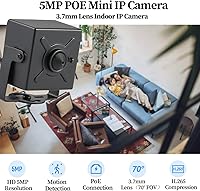
Image Quality
83%
Buyers consistently note that the jump to 5MP makes a real difference when reviewing recorded footage — faces and license plates hold up far better under digital zoom than with typical 1080p budget cameras. For office hallways or retail counters, the extra resolution gives investigators usable detail that lower-resolution alternatives simply cannot match.
At 20fps the footage is smooth enough for most static monitoring scenarios, but fast movement can produce mild motion blur. Low-light performance without dedicated IR illumination is the most cited image complaint, with several users noting the image becomes grainy in rooms with only minimal ambient light.
Build Quality
78%
22%
The all-metal housing surprises buyers who expect plasticky construction at this price point. Several reviewers noted it feels noticeably more solid than competing cameras in the same range, and the compact form factor does not feel fragile when handling it during installation.
Despite the IP67 rating, this pinhole IP camera is spec'd for indoor use only, so the weather resistance is a secondary benefit rather than a practical feature for most buyers. A few users mentioned the mounting plate feels slightly less robust than the camera body itself.
Value for Money
86%
For a wired 5MP ONVIF camera with H.265 encoding and a metal body, buyers broadly agree the pricing is fair — particularly when compared to branded alternatives that charge significantly more for similar core specs. It earns consistent praise as a cost-effective secondary camera on existing POE networks.
The value proposition erodes for buyers who need to purchase a POE switch specifically for this camera, since that adds a meaningful cost to what looked like an affordable entry point. Mac users who expected full desktop software functionality also felt the value was compromised by the Windows-only VMS limitation.
Ease of Setup
57%
43%
Buyers with basic networking knowledge found the setup manageable — connecting to a POE switch, accessing the default IP, and configuring the camera through the web interface is straightforward if you are comfortable with router-level settings. POE compatibility with third-party switches was broadly reported as reliable.
The default static IP address and manual network configuration are a real stumbling block for non-technical users, and this accounts for a disproportionate share of negative reviews. Several buyers also reported friction getting the TSEYE app to establish a stable remote connection on first attempt, requiring multiple resets.
Software & App
52%
48%
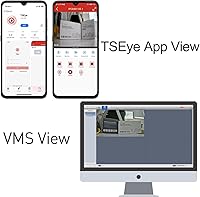
The TSEYE mobile app covers the basics adequately — live viewing, motion alert notifications, and camera settings are all accessible from a phone once the connection is established. Android and iOS users generally get functional remote access without needing to touch a PC.
The Windows-only VMS desktop software is the single most recurring frustration in user feedback, leaving Mac owners with a significantly reduced experience. Even on Windows, several users described the VMS interface as dated and less intuitive than competing platforms, requiring more patience than expected during initial configuration.
Discreet Form Factor
89%
The physical size genuinely impresses buyers — at roughly the dimensions of a large sugar cube, the I706-2-P tucks into ceiling corners, behind fixtures, or along baseboards in ways a standard dome or bullet camera simply cannot. Multiple reviewers mentioned that guests and visitors simply did not notice it.
The metal finish, while durable, does not blend naturally into white ceilings without some effort — painting or using a matching surface cover helps significantly. Buyers expecting an invisible installation out of the box may need to do minor cosmetic work to fully conceal the unit.
Night Vision
44%
56%
The 0.1 lux minimum illumination rating means the camera can still produce usable images in dim conditions — a softly lit hallway or office with streetlight filtering through a window is generally enough for recognizable footage.
Without dedicated infrared LEDs, truly dark environments are a serious weakness. Users monitoring garages, basement storage areas, or any room without overnight ambient lighting reported the image becomes effectively unusable after dark, which is a significant gap for a security-focused product.
Storage Flexibility
48%
52%
ONVIF compatibility makes this pinhole IP camera easy to slot into existing NVR setups from major brands, and the dual H.265/H.264 support means it works with a wide range of recorder configurations without transcoding issues.
The complete absence of an SD card slot removes any standalone recording option, making this camera fully dependent on external NVR or PC-based recording infrastructure. Buyers expecting even basic local backup found this a dealbreaker, particularly for single-camera home setups without a dedicated recorder.
Motion Detection
71%
29%
Email-based motion alerts work reliably once configured, and buyers appreciated not having to scrub through hours of idle footage to find relevant events. For office monitoring during off-hours, the alert system performs its core job without unnecessary complexity.
Sensitivity tuning requires some trial and error — out of the box, minor light changes and passing shadows can trigger false alerts in certain room configurations. There is no clip preview attached to alerts, meaning you still need to access the app or NVR to view what triggered the notification.
POE Compatibility
81%
19%
Compliance with the 802.3af standard means the camera works reliably with the vast majority of mainstream POE switches on the market, and buyers running TP-Link, Netgear, or Ubiquiti infrastructure reported clean, consistent power delivery without compatibility issues.
The camera does not support the higher-power 802.3at standard, which is a non-issue for this unit but worth noting for buyers building mixed POE networks. A small number of users with older or non-standard POE injectors reported intermittent power cycling that required a switch upgrade to resolve.
Installation Experience
66%
34%
The included screw set and ceiling-mount design make physical installation quick and clean, and the single-cable POE setup removes the need to run separate power wiring through walls or ceilings. Most buyers with basic DIY comfort completed the physical install without difficulty.
Manual focus is factory-set and non-adjustable after mounting, which frustrated several users who found the framing slightly off once the camera was fixed in place. Getting the angle exactly right before securing the mount is important, and the lack of any adjustment post-installation is a meaningful ergonomic limitation.
Remote Access
63%
37%
When configured correctly, remote viewing through the TSEYE app works across standard home and office internet connections, giving buyers the ability to check in from a phone wherever they are.
Initial remote access setup requires port forwarding or DDNS configuration on the router, which is non-trivial for average users. A handful of buyers reported inconsistent app reconnection after network interruptions, requiring a manual camera restart to restore the remote feed.
Durability & Longevity
74%
26%
The metal housing and solid construction give buyers confidence in long-term reliability, and early adopters who have run the camera continuously on NVR setups report stable operation over extended periods without hardware failures.
Long-term firmware support is an open question with smaller brands, and several buyers expressed concern about ongoing app and software updates. There is limited public track record for this specific model beyond a couple of years of market availability.

Suitable for:

The REVODATA I706-2-P 5MP POE Mini IP Camera is a strong fit for anyone who already has a POE switch in place and wants to add a discreet, high-resolution camera without dealing with wireless dead zones or battery maintenance. Small business owners monitoring a back office, stockroom, or retail counter will find the wired-only design an asset rather than a limitation — it is simply more dependable than Wi-Fi at that range. Home users who want a low-profile camera tucked into a ceiling corner, without drawing attention, will appreciate just how compact and unobtrusive this pinhole IP camera actually is. It pairs cleanly with most ONVIF-compatible NVR systems, making it a practical addition to an existing multi-camera wired setup. Windows users specifically will get the most out of the full desktop VMS software alongside the mobile app.
Not suitable for:

Buyers expecting a plug-and-play experience may find the initial setup of this mini POE camera more involved than anticipated — the default static IP address needs to be configured manually, and first-time IP camera users often hit a wall here without a basic network background. Mac and Linux users should know upfront that the desktop VMS software is Windows-only; the mobile app works, but it is a meaningful step down in control and usability for anyone who prefers computer-based monitoring. There is no onboard SD card slot, so without an NVR or a connected Windows PC running the recording software, footage cannot be saved locally at all. Anyone looking for built-in infrared night vision will need to look elsewhere, as this pinhole IP camera relies on ambient light and its low-lux sensitivity rather than active IR illumination. If your space is primarily outdoors or you need wide-angle coverage beyond roughly 70 degrees, this is not the right tool for the job.

Specifications

  • Resolution: Records at 2880x1620P (5MP) and 20 frames per second using a 1/3-inch CMOS sensor for clear, detailed footage.
  • Lens: Fitted with a 3.7mm pinhole M12 lens providing approximately 70 degrees field of view, suited for focused indoor coverage.
  • Compression: Supports dual H.265 and H.264 encoding, with H.265 reducing storage and bandwidth consumption by roughly half versus H.264.
  • Power Input: Accepts 48V POE 802.3af via RJ-45 or an auxiliary 12V DC adapter connection for flexible installation options.
  • Connectivity: Connects over 10/100 Mbps Ethernet using a standard RJ-45 jack; no wireless connectivity is available on this camera.
  • Protocols: Supports ONVIF, RTSP, HTTP, TCP/IP, SMTP, DHCP, DNS, NTP, ICMP, RTP, and RTCP network protocols.
  • Dimensions: The camera body measures 5.7 x 4.4 x 3.9 cm (approximately 2.24 x 1.73 x 1.54 inches), making it notably compact.
  • Weight: Weighs approximately 0.44 lbs (7 oz), light enough for easy ceiling or wall mounting with the included screw set.
  • Housing: Constructed from metal for durability, providing a more solid build than comparable plastic-bodied cameras at this price tier.
  • IP Rating: Rated IP67, indicating protection against dust ingress and temporary water immersion, though the camera is designated for indoor use.
  • Min Illumination: Minimum illumination is 0.1 Lux at F1.2 with AGC enabled, allowing usable image capture in dimly lit indoor environments.
  • Shutter Speed: Shutter range runs from 1/25 second up to 1/100,000 second, offering flexibility across varying indoor lighting conditions.
  • Storage: No onboard SD card slot; footage must be stored via a connected NVR or a Windows PC running the included VMS software.
  • Mobile App: Compatible with the TSEYE app available on iOS and Android for remote live viewing and basic camera management.
  • Desktop Software: Includes VMS software for Windows only; Mac OS and Linux systems are not supported by the desktop application.
  • Motion Detection: Built-in motion detection triggers email alerts, allowing event-based notification without requiring continuous recording review.
  • IP Address: Ships with a default static IP address of 192.168.1.108, configurable to dynamic IP assignment via DHCP.
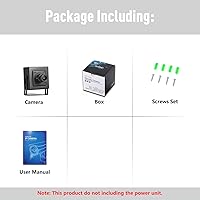
  • Mounting: Designed for ceiling mount installation; one screw set and a user manual are included in the box.
  • Focus Type: Features manual focus set at the factory; the lens is not user-adjustable after the camera is mounted.
  • In the Box: Package includes one camera unit, one screw set for mounting, and one printed user manual.

Related Reviews

Inwerang 5MP PoE PTZ Dome Security Camera
76%
88%
Image Clarity (Daytime)
74%
Night Vision Performance
81%
Pan-Tilt Coverage & Accuracy
91%
PoE Installation Experience
77%
NVR Compatibility
More
Anpviz IPC-D3053WD-S 5MP PoE IP Camera
86%
94%
Video Clarity
91%
Night Vision Performance
88%
AI Detection Accuracy
90%
Build Quality
92%
Weather Resistance
More
Real HD 6MP PTZ Dome PoE IP Camera
74%
88%
Image Clarity
86%
Optical Zoom Performance
83%
PTZ Coverage
74%
Night Vision
51%
Ease of Setup
More
REOLINK RLK16-410B8-5MP 16-Channel PoE Security Camera System
77%
91%
Video Clarity
74%
Night Vision Performance
72%
Installation Experience
78%
Smart Detection Accuracy
88%
Local Storage & Expandability
More
Barlus UW-S5-3PBX30 Underwater POE IP Camera
74%
83%
Image Quality
79%
Low-Light Performance
88%
Build Quality
86%
Cable Durability
91%
Waterproofing & Depth Rating
More
Amcrest 5MP Outdoor POE Camera
85%
89%
Image Quality
80%
Motion Detection Accuracy
91%
Ease of Setup
88%
Night Vision Performance
85%
Build Quality and Durability
More
ZOSI IPC-1825Y-W 5MP PoE Security Camera
75%
88%
Image Quality
84%
Night Vision Performance
79%
AI Detection Accuracy
73%
Active Deterrent Features
61%
NVR Compatibility
More
ANNKE 12MP PoE IP Camera C1200
87%
93%
Image Quality
88%
Night Vision Performance
84%
Motion Detection Accuracy
91%
Setup Ease
89%
Build Quality
More
ieGeek IE92 5MP PoE Security Camera System
76%
88%
Video Clarity
74%
Night Vision
81%
PTZ Performance
83%
AI Detection
72%
Installation Ease
More
Anpviz IPC-D240W-S 4MP PoE Dome Camera
76%
88%
Image Clarity (Daytime)
76%
Night Vision Performance
83%
Build Quality & Housing
85%
Weatherproofing (IP66)
91%
ONVIF & NVR Compatibility
More

FAQ

Any POE switch that supports the 802.3af standard at 48V should work fine with this mini POE camera. Most mainstream POE switches from brands like TP-Link, Netgear, or Ubiquiti are 802.3af compliant, so compatibility is rarely an issue. Just double-check the spec sheet on your switch before buying.

Yes. There is an auxiliary power connector on the camera that accepts a standard 12V/2A DC adapter, so you can power it independently if you do not have a POE switch. You would still need an Ethernet cable run for the data connection, just powered separately.

Partially. The TSEYE mobile app works on iPhone and iPad, so you can view the live feed and manage basic settings from an Apple device. However, the full desktop VMS software is Windows-only and will not run on macOS or Linux. If you rely on a Mac for your security setup, that is a meaningful limitation to factor in.

Without an SD card slot, your only local recording option is the Windows VMS software running on a connected PC. If you want standalone recording without a computer running continuously, you will need an ONVIF-compatible NVR — this pinhole IP camera is not designed to record on its own.

It is manageable, but not completely plug-and-play. The camera ships with a default static IP of 192.168.1.108, which means your computer or NVR needs to be on the same subnet to communicate with it initially. If you are comfortable logging into a router or adjusting network settings, you will be fine. If networking is unfamiliar territory, budget some time to read the manual carefully or follow a setup video online.

The REVODATA I706-2-P 5MP POE Mini IP Camera has a minimum illumination rating of 0.1 Lux, which means it handles dim lighting reasonably well for a camera without built-in IR LEDs. In near-total darkness, though, image quality will degrade since there is no active infrared illumination to compensate. It is best suited for areas with at least some ambient light, like a hallway with a night light or an office with streetlight coming through a window.
It should, yes. This pinhole IP camera supports ONVIF, which is the standard protocol most major NVR brands including Hikvision and Dahua use for third-party camera integration. Add it as a generic ONVIF device in your NVR interface and it will typically pull up without much fuss.

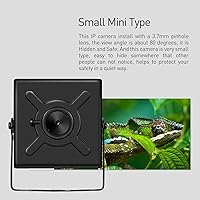
It is genuinely tiny — roughly the size of a large sugar cube at about 2.24 x 1.73 x 1.54 inches. When mounted flush to a ceiling corner and painted or matched to the surrounding surface, most people simply do not notice it. That said, it is a metal box, so it will not disappear entirely the way a recessed sensor might.

Yes, remote access is possible through the TSEYE app on your smartphone. You will need to set up remote access through your router, typically by configuring port forwarding or using the app's built-in connection method. The process is standard for IP cameras but does require some basic router configuration if you have not done it before.

Motion detection on cameras like this is zone-based and sensitivity-adjustable, so you can tune it to reduce false triggers from things like passing shadows or minor light changes. Out of the box it may need some adjustment depending on your environment, but once dialed in, the email alert system works well for flagging actual activity rather than flooding your inbox.