
Overview

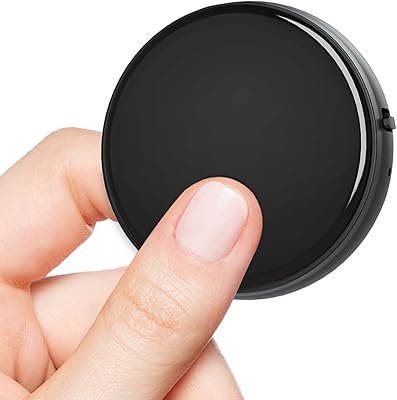
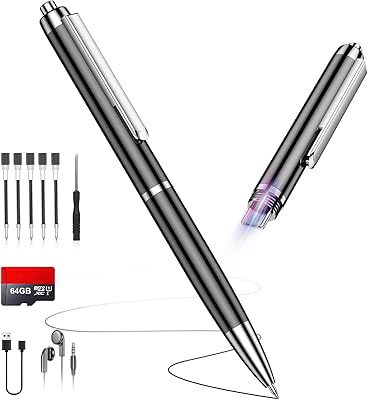
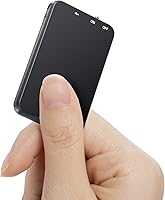
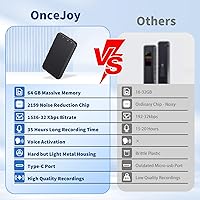
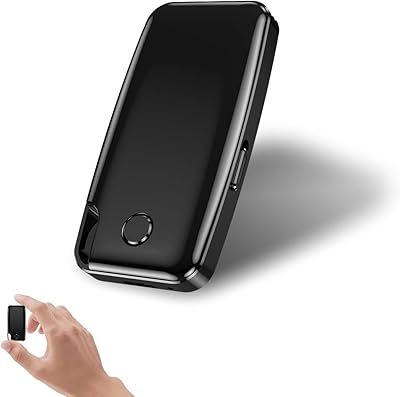
The OnceJoy V15 64GB arrived in early 2025 as a budget-friendly recorder aimed squarely at students and working professionals who need something discreet and dependable. It is genuinely tiny — closer in size to a USB drive than a traditional recorder — and the zinc alloy shell gives it a solidity you rarely find at this price. OnceJoy and its parent manufacturer VLL are relatively new names, so there is limited long-term track record to draw on. Still, the combination of USB-C connectivity and WAV output puts it ahead of older plastic competitors clinging to micro-USB. Just temper expectations: bold audio claims are common in this crowded sub-$40 segment.

Features & Benefits

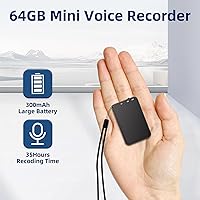
The headline spec is 1536kbps audio, backed by a DSP noise reduction chip designed to filter ambient hum and background chatter. In practice, that kind of clarity matters most in moderate-noise environments — a lecture hall or a small conference room — rather than a busy café. The 64GB internal storage is legitimately impressive; you would have to record continuously for weeks before running low. Battery life is the other standout: the 300mAh cell reportedly delivers 35 to 40 hours per charge and refills in 90 minutes. A 3.5mm headphone jack rounds things out, letting you monitor or play back audio on the spot without needing a separate device.

Best For

This pocket voice recorder hits its stride with students who sit through multi-hour lectures and cannot afford to swap batteries or hunt for an outlet mid-session. It suits professionals equally well — small enough to sit on a conference table without drawing attention. Field researchers and travel journalists will appreciate the rugged metal casing, which handles being tossed in a bag far better than plastic alternatives. If you are upgrading from an older recorder with a dated port, the V15 is a logical next step. Where it struggles is genuinely loud environments — it is not designed for crowd or event recording and should not be expected to perform there.

User Feedback

Buyers consistently praise audio clarity in quieter settings — classrooms and small meeting rooms earn the most positive mentions. The metal build gets approval too; most describe it as feeling solid rather than hollow. On the flip side, the manual is a recurring complaint: it is poorly translated in places, and because voice activation ships disabled by default, some users never find the feature at all. Battery life feedback is split — a portion of buyers confirm the 35-plus hour claim, while others fall short of it. Customer support responsiveness gets generally positive marks, though the sample size remains thin given this product launched only months ago.

Pros

  • Metal housing feels noticeably solid and premium for a recorder in this price range.
  • 64GB of internal storage means most users will never come close to running out of space.
  • Battery life is a genuine standout — multi-day use between charges is realistic for moderate recording schedules.
  • USB-C charging and file transfer works seamlessly on both Mac and Windows without extra drivers.
  • Voice clarity in quiet-to-moderate environments earns consistent praise from students and meeting attendees.
  • At under an ounce, the V15 is light enough to forget it is in your pocket until you need it.
  • WAV output at high bitrate makes recordings suitable for transcription or light professional editing.
  • The 3.5mm headphone jack allows immediate on-device playback without needing a separate app or device.
  • Recharges fully in roughly 90 minutes, making a midday top-up entirely practical.

Cons

  • The manual is poorly translated, making voice activation setup genuinely confusing for many first-time users.
  • Voice activation is disabled by default — easy to miss entirely if you skip the instruction booklet.
  • Noise reduction struggles with dynamic, unpredictable sounds beyond steady background hum.
  • Actual battery life varies noticeably; some users land well below the advertised upper limit.
  • Onboard playback navigation is clunky — scrubbing through long recordings is tedious without a computer.
  • Cannot record and charge simultaneously, which limits use in truly marathon sessions.
  • Small physical controls are difficult to operate confidently by touch alone, especially in the dark.
  • The metal finish scratches easily when carried loose alongside other items.
  • Customer support quality is inconsistent — helpful responses and templated non-answers both appear in user reports.
  • No compressed audio output option means WAV files accumulate quickly on a computer during regular transfers.

Ratings

The scores below for the OnceJoy V15 64GB were generated by our AI engine after processing verified buyer reviews from global markets, with spam, bot submissions, and incentivized feedback actively filtered out. Each category reflects the honest spread of real user experiences — the genuine strengths as well as the friction points that showed up repeatedly across independent purchases. Nothing has been smoothed over to flatter the product.

Audio Clarity
83%
In quiet-to-moderate environments — a university lecture hall, a small boardroom, a one-on-one interview — buyers consistently report that the V15 captures voice with surprising crispness for a device this small. The DSP noise reduction chip earns genuine praise for keeping background hum from overwhelming recordings.
Step into a noisier setting, like a bustling open-plan office or a busy café, and the noise reduction starts to struggle. Several users noted that ambient sound bleeds in noticeably above a certain threshold, making the recorder less reliable for anything beyond controlled environments.
Battery Life
79%
21%
For a device that weighs under an ounce, the battery performance is a genuine highlight. A meaningful portion of buyers confirm hitting or approaching the claimed 35-plus hours on a single charge, which covers multi-day conference trips without needing to pack a cable every night.
Not every user lands in that range. A notable minority report shorter run times — closer to 25 to 28 hours — particularly when recording at higher bitrates or in cooler temperatures. The 35 to 40 hour figure appears to reflect best-case conditions rather than a guaranteed everyday result.
Build Quality
86%
The zinc alloy housing is the detail buyers mention most positively about the physical experience. Holding the V15 feels meaningfully different from the hollow plastic recorders that dominate this price tier — it has a density and rigidity that suggests it will survive being dropped in a bag alongside keys and a charger.
A small number of users felt the button feedback was soft and slightly imprecise, making it harder to confirm recording had started without glancing at the device. The finish, while attractive, also picks up fine scratches quickly when carried loose in a pocket.
Storage Capacity
94%
Sixty-four gigabytes of internal storage is genuinely hard to fault at this price. Students who record every class for an entire semester, researchers logging weeks of fieldwork — nearly everyone agrees they ran out of reasons to worry about space long before they ran out of space itself.
Because storage is fixed and internal, there is no option to expand it with a memory card if future needs grow. A few technically minded users also noted they would have preferred the option to record directly to an external drive for archiving, which is not supported.
Ease of Setup
58%
42%
Plugging in and starting a basic recording is straightforward enough — press record, it records. For buyers who only need that core function, the learning curve is minimal and the device is usable within minutes of unboxing.
Voice activation is disabled by default and the manual explaining how to enable it is widely criticized for its poor translation quality. Multiple buyers reported giving up on the feature entirely, not because it does not work, but because the instructions made it genuinely difficult to figure out. This is the most consistent complaint across reviews.
Portability & Size
91%
Few recorders in this category are this compact without sacrificing core functionality. Journalists clip it to a notebook, students slip it into a shirt pocket, and travelers tuck it into a carry-on without it registering as an item worth thinking about. The weight — barely three-quarters of an ounce — reinforces that.
The trade-off for the ultra-small form is that the physical controls are correspondingly tiny. Users with larger hands or those who need to operate it quickly in the dark, without looking, occasionally hit the wrong button. It is a minor ergonomic cost of the compact design.
Noise Reduction Performance
74%
26%
The 2159 DSP chip does a credible job filtering low-frequency hum — HVAC systems, projector fans, and distant traffic — which are exactly the sounds that ruin classroom recordings. Buyers who use it in predictable, steady-noise environments notice a real improvement over unprocessed recordings.
Dynamic, unpredictable noise — a door slamming, a cough nearby, a loud side conversation — largely bypasses the noise reduction. The chip is tuned for steady background hum rather than sudden bursts, so expectations should be calibrated accordingly rather than treating it as a universal filter.
Charging Speed & Convenience
88%
A 90-minute full recharge is well-suited to real life. Plugging in during lunch, a commute, or a short break between meetings is enough to restore meaningful runtime. USB-C compatibility means most people already have the right cable without needing to find a proprietary charger.
The 300mAh battery, while efficient, cannot be charged and actively recorded at the same time on most setups. Users who intended to keep it plugged in during marathon recording sessions discovered this limitation later rather than upfront, which caused frustration.
File Transfer & Compatibility
82%
18%
USB-C plug-and-play transfer works reliably on both Mac and Windows without drivers according to most users. Files appear as a standard mounted drive, making it easy to drag and drop recordings directly into editing software or a folder structure without any intermediate app.
A handful of users on older operating systems reported occasional connection drops or the device needing to be replugged to be recognized. Nothing catastrophic, but it points to firmware that could benefit from further polish on edge-case system configurations.
Voice Activation (VAR)
61%
39%
When buyers successfully enable the voice activation feature, the response is reasonably quick and reduces file clutter by skipping silent gaps. In lecture settings where a professor moves between notes and speaking, it can meaningfully extend effective battery use over long sessions.
Too many users never get there. The combination of an opt-in default and an unclear manual means the feature has an adoption problem rather than a performance problem. Buyers who do not read reviews or instructions in advance often discover it exists only after they return home.
Audio Format & Bitrate
77%
23%
WAV output at up to 1536kbps is a strong choice for anyone who plans to edit, transcribe, or archive recordings professionally. The uncompressed format retains audio fidelity without the artifacts that compressed formats introduce, which matters most for transcription accuracy.
WAV files are large by nature, and users who were not expecting that found their computers filling up faster than anticipated when transferring hours of content. A selectable MP3 or compressed output option would make the V15 more flexible for casual users who do not need full fidelity.
Value for Money
81%
19%
For buyers who stick to the core use case — recording lectures, interviews, or meetings in reasonably controlled environments — the value delivered relative to the asking price is genuinely competitive. Metal housing and USB-C at this tier represent better-than-average specifications.
If the manual friction causes a buyer to miss key features, or if they need the device to perform in louder environments, the value equation weakens. The price feels fair only when the product is used within its actual capability range, which not all buyers discover before purchasing.
Customer Support
68%
32%
Buyers who reached out with setup questions generally received responses within a reasonable window, and the brand does appear to engage with product questions rather than going silent. For a newer manufacturer, that level of responsiveness is a reasonable starting point.
The quality of support responses is uneven. Some users received helpful, specific guidance while others got templated replies that did not address their actual question. Given that the manual is a known weak point, support needs to compensate — and it does not always do that consistently.
Playback Experience
72%
28%
The 3.5mm headphone jack is a practical addition that lets users review recordings immediately without needing a computer or Bluetooth speaker. Students who want to replay a lecture section right after class find this particularly useful and do not take it for granted at this price.
Onboard playback navigation is basic. Jumping to a specific point in a long recording is clunky, and there is no speed control or chapter marking. For quick spot-checks it is fine, but anyone doing serious review work will need to transfer files to a computer first.

Suitable for:

The OnceJoy V15 64GB is a strong practical choice for students who record multiple hours of lectures daily and cannot be bothered managing memory cards or hunting for an outlet between classes. The combination of genuinely large storage and a battery that can stretch across full conference days means it fits naturally into the workflow of professionals who move between meetings without time to recharge gear. Journalists and writers who need a discreet, always-ready device will appreciate how easily it disappears into a shirt pocket or sits flat on a table without attracting attention. Field researchers and light travelers benefit from the rugged metal housing, which holds up far better than the brittle plastic recorders typically found at this price. Anyone currently using a micro-USB recorder who wants to modernize without spending a lot will find the USB-C connectivity and WAV output a meaningful step up.

Not suitable for:

The OnceJoy V15 64GB is not the right tool for anyone who needs to record reliably in loud or unpredictable environments — think conference keynotes with crowd noise, street interviews, or busy open-plan offices where ambient sound is constant and dynamic. The noise reduction handles steady background hum reasonably well, but it is not engineered to isolate a single voice from competing conversations or sudden bursts of noise. Buyers who are not comfortable reading through a manual — or who expect every feature to work out of the box — may find the default-off voice activation genuinely frustrating rather than a minor inconvenience. The fixed internal storage, while large, also means there is no upgrade path if your archiving needs grow significantly over time. And if long-term brand support matters to you, it is worth noting that OnceJoy is a newer name with a limited track record, which is a reasonable hesitation for buyers who factor after-sale reliability into their purchasing decisions.

Specifications

  • Brand: Manufactured by VLL and sold under the OnceJoy brand, a newer entrant to the consumer audio recorder market.
  • Model: The device carries the model designation V15, identifying it within the OnceJoy product line.
  • Dimensions: The recorder measures 0.23″ deep, 1.25″ wide, and 2.1″ tall — roughly the footprint of a large USB drive.
  • Weight: At 0.74 oz, the V15 is light enough to carry in a shirt pocket or clip to a notebook without any noticeable bulk.
  • Housing Material: The outer casing is constructed from zinc alloy, providing a rigid, scratch-resistant shell that is meaningfully more durable than plastic alternatives in this price tier.
  • Internal Storage: 64GB of fixed internal storage is built in, with no memory card slot; at a mid-range bitrate this translates to an estimated 900-plus hours of recordings.
  • Audio Format: Recordings are saved in WAV format, an uncompressed audio standard that preserves full fidelity and is compatible with most editing and transcription software.
  • Max Bitrate: The recorder supports a maximum bitrate of 1536kbps, which delivers high-resolution audio capture suitable for professional transcription or archiving.
  • Noise Reduction: A DSP noise reduction chip designated model 2159 actively filters steady background noise such as HVAC hum or projector fan noise during recording.
  • Battery Capacity: A 300mAh rechargeable lithium battery powers the device, with a manufacturer-stated runtime of 35 to 40 hours per full charge under typical conditions.
  • Charge Time: The battery reaches a full charge in approximately 1.5 hours when connected via the included USB-C cable.
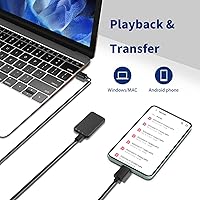
  • Connectivity: A USB Type-C port handles both charging and wired file transfer to Mac and Windows computers without requiring additional drivers.
  • Headphone Output: A 3.5mm headphone jack enables direct audio monitoring during recording or immediate playback review without needing an external device.
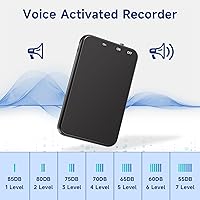
  • Voice Activation: Voice-activated recording (VAR) is a supported feature but is disabled by default; it must be manually enabled via the settings described in the product manual.
  • Microphone Type: The microphone is built directly into the device body, with no external microphone input port available.
  • File Transfer: The device mounts as a standard USB mass storage device on both Mac and Windows, allowing straightforward drag-and-drop file management.
  • Date Available: The V15 was first listed for sale in January 2025, making it a recent release with a still-developing user review base.

Related Reviews
COHANA GL-37 128GB Voice Recorder
76%
74%
Audio Clarity
61%
Noise Cancellation Performance
88%
Magnetic Mount Usability
78%
Voice Activation Accuracy
93%
Storage & Capacity
More
Oculus Quest 2 64GB
Oculus Quest 2 64GB
75%
92%
Ease of Setup
88%
Display Quality
86%
Performance & Processing
84%
Controller Responsiveness
58%
Comfort & Wearability
More
Run_kkarrr 59-64 64GB Voice Recorder
73%
88%
Battery Life
91%
Storage Value
67%
Audio Clarity
63%
Voice-Activated Recording (VAR)
74%
Ease of Use
More
Insta360 GO 3 64GB
Insta360 GO 3 64GB
85%
88%
Video Quality
92%
Stabilization Performance
85%
Waterproof Durability
70%
Battery Life
96%
Portability/Size
More
HP Chromebook 14a 64GB
82%
78%
Performance
88%
Battery Life
91%
Portability
80%
Display Quality
75%
Build Quality
More
Yottix 64GB MP3 Player
82%
88%
Sound Quality
85%
Battery Life
80%
Build Quality
92%
Ease of Use
75%
Bluetooth Connectivity
More
Yegolito U46 64GB Voice Recorder
80%
83%
Audio Clarity (Quiet Environments)
67%
Noise Reduction Performance
89%
Battery Life
71%
VOR (Voice Activated Recording) Reliability
86%
Storage & File Management
More
AGPTEK A02PL 64GB MP3 Player
83%
94%
Battery Life
87%
Sound Quality
91%
Ease of Use
82%
Storage Capacity
80%
Build Quality
More
JOLIKE M5 64GB MP3 Player
85%
89%
Sound Quality
91%
Bluetooth Connectivity
94%
Portability
72%
Battery Life
85%
Ease of Use
More
RUIZU 64GB MP3 Player for Kids
87%
91%
Value for Money
95%
Ease of Use
90%
Battery Life
78%
Audio Quality
85%
Build Quality
More

FAQ

No, and this catches a lot of buyers off guard. Voice activation is turned off by default on the OnceJoy V15 64GB, so you will need to open the manual and follow the steps to enable it manually. The instructions are functional but not the clearest, so set aside a few minutes and read carefully before your first important recording session.

Unfortunately, no. The V15 does not support simultaneous charging and recording in most setups. If you are planning a session that runs longer than your remaining battery, you will need to charge it beforehand rather than rely on a plugged-in workaround.

Just plug it into your computer using a USB-C cable and it will show up as an external drive — no software or drivers needed. From there you can drag and drop your WAV files wherever you want. It works the same way on both Mac and Windows.

The 35 to 40 hour claim reflects best-case conditions — lower bitrate settings, moderate temperatures, and continuous recording without heavy voice activation cycling. In practice, many users land somewhere between 25 and 38 hours depending on how they use it. It is still a strong battery for the size, but treat the upper figure as an optimistic ceiling rather than a guarantee.

Most buyers describe it as genuinely solid — it has a density and rigidity that feels noticeably different from the hollow plastic recorders common in this price range. A few users note that the finish picks up fine surface scratches fairly easily if carried loose in a pocket, but structurally it holds up well to everyday handling.

Honestly, not that well. The noise reduction chip performs best against steady, predictable background sounds — like an air conditioner or a projector fan — rather than dynamic noise like conversations, door slams, or crowd chatter. If you regularly need to record in loud or unpredictable spaces, this pocket voice recorder may leave you disappointed.

The USB-C port is primarily for charging and PC or Mac file transfer. It is not designed to connect directly to a smartphone for real-time recording or file syncing. If smartphone compatibility is important to your workflow, you would need to transfer files via computer as an intermediate step.

No, the storage is entirely internal and fixed at 64GB. There is no memory card slot. For most users that is more than enough — but if you are planning long-term archiving of high-bitrate WAV files without frequently clearing the device, keep in mind that there is no upgrade path.

It is workable but not particularly smooth. The onboard navigation for scrubbing through recordings is basic, and jumping to a precise timestamp in a two-hour file takes patience. For quick spot-checks it is fine, but if you regularly need to review specific sections, you will find it much easier to transfer the file to a computer and use audio software there.

According to the manufacturer, the V15 is designed to save the current file before the battery fully depletes. So you should not lose your recording entirely, though the final few seconds before shutdown may be cut off. That said, it is always safer to start important sessions with a full charge rather than relying on that safety net.