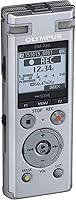
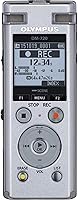

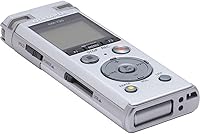

Overview

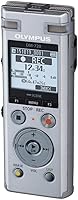
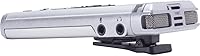
The Olympus DM-720 Digital Voice Recorder has been on the market since 2016, and its continued relevance among journalists, students, and business professionals is a quiet endorsement of its reliability. At just 2.4 oz, it is genuinely pocket-sized — the kind of device you forget is there until you need it. The silver build feels purposeful, and the hardware button layout lets you start recording with a single press, no fumbling through a touchscreen required. This is a dedicated recorder, not a smartphone app stand-in. It solves a specific problem and does so with consistent dependability.

Features & Benefits

What separates the DM-720 from cheaper alternatives starts with its TRESMIC 3-microphone system, which captures directional sound far more accurately than a single built-in mic. Pair that with 48 kHz/16-bit linear PCM recording — essentially the quality standard used in professional audio work — and voice recordings come out clean enough for serious transcription or long-term archiving. The Intelligent Auto Mode adjusts mic sensitivity on the fly, so you are not fiddling with settings mid-interview. A low-cut filter at 300 Hz handles background hum from HVAC systems or outdoor wind. Then there is Transcription Mode, which lets you slow playback without distorting pitch — genuinely useful if you type up your own recordings.

Best For

This voice recorder is a natural fit for journalists who need discreet, reliable audio capture during interviews — the compact size and physical controls make it easy to operate without drawing attention. Students recording lectures will appreciate the single-battery operation and the no-fuss record button that works without waking a screen. For legal or medical professionals who dictate notes, the adjustable-speed playback in Transcription Mode is a meaningful time-saver. Field researchers and frequent travelers will value how much it accomplishes on one AAA battery. And if you have ever struggled with a smartphone mic dropping syllables in a crowded room, this Olympus recorder is a convincing answer to that frustration.

User Feedback

Buyers consistently praise the DM-720 for its audio clarity in quiet to moderate environments, and Transcription Mode earns repeated mention from professionals who rely on it daily. Where opinions split is around the interface — many find the menu system intuitive once they have spent an hour with it, while others report a steeper learning curve managing folders and file organization. One recurring complaint worth flagging honestly: the 2.5 mm headphone jack requires a non-standard adapter that most people do not own, which is a genuine inconvenience. WAV files are high quality but eat storage quickly, and some users wish there were more flexible export options. Casual users occasionally feel the device is more involved than their needs warrant, while professionals tend to rate it highly for exactly the same reasons.

Pros

  • The triple-microphone array captures voice with noticeably better directionality than a standard single-mic recorder.
  • 48 kHz/16-bit PCM recording delivers audio clean enough for professional transcription and long-term archiving.
  • Intelligent Auto Mode removes the need to manually adjust microphone sensitivity in unpredictable recording environments.
  • At 2.4 oz, this voice recorder fits in a shirt pocket without adding any noticeable bulk to your bag.
  • The 300 Hz low-cut filter quietly handles HVAC hum and outdoor wind noise without affecting vocal clarity.
  • Transcription Mode lets you slow playback without pitch distortion — a real time-saver for anyone who types up recordings.
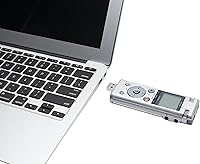
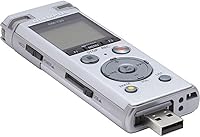
  • USB direct connection makes offloading files to a computer straightforward, without needing a separate card reader.
  • Running on a single AAA battery means a replacement is available almost anywhere in the world.
  • The hardware button layout supports one-handed operation, which is genuinely useful during live interviews or note-taking.
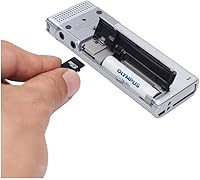
  • MicroSD slot expansion means the built-in 4 GB storage limit is not a hard ceiling for heavy users.

Cons

  • The 2.5 mm headphone jack is a non-standard size that requires an adapter most buyers do not already own.
  • WAV files are large by nature and can exhaust the built-in 4 GB storage faster than users expect.
  • The folder and file management system has a learning curve that can frustrate anyone who wants instant results.
  • No wireless connectivity means recordings cannot be synced to a phone or cloud service directly from the device.
  • The 1.36-inch display is small enough that browsing long file lists or navigating deeper menus requires real patience.
  • Audio quality drops noticeably in loud or crowded spaces, as the DM-720 is tuned for voice, not high-volume capture.
  • No windscreen or foam cover is included in the box, which can introduce wind noise in outdoor recordings.
  • The compact form factor and small physical buttons can feel fiddly during extended use or for those with larger hands.

Ratings

The ratings below for the Olympus DM-720 Digital Voice Recorder were generated by our AI system after analyzing thousands of verified purchase reviews from buyers worldwide, with spam, incentivized, and bot-generated feedback actively filtered out. The scores reflect the full range of real user experience — from the features that professionals depend on daily to the friction points that catch casual buyers off guard. Both the genuine strengths and the honest shortcomings are represented transparently in every category.

Audio Recording Quality
88%
Users who record interviews and lectures consistently describe playback as crisp and detailed, with voices coming through clearly even on softer-spoken subjects. The 48 kHz linear PCM format captures a level of audio fidelity that holds up well when played back through quality speakers or used for professional transcription.
Audio quality noticeably degrades in high-noise environments — busy cafeterias, street-level recordings, or crowded event spaces tend to overwhelm the system. Buyers who assumed this recorder would perform equally well in chaotic acoustic settings were the most likely to feel let down.
Microphone Performance
84%
The TRESMIC triple-microphone array earns consistent praise from journalists and researchers who need to capture voices from across a table without positioning the device awkwardly. In quiet to moderate environments, it picks up directional audio noticeably better than comparable single-mic recorders, which users switching from budget alternatives quickly appreciate.
The microphone system is tuned for voice, not broad-spectrum sound capture — music recording or environmental audio comes out flat and lacking presence. A number of users also reported that background noise bleed in open-plan offices was more prominent than they had hoped, even with Intelligent Auto Mode engaged.
Build Quality
82%
18%
The silver body feels solid and purposeful in hand — not premium in the way a high-end camera might, but well-assembled with no creaks or flex in the casing. Users who have carried the DM-720 daily in pockets, bags, and briefcases for years report that it holds up to everyday handling without issue.
The device is not water-resistant and lacks any ruggedized protection, so field users who record outdoors in variable conditions should take care with it. A few reviewers also noted that the small physical buttons can feel slightly stiff initially, and that accidental key presses occasionally start or stop recordings unintentionally.
Battery Life
91%
Users consistently rate battery life as one of the strongest aspects of this recorder — a single AAA cell regularly lasts through multiple full days of intermittent use, covering lectures, interviews, and field sessions without mid-day swaps. The convenience of running on standard AAA batteries, available in any pharmacy or convenience store worldwide, gets frequent positive mention from travelers and field professionals.
The single-cell design means there is no built-in rechargeable reserve — if the battery dies mid-recording, you need a physical replacement, not just a USB cable. Heavy users who record four or more hours consecutively in a single sitting occasionally report draining a battery faster than expected.
Ease of Use
73%
27%
For basic recording tasks — press the button, capture audio, stop, transfer files — this voice recorder gets out of the way quickly, and new users often report being up and running within minutes. The physical button layout is better than tapping through a touchscreen app mid-interview, and Intelligent Auto Mode removes the need for manual mic setup entirely.
Where ease of use breaks down is in the folder and file management system — keeping recordings organized across multiple projects requires more menu navigation than feels natural on a 1.36-inch screen. The interface rewards users who read the manual first, which is not what most buyers want to hear about a recorder they expected to be grab-and-go simple.
Portability
93%
At 2.4 oz and barely wider than a thumb, this is a recorder that disappears into your bag without occupying mental real estate. Journalists, students, and researchers who carry it daily consistently highlight that the slim profile and featherweight feel make it genuinely easy to have on hand at all times — not something they need to actively remember to pack.
Portability has a minor practical trade-off: the small footprint means small buttons, and users with larger hands occasionally find precise control more cumbersome than it should be. The compact display also limits how much information is visible at once, which can slow navigation when you are trying to locate a specific file quickly.
File Management
62%
38%
The folder-based file system gives organized users a structured way to separate recordings by project, date, or subject. Professionals who take a methodical approach to their workflow often find the hierarchy genuinely useful once they have invested time in setting it up consistently.
For most users, file management is the most friction-heavy part of owning this recorder — navigating folders, renaming files, and deleting recordings through the small screen and physical buttons feels laborious compared to what a smartphone app can do with a swipe. Several buyers specifically cited the organizational system as the main reason they moved to a different device.
Transcription Mode
87%
Transcription Mode draws strong praise from legal professionals, researchers, and journalists who type up their own notes — slowing playback without pitch distortion means you can follow along at a natural typing pace instead of constantly rewinding. Users who relied on this feature daily frequently described it as the single reason they chose this recorder over less-equipped alternatives.
It is worth clarifying that Transcription Mode is not automatic speech-to-text — it only adjusts playback speed, which surprises buyers who assume the feature generates a typed transcript on its own. Some users also found the range of speed adjustment narrower than they wanted when working through very dense, fast-spoken recordings.
Storage & Expandability
76%
24%
The combination of 4 GB built-in storage and a MicroSD slot gives users a reasonable baseline with genuine flexibility to expand — professionals who regularly record full days of material can add a card without any complicated setup. Transferring files via USB direct connection to free up space is also quick and straightforward.
The 4 GB built-in limit feels modest for heavy users recording exclusively in WAV format — at the highest quality setting, storage fills faster than expected, and some buyers were caught off guard before they had a MicroSD card on hand. The absence of wireless syncing means offloading always requires a physical connection, which adds friction to daily file management.
Connectivity
78%
22%
USB direct connection is reliable and recognized immediately on both Windows and macOS as a removable drive, making file transfers simple without any driver installation. Users who work in environments without reliable internet particularly valued not being dependent on cloud sync or wireless pairing just to retrieve their recordings.
The absence of Bluetooth or Wi-Fi means there is no way to send a recording to a phone or cloud app without first connecting a cable — a real friction point for users who want to share or process files quickly while away from a desk. As wireless connectivity has become standard on newer recorders, this gap feels more limiting than it once did.
Value for Money
74%
26%
For journalists, students, and professionals who record regularly and need reliable, high-quality audio capture in a pocketable form factor, the DM-720 delivers real practical value that a smartphone simply cannot replicate. Users in these groups consistently rate it as a worthwhile investment given how dependably it performs its core purpose day after day.
Casual users who record only occasionally tend to feel the price is difficult to justify when free smartphone apps exist, and the absence of wireless features at this price point draws repeated criticism. Buyers expecting app integration, wireless sync, or automatic transcription often feel the asking price implies more modern functionality than the device actually delivers.
Noise Reduction
83%
The 300 Hz low-cut filter performs reliably in the environments most users actually record in — air-conditioned conference rooms, offices with background hum, and outdoor settings with moderate wind. Many reviewers specifically noted that activating the filter cleaned up recordings noticeably compared to leaving it off, without any audible impact on vocal clarity.
The low-cut filter is a fixed threshold at 300 Hz, which handles common indoor hum well but leaves users without flexibility for more nuanced noise profiles — there is no adjustable EQ or multi-band filtering available. Users who recorded in environments with mid-frequency background noise, such as large open spaces with crowd murmur, found the filter less effective than expected.
Playback Quality
81%
19%
Playback through the device itself is clear and intelligible enough for spot-checking recordings in the field — professionals who review key moments of an interview before leaving a location consistently find it adequate for that purpose. The adjustable playback speed in Transcription Mode adds meaningful utility well beyond simple audio review.
The 2.5 mm headphone jack is the biggest obstacle to comfortable playback — most people do not carry a 2.5 mm adapter, and discovering this limitation during a time-sensitive situation is a genuine frustration. The built-in speaker output is functional for basic spot-checks but not well-suited to any environment with even moderate background noise.
Durability & Longevity
86%
Users who have owned this Olympus recorder for three or more years frequently report that it still performs exactly as it did on day one — no mic degradation, button failures, or housing issues. The brand's long history in the voice recorder category gives long-term buyers a level of confidence that newer, less-established brands struggle to match.
The device carries no water resistance or ruggedization rating, which means accidental exposure to rain or a spilled drink poses a real risk with no protection to fall back on. Users who work outdoors regularly or in physically demanding field conditions would benefit from a dedicated protective case, which adds to the overall cost and pocket bulk.

Suitable for:

The Olympus DM-720 Digital Voice Recorder is purpose-built for people who record audio as a regular part of their work or studies and need a dedicated tool rather than a workaround. Journalists conducting interviews in cafes, conference rooms, or unpredictable outdoor environments will get the most out of the triple-microphone system and the hands-free auto sensitivity adjustment, which removes setup guesswork before a conversation begins. Students who sit through long lectures and want a no-fuss record button — one they can press without unlocking a screen — will find this fits naturally into their routine, and the single AAA battery means no scrambling for a charger between classes. Legal and medical professionals who dictate notes throughout the day and then play them back at reduced speed for transcription will find that workflow genuinely well supported. Field researchers and travelers also benefit from how much this device accomplishes with minimal power and no dependence on a Wi-Fi signal.

Not suitable for:

The Olympus DM-720 Digital Voice Recorder is not the right choice for casual or infrequent users who simply want to leave themselves voice reminders — a smartphone handles that job without the extra cost or learning curve. Anyone expecting to plug in standard earphones for playback monitoring will hit an immediate wall: the 2.5 mm headphone jack is a non-standard size, and the required adapter does not come in the box, which is a genuine inconvenience that trips up buyers more often than it should. Users who need to record music, live performances, or loud events will find the audio noticeably degrades at high input levels, since this recorder is tuned for voice clarity rather than high-volume capture. Those who prefer to work with compressed audio files they can share or store easily may also find WAV output limiting, as the format produces large files that consume built-in storage faster than expected. Finally, anyone who dislikes managing files through folder-based menu systems on a small screen may find the organizational workflow more fiddly than convenient.

Specifications

  • Brand: The DM-720 is manufactured by OM SYSTEM, the company formerly known as Olympus Imaging Corporation.
  • Model: The model designation is DM-720, part of Olympus's mid-range professional voice recorder lineup.
  • Dimensions: The recorder measures 0.57″ deep, 1.6″ wide, and 4.17″ tall, making it compact enough to fit in a shirt pocket.
  • Weight: The device weighs 2.4 oz without its battery, light enough to carry without noticing it in a bag or pocket.
  • Built-in Storage: Internal storage capacity is 4 GB, sufficient for many hours of voice recording depending on the selected quality setting.
  • Storage Expansion: A MicroSD card slot allows users to expand storage beyond the built-in 4 GB using a standard MicroSD card.
  • Recording Format: Audio is recorded in WAV linear PCM format, which prioritizes audio fidelity over file size efficiency.
  • Sample Rate: The recorder captures audio at 48 kHz with 16-bit depth, which is consistent with professional audio production standards.
  • Microphone System: The TRESMIC system uses three built-in microphones arranged to improve directional audio pickup and reduce ambient noise bleed.
  • Low-Cut Filter: A built-in low-cut filter engages at 300 Hz to suppress low-frequency background noise such as HVAC hum and wind rumble.
  • Headphone Jack: The headphone output is a 2.5 mm jack, which is not compatible with standard 3.5 mm earphones without an adapter.
  • Battery: The recorder is powered by one AAA battery, which is included in the box at the time of purchase.
  • Connectivity: The device connects to computers via a direct USB connection for file transfer and is recognized as a removable storage device.
  • Display: The built-in screen measures 1.36″ and is used for navigating menus, folders, and playback controls.
  • Special Modes: The recorder includes Intelligent Auto Mode for automatic sensitivity adjustment and Transcription Mode for variable-speed playback without pitch distortion.

Related Reviews
Olympus VN-7200 Digital Voice Recorder
82%
93%
Recording Time
89%
Portability
85%
Audio Quality
88%
Ease of Use
91%
Value for Money
More
Olympus VN-7000 Digital Voice Recorder
84%
88%
Ease of Use
85%
Recording Quality
90%
Portability & Size
94%
Battery Life
92%
Value for Money
More
OM System WS-883 Digital Voice Recorder
77%
88%
Audio Clarity
83%
Stereo Performance
81%
Build Quality
69%
Ease of Use
72%
Storage & File Management
More
Olympus VN-8100PC Digital Voice Recorder
82%
83%
Recording Clarity
91%
Ease of Use
94%
Storage & Recording Time
78%
Build Quality
72%
Battery Performance
More
OM SYSTEM VN-541PC
OM SYSTEM VN-541PC
77%
93%
Ease of Use
71%
Audio Recording Quality
68%
Noise Cancellation
84%
Battery Life
62%
Build Quality & Durability
More
OM System WS-882 Digital Voice Recorder
78%
88%
Audio Clarity (PCM Mode)
63%
Background Noise Handling
84%
Battery Life
74%
Ease of Use
77%
Build Quality & Durability
More
OM Digital Solutions WS-500 Digital Voice Recorder
81%
94%
Battery Life
91%
Ease of Use
78%
Sound Quality
96%
Recording Time
85%
Portability
More
Wucotc Z1 264GB Digital Voice Recorder
75%
71%
Audio Clarity
93%
Storage Capacity
84%
Battery Life
82%
Ease of Use
76%
Build Quality & Portability
More
Escytegr Digital Voice Recorder 144GB
84%
88%
Recording Quality
92%
Battery Life
84%
Voice Activation
85%
Portability
91%
Storage Capacity
More
Olympus VN-702PC Digital Voice Recorder
77%
83%
Audio Clarity (Quiet Environments)
51%
Audio Quality (Noisy Environments)
91%
Ease of Use
74%
Battery Life
78%
Build Quality & Durability
More

FAQ

No special software is required for basic file transfer. The DM-720 connects via USB and appears as a removable drive on both Windows and macOS, so you can drag and drop your recordings directly. If you want to use any bundled transcription utilities, those may require a separate installation, but day-to-day file management works without them.

Most standard earphones use a 3.5 mm plug, and this recorder uses a 2.5 mm jack — so they are not directly compatible. You will need a 2.5 mm to 3.5 mm adapter, which is inexpensive but does not come in the box. It is genuinely worth sorting this out before you need to monitor a recording in a hurry.

It depends on the quality setting you record at. At the highest WAV quality, file sizes are large and 4 GB fills faster than most people expect. Dropping to a lower quality setting — still perfectly fine for voice and interviews — significantly extends how much you can store before needing to offload or swap in a MicroSD card.

Yes, the MicroSD card slot lets you add more storage using a standard MicroSD card. If you record long sessions frequently or always use the highest quality setting, keeping a card in the slot is a practical habit rather than an afterthought.

No, it is not speech-to-text or automatic transcription. Transcription Mode slows down playback speed so you can type along at a comfortable pace without the audio becoming distorted or pitch-shifted. Voices stay clear and natural — just slower. It is a simple but effective feature that saves a lot of pausing and rewinding when you are working through a long recording manually.

Yes, it works with both platforms as a standard USB storage device without requiring any special drivers. For any bundled software, it is worth verifying compatibility with your current operating system version, especially if you are running a newer macOS release.

Not if you use Intelligent Auto Mode — it reads the input level in real time and adjusts sensitivity on its own. That said, if you are recording in a controlled, familiar environment and prefer consistent settings, you can switch to manual mode and dial it in yourself. For most everyday use, the auto mode handles things reliably without any intervention.

This voice recorder is genuinely well-suited to quiet and moderately noisy spaces — think offices, meeting rooms, classrooms, and one-on-one interviews. In louder environments like busy public spaces or events, audio quality does degrade, and the recorder will struggle to isolate voice cleanly from background noise. If most of your recording happens in controlled settings, it performs very well; if you need to capture audio in truly loud conditions, expectations should be adjusted accordingly.

Battery life varies depending on how often you record, what quality settings you use, and how frequently the backlit screen is active. Under typical intermittent use — recording for portions of a day across meetings or lectures — most users find a single battery lasts for several days before needing a replacement. The fact that it runs on a standard AAA cell is also practical since replacements are available anywhere in the world.

Opinions genuinely vary here. Many users find the button layout and folder-based navigation straightforward once they have spent a short time getting familiar with it. Others — particularly those accustomed to app-based interfaces — find the file and folder management system a bit fiddly at first, especially on the compact 1.36″ screen. Reading through the manual before your first important recording session is a worthwhile investment of twenty minutes.

Where to Buy