Overview

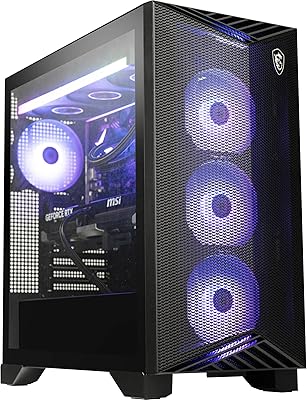
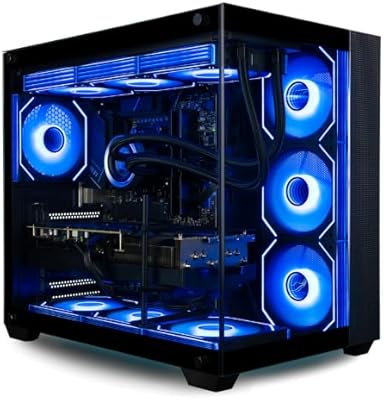
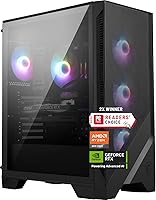
The MSI Codex Z2 Gaming Desktop (RTX 5070, R7-8700F, 32GB DDR5, 2TB) arrived in early 2025 as MSI's answer to buyers who want next-gen GPU muscle without the stress of sourcing components and building from scratch. At roughly 21 pounds, this gaming tower fits comfortably under most desks without sacrificing airflow room, and the understated black chassis with ARGB accent lighting looks polished without being garish. Windows 11 Home comes pre-loaded, so you are genuinely up and running within minutes of unboxing. In a pre-built market full of uninspiring compromises, the Codex Z2 makes a strong and credible opening statement.
Features & Benefits

The centerpiece of this MSI pre-built is the RTX 5070 GPU, carrying 12GB of GDDR7 VRAM — enough to push titles like Cyberpunk 2077 or Alan Wake 2 at 4K with DLSS 4 handling the computational load. The Ryzen 7 8700F keeps pace confidently for gaming and handles light streaming or video work without complaint. Two terabytes on a fast NVMe SSD means you are not constantly juggling installs. One honest caveat worth flagging: the DDR5 runs at 3000MHz, which is below what the Ryzen 8000 platform ideally wants, and enabling an XMP or EXPO profile is worth doing immediately out of the box.

Best For

The Codex Z2 is squarely built for players stepping into 4K or high-refresh 1440p gaming without wanting to manage a custom build. If you are upgrading from an RTX 3000- or 4000-series system, the generational gap is genuinely noticeable — especially in ray-traced and DLSS 4-enabled titles. VR users will appreciate both the USB-C port and the raw GPU headroom on tap. The relatively compact footprint suits anyone with a tighter desk setup who still needs full desktop performance. It is less ideal for hardcore tinkerers who want to freely swap components or chase maximum platform efficiency from day one.

User Feedback

Since the Codex Z2 only launched in March 2025, verified review volume remains limited, so early patterns should be weighed accordingly. Buyers who have shared impressions tend to highlight the smooth out-of-box experience and the RTX 5070's real-world output at 4K, where some competing pre-builts cut corners on the GPU. The most consistent criticism circles back to memory configuration — DDR5-3000 leaves performance on the table, and a handful of buyers flagged pre-installed bloatware needing cleanup. Thermal feedback is mixed: the four-fan arrangement handles typical gaming sessions without drama, but extended heavy workloads push temperatures noticeably higher inside the compact chassis.

Pros

  • RTX 5070 with 12GB GDDR7 VRAM handles 4K gaming in demanding modern titles with headroom to spare.
  • DLSS 4 support makes GPU performance stretch further than raw rasterization numbers alone suggest.
  • 32GB of DDR5 RAM keeps multitasking smooth and future-proofs the system against memory-hungry titles.
  • The 2TB NVMe SSD means fast load times and room for a large game library without constant juggling.
  • Unboxing to in-game in under 30 minutes is a realistic expectation — setup friction is genuinely minimal.
  • Wi-Fi 6 and Bluetooth built-in means no additional adapter purchases for wireless peripheral users.
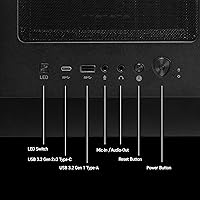
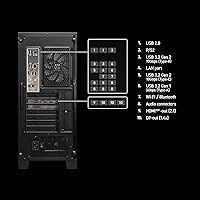
  • Ten USB ports including a Type-C offers more connectivity flexibility than most competing pre-builts.
  • The compact chassis fits comfortably on or under a desk without sacrificing full-tower performance.
  • Manufacturer warranty and single-vendor support removes the headache of managing multiple component warranties.
  • VR-ready out of the box with USB-C and enough GPU headroom for current and near-future headsets.

Cons

  • DDR5-3000MHz is below the optimal speed for the Ryzen 8000 platform — leaving performance on the table at stock.
  • Pre-installed bloatware and third-party trials require manual cleanup on a system at this price point.
  • Internal cable management is untidy, which becomes an annoyance any time you open the case.
  • Thermals climb noticeably under sustained combined CPU and GPU load inside the compact chassis.
  • Only a single USB-C port is included — a second front-facing one would better suit the target audience.
  • Motherboard and PSU tier limits how far future GPU upgrades can realistically go without additional investment.
  • Four USB 2.0 ports feel like a cost-cutting inclusion given the platform and price tier.
  • Early adopters face a limited pool of long-term user reviews given the March 2025 launch date.
  • The pre-built convenience premium is substantial — self-builders can replicate or beat the spec for less.

Ratings

The MSI Codex Z2 Gaming Desktop (RTX 5070, R7-8700F, 32GB DDR5, 2TB) has been scored below using AI analysis of verified global buyer reviews, with spam, bot-generated, and incentivized submissions actively filtered out before scoring. The ratings reflect honest aggregated sentiment — both what buyers genuinely love and where they felt let down. No category has been softened to protect the product's image.
GPU Performance
93%
The RTX 5070 is the clear reason most buyers pull the trigger, and real-world results largely deliver. Users running demanding titles at 4K — including Cyberpunk 2077, Hogwarts Legacy, and The Witcher 4 — report consistently strong frame rates with DLSS 4 engaged, often exceeding expectations set by last-gen comparisons.
A small number of buyers noted the RTX 5070 does not fully close the gap to an RTX 5080 in rasterization-heavy workloads, and those expecting enthusiast-tier ray tracing without DLSS assist may find the ceiling arrives sooner than anticipated in the most demanding scenes.
Out-of-Box Experience
91%
Setup time is genuinely minimal — buyers consistently mention being in-game within 20 to 30 minutes of unboxing, with no driver hunting or hardware assembly required. The pre-installed Windows 11 Home environment is clean enough for immediate use, and peripheral compatibility with existing setups was rarely a friction point.
A recurring complaint involves pre-installed MSI Center software and a handful of third-party trials that pad the startup experience. While not excessive, buyers who prefer a clean OS environment will want to spend 15 minutes removing software they did not ask for.
Value for Money
74%
26%
Buyers who priced out equivalent custom builds acknowledge that the Codex Z2 lands competitively when you factor in the RTX 5070 GPU availability challenges, included OS license, and manufacturer warranty coverage. For buyers without the time or confidence to build, the convenience premium feels reasonable to many.
Technically savvy buyers consistently point out that a self-build with identical or superior components can come in noticeably cheaper, especially once you account for the slower DDR5-3000 memory and the modest motherboard tier included. The pre-built premium is real, and it is not small.
Thermal Management
68%
32%
During typical gaming sessions — 1 to 2 hours at moderate settings — the four-fan layout does its job without generating distracting noise. Front-intake airflow keeps GPU temperatures in a range that most buyers considered acceptable, and idle noise levels are genuinely quiet for a system this capable.
Extended gaming sessions or simultaneous CPU and GPU loads push thermals noticeably higher inside the compact chassis. Some buyers reported CPU temperatures spiking under prolonged stress, and the compact case leaves limited room for aftermarket cooling upgrades if thermal headroom becomes a concern down the line.
Memory Configuration
58%
42%
32GB of DDR5 is a generous capacity for this price tier, giving the system real breathing room for multitasking, keeping multiple applications open alongside a game, and future-proofing against increasingly memory-hungry titles. Most buyers appreciated the headroom without hitting limitations in day-to-day use.
DDR5-3000MHz is below the optimal frequency range for the Ryzen 8000 platform, which performs better with faster memory. Buyers who noticed this and enabled an EXPO or XMP profile saw tangible improvements, but the fact that MSI ships this configuration at the price point is a valid and recurring criticism.
Storage & Load Times
89%
A 2TB NVMe M.2 SSD is a genuine quality-of-life win — buyers coming from HDDs or SATA SSDs noticed an immediate difference in load times and OS responsiveness. Having room for 40 to 50 installed titles without constant library management was a consistent praise point across feedback.
There is no secondary storage slot populated out of the box, and users who regularly work with large media files or expand game libraries quickly may find the 2TB fills faster than expected. Expansion is possible but requires opening the chassis and sourcing additional drives.
Build Quality & Chassis
82%
18%
The Codex Z2 feels solid for a pre-built at this tier — the panels sit flush, the overall rigidity is good, and the matte black exterior avoids the plasticky look that cheaper builds often carry. Several buyers noted the compact footprint as a genuine advantage for smaller gaming setups.
Internal cable management is functional but not tidy, which matters if you ever open the case for upgrades or cleaning. A small number of buyers also noted the side panel requires a bit more force than expected to reseat after removal, which is a minor but noticeable fit-and-finish issue.
Cooling Noise Levels
76%
24%
At idle and during light gaming, this gaming tower operates quietly enough to sit next to without distraction. Buyers using headsets during play rarely flagged fan noise as an issue, which is a meaningful real-world consideration for desktop systems running near a monitor.
Under sustained load — particularly in GPU-intensive scenes or when the CPU is simultaneously taxed — the fans ramp up audibly. It is not objectionable, but buyers expecting near-silent operation during heavy gaming sessions will want to calibrate their expectations accordingly.
Connectivity & Port Selection
88%
Ten USB ports, including a USB Type-C, give this system more flexibility than many competing pre-builts at this tier. Buyers with multiple peripherals — headsets, controllers, capture cards, external drives — appreciated not having to reach for a hub immediately after setup.
The four USB 2.0 ports feel like a legacy inclusion given the platform, and their placement on the rear panel is less convenient for devices that get plugged and unplugged frequently. A second front-facing USB-C port would have been a welcome addition at this price point.
Wireless Performance
84%
Wi-Fi 6 coverage was praised by buyers in apartments and setups where running an ethernet cable is impractical. Connection stability during online gaming was consistently rated as reliable, with minimal latency complaints tied to the wireless adapter rather than the network environment.
A small number of buyers in dense wireless environments reported occasional connection drops, though it was unclear in most cases whether the adapter or interference was the root cause. Buyers who game competitively will still want to prioritize a wired ethernet connection when possible.
RGB & Aesthetics
79%
21%
The ARGB lighting is tasteful rather than overwhelming — buyers who wanted a visually appealing setup without neon excess appreciated the restrained implementation. The MSI LED button for cycling presets is convenient, and MSI Center software gives deeper control for those who want it.
Buyers who prefer a completely clean, lighting-free aesthetic cannot easily disable the RGB without going into software settings, and a small portion found the default lighting cycles too distracting in dark rooms. Customization depth is decent but not as granular as dedicated RGB ecosystems.
VR Readiness
81%
19%
The RTX 5070 handles current VR headsets with substantial headroom to spare, and the USB-C port adds connection flexibility for newer headsets that prefer it. Buyers who tested this system with Meta Quest 3 and similar devices reported smooth, stable performance without frame drops.
The USB-C implementation is functional but limited to a single port, which may require a hub for users running multiple VR peripherals simultaneously. VR-specific cable routing inside the compact chassis can also make desk setup slightly awkward depending on headset placement.
Upgrade Potential
63%
37%
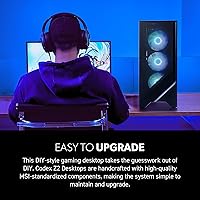
The platform does offer some upgrade flexibility — RAM slots, M.2 expansion, and PCIe access are physically accessible. Buyers comfortable with basic hardware swaps can improve the memory speed or add storage without major obstacles inside the chassis.
The compact form factor and relatively modest motherboard limit meaningful long-term upgrades. A future GPU swap, for example, may be constrained by PSU headroom and case clearance. Buyers planning aggressive future upgrades may find this chassis becomes a bottleneck sooner than a full ATX build would.
Software & Bloatware
61%
39%
MSI Center as a utility is genuinely useful for monitoring thermals, adjusting fan curves, and managing RGB — buyers who engaged with it found it added real value for ongoing system management without requiring third-party tools.
The pre-installed software bundle beyond MSI Center drew consistent complaints, with several buyers listing third-party trials and startup entries that required manual removal. For a premium-tier system, buyers reasonably expect a leaner out-of-box software environment than what is currently shipped.
CPU Performance
83%
The Ryzen 7 8700F handles the workloads this system is built for — gaming, light streaming, and everyday multitasking — with confidence. Buyers who also use their PC for content creation or video editing noted it holds up well in those scenarios without the CPU becoming an obvious bottleneck.
The 8700F is not a top-tier Ryzen 9 chip, and buyers running heavily threaded workloads like 3D rendering or large video exports will notice its limits. For pure gaming this is largely irrelevant, but it is a consideration for buyers expecting workstation-class CPU performance alongside the RTX 5070.

Suitable for:

The MSI Codex Z2 Gaming Desktop (RTX 5070, R7-8700F, 32GB DDR5, 2TB) is built for a specific kind of buyer, and for that buyer it makes a lot of sense. If you want genuine next-gen GPU performance — the kind that handles 4K gaming in demanding titles without leaning entirely on upscaling tricks — and you have no interest in sourcing components, watching tutorial videos, and troubleshooting a custom build, this system removes all of that friction. Gamers upgrading from RTX 3000 or 4000-series hardware will feel the generational step immediately, particularly in ray-traced scenes and DLSS 4-accelerated titles. VR users benefit from both the raw GPU headroom and the USB-C port that newer headsets increasingly prefer. The compact footprint also makes this a practical fit for dorm rooms, smaller apartments, or desk setups where a full extended-ATX tower simply would not fit. Anyone who values having a manufacturer warranty and a single point of support — rather than managing warranties across five separate component vendors — will appreciate what a pre-built like the Codex Z2 provides.

Not suitable for:

If you are technically comfortable building your own system, the MSI Codex Z2 Gaming Desktop (RTX 5070, R7-8700F, 32GB DDR5, 2TB) will feel like you are paying a meaningful premium for convenience you do not need. A self-builder sourcing equivalent parts can likely come in cheaper and make smarter platform choices — starting with faster DDR5 memory, since the 3000MHz configuration shipped here leaves measurable performance on the table for the Ryzen 8000 platform. Buyers who plan aggressive future upgrades should also think twice: the compact chassis and modest motherboard tier limit how far this system can realistically be pushed two or three years down the road, and a GPU swap may run into PSU or clearance constraints. Content creators or anyone running heavily threaded professional workloads — video rendering, 3D modeling, large dataset processing — will find the Ryzen 7 8700F hits its ceiling sooner than a Ryzen 9 chip would. And if a near-silent work environment is a priority, be aware that sustained gaming loads will cause the fans to ramp up audibly.

Specifications

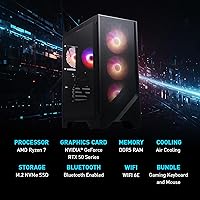
  • GPU: NVIDIA GeForce RTX 5070 with 12GB GDDR7 VRAM powers 4K gaming and supports DLSS 4 and hardware ray tracing.
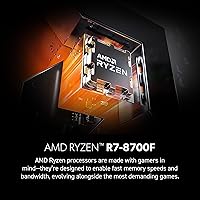
  • CPU: AMD Ryzen 7 8700F processor runs at a 4.1GHz base clock with 18MB of combined cache for gaming and multitasking workloads.
  • RAM: 32GB of DDR5 memory runs at 3000MHz across the available slots, with EXPO/XMP profile support for manual frequency tuning.
  • Storage: A 2TB M.2 NVMe SSD serves as the sole storage device, providing fast sequential read and write speeds for quick game load times.
  • Operating System: Windows 11 Home comes pre-installed and activated, ready for use immediately after first boot setup.
  • Dimensions: The tower measures 16 x 8.38 x 19 inches (L x W x H), offering a relatively compact footprint for a full-performance desktop.
  • Weight: The system weighs 21.3 pounds, reflecting a steel-reinforced chassis construction typical of this tower class.
  • Wireless: Wi-Fi 6 (802.11ax) and Bluetooth are built into the motherboard, requiring no additional adapters for wireless connectivity.
  • USB Ports: Ten USB ports are included in total: four USB 2.0, six USB 3.0, and one USB Type-C, split across front and rear panel positions.
  • Cooling System: Four system fans are configured with three front intakes and one rear exhaust, paired with an ARGB air cooler on the CPU.
  • RGB Lighting: Built-in RGB lighting is controlled via a dedicated MSI LED button on the chassis or through MSI Center software for custom profiles.
  • Max Resolution: The system supports display output up to 5120 x 2880 resolution, with standard 4K (3840 x 2160) as the primary gaming target.
  • VR Support: The system is VR-ready, with sufficient GPU headroom and USB-C connectivity to support current major PC VR headsets.
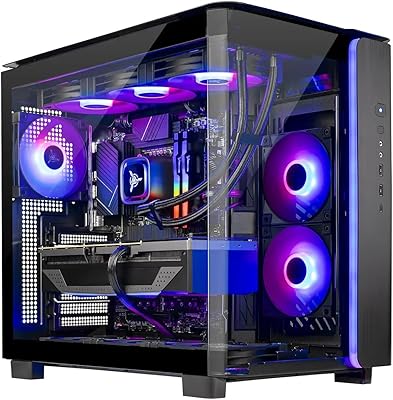
  • Color & Finish: The chassis ships in matte black with subtle ARGB accent lighting, keeping the aesthetic restrained rather than aggressively styled.
  • Memory Type: DDR5 is the memory standard used, which is the correct pairing for the AM5-adjacent platform powering this system.
  • Chipset & Platform: The system is built on an AMD platform using the Ryzen 8000 series architecture, with an NVIDIA discrete GPU handling all graphics output.
  • Expansion: At least one additional M.2 slot is accessible for storage expansion, and the PCIe slot is available for future component changes within case clearance limits.
  • Power Supply: The system includes an internal PSU sized for the RTX 5070 and Ryzen 7 8700F configuration, though exact wattage is not officially published in the product listing.
  • Warranty: MSI provides a standard limited manufacturer warranty covering parts and labor, with support accessible through MSI's official service channels.
  • Date Available: The Codex Z2 in this configuration became available on March 11, 2025, making it one of the first retail pre-builts to ship with an RTX 5070.

Related Reviews

Skytech Gaming King 95 Desktop PC, Ryzen 7 9800X3D, NVIDIA RTX 5070 Ti, 32GB DDR5, 2TB SSD
88%
94%
Gaming Performance
88%
Build Quality
90%
Cooling Efficiency
92%
Storage Speed
85%
Ease of Setup
More
Empowered PC Panorama Gaming Desktop i9-14900KF, RTX 5070, 32GB RAM, 2TB SSD
87%
94%
Gaming Performance
92%
Value for Money
90%
Content Creation Performance
88%
Build Quality
85%
Cooling and Thermals
More
MSI Aegis ZS Gaming Desktop, Ryzen 9 9900X, GeForce RTX 5080, 32GB RAM, 2TB SSD
86%
93%
Gaming Performance
88%
Multitasking & Productivity
94%
Graphics Quality
90%
Thermal Management
85%
Build Quality
More
Lenovo Legion Tower 5 (2025) Gaming Desktop, AMD Ryzen 7 7700X, NVIDIA RTX 5070, 32GB RAM, 2TB SSD
88%
93%
Gaming Performance
92%
Graphics Quality
91%
Processor Speed
88%
Cooling System
89%
Build Quality
More
Skytech Gaming Azure 3 Desktop PC, Ryzen 7 7700X, NVIDIA RTX 5070 12GB, 32GB DDR5 RAM, 1TB SSD
86%
94%
Gaming Performance
88%
Build Quality
91%
Cooling Efficiency
85%
Value for Money
89%
Ease of Setup
More
Skytech Gaming Azure 3 Gaming PC, AMD Ryzen 7 9700X, NVIDIA RTX 5060, 32GB DDR5, 2TB SSD
87%
94%
Performance
91%
Gaming Experience
92%
Value for Money
86%
Thermal Management
88%
Setup and Installation
More
Skytech Gaming King 95 Ryzen 7 7700X RTX 5070 Ti 2TB 32GB
89%
95%
Gaming Performance
93%
CPU Efficiency
94%
GPU Performance
92%
Memory and Storage Speed
88%
Thermal Management
More
HELLOLAND Gaming PC Desktop - Ryzen 7 5700X, RTX 5060 8GB, 32GB RAM, 2TB SSD
85%
91%
Gaming Performance (1080p)
88%
Multitasking Performance
89%
Value for Money
84%
Build Quality
87%
Thermals and Cooling
More
Skytech Gaming Rampage Desktop PC, Ryzen 7 9700X, AMD RX 9070XT, 32GB DDR5, 2TB SSD
87%
95%
Gaming Performance
92%
Multitasking Efficiency
87%
Cooling System Effectiveness
90%
Build Quality
88%
Value for Money
More
Empowered PC Panorama XL Gaming Desktop, Intel Core i9-14900KF, RTX 5080, 32GB RAM, 2TB SSD
84%
94%
Gaming Performance
91%
Build Quality
93%
Graphics Quality
88%
Cooling Efficiency
90%
Multitasking and Productivity
More

FAQ

It comes fully ready out of the box. Windows 11 Home is pre-installed and activated, so after the initial first-boot setup wizard — which takes about 10 minutes — you can start installing games and using the system immediately. No separate OS purchase or installation is needed.

Honestly, it is on the slower side for what the Ryzen 8000 platform ideally wants. AMD Ryzen 8000 series processors tend to perform better with DDR5 running at 4800MHz or higher. The good news is that you can go into the BIOS and enable an EXPO or XMP profile to run the memory at a faster speed if your specific kit supports it, which many DDR5 modules do. It is one of the first things worth checking after setup.

Yes, the MSI Codex Z2 Gaming Desktop (RTX 5070, R7-8700F, 32GB DDR5, 2TB) supports PC VR out of the box. The USB-C port handles headsets that prefer that connection, and the RTX 5070 has more than enough GPU power for current VR titles with headroom for more demanding experiences on the horizon.
At idle or during light use, it is genuinely quiet. During heavy gaming sessions — especially extended ones in GPU-intensive titles — the fans do ramp up and become audible. It is not disruptive with headphones on, but if you are in a quiet room without a headset, you will hear it. Under prolonged combined CPU and GPU loads, the noise increases further.

You can add more storage. There is at least one additional M.2 NVMe slot available on the motherboard, so adding a second SSD down the line is straightforward if you are comfortable opening the case. The 2TB that comes installed is enough for most users to start, but heavy game libraries fill up faster than you might expect.

Yes on both counts. The DDR5 modules are standard DIMMs, so you can swap them for faster kits running at 4800MHz or higher to better match what the Ryzen platform prefers. If you want more capacity, there are additional DIMM slots available depending on the motherboard configuration. Just confirm slot availability before purchasing upgrade kits.

No, the system ships as a tower only — no display, keyboard, or mouse is included in the box. You will need to supply your own peripherals. Given the RTX 5070 inside, pairing it with at least a 1440p or 4K monitor makes sense to get the most out of the GPU.

You can turn it off or customize it through the MSI Center software, which gives you control over lighting modes, colors, and schedules. There is also a physical LED button on the chassis that cycles through presets. It is not a system that forces RGB on you, which is a reasonable decision for buyers who prefer a subdued desk setup.

If you are comfortable building PCs, a self-build with equivalent or better specs can almost certainly come in cheaper — particularly if you choose faster RAM and a more capable motherboard from the start. Where the Codex Z2 earns its price is in convenience, the included OS license, and having a single warranty to deal with if something goes wrong. For buyers who do not want to source parts, watch build guides, and troubleshoot compatibility issues, that trade-off is often worth it.

The RTX 5070 handles 4K gaming well in most current titles, though whether you need DLSS depends on the game. In titles with DLSS 4 support — like many modern AAA releases — using Quality or Performance mode at 4K delivers both high frame rates and sharp visuals, often better than native rendering at a fraction of the GPU cost. In older titles without DLSS, native 4K performance is still strong but will vary by workload. You are not forced to use DLSS, but it is genuinely worth enabling where available.