Overview

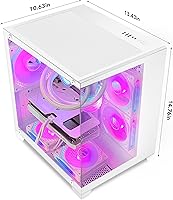
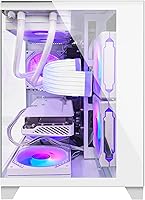
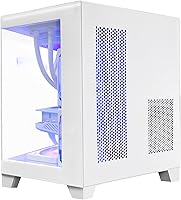
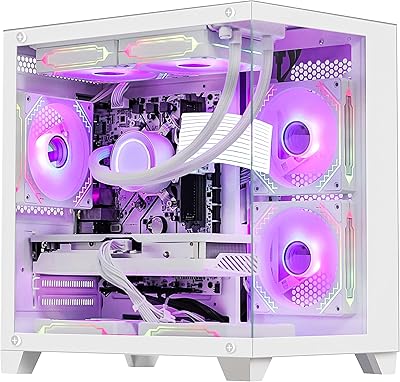
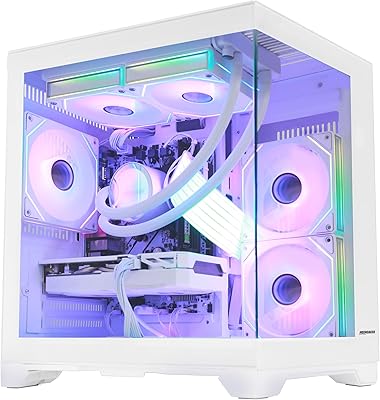
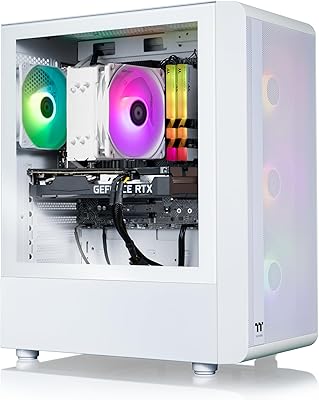
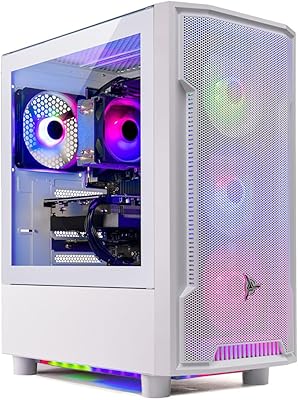
The HELLOLAND Panorama RTX 5060 Gaming Desktop is a mid-range prebuilt tower that pairs a Ryzen 7 5700X processor with an RTX 5060 8GB graphics card, aiming squarely at gamers who want strong 1080p performance without overspending. These systems are assembled in the USA, and that domestic build process shows in how the unit arrives: cables routed, components seated, and Windows 11 Pro already configured so you're not stuck installing drivers on day one. The case itself is a clean white tower with ARGB fans up front and a 240mm liquid cooler keeping the CPU in check. It's not flashy, but it feels purposeful, like a machine built for actual gaming sessions rather than a showroom photo.
Features & Benefits

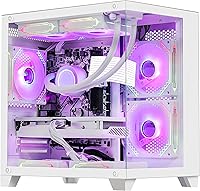
Open up this gaming desktop and the spec sheet reads like a solid 1080p gaming kit. The Ryzen 7 5700X brings 8 cores and 16 threads to the table, so it chews through both game logic and whatever you're running in the background, whether that's a browser with thirty tabs or a Discord call. The RTX 5060 8GB handles current titles comfortably and leans on DLSS 4 frame generation to squeeze extra smoothness out of newer, more demanding games. 32GB of DDR4 RAM means multitasking doesn't feel like a compromise, and the dual storage setup, a fast NVMe drive plus a roomy SATA SSD, keeps boot times and load screens short. A 240mm AIO cooler and a 650W 80 Plus PSU round things out with reasonable thermals and a bit of upgrade headroom.

Best For

This Ryzen 7 build makes the most sense for people gaming at 1080p who don't need the overhead of 1440p or 4K. If you want a machine that's ready to use the moment you plug it in, with Windows already set up and no bloatware-hunting required, that's exactly the kind of buyer this fits. It also suits casual streamers or anyone dabbling in light content creation, since the CPU and RAM combination handles multitasking without much fuss. Someone upgrading from an aging prebuilt or finally ditching a gaming laptop will likely feel the difference immediately. On the flip side, heavy 4K gaming, GPU-intensive rendering work, or setups relying on a long row of USB peripherals will probably outgrow what's on offer here fairly quickly.

User Feedback

Feedback on this prebuilt tower tends to follow a consistent pattern. Most buyers appreciate how little setup is required, since the system arrives ready to game with minimal fuss involved. The technical support line gets mentioned often as a genuine safety net, especially for anyone less comfortable troubleshooting hardware solo. On the downside, the limited selection of USB 2.0 and 3.0 ports comes up repeatedly as an annoyance for people running multiple peripherals or external drives. Build quality and cable management inside the case seem to vary a bit from unit to unit, which isn't unusual for this price tier but is worth knowing going in. A few owners also wish for better airflow or more fan control options.

Pros

  • Handles smooth 1080p gaming across most current titles without breaking a sweat.
  • Ships ready to use, with Windows 11 Pro already installed and configured.
  • 8-core Ryzen 7 CPU manages background apps and gaming simultaneously with ease.
  • Dual SSD storage means fast boot times and quick game load screens.
  • 32GB of RAM gives serious multitasking headroom for streaming, browsing, and chat apps.
  • 240mm liquid cooling keeps thermals in check during extended gaming sessions.
  • Lifetime technical support line offers real peace of mind for less experienced builders.
  • Assembled in the USA, which buyers consistently note as a reassuring touch.
  • DLSS 4 frame generation adds extra smoothness in newer, more demanding games.

Cons

  • Only three total USB ports feels stingy for a modern gaming setup.
  • Not built for 4K gaming or serious video rendering workloads.
  • Build quality and internal cable routing can vary somewhat between individual units.
  • Case airflow could be better for buyers chasing maximum thermal headroom.
  • Fan and lighting customization options are fairly limited out of the box.
  • 650W power supply leaves only modest room for a serious future GPU upgrade.
  • Peripheral-heavy desks with multiple drives may quickly outgrow the available ports.

Ratings

Every score below comes from an AI-driven analysis of the HELLOLAND Panorama RTX 5060 Gaming Desktop, built from a wide pool of verified buyer reviews collected worldwide. Spam, bot activity, and incentivized feedback are filtered out before any scoring happens, so what remains reflects genuine usage patterns. Both the strong points and the recurring frustrations are represented here exactly as buyers describe them.

1080p Gaming Performance
84%
The Ryzen 7 and RTX 5060 pairing handles modern titles at 1080p with strong, consistent frame rates, and DLSS 4 frame generation adds extra smoothness in more demanding games. For everyday gaming sessions at native Full HD, performance feels responsive and stable.
Push toward 1440p or ultra settings in newer AAA titles and frame rates start to dip noticeably. This card is clearly tuned for 1080p, so anyone expecting strong 1440p or 4K headroom will be disappointed.
CPU & Multitasking Performance
88%
An 8-core, 16-thread Ryzen 7 5700X chews through gaming, streaming, and background browser tabs without breaking a sweat. Daily multitasking, like running Discord and a dozen Chrome tabs alongside a game, feels smooth thanks to the combination with 32GB of RAM.
Heavier workloads like serious video rendering or 3D modeling will eventually expose the limits of a mid-range desktop chip. It is plenty capable for gaming and casual content creation, but it is not a workstation-class processor.
Value for Money
82%
18%
Bundling a modern RTX 5060, 32GB of RAM, and dual SSD storage into one prebuilt package gives buyers a lot of usable hardware without needing to source and assemble parts themselves. For someone wanting a ready-to-game system, the overall package feels reasonably priced for what is included.
Shoppers comparing component prices individually may find they could build something similar themselves for a bit less if they are comfortable with self-assembly. The convenience premium is real, even if it is not extreme.
Build Quality & Materials
71%
29%
The white tower case feels solid for everyday handling, and the 240mm AIO cooler along with ARGB fans gives it a clean, put-together look rather than a bargain-bin feel. Most units arrive well packaged with components properly seated.
Feedback suggests cable management and overall build consistency can vary somewhat from one unit to the next, which is a real concern at this price tier. A few buyers have needed to tidy up internal wiring themselves after unboxing.
Cooling & Thermal Performance
86%
The 240mm AIO liquid cooler keeps the Ryzen 7 5700X running at comfortable temperatures even during extended gaming sessions, which helps maintain steady performance over time. It runs quietly enough for normal day-to-day use.
Case airflow beyond the CPU loop is fairly basic, so GPU and case temperatures can climb a bit more than enthusiast builds with additional intake fans. A few owners have added extra fans for better overall airflow.
Storage Speed
89%
Pairing a 1TB NVMe drive with a 1TB SATA SSD means fast boot times and quick game load screens, with the secondary drive offering extra room for a growing game library. There is no spinning hard drive dragging things down anywhere in the system.
2TB total storage can fill up quickly with today's larger game installs, so heavier gamers may need to think about cloud backups or future expansion sooner than expected. There is no built-in option for higher-capacity storage out of the box.
Connectivity & Port Selection
58%
42%
Built-in 802.11AC WiFi and Bluetooth 5.3 mean you can get online and pair peripherals without hunting for extra adapters. HDMI and DisplayPort outputs cover most common monitor setups without issue.
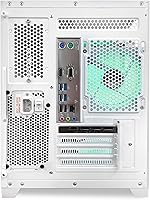
Only two USB 2.0 ports and a single USB 3.0 port feels noticeably tight for anyone running a webcam, headset, controller, and external drive at once. This is one of the more consistently mentioned drawbacks among buyers, and a USB hub becomes almost a necessity.
Setup & Out-of-Box Experience
91%
Windows 11 Pro arrives already installed and configured, so most buyers can plug in a monitor, keyboard, and mouse and start playing within minutes. This hassle-free setup is one of the most consistently praised aspects across feedback.
Buyers who prefer customizing their OS installation from scratch or wiping factory software will need to handle that themselves. There is little documentation included for advanced configuration beyond the basics.
Customer & Technical Support
85%
The lifetime technical and diagnostic support line stands out as a genuine safety net for less experienced builders who run into setup questions or hardware issues down the road. Many buyers specifically call this out as reassuring.
Support is most useful for diagnostics and troubleshooting guidance rather than hands-on repair, so anyone expecting in-home service may need to look elsewhere. Response times can also vary depending on demand.
Power Supply & Efficiency
79%
21%
The 650W 80 Plus certified power supply runs efficiently and stays cool under typical gaming loads, keeping overall case temperatures and electricity use reasonable. It is sized appropriately for the included components.
Anyone planning a significant future GPU upgrade may find the 650W ceiling limiting compared to higher-wattage units in pricier builds. It leaves only modest headroom beyond the current hardware configuration.
Design & Aesthetics
76%
24%
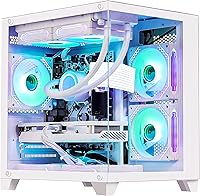
The white chassis paired with ARGB front fans gives the tower a clean, modern look that fits well on a desk or in a dorm setup. It avoids the overly aggressive gamer aesthetic some competitors lean into.
Fan and lighting customization options are fairly limited out of the box, so buyers wanting deep RGB control through software may feel a bit boxed in. The exterior styling, while tidy, is not especially distinctive.
Upgradability
68%
32%
Standard DDR4 RAM slots and conventional SATA/NVMe storage bays make future memory or drive upgrades straightforward for anyone comfortable opening the case. There is no proprietary hardware blocking simple component swaps.
The 650W power supply and overall case airflow put a practical ceiling on how far GPU upgrades can realistically go. Buyers planning a major future upgrade path may eventually need to replace more than just the graphics card.
Noise Level
73%
27%
Under normal gaming and browsing use, the 240mm AIO cooler and case fans stay reasonably quiet, making it comfortable for shared living spaces or late-night sessions. It does not require constant fan ramp-up during typical use.
Fan noise does become more noticeable under sustained heavy loads, since case airflow is fairly basic and the fans need to work harder to compensate. A few buyers wish for quieter or more adjustable fan profiles.

Suitable for:

The HELLOLAND Panorama RTX 5060 Gaming Desktop fits best with someone who games primarily at 1080p and wants strong, consistent frame rates without chasing 1440p or 4K specs. It's a smart pick for a student or young professional setting up their first real gaming rig, since Windows arrives already configured and there's no driver-hunting required out of the box. Casual streamers and light content creators will appreciate the combination of an 8-core CPU and 32GB of RAM, which handles game capture, browser tabs, and chat apps running at once without stutter. Anyone retiring an aging prebuilt or finally moving off a laptop will notice an immediate jump in load times thanks to the dual SSD setup. It also suits buyers who value a straightforward purchase experience, with USA assembly and a lifetime tech support line backing up the hardware warranty.
Not suitable for:

Buyers chasing high-refresh 1440p or 4K gaming should look elsewhere, since the RTX 5060 8GB is built for 1080p and will hit its ceiling well before those resolutions feel smooth. The HELLOLAND Panorama RTX 5060 Gaming Desktop also isn't the right fit for video editors or 3D artists doing serious rendering work, where a beefier GPU and more cores would pay off. Anyone with a desk full of peripherals, multiple external drives, or a docking station setup may find the limited USB 2.0 and 3.0 port count genuinely restrictive rather than a minor quirk. People who want guaranteed pristine build quality and cable management every single time might be frustrated, since feedback suggests some unit-to-unit variation. Finally, buyers hoping for extensive airflow customization or fan control software out of the box will probably want to look at pricier, more enthusiast-oriented builds.

Specifications

  • Processor: The system runs an AMD Ryzen 7 5700X, an 8-core, 16-thread CPU with a 3.4GHz base clock and 4.6GHz max boost.
  • Graphics Card: Graphics are handled by an NVIDIA GeForce RTX 5060 with 8GB of GDDR7 memory and support for DLSS 4 Multi Frame Generation.
  • Memory: 32GB of DDR4 RAM running at 3200MHz is installed for multitasking and gaming workloads.
  • Storage: Storage combines a 1TB M.2 NVMe SSD with an additional 1TB SATA SSD for 2TB total.
  • Cooling System: CPU cooling is handled by a 240mm AIO liquid cooler paired with ARGB PWM case fans.
  • Power Supply: A 650W 80 Plus certified power supply handles power delivery and efficiency.
  • Operating System: Windows 11 Pro 64-bit comes pre-installed and activated on the system.
  • Connectivity: Wireless connectivity includes 802.11AC WiFi and Bluetooth 5.3.
  • Video Outputs: Display output is available through both HDMI and DisplayPort connections.
  • USB Ports: The case includes two USB 2.0 ports and one USB 3.0 port.
  • Case Design: The tower uses a white chassis with ARGB front fans for visual styling.
  • Dimensions: The case measures 13.58 x 10.63 x 14.76 inches and weighs 26 pounds.
  • Display Resolution: The system is optimized for 1920 x 1080 Full HD gaming resolution.
  • Build Origin: Units are assembled in the USA by HELLOLAND before shipping.
  • Warranty & Support: Coverage includes a 1-year limited hardware warranty plus lifetime technical and diagnostic support.

Related Reviews

HELLOLAND Ryzen 5600X RTX 5060 Gaming Desktop
78%
88%
1080p Gaming Performance
87%
GPU Capability
74%
Value for Money
84%
Aesthetics & Design
72%
Build Quality
More
Empowered PC Panorama XL RTX 5090 Desktop
78%
96%
Raw Gaming Performance
83%
Build Quality
78%
Thermal Management
88%
Storage Configuration
54%
Value for Money
More
Empowered PC Panorama Gaming Desktop i9-14900KF, RTX 5070, 32GB RAM, 2TB SSD
87%
94%
Gaming Performance
92%
Value for Money
90%
Content Creation Performance
88%
Build Quality
85%
Cooling and Thermals
More
HOENGAGER Panorama RTX 5060 Gaming Desktop
73%
79%
Gaming Performance
74%
Value for Money
86%
Out-of-Box Experience
62%
Memory Configuration
47%
Upgrade Potential
More
Skytech Storm RTX 5060 Gaming Desktop
73%
91%
1080p Gaming Performance
67%
CPU Performance
88%
Out-of-Box Experience
74%
Value for Money
78%
Build Quality & Cable Management
More
Empowered PC Panorama XL Gaming Desktop
82%
94%
Gaming Performance
76%
Value for Money
91%
Out-of-Box Experience
83%
Thermal Management
81%
Build Quality
More
ViprTech Stryker 4.0 Gaming Desktop PC
73%
81%
Gaming Performance
73%
Value for Money
62%
CPU Performance
69%
Build & Assembly Quality
83%
Thermal Management
More
ViprTech Ghost 4.0 Gaming Desktop PC
76%
74%
Gaming Performance
83%
GPU Performance
68%
Value for Money
82%
Build Quality
88%
Out-of-Box Experience
More
Thermaltake LCGS Quartz i1460
79%
88%
Gaming Performance at 1080p
74%
Value for Money
86%
Build Quality & Fit
71%
Thermal Management
61%
Memory Configuration
More
Skytech Archangel RTX 5060 Ti Gaming Desktop
77%
88%
Gaming Performance
83%
Build Quality
71%
Value for Money
91%
GPU Specification
67%
CPU Performance
More

FAQ

This build is tuned for 1080p gaming, where the RTX 5060 and Ryzen 7 5700X combo runs most current titles smoothly at high settings. If you push into 1440p, especially in newer, GPU-heavy games, you will need to dial back some settings. It is not built with 4K gaming in mind.

No, this is a tower-only setup, so you will need to supply your own monitor, keyboard, and mouse. The desktop does include the case, internal hardware, and Windows 11 Pro pre-installed.

Keep in mind there are only two USB 2.0 ports and one USB 3.0 port built into the case, so heavy peripheral setups might feel cramped out of the gate. A simple USB hub fixes this pretty easily if you have more than three devices to connect.

The 8-core Ryzen 7 chip and 32GB of RAM give you decent headroom for light streaming or casual video editing alongside gaming. It will not replace a workstation built for heavy 4K timeline editing or 3D rendering, but for everyday content creation tasks it holds up well.

The 240mm AIO liquid cooler keeps CPU temperatures in check without needing to ramp fans to uncomfortable noise levels during normal use. Under sustained heavy load you will hear the fans pick up, which is typical for any liquid-cooled gaming tower at this price point.

Yes, the system uses standard DDR4 RAM and standard SATA/NVMe storage slots, so adding more memory or swapping in a bigger drive down the line is straightforward for anyone comfortable opening a case. Just check open slot availability before buying additional sticks.

It can technically output to a 1440p display through the HDMI or DisplayPort connections, but the RTX 5060 is really built around 1080p performance. You will likely need to lower in-game settings to keep frame rates smooth at the higher resolution.

The HELLOLAND Panorama RTX 5060 Gaming Desktop ships with a 1-year limited hardware warranty, and the lifetime technical and diagnostic support line is genuinely useful if you run into setup or troubleshooting issues. Plenty of buyers mention that support line specifically as a reassuring safety net.
Not really. Windows 11 Pro comes already installed and configured, so most people just need to plug in a monitor, keyboard, and mouse and they are ready to go. Buyers consistently mention how hassle-free the initial setup process is.

Feedback suggests build quality and internal cable routing can vary a bit from unit to unit, which is not unusual at this price tier but is worth knowing going in. If you ever want to clean up cabling or add components, opening the case yourself is straightforward since it is a standard tower layout.