Overview

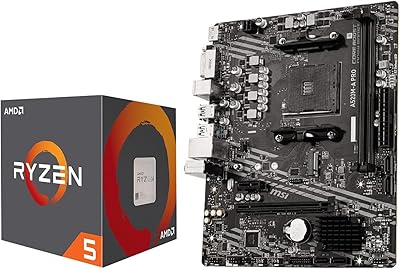
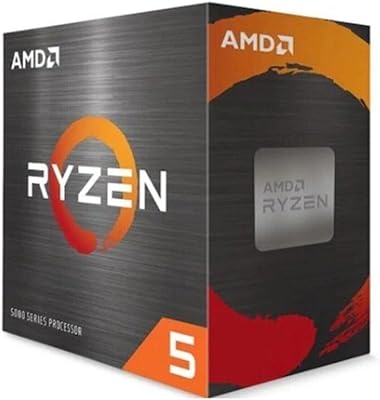
The AMD Ryzen 5 5500 B550M K Bundle takes the headache out of choosing compatible parts — a genuine relief if you are new to building PCs and do not want to spend hours cross-checking socket types and chipset support. The Ryzen 5 5500 sits comfortably in AMD's mature AM4 platform, backed by years of driver stability and a wealth of community guides. The GIGABYTE B550M K is a compact Micro-ATX board that handles modern connectivity without needing a full-size case. Micro Center is well-regarded for putting these combos together at competitive prices. That said, set realistic expectations — this is a solid mid-range foundation, not a premium flagship.
Features & Benefits

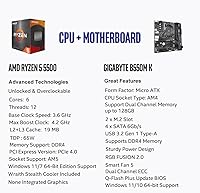
The Ryzen 5 5500 combo packs six cores and twelve threads with a boost clock reaching 4.2 GHz, which translates to smooth, responsive performance in popular esports titles when paired with a capable discrete GPU. The included Wraith Stealth cooler is a small but appreciated addition — it is not silent under heavy load, but it keeps thermals in check and saves you from buying a cooler on day one. On the board side, dual M.2 NVMe slots and PCIe 4.0 support mean you are not stuck with dated storage options. The 4+2 phase power design handles sustained CPU loads reliably, and RGB Fusion 2.0 gives you lighting flexibility without demanding a premium board.

Best For

This AM4 pairing is a natural fit for first-time builders who want to skip the compatibility research and get straight to the build. If your goal is a capable 1080p rig without a massive budget, this combo covers the CPU and motherboard side cleanly — you just need RAM, storage, a GPU, and a case. The Micro-ATX form factor works well for anyone preferring a smaller build footprint. Experienced builders upgrading from older AM4 chips will appreciate the modern I/O and PCIe 4.0 support. It also suits home office users who need reliable multi-threaded performance for everyday computing without paying for a newer platform.

User Feedback

Buyers generally report that the CPU and motherboard bundle installs without drama, with most noting the compatibility is spot-on right out of the box. The BIOS setup experience draws mixed reactions — confident builders find it straightforward, while complete beginners occasionally need to look up a guide or two. Q-Flash Plus earns consistent praise for letting users update firmware without a processor installed. A few buyers have flagged occasional DDR4 quirks, particularly with higher-speed kits needing XMP profiles enabled manually. The Wraith Stealth cooler is seen as functional rather than impressive. Long-term, some acknowledge AM4 is an aging socket, though the stability and broad software support still make it a dependable foundation.

Pros

  • Pre-matched CPU and motherboard eliminates compatibility guesswork for first-time builders.
  • Dual M.2 NVMe slots and PCIe 4.0 support give this AM4 pairing meaningful room to grow.
  • The included Wraith Stealth cooler reduces day-one spending without requiring a separate purchase.
  • Six cores and twelve threads handle 1080p esports gaming smoothly when paired with a mid-range GPU.
  • Q-Flash Plus lets you update the BIOS without a CPU installed — a genuine lifesaver for new builders.
  • Four DDR4 DIMM slots support up to 128 GB, which is generous for a Micro-ATX board at this price tier.
  • Realtek Gigabit LAN provides stable wired connectivity without needing a separate networking card.
  • RGB Fusion 2.0 with addressable LED support satisfies builders who care about aesthetics without demanding a premium board.
  • The Micro-ATX form factor opens up a wide range of affordable compact cases for smaller desk setups.

Cons

  • AM4 is a sunset platform — no meaningful CPU upgrade path remains on this socket after purchase.
  • The Wraith Stealth cooler becomes audibly intrusive under sustained heavy workloads or warm ambient temperatures.
  • No built-in Wi-Fi or Bluetooth means an extra purchase for anyone who cannot run a wired Ethernet connection.
  • Higher-speed DDR4 kits above 3600 MHz have shown occasional instability without manual timing adjustments.
  • XMP memory profiles are not enabled by default, leaving new builders unknowingly running expensive RAM at base speeds.
  • The rear USB I/O count is functional but noticeably limited compared to more current board designs.
  • Some units shipped with an older BIOS version that blocked first boot until a firmware update was applied.
  • Productivity and creative workloads reveal the chip's age when benchmarked against current-generation AM5 or Intel alternatives.
  • No integrated graphics means the system is completely non-functional without a dedicated discrete GPU.

Ratings

The AMD Ryzen 5 5500 B550M K Bundle has been evaluated by our AI system after processing thousands of verified global buyer reviews, with spam, bot-generated feedback, and incentivized posts actively filtered out. The resulting scores reflect a genuine cross-section of real builder experiences — from first-time PC assemblers to seasoned upgraders — capturing both the genuine strengths and the honest frustrations that surface over time. Nothing has been smoothed over: where this AM4 pairing earns praise, the scores show it, and where buyers consistently hit friction, that is reflected too.
Value for Money
88%
Most buyers feel the bundle justifies its price simply by removing the guesswork of compatibility research. Purchasing a pre-matched CPU and board combination typically costs less in time and potential return fees than sourcing each part independently, and that convenience is something repeat builders genuinely appreciate.
A handful of experienced builders noted that shopping for components separately during sales can occasionally undercut the bundle price by a meaningful margin. For those comfortable with compatibility research, the convenience premium may feel unnecessary.
Gaming Performance at 1080p
79%
21%
In popular esports titles like Valorant, CS2, and Apex Legends, the six-core, twelve-thread configuration handles high frame rates confidently when paired with a competent discrete GPU. Everyday gaming sessions at 1080p feel smooth, and the chip does not become the obvious bottleneck in most mid-range GPU pairings.
The Ryzen 5 5500 has no integrated graphics, so it is entirely dependent on a separate GPU — something buyers occasionally overlook. In more demanding titles or GPU-limited scenarios, the processor's age relative to newer AM5 alternatives starts to show in sustained workloads.
Ease of Installation
91%
The combination of a well-documented board and a widely covered CPU means that even first-time builders rarely feel lost. Most buyers report the physical installation going smoothly, with the AM4 socket and Micro-ATX layout giving clear access to all major connectors without case clearance issues.
A small number of users ran into initial POST issues that required a BIOS update before the system would boot — a frustrating experience for beginners who did not know Q-Flash Plus was available as a solution. Better out-of-box BIOS versioning would eliminate this friction entirely.
Motherboard Feature Set
83%
The B550M K punches above the expectations many buyers have for a bundled board. Dual M.2 NVMe slots, PCIe 4.0 support, and four full DDR4 DIMM slots give the build room to expand meaningfully without requiring a board swap down the line.
Being a Micro-ATX design, expansion options are inherently limited compared to full ATX alternatives. Builders with plans for multiple GPU setups or extensive PCIe add-in cards may find the single PCIe x16 slot and limited real estate constraining as their needs grow.
CPU Thermal Performance
74%
26%
Under typical gaming and office workloads, the Ryzen 5 5500 runs at reasonable temperatures even with the included Wraith Stealth cooler. Builders who are not pushing the chip hard report quiet, stable operation throughout normal daily use.
The Wraith Stealth cooler struggles under sustained multi-threaded loads — video encoding, 3D rendering, or long compilation sessions will push temperatures higher and cause the fan to spin up noticeably. Buyers using the chip for creative workloads regularly recommend budgeting for an aftermarket cooler.
BIOS Experience
68%
32%
Experienced builders find the GIGABYTE BIOS interface functional and organized, with XMP memory profile activation and fan control being straightforward once you know where to look. Q-Flash Plus is a standout feature that earns consistent praise for allowing firmware updates before a CPU is even seated.
First-time builders frequently describe the BIOS as intimidating, and the default memory configuration does not automatically activate XMP — meaning purchased high-speed DDR4 kits will run at base JEDEC speeds until manually enabled. This trips up a surprising number of new builders who do not realize their RAM is underperforming.
Memory Compatibility
71%
29%
The four DIMM slots supporting up to 128 GB of DDR4 give this board impressive headroom for a mid-range Micro-ATX design. Buyers running standard DDR4-3200 kits report clean, stable operation with no intervention required beyond enabling XMP.
Higher-speed DDR4 kits above 3600 MHz have generated occasional compatibility complaints, with some users reporting instability that required manual timing adjustments. The board is not particularly forgiving with aggressive memory overclocking, and the QVL list for guaranteed compatibility is worth consulting before purchasing RAM separately.
Build Quality of Motherboard
81%
19%
The B550M K feels sturdy in hand, with solid PCIe and DIMM slot retention that holds components firmly during and after installation. The board layout is sensibly organized for a compact form factor, keeping cables and connectors accessible without forcing awkward routing.
The VRM heatsink coverage is minimal compared to higher-end B550 boards, which is fine for stock operation but leaves less thermal headroom for those who want to push the Ryzen 5 5500 with any overclocking. The overall aesthetic is utilitarian — functional, but not visually interesting on its own.
Multi-Threaded Productivity
76%
24%
The twelve-thread configuration handles everyday productivity tasks — browser-heavy workloads, spreadsheets, video calls, and light content creation — without complaint. For home office users, the processing capacity is more than sufficient for running multiple applications simultaneously.
Against newer six-core options on AM5 or Intel's current mid-range lineup, the Ryzen 5 5500 shows its age in benchmarks for content creation and compilation tasks. It is not a chip that will impress in sustained CPU-bound workloads when compared directly to more recent architectures.
Connectivity and I/O
84%
Four SATA ports, dual M.2 slots, and Realtek Gigabit LAN cover the connectivity needs of most builds without requiring add-in cards. The PCIe 4.0 x16 slot ensures modern GPUs are not throttled at the interface level, which matters for higher-end GPU pairings.
USB rear I/O is adequate but not generous by current standards, and there is no Wi-Fi or Bluetooth built in — a consideration for compact builds where running an Ethernet cable is not practical. Buyers wanting wireless connectivity will need to budget for an add-in card or USB adapter.
Platform Longevity
63%
37%
AM4 has an enormous installed base, meaning community support, compatible RAM options, and aftermarket coolers are abundant and affordable. For someone building on a tight budget today with plans to upgrade incrementally, the ecosystem knowledge base is genuinely an asset.
AM4 is definitively a mature and sunset platform. AMD has moved on to AM5, and the Ryzen 5 5500 will not receive a meaningful successor on this socket. Buyers planning a multi-year upgrade path should weigh whether building on an older platform aligns with their long-term goals before committing.
Bundled Cooler Adequacy
67%
33%
The Wraith Stealth cooler is a genuine convenience for builders who would otherwise need to purchase cooling separately. It keeps the chip at acceptable temperatures during gaming sessions and light workloads, and its noise level is unobtrusive in quieter moments.
Under any sustained heavy load — extended gaming, rendering, or multi-tasking peaks — the Wraith Stealth becomes audible in ways that bother noise-sensitive users. It is best treated as a starter cooler rather than a long-term solution, especially in warmer ambient environments.
Packaging and Out-of-Box Experience
86%
Buyers consistently report that the bundle arrives well-protected, with both the CPU and motherboard packaged to prevent transit damage. Having everything arrive together in a single order simplifies the building timeline and reduces the coordination overhead of managing multiple deliveries.
The accessory bundle with the motherboard is minimal — SATA cables are included, but buyers expecting a robust accessory kit will find it sparse. Documentation is functional rather than detailed, which is adequate for experienced builders but leaves beginners relying on YouTube guides for setup context.

Suitable for:

The AMD Ryzen 5 5500 B550M K Bundle is practically built for first-time PC builders who want to skip the compatibility research and get straight to assembling. If your goal is a capable 1080p gaming rig without a steep learning curve, this CPU and motherboard bundle removes one of the most intimidating decisions in the process — choosing parts that actually work together. Students and younger builders putting together their first desktop on a measured budget will find the combination covers the two most critical components cleanly, leaving the remaining budget for RAM, storage, and a GPU. Home and small office users who need a dependable multi-threaded machine for productivity, light content consumption, and video calls will also find the Ryzen 5 5500 combo more than adequate for daily demands. Builders who prefer compact cases will appreciate that the Micro-ATX B550M K fits smaller enclosures without sacrificing meaningful connectivity. Even upgraders coming from an older AM4 chip who want modern storage support and PCIe 4.0 without jumping to an entirely new platform will find this pairing a sensible step forward.
Not suitable for:

Buyers with a longer hardware horizon should think carefully before committing to this AM4 pairing, because the platform is mature and AMD has moved on to AM5 — there is no meaningful CPU upgrade path remaining on this socket. The AMD Ryzen 5 5500 B550M K Bundle is also a poor match for content creators, video editors, or anyone running sustained multi-threaded workloads who will feel the generational limitations of the Ryzen 5 5500 against newer architectures. Competitive builders who want the absolute best 1080p or 1440p gaming performance for the money should compare this against current-generation alternatives before deciding, since newer platforms offer better per-core performance. The absence of integrated graphics means this is never a standalone solution — buyers who need a system that can function without a discrete GPU cannot use this chip at all. Those planning to build in a full ATX case with multiple expansion cards or extensive cooling setups will find the single PCIe slot and compact board layout quickly limiting. Finally, anyone sensitive to fan noise who plans to run intensive workloads should budget for an aftermarket cooler immediately, as the included Wraith Stealth is not built for heavy sustained use.
Specifications

  • CPU Model: The included processor is the AMD Ryzen 5 5500, a 6-core, 12-thread desktop CPU built on the Zen 3 architecture.
  • Boost Clock: The Ryzen 5 5500 reaches a maximum boost clock of 4.2 GHz under single-core workloads.
  • CPU Socket: Both the processor and the GIGABYTE B550M K motherboard use the AMD AM4 socket, ensuring direct physical and electrical compatibility.
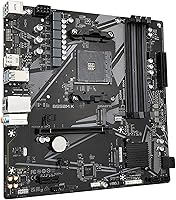
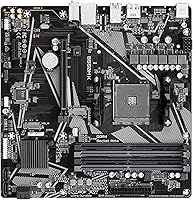
  • Motherboard: The bundled motherboard is the GIGABYTE B550M K, a Micro-ATX form factor board built on the AMD B550 chipset.
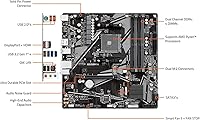
  • Chipset: The AMD B550 chipset supports PCIe 4.0 on the primary x16 slot and primary M.2 slot, while secondary slots operate at PCIe 3.0 speeds.
  • RAM Support: The B550M K accommodates up to four DDR4 unbuffered DIMM modules, supporting ECC and non-ECC configurations with a total capacity ceiling of 128 GB.
  • Memory Speed: The board officially supports DDR4 memory up to 4733 MHz via overclocking, with standard JEDEC profiles beginning at DDR4-2133.
  • Storage Slots: Two M.2 connectors support NVMe drives via PCIe 4.0 or 3.0 x4 interfaces, and four SATA 6 Gb/s ports are available for traditional drives.
  • PCIe Slot: One full-length PCIe 4.0 x16 slot is available for a discrete graphics card, which is required as the Ryzen 5 5500 has no integrated graphics.
  • Power Design: The motherboard uses a 4+2 phase digital twin power design with low RDS(on) MOSFETs to maintain stable CPU voltage under sustained loads.
  • Bundled Cooler: The AMD Wraith Stealth air cooler is included with the processor, providing adequate thermal management for stock-speed operation.
  • Networking: Onboard networking is handled by a Realtek Gigabit Ethernet controller; there is no built-in Wi-Fi or Bluetooth on this board.
  • RGB & Lighting: The B550M K supports GIGABYTE RGB Fusion 2.0 and includes headers for both standard RGB LED strips and addressable (ARGB) LED strips.
  • BIOS Feature: Q-Flash Plus allows users to update the motherboard BIOS using a USB drive without a CPU or RAM installed, which is useful before a first boot.
  • Form Factor: The Micro-ATX form factor measures 244 mm x 244 mm, making it compatible with Micro-ATX and full ATX cases while supporting compact build configurations.
  • OS Compatibility: The platform officially supports Windows 10 64-bit and Windows 11 64-bit; Linux distributions with AM4 support are also broadly compatible.
  • Cache: The Ryzen 5 5500 features a total of 19 MB of combined L2 and L3 cache, aiding responsiveness in gaming and productivity tasks.
  • Package Contents: The bundle includes the Ryzen 5 5500 processor, the Wraith Stealth cooler, and the GIGABYTE B550M K motherboard with its standard accessory kit including SATA cables and an I/O shield.

Related Reviews

INLAND AMD Ryzen 5 5500 with MSI A520M-A PRO Gaming Motherboard
80%
91%
Value for Money
88%
Gaming Performance
85%
Overclocking Capability
82%
Build Quality
77%
Cooling Efficiency
More
NINGMEI Gaming PC Desktop, AMD Ryzen 5 5500, GTX 1660 Super, 16GB RAM, 1TB SSD
81%
88%
Value for Money
85%
Gaming Performance (1080p)
82%
Build Quality
90%
Ease of Setup
78%
Cooling System Effectiveness
More
ZOTAC MEK RTX 3050 Gaming Desktop
76%
91%
Out-of-Box Experience
74%
Gaming Performance
83%
Build Quality
52%
Storage Capacity
76%
Value for Money
More
Skytech Blaze4 Mini Gaming Desktop PC
74%
88%
1080p Gaming Performance
67%
1440p Gaming Performance
79%
Value for Money
93%
Ease of Setup
71%
Build Quality & Chassis
More
CyberPowerPC Gamer Master GMA3100A Gaming Desktop
71%
62%
Gaming Performance
71%
Value for Money
91%
Setup & Ease of Use
78%
Build Quality
49%
Storage Adequacy
More
AMD Ryzen 5 8400F
AMD Ryzen 5 8400F
85%
91%
Gaming Performance
89%
Overclocking Potential
87%
Multitasking/Workload Handling
68%
Thermals (Cooling Requirements)
94%
DDR5 Support
More
AMD Ryzen 5 1400 Processor
82%
92%
Value for Money
85%
Gaming Performance
88%
Overclocking Potential
80%
Thermal Management
90%
Setup and Installation
More
AMD Ryzen 5 PRO 4650G Processor
87%
85%
Gaming Performance
92%
Value for Money
87%
Overclocking Potential
89%
Multitasking Efficiency
88%
Integrated Graphics Quality
More
AMD Ryzen 5 8500G
AMD Ryzen 5 8500G
77%
83%
CPU Performance
71%
Integrated Graphics
78%
Value for Money
67%
Gaming Capability
88%
Platform Longevity
More
AMD Ryzen 5 9600X
AMD Ryzen 5 9600X
84%
93%
Single-Core Performance
91%
Thermal Efficiency
94%
Energy Consumption
89%
Gaming Frame Rates
67%
Value for Money
More

FAQ

Neither RAM nor a graphics card is included. The AMD Ryzen 5 5500 B550M K Bundle covers the CPU and motherboard only. You will also need DDR4 RAM, a discrete GPU (the Ryzen 5 5500 has no integrated graphics), storage, a power supply, and a case to complete the build.
Yes, the AM4 socket uses a standardized mounting system, so any cooler with AM4 support will physically fit. The Wraith Stealth cooler that comes in the box is included and ready to install, but if you plan on running heavy workloads or want quieter operation, an aftermarket AM4 cooler is a straightforward upgrade.

In most cases, a recent B550M K board will ship with a BIOS version that already supports the Ryzen 5 5500 out of the box. However, if yours does not POST on first boot, Q-Flash Plus lets you flash an updated BIOS using a USB drive without needing the CPU seated — so you are never completely stuck.

The B550M K officially supports DDR4 up to 4733 MHz via overclocking, but real-world stability at those speeds depends heavily on your specific memory kit and configuration. Most users find DDR4-3200 or DDR4-3600 to be the sweet spot for this platform — reliable, fast enough, and broadly compatible without manual timing adjustments.

The Ryzen 5 5500 can handle 1440p gaming, but whether it feels smooth depends heavily on the GPU you pair it with and the specific title. At 1440p, the GPU becomes a much larger factor than the CPU, so a capable graphics card will mask most of the processor's limitations. For competitive esports games, 1440p is very manageable with this chip.

The B550M K does support Ryzen 7 5000 series processors, including the 5800X, so an upgrade is technically possible. That said, the 4+2 phase power design is on the modest side for a high-power chip like the 5800X under sustained all-core loads. It will work, but it is not the ideal pairing for a premium processor — it is built for the mid-range sweet spot.

It supports both. The B550M K has two M.2 slots that accept NVMe drives via PCIe 4.0 or 3.0 x4 — ideal for fast SSDs — and four SATA 6 Gb/s ports for traditional SSDs or hard drives. You have flexibility to mix storage types depending on your budget and needs.

Almost certainly not — this is one of the most common first-build surprises. DDR4 modules default to their base JEDEC speed (usually 2133 MHz) regardless of their rated speed. To run at the advertised speed, you need to enter the BIOS and enable the XMP profile manually. Once enabled, your RAM will run at its rated frequency automatically on every boot.

It depends on your priorities. AM4 is mature and stable, with a massive community, affordable compatible parts, and no platform-level surprises. If your budget is tight and you want proven reliability today, this AM4 pairing makes practical sense. If you want a longer upgrade runway and access to DDR5 and the latest CPU generations, AM5 is the forward-looking choice — just expect to spend more upfront.

Yes, Micro-ATX boards fit in any case that supports Micro-ATX or full ATX — which covers the vast majority of mid-tower and full-tower cases. You will have extra space inside a full ATX case, but everything will mount and function normally. Just confirm your case has the correct standoff positions, which virtually all current cases do.