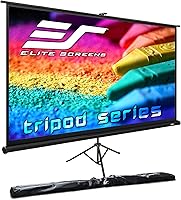
Elite Screens T120UWH 120-inch Tripod Projector Screen
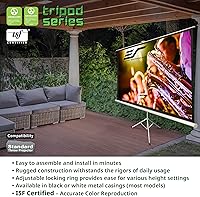
Elite Screens T120UWH 120-inch Tripod Projector Screen — image 1
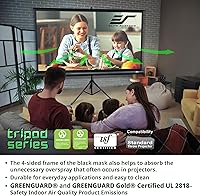
Elite Screens T120UWH 120-inch Tripod Projector Screen — image 2
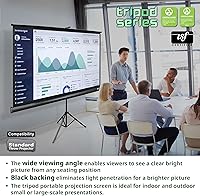
Elite Screens T120UWH 120-inch Tripod Projector Screen — image 3
Elite Screens T120UWH 120-inch Tripod Projector Screen — image 4
Elite Screens T120UWH 120-inch Tripod Projector Screen — image 5
Elite Screens T120UWH 120-inch Tripod Projector Screen — image 6
Elite Screens T120UWH 120-inch Tripod Projector Screen — image 7

Elite Screens T120UWH 120-inch Tripod Projector Screen — image 8
Elite Screens T120UWH 120-inch Tripod Projector Screen — image 9
77%
23%

Overview

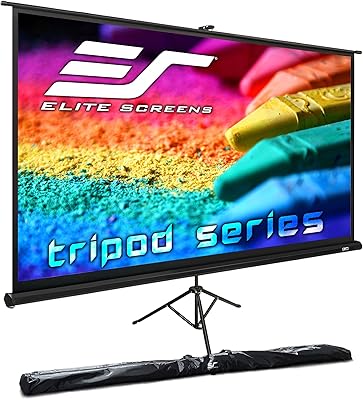
The Elite Screens T120UWH 120-inch Tripod Projector Screen has been around since 2008, which says a lot — products that hold their ground in a competitive space tend to earn it. This is a pull-up, freestanding screen aimed at people who want a genuinely large widescreen image without committing to a wall mount. The 16:9 format fits naturally with most modern content, from streaming services to presentations. Backed by a US-based company with a two-year warranty, it sits comfortably in the mid-range — not the cheapest option, but not overreaching either. Reliability over flash. That's the value pitch here.

Features & Benefits

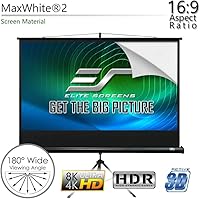
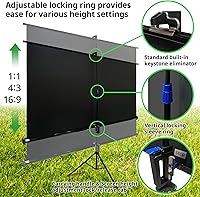
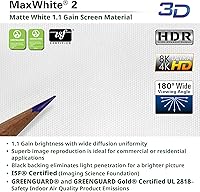
The MaxWhite 2 screen material is one of this tripod screen's stronger suits. With a 1:1 gain, it distributes light evenly rather than boosting brightness at the expense of viewing angle — which means people sitting off to the side still get a clean, consistent image. The screen is 4K Ultra HD ready and handles Active 3D content, though it's worth clarifying: the material is capable of rendering what your projector outputs, it doesn't improve projection quality on its own. One important note — this is not compatible with ultra-short-throw projectors, so double-check your setup before buying. The auto-locking height mechanism and built-in keystone eliminator make setup genuinely quick and flexible.

Best For

This portable projection screen makes the most sense for people who need flexibility above all else. Renters who can't put holes in walls, teachers who rotate between classrooms, or anyone who sets up a movie night in the living room on Friday and packs it away by Saturday morning — this is built for that kind of use. It pairs well with a standard HD or UHD projector, and at 120 inches diagonal, it delivers a genuinely cinematic image for casual home theater or community screenings. If you need a permanent, fixed installation, a mounted screen will serve you better. But for portability without major compromise, this fits the bill.

User Feedback

The feedback on the Elite Screens pull-up screen tends to cluster around a few consistent themes. On the positive side, buyers frequently praise how quickly it sets up and how stable the tripod base feels — no wobbling mid-presentation. Image clarity with standard projectors earns consistent approval as well. That said, some longer-term users report that the screen develops a subtle edge curl over time, which can affect the flat surface you need for clean projection. A handful of reviewers also flag that pull-up tension can feel less reliable after heavy repeated use. The carrying bag gets mixed marks — functional, but not particularly padded. Customer support from Elite Screens is generally described as responsive and helpful.

Pros

  • Sets up in minutes with no tools required — the auto-locking mechanism is genuinely straightforward.
  • The tripod base is stable enough that it does not wobble during presentations or movie playback.
  • MaxWhite 2 material delivers even brightness across a wide seating area, not just dead-center.
  • At roughly 120 inches diagonal, the image size is substantial enough to feel cinematic in a living room.
  • The screen material is rated for 4K content, so it keeps pace with modern projector upgrades.
  • GREENGUARD Gold certification makes it a safe choice for classrooms, children's spaces, and offices.
  • A two-year warranty backed by a US-based support team adds meaningful peace of mind.
  • The included carrying bag makes it practical to transport between locations without improvising.
  • This tripod screen has been on the market since 2008 — its longevity reflects a consistently reliable design.
  • The keystone eliminator adds real flexibility for rooms where projector placement is not ideal.

Cons

  • Some users report noticeable edge curl developing after extended or repeated use over time.
  • The pull-up tension can weaken with heavy daily use, which may affect screen flatness long-term.
  • The included carrying bag offers minimal padding — not ideal if you're transporting it frequently by vehicle or transit.
  • At nearly 25 pounds, this portable projection screen is manageable but not lightweight by any stretch.
  • Ultra-short-throw and laser projector owners cannot use this screen at all — compatibility is a hard limitation.
  • The locking mechanism, while convenient, has drawn occasional complaints about reliability after prolonged use.
  • For truly permanent home theater setups, the freestanding form factor feels like a compromise rather than a solution.
  • There is no motorized or remote-operated option — everything is manual, which some buyers find limiting.

Ratings

Our AI rating system analyzed thousands of verified global reviews for the Elite Screens T120UWH 120-inch Tripod Projector Screen, actively filtering out incentivized, bot-generated, and duplicate submissions to surface what real buyers actually experience. The scores below reflect an honest synthesis of both consistent praise and recurring frustrations across home theater setups, classroom environments, and portable presentation use cases. Nothing has been smoothed over — where users ran into genuine problems, the scores show it.

Ease of Setup
91%
Buyers consistently describe unboxing and getting the screen ready to project as a matter of minutes, not an afternoon. The auto-locking tripod and pull-up mechanism require no tools or instructions, which is a real advantage for solo presenters setting up in an unfamiliar classroom or conference space.
A small number of users found the tripod leg locks slightly stiff straight out of the box, requiring more force than expected. This tends to loosen with repeated use, but first-time setup can feel less intuitive than the marketing suggests.
Screen Flatness
67%
33%
Right out of the case, the screen surface is flat enough for clean, distortion-free projection in typical home theater and presentation contexts. Most casual users — weekend movie nights, bi-weekly training sessions — report no meaningful flatness issues during the life of the screen.
Edge curl is one of the most frequently cited complaints among long-term users, particularly those who pull the screen up and retract it daily. Over several months of regular use, the edges can develop a persistent bow that subtly degrades image quality along the screen borders.
Image Quality
84%
The MaxWhite 2 surface earns consistent praise for delivering even, natural-looking brightness across the full viewing width — no hot spots at center, no significant dimming at the sides. Users pairing this with mid-range 1080p or 4K projectors report sharp, color-accurate images that hold up well in moderately lit rooms.
In brighter ambient conditions, the 1:1 gain shows its limits — the image can appear washed out without proper light control. The screen does not compensate for a weak projector; buyers expecting it to enhance a budget lamp-based projector will likely be disappointed.
Portability
78%
22%
For a 120-inch screen, the all-in-one tripod design is genuinely convenient. Teachers and trainers who cart it between rooms report it fits through standard doorways without disassembly, and the carrying bag handles basic transport duties well enough for semi-regular moves.
At just under 25 pounds, this portable projection screen is not something most people want to haul more than a short distance alone. The carrying bag provides minimal padding, so transporting it in a vehicle trunk or on public transit without additional wrapping carries some risk.
Build Quality
74%
26%
The heavy-duty black casing holds up well under normal use, and the overall structure feels solid for a product in this price tier. Users who treat it as a semi-permanent fixture — set it up, leave it for weeks — generally report no structural concerns.
The pull-up tension mechanism draws the most criticism for long-term durability. With daily operation over a year or more, some users report the retraction becomes uneven or the locking mechanism loses its positive engagement, which can be frustrating and costly to address without replacement.
Stability
83%
On hard, level flooring the tripod base is impressively steady — users in home theater setups report zero sway even from nearby foot traffic or air conditioning vents. The wide-stance leg design distributes the weight effectively for a screen this tall.
On thick carpet or uneven surfaces the legs can settle unevenly, and users occasionally need to readjust mid-session. Outdoor use on grass introduces stability concerns that require vigilance, especially in any light breeze.
Compatibility
61%
39%
For anyone running a conventional standard-throw or long-throw projector — the vast majority of the consumer market — this tripod screen works without any configuration headaches. It handles HD, 4K, and Active 3D signals from the projector side without issue.
The hard incompatibility with ultra-short-throw projectors is a real problem when buyers do not check before purchasing. Returns and disappointed reviews in this category almost always trace back to this mismatch, and the product description does not always make it prominent enough at point of sale.
Value for Money
79%
21%
Given the brand reputation, screen size, and included accessories, most buyers feel the price is fair for what they receive. The two-year warranty and US-based lifetime support add tangible value that cheaper no-name alternatives cannot match.
A few buyers feel the edge curl and locking mechanism concerns are not acceptable at this price point, where they expected something closer to commercial durability. The gap between expectation and reality is widest for buyers who compared it to fixed-frame screens before purchasing.
Warranty & Support
88%
Elite Screens' US-based customer service is genuinely well-regarded by buyers who have needed to use it. Response times are described as prompt, staff are knowledgeable about technical questions, and the two-year coverage on new purchases is competitive for this product category.
The extended ENR-G warranty requires proactive registration at purchase, which some buyers miss. A handful of users also noted that warranty support for mechanical components like the locking mechanism can involve back-and-forth troubleshooting before a resolution is reached.
Carrying Bag Quality
53%
47%
The included bag keeps everything together and makes it practical to move the screen without improvising a solution. For infrequent movers — say, setting up once a month at a community event — the bag is more than adequate.
For regular transport, the bag's lack of meaningful padding is a legitimate complaint. Multiple users describe it as a glorified sleeve rather than a proper carrying case, and a few have reported minor scuffs and dings to the casing as a result of relying on it alone.
Keystone Correction
76%
24%
The built-in keystone eliminator gives this portable projection screen practical flexibility in real-world rooms where the projector cannot be placed at the ideal height. Presenters who work in low-ceiling classrooms or awkward living room layouts find it genuinely useful.
The keystone feature addresses mild to moderate angle issues but is not a fix for severe placement constraints. Users projecting at steep angles still encounter distortion that the eliminator cannot fully compensate for, requiring projector repositioning.
Screen Material Durability
72%
28%
The MaxWhite 2 coating holds up well to careful handling and occasional cleaning with a soft cloth. Users who treat it with care — avoiding physical contact with the surface — report no degradation in image quality or material condition over a year or more of use.
The screen surface is not impervious to contact damage; even light touching can leave faint marks or micro-abrasions that become visible during projection. Households with young children or high-traffic environments tend to report surface wear sooner than expected.
Indoor Air Safety
93%
GREENGUARD and GREENGUARD Gold certification means the screen has been independently tested for chemical emissions, making it a genuinely safe choice for bedrooms, children's playrooms, and school environments. This is not a rubber-stamp certification — it reflects real testing standards.
There are essentially no meaningful complaints in this category. The certification addresses a concern that most buyers only discover post-purchase, so it rarely drives the buying decision even though it arguably should for certain use environments.

Suitable for:

The Elite Screens T120UWH 120-inch Tripod Projector Screen is a strong match for anyone who needs a large, high-quality projection surface without the permanence of a wall or ceiling mount. Renters and apartment dwellers will appreciate being able to set up a proper home theater experience and pack it away without leaving a mark on the walls. It's equally well-suited for educators, corporate trainers, and presenters who move between spaces — the pull-up mechanism and carrying bag make transport practical enough for regular use. Home theater enthusiasts who host occasional movie nights but don't have a dedicated screening room will get genuine value from the 120-inch widescreen image. Anyone pairing this with a standard HD or 4K projector and looking for a reliable, proven screen material will find the MaxWhite 2 surface performs consistently across a wide seating area.

Not suitable for:

Buyers with ultra-short-throw projectors should stop here — this portable projection screen is explicitly incompatible with that projector type, and no workaround changes that. Anyone looking for a permanent, fixed installation will likely outgrow this screen's form factor; a rigid wall-mounted screen will offer better long-term flatness and a cleaner look for a dedicated home theater room. If you're planning daily heavy-duty use — think a busy conference room or a school auditorium running multiple sessions every day — the pull-up tension mechanism may not hold up as well over the long haul compared to commercial-grade alternatives. Those who prioritize ultra-flat screen surfaces at all times may find the occasional edge curl frustrating, particularly as the screen ages. Finally, buyers who already own or plan to buy an ultra-short or laser projector should look elsewhere entirely.

Specifications

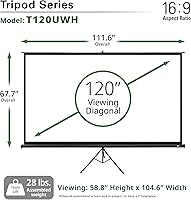
  • Screen Size: The viewable diagonal measures 120 inches, with an active viewing area approximately 58.8″ high by 104.6″ wide.
  • Aspect Ratio: The screen uses a 16:9 widescreen aspect ratio, suited for HD and UHD content, films, and standard presentations.
  • Overall Dimensions: When fully assembled, the unit stands approximately 118.1″ tall, spans 111.6″ wide, and extends 43.3″ deep at the tripod base.
  • Screen Material: The projection surface is constructed from MaxWhite 2, a front-projection fabric with a neutral 1:1 gain and a black backing to reduce light bleed.
  • Gain: The 1:1 gain rating means the screen reflects light evenly in all directions without artificially boosting brightness at the center.
  • Viewing Angle: MaxWhite 2 supports a 180-degree viewing angle, allowing audiences seated well off-axis to see a consistent, undistorted image.
  • Projection Type: This screen is designed exclusively for front projection and is not compatible with rear-projection or ultra-short-throw projector setups.
  • 4K Compatibility: The screen material is rated 4K Ultra HD ready, meaning it can accurately render the output of a 4K-capable standard-throw projector.
  • 3D Support: The screen is Active 3D compatible when paired with a projector and glasses system that supports active 3D technology.
  • Mounting Type: The screen uses a freestanding tripod base with an auto-locking height adjustment mechanism, requiring no wall anchors or drilling.
  • Weight: The complete unit weighs approximately 24.6 pounds, making it portable but not ultralight for frequent solo transport.
  • Casing: The screen housing is a heavy-duty black casing designed to protect the rolled screen material during storage and repeated use.
  • Keystone Feature: A built-in standard keystone eliminator allows the screen to be angled slightly to correct image distortion from non-ideal projector placement.
  • Certifications: The screen material carries both GREENGUARD and GREENGUARD Gold certifications, confirming it meets strict chemical emission standards for indoor environments.
  • Included Accessories: A soft carrying bag is included with purchase to assist with transport and storage between locations.
  • Warranty: Elite Screens provides a 2-year manufacturer warranty for new purchases, with an optional 3-year ENR-G extended warranty available.
  • Support: Lifetime technical support is available by phone or email through Elite Screens' professional service team based in the United States.
  • Model Number: The official model designation for this screen is T120UWH, identifying it as a 120-inch, 16:9 tripod model in the Elite Screens lineup.
  • Availability: This model has been commercially available since May 2008, reflecting a long-standing and actively maintained product line.
  • Manufacturer: Elite Screens is a US-based company and ISO 9001-certified manufacturer with a focus on projection screen products across multiple categories.

Related Reviews
Elite Screens OMS120H2 120-inch Portable Projector Screen
78%
91%
Ease of Assembly
84%
Screen Surface Quality
78%
Build Quality & Frame Durability
69%
Stability & Leg Performance
83%
Image Performance
More
Elite Screens T60UWH 60-Inch Tripod Projector Screen
79%
93%
Ease of Setup
91%
Portability
84%
Image Quality
72%
Screen Flatness
74%
Build Quality
More
Elite Screens Tripod Lite T50SW 50-Inch Projector Screen
85%
89%
Portability & Setup
85%
Viewing Angle
87%
Image Quality
81%
Build Quality
90%
Ease of Cleaning
More
Elite Screens M120H 120-Inch Manual Pull-Down Projector Screen
87%
91%
Ease of Setup
87%
Image Quality
92%
Build Quality
88%
Value for Money
89%
Compatibility with 4K/8K/3D
More
Elite Screens Tripod Series T119NWS1 119-inch Projector Screen
85%
94%
Portability & Setup
88%
Visual Quality
85%
Build Quality
91%
Adjustable Features
82%
Value for Money
More
Elite Screens Yard Master 2 120-inch Outdoor Projector Screen
84%
94%
Portability
91%
Setup Ease
85%
Build Quality
89%
Picture Quality
74%
Weather Resistance
More
Elite Screens Spectrum 2 120-inch Projector Screen
78%
88%
Image Quality
83%
Build Quality
86%
Ease of Installation
81%
Motor Performance
87%
Screen Material
More
Elite Screens T72UWH 72-Inch Tripod Projector Screen
79%
91%
Ease of Setup
83%
Image Quality
74%
Build Quality
78%
Portability
67%
Screen Surface Flatness
More
Elite Screens Evanesce Tab-Tension B 120″ Screen
82%
93%
Image Flatness
88%
Screen Surface Quality
84%
Build & Housing Quality
51%
Installation Experience
86%
Remote & Trigger Reliability
More
Elite Screens AR120WH2 120″ Fixed Frame Projector Screen
89%
95%
Image Quality
93%
Color Accuracy
91%
Contrast & Black Levels
87%
Installation Ease
90%
Build & Frame Quality
More

FAQ

It works with most standard-throw and long-throw projectors, whether HD or 4K. The one firm exception is ultra-short-throw projectors — those require a screen specifically engineered for that projection angle, and this tripod screen is not it. If you are unsure whether your projector qualifies, check its throw ratio; anything above about 0.4 should be fine.

Out of the box, most users find the surface acceptably flat for everyday home theater and presentation use. That said, some owners report a slight curl developing at the edges after extended use or repeated rolling and unrolling over many months. It is not unusual for pull-up screens in this category, but if you need a perfectly taut surface every time, a fixed-frame screen is a more reliable choice.

One person can handle it without any trouble. The tripod legs unfold and lock in place, and the screen pulls up and locks at your preferred height using the auto-locking mechanism. Most buyers report being ready to project within a few minutes of taking it out of the bag.

Technically you can use the Elite Screens T120UWH 120-inch Tripod Projector Screen outdoors, and plenty of people do for casual backyard screenings. Just keep in mind it is not weatherproofed — keep it out of rain and wind, and make sure the ground is level enough to stabilize the tripod. Ambient light will also affect image quality outdoors, so a darker environment works best.

It is genuine but worth understanding correctly. The screen material itself can accurately display what a 4K projector outputs — it does not blur or distort fine detail. What it does not do is make a non-4K projector look sharper. The screen is a neutral surface; the quality ceiling is set by your projector, not the fabric.

The bag is functional and adequate for occasional moves between home and a venue or classroom. The criticism that comes up repeatedly from regular users is that it is lightly padded — not much protection if the bag gets knocked around in a car trunk or during transit. If you plan to transport this screen frequently, you may want to wrap the cased unit in a blanket for extra protection.

For dust, a soft dry cloth or a very gentle brush works well. For smudges, a lightly dampened microfiber cloth — barely moist — applied with light pressure is the standard approach. Avoid any harsh cleaners, solvents, or abrasive materials, as these can damage the MaxWhite 2 coating.

On hard, level floors the base is quite stable. On thick carpet, the legs can sink slightly unevenly, so it helps to check the screen is level after setup. Buyers generally describe the base as solid enough that normal room movement or a nearby air vent does not cause noticeable swaying.

The mechanism allows the screen to be raised to multiple height positions within the overall unit height of just under ten feet. You can adjust it to suit the projector angle and room layout without tools. The range is practical for most residential and classroom ceiling heights.

The standard two-year warranty covers manufacturer defects on new purchases. Elite Screens also offers a three-year ENR-G option if you register at purchase. Their US-based support team is reachable by phone or email, and the general sentiment from buyers is that response times are reasonable and staff are knowledgeable. Lifetime tech support is included regardless of warranty tier.

Where to Buy