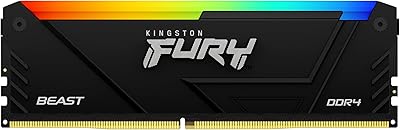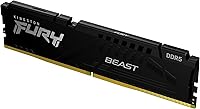

Overview

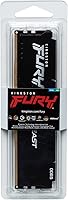
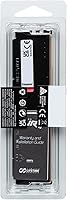
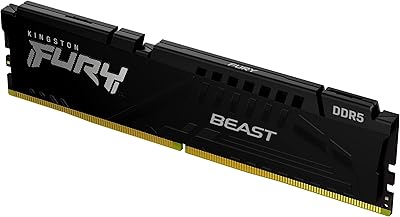
The Kingston Fury Beast 8GB DDR5 Desktop RAM is one of the more practical ways to step into DDR5 without committing to a premium kit price. Kingston's Fury sub-brand has earned its reputation over years of consistent memory releases, and this stick continues that track record at an accessible price point. Running at 5600MT/s with CL40 latency, it sits comfortably in the sweet spot for Intel 12th, 13th, and 14th gen platforms. Worth noting upfront: this is a single-module configuration. If you drop it into one slot solo, you're operating in single-channel mode — fine for getting started, but you'll want a matched pair eventually.

Features & Benefits

The Intel XMP 3.0 support is probably the most practical feature here for everyday builders — enable it in BIOS, and you're running at the rated 5600MHz without touching any manual timing settings. The low-profile aluminum heat spreader is a genuine plus in compact builds where a large tower cooler might otherwise conflict with tall memory. At 1.25V, this DDR5 module runs cooler and draws less power than the DDR4 sticks it replaces in a new build. Compatibility across Intel 600 and 700 series boards has been broadly reported as solid, and the clean all-black design works with virtually any case aesthetic without demanding attention.

Best For

This Fury Beast stick makes the most sense for budget-conscious Intel builders who want verified DDR5 performance without paying for a high-end kit loaded with RGB and tight timings they may never actually push. It's also a solid pick if you're planning to start with one module and add a second matching stick down the road — Kingston's consistent binning makes finding a pair easier than with lesser-known brands. Compact and mini-ITX builders will appreciate the low clearance. On the productivity and home office side, where workload stability outranks raw bandwidth, this DDR5 module handles daily demands well without unnecessary complexity.

User Feedback

With a 4.8-star rating across over 800 reviews, the Beast 8GB DDR5 has clearly landed well with real buyers. The most consistent praise covers quick XMP activation, stable long-term operation, and no notable compatibility issues on Intel boards. A few users mention trying it on AMD systems, but results there are more mixed — XMP 3.0 is an Intel spec and AMD's EXPO profile is absent here, so Ryzen builders should proceed with caution. The main criticism worth flagging is the single-channel limitation: buyers who expected dual-channel output from one stick occasionally expressed disappointment. That's a setup awareness issue more than a product flaw, but worth knowing before you buy.

Pros

  • XMP 3.0 support lets you hit rated 5600MHz speeds with a single BIOS toggle — no manual tuning needed.
  • Broad compatibility across Intel 600 and 700 series motherboards makes installation predictably straightforward.
  • The low-profile heat spreader keeps clearance conflicts with large tower coolers to a minimum.
  • At 1.25V, this DDR5 module runs more efficiently than DDR4, which matters in small-form-factor or thermally constrained builds.
  • Kingston's Fury line has a well-established track record, so you are not gambling on an unknown brand at this price point.
  • The clean all-black finish works in virtually any build without clashing against the rest of your components.
  • Highly rated by real buyers — a 4.8-star average across over 800 reviews is unusually consistent for a memory product.
  • Buying a single stick now leaves the door open for a matched-pair upgrade later without starting over.
  • 5600MT/s is a practical sweet spot — fast enough to matter on current Intel platforms, not so exotic that board support becomes a concern.

Cons

  • Sold as a single module, so dual-channel bandwidth requires purchasing a second stick separately.
  • No AMD EXPO certification means Ryzen platform users cannot rely on plug-and-play performance at rated speeds.
  • CL40 latency is acceptable at this tier but noticeably looser than what higher-end DDR5 kits offer at similar frequencies.
  • 8GB per module may feel limiting sooner than expected if your workload grows toward video editing, virtualization, or heavier multitasking.
  • No RGB lighting option exists in this variant, which may matter to builders with a lit aesthetic theme.
  • The 4.8-star rating likely reflects value-for-money satisfaction as much as raw performance — temper expectations accordingly.
  • Buyers who did not research single-channel vs. dual-channel behavior before purchasing have reported disappointment with real-world benchmark results.
  • No EXPO or AMD-specific profile means AMD users may need to manually dial in timings and voltages to stabilize the kit.

Ratings

The scores below reflect an AI-driven analysis of verified global buyer reviews for the Kingston Fury Beast 8GB DDR5 Desktop RAM, with spam, bot-generated feedback, and incentivized reviews actively filtered out before scoring. Aggregated from hundreds of real-world build logs, daily driver reports, and long-term ownership accounts, these ratings are designed to surface both what this module genuinely does well and where it falls short for specific buyers.

Value for Money
93%
Buyers consistently highlight how much DDR5 performance this stick delivers relative to its accessible price point. For first-time DDR5 builders stepping up from DDR4, getting a validated 5600MHz XMP module from a reputable brand without overspending feels like a genuine win.
A handful of buyers who later discovered they needed a second stick to unlock dual-channel noted the total cost crept higher than initially expected. The per-stick value is strong, but the full dual-channel investment requires budgeting for two units from the start.
Compatibility
88%
On Intel 600 and 700 series boards, virtually every reviewer reported clean installation with no compatibility surprises. XMP 3.0 profiles loaded without issue on popular boards from ASUS, MSI, and Gigabyte, making the setup experience predictably smooth for mainstream Intel builders.
AMD Ryzen users who purchased this module without researching XMP versus EXPO often hit frustration — rated-speed operation is not guaranteed on Ryzen platforms, and a few buyers reported needing manual BIOS tuning just to stabilize the stick at lower-than-advertised frequencies.
Stability & Reliability
91%
Long-term users running always-on workstation setups and home office machines reported zero crashes or memory errors after months of continuous operation. The Fury Beast line's reputation for consistent binning shows through here — buyers rarely mentioned instability even at the rated XMP speed.
A very small number of reviewers encountered instability on edge-case board and CPU combinations, particularly on older BIOS versions. Keeping firmware updated resolved most of these issues, but it added an unexpected step for less experienced builders.
Ease of Setup
89%
Most buyers described the installation experience as genuinely plug-and-play on Intel systems, with XMP activation requiring nothing more than a single BIOS toggle. First-time builders specifically praised the fact that no manual timing tweaks were needed to hit rated performance.
The setup experience is notably less straightforward for anyone building on an AMD platform or using an older board with outdated BIOS. A recurring complaint involved BIOS updates being required before the module would even post at XMP speeds on certain Intel boards.
Raw Performance
76%
24%
At 5600MHz, this DDR5 module hits a solid performance tier for mid-range Intel builds, producing real gains in memory-bandwidth-sensitive workloads like light video editing and fast asset loading compared to DDR4 alternatives. Buyers pairing it with Core i5 and i7 processors reported smooth, responsive everyday performance.
Enthusiast builders chasing top-tier benchmark numbers will find the CL40 latency limiting compared to tighter-timed DDR5 kits. Running as a single stick also means operating in single-channel mode, which meaningfully cuts bandwidth versus a dual-module configuration — a real performance ceiling for demanding workloads.
Build Quality
84%
The low-profile aluminum heat spreader feels solid and well-fitted, with no flex or loose tolerances reported by reviewers. The matte black finish maintains a clean appearance even in open-frame builds and does not show fingerprints the way glossy surfaces do.
Compared to higher-end DDR5 kits, the heat spreader design is functional rather than premium — there is nothing visually distinctive about it. Buyers who prioritize aesthetics in a windowed build may find it underwhelming next to RGB-equipped alternatives.
Thermal Management
81%
19%
Running at 1.25V keeps heat output low during everyday use, and the aluminum spreader handles the modest thermal load without requiring active cooling. Buyers in compact ITX builds noted the module stayed cool even in restricted-airflow enclosures during extended productivity sessions.
Under sustained synthetic stress testing, a small number of users noted the heat spreader grew noticeably warm, though never to a level that triggered throttling. The low-profile design does limit the total surface area available for heat dissipation compared to taller, finned alternatives.
Physical Fit & Clearance
92%
The 1.37-inch height clears virtually every large air cooler on the market without conflict, which buyers in compact mini-ITX builds specifically called out as a deciding factor. Reviewers using popular coolers like the Noctua NH-D15 or be quiet! Dark Rock Pro 4 reported zero clearance issues.
There is very little to criticize here given the low-profile intent, though a few users noted the module feels almost too compact next to taller board components, making it slightly harder to seat and eject from slots with limited finger clearance in tight cases.
Overclocking Headroom
63%
37%
For buyers who simply want a stable XMP profile without touching timings, the 5600MHz factory setting delivers exactly what is advertised. On supportive motherboards, some users reported successfully nudging frequencies slightly above 5600MHz with minimal BIOS adjustments.
This is not an enthusiast overclocking module, and buyers who tried aggressive manual tuning beyond the XMP profile found limited headroom before encountering instability. The CL40 timings also leave little room for meaningful tightening without sacrificing stability on most mid-range boards.
AMD Platform Support
44%
56%
A subset of technically experienced AMD users did manage to run this DDR5 module at reasonable speeds after manually configuring BIOS timings, suggesting the underlying silicon is not fundamentally incompatible with Ryzen platforms. For those willing to invest the time, stable operation is achievable.
Without EXPO certification, this module is genuinely not designed for AMD systems, and the majority of Ryzen users reported having to settle for lower default JEDEC speeds or instability at rated frequencies. Buyers who purchased this for an AMD build without researching the XMP/EXPO distinction were largely disappointed.
Dual-Channel Readiness
67%
33%
Kingston's consistent binning within the Fury Beast line makes sourcing a second matched KF556C40BB-8 module relatively straightforward, which buyers who planned a phased upgrade specifically appreciated. The model number clarity removes guesswork when shopping for a pair later.
Buyers who did not realize this was a single-module purchase and expected dual-channel bandwidth out of the box expressed clear frustration in their reviews. Running solo in a single slot is a real bandwidth constraint, and the product listing could do more to set that expectation upfront.
Aesthetics
74%
26%
The understated all-black design fits cleanly into professional, workstation, and stealth-themed builds where excessive lighting or branding would feel out of place. Reviewers building productivity rigs specifically appreciated that it did not clash with neutral or dark color schemes.
There is no RGB option in this variant, which is a dealbreaker for buyers building around a lit aesthetic. Some reviewers also noted the heat spreader's minimalist look feels slightly generic next to more visually distinctive DDR5 kits available at similar price points.
Longevity
87%
Reviewers who have run this DDR5 module continuously for a year or more in workstation-style use reported no performance degradation or failure, reinforcing confidence in Kingston's manufacturing quality. The lifetime warranty backing adds a meaningful layer of long-term reassurance.
DDR5 as a platform is still maturing, and some buyers expressed concern that 8GB per module may feel constraining as software demands grow over a multi-year ownership window. This is a platform-level consideration rather than a product defect, but it does affect the long-term value calculus.

Suitable for:

The Kingston Fury Beast 8GB DDR5 Desktop RAM is a strong match for builders who are entering the DDR5 ecosystem for the first time and want a reliable, no-fuss stick from a trusted brand without stretching their budget. It works especially well paired with mid-range Intel Core i5 or i7 platforms on 600 or 700 series boards, where 5600MHz XMP performance translates directly into real-world responsiveness for everyday computing, light content creation, and gaming at moderate settings. Builders planning a phased upgrade — starting with one module now and adding a matched stick later — will appreciate the consistent binning that makes finding a compatible pair straightforward down the road. The low-profile heat spreader also makes this a natural fit for compact and mini-ITX cases, where clearance around large CPU coolers is genuinely limited. Home office users and productivity-focused builders who prioritize stability over peak synthetic benchmark scores will find this DDR5 module delivers exactly what they need without unnecessary extras.

Not suitable for:

Buyers expecting dual-channel performance out of the box should know upfront that the Kingston Fury Beast 8GB DDR5 Desktop RAM is a single-module purchase — running it alone in one slot means operating in single-channel mode, which measurably reduces memory bandwidth compared to a matched pair. Enthusiasts chasing tight timings, high-frequency overclocking headroom, or the absolute best frames-per-second in demanding titles will quickly outgrow what this stick offers and should look at purpose-built performance kits instead. AMD platform builders should also pause before purchasing: XMP 3.0 is an Intel specification, and this module does not carry AMD EXPO certification, so rated-speed operation on Ryzen systems is not guaranteed and may require manual configuration with mixed results. Users who already have a DDR4 system and are not upgrading to a DDR5-capable Intel or compatible platform will find no use for this module at all. If your build calls for 16GB or more of capacity from the start, buying a proper dual-channel kit upfront is a smarter long-term investment than starting with a single 8GB stick.

Specifications

  • Capacity: This module provides 8GB of memory per stick, sold as a single unit.
  • Memory Type: Uses DDR5 technology, the current-generation standard for modern Intel desktop platforms.
  • Speed: Rated at 5600MT/s (5600MHz) when XMP 3.0 is enabled in the system BIOS.
  • Latency: Operates at CL40 primary latency timings at its rated XMP speed profile.
  • Voltage: Runs at 1.25V under XMP, which is within the standard DDR5 efficiency range.
  • XMP Support: Certified for Intel XMP 3.0, enabling automatic overclocking profiles without manual timing adjustments.
  • Form Factor: Standard DIMM form factor designed exclusively for desktop motherboards, not compatible with laptop SO-DIMM slots.
  • Heat Spreader: Equipped with a low-profile black aluminum heat spreader measuring approximately 1.37 inches in height.
  • Dimensions: Physical dimensions are 5.25 x 0.26 x 1.37 inches (length x width x height).
  • Weight: Each module weighs 1.4 ounces, consistent with standard full-length DIMM hardware.
  • Color: Available in a uniform matte black finish with no RGB lighting on this variant.
  • Compatibility: Validated for Intel 600 and 700 series desktop motherboards; AMD EXPO certification is not included.
  • Module Count: Sold as a single 1x8GB module; a second matching stick must be purchased separately for dual-channel operation.
  • Model Number: Official Kingston model identifier is KF556C40BB-8, useful for finding a matched pair later.
  • Brand Series: Part of the Kingston Fury Beast lineup, which is Kingston's entry-to-mid-tier performance memory sub-brand.

Related Reviews
Kingston Fury Beast 64GB (2x32GB) DDR5 6400MT/s RAM
88%
91%
Performance
95%
Ease of Installation
88%
Overclocking Potential
82%
RGB Aesthetics
89%
Stability During Gaming
More
Kingston FURY Beast DDR5 16GB Desktop RAM
84%
83%
Value for Money
91%
Installation & Setup
88%
Performance at Rated Speed
92%
Stability & Reliability
86%
Thermal Management
More
Kingston Fury Beast 32GB DDR5 RAM Kit
85%
91%
EXPO & XMP Activation
78%
Platform Compatibility
86%
Memory Performance
88%
Build Quality & Finish
84%
Thermal Management
More
Kingston FURY Beast 16GB DDR5 RAM Kit
80%
93%
Out-of-Box Setup
88%
Platform Compatibility
84%
Memory Performance
91%
Stability & Reliability
79%
Value for Money
More
Kingston FURY Beast 32GB DDR5 Memory Kit
86%
88%
Real-World Performance
91%
Installation & Setup
74%
Platform Compatibility
93%
Stability & Reliability
83%
Value for Money
More
Kingston FURY Beast 16GB DDR5 Desktop RAM
81%
93%
XMP Setup Experience
91%
Long-term Stability
88%
Thermal Management
84%
Value for Money
79%
Speed & Bandwidth
More
Kingston Fury Beast RGB 32GB DDR5 Desktop RAM
84%
91%
Ease of Setup
88%
Performance at Rated Speed
86%
Platform Compatibility
83%
RGB Lighting Quality
89%
Build Quality & Design
More
Kingston FURY Beast 32GB 5600MT/s DDR5 Memory
89%
89%
Performance for Gaming
93%
Ease of Installation
85%
Thermal Management
91%
Overclocking Support
87%
Compatibility with Desktop Systems
More
Kingston FURY Beast DDR5 128GB Memory Kit
80%
88%
Performance & Speed
67%
Value for Money
82%
Installation & Setup
91%
RGB Lighting Quality
89%
Build Quality & Aesthetics
More
Kingston Fury Renegade DDR5 96GB RAM Kit
80%
91%
Raw Performance
86%
XMP Setup Ease
78%
Capacity Value
74%
Compatibility
83%
Thermal Management
More

FAQ

Yes, one small step is required. After installing the module, enter your BIOS and enable XMP 3.0 — it usually appears under memory or overclocking settings. Without that step, the stick will default to the JEDEC base speed, which is lower. Most Intel 600 and 700 series boards make this a single toggle.

It will likely post and run at base JEDEC speeds, but hitting the rated 5600MHz is not guaranteed on AMD platforms. XMP 3.0 is an Intel specification, and this module does not carry AMD EXPO certification. Some users report success with manual tuning, but it is not a plug-and-play situation on Ryzen systems the way it is on Intel boards.

For light productivity, web browsing, and casual gaming it can work, but most builders today would consider 16GB a more comfortable baseline. That said, many buyers start with a single 8GB stick here and add a second matching module later, which gives them 16GB in dual-channel — a sensible phased approach if budget is tight right now.

Yes, and that is actually one of the more practical reasons to buy this specific module. Kingston uses consistent binning within the Fury Beast line, so finding a second KF556C40BB-8 to match it later is straightforward. Just make sure to install both sticks in the correct paired slots on your motherboard — check your board manual for the right configuration.

Running a single stick means your system operates in single-channel mode, which noticeably reduces memory bandwidth. In gaming and content creation benchmarks, dual-channel setups can show meaningful performance advantages — sometimes 10 to 20 percent better in memory-bandwidth-sensitive workloads. For basic office tasks the gap is less obvious, but if performance matters, two sticks is always the better setup.

Almost certainly yes. The low-profile design keeps the module height to about 1.37 inches, which is well below the clearance threshold of virtually all standard air coolers, including popular tall models. Conflicts between memory and CPU coolers are far more common with high-profile RGB kits — this one was specifically designed to avoid that problem.

Kingston backs its Fury Beast memory with a lifetime warranty, which is standard across their Fury product line. This covers manufacturing defects under normal use conditions. Given Kingston's long-standing reputation for honoring warranties, this is a genuine reassurance for buyers who plan to keep their build running for several years.

It is compatible with Intel 12th gen Alder Lake boards that support DDR5, as well as 13th gen Raptor Lake and 14th gen Raptor Lake Refresh platforms. Just confirm your specific motherboard supports DDR5 before purchasing — some 12th and 13th gen boards were offered in DDR4-only variants, so the generation alone does not guarantee DDR5 support.

No, this variant has no RGB lighting. It has a clean matte black aluminum heat spreader. If lighting is important to your build aesthetic, Kingston does offer RGB versions within the Fury Beast range, but this particular model is intentionally understated — which many builders in compact or professional-looking setups actually prefer.

DDR5 operates at a lower voltage than DDR4 — this stick runs at 1.25V, whereas DDR4 typically runs at 1.35V. In practical terms, the difference in power draw on a desktop is small, but it does contribute to slightly lower heat output under sustained load. For always-on workstation builds or small-form-factor systems with limited airflow, that marginal efficiency improvement is a legitimate, if minor, benefit.