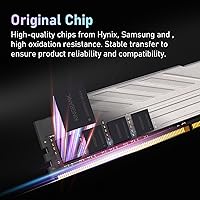
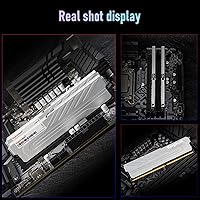
Overview

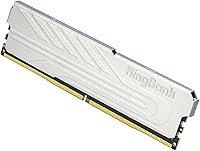
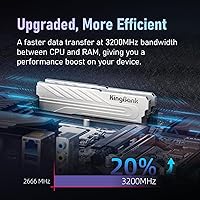
The KingBank DDR4 8GB 3200MHz Desktop RAM is a no-frills memory upgrade that does exactly what it promises without asking you to spend much. KingBank is a Chinese manufacturer that doesn't carry the name recognition of Corsair or G.Skill, so going in with measured expectations is reasonable. That said, DDR4 3200MHz remains a perfectly capable speed for most mid-range Intel and AMD desktop builds in 2024 and into 2025. The silver heatspreader looks clean enough in an open-side case without being flashy. One thing worth knowing upfront: this is a single 8GB stick, so if you want dual-channel bandwidth later, you can always slot in a matching second module.

Features & Benefits

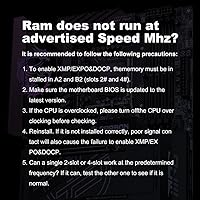
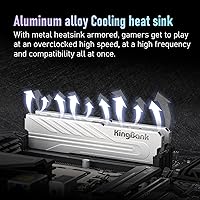
With XMP 2.0 support, getting this DDR4 3200MHz module running at its rated speed on an Intel platform is as simple as enabling a toggle in your BIOS — no manual voltage adjustments or timing tweaks needed. The CL16 latency is standard issue for DDR4 at this speed; it won't win benchmarks, but it won't hold you back either. Running at 1.35V, it draws slightly less power and generates less heat than older DDR4 designs, which helps during extended rendering sessions or long gaming runs. The metal heatspreader is modest — think basic thermal coverage, not enthusiast cooling — but it does its job keeping temperatures stable. Before installing, update your BIOS to the latest version; it's a smart move that can save you a real headache.

Best For

This budget RAM upgrade makes the most sense for anyone stuck on a desktop that's crawling along with 4GB or running DDR4 at 2133MHz — the improvement in day-to-day responsiveness is noticeable. It's also a solid pick for Ryzen or Intel 10th-through-13th-Gen builds where you want XMP-rated speed without fiddling with manual overclocking. Home office users who notice their machine bogging down with a dozen browser tabs and a spreadsheet open will likely feel a real difference. And if you're tight on budget now but plan to expand memory later, starting with a single 8GB stick and adding a matching module for dual-channel mode down the road is a practical approach.

User Feedback

With 363 ratings and a 4.5-star average — solid numbers for a listing that only launched in late 2024 — buyer sentiment is largely positive. Most praise centers on hassle-free installation and XMP activating without fuss. Where things get a little more nuanced: a handful of reviewers mention needing a BIOS update before the system would post correctly, which is consistent with KingBank's own guidance. The heatspreader keeps temperatures in check under normal loads, but nobody's calling it exceptional. The bigger consideration is brand trust — KingBank doesn't have the long-term track record of established names, so buyers who prioritize warranty confidence may want to factor that in.

Pros

  • XMP 2.0 makes hitting 3200MHz dead simple — one BIOS toggle and you're done.
  • Low 1.35V operation runs cooler than standard DDR4, which matters during long gaming or rendering sessions.
  • The included metal heatspreader keeps thermals stable and looks presentable in open-side builds.
  • A 4.5-star average across 363 ratings is a credible signal for a module that only launched in late 2024.
  • Single-stick format lets budget buyers start with 8GB and expand to dual-channel later without discarding anything.
  • Multi-layer PCB construction and per-module testing suggest more quality control effort than bare no-name sticks.
  • Compatible with both AMD Ryzen and Intel 10th-through-13th-Gen desktop platforms.
  • Installation is straightforward, with most buyers reporting smooth out-of-the-box functionality once XMP is enabled.

Cons

  • KingBank lacks the long-term reliability track record of established names like Corsair, G.Skill, or Kingston.
  • Buying a single stick means you're running single-channel memory — a real bandwidth penalty many buyers overlook.
  • A BIOS update is recommended before installing, which adds a step that less experienced builders may not expect.
  • CL16 latency is purely average for this speed tier — no advantage over competing budget sticks.
  • Warranty terms and after-sales support from a lesser-known Chinese brand are harder to verify and act on.
  • Not suited to DDR5 motherboards, limiting its usefulness as platform upgrades become more common.
  • The heatspreader is a basic thermal cover, not a genuine cooling solution — enthusiast workloads may still push temperatures.
  • No kit option is listed, so buyers wanting a guaranteed matched dual-channel pair need to purchase two separately and hope for consistency.

Ratings

Our AI-powered scoring system analyzed verified buyer reviews for the KingBank DDR4 8GB 3200MHz Desktop RAM from across global markets, filtering out incentivized, duplicate, and bot-generated feedback to surface only authentic user experiences. The category scores below reflect a transparent picture of where this budget RAM upgrade genuinely delivers and where real-world buyers have encountered friction. Both the clear strengths and the meaningful limitations are captured here to help you make a fully informed purchase decision.

Value for Money
88%
Buyers consistently point to this DDR4 3200MHz module as one of the better-performing sticks available at its price tier, especially for upgraders coming from 4GB or 2133MHz systems where the performance jump is immediately felt in daily tasks like browser multitasking and app loading.
Purchasing two sticks separately to build a dual-channel setup ends up costing more than a pre-paired kit from established brands, which can quietly erode the perceived savings depending on where you shop and when.
Installation Ease
84%
Most buyers report a smooth experience — the module seated cleanly and systems posted without drama on the first try. For users who have never installed RAM before, the process is as forgiving as any standard desktop DIMM, and several reviewers specifically praised how intuitive the whole upgrade felt.
The recommendation to update the BIOS before installing catches some buyers off guard, and a small number experienced boot failures until they applied the latest firmware. For less experienced builders, that extra step can feel unexpectedly stressful.
XMP Performance
83%
On Intel platforms, enabling XMP 2.0 and hitting a stable 3200MHz is genuinely a one-click affair, and buyers on 10th-through-12th-Gen Intel boards report the module running at its rated speed without any additional tweaking. The frequency bump from slower stock speeds is measurable and appreciated in memory-intensive tasks.
AMD users face a slightly rougher experience since XMP is an Intel specification — DOCP or EXPO equivalents are needed, and not all AMD boards handle the transition cleanly. A few Ryzen users also reported needing manual intervention to stabilize the module at the rated frequency.
Compatibility
73%
27%
The module works across a solid range of Intel and AMD desktop platforms, and the majority of buyers using mainstream boards like the Z490, B550, or B660 had no issues getting it recognized and running correctly. Positive compatibility reports outnumber problem reports by a significant margin in the review pool.
Some users with older or budget B-series motherboards report needing multiple BIOS revisions before the system stabilized, and a handful describe incompatibilities that required dropping the frequency below 3200MHz to maintain consistent operation. Compatibility confidence is lower for entry-level board pairings.
Brand Reliability
57%
43%
For a brand that entered the global market relatively recently, KingBank’s early user satisfaction numbers are encouraging — the strong aggregate rating suggests that a clear majority of buyers received a working, stable module that performed as described. Quality control at the individual unit level appears reasonably solid.
KingBank simply does not have the verified multi-year track record of Corsair, G.Skill, or Kingston, and buyers who prioritize long-term peace of mind or strong after-sales support will feel that absence. Warranty resolution processes for a lesser-known brand are harder to navigate after the standard return window closes.
Thermal Management
71%
29%
The metal heatspreader keeps the module from throttling under prolonged gaming sessions or light rendering work, and most users report temperatures staying in a comfortable range during normal desktop use. The 1.35V operating voltage also contributes to naturally reduced heat generation compared to older 1.5V DDR4 designs.
The heatspreader is a basic thermal cover rather than a purpose-built cooling solution, so buyers running aggressive sustained workloads in tight or poorly-ventilated cases may notice the module running warm. It is not designed for extreme overclocking scenarios where more robust thermal coverage would be needed.
Build Quality
76%
24%
The multi-layer PCB construction is a step above the bare-minimum builds found on the cheapest no-name sticks, and KingBank’s per-module testing claim appears consistent with the low early defect rate reported in user reviews. The physical construction feels solid with no notable flex when handling the module.
Without years of real-world durability data, it is genuinely difficult to assess how the module holds up over three to five years of continuous operation. Buyers with high build-quality expectations may find the overall material feel a notch below what premium-tier brands deliver at a higher price point.
Latency Performance
67%
33%
CL16 at 3200MHz is the DDR4 standard, and for home office multitasking, light gaming, or general productivity use, the latency profile is entirely adequate. Users upgrading from slower 2133MHz modules will still notice an overall improvement in responsiveness even where absolute latency figures are similar.
Performance enthusiasts chasing tight timings will be disappointed — CL16 offers no competitive edge over dozens of similarly priced sticks, and there is no indication that sub-timing tuning is reliably achievable. For benchmarks where memory latency directly impacts frame rates, more precisely binned modules from established brands score measurably higher.
Upgrade Scalability
78%
22%
The single-stick format is intentionally flexible for buyers who want to start with 8GB and scale up by adding a second matching module later — a sensible approach when budgets are tight but memory needs are expected to grow. This expandability is one of the module’s more practical selling points for first-time desktop builders.
Buying a second stick later introduces the risk of receiving a module from a different production batch, which can cause instability in dual-channel configurations. There is currently no guaranteed matched-kit listing from KingBank, meaning users who want a pre-certified dual-channel pair need to look elsewhere.
Aesthetic Design
79%
21%
The silver heatspreader gives this DDR4 3200MHz module a clean, understated look that blends well in most mid-range builds without clashing with common color schemes. For open-side cases, it presents as intentionally minimal rather than cheap, which is more than can be said for bare-PCB budget alternatives.
Buyers who want RGB lighting or a more expressive visual presence will find this module too plain — there is no lighting option available, and the silver finish is unlikely to impress anyone building a showcase rig. Enthusiasts who invest in coordinated aesthetic builds may find it underwhelming alongside more visually dynamic components.
Voltage Efficiency
82%
18%
Running at 1.35V rather than the 1.5V of older DDR4 generations, this budget RAM upgrade generates measurably less heat under load, which is a genuine benefit in compact or poorly-ventilated desktops where thermal headroom is limited. Users in small-form-factor builds particularly appreciate the lower thermal contribution during long work sessions.
The efficiency advantage is incremental rather than transformative — the voltage difference is not something most users will notice in electricity costs or case temperatures in a typical well-ventilated desktop build. It is a specification worth noting, but not a compelling standalone reason to choose this over a competing module.
After-Sales Support
59%
41%
KingBank appears to have a customer service channel in place, and early buyers who reached out with compatibility questions report receiving responses. The brand’s Amazon presence also gives buyers a platform-level layer of purchase protection that partially compensates for any gaps in direct brand support infrastructure.
Warranty terms are not clearly spelled out in the product listing, and getting meaningful resolution from an emerging brand after the Amazon return window closes can be unpredictable and time-consuming. Buyers accustomed to warranty service from Corsair or Kingston will notice the difference in support infrastructure immediately.
Real-World Performance
81%
19%
For the everyday workloads this KingBank memory stick is designed for — browser-heavy office sessions, spreadsheet work, light gaming, and general Windows multitasking — performance is noticeably better than what most upgraders were previously running. The bandwidth improvement from 2133MHz or 2400MHz is tangible in day-to-day system responsiveness.
In objective benchmarks, this module does not meaningfully outpace competing DDR4 3200MHz sticks at the same price point — the real-world advantage comes from the upgrade itself rather than anything exceptional about the chip or factory tuning. Power users who evaluate components by synthetic memory scores will find the numbers unremarkable.

Suitable for:

The KingBank DDR4 8GB 3200MHz Desktop RAM is a well-matched upgrade for anyone running an older desktop that shipped with 4GB of RAM or slow DDR4 at 2133MHz, where the performance gap is large enough that even a modest memory upgrade will feel meaningful in daily use. Budget-conscious builders putting together a light gaming rig or a home office machine on a tight parts list will find this DDR4 3200MHz module hits a practical sweet spot of speed and affordability. Ryzen and Intel 10th-through-13th-Gen users who want XMP-enabled memory without manually tuning timings will appreciate the one-click setup. It also works well as a starting point for buyers who plan to eventually run dual-channel memory — grab one stick now, add a matching one later when the budget allows. Small office environments where slow multitasking is the main complaint, not raw gaming performance, are arguably where this budget RAM upgrade does its best, most appreciated work.

Not suitable for:

The KingBank DDR4 8GB 3200MHz Desktop RAM is not the right call for buyers who need maximum memory bandwidth out of the gate, since a single 8GB stick running in single-channel mode leaves real performance on the table compared to a matched 2x8GB dual-channel kit. Enthusiasts chasing tight timings or pushing beyond 3200MHz will quickly hit the ceiling here — CL16 is standard, not tuned, and there is no indication this module handles aggressive overclocking beyond its rated XMP profile. Anyone building a high-end workstation or a competitive gaming rig where memory throughput directly affects frame rates or render times should look at established tier-1 brands with proven long-term reliability. DDR5 platform users are entirely out of scope, as this is a DDR4-only module. Finally, buyers who strongly value brand heritage, lengthy warranties, or years of reliability data from a manufacturer may find KingBank's relatively short track record an uncomfortable unknown.

Specifications

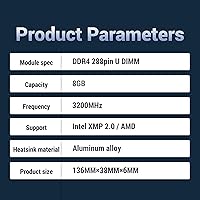
  • Capacity: Each module provides 8GB of memory, suited to light-to-mid-range desktop computing and everyday multitasking workloads.
  • Memory Type: This is a DDR4 module and is only physically and electrically compatible with DDR4 desktop motherboards.
  • Clock Speed: The rated operating frequency is 3200MHz, which is unlocked via the XMP profile in the BIOS rather than running at that speed by default.
  • Latency: Primary latency is rated at CL16, a standard timing for DDR4 modules running at 3200MHz.
  • Operating Voltage: The module operates at 1.35V, which is below the legacy DDR4 standard of 1.5V and results in slightly reduced heat generation.
  • Form Factor: This is a full-size DIMM intended for desktop PC motherboards only; it is not compatible with laptop SO-DIMM slots.
  • XMP Version: XMP 2.0 support enables automatic frequency configuration to 3200MHz on compatible Intel motherboards with a single BIOS setting.
  • Heatspreader: A silver metal heatspreader is factory-fitted to aid heat distribution across the module during prolonged or demanding workloads.
  • PCB Design: The module uses a multi-layer PCB construction, which KingBank states undergoes per-module compatibility testing before shipment.
  • Module Count: This listing contains one single 8GB stick; a second module must be purchased separately to enable dual-channel memory operation.
  • Color: The heatspreader is finished in silver, giving the module a clean, neutral look that suits most open-side desktop builds.
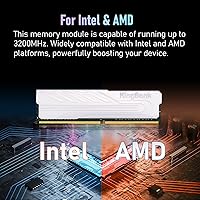
  • Compatibility: Designed for AMD Ryzen and Intel 10th-through-13th-Gen desktop platforms with DDR4 memory support.
  • Item Weight: The module weighs 1.76 oz, consistent with a standard DDR4 DIMM fitted with a metal heatspreader.
  • Release Date: First made available in October 2024, making this a recent product with an early but growing body of user reviews.
  • Brand Origin: KingBank is a Chinese memory manufacturer focused on the budget DDR4 desktop segment, without the legacy of tier-1 Western brands.

Related Reviews
KingSpec 32GB DDR4 3200MHz Desktop RAM
80%
91%
Value for Money
93%
Installation Ease
84%
Compatibility
87%
Stability & Reliability
78%
Performance at Rated Speed
More
Samsung 8GB DDR4 3200MHz SO-DIMM Laptop RAM
83%
86%
Performance
79%
Compatibility
91%
Value for Money
93%
Installation Ease
89%
Reliability
More
NVTEK 8GB DDR4 2666MHz Desktop RAM
71%
83%
Value for Money
78%
Compatibility
88%
Ease of Installation
71%
Reliability & Stability
74%
Performance at Rated Speed
More
Crucial 16GB DDR4 3200MHz Desktop RAM
78%
93%
Ease of Installation
88%
Compatibility Range
79%
Real-World Performance
91%
Long-Term Reliability
74%
Value for Money
More
Transcend JM3200HLB-8G 8GB DDR4 Desktop RAM
74%
91%
Value for Money
88%
Compatibility
86%
Installation Ease
74%
Memory Speed
61%
Latency Performance
More
KingBank RGB DDR4 16GB (2x8GB) 3200MHz RAM
86%
91%
Performance
88%
RGB Lighting Customization
87%
Overclocking Ease
84%
Heat Dissipation
92%
Compatibility (Intel & AMD)
More
A-Tech 128GB DDR4 3200MHz Desktop RAM Kit
87%
92%
Performance
88%
Installation Ease
81%
Compatibility with Systems
90%
Reliability and Stability
85%
Build Quality
More
KLEVV DDR4 8GB 3200MHz SODIMM Laptop RAM
87%
88%
Performance
90%
Compatibility
94%
Ease of Installation
92%
Value for Money
85%
Stability during Regular Use
More
Timetec 16GB KIT DDR4 3200MHz Desktop RAM
81%
88%
Value for Money
93%
Installation Ease
82%
Compatibility
86%
Stability & Reliability
62%
Latency Performance
More
Timetec Pinnacle 8GB DDR4 3200MHz Laptop RAM
83%
93%
Value for Money
78%
Compatibility
91%
Ease of Installation
86%
Performance Gain
88%
Build & Reliability
More

FAQ

The KingBank DDR4 8GB 3200MHz Desktop RAM is compatible with both AMD Ryzen and Intel desktop platforms. The XMP 2.0 profile is technically an Intel specification, but most AMD boards let you reach 3200MHz by enabling the DOCP or EXPO profile in the BIOS instead. Either way, getting to the rated speed is manageable on modern AMD motherboards with minimal effort.

DDR4 memory always initializes at a conservative JEDEC speed — often 2133MHz or 2400MHz — until you tell it otherwise. To unlock 3200MHz, head into your BIOS after installation and enable the XMP profile. It is usually a single toggle, and once saved, the system will boot at the correct speed every time.

It is a recommended step rather than a hard requirement, but it is worth doing. An outdated BIOS can occasionally cause the system to fail to recognize new memory correctly or run it at the wrong speed. Most motherboard manufacturers provide straightforward guides for flashing a BIOS update via USB. Think of it as routine housekeeping — it takes about ten minutes and can prevent a lot of confusing troubleshooting later.

For casual gaming and older titles, 8GB can still hold its own, especially if you are upgrading from just 4GB. However, some newer AAA games are starting to recommend 16GB, and running a game alongside a browser or Discord will push an 8GB system harder. The good news is that this DDR4 3200MHz module’s single-stick format means you can add a matching second stick later and step up to 16GB without throwing anything away.

No. This is a full-size desktop DIMM and will not physically fit a laptop memory slot, which requires the smaller SO-DIMM format. If you are shopping for a laptop upgrade, you will need to look for a DDR4 SO-DIMM module specifically.

You can try, but it carries some risk. Mixing brands or module revisions can cause instability, boot failures, or force both sticks to run at the slower stick’s speed. If you already have an existing DDR4 stick in your system, it is worth testing, but for a guaranteed stable dual-channel setup, two identical modules are always the more reliable path.

It does serve a real purpose, just a modest one. The metal cover helps distribute heat more evenly across the module surface, which is useful during extended workloads like video encoding or long gaming sessions. It is not an advanced thermal solution by any stretch, but it performs the same role you would find on most mid-range DDR4 sticks in this category.

KingBank is a Chinese memory manufacturer that has been gaining traction in the budget DDR4 market, though it does not have the multi-decade track record of names like Corsair or Kingston. With over 360 customer ratings averaging 4.5 stars since launching in late 2024, early real-world feedback is positive. That said, long-term reliability data is still limited, and warranty enforcement from a lesser-known brand can be harder to navigate than with established players.

Yes, and this is a common upgrade strategy. When you are ready, purchase a second identical stick and install both in the paired slots on your motherboard — typically labeled A2 and B2. One thing to keep in mind: if KingBank silently updates the chip configuration between production runs, a stick bought later may not be a perfect match for the first. Buying both sticks at the same time eliminates that uncertainty entirely.

Start by powering down completely, unplugging from the wall, and firmly reseating the module until both retention clips click into place. Next, confirm the stick is in the correct slot — on most motherboards, a single stick should go in slot A2 or B2, not slot A1. If the system still won’t post, try clearing the CMOS to reset BIOS settings, and check whether you are running the latest BIOS version. In the majority of cases, reseating and a CMOS clear resolve early boot issues without any lasting problem.