Overview

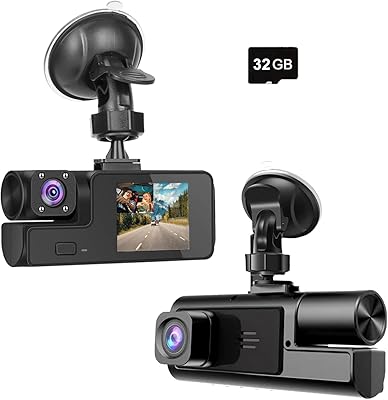
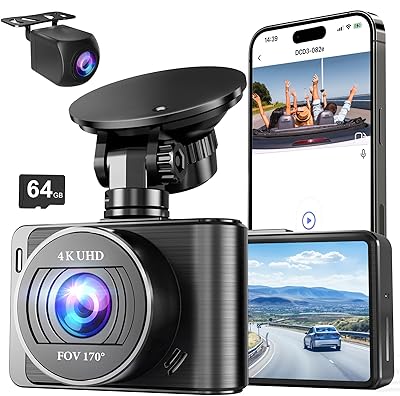
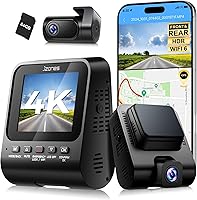
The Jzones V620 Dual Dash Camera is a mid-range front-and-rear system that launched in early 2025 with a clear pitch: 4K front recording and full HD rear coverage without the price tag of established flagships. It ships with a 64GB card included, which means you can mount it and start recording the same day. WiFi 6 and GPS are the headline differentiators — features that typically cost more on competing models at this price level. The windshield-mounted design keeps installation simple, and the companion app handles everything from live view to clip downloads. For everyday drivers who want reliable documentation without a steep learning curve, this dual dash cam is a solid starting point.
Features & Benefits

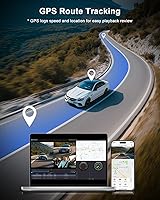
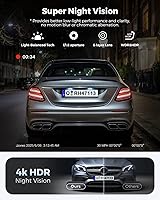
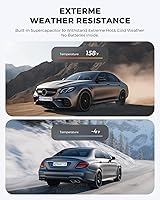
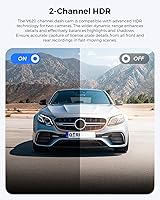
The front lens sweeps a wide enough field to cover multiple lanes, and the F1.8 aperture gives it a real advantage in tricky lighting like tunnels or pre-dawn commutes. HDR and WDR processing balance out scenes where bright sky competes with shadowed road — useful at midday intersections, not just at night. Night footage is competent in well-lit areas but won't impress on dark rural stretches. The built-in GPS logs speed and location continuously, which is genuinely useful for insurance disputes or fleet checks. Loop recording auto-overwrites older files, and the G-sensor locks collision clips before they disappear. Worth noting: WiFi 6 here means faster phone transfers, not extended wireless range — a common misconception worth clearing up.

Best For

This front-and-rear camera is a strong match for daily commuters who want automatic recording without constantly managing storage — loop recording and collision detection handle most of that for you. Rideshare and delivery drivers benefit particularly from the GPS logging, since verifiable speed and route data can deflect blame in disputed incidents. Urban drivers dealing with tight parking lots or stop-and-go traffic will find the rear channel earns its keep quickly. This dual dash cam is less ideal for buyers who avoid smartphone apps, since the best experience comes from engaging with live view and clip-sharing. The included storage card means you can get up and running without any immediate extra purchases.

User Feedback

This dual dash cam holds a strong rating across several hundred reviews, and the most consistent praise centers on daytime video clarity and how quickly the app pairs — reviewers frequently mention reading license plates in footage, which is the practical test that actually matters. Night performance earns more mixed reactions: adequate on well-lit suburban roads, but it loses detail on darker stretches where the aperture spec raises expectations. The most repeated complaint is the parking mode setup — specifically, the hardwiring kit being sold separately, which catches buyers off guard. A handful of users on older Android devices also mention occasional app instability. The 18-month warranty and responsive customer support earn consistent positive mentions that help offset those frustrations.

Pros

  • Front camera captures license plates and road signs clearly in daylight — the practical test that actually matters.
  • Included 64GB card means you can mount and start recording the same day, no extra shopping required.
  • Built-in GPS logs speed and route data that can be reviewed on Google Maps, useful for insurance disputes.
  • Loop recording auto-overwrites old footage silently in the background, so storage never needs manual attention.
  • WiFi 6 speeds up clip transfers to your phone noticeably compared to older wireless dash cam standards.
  • G-sensor automatically locks collision footage before it can be overwritten, protecting evidence without any action from you.
  • HDR processing handles tunnel entries and bright midday intersections better than most cameras at this price tier.
  • App pairing is consistently described as fast and straightforward, even by buyers who are not particularly tech-savvy.
  • The 18-month warranty and responsive support give meaningful reassurance for a relatively new brand in this category.
  • Rideshare and delivery drivers get a verifiable, GPS-stamped record of every trip without any extra setup effort.

Cons

  • Parking mode requires a separately purchased hardwiring kit that many buyers only discover after unboxing.
  • Night footage on dark rural roads lacks the sharpness the aperture specification suggests it should deliver.
  • App crashes and connection drops have been reported specifically on older Android devices, disrupting clip access.
  • G-sensor sensitivity defaults can trigger unnecessary clip locks from road bumps, filling the protected folder quickly.
  • No desktop app means reviewing footage on a computer requires removing the SD card and using a reader.
  • GPS lock can take up to a minute after startup, leaving the first portion of a trip without location data.
  • Mount adhesion can weaken over time in high-heat climates where dashboards absorb significant direct sunlight.
  • Physical buttons feel noticeably cheap and do not inspire confidence during everyday interaction with the unit.
  • The printed setup guide is too sparse for parking mode installation, sending most users to find external video tutorials.
  • App interface is functional but unpolished, and the overall software experience trails what more established brands offer.

Ratings

The Jzones V620 Dual Dash Camera earned its scores through AI-assisted analysis of verified buyer reviews collected globally, with spam, bot-generated feedback, and incentivized posts actively filtered out before scoring. Across categories ranging from video quality to app stability, both the genuine strengths and the recurring frustrations are reflected without sugarcoating. The result is an honest breakdown designed to help real drivers decide whether this front-and-rear camera fits their specific needs.
Daytime Video Quality
91%
Reviewers consistently report being able to read license plates and street signs in clear daylight footage — the practical benchmark most buyers actually care about. The wide front lens captures multiple lanes without excessive distortion, which is useful in merging and intersection scenarios on the daily commute.
A small number of users noted slight overexposure on very bright summer days, where white road markings can bleed at the edges. This is a minor complaint in the broader picture, but worth knowing if you drive in consistently sunny climates.
Night Vision Performance
68%
32%
In well-lit suburban streets and city environments, the large-aperture lens and HDR processing deliver footage that is genuinely usable — faces in other vehicles and nearby road markings remain discernible. For urban commuters, this is more than adequate for documenting nighttime incidents.
On poorly lit rural roads or unlit parking lots, the footage softens noticeably and fine detail like distant plates can be lost. The aperture spec raises expectations that the sensor does not fully meet in true low-light conditions, and several reviewers flagged this gap specifically.
Rear Camera Quality
76%
24%
The rear channel records in full HD and covers a wide enough field to catch tailgaters and lane-changers behind you. Buyers using this for rideshare or delivery work report that the rear footage has held up as supporting evidence in at least one documented dispute.
The rear camera is a meaningful step down from the front in terms of sharpness, which is expected at this price tier but still noticeable when reviewing side-by-side footage. In low light, the rear performs weaker than the front and may not capture plate numbers on fast-moving vehicles.
GPS Accuracy & Logging
83%
The built-in GPS logs speed and route data continuously, and the ability to replay trips overlaid on Google Maps is a practical feature that goes beyond basic dash cam use. Drivers who have filed insurance claims report that the timestamped location data added meaningful credibility to their accounts.
A handful of users on both iOS and Android noted occasional GPS lock delays of up to a minute after startup, which can leave the first stretch of a drive untagged. In dense urban canyons, signal drift was mentioned by a few reviewers as a minor but recurring annoyance.
App Experience & WiFi Connectivity
74%
26%
Pairing with the companion app is frequently cited as one of the smoothest parts of the setup experience — most users were live-viewing within minutes of mounting the camera. The WiFi 6 connection speeds up clip transfers noticeably compared to older WiFi standards, making it practical to pull footage to your phone before leaving a parking lot.
App stability on older Android devices has come up repeatedly, with some users reporting crashes or failed connections that required restarting the camera. The app interface itself feels functional rather than polished, and a few iOS users flagged that background refresh occasionally drops the connection mid-transfer.
Parking Mode
61%
39%
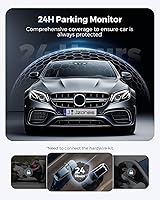
When properly set up, the time-lapse parking mode provides genuine peace of mind for drivers who leave their cars in busy lots or on street parking overnight. The G-sensor trigger adds a layer of event-based protection on top of the continuous time-lapse, and several buyers reported catching door-ding incidents they would have otherwise missed.
The hardwiring kit required to power parking mode is sold separately, and a meaningful portion of negative reviews stem directly from buyers who were not aware of this at purchase. Even for those who buy the kit, the installation process is more involved than a typical plug-and-play setup, and the instructions provided are sparse.
Build Quality & Design
78%
22%
The camera feels solid on the windshield mount without wobbling on rough roads, which matters more than it sounds — vibration artifacts in footage are a common complaint on cheaper units. The compact black housing is unobtrusive in the cabin and does not significantly impede the driver's sightline.
The physical buttons feel slightly cheap under pressure, and a few long-term users noted that the mount adhesion can weaken over time in very hot climates where dashboards absorb significant heat. The overall aesthetic is functional rather than premium, which matches the price tier but may disappoint buyers expecting a more refined finish.
Installation & Setup
84%
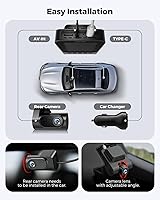
The windshield mount is genuinely easy to position, and the included 64GB card means there is no additional shopping required to get started. Most buyers report being fully up and running within fifteen to twenty minutes, which is a realistic and achievable benchmark for non-technical users.
Cable management is the most common setup complaint — the power cable is long enough to route cleanly, but without included clips or adhesive guides, keeping it tidy takes extra effort. The printed quick-start guide is brief, and some users preferred hunting for video tutorials rather than relying on the documentation provided.
Value for Money
88%
Stacking GPS, WiFi 6, dual-channel 4K recording, and a free storage card into a single mid-range purchase is a genuinely competitive offer in the current dash cam market. Buyers upgrading from basic single-channel units consistently express that the step-up in functionality felt justified relative to what they paid.
The parking mode kit being excluded adds to the real-world cost if that feature is part of your plan, which shifts the value perception slightly. A few buyers who compared directly against Vantrue or Garmin equivalents felt the image processing software still trails the more established names at a similar price.
Loop Recording & Storage Management
89%
Auto-overwrite loop recording works reliably in the background without any user intervention once configured, and the G-sensor locks important clips before they can be erased. Buyers who previously dealt with manually clearing SD cards specifically call this out as a quality-of-life improvement over older setups.
Some users reported that the locked clip folder can fill up quickly after multiple minor bumps or road vibrations that trigger the G-sensor unnecessarily. Sensitivity adjustment is available in the settings, but finding the right threshold takes trial and error and is not well-documented.
HDR & High-Contrast Performance
79%
21%
Footage captured while driving into or out of tunnels — one of the hardest tests for any dash cam — shows noticeably better shadow and highlight balance than entry-level competitors. The HDR processing prevents the washed-out sky and underexposed road surface problem that plagues cameras without it.
The HDR processing introduces a slight processing lag that a small number of users noticed as a subtle frame judder in rapidly changing light conditions. It is a minor technical artifact rather than a practical problem, but videographers or detail-oriented buyers may find it distracting on close inspection.
Customer Support & Warranty
82%
18%
The 18-month warranty is longer than the 12-month standard offered by many competitors at this tier, and reviewers who reached out to support describe response times as fast and resolutions as reasonable. Replacement units for hardware defects appear to have been dispatched without excessive friction based on reported experiences.
Support interaction quality seems to vary, with a subset of users describing follow-up responses as scripted and slow after the initial contact. Warranty claims involving app-related issues rather than physical hardware appear to have a less clear resolution path based on buyer accounts.
GPS Route Replay & Evidence Quality
81%
19%
The ability to replay a full trip with speed and location data on Google Maps is genuinely useful beyond just accident documentation — delivery drivers in particular appreciate having a verifiable route log. The data exports in a format compatible with widely used desktop GPS software, adding flexibility for professional or legal use cases.
The GPS metadata is embedded in footage files in a way that is not immediately readable without the app or compatible software, which adds a step when sharing evidence with insurers or law enforcement. A cleaner export workflow would improve the practical utility of this otherwise strong feature.
Compatibility & Ecosystem
72%
28%
The app covers both iOS and Android with comparable feature sets, and the camera itself works across a wide range of vehicles without requiring any special wiring adapters for standard 12V outlets. Updates to the app have rolled out since launch, suggesting the product is actively maintained.
There is no desktop app for Windows or macOS beyond the GPS playback software, which means all clip management and sharing runs through the smartphone app. Buyers who prefer reviewing footage on a larger screen are limited to removing the SD card and using a card reader, which partially undermines the wireless transfer pitch.

Suitable for:

The Jzones V620 Dual Dash Camera is a practical fit for daily commuters who want reliable, low-maintenance documentation without micromanaging storage or settings — the loop recording and automatic collision lock handle the busywork for you. Rideshare and delivery drivers will find particular value in the GPS route logging, since having verifiable speed and location data on hand can make a real difference when a passenger or third party disputes the facts of an incident. Urban drivers who deal with dense traffic, tight parking structures, and frequent lane changes benefit from having both front and rear channels running simultaneously, especially given how often rear-end collisions happen at low speed with minor but costly damage. Tech-comfortable buyers who are used to managing devices through smartphone apps will get the most out of the live view, clip-sharing, and transfer features, all of which reward engagement with the companion app. Anyone stepping up from a basic single-channel unit and wanting a meaningful jump in capability — GPS, dual recording, HDR processing — without moving into flagship price territory will find this front-and-rear camera a convincing upgrade.
Not suitable for:

The Jzones V620 Dual Dash Camera is not the right choice for buyers who want full 24-hour parking protection out of the box — the hardwiring kit that enables parking mode is sold separately, adds to the total cost, and requires a more involved installation than most people anticipate. Drivers who prefer reviewing footage on a laptop or desktop will find the workflow cumbersome, since there is no dedicated Windows or macOS app and pulling clips to a large screen means either using the phone or removing the SD card manually. Buyers who expect flagship-level night vision performance should temper their expectations: this dual dash cam handles lit suburban roads well enough, but on dark country roads or unlit lots, the footage quality drops in ways that the spec sheet does not fully telegraph. Users with older Android phones should be aware that app stability issues have been reported, and anyone who dislikes app-dependent devices in general will find the experience frustrating since the best features are tied to the companion app. Finally, buyers who are comparing directly against well-established brands with mature image processing pipelines may find that the gap in footage refinement is still noticeable, particularly in high-contrast or very low-light conditions.
Specifications

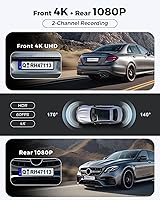
  • Front Resolution: The front camera records in 4K UHD at 25 frames per second, delivering enough detail to read license plates and road signs in clear conditions.
  • Rear Resolution: The rear camera captures full HD 1080P footage simultaneously with the front channel, providing continuous rear coverage without interrupting front recording.
  • Front Lens: The front lens features a 170° wide-angle field of view, an F1.8 maximum aperture, and a 6-layer glass optical construction.
  • Rear Lens: The rear lens covers a 140° wide-angle field of view, sufficient to monitor following traffic and adjacent lane encroachments.
  • HDR & WDR: Both HDR and WDR processing are built in to balance exposure across high-contrast scenes such as tunnel exits, bright intersections, and dawn or dusk driving.
  • Connectivity: The camera uses WiFi 6 to connect with the Jzones companion app on iOS and Android, primarily enabling faster clip transfers and live view sessions.
  • GPS: A built-in GPS module logs real-time speed and route history, with data reviewable on Google Maps through the app or compatible desktop GPS software.
  • G-Sensor: An integrated G-sensor detects sudden impacts or hard braking and automatically locks the relevant footage file to prevent it from being overwritten by loop recording.
  • Loop Recording: Loop recording continuously overwrites the oldest unlocked footage once the storage card is full, keeping the camera fully automated without manual file management.
  • Parking Mode: A 24-hour parking mode with time-lapse recording is supported, but requires a separately purchased hardwiring kit (Jzones ASIN B0DPQSR7MH) to function.
  • Included Storage: A 64GB SD card is included in the box, providing enough capacity to begin recording immediately after installation.
  • Mounting Type: The camera attaches to the windshield via a dedicated mount, positioned to capture road footage without significantly obstructing the driver's forward sightline.
  • Dimensions: The unit measures 9.41 × 2.44 × 5.55 inches, making it a mid-sized dual-channel system relative to others in the category.
  • Weight: The complete camera assembly weighs 1.46 pounds, which is within the typical range for a dual-lens windshield-mounted unit.
  • Warranty: Jzones backs this camera with an 18-month limited warranty and advertises 24-hour technical support availability for the duration of the coverage period.
  • App Compatibility: The Jzones companion app is compatible with both iOS and Android devices and supports live view, clip playback, download, and sharing functions.
  • Color: The camera is available in black only, with a matte housing finish designed to minimize cabin reflections during recording.
  • Power Source: The camera draws power from the vehicle's 12V outlet via the included cable; parking mode requires a separate hardwiring connection to a fused power source.

Related Reviews

Meiqils Dual 1080P Front and Inside Dash Cam
73%
91%
Value for Money
89%
Ease of Installation
82%
Video Quality (Daytime)
63%
Night Vision Performance
78%
G-Sensor Reliability
More
Wkreuoar RM Front and Inside Dash Camera
70%
78%
Video Clarity (Daytime)
63%
Night Vision Performance
83%
Dual-Channel Coverage
86%
Ease of Installation
74%
G-Sensor & Incident Lock
More
Miden MIDEN 2K Dual Dash Camera
84%
90%
Video Quality
85%
Ease of Setup
88%
Night Vision Performance
92%
Build Quality
87%
Parking Mode Effectiveness
More
YOVDA Y8-32 Dual Dash Cam
67%
88%
Value for Money
76%
Video Quality (Daytime)
67%
Night Vision (Interior Camera)
61%
Night Vision (Front Camera)
91%
Ease of Installation
More
Nezion D3 4K Dual Dash Cam
77%
83%
Video Quality (Front Camera)
71%
Video Quality (Rear Camera)
67%
Night Vision Performance
91%
Ease of Setup
88%
Value for Money
More
Yatao YT01 64MP Digital Camera
72%
83%
Value for Money
67%
Image Quality
61%
Video Performance
53%
Autofocus
88%
Ease of Use
More
70mai A410 Dual Dash Camera
78%
88%
Daytime Video Clarity
71%
Night Vision Performance
74%
Rear Camera Quality
67%
App & Wi-Fi Experience
84%
GPS Accuracy & Data Logging
More
Thinkware Q200 2-Channel Dash Cam
76%
84%
Front Camera Clarity
67%
Rear Camera Clarity
72%
Night Vision Performance
76%
Parking Mode
63%
GPS Alert Accuracy
More
Ecomoment S70 Dual Dash Cam
83%
88%
Video Quality (Front & Rear)
91%
Night Vision Performance
85%
Ease of Installation
89%
Field of View (Wide Angle)
82%
Durability & Build Quality
More
ORSKEY S800 Dual Dash Cam
73%
88%
Value for Money
82%
Front Camera Video Quality
53%
Rear Camera Video Quality
61%
Night Vision Performance
91%
Ease of Installation
More

FAQ

Both channels record simultaneously — the front in 4K and the rear in full HD — so you never have to pick one over the other. There is no toggle or mode switch needed; it runs as a dual-channel system by default from the moment it powers on.

For basic dash cam recording, no — the box includes the camera, mount, cables, and a 64GB card, so you can be up and recording in one sitting. The one caveat is parking mode: if you want the camera to monitor your car while it is parked and off, you will need to purchase a hardwiring kit separately, as it is not included.

In well-lit urban environments — streets with regular lighting, gas stations, city roads — the footage holds up well and is genuinely useful for documenting incidents. On dark rural roads or poorly lit lots, the quality drops off more than the spec sheet implies, and reading plates on fast-moving vehicles can be a struggle. It is competent for city nighttime driving, but if most of your after-dark driving is on unlit roads, manage expectations accordingly.

The WiFi 6 here is about transfer speed, not range — it lets you pull clips to your phone faster than older WiFi standards would allow, which is handy when you need footage quickly after an incident. The connection range is still short-range and designed for phone-to-camera pairing in close proximity, not for streaming footage across a parking lot to a laptop.

The Jzones V620 Dual Dash Camera logs continuous speed and location data embedded in the footage files, and that data is reviewable on Google Maps via the app. Several users have reported that GPS-stamped footage helped support their accounts in insurance disputes. That said, for any legal or formal proceeding, you should confirm with your insurer or attorney what formats and data types they accept.
Parking mode itself works well once connected, but the setup requires hardwiring the camera to a fused power source in your vehicle — which is not a plug-and-play job. If you are not comfortable with basic automotive wiring, you will probably want a professional installer to handle it. The instructions provided for this step are minimal, and most users recommend watching a video tutorial rather than relying on the printed guide.

The app covers both platforms and the core features are available on both. That said, stability issues on older Android phones have come up in user feedback more frequently than on iOS — some users on aging Android hardware report occasional crashes or dropped connections during transfers. If you are on a recent Android model, most buyers report a smooth experience.

Loop recording automatically records over the oldest footage once the SD card fills up — but anything flagged by the G-sensor during a collision or hard brake event gets locked and protected from overwrite. You can also manually lock clips through the app if you need to preserve specific footage. Just be aware that if the protected folder fills up with too many G-sensor triggers from rough roads, it can stop new locks from saving until you clear space.

The GPS route data can be reviewed using compatible desktop GPS software, but for actual video playback, your main options are the smartphone app or removing the SD card and using a card reader on your computer. There is no dedicated desktop application for Windows or macOS for clip management, so if you prefer working on a bigger screen, the SD card route is currently the most practical path.

Based on buyer feedback, the warranty support is generally responsive for hardware defects — replacement units have been issued without excessive back-and-forth in most reported cases. The experience with software or app-related issues is less consistent, and some users describe those interactions as slower to resolve. Overall, the 18-month coverage period is longer than the category average, and most buyers seem to view it as a genuine differentiator rather than a marketing footnote.