
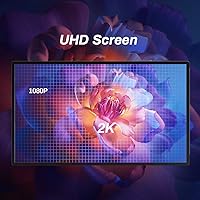
Overview
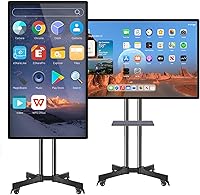
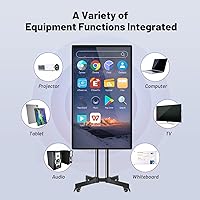
The JYXOIHUB 49-Inch Smart Interactive Whiteboard sits in an interesting spot — capable enough to handle real classroom and business workloads, yet priced and sized to appeal to buyers who find 65-inch-and-up boards impractical for smaller rooms. The 49-inch footprint works well in mid-sized classrooms and conference rooms without dominating the space. Beyond annotation and collaboration, it doubles as a digital signage display, handling advertising and lobby content in both portrait and landscape orientations. Running on Android 11 with an open app ecosystem, it lets you install third-party software — a genuine advantage over locked-down competitors. One thing to know upfront: this is a board-only purchase, so budget separately for a stand or wall mount.
Features & Benefits
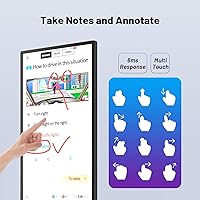
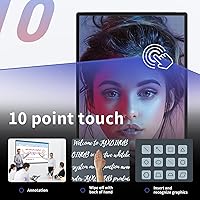
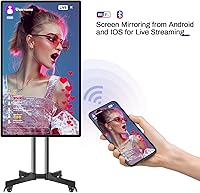
The processing muscle here comes from an octa-core CPU pairing CORTEX-A76 and A55 cores, which keeps things moving when you have a video call running alongside annotation tools and a mirrored phone screen. Touch response sits at 6ms across 10 simultaneous points, so writing with the included stylus — or erasing with the back of your hand — feels close to working on paper. Wireless mirroring works across AirPlay, Miracast, and Chromecast, covering virtually any device a student or colleague might bring. The bidirectional phone control feature is genuinely useful: you can operate your mobile device directly from the board screen, handy when presenting without an assistant. App compatibility depends on the Android 11 environment, so verify your preferred tools before committing.
Best For
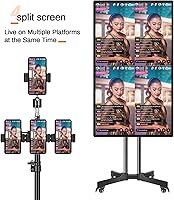
This smart board makes the most sense in a few specific settings. K-12 classrooms and university lecture rooms get the most value from the annotation tools and real-time multi-device collaboration. Small business meeting rooms — particularly those without dedicated AV staff — will appreciate how straightforward wireless mirroring is from both iOS and Android devices. Live streamers and content creators who need a large interactive canvas with built-in connectivity will find it capable. Retail or hospitality spaces wanting a dual-purpose display for presentations and digital signage are also well served. It is not the right fit for large auditoriums or enterprise environments where a bigger screen and advanced software management are expected.
User Feedback
Buyers consistently praise the touch accuracy and how easily phones and tablets connect to the board — setup is described as straightforward even for non-technical users. The metal body and 7H-rated glass earn frequent compliments for feeling durable and well-made relative to the price point. The main gripe worth taking seriously: the native display is 1080p, and on a 49-inch panel that resolution is noticeable up close. The board decodes 8K video, but the screen itself will not render it — an important distinction. A few buyers noted the board-only bundle led to unexpected mounting costs. After-sales support gets mixed reviews, with some praising quick responses and others reporting slower turnaround on issues.
Pros
- Touch response is fast and accurate — writing with the stylus feels close to using a real marker on paper.
- Wireless mirroring works reliably across AirPlay, Miracast, and Chromecast, covering virtually any device in the room.
- The open Android 11 ecosystem lets you install third-party apps rather than being locked into a fixed software suite.
- Bidirectional phone-to-screen control is a practical feature that makes solo presenting noticeably easier.
- Metal body and 7H-rated glass feel solid and durable, which matters for a device mounted in a busy classroom or office.
- Built-in digital signage mode adds real versatility — one screen handles both presentations and lobby advertising.
- The octa-core processor handles multitasking well, keeping annotations, mirroring, and apps running without obvious slowdowns.
- Comes with relevant certifications including FCC, CE, and RoHS, which adds credibility for institutional buyers.
- A two-year replacement warranty with US-based inventory provides reasonable peace of mind for the investment.
- Setup for wireless device mirroring is straightforward enough that non-technical staff can manage it independently.
Cons
- The native 1080p resolution looks soft on a 49-inch panel — a meaningful drawback for close-up professional use.
- Claiming 8K decoding capability while shipping a 1080p display is misleading marketing that erodes trust.
- Board-only packaging means you will need to budget extra for a stand or wall mount, which is not always obvious upfront.
- After-sales support quality appears inconsistent, with some buyers reporting slow or unhelpful responses to technical issues.
- 32 GB of internal storage fills up quickly if you install multiple large apps or store video content locally.
- App compatibility is not guaranteed — some Android applications are not optimized for large-format touchscreen use.
- At nearly 64 pounds, repositioning or reinstalling this classroom whiteboard is a two-person job at minimum.
- The included stylus is basic and may not satisfy users accustomed to pressure-sensitive or finer-tipped alternatives.
- No camera or microphone is included, so video conferencing requires purchasing and connecting additional peripherals.
- The 16:10 aspect ratio is slightly unconventional and can cause minor letterboxing or cropping with standard 16:9 content.
Ratings
The scores below were generated by AI after analyzing verified buyer reviews from multiple global markets, with spam, bot activity, and incentivized feedback actively filtered out. The JYXOIHUB 49-Inch Smart Interactive Whiteboard earns strong marks in several areas, but the data also surfaces genuine frustrations that prospective buyers deserve to know before purchasing. Both the highlights and the pain points are reflected transparently in every category score.
Touch Responsiveness
Display Quality
Build Quality
Wireless Mirroring
Software & App Ecosystem
Setup Experience
Performance & Speed
Value for Money
After-Sales Support
Signage & Streaming
Stylus & Writing Tools
Portability & Mounting
Compatibility
Suitable for:
The JYXOIHUB 49-Inch Smart Interactive Whiteboard is a strong fit for educators, small business teams, and versatile content creators who need a capable interactive display without committing to the bulk and cost of enterprise-grade boards. Teachers running hybrid classrooms will appreciate the multi-touch annotation, real-time collaboration tools, and the ability to mirror student devices wirelessly regardless of whether they run Android or iOS. Small business meeting rooms — especially those without dedicated AV support — benefit from the straightforward wireless setup and the open Android 11 environment, which allows teams to install the conferencing apps they already use. Content creators and live streamers who want a large-format interactive canvas with built-in signage and streaming capabilities will find this board covers a lot of ground in a single unit. Retail and hospitality businesses looking for a dual-purpose display — something that shows promotional content in the lobby and doubles as a presentation screen during staff meetings — are also well served here.
Not suitable for:
Buyers who need a pixel-sharp display for detailed design work or high-resolution video review should think carefully before purchasing this board, since the native panel resolution is 1080p — noticeable on a 49-inch screen when viewed up close. Large auditoriums, lecture halls with more than 40 seats, or any space where the audience sits far from the screen will likely find 49 inches undersized for comfortable viewing. The JYXOIHUB 49-Inch Smart Interactive Whiteboard is not an enterprise-grade solution, so organizations requiring centralized device management, advanced security policies, or deep integration with platforms like Google Workspace for Education at scale may find it limiting. The board-only packaging also means buyers without an existing wall mount or compatible stand will face additional setup costs and logistics that are easy to overlook at purchase. Finally, anyone expecting plug-and-play compatibility with every Android app should verify their critical tools work on Android 11 before buying, as not all apps are optimized for large-format touchscreen environments.
Specifications
- Screen Size: The display measures 49 inches diagonally with a 16:10 aspect ratio, making it practical for mid-sized classrooms and conference rooms.
- Resolution: The panel renders natively at 1080p, though the hardware supports decoding of video content up to 8K UHD from external sources.
- Processor: An octa-core CPU combining CORTEX-A76 and CORTEX-A55 cores handles multitasking across apps, annotations, and mirroring simultaneously.
- RAM: 4 GB of RAM is installed, providing enough headroom for typical classroom and meeting room workloads under Android 11.
- Storage: 32 GB of internal storage is available for apps, downloaded content, and locally saved documents.
- Operating System: The board runs Android 11, with an open ecosystem that allows users to download and install third-party applications.
- Touch Input: The display supports 10-point multi-touch with a 6ms response time, enabling multiple users to write or interact simultaneously.
- Screen Mirroring: Wireless mirroring is supported via AirPlay, Miracast, and Chromecast, covering both iOS and Android devices without additional hardware.
- Glass & Body: The touchscreen is protected by 7H-rated hardened glass, and the outer frame is constructed from metal for durability.
- Dimensions: The unit measures 49.21 x 30.91 x 6.5 inches and weighs 63.9 pounds, requiring at minimum a two-person installation.
- Connectivity: The board supports wireless, USB, and wired connections for screen mirroring and live streaming peripherals including cameras and microphones.
- Signage Mode: A built-in digital signage mode supports video playback and image display in both vertical and horizontal orientations.
- Certifications: The board has passed FCC, CE, RoHS, and 3C quality and safety certifications, meeting standards for commercial use in multiple regions.
- Warranty: JYXOIHUB provides a 2-year replacement warranty backed by a US-based warehouse for faster resolution of hardware issues.
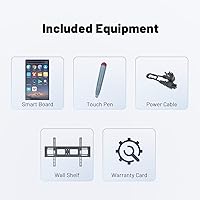
- Package Contents: The box includes the board only, one power cord, one basic stylus, one warranty card, and one certificate — no stand or mount is included.
Related Reviews
LG SM8600PUA 49-inch NanoCell 4K Smart TV
Sony XBR49X800G 49-inch 4K Android TV
Westinghouse 32-inch Xumo Smart TV
SYLVOX 27-Inch 12V RV Smart TV
Dakofied 1.85″ Bluetooth Calling Fitness Smartwatch
Amzfast AMZG49C7U 49-inch Curved Ultrawide Gaming Monitor
SYLVOX 19-inch 12V Smart RV TV
Kuizil 1.91-inch Bluetooth Call Smartwatch
SYLVOX Patio Series 50-inch Outdoor Smart TV