
Overview

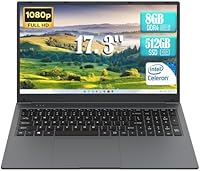
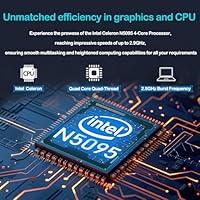
The IJKKJI MTL1732 17.3-inch Laptop is a straightforward, no-frills Windows 11 machine built for buyers who want a big screen without a big price tag. IJKKJI isn't a household name, and that's worth acknowledging upfront — but the specs paint a clear picture of what this machine is designed to do. Powered by an Intel Celeron N5095 processor, it sits firmly in entry-level territory. That chip handles web browsing, email, and light document work without complaint, but don't expect it to breeze through video editing or heavy multitasking. At just 0.78 inches thin and 5.74 pounds, this budget 17-inch laptop is reasonably portable for its size.

Features & Benefits

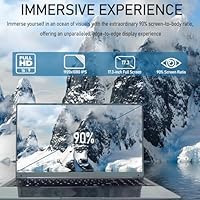
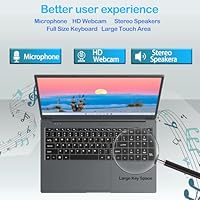
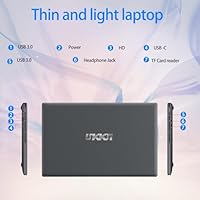
The 17.3-inch Full HD panel is probably the MTL1732's biggest draw — 1920x1080 resolution at this screen size looks decent for streaming and casual browsing, though pixel density is lower than on smaller laptops, so text isn't razor-sharp up close. The 8GB of DDR4 RAM pairs adequately with the Celeron chip for a handful of browser tabs and Office apps running simultaneously. Boot times are quick thanks to the 512GB SSD, and storage is generous for most everyday users. The port selection is a genuine strength: dual USB 3.0, HDMI, Type-C, an SD card slot, and a headphone jack cover the bases well. A built-in webcam and Bluetooth 4.2 add practical value.

Best For

This large-screen notebook finds its sweet spot with students, seniors, and budget-conscious home users. Students who need a roomy display for research, writing, or video lectures without overspending will find it a sensible pick. Seniors and home users who struggle with smaller screens will appreciate the 17-inch real estate for browsing, email, and video calls. It also works well as a shared household machine — a secondary computer for light tasks where no one is pushing the hardware hard. Remote workers needing basic video conferencing and document editing on a tight budget will find it adequate. Anyone chasing real processing power, though, should look elsewhere.

User Feedback

Buyers generally appreciate the large, clear display and the generous port selection, with many describing it as solid value for basic home use. Complaints do surface around keyboard feel and trackpad responsiveness, which some users find underwhelming for the price. Windows 11 Pro on the Celeron N5095 handles simple tasks adequately, but several buyers note noticeable slowdowns when too many apps are open simultaneously. Battery life earns mixed marks — the 6000mAh pack manages several hours of light use, but heavier streaming drains it faster than the spec sheet implies. Most buyers ultimately feel the value holds up, provided expectations stay grounded in what a budget machine at this tier can realistically deliver.

Pros

  • The 17.3-inch Full HD screen is genuinely spacious and comfortable for extended browsing, streaming, and document work.
  • A 512GB SSD means fast boot times and plenty of room for documents, photos, and everyday software.
  • The port selection is surprisingly complete, covering USB 3.0, HDMI, Type-C, SD card, and a headphone jack.
  • At under an inch thick, this large-screen notebook is easier to carry around than its size might suggest.
  • Windows 11 Pro comes pre-installed, which adds value for users who need a business-ready operating system.
  • The built-in webcam and Bluetooth 4.2 make video calls and wireless peripherals straightforward out of the box.
  • 8GB of DDR4 RAM handles light multitasking — a few browser tabs, a document, and music playing simultaneously — without issue.
  • The MTL1732 offers a genuinely large display at a price point where most competitors are stuck at 15 inches.

Cons

  • The Celeron N5095 processor struggles visibly once more than a handful of apps are open at the same time.
  • Keyboard feel and trackpad responsiveness have drawn repeated criticism from buyers who type frequently.
  • Pixel density on the 17.3-inch 1080p panel is lower than on smaller laptops, so text can look slightly soft up close.
  • Battery life under real-world streaming or multitasking conditions falls noticeably short of the advertised rating.
  • IJKKJI is an obscure brand with little established reputation, making long-term reliability harder to predict.
  • The integrated Intel graphics handle basic display output but make any visually intensive task impractical.
  • Older 802.11bgn Wi-Fi lacks the speed and range improvements found in newer Wi-Fi 5 or Wi-Fi 6 chipsets.
  • Buyers report that Windows 11 Pro can feel sluggish on this hardware, particularly during updates or background processes.

Ratings

Our AI rating system analyzed verified global user reviews for the IJKKJI MTL1732 17.3-inch Laptop, actively filtering out incentivized, bot-generated, and spam submissions to surface what real buyers actually experience. The scores below reflect an honest cross-section of feedback — strengths are credited where earned, and recurring pain points are not glossed over. Whether this large-screen notebook earns a place in your home depends heavily on how well your expectations align with what a budget-tier Celeron machine can realistically deliver.

Value for Money
72%
28%
For buyers who need a large 17-inch screen and basic Windows functionality without breaking the bank, this machine offers a compelling starting point. The combination of a Full HD display, 512GB SSD, and Windows 11 Pro at this price tier is genuinely difficult to match from established brands.
Value perception drops sharply once buyers start comparing performance to slightly pricier alternatives with Core i3 or Ryzen 3 processors. A portion of reviewers felt the overall build quality did not fully justify the investment, even at the budget level.
Display Quality
74%
26%
The 17.3-inch Full HD panel is the most praised aspect of this laptop across buyer feedback. For streaming shows on Netflix, attending video lectures, or reading documents without squinting, the screen size alone makes a meaningful difference in daily comfort.
Pixel density at 1920x1080 on a panel this large is noticeably lower than on 13 or 14-inch laptops, making text appear slightly soft at close viewing distances. A handful of buyers also noted average brightness levels that struggle in well-lit rooms.
Performance
53%
47%
For the specific tasks this machine was designed for — email, light web browsing, video calls, and cloud-based document editing — the Celeron N5095 holds its own adequately. Boot times are snappy thanks to the SSD, which offsets some of the processor's raw limitations.
The moment workloads exceed simple tasks, the Celeron N5095 reveals its ceiling quickly. Multiple browser tabs, a streaming video, and a background download running simultaneously can cause visible lag, and buyers who expected smooth Windows 11 multitasking were frequently disappointed.
Build Quality
57%
43%
The slim 0.78-inch chassis gives the MTL1732 a more refined appearance than many competitors at this price, and the lightweight-relative-to-size design means it can be moved around the home without much hassle.
Buyers consistently flag the plastic construction as feeling budget-grade under the hands, with some flex noted in the lid and keyboard deck. For a machine that may sit on a kitchen counter and get passed between family members, durability questions are fair.
Keyboard & Trackpad
48%
52%
The keyboard layout covers the full width of the large chassis, giving keys reasonable spacing that some users found comfortable for casual typing sessions like composing emails or filling out forms.
Key travel depth and tactile feedback rank among the most common complaints, with multiple buyers describing the typing experience as mushy or imprecise. The trackpad also drew criticism for inconsistent responsiveness, particularly when using multi-finger gestures in Windows 11.
Battery Life
61%
39%
Under light conditions — reading articles, watching a single video stream at moderate brightness — the 6000mAh battery can carry users through a reasonable stretch of the day without reaching for the charger.
Real-world battery duration falls noticeably short of the advertised figures once brightness goes up or multiple applications run simultaneously. Buyers using this laptop for continuous streaming or productivity tasks typically report needing to recharge well before finishing a workday.
Port Selection
83%
The connectivity lineup on this large-screen notebook is one of its most practical strengths. Having dual USB 3.0 ports, HDMI, Type-C, an SD card slot, and a headphone jack on a single machine means most users can plug in what they need without carrying a hub.
The Type-C port does not support Thunderbolt, limiting its usefulness for high-speed data transfers or external GPU setups. The wireless chipset is also aging — 802.11bgn lacks the throughput improvements of Wi-Fi 5 or Wi-Fi 6.
Webcam Quality
59%
41%
Having a built-in webcam is a genuine convenience for home users and remote workers who need to jump on a Zoom or Google Meet call without purchasing external hardware. Setup requires no drivers or configuration.
The webcam produces serviceable but average video quality — adequate for a basic video call in decent lighting, but noticeably grainy in low-light environments. Buyers who participate in frequent professional video meetings may find the image quality underwhelming.
Wi-Fi & Connectivity
55%
45%
Dual-band Wi-Fi support means the MTL1732 can connect to both 2.4GHz and 5GHz networks, which helps in households with congested routers where switching bands improves stability for video calls.
The 802.11bgn wireless standard lags behind what most modern laptops ship with, and several buyers noted that connection speeds and signal range felt weaker than expected compared to other devices on the same network.
Storage Capacity
81%
19%
A 512GB SSD is a well-judged inclusion at this tier and one of the budget 17-inch laptop's most practical day-to-day strengths. Students and home users can store documents, photos, downloaded media, and installed software without feeling squeezed.
There is no optical drive, which is expected at this form factor, and buyers should verify whether the SSD is upgradeable before purchasing if they anticipate outgrowing 512GB. No cloud storage subscription is bundled with the purchase.
Software & OS
66%
34%
Windows 11 Pro arriving pre-installed is a genuine value-add, giving users access to BitLocker encryption, Remote Desktop, and the full Microsoft ecosystem right out of the box without an additional license purchase.
Running Windows 11 Pro on a Celeron N5095 is functional but not fluid — background update processes and system tasks can noticeably slow down the experience. Some buyers expressed frustration that a premium OS label does not translate to a premium-feeling operating experience on this hardware.
Portability
69%
31%
At 5.74 pounds and under an inch thick, the large-screen notebook is more portable than its 17-inch footprint might suggest. Slipping it into a backpack for a commute to a library or coffee shop is entirely practical for occasional trips.
Carrying a 17-inch laptop daily over longer distances is still a commitment, and the battery anxiety noted by some reviewers adds to the hassle. Buyers looking for a true on-the-go machine would be better served by a lighter 14-inch option.
Setup Experience
77%
23%
Multiple buyers highlighted how straightforward the out-of-box setup process was — plugging in, walking through the Windows 11 setup wizard, and being up and running within minutes without technical knowledge required.
A small number of users reported pre-installed bloatware that required cleanup before the system felt responsive. First-time Windows 11 users occasionally noted confusion around the redesigned Start menu and settings layout.
Brand Reliability
44%
56%
For buyers willing to take a chance on an unfamiliar name, the MTL1732 delivers a functional machine that performs as described for basic tasks — which is ultimately what many budget shoppers care most about.
IJKKJI carries essentially no brand recognition, which creates genuine uncertainty around long-term reliability, warranty claims, and customer service responsiveness. Buyers who have experienced issues report difficulty getting timely support, which is a meaningful risk for a primary household computer.

Suitable for:

The IJKKJI MTL1732 17.3-inch Laptop was clearly designed with a specific type of buyer in mind, and for that buyer it delivers real value. Students on a tight budget who need a spacious screen for writing papers, attending virtual classes, or doing online research will find it a capable daily companion. Seniors and home users who find smaller laptop screens straining on the eyes will particularly appreciate the large 17.3-inch display for browsing, streaming, and video calls. It works well as a shared household machine — think a family's second computer parked on the kitchen counter for casual use. Remote workers who stick to email, video conferencing, and cloud-based document editing will find the built-in webcam, solid port selection, and Windows 11 Pro setup sufficient for their day-to-day workflow.

Not suitable for:

The IJKKJI MTL1732 17.3-inch Laptop is a poor fit for anyone who needs real computing muscle or plans to run demanding software. The Intel Celeron N5095 is an entry-level chip — buyers who compare it to a Core i5 or AMD Ryzen device will immediately notice the performance gap in anything beyond basic tasks. Creative professionals, developers, or gamers should look elsewhere entirely; this machine was never built for photo editing, video rendering, coding environments, or modern gaming. Students in technical programs who rely on resource-heavy software like engineering tools, data analysis platforms, or design suites will run into frustrating slowdowns. IJKKJI is also a lesser-known brand with limited support infrastructure, which may be a concern for buyers who prioritize long-term reliability assurance or warranty peace of mind.

Specifications

  • Screen Size: The display measures 17.3 inches diagonally with a 1920x1080 Full HD resolution, offering a spacious viewing area suitable for everyday use.
  • Processor: An Intel Celeron N5095 quad-core chip runs at up to 2.9GHz, providing enough power for basic computing tasks like browsing, email, and light document editing.
  • RAM: The laptop ships with 8GB of DDR4 SDRAM, which is adequate for light multitasking within the limits of the Celeron processor.
  • Storage: A 512GB SSD handles all internal storage, delivering noticeably faster boot times and application loading compared to traditional hard drives.
  • Operating System: Windows 11 Pro comes pre-installed, giving users access to Microsoft's current operating system with business-oriented features included.
  • Battery: A 6000mAh Lithium Polymer battery powers the machine, with realistic runtime varying based on screen brightness and workload intensity.
  • Dimensions: The chassis measures 15.7 x 10 x 0.78 inches, keeping the profile relatively slim for a laptop in the 17-inch category.
  • Weight: At 5.74 pounds, this large-screen notebook is manageable for occasional transport but is best suited as a desk or table machine.
  • Graphics: Intel integrated graphics handle all display output, which is sufficient for video playback and standard desktop use but not gaming or creative work.
  • USB Ports: Two USB 3.0 ports are included, enabling fast data transfer with compatible external drives and accessories.
  • Other Ports: Additional connectivity includes one HDMI port, one Type-C port, an SD card slot, and a 3.5mm headphone jack.
  • Wireless: The laptop supports 802.11bgn dual-band Wi-Fi, providing standard wireless connectivity for home and office networks.
  • Bluetooth: Bluetooth 4.2 is built in, allowing connection to wireless mice, keyboards, headphones, and other compatible peripherals.
  • Webcam: A built-in webcam is included, making the laptop ready for video calls and virtual meetings without additional hardware.
  • Color: The MTL1732 ships in a gray finish that gives it a neutral, understated appearance suitable for home or office environments.
  • Brand & Model: This laptop is manufactured by IJKKJI under the model designation MTL1732, a lesser-known brand in the budget laptop segment.

Related Reviews
HP Essential 17 Touchscreen Laptop
75%
88%
Performance & Speed
93%
RAM & Multitasking
61%
Display Quality
78%
Touchscreen Usability
91%
Storage & File Access
More
HP Laptop 17-cp2199nr
70%
83%
Value for Money
61%
Display Quality
78%
Performance & Speed
87%
Storage Performance
84%
RAM & Multitasking
More
Tangcorle 17.3-inch 26L Travel Laptop Backpack
78%
91%
Value for Money
88%
Organizational Layout
86%
Laptop Protection
84%
Carry-On Compliance
67%
Build Quality
More
MOLNIA Expandable 17.3″ 3-in-1 Laptop Backpack
77%
88%
Versatility & Carry Modes
83%
Expansion Feature
86%
Laptop Protection
57%
Weight & Portability
62%
Shoulder Strap Comfort
More
LOVEVOOK 17.3″ Women's Laptop Backpack
78%
93%
Storage & Organization
88%
Laptop Protection
66%
Build Quality
81%
Comfort & Ergonomics
89%
Value for Money
More
Tzowla 17.3-inch Canvas Laptop Backpack

76%
88%
Build Quality
91%
Laptop Fit & Protection
86%
Organization & Storage
72%
Comfort & Ergonomics
23%
Water Resistance
More
LIGHT FLIGHT 17.3-inch Laptop Backpack
82%
93%
Storage Capacity
88%
Laptop Protection
79%
Comfort & Ergonomics
74%
Build Quality
81%
Water Resistance
More
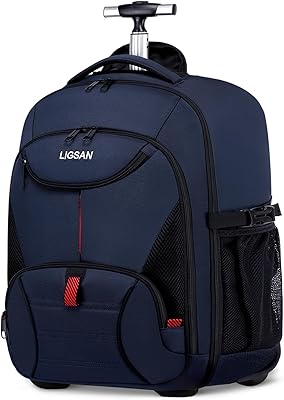
Ytonet 17.3-Inch Rolling Laptop Briefcase
76%
88%
Wheel Performance
83%
Storage & Organization
74%
Build Quality
86%
Handle & Mobility
89%
Laptop Protection
More
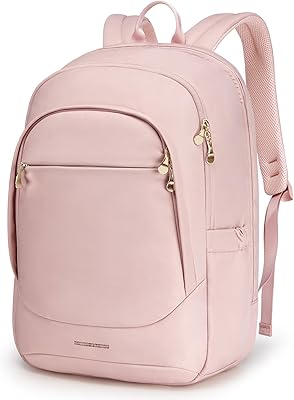
LIGSAN Rolling Backpack 17.3-inch Laptop
87%
86%
Overall Durability
88%
Ease of Use
83%
Comfort & Ergonomics
90%
Storage Capacity
87%
Build Quality
More
Boavan Laptop Backpack for Men 17.3-inch
87%
89%
Build Quality
92%
Portability/Weight
88%
Comfort/Ergonomics
85%
Water-Resistance
90%
USB Charging Port
More

FAQ

It depends heavily on the student's major. For writing papers, browsing research, attending online lectures, and using cloud-based tools like Google Docs or Microsoft 365, this budget 17-inch laptop handles things just fine. Students in engineering, design, or data science programs who need specialized or resource-heavy software should look at a machine with a stronger processor.

IJKKJI has not published official upgrade documentation for the MTL1732, and many laptops in this budget category use soldered memory that cannot be swapped out. It is safest to assume the 8GB is fixed and buy accordingly rather than plan on upgrading later.

The 6000mAh battery is a reasonable size for a laptop this large, but real-world runtime depends a lot on what you are doing. Light browsing and document work at medium brightness can stretch several hours, while continuous video streaming tends to drain it noticeably faster. Do not count on a full workday away from the outlet.

It is perfectly fine for everyday use — streaming video, browsing, and general work all look decent. That said, pixel density is lower on a large 17-inch panel compared to a 13 or 14-inch screen at the same resolution, so text edges may look slightly softer if you sit very close to the display.

For basic tasks, yes. Opening a browser, checking email, using Office apps, or watching a video works without obvious trouble. Where things can get sluggish is during Windows updates running in the background or when multiple applications are open simultaneously — the Celeron N5095 chip has clear limits, and Windows 11 can push against them.

The port setup is actually one of the stronger points of the MTL1732. You get two USB 3.0 ports, HDMI for an external monitor or TV, a Type-C port, an SD card reader for cameras, a headphone jack, Bluetooth 4.2 for wireless peripherals, and built-in Wi-Fi. Most everyday peripherals will connect without needing a hub.

Honestly, yes — this large-screen notebook is a reasonable fit for that exact use case. The 17.3-inch display is much easier on the eyes than a typical 14-inch laptop, and tasks like video calling on Zoom or FaceTime, browsing the web, and reading emails are well within what the hardware can handle comfortably.

Feedback from buyers on this point has been mixed. Some find the keyboard acceptable for casual typing, while others note that the key travel and trackpad responsiveness feel budget-grade. If you type for long stretches daily, you may want to connect an external keyboard and mouse for a more comfortable experience.

Very light gaming only — think older browser-based games or simple titles from a decade ago. The integrated Intel graphics and Celeron processor are not designed for modern gaming of any kind, and you will run into performance walls quickly with anything more demanding than casual games.

This is a legitimate concern worth thinking through before buying. Lesser-known brands often provide limited warranty coverage and minimal customer support infrastructure compared to established names. Check the seller page for warranty terms before purchasing, and factor that into your buying decision if long-term peace of mind matters to you.