Overview

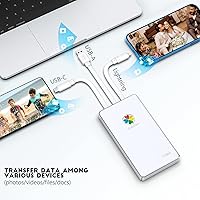
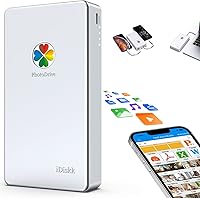
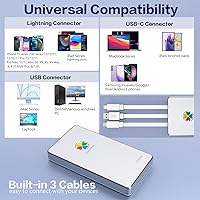
The iDiskk PD01 2TB External Hard Drive entered the market in 2022 as a practical answer to a frustration millions of iPhone users share: running out of space and not wanting another monthly cloud bill. It is a 2.5-inch mechanical hard drive with a built-in 2000mAh battery, meaning it can charge your phone while you transfer files — a genuinely useful touch. The MFi certification matters here not because it unlocks any special features, but because it tells iOS the drive is authorized, preventing the connection warnings that plague uncertified accessories. It covers iPhone, iPad, Android, Mac, and PC from one device.
Features & Benefits

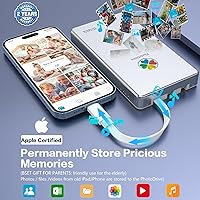
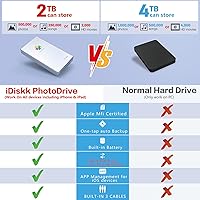
The standout convenience of this portable iPhone hard drive is the one-tap backup through its companion app — open it, connect, tap once, and it pulls your entire camera roll automatically, skipping files it has already saved. You can also shoot photos and videos directly into the drive using the app's built-in camera, which keeps your phone's internal storage completely out of the equation. On a Mac or PC, no drivers are needed; it mounts like any USB drive. The encryption feature lets you password-protect files so they stay invisible on connected computers, though it is standard password security, not anything enterprise-grade. Keep in mind the 5400 RPM mechanical disk sets a real ceiling on transfer speed.

Best For

This MFi-certified external HDD makes the most sense for iPhone and iPad owners who have hit their iCloud limit and want a one-time hardware purchase instead of an ongoing subscription. It is also a strong fit for travelers who carry large video libraries and need offline access without depending on Wi-Fi or streaming services. Cross-platform households benefit from the broad compatibility — one drive that moves files between an iPhone, an Android phone, and a Windows laptop without friction. If you are a content creator backing up raw footage on the go across multiple devices, the 2TB capacity at this price tier is genuinely competitive against flash-based alternatives.

User Feedback

Sitting at 4.1 stars across nearly 200 ratings, the iDiskk drive earns consistent praise for easy setup and the convenience of automatic backups — buyers who just want to plug in and not think about it tend to be satisfied. Where things get mixed is transfer speed: several reviewers note the process is noticeably slow, which is expected from a mechanical HDD but surprises buyers assuming flash-drive performance. The companion app draws some criticism for a clunky interface, and it is worth acknowledging that the app is required for iPhone use — you cannot skip it. A few users also raise durability concerns, which is a fair point since spinning-disk drives are more sensitive to drops than flash storage.

Pros

  • 2TB of storage eliminates iCloud upgrade fees with a single hardware purchase.
  • One-tap automatic backup via the companion app requires almost no effort to maintain.
  • Works across iPhone, iPad, Android, Mac, and PC without reformatting.
  • MFi certification means iOS recognizes the drive cleanly — no irritating connection warnings.
  • Built-in 2000mAh battery provides a trickle charge to your phone during transfers.
  • Plug-and-play on Mac and PC with no drivers or software installation needed.
  • In-app camera lets you shoot directly to the drive, bypassing internal phone storage entirely.
  • Password protection hides sensitive files from appearing on connected shared computers.
  • Ranked in the top 100 external hard drives on Amazon with a solid 4.1-star average.
  • Cost per gigabyte is highly competitive compared to flash-based iPhone storage alternatives.

Cons

  • Transfer speeds are slow — the mechanical HDD will test your patience with large video files.
  • The companion app is mandatory for iPhone use and cannot be bypassed under any circumstances.
  • App interface receives consistent UI complaints; file management feels unpolished and clunky.
  • Mechanical internals make this drive significantly more vulnerable to drop damage than SSD alternatives.
  • The 2000mAh battery barely moves the needle on a modern iPhone charge — do not rely on it.
  • Android app support lags behind the iOS version, with fewer features and less frequent updates.
  • No protective pouch or sleeve is included, which feels like an oversight for a shock-sensitive device.
  • Occasional reports of incomplete backups with very large photo libraries exceeding several thousand files.
  • Customer support responsiveness has received mixed reviews from buyers who encountered early issues.
  • Heavier and bulkier than flash-based phone storage dongles, which may matter for minimalist travelers.

Ratings

The iDiskk PD01 2TB External Hard Drive has been scored by our AI system after analyzing verified global buyer reviews, actively filtering out incentivized and bot-generated feedback to surface what real users actually experience. These ratings reflect both the genuine strengths that keep buyers satisfied and the recurring pain points that push others to leave critical notes. Nothing has been softened — the scores tell the full story.
Ease of Setup
88%
Most buyers report having the drive up and running within minutes, especially on Mac and PC where it mounts like any standard USB drive with no driver installation required. iPhone users also find the initial app pairing straightforward, and the one-tap backup process clicks into place quickly on first use.
The dependency on the companion app for iPhone functionality is a friction point some buyers did not anticipate. Users who expected a completely driverless experience on iOS were caught off guard by the mandatory app download before anything works.
Transfer Speed
51%
49%
For users moving large photo archives in bulk overnight or during long trips, the drive gets the job done without requiring any technical setup. The USB 3.0 interface does provide a meaningful speed bump over USB 2.0 when connected to a compatible port on a modern laptop.
The 5400 RPM mechanical disk is the core bottleneck, and buyers transferring large video files report noticeably slow speeds compared to flash-based alternatives. Several reviewers specifically called out frustration when backing up 4K footage, where waits of 30-plus minutes were not uncommon.
Storage Capacity & Value
83%
Getting 2TB in a mobile-friendly form factor at this price tier is genuinely competitive, particularly for buyers who have been paying monthly for iCloud storage upgrades. For photographers and videographers carrying large RAW files or 4K clips, having that headroom on a single portable device is a real practical advantage.
The value calculation shifts if transfer speed matters to you — a flash-based drive at a higher cost per gigabyte may deliver a far better experience for frequent, time-sensitive transfers. Buyers who do not need the full 2TB may find smaller SSD-based options faster and similarly priced.
Companion App Quality
58%
42%
The one-tap backup function works as advertised for most users, and the in-app camera feature for shooting directly to the drive is a genuinely clever addition that bypasses phone storage entirely during long shoots or trips.
UI complaints appear consistently across reviews, with users describing the interface as clunky and occasionally confusing to navigate. A subset of buyers reported bugs with file browsing and inconsistent behavior when switching between iPhone and PC access within the same session.
Cross-Device Compatibility
86%
Households running a mix of iPhones, Android phones, Windows PCs, and Macs find this drive unusually flexible — one device that handles all of them without reformatting or fuss. The MFi certification ensures iOS recognizes the connection cleanly, which eliminates the warning prompts that cheaper uncertified adapters trigger.
Android support, while functional, is not as polished as the iOS experience, and the companion app's Android version receives fewer updates. Some Android users report that certain file management features available on iOS are either missing or harder to access on the Android build.
Build Quality & Portability
67%
33%
The silver aluminum-look casing feels reasonably solid for a mid-range portable drive, and the 2.5-inch form factor fits into a jacket pocket or bag side pocket without trouble. At 13.4 ounces, it is perceptibly heavier than flash-based competitors, but not uncomfortably so for a travel bag.
Being a mechanical hard drive, it carries an inherent vulnerability to drops and physical shock that flash storage simply does not have. A handful of reviewers reported drive failures after accidental drops, which is a real concern for buyers who plan to carry this in a gym bag or backpack without a protective case.
Battery & Charging Feature
72%
28%
The built-in 2000mAh battery adds a layer of convenience that most competing drives lack entirely — being able to top up your iPhone while transferring files on a long flight or road trip is a small but genuinely appreciated bonus.
The 2000mAh capacity is modest and will not fully charge a modern iPhone, so buyers expecting meaningful emergency charging will be disappointed. It functions more as a trickle-charge assist than a true power bank, and some users felt the feature was overstated in the product marketing.
Data Encryption & Privacy
69%
31%
The password-protection feature that hides encrypted files from appearing on connected computers is useful for anyone sharing a household PC or handing a laptop to a colleague. For personal photo privacy or storing sensitive documents, it adds a practical layer of basic security.
This is standard password-based encryption, not hardware-level or AES-grade protection, so it should not be relied on for truly sensitive business or legal data. Buyers who assumed enterprise-level security based on the product description may feel the feature is less robust than implied.
iPhone & iPad Backup Reliability
77%
23%
The incremental backup logic — where future backups only save newly added files — is a well-implemented touch that saves storage and time after the initial full backup. For iPhone users who just want a reliable nightly or weekly backup habit without thinking about it, the experience is mostly consistent.
A portion of reviewers flagged occasional incomplete backups, particularly with very large libraries exceeding several thousand photos. App crashes mid-backup, though not universal, appear in enough reviews to warrant caution for users with massive camera rolls.
PC & Mac Plug-and-Play Experience
84%
On both Windows and macOS, the drive behaves exactly like a standard external USB hard drive — drag, drop, copy, paste, no additional software needed. For users who only need iPhone backup via the app but want straightforward computer access for everything else, this dual behavior is well executed.
A small number of Windows users reported that the drive was not immediately recognized on older USB 2.0 ports, requiring a port swap before it mounted properly. This is a minor edge case, but worth noting for anyone using an older desktop setup.
File Management & Organization
61%
39%
The ability to organize photos and videos into folders directly within the app gives users more control than a simple flat backup dump, which is useful for creatives managing multiple shoots or trip archives on a single drive.
The in-app file management is where the interface complaints pile up most — moving, renaming, or deleting folders is not intuitive, and several users resorted to doing file organization on their PC instead. For a device marketed heavily on mobile convenience, this is a weak link.
Durability Over Time
59%
41%
Buyers who treat the drive carefully — keeping it in a padded sleeve and avoiding drops — report no mechanical failures even after a year or more of regular use. For stationary or low-movement backup use cases, longevity appears reasonable.
The mechanical internals mean that long-term reliability is more variable than with solid-state alternatives, and the warranty and support experience from iDiskk receives mixed feedback in reviews. Users who experienced early failures noted difficulty getting responsive customer service.
In-App Camera Functionality
71%
29%
Shooting photos and video directly into the drive via the companion app is a standout niche feature that serious mobile content creators will genuinely appreciate, especially on trips where internal phone storage fills up fast.
Image and video quality captured through the in-app camera does not match the native iPhone camera app, and some users noted a noticeable lag when recording video through the interface. For casual snapping it is fine, but professional use is limited.
Packaging & Included Accessories
64%
36%
The drive arrives with the necessary cables included, and the packaging is clean enough that it presents well as a gift. Buyers appreciated not having to immediately purchase additional cables before using it.
There is no included protective pouch or case, which feels like an oversight for a mechanical drive that benefits from physical protection. Given the drop-sensitivity of the internals, a basic sleeve would have meaningfully improved the out-of-box experience.

Suitable for:

The iDiskk PD01 2TB External Hard Drive makes the most sense for iPhone and iPad owners who have hit their iCloud storage ceiling and want to pay once for hardware rather than indefinitely for a subscription. If you are the kind of person who takes hundreds of photos and videos on trips and dreads the low-storage warning mid-vacation, this portable iPhone hard drive gives you a practical safety net that works on the plane, in a hotel room, or anywhere without Wi-Fi. Travelers carrying offline video libraries will appreciate being able to watch content directly from the drive without eating into phone storage. Cross-platform households — where one person uses an iPhone, another an Android, and everyone shares a Windows laptop — will find the broad compatibility genuinely useful rather than just a marketing claim. Content creators who need to offload raw footage from multiple devices during a shoot day, and who are not in a hurry about transfer speeds, also fit the profile well. Anyone who wants basic encrypted local storage for personal files without paying for a cloud privacy tier will find the password-protection feature a workable, no-frills solution.
Not suitable for:

The iDiskk PD01 2TB External Hard Drive is not the right tool if fast transfer speeds are a priority — the mechanical 5400 RPM drive is noticeably slower than any SSD or flash-based alternative, and buyers who regularly move large 4K video files will find the wait times genuinely frustrating. If you are an iPhone user expecting a completely app-free plug-and-play experience like you get with a standard USB drive on a computer, this MFi-certified external HDD will disappoint — the companion app is mandatory for mobile use, and there is no workaround. Users who need enterprise-grade or hardware-level data encryption should look elsewhere, because the password protection here is basic and would not satisfy serious security requirements. Anyone planning to carry this drive loose in a bag, a gym kit, or a backpack without a protective case should be cautious — mechanical hard drives are inherently vulnerable to drops and physical shock in a way that solid-state storage simply is not. Finally, buyers who only need a modest amount of extra storage and want something ultra-compact or featherlight will find better-suited flash-based options that trade raw capacity for speed, durability, and size.
Specifications

  • Storage Capacity: The drive provides 2TB of mechanical hard disk storage for photos, videos, and files across all compatible devices.
  • Drive Type: It uses a 2.5-inch mechanical hard disk drive (HDD) spinning at 5400 RPM, which affects maximum transfer speeds.
  • Interface: Connectivity is via USB 2.0/3.0, offering broad compatibility with older and newer ports on laptops and desktop computers.
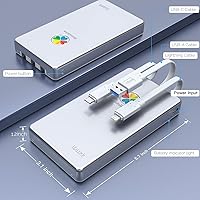
  • Dimensions: The unit measures 5.71 x 2.83 x 0.73 inches, making it pocket-sized for a mechanical drive of this capacity.
  • Weight: The drive weighs 13.4 ounces, which is noticeably heavier than flash-based phone storage dongles but reasonable for a 2TB HDD.
  • Built-in Battery: A 2000mAh lithium-ion battery is built in, allowing the drive to provide a trickle charge to connected mobile devices during use.
  • Power Input: The drive operates at 5 volts and includes a lithium-ion battery; no external power adapter is required for standard operation.
  • MFi Certification: The drive carries Apple MFi certification, confirming the Lightning or USB-C connector meets Apple's hardware standards for safe iPhone and iPad use.
  • Compatibility: Fully compatible with iPhone (6 through 17 series), iPad, Android smartphones, macOS computers, and Windows PCs.
  • Encryption: Password-based encryption allows users to hide selected files so they remain invisible when the drive is connected to a computer.
  • Backup Method: A one-tap automatic backup via the companion app syncs the full camera roll on connection, with incremental updates for subsequent sessions.
  • Color & Finish: The drive comes in a silver finish with a casing that has a brushed metallic appearance common to 2.5-inch portable hard drives.
  • Model Number: The official model identifier is iDiskk-PD01-2TB, which can be used to verify the correct variant when purchasing or registering.
  • In-App Camera: The companion app includes a built-in camera function that saves photos and videos directly to the drive, bypassing internal phone storage.
  • Rotational Speed: The internal disk spins at 5400 RPM, a standard speed for portable HDDs that prioritizes capacity over peak transfer performance.
  • Form Factor: The 2.5-inch form factor is the same used in laptop hard drives, balancing portability with the ability to house high-capacity mechanical platters.
  • Included Accessories: The package includes the necessary connection cables; no protective sleeve or carrying case is included in the box.
  • App Requirement: The iDiskk companion app must be installed on iPhone or Android devices to enable file transfers, backups, and mobile management functions.

Related Reviews

Seagate Game Drive for PlayStation 2TB
79%
94%
Ease of Setup
91%
Storage Capacity
93%
PS4 Compatibility
72%
PS5 Compatibility
74%
Transfer Speed
More
G-Technology 2TB G-DRIVE Mobile USB-C Portable External Hard Drive
88%
91%
Portability
88%
Transfer Speed
89%
Build Quality
94%
Ease of Use (Plug-and-Play)
92%
Compatibility (Mac/Windows)
More
Seagate Portable 2TB (STGX2000400)
84%
93%
Value for Money
91%
Portability
94%
Setup Experience
88%
Operating Noise
67%
Cable Utility
More
ADATA HV620 2TB External Hard Drive
85%
92%
Portability
89%
Build Quality
87%
Transfer Speed
75%
Compatibility
91%
Ease of Use
More
ADATA HD720 2TB External Hard Drive
86%
91%
Durability
94%
Water Resistance
89%
Shock Resistance
75%
Portability
88%
Data Transfer Speed
More
Transcend StoreJet 25M3C 2TB
79%
91%
Build Quality & Durability
62%
Transfer Speed
88%
Shock & Drop Resistance
89%
Plug-and-Play Compatibility
93%
Portability & Form Factor
More
Seagate Ultra Touch 2TB External Hard Drive
88%
94%
Portability & Size
78%
Data Transfer Speed
89%
Eco-Friendly Materials
88%
Storage Capacity
91%
Compatibility with Devices
More
WD Elements Portable 2TB
75%
96%
Ease of Setup
88%
Reliability & Longevity
93%
Portability & Form Factor
61%
Transfer Speed
84%
Value for Money
More
Western Digital Easystore 2TB External Hard Drive
85%
88%
Value for Money
90%
Performance
94%
Portability/Size/Weight
91%
Ease of Use
80%
Build Quality/Durability
More
OWC Express 2TB Portable External Hard Drive
86%
94%
Portability
89%
Data Transfer Speed
92%
Ease of Use
90%
Compatibility
74%
Durability
More

FAQ

Yes — and this is worth knowing before you buy. The companion app is required for all iPhone and iPad functionality, including backup and file browsing. On a Mac or Windows PC, no software is needed at all; it shows up like any USB drive. But for mobile use, the app download is not optional.

Honestly, it depends on how much you are transferring, but do not expect flash-drive speeds. This is a mechanical HDD spinning at 5400 RPM, so large transfers — especially batches of 4K videos — can take a significant amount of time. It is best suited for patient, set-and-leave backups rather than quick on-the-go transfers.

It means Apple has verified that the connector hardware meets their technical standards. In practice, this means iOS will recognize the iDiskk PD01 2TB External Hard Drive without throwing up the warning that says the accessory is not supported. It does not unlock any special iOS features — it simply ensures a clean, stable connection without that error message interrupting you.
Yes, this is one of the genuine strengths of the iDiskk drive. It works across iPhone, Android, Mac, and Windows without requiring you to reformat between platforms. On a PC, it behaves like a standard USB hard drive — plug it in, drag and drop files, done.

It provides a practical layer of privacy — files you encrypt become invisible when the drive is connected to a computer, which is useful for shared households or office environments. That said, it is password-based protection, not hardware-level AES encryption. It is fine for personal privacy, but not suitable for confidential business or legal data that requires certified security standards.

It will, but only a little. The built-in 2000mAh battery is more of a trickle-charge assist than a real power bank. It can slow down battery drain or add a small top-up while you are doing a transfer, but it will not fully charge a modern iPhone. Think of it as a bonus convenience, not a primary charging solution.

This is a real concern with any mechanical hard drive. Unlike SSD or flash-based storage, the spinning platters inside are physically vulnerable to shock from drops. If you plan to carry this portable iPhone hard drive loosely in a backpack or bag, investing in a padded sleeve is strongly recommended. Several reviewers who experienced failures mentioned accidental drops were a factor.

After the initial full backup, the app only saves newly added files in subsequent sessions, which is a smart design choice — it avoids filling the drive with duplicates and keeps backup times shorter over the long run. The first backup, especially for large libraries, will take the most time.

Yes, you can stream video files directly from this MFi-certified external HDD to your iPhone through the companion app. This is particularly useful for travelers who want to carry a large offline video library without using any internal phone storage. Just keep in mind that very high-bitrate files may occasionally stutter depending on the file format and app performance.

The iOS version is generally more polished and receives more frequent updates. Android users report that some file management features available on iPhone are either absent or harder to access on the Android build. It works on Android, but if you are primarily an Android user, it is worth knowing that the experience is not quite at the same level as on iOS.