Overview

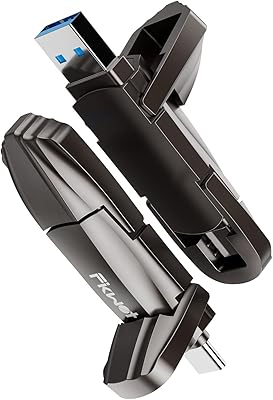
The Fikwot FU389 512GB External SSD enters a crowded but genuinely useful category — thumb-sized drives that actually behave like SSDs rather than oversized flash sticks. It sits in mid-range territory, priced where buyers expect real performance without paying flagship money. What makes it stand out at a glance is the zinc alloy housing, which feels noticeably more solid in hand than the plastic shells common at this price point. If you regularly shuttle files between devices and have grown frustrated watching a traditional USB drive crawl through large transfers, this review will help you decide whether the FU389 drive deserves a spot in your bag.

Features & Benefits

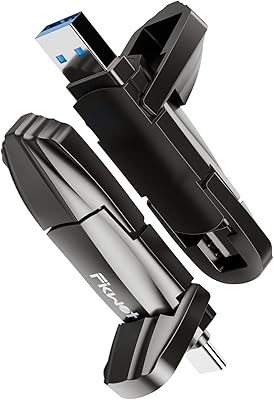
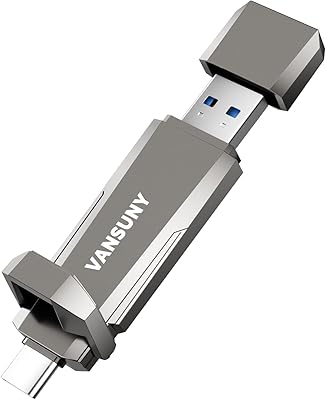
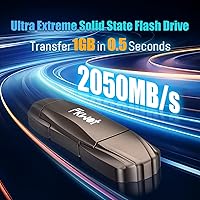
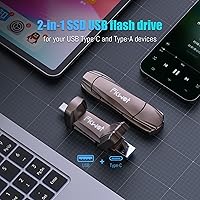
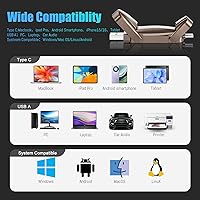
The headline spec is the USB 3.2 Gen2x2 interface, powered by an SM2320 controller that pushes advertised read speeds up to 2050MB/s and writes up to 1800MB/s. Those are sequential peak numbers, so real-world sustained transfers — especially with mixed file types — will likely land lower, though still far ahead of standard flash drives. One practical highlight is the dual USB-A and USB-C connector design, meaning you can plug directly into older laptops and newer ultrabooks without hunting for an adapter. Compatibility covers Windows, macOS, Linux, and Android 4.0 and above. Worth flagging: some listing fields describe the interface as USB 3.0, which conflicts with the Gen2x2 controller spec — keep that inconsistency in mind when verifying device compatibility.

Best For

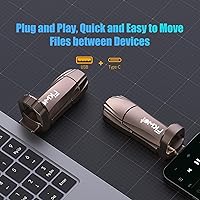
This dual-interface flash SSD makes the most sense for people whose work involves moving large files on a regular basis. Content creators and videographers will appreciate the transfer headroom when offloading RAW photos or 4K footage between machines. Students and remote workers who bounce between a MacBook and a Windows laptop will find the dual connector genuinely convenient — no dongle needed. Gamers can use it to transfer large installs or back up save data quickly. It also works well as a local backup option for iPhone 15 or 16 users, though only models with a USB-C port connect directly; older Lightning-based iPhones are not supported. If your current flash drive is the bottleneck, the improvement here is hard to miss.

User Feedback

Sitting at a 4.4-out-of-5 rating across 111 reviews, the FU389 drive has landed well with early buyers — but it launched in February 2025, so the long-term reliability picture is still forming. On the positive side, users frequently cite consistent transfer speeds and appreciate the compact build holding its own against bulkier external drives. The dual-connector setup earns repeated praise from people who switch regularly between devices. On the critical side, some buyers note a gap between peak advertised speeds and real-world measurements under sustained workloads, which is worth factoring into your expectations. A handful of compatibility edge cases have surfaced as well. The five-year warranty offers meaningful reassurance, but actual longevity data simply needs more time and more reviews to tell the full story.

Pros

  • Dual USB-A and USB-C connectors mean you can plug directly into almost any laptop without carrying an adapter.
  • The zinc alloy body feels far more durable than the plastic shells found on most drives in this price range.
  • USB 3.2 Gen2x2 with an SM2320 controller delivers a substantial real-world speed upgrade over standard flash drives.
  • 512GB capacity handles large video projects, photo archives, and game file transfers without constant space juggling.
  • Works across Windows, macOS, Linux, and Android, covering practically every device most people actually own.
  • The five-year service warranty is a meaningful commitment that most competing drives at this tier do not offer.
  • Compact enough to sit on a keychain or slip into a pocket without adding noticeable bulk.
  • Early buyer ratings average 4.4 out of 5, suggesting a strong initial reception across a variety of use cases.
  • Compatible with USB-C iPhones (15 and 16), making it a handy on-device backup tool without any apps or cloud setup.

Cons

  • Peak advertised speeds are sequential read benchmarks; real-world sustained transfers will fall short, sometimes significantly.
  • The product listing contains conflicting interface specs — some fields say USB 3.0, others correctly reflect USB 3.2 Gen2x2 — which creates unnecessary buyer confusion.
  • With just over 100 reviews and a launch date of early 2025, long-term durability and reliability remain genuinely unproven.
  • Lightning-port iPhone users get no native compatibility; there is no adapter included to bridge the gap.
  • At 4.6 ounces, this dual-interface flash SSD is heavier than ultra-slim competitors, which some users may notice.
  • No included carrying pouch or cap means the connectors are exposed to pocket debris during everyday carry.
  • Buyers on Linux or older Android versions should double-check compatibility before assuming plug-and-play support.
  • The brand, Fikwot, lacks the established service infrastructure of larger storage names, which matters if a warranty claim ever arises.

Ratings

The scores below reflect an AI-driven analysis of verified global buyer reviews for the Fikwot FU389 512GB External SSD, with spam, bot-generated, and incentivized feedback actively filtered out before any score was calculated. Each category captures what real users experienced day-to-day — not just what the spec sheet promises — so both the strengths and the friction points are represented honestly.

Transfer Speed
83%
Users moving large batches of RAW photos or 4K video clips between laptops report a genuinely dramatic improvement over conventional flash drives. The USB 3.2 Gen2x2 interface makes the speed uplift noticeable in real workflows, not just in benchmarks.
Buyers who ran their own tests found that sustained throughput on mixed-size files lands well below the advertised sequential peaks. A few users expressed frustration that marketing figures created expectations the drive cannot reliably match outside controlled conditions.
Build Quality
86%
The zinc alloy chassis earns consistent praise from users who have handled a lot of plastic thumb drives — it feels noticeably more solid and premium. Several buyers mentioned surviving accidental drops without any visible damage or performance change.
At 4.6 ounces, some users find the drive heavier than expected for a thumb-sized device, and a small number noted the finish attracts scratches with daily pocket carry. There is no included cap or case to protect the connectors from dust and lint.
Dual Connector Design
91%
The built-in USB-A and USB-C connectors are one of the most frequently praised features, particularly among users who switch regularly between older desktops and modern ultrabooks. Eliminating the need for a dangling adapter is a practical convenience that buyers notice immediately.
The physical dual-connector form factor makes the drive slightly bulkier than single-connector alternatives. A handful of users also noted that having both connectors exposed simultaneously without a protective cover feels like an oversight.
Device Compatibility
78%
22%
Cross-platform performance across Windows, macOS, Linux, and Android is reported as reliable, with most users plugging in and getting immediate recognition without driver installation. Students and remote workers with mixed-device setups particularly appreciate not having to reformat for each system.
Lightning-port iPhone users are left out entirely, which some buyers discovered only after purchase. A persistent spec inconsistency between USB 3.0 and USB 3.2 listings has caused pre-purchase confusion and a few post-purchase disappointments on older host hardware.
Value for Money
74%
26%
For buyers replacing a slow USB-A flash drive, the real-world speed jump justifies the cost without much debate. The dual connector alone removes the need to buy a separate adapter, which adds practical value for multi-device users.
Users who compare this drive against established brands at similar price points sometimes feel the speed-to-price ratio is thin, especially once sustained real-world speeds are accounted for. The brand's limited track record also makes some buyers hesitant to pay a premium without more long-term data.
Heat Management
71%
29%
The zinc alloy shell handles moderate heat better than plastic alternatives, and users doing typical file transfers — offloading a shoot, backing up a project folder — report no uncomfortable warmth during those sessions.
Under sustained heavy workloads, the drive does get noticeably warm to the touch, which has made a few users cautious about leaving it running during long automated backups. Early reviews do not flag thermal throttling yet, but the sample size is still small enough that this warrants monitoring.
Portability
82%
18%
The compact footprint makes the FU389 drive easy to toss into a laptop bag, camera bag, or jacket pocket without dedicating a separate compartment to it. Photographers and videographers shooting on location mention it as a low-friction part of their kit.
The 4.6-ounce weight is heavier than ultra-slim competitors, and users who carry it daily in a pants pocket do feel the difference. Without a clip, lanyard hole, or included pouch, keeping track of it requires more care than a lighter keychain-style drive.
Write Performance
79%
21%
For ingesting large sequential files — camera card offloads, project folder transfers, ISO images — the write performance delivers a clear and practical upgrade over what most buyers were using before. Users report that moving a 50GB folder feels fast enough that they no longer leave it running unattended.
Writing many small files simultaneously, such as software installations or large numbers of documents, produces a more modest real-world result. Some users running backup software with mixed file sets noted speeds that felt inconsistent with the drive's headline positioning.
iPhone and Mobile Use
67%
33%
iPhone 15 and 16 owners using the USB-C port report clean direct connectivity and fast photo and video offloads without needing any app beyond the native Files app. For USB-C Android users, plug-and-play recognition works reliably across a range of recent devices.
The drive offers zero native support for Lightning-port iPhones, a limitation not clearly signaled in all parts of the listing. Some Android users on older devices or custom OS builds encountered recognition issues that required manual USB OTG configuration to resolve.
Warranty and Support
69%
31%
The five-year service commitment stands out in a category where one or two years is the norm, and buyers who factor long-term protection into their decision tend to view it favorably. It signals that Fikwot is willing to back the product beyond a typical return window.
Fikwot does not have an established support reputation, and buyers researching warranty claim experiences find very little documentation to go on. For users storing anything genuinely important, that uncertainty makes the warranty feel more like a promise than a proven safety net.
Ease of Setup
88%
Nearly every buyer across platforms reports an immediate plug-and-play experience — no drivers, no software, no formatting required out of the box on Windows and macOS. First-time portable SSD users specifically appreciate how little friction is involved in getting started.
A small number of users found the drive did not auto-mount on their system and needed to initialize it manually through Disk Management or Disk Utility, which was unexpected for buyers assuming fully automatic setup. Instructions in the box are minimal and do not walk through troubleshooting steps.
Long-Term Reliability
61%
39%
Short-term impressions from buyers using the drive daily for several months are generally positive, with no reported failures or data loss incidents surfacing in early reviews. The solid-state design with no moving parts does reduce the risk profile compared to traditional portable hard drives.
The drive launched in February 2025 and has just over 100 ratings, which is simply not enough data to draw confident conclusions about longevity. Buyers planning to use this dual-interface flash SSD as their sole backup for irreplaceable files should treat current reliability assessments as preliminary.
Listing Accuracy
53%
47%
The core product — capacity, connector types, and OS compatibility — is accurately represented, and buyers who received the drive report it matches the physical description and primary feature claims in the listing.
The conflicting USB 3.0 versus USB 3.2 Gen2x2 interface specs across different listing fields have frustrated technically savvy buyers and caused some to question the brand's attention to detail. This kind of inconsistency erodes trust before a buyer has even made a decision.

Suitable for:

The Fikwot FU389 512GB External SSD is a practical pick for anyone who regularly moves large files between multiple devices and is tired of waiting on slow, plastic flash drives. Content creators offloading 4K footage or RAW photo bursts will feel the speed difference most clearly, especially when jumping between a MacBook and a Windows workstation in the same workflow. Students and remote workers will appreciate the dual USB-A and USB-C connectors, which means one drive handles virtually every laptop on the market without an adapter in sight. Mobile-first users with an iPhone 15, iPhone 16, or a USB-C Android phone can also use this portable SSD stick for fast local backups without relying on cloud subscriptions. Gamers who want to quickly move large installs or back up save data will find 512GB of SSD speed far more practical than dragging files over a sluggish traditional thumb drive.

Not suitable for:

Buyers expecting consistent peak throughput under every condition should temper expectations — the advertised speeds of 2050MB/s are sequential read peaks, and sustained real-world transfers, particularly with mixed or smaller files, will land noticeably lower. Anyone still using an older iPhone with a Lightning port should know the Fikwot FU389 512GB External SSD simply will not connect natively; this drive is built around USB-C and USB-A, not Apple's legacy connector. Professional archivists or anyone depending on a drive for mission-critical long-term storage should also pause: with a February 2025 launch and just over 100 reviews so far, the FU389 drive has not yet built a track record that justifies that level of trust. Users who need more than 512GB of capacity for large media libraries or full system backups will find this drive undersized. Finally, buyers who have seen conflicting USB 3.0 and USB 3.2 specs in the listing are right to be cautious — that inconsistency is real and worth verifying against your specific device before purchasing.

Specifications

  • Brand: Manufactured by Fikwot, a storage peripheral brand offering mid-range portable SSD products.
  • Model: The drive carries the model designation FU389, part of the FU389_512GB series.
  • Capacity: Offers 512GB of total storage, suitable for large media libraries, game files, and document archives.
  • Drive Type: Solid state drive with no moving parts, making it more resistant to physical shock than traditional hard drives.
  • Interface: Uses a USB 3.2 Gen2x2 interface, delivering substantially higher throughput than standard USB 3.0 or Gen1 connections.
  • Controller: Powered by the SM2320 main controller chip, paired with premium-grade NAND flash for stable performance.
  • Read Speed: Rated for sequential read speeds of up to 2050MB/s under optimal, benchmark-style conditions.
  • Write Speed: Rated for sequential write speeds of up to 1800MB/s, again reflecting peak rather than sustained real-world performance.
  • Connectors: Equipped with both a USB-A and a USB-C connector in a dual-interface design, removing the need for a separate adapter on most devices.
  • OS Compatibility: Compatible with Windows 7, 8, and 10, macOS 10.4 and above, Linux 2.4 and above, and Android 4.0 and above.
  • Body Material: Chassis is constructed from zinc alloy, which improves heat dissipation and adds structural rigidity compared to plastic alternatives.
  • Dimensions: Measures 5.12 x 3.58 x 0.75 inches, making it compact enough for everyday carry in a bag or pocket.
  • Weight: Weighs 4.6 ounces, which is slightly heavier than ultra-slim flash drives but reflects the zinc alloy construction.
  • Warranty: Covered by a five-year service warranty, which is above average for this category of portable storage device.
  • Availability: First listed on Amazon on February 8, 2025, making it a relatively recent product with a still-developing review history.
  • Sales Rank: Holds a Best Sellers Rank of #82 in the External Solid State Drives category on Amazon at the time of review.

Related Reviews
KEXIN 512GB Portable External SSD
79%
88%
Value for Money
74%
Transfer Speed
83%
Build Quality
93%
Portability
86%
Device Compatibility
More
Fikwot FX815 512GB SSD
83%
88%
Performance
92%
Value for Money
85%
Installation Ease
83%
Durability
90%
Compatibility
More
Fikwot FU388 256GB External SSD
85%
89%
Transfer Speed
91%
Build Quality
90%
Compatibility
87%
Durability
92%
Portability
More
Fikwot FX550 512GB NVMe SSD
83%
91%
Performance
92%
Value for Money
88%
Read Speed
85%
Write Speed
89%
Reliability
More
Fikwot FU386 1TB External SSD
77%
74%
Transfer Speed
88%
Build Quality
91%
Dual Connector Design
78%
iPhone Compatibility
86%
Cross-Platform Compatibility
More
SSK SD451 512GB External SSD
87%
91%
Transfer Speed
94%
Portability/Size
95%
Setup/Installation
88%
Durability/Reliability
75%
Compatibility/Connectivity
More
KingSpec Z5 512GB External SSD
80%
83%
Transfer Speed
88%
Build Quality
91%
Portability
67%
Device Compatibility
74%
RGB Lighting
More
Fikwot FP70 1TB External SSD
88%
91%
Performance
88%
Ease of Use
85%
Compatibility
94%
Portability
90%
Build Quality
More
Transcend ESD300 512GB Portable External SSD
78%
94%
Portability
83%
Transfer Speed
91%
Device Compatibility
68%
Build Quality
89%
Setup Ease
More
fanxiang FF520 512GB External SSD
87%
88%
Performance (Read/Write Speeds)
93%
Durability (Build Quality)
90%
Compatibility
85%
Ease of Use
91%
Portability (Size & Weight)
More

FAQ

Yes, the FU389 drive is plug-and-play on both macOS 10.4 and above and Windows 7, 8, and 10. You do not need to install any drivers or companion apps. Just plug it in and it mounts like any external drive. Keep in mind that if you plan to use it across both operating systems regularly, you may want to format it as exFAT so it remains readable and writable on both platforms without reformatting.

Only if your iPhone has a USB-C port, which means iPhone 15 and iPhone 16 models. Older iPhones with a Lightning connector are not compatible — there is no adapter included in the box, and Apple does not support Lightning-to-USB-A storage connections for file transfer. If you have a Lightning iPhone, this portable SSD stick is not the right choice for direct mobile use.

The advertised 2050MB/s read and 1800MB/s write figures are sequential peak speeds measured under ideal benchmark conditions. Real-world performance, especially when copying mixed files of varying sizes, will typically run lower. That said, even at reduced sustained speeds, this dual-interface flash SSD is still considerably faster than a conventional USB flash drive, so the practical upgrade is very real — just do not expect benchmark numbers to show up consistently in everyday use.

The controller and headline specs point clearly to USB 3.2 Gen2x2, which is the more capable and accurate description of what is inside the drive. The USB 3.0 references in the listing appear to be leftover metadata errors rather than a reflection of actual hardware. That said, to get the full speed benefit, your host device also needs to support USB 3.2 Gen2x2 — plugging into an older USB 3.0 port will cap your throughput at that port's maximum, not the drive's rated ceiling.

Yes, it is compatible with Android 4.0 and above. Devices with a USB-C port will connect directly using the built-in USB-C connector. For older Android phones with a micro-USB port, you would need a separate OTG adapter, which is not included. Once connected, most modern Android versions will recognize it as external storage automatically through the Files or My Files app.

The zinc alloy body helps dissipate heat better than plastic-shelled drives, so it handles warmth more gracefully during extended sessions. Under sustained heavy workloads it will get warm to the touch, which is normal for any compact SSD pushing high throughput, but early user reports have not flagged overheating as a recurring complaint. If you are doing very long continuous transfers regularly, giving it a short break between large jobs is a reasonable precaution.

It depends on your workflow. For shorter projects, proxy editing, or keeping a working set of footage while a NAS or desktop stores the full library, 512GB is workable. If you routinely shoot long-form 4K or 6K RAW footage and need everything on one portable drive, you may find yourself managing space frequently. It is a solid capacity for most hobbyists and part-time creators, but heavy production work often calls for a larger drive.

A five-year service commitment is a meaningful promise, and it does signal that Fikwot is willing to stand behind the product longer than many competitors. The honest caveat is that Fikwot does not have the service infrastructure of larger brands like Samsung or Western Digital, so your experience with a warranty claim will depend heavily on the support process they have in place. Reading through recent buyer feedback on the warranty experience would be worth doing before committing, especially if you plan to rely on this drive for important data.

Generally, no. On Windows and macOS it should mount automatically as soon as you plug it in. If it does not appear, check Disk Management on Windows or Disk Utility on macOS — it may need to be initialized or formatted if it arrived without a pre-formatted partition. For Android, the Files app should prompt you when it detects external storage. The drive does not require any software installation on any supported operating system.

It works well for transferring game files between devices and for storing backwards-compatible titles on consoles that support USB external storage. However, running PS5-optimized games directly from an external USB drive is not supported by Sony — those titles require an internal M.2 expansion slot. On Xbox Series consoles, the FU389 drive can store and play games, though for the best loading performance on current-generation titles, an official Xbox Expansion Card is still the recommended option.