Overview

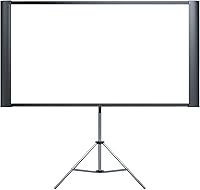
The Epson Duet 80-Inch Projection Screen solves a problem anyone with a mixed media library will recognize: most screens force you to choose between standard 4:3 and widescreen 16:9, but this dual-format screen handles both. It folds into its own compact carrying case — just 43 inches long when closed — and can be set up on the included floor stand or wall-mounted with the included bracket. Epson's standing in the projection space carries some weight here, and the mid-range price positions the Duet squarely between bargain-bin portables and dedicated fixed installations.
Features & Benefits

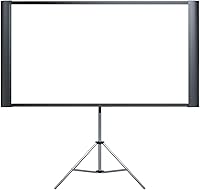
At 80 inches diagonal, this portable projection screen expands to 42.5 by 79.5 inches in widescreen mode — large enough to feel cinematic in a typical living room. The white anti-glare surface performs well in moderately lit spaces, though it is a functional surface rather than a reference-grade one; don't expect the same pop as a dedicated home theater install. Setup is genuinely quick: the collapsible frame clicks into place without tools, and the floor stand brings the screen to a comfortable 76.25 inches tall. Closed down, it measures just 9 inches wide — easy to slide behind a couch or load into a car.

Best For

The Epson Duet makes most sense for two distinct groups. Home theater owners who regularly switch between formats — classic 4:3 content and modern widescreen movies — will appreciate not having to buy two screens. For anyone giving business presentations or teaching across different rooms, the portability here is a real practical advantage over a fixed pull-down screen. Renters especially benefit since no drilling is required when using the floor stand. That said, if your projector stays in one dedicated room and you never touch 4:3 content, a fixed-mount screen at this price range will likely deliver a cleaner, more consistent result.

User Feedback

With a 4.6-star average across more than 1,000 ratings, buyer satisfaction is notably strong for this category. Most praise centers on the quick, tool-free assembly and the genuine convenience of having both aspect ratios on demand — something buyers upgrading from single-format screens consistently highlight. Where opinions soften is around long-term durability; a handful of reviewers have flagged concerns about hinge and frame wear after repeated folding cycles, worth factoring in if you move this dual-format screen frequently. Image quality feedback is generally positive but measured — buyers rate it as solid and practical, not a premium optical surface.

Pros

  • Switches between 4:3 and 16:9 aspect ratios without buying or storing two separate screens.
  • Folds into its own compact carrying case — no separate bag needed for transport.
  • Tool-free setup means most users are projecting within a few minutes of arrival.
  • Floor stand and wall bracket both included, covering temporary and semi-permanent installs.
  • Anti-glare surface handles moderately lit rooms better than projecting onto a plain white wall.
  • Compact closed dimensions make it easy to store behind furniture or in a closet.
  • Over 1,000 verified buyer ratings with a 4.6-star average signals consistent real-world satisfaction.
  • Epson brand backing provides reasonable confidence in product consistency and support availability.
  • The 80-inch diagonal size delivers a genuinely cinematic feel in typical living room or classroom spaces.

Cons

  • At 28 pounds, solo transport over any real distance quickly becomes uncomfortable.
  • Hinge and frame components show fatigue under frequent folding — not built for daily heavy rotation.
  • Wall mounting hardware feels noticeably cheaper than the screen itself; better anchors recommended.
  • Included assembly instructions are sparse and confusing, especially for first-time setup.
  • Screen surface can develop slight waviness after repeated storage, affecting image uniformity.
  • No shoulder strap or ergonomic carry handle despite the product being marketed as portable.
  • Frame tension between the two aspect ratio positions occasionally feels inconsistent out of the box.
  • Floor stand can shift on carpet or uneven surfaces, which is a real issue in classroom environments.
  • Buyers who use only one aspect ratio will find limited justification for the price over simpler alternatives.

Ratings

The scores below reflect an AI-driven analysis of verified global buyer reviews for the Epson Duet 80-Inch Projection Screen, with spam, bot-submitted, and incentivized feedback actively filtered out before any scoring was applied. Across thousands of real-world impressions — from living room movie nights to classroom presentations — both the genuine strengths and the recurring frustrations are represented here without softening either side.

Ease of Setup
91%
This is consistently the most praised aspect across buyer reviews. Most users report the collapsible frame clicks into position within a few minutes, with no tools required — a meaningful advantage when setting up in a conference room or a guest room on short notice.
A smaller segment of buyers found the initial assembly less intuitive than expected, particularly when aligning the frame extensions for the first time. The learning curve flattens quickly, but first-timers should expect to spend a few extra minutes on the first deployment.
Dual Aspect Ratio Versatility
88%
The ability to switch between 4:3 and 16:9 on a single screen is the core reason most buyers choose this over competing portables. Users who regularly watch classic TV content alongside modern streaming films find genuine everyday value in not having to reposition or replace their screen.
A few reviewers note that the transition between aspect ratio positions feels slightly awkward and that the frame tension is not always perfectly consistent across both configurations. It works, but it does not feel as polished as a single-format dedicated screen.
Portability & Storage
83%
Folding down to 43 inches long and just 9 inches wide, the Epson Duet stores tidily behind furniture or in a closet, which renters and occasional users particularly appreciate. Several business users highlight how it fits in a standard vehicle without needing a dedicated case.
At 28 pounds, this portable projection screen is heavier than buyers sometimes anticipate. Solo transport over longer distances — carrying it through a parking lot or up stairs — is manageable but not comfortable, and a few reviewers wish the weight had been trimmed further.
Screen Image Quality
74%
26%
The white anti-glare surface performs respectably in typical living room or office lighting conditions, reducing hotspots and providing a reasonably even image across the panel. Paired with a decent mid-range projector, most buyers report a noticeably better result than projecting onto a plain wall.
This is a functional surface, not a reference-grade one. Buyers accustomed to dedicated home theater screens with gain coatings will find the image slightly flatter and less vibrant. Some also report minor texture visibility at close viewing distances, which can distract in smaller rooms.
Build Quality & Frame Durability
67%
33%
For its price tier, the overall construction feels reasonably solid during initial use. The floor stand is stable on flat surfaces, and the frame holds its shape well through normal weekly or biweekly setups without visible warping or loosening.
Long-term durability is the most honest concern in the review pool. Users who fold and unfold the screen frequently — particularly mobile presenters using it several times a week — report hinge fatigue and occasional frame looseness appearing within the first year. It is built for occasional use, not heavy rotation.
Floor Stand Stability
78%
22%
On hard, level floors the stand keeps the screen impressively steady for its size, and the 76.25-inch height with the stand gives good sightlines for a seated audience. Most classroom and living room users report no wobble issues under normal viewing conditions.
On carpet or uneven surfaces, some buyers note the stand can shift slightly when the screen is bumped, which is a real concern in busier environments like classrooms with students moving around. A locking foot mechanism would have addressed this cleanly.
Wall Mounting Experience
72%
28%
The included wall bracket gives buyers a no-extra-cost path to a semi-permanent install, which apartment dwellers who do have permission to make small wall penetrations appreciate. Mounting takes under 30 minutes for most users with basic tools.
The wall bracket hardware feels noticeably lighter in quality compared to the screen itself, and several reviewers recommend purchasing higher-grade wall anchors separately for long-term reliability. Instructions for wall mounting are also described as sparse and confusing by a meaningful number of buyers.
Value for Money
81%
19%
Given that this dual-format screen replaces what would otherwise require two separate screens, buyers generally feel the mid-range price is justified. The combination of floor stand, wall bracket, and carrying case functionality in one package is a genuine value proposition most users acknowledge.
Buyers who only ever use one aspect ratio — strictly widescreen, for example — tend to feel the pricing is harder to justify, since competing fixed-format portable screens offer better image surfaces or lighter frames at similar or lower cost.
Carry & Transport Design
76%
24%
The fold-to-case design is a clever touch that eliminates the need to source a separate bag or case. For users driving between offices or classrooms, simply picking it up and loading it into a vehicle trunk is a friction-free experience that reviewers repeatedly call out positively.
There is no shoulder strap or ergonomic grip, so carrying it any meaningful distance by hand is awkward given the weight. A built-in handle or optional strap solution would significantly improve what is otherwise a smart transport concept.
Setup Speed in Repeat Use
84%
After the first couple of uses, most buyers report they can have the screen fully deployed and ready in under three minutes — a figure that comes up organically in reviews from teachers and small business presenters who depend on quick turnarounds between sessions.
The first setup session consistently takes longer due to the non-obvious frame extension sequence. Epson's included documentation is considered adequate by most but minimal — a short video guide would reduce the frustration that some first-time users report.
Screen Surface Uniformity
69%
31%
For the majority of buyers, the screen surface appears flat and consistent enough during regular projected use, with no visible sagging or uneven tension across the panel when properly set up at either aspect ratio.
A recurring minority complaint involves slight surface waviness or uneven tension, particularly when the screen has been stored folded for extended periods or has been transported frequently. This can cause subtle image distortion that is more noticeable in high-contrast content.
Brand Reliability Perception
82%
18%
Epson's established reputation in the projector category transfers positively to buyer confidence in this screen. Many reviews mention choosing the Duet specifically because of the brand name, and post-purchase satisfaction largely reinforces that trust.
Some buyers express mild surprise that the build quality does not fully match the premium association the Epson name carries in the projector space. The screen is competent but clearly manufactured to a mid-range cost target rather than the higher standards Epson projects are known for.
Packaging & Out-of-Box Experience
77%
23%
Most buyers describe the unboxing experience as organized and complete, with all components — stand, bracket, and hardware — clearly separated and accounted for. No significant reports of damage in transit, which speaks to adequate protective packaging.
Instructions are the consistent weak link in the out-of-box experience. Multiple reviewers describe the assembly guide as too brief, with diagrams that are small and hard to follow. A QR code linking to a setup video would solve this at almost zero cost.

Suitable for:

The Epson Duet 80-Inch Projection Screen is a strong fit for anyone whose viewing life does not fit neatly into one format — think households that stream modern widescreen films in the evening but also pull up older 4:3 documentary or educational content on weekends. Renters and apartment dwellers will particularly appreciate the floor stand option, which delivers a proper big-screen setup without putting a single hole in the wall. Small business owners, teachers, and trainers who carry a projector between locations will find the fold-to-case design genuinely useful rather than gimmicky — it slides into a car trunk and deploys in minutes once you have run through it a couple of times. Occasional users who want a clean living space without a screen permanently dominating a wall also fit this product's strengths well; it stows away completely when not needed. If your projector budget is in the mid range and you want a dedicated surface that improves image quality over a bare wall without committing to a permanent install, this portable projection screen delivers solid value.
Not suitable for:

The Epson Duet 80-Inch Projection Screen is not the right call for buyers building a dedicated, light-controlled home theater where image performance is the primary concern. A fixed, tensioned screen with a proper gain coating will produce noticeably better results in that context, and the price difference is often smaller than people expect. Users who plan to set up and break down this dual-format screen multiple times per week should also think carefully — the hinge and frame components show wear under that kind of frequency, and the 28-pound carry weight becomes a real physical burden over time. If you only ever watch widescreen content and have no use for the 4:3 configuration, the core value proposition disappears and you can likely find a lighter, cheaper single-format portable screen that outperforms it on image surface quality. Buyers expecting a premium, precision-built product comparable to Epson's projector hardware may also come away underwhelmed — this is a functional mid-range accessory, not a flagship product.
Specifications

  • Screen Size: The viewable diagonal measures 80 inches, expanding to a 42.5 x 79.5″ surface in 16:9 HDTV format and 42.5 x 61.75″ in standard 4:3 video format.
  • Aspect Ratios: Supports both 4:3 standard and 16:9 widescreen formats within a single adjustable frame, with no screen swap required between configurations.
  • Screen Material: The projection surface is constructed from white anti-glare plastic designed to reduce hotspots and maintain acceptable image clarity in moderately lit environments.
  • Frame Design: Features a patent-pending collapsible frame that folds and unfolds without tools, enabling fast deployment and breakdown in minutes.
  • Mounting Options: Includes both a freestanding floor stand and a wall-mount bracket, giving users the flexibility to set up the screen temporarily or semi-permanently.
  • Height With Stand: When assembled on the included floor stand, the top of the screen reaches 76.25 inches from the ground, suitable for standard seated viewing distances.
  • Height Without Stand: The screen panel alone measures 42.5 inches tall, relevant for wall-mount installations or custom stand configurations.
  • Closed Dimensions: When folded for transport or storage, the unit measures 43 inches in length and 9 inches in width, forming its own compact carrying case.
  • Product Weight: The complete unit weighs 28 pounds, which supports stable freestanding use but requires two hands and reasonable effort for solo transport.
  • Packaged Dimensions: The shipping box measures 46.2 x 12.2 x 9.3 inches, which is useful to reference when planning vehicle transport or storage space.
  • Model Number: The manufacturer model designation is ELPSC80, which can be used to identify compatible accessories or verify warranty registration with Epson.
  • Brand: Manufactured and sold under the Epson brand, a company with an established track record in the projection display category.
  • Carry Case: No separate carry case is required; the folded frame itself forms the protective enclosure for transport and storage.
  • Assembly Tools: No tools are required for standard floor stand assembly or screen deployment; the wall bracket installation does require basic household tools such as a drill and screwdriver.
  • Discontinuation Status: As of the available product data, this screen is confirmed as not discontinued by the manufacturer, indicating ongoing production and part availability.
  • Availability Date: This product was first made available for purchase on October 21, 2017, indicating a mature product with an established buyer review history.

Related Reviews
Elite Screens Spectrum ELECTRIC150H2 150″
82%
88%
Screen Image Quality
91%
Build Quality & Materials
89%
Motorized Mechanism
86%
Installation Ease
83%
Remote & Control Options
More
Elite Screens Aeon AUHD Series 150-inch 4K AcousticPro UHD Projection Screen
86%
92%
Image Quality
89%
Sound Transparency
85%
Installation Ease
88%
Build Quality
91%
Viewing Angle
More
Tecdigbo 40-inch Portable Projection Screen
85%
91%
Portability
89%
Ease of Setup
87%
Image Quality
65%
Stand Stability
82%
Design and Build Quality
More
VISULAPEX 80-Inch Projector Screen with Stand
78%
88%
Ease of Setup
79%
Image Quality
91%
Portability & Storage
71%
Build Quality & Stability
82%
Screen Material & Surface
More
HYZ 80-inch Projector Screen with Stand
86%
91%
Portability & Ease of Setup
88%
Image Quality & Viewing Experience
87%
Durability & Build Quality
89%
Adjustable Height Flexibility
68%
Outdoor Visibility in Bright Conditions
More
NIERBO 100-inch Portable Projector Screen
75%
91%
Value for Money
88%
Portability
74%
Image Quality (Screen Surface)
58%
Ambient Light Rejection
63%
Crease Recovery
More
VerCorkin 120-inch Portable Projection Screen
76%
88%
Value for Money
91%
Portability & Storage
84%
Setup & Installation
79%
Image Contrast & Backing
62%
Screen Flatness
More
VIVOHOME VH828-BK 80-Inch Pull-Down Projector Screen
79%
83%
Build Quality
88%
Mechanical Smoothness
79%
Screen Fabric Quality
81%
Image Clarity & Reflectivity
74%
Ease of Installation
More
SCREENMAX 80-Inch Portable Projector Screen
77%
91%
Ease of Setup
74%
Portability
78%
Image Quality
71%
Build Quality
62%
Outdoor Stability
More
HOIN 80-inch Portable Projector Screen Stand
78%
91%
Ease of Assembly
88%
Portability & Transport
84%
Screen Fabric Flatness
82%
Frame Stability — Calm Conditions
56%
Wind Resistance
More

FAQ

Realistically, plan for about 10 to 15 minutes on your first attempt while you get familiar with the frame extension sequence. After that, most users settle into a 3 to 5 minute routine. The process becomes second nature quickly, but the included instructions are fairly minimal, so do not be discouraged if it feels slightly awkward the first time through.

It can work outdoors in calm conditions, but it is not designed for outdoor use. Wind is the main concern — at 28 pounds the floor stand is stable indoors, but even a moderate breeze can make it unsteady. The screen surface is also not weatherproof, so any moisture exposure risks damage to the anti-glare coating.

For freestanding use, everything you need is in the box — the screen, the floor stand, and the wall bracket with basic hardware. The only exception is if you choose wall mounting on masonry or drywall without solid studs, in which case buying better-quality wall anchors separately is a good idea, since several users flag the included hardware as lightweight.

The frame extends and retracts to change the screen width between the two formats. You are essentially pulling the side arms out further to reach the 16:9 widescreen position, or collapsing them inward for the 4:3 standard configuration. It takes a minute or two once you know the mechanism, though a handful of users note the tension can feel slightly uneven until the frame fully seats.

Honestly, if you have a dedicated, light-controlled home theater, this portable projection screen is not the best fit. The anti-glare surface is functional and practical, but it does not deliver the same brightness, contrast, or surface precision as a tensioned fixed-frame screen with a proper gain coating. For a casual living room setup or a flexible multi-use space, it performs well — but pure home theater performance is not its strong suit.

Use a soft, dry microfiber cloth for light dust. For smudges or fingerprints, a lightly dampened cloth with plain water works well — avoid any chemical cleaners, solvents, or abrasive materials, as these can damage or strip the anti-glare coating on the white plastic surface. Always let the surface dry fully before folding the screen for storage.

It works with any projector regardless of brand. The screen surface is a universal white anti-glare panel, and there is no proprietary technology involved. The main thing to check is throw distance — make sure your projector can fill an 80-inch screen at the distance you plan to place it, which varies by projector model.

This is a legitimate concern worth being upfront about. The dual-format screen holds up well for occasional users — weekly or biweekly setups over a couple of years without significant issues. However, users who fold and transport it several times per week do report hinge looseness and frame wear appearing within the first year. If you are a frequent mobile presenter, factor this into your decision and consider whether a more ruggedized portable screen might be a better investment.

One person can absolutely set it up solo — the floor stand and frame deployment do not require a second set of hands. The 28-pound weight means you will want to be reasonably careful when unfolding and positioning it, but nothing about the mechanism demands assistance. Wall mounting is slightly easier with a second person to hold the bracket in place while you drill, but it is not strictly required.

On hardwood or tile floors, stability is generally good. On thick carpet, several users report the stand legs can shift if the screen is bumped or if people are moving around nearby — a relevant concern for classroom or meeting room use. Placing the stand legs on a thin, flat board or a furniture pad can help on softer surfaces. There are no rubber grip feet or floor anchors included to address this out of the box.

Where to Buy