Overview

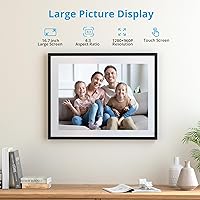
The Dragon Touch 16.7-inch Digital Picture Frame is a notably large WiFi-connected display that sits squarely in the mid-range of a crowded category — above bargain-bin options but without the polish of premium brands. Dragon Touch has been around consumer electronics accessories for years, best known for budget tablets and action cams, so this feels like a natural extension of their lineup. What sets this large digital frame apart is its 4:3 screen, genuinely bigger than the 10- to 12-inch panels most competitors offer, and a remote photo-sharing app that turns it into a living connection between family members who are miles apart.

Features & Benefits

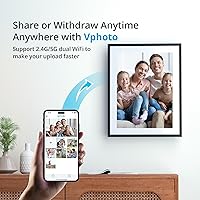
The IPS touch screen delivers respectable color accuracy and wide viewing angles — photos look warm and natural rather than washed out. Worth flagging: the listing advertises both 1280×960 and 1080p, which are not the same resolution, so buyers expecting true 1080p sharpness may be mildly surprised. The 4:3 aspect ratio is a thoughtful choice since most family photos from before the smartphone era were square or 4:3, meaning images fill the frame without awkward cropping. The Vphoto app supports up to 30 contributors sending batches of up to 50 photos at once over dual-band WiFi, and 32GB internal storage means running out of space will rarely be a concern.

Best For

This WiFi photo frame makes the most sense as a gift for grandparents or older relatives who are not particularly tech-savvy, because setup is minimal and the payoff is immediate. Once connected, family members anywhere can push photos without the recipient needing to lift a finger. It also suits home decorators who want a larger statement piece rather than the compact frames that get lost on a shelf. The wall-mount option and auto-rotate give it genuine versatility across rooms and orientations. If you want a frame that doubles as both a tabletop piece and a wall-mounted display, this large digital frame handles both without compromise.

User Feedback

Buyers consistently praise the screen size and how quickly the Vphoto app gets running — most report the Dragon Touch frame receiving photos within minutes of setup. The gifting experience tends to land well; recipients appreciate not needing a tech tutorial. On the critical side, a notable share of buyers find the resolution softer than the marketing implies, especially when viewing detailed images up close. Some users report occasional WiFi disconnects or app glitches after updates. Build quality gets mixed reviews — sturdy enough, but not especially refined for its price point. Overall sentiment skews positive, provided buyers approach it as a shared family display rather than a high-fidelity photo viewer.

Pros

  • The 16.7-inch screen is noticeably larger than most competing frames, making photos feel like a real display rather than a small novelty.
  • Setup takes only a few minutes, and most non-technical users can get it running without outside help.
  • Up to 30 family members can contribute photos remotely, making it genuinely practical for large or spread-out families.
  • The 4:3 aspect ratio suits traditional printed photos well, reducing awkward cropping or black bars.
  • Dual-band WiFi handles bulk photo transfers quickly, with up to 50 images sent in a single batch.
  • 32GB of internal storage means the frame can hold thousands of photos without needing constant management.
  • The IPS panel offers wide viewing angles and decent color warmth that flatters everyday family photography.
  • Wall-mount capability and auto-rotate give it real flexibility across different rooms and orientations.
  • The Vphoto app is free with no subscription required, which keeps the long-term cost of ownership straightforward.
  • Recipients of this frame as a gift consistently report feeling connected to distant family in a way a card or text message cannot replicate.

Cons

  • The resolution listing is misleading — the panel is 1280×960, not true 1080p, and fine detail can look soft on a screen this size.
  • Some users report intermittent WiFi disconnects, particularly after app updates, which can interrupt the always-on display experience.
  • Build quality feels functional rather than refined — the frame does not have the premium finish its price might suggest.
  • The Vphoto app, while free, has received mixed reviews on reliability and occasionally requires troubleshooting after OS updates on connected phones.
  • At over six pounds, this WiFi photo frame is heavy enough that wall mounting requires proper anchoring rather than a simple hook.
  • There is no built-in option to moderate or approve incoming photos before they appear on screen, which could be a concern for shared family use.
  • The touch screen response has been described as sluggish by some users compared to modern smartphone standards.
  • Customer support from Dragon Touch has drawn criticism for slow response times when hardware issues arise.

Ratings

Our AI-generated scores for the Dragon Touch 16.7-inch Digital Picture Frame were built by analyzing verified buyer reviews from multiple global markets, with spam, incentivized, and bot-flagged submissions actively filtered out before scoring. The results reflect a balanced picture — where this large digital frame genuinely earns its place, and where it falls short of what buyers at this price tier reasonably expect. Both strengths and recurring frustrations are transparently represented across every category below.
Screen Size & Impact
91%
The 16.7-inch display is the single most praised aspect of this WiFi photo frame — buyers consistently describe it as far more impactful than the 10- to 12-inch frames they had previously owned. Hung above a fireplace or on a hallway wall, it commands attention in a way that smaller frames simply cannot.
A handful of buyers in compact apartments found the footprint larger than anticipated based on product photos, and a few noted it overwhelmed smaller wall spaces. The 4:3 panel shape also means it looks noticeably tall in portrait mode, which does not suit every room layout.
Image Clarity & Resolution
62%
38%
For casual family snapshots viewed from a normal sitting distance of six to ten feet, the IPS panel renders skin tones warmly and colors with reasonable accuracy. Most everyday photos from smartphones look perfectly pleasant in slideshow mode under typical living room lighting conditions.
Up close, the 1280×960 resolution shows its limits on a screen this large — fine details like text in photos or landscape textures can look noticeably soft. The listing's conflicting references to 1080p have frustrated buyers who made a purchase decision expecting sharper output, and that mismatch is a recurring complaint.
Setup Experience
88%
Buyers across all age groups report that getting the frame connected and displaying photos takes well under ten minutes, which is a meaningful achievement for a device frequently gifted to older, less tech-confident recipients. The on-screen prompts are clear and the Vphoto app guides new users without requiring a manual.
A small but consistent group of users ran into WiFi pairing issues during initial setup, particularly on networks with older routers or strict security settings. In those cases, troubleshooting required contacting support, which slowed down what should be a quick gifting experience.
Remote Photo Sharing
84%
The ability to invite up to 30 contributors makes this frame a genuinely practical solution for large extended families — grandparents light up when a new photo from a grandchild appears without anyone having to physically visit or mail anything. Sending batches of 50 photos at once over 5GHz WiFi is fast and reliable under normal conditions.
There is no content moderation layer, so any invited contributor can push photos directly to the screen without approval — a design choice that has caused awkward moments for some families. A few users also reported that contributor invitations occasionally expired or failed to send, requiring re-inviting contacts.
App Reliability
67%
33%
When the Vphoto app works smoothly, users find it genuinely intuitive — photo selection and sending takes only a few taps, and contributors do not need to create accounts on the frame side. The free, no-subscription model is widely appreciated across reviewer demographics.
Post-update connectivity drops are a recurring complaint, with some users reporting the frame losing its WiFi connection after app updates on their phones and requiring a restart to re-sync. A subset of Android users in particular noted inconsistent notification delivery and occasional app crashes on older devices.
Build Quality
69%
31%
The frame feels solid enough for tabletop use and does not flex noticeably when handled. The bezel finish has a clean, neutral appearance that blends into most home decor without drawing attention to itself.
At its price point, buyers expect a more refined finish, and the plastic construction feels functional rather than premium. Several reviewers noted that the stand feels less stable than expected for a frame this large and heavy, and the back panel shows fingerprints and scuffs easily.
Display Color Accuracy
78%
22%
The IPS technology delivers consistent color across wide viewing angles, which matters when the frame is mounted on a wall and viewed from different positions across a room. Family portraits and outdoor vacation shots in particular look vibrant without oversaturating skin tones.
Bright whites can appear slightly cool or bluish in certain lighting environments, and the frame does not appear to offer user-adjustable color temperature settings to compensate. Under strong overhead lighting, minor color uniformity variations are visible toward the panel edges.
Storage & Media Flexibility
86%
32GB of internal storage handles thousands of family photos without any day-to-day management needed, and the addition of TF card and USB support gives technically comfortable users a direct import path that bypasses the app entirely. This offline media access is especially appreciated in areas with unreliable internet.
There is no cloud backup or sync for photos stored internally, so if the frame is factory reset or damaged, locally stored images not saved elsewhere are lost. Some users also noted that file format compatibility with older video formats is limited.
Touch Screen Responsiveness
66%
34%
For basic navigation — swiping through albums, adjusting volume, or opening settings — the touch screen is functional and responsive enough for occasional use. Most users access these controls infrequently since the frame largely runs itself in slideshow mode.
Compared to the touch screens on modern tablets or smartphones, the response feels noticeably sluggish, with a slight lag between tap and action that some users found frustrating during initial setup. Pinch-to-zoom and multi-touch gestures are not supported, which limits hands-on photo browsing.
Wall Mount Usability
77%
23%
The included wall-mount bracket is straightforward to install on standard drywall, and the frame locks securely once hung. Switching between landscape and portrait orientation is a genuine design strength, giving buyers real flexibility in how and where they display the frame.
At 6.56 pounds, the frame is heavier than most buyers expect from product photos, and the included hardware is only appropriate for standard drywall — those with plaster, tile, or masonry walls need to source their own anchors. Cable management for the power cord is not addressed by the mount design.
Gifting Experience
83%
Recipients consistently describe feeling genuinely moved when photos from family members start arriving on the frame without any effort on their part. The gifting arc — from unboxing to first incoming photo — is smooth enough that it works as a standalone gift without requiring the giver to be physically present for setup.
When the recipient does encounter a setup snag, such as a forgotten WiFi password or an unfamiliar app prompt, there is no built-in guided recovery path and support documentation is limited. A small number of buyers noted that elderly recipients became confused when the frame showed a black screen during a power-saving cycle, assuming it had malfunctioned.
Value for Money
71%
29%
For buyers whose primary goal is a large, WiFi-connected family sharing display with no ongoing subscription costs, the Dragon Touch frame delivers a functional experience at a mid-range price that undercuts premium alternatives considerably. The screen size-to-price ratio is genuinely competitive.
Buyers who compare image sharpness and build polish against premium brands at a similar price point often feel the value calculation is less favorable than the specs suggest. The resolution confusion in the listing compounds this — paying mid-range prices while receiving a frame that does not match advertised specs damages perceived value.
WiFi Performance
74%
26%
Dual-band support for both 2.4GHz and 5GHz networks gives the frame an advantage in households with congested WiFi, and bulk photo transfers over 5GHz are noticeably faster than single-band alternatives. The frame holds its connection reliably under normal home network conditions.
Connectivity issues tend to cluster around two scenarios: initial pairing on networks with MAC filtering or guest network restrictions, and post-update re-authentication failures. Users in apartment buildings with many competing networks reported more frequent drops than those in standalone homes.
Slideshow Customization
63%
37%
Basic slideshow controls — transition style, display duration per photo, and shuffle mode — are available and cover what most users need for a background display running through the day. The auto-rotate feature works correctly without any manual adjustment required.
Advanced customization options are thin: there is no scheduling to turn the display on or off at set times without using external smart plugs, and playlist or album organization within the frame's own interface is limited. Users accustomed to competitor platforms with richer slideshow controls found the options underwhelming.
Customer Support
54%
46%
Dragon Touch does provide a dedicated support channel for the Vphoto ecosystem, and some buyers reported successful resolution of setup issues through email correspondence. The brand is reachable, which is a step above some no-name competitors in this category.
Response times drew consistent criticism — multiple buyers described waiting several days for replies to straightforward technical questions, and a few noted that responses were templated rather than addressing their specific issue. Hardware warranty support in particular was flagged as slow and inconsistent in several reviews.

Suitable for:

The Dragon Touch 16.7-inch Digital Picture Frame is best suited for anyone who wants to give a meaningful, low-maintenance gift to a family member who is not especially tech-savvy. Grandparents in particular tend to get the most out of it — once the initial WiFi setup is done by a younger relative, the frame essentially runs itself, updating automatically as family members send photos through the Vphoto app. Distributed families — siblings in different cities, parents far from grown children, or expats staying connected with relatives back home — will find the 30-contributor remote sharing model genuinely useful rather than gimmicky. The large 4:3 screen also appeals to home decorators who want a prominent, wall-mounted display that actually looks intentional in a living room rather than like an afterthought on a side table. If the primary goal is emotional connection through shared photos rather than pixel-perfect image reproduction, this large digital frame delivers on that promise reliably.
Not suitable for:

Buyers who prioritize sharp, high-fidelity image quality should approach this WiFi photo frame with measured expectations. The product listing creates confusion by citing both 1280×960 and 1080p — these are different resolutions, and the actual panel falls short of true 1080p, which will be noticeable when viewing detailed or zoomed-in photography on a screen this size. Anyone accustomed to premium digital frames from brands like Aura or Nixplay may find the build quality and app polish a step below what they expect at a comparable price point. Users who rely heavily on a single companion app should also note that the Vphoto platform has drawn some complaints around occasional connectivity drops and post-update glitches, meaning it requires a reasonably stable home WiFi environment to stay consistent. Finally, buyers looking for a compact tabletop frame — something discreet for a desk or nightstand — will find the 16-inch footprint and 6.5-pound weight simply too large and heavy for that kind of placement.

Specifications

  • Screen Size: The display measures 16.7 inches diagonally, making it substantially larger than the 10- to 12-inch panels common in most competing digital frames.
  • Aspect Ratio: The panel uses a 4:3 aspect ratio, which aligns naturally with traditional printed photographs and avoids the letterboxing common on widescreen digital frames.
  • Resolution: The actual panel resolution is 1280×960 pixels; the product listing also references 1080p, which is a separate standard and not equivalent to this frame's native output.
  • Panel Type: An IPS panel is used, providing wide horizontal and vertical viewing angles with consistent color reproduction across the screen.
  • Touch Screen: The frame features a capacitive touch screen that allows users to navigate menus, rotate photos, and adjust settings directly on the display.
  • Internal Storage: 32GB of built-in storage is included, which is sufficient to hold thousands of standard-resolution family photos without external media.
  • External Storage: The frame accepts TF cards up to 64GB and supports USB drives, allowing users to expand storage or import photos and videos directly.
  • WiFi Connectivity: Dual-band WiFi supporting both 2.4GHz and 5GHz networks allows for faster and more stable photo transfers compared to single-band frames.
  • Sharing App: The Vphoto app, available free on iOS and Android, enables remote contributors to send photos directly to the frame without any subscription fee.
  • Contributors: Up to 30 individual users can be invited to send photos to the same frame simultaneously through the Vphoto app.
  • Bulk Transfer: The Vphoto app supports sending up to 50 photos in a single transfer session, reducing the time needed to populate the frame with a large album.
  • Orientation: The frame supports both landscape and portrait display orientations, and incoming photos are automatically rotated to match the correct viewing direction.
  • Wall Mount: Wall-mounting hardware is included, and the frame is designed to be installed horizontally or vertically on a standard interior wall.
  • Dimensions: The overall unit measures 16 × 15 × 0.99 inches, giving it a footprint comparable to a medium-sized picture frame you would hang above a sofa or mantel.
  • Weight: The frame weighs 6.56 pounds, which means wall mounting should use appropriately rated anchors rather than lightweight adhesive strips.
  • Brand: Dragon Touch is a US-based consumer electronics brand with a background in budget tablets, action cameras, and accessories for home and family use.
  • Market Rank: At the time of listing, this frame held a Best Sellers Rank of #129 in the Digital Picture Frames category on Amazon.
  • Availability Date: The product was first made available for purchase in March 2025, making it a relatively recent addition to Dragon Touch's product lineup.

Related Reviews

eco4life 7-Inch Digital Picture Frame
76%
93%
Ease of Setup
88%
Value for Money
71%
Display Quality
62%
Build Quality
66%
Remote Control
More
Canupdog BOLYDOOM 16-Inch Digital Picture Frame
77%
83%
Display Quality
78%
Ease of Setup
67%
App Performance
88%
Storage & Capacity
71%
Build Quality
More
FLYAMAPIRIT DPF808 8-inch Digital Picture Frame
70%
91%
Ease of Setup
78%
Display Quality
72%
Motion Sensor
58%
Build Quality
83%
Value for Money
More
KODAK 8-Inch Digital Picture Frame

78%
93%
Ease of Setup
84%
Display Quality
88%
Simplicity & Usability
61%
Remote Control
89%
Auto On/Off Timer
More
Arktronic 24-inch Digital Picture Frame
83%
91%
Display Quality
87%
Ease of Use
88%
Storage Capacity
85%
WiFi Connectivity
83%
Build Quality
More
Jaihonda 10 Inch Digital Picture Frame
80%
90%
Display Quality
88%
Ease of Use
84%
Value for Money
75%
Build Quality
94%
Setup & Installation
More
Skylight Digital Picture Frame 15-inch

84%
91%
Ease of Setup
88%
Display Quality
74%
Wi-Fi Connectivity
85%
Design & Build Quality
89%
User Interface
More
Atatat Digital Picture Frame 10-inch
84%
90%
Display Quality
85%
Ease of Setup
88%
Slideshow Functionality
80%
Build Quality
83%
Remote Control Usability
More
NexFoto 32-Inch Digital Picture Frame 64GB
84%
92%
Display Quality
87%
Ease of Setup
85%
Build Quality
75%
Wi-Fi Connectivity
78%
App Experience
More
BSIMB 32-Inch Digital Picture Frame 64GB
83%
88%
Display Quality
92%
Ease of Use
84%
WiFi Functionality
87%
Storage Capacity
90%
Remote Control Performance
More

FAQ

No, only the people sending photos need to download the Vphoto app. The recipient — say, a grandparent — just needs the frame connected to WiFi. Once that initial setup is done, photos arrive on the screen automatically without any action needed on their end.

According to Dragon Touch, the Vphoto app is free to download and use indefinitely on both iOS and Android. There is no monthly or annual subscription required to send or receive photos. That said, it is always worth checking the app store listing at time of purchase in case terms have changed.

Setup is straightforward: power on the frame, connect it to your home WiFi network through the on-screen menu, and then download the Vphoto app on your phone. From there you can invite family members and start sending photos. Most users report the whole process takes under five minutes if your WiFi password is handy.

Yes, the frame works without a WiFi connection. You can insert a TF card or plug in a USB drive loaded with photos and videos, and the frame will display them in slideshow mode. WiFi is only required if you want to use the remote photo-sharing features through the Vphoto app.

This is a fair concern. The product listing references both 1280×960 and 1080p, but these are not the same resolution — 1080p refers to 1920×1080, which is a higher standard. The frame's native resolution appears to be 1280×960, so buyers expecting true 1080p crispness may notice that fine details look slightly soft, especially on a screen this size.

By default, photos sent by approved contributors appear on the frame automatically. There is no built-in moderation or approval step before an image shows up on screen. If you are sharing access with a larger group, it is worth being mindful of who you invite, since you cannot pre-screen incoming photos before they display.

The frame weighs about 6.5 pounds, so you should treat it like a heavier picture frame rather than a lightweight poster. Standard drywall anchors rated for at least 10 pounds will work for most interior walls, but if you are mounting into plaster or tile, use appropriate anchors for that surface. The included mounting hardware works fine for typical drywall installations.

It works in both. The frame supports portrait and landscape display, and it auto-rotates photos to match whichever orientation you choose. This makes it flexible enough to hang vertically on a narrow wall section or horizontally above furniture, depending on your space.

In practical terms, 32GB holds tens of thousands of typical smartphone photos, so you are unlikely to run out of space through normal family use. If you are storing video clips alongside photos, storage will fill faster, but even then the 32GB capacity is generous for a frame in this category. You can also expand to 64GB with a TF card if needed.

No, the frame continues to display whatever photos and videos are already stored in its internal memory or on a connected card even without an active WiFi connection. The only features that require WiFi are receiving new photos through the Vphoto app. Some users have reported occasional disconnects after app updates, but the frame itself keeps running as a standalone slideshow display.