





Overview

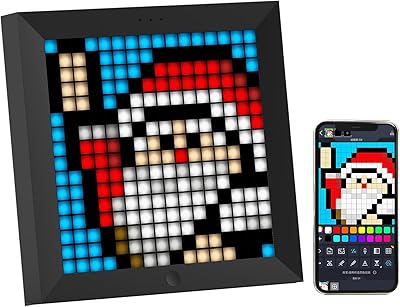
The Divoom Pixoo-64 64x64 Pixel Art Display is a WiFi-connected LED frame that sits at an interesting crossroads between decorative gadget and live data dashboard, aimed squarely at gamers, streamers, and pixel art fans. It is not a traditional digital photo frame — don't buy it expecting crisp family photos or slideshow functionality. What it offers instead is a retro-flavored, grid-based display that can show animated pixel art, clock faces, and real-time stats pulled straight from the internet. Priced in the mid-range for novelty tech displays, it asks you to commit to an app-driven experience as much as the hardware itself. The WiFi connection is central to almost everything it does.

Features & Benefits

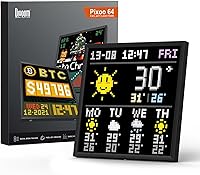
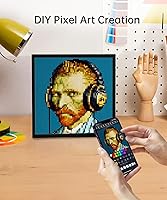
The pixel art frame packs a dense grid of LEDs across a roughly 10-inch panel — small enough for a desk shelf, but bright enough to hold its own in a well-lit room. Through the Divoom app, you can draw your own pixel art from scratch, import GIFs, or browse a community-built gallery of shared designs. The live data integrations are where it genuinely earns attention: hook it up to your Twitch channel or social accounts and it will display follower counts updating automatically over WiFi. Clock and scrolling text modes round things out for anyone who wants functional utility alongside the visual flair. The app keeps expanding what the hardware can do.

Best For

This LED frame is a natural fit for streamers and content creators who want something visually dynamic on their desk that actually tells them something useful, like how their audience is growing. Gaming room setups benefit from the retro aesthetic, especially if you already lean into that whole pixel-art-and-neon look. Pixel art hobbyists get a physical outlet for their digital work that goes beyond a phone screen. It also works surprisingly well in small commercial settings, like a boutique counter needing a bit of animated flair. Just keep in mind: if you are shopping for a conventional photo slideshow frame, this is not that.

User Feedback

Across a large pool of verified buyer reviews, the brightness and visual impact in person come up again and again as pleasant surprises — people did not expect it to look as good as it does sitting on a desk. That said, the lower-rated reviews share a familiar theme: app connectivity issues, particularly around initial setup and occasional disconnects, frustrate a meaningful portion of buyers. The frame itself is also noticeably heavier and thicker than photos suggest, which catches some off guard. On the positive side, the Divoom community earns real appreciation; buyers genuinely enjoy browsing other users' artwork. Overall, most reviewers recommend it with caveats, rating the experience solidly but not without reservations.

Pros

  • The LED display is noticeably bright and visually striking in person, often exceeding buyer expectations.
  • Live follower and streaming stats update automatically over WiFi, making it genuinely useful for active creators.
  • The Divoom app community offers a large, constantly growing library of free pixel art to download and display.
  • Custom pixel art creation tools in the app are accessible even for users with no prior design experience.
  • Clock and scrolling text modes give the Pixoo-64 practical everyday utility beyond pure decoration.
  • The retro pixel aesthetic fits naturally into gaming room and streamer desk setups.
  • WiFi-based architecture means new features and integrations can be added through app updates over time.
  • For a novelty tech display in this category, the overall build feels solid and the image stays consistent across normal viewing distances.

Cons

  • App connectivity and stability issues are a recurring complaint, with some users experiencing frequent disconnects after initial setup.
  • The frame is significantly heavier and bulkier than product photos suggest, which can be a surprise for desk setups with limited space.
  • The Divoom app interface feels unpolished in places, with a layout that can be unintuitive for new users.
  • Live data features are completely dependent on a stable WiFi connection, limiting the display's usefulness in poor network conditions.
  • The pixel grid resolution, while charming for art and animations, looks noticeably coarse at very close viewing distances.
  • Setup requires account creation and app dependency, which adds friction for users expecting a simple plug-in experience.
  • Power requires a continuous wired connection, so placement options near an outlet are a real constraint.
  • Some users report inconsistent app behavior across different smartphone operating system versions.

Ratings

The scores below reflect our AI-driven analysis of thousands of verified global reviews for the Divoom Pixoo-64 64x64 Pixel Art Display, with spam, bot-generated, and incentivized submissions actively filtered out before scoring. Each category is evaluated on real buyer experiences, capturing both what genuinely impresses and what regularly frustrates owners in everyday use. Nothing is glossed over — the ratings transparently reflect the full picture, strengths and pain points alike.

Display Quality
83%
The LED panel consistently earns praise for its punchy brightness and vivid color reproduction, especially in moderately lit gaming rooms and streaming setups. Buyers regularly note that the display looks better in person than in product photos, with animations appearing fluid and visually satisfying at a comfortable desk viewing distance.
The inherent limitation of a 64x64 pixel grid means fine detail is simply not possible, and some owners find the chunky look less appealing up close than they anticipated. Those who expected anything resembling a sharp or photo-realistic display are consistently disappointed by the deliberately coarse pixel structure.
App Experience
61%
39%
The Divoom app genuinely delivers on its core promise for patient users, offering a surprisingly deep toolset for drawing pixel art, importing GIFs, and setting up live data widgets. The community gallery within the app is a highlight for many owners, providing a steady stream of free, ready-to-use content without any creative effort required.
App stability is the single most cited frustration across negative reviews, with reports of frequent disconnects, unresponsive controls, and a cluttered interface that feels unfinished. Users on certain Android versions or older iPhones report notably worse experiences, and the initial pairing process alone trips up a meaningful share of new owners.
Live Data & Integrations
78%
22%
For streamers and content creators, the real-time follower counter and Twitch stat display work reliably once properly configured, and seeing live numbers update on the desk during a stream is a genuinely satisfying experience. The range of supported platforms covers the most common creator needs, and WiFi delivery means no cables or extra hardware are required.
Setup for live data integrations requires more steps than the product marketing implies, and some platform connections need periodic re-authentication after app updates. Users in regions with unstable home WiFi report the live widgets dropping out without warning, which undermines the core appeal for exactly the audience this display targets.
Build Quality
72%
28%
The physical frame feels sturdy and well-assembled, with no reports of LED panels failing or bezels cracking under normal desktop use. The matte black finish resists fingerprints reasonably well and blends into most gaming room or desk setups without looking cheap.
At 6.6 pounds, the frame is considerably heavier than the product photos suggest, which surprises many buyers when the box arrives. The depth is also more substantial than expected for a display in this category, making it less elegant on a crowded desk than some owners had hoped.
Setup & Onboarding
67%
33%
The majority of buyers complete initial setup without needing outside help, and the basic steps of downloading the app, creating an account, and connecting to WiFi are logical enough for most tech-comfortable users. Once past the first-time configuration, day-to-day switching between display modes is relatively quick through the app.
The onboarding process is not intuitive enough for less tech-savvy buyers, and negative reviews frequently mention getting stuck during WiFi pairing or account verification. There is no meaningful offline fallback or detailed printed guide in the box, leaving confused first-time users reliant on community forums for troubleshooting.
Pixel Art Creation Tools
76%
24%
The in-app drawing tools are approachable for beginners and functional enough to produce genuinely appealing animations without prior pixel art experience. Being able to draw directly on a mobile device and push the result to the physical frame within seconds is a workflow that many hobbyists find genuinely enjoyable.
More experienced pixel artists find the app tools limiting compared to dedicated desktop software, and there is no option to import artwork from third-party tools like Aseprite without converting to GIF first. The canvas size constraints tied to the 64x64 grid also restrict creative ambition for users with more advanced ideas.
Community & Content
84%
The Divoom community gallery is one of the most pleasant surprises for new owners, offering a large and constantly refreshed library of user-made pixel art spanning game characters, animated clocks, and seasonal themes. The social layer of downloading, rating, and sharing designs adds longevity to the product that purely hardware-focused displays simply cannot match.
Content quality in the gallery varies widely, and browsing to find high-quality designs among lower-effort submissions takes time. The community platform is also entirely dependent on Divoom maintaining its servers, which raises a reasonable long-term concern about what happens to this functionality if the company changes direction.
Value for Money
71%
29%
For streamers and pixel art enthusiasts who will actively use the live data and community features, the price lands in a reasonable range for a niche novelty tech display with ongoing software support. Buyers who lean into everything the ecosystem offers tend to feel the purchase was justified, especially when comparing it to DIY alternatives.
For casual buyers or anyone not deeply invested in the pixel art or streaming niche, the asking price feels harder to justify given the app frustrations and resolution limitations. A meaningful portion of reviewers with buyer's remorse fall into the camp of people who underestimated how app-dependent the experience truly is.
Brightness & Visibility
86%
Brightness is consistently one of the most praised physical attributes, with the display holding up clearly in well-lit rooms without needing to be pushed to maximum intensity. Owners who use it as an always-on ambient element in a gaming room particularly appreciate that it does not wash out or look dull under ceiling lighting.
At maximum brightness, the display can be slightly harsh in a dark room at close range, which matters for streamers who work in dimmed setups. Some users report the brightness controls in the app feel imprecise, making it difficult to dial in a comfortable middle-ground level quickly.
WiFi Reliability
63%
37%
When the WiFi connection is stable, the device operates smoothly and the live data features refresh consistently without requiring any manual intervention. Owners with modern routers and strong 2.4GHz signal coverage near their desk report very few connectivity problems after the initial setup phase.
The 2.4GHz-only WiFi requirement creates compatibility issues for users with congested networks or routers that prioritize 5GHz traffic, and reconnection after a network interruption is not always automatic. A recurring thread in negative reviews involves the display going blank or freezing after a router reboot, requiring a manual restart cycle.
Versatility of Use
74%
26%
Beyond the obvious streaming and gaming room applications, the Pixoo-64 works surprisingly well as a small commercial display for boutique shops or event counters, where its animated pixel art draws casual attention effectively. Clock and scrolling text modes also give it legitimate everyday utility that keeps it from feeling like a one-trick novelty after the initial excitement fades.
The use cases are inherently narrow, and buyers who try to push the display into roles it was not designed for, such as detailed product signage or photo display, are uniformly disappointed. The corded power requirement also restricts placement flexibility, particularly for anyone hoping to use it as a portable or battery-powered display at events.
Physical Design
69%
31%
The square format and matte black finish give the frame a clean, purposeful look that suits gaming and creator desk aesthetics well. It does not look like a cheap gadget on a shelf, and several reviewers specifically note that it reads as more premium in person than the price point might suggest.
The weight and thickness are the most common physical complaints, with buyers describing the unit as noticeably bulkier than anticipated based on listing images. For wall mounting, the heft demands proper anchoring hardware that is not prominently addressed in the packaging, which has led to some installation frustration.
Longevity & Durability
77%
23%
LED panel failures are rarely reported even among long-term owners, and the hardware itself appears built to last under typical indoor desk conditions. The ongoing app updates from Divoom suggest active product support, which gives buyers reasonable confidence that the software ecosystem will continue to evolve rather than stagnate.
The long-term viability of cloud-dependent features, such as the community gallery and live data integrations, is entirely tied to Divoom's continued server operation, which is an unavoidable risk for any always-online product. A small number of reviewers also report LED sections dimming unevenly after extended use at maximum brightness over many months.

Suitable for:

The Divoom Pixoo-64 64x64 Pixel Art Display is genuinely well-suited for streamers and content creators who want a live, glanceable counter on their desk showing follower growth or stream stats without staring at a second monitor. If you are building out a gaming room with a retro or pixel-art aesthetic, this LED frame slots in naturally alongside RGB lighting and themed peripherals, adding animated visual personality without requiring much ongoing effort. Pixel art hobbyists will appreciate having a physical display that brings their creations off the phone screen and into the real world. Small business owners running a boutique, pop-up shop, or event booth may also find real value here as a low-effort animated display that draws the eye. Tech-forward gift buyers looking for something genuinely original for a gamer or creator friend will find this hard to beat at its price point.

Not suitable for:

Buyers expecting a traditional digital photo frame experience should steer clear of the Divoom Pixoo-64 64x64 Pixel Art Display entirely, as the pixelated LED grid is fundamentally incompatible with rendering photographs in any satisfying way. Anyone who dislikes relying on a companion app for core functionality will find this frustrating, since nearly every meaningful feature runs through the Divoom app, and app connectivity hiccups are a documented and recurring issue. The frame is also physically heavier and thicker than most people anticipate from photos, so those wanting a sleek, minimal desk piece may be disappointed. If you are not connected to a stable home WiFi network, many of the live-data features that make this display interesting simply will not work reliably. Finally, buyers who want a truly plug-and-play experience with no learning curve should probably look elsewhere, as getting the most out of this LED frame requires some patience with setup and app navigation.

Specifications

  • Brand: Manufactured by Divoom, a brand specializing in pixel art displays and portable Bluetooth speakers.
  • Model: The Pixoo-64 is Divoom's flagship large-format pixel art display, identified by model number 819285.
  • Panel Size: The active display area spans approximately 10.3 inches diagonally, making it a compact but noticeable desk or shelf piece.
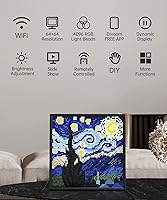
  • LED Matrix: The display uses a 64x64 pixel LED grid, delivering the characteristic chunky, retro pixel art aesthetic the device is built around.
  • Frame Dimensions: The overall unit measures approximately 25.2 x 25.2 x 0.99 inches, giving it a square footprint with a slim but non-negligible depth.
  • Weight: The frame weighs 6.6 pounds, which is heavier than most compact desk displays and should be factored into shelf or mount planning.
  • Connectivity: The display connects exclusively over a 2.4GHz WiFi network; there is no offline or standalone operation for most app-driven features.
  • Companion App: All core functions are managed through the Divoom app, available for both iOS and Android smartphones.
  • Display Modes: Supported modes include pixel art animations, GIF playback, digital clock, scrolling text, and live data info widgets.
  • Live Data Support: The frame can pull real-time data including social media follower counts, Twitch streaming stats, and game KDA results via WiFi.
  • Custom Content: Users can create original pixel art and animations directly in the app, or import existing GIF files for display on the panel.
  • Community Gallery: The Divoom app includes a built-in community platform where users can upload, browse, and download pixel art shared by others globally.
  • Power Source: The unit is powered via a corded AC adapter and requires a continuous wired power connection; there is no built-in battery.
  • Color: The frame is available in black, with a matte finish housing that suits most desk and gaming room color schemes.
  • Amazon Rating: The product holds a 4.2 out of 5 star rating based on over 1,400 verified customer ratings on Amazon.

Related Reviews
Divoom Pixoo Pixel Art Digital Frame
87%
88%
App Control Experience
91%
Display Quality
85%
Customization Options
92%
Ease of Setup
83%
Battery Life
More
Divoom Ditoo Pixel Art Bluetooth Speaker

76%
83%
Sound Quality
91%
Display & Pixel Art
63%
App Experience
82%
Build Quality
78%
Battery Life
More
ASUS ProArt Display PA169CDV 15.6” 4K Pen Display
87%
94%
Color Accuracy
89%
Portability
90%
Touchscreen Responsiveness
85%
Build Quality
92%
Wacom Pen Precision
More
AUUXVA 20L Kids School Backpack
77%
74%
Build Quality
66%
Comfort & Ergonomics
82%
Storage & Organization
61%
Water Resistance
88%
Design & Visual Appeal
More
ART USB Phono Plus Phono Preamp
72%
88%
Ease of Setup
74%
Audio Signal Quality
83%
Gain Control Usability
66%
Build Quality
61%
Hum & Noise Performance
More
PIXEL Lavalier Microphone for iPhone
85%
92%
Value for Money
88%
Ease of Use
84%
Audio Quality in Noisy Environments
93%
Compatibility with iPhone
91%
Portability & Size
More
Pixel M80 Shotgun Microphone
74%
74%
Audio Clarity
71%
Noise Rejection
38%
Wind Resistance
67%
Build Quality
83%
Value for Money
More
Caydo P1 Art Projector
75%
83%
Drawing App Utility
58%
Image Brightness
62%
Native Resolution & Clarity
86%
Setup & Ease of Use
88%
Portability & Form Factor
More
Calibrite Display Plus HL
88%
93%
Calibration Accuracy
89%
Ease of Setup
88%
Software Functionality
91%
Portability & Size
87%
Build Quality
More
Google Pixel Tablet 11-inch 128GB
85%
89%
Display Quality
92%
AI Functionality
86%
Smart Home Integration
82%
Battery Endurance
71%
Value for Money
More

FAQ

Most of its useful features depend on an active WiFi connection, including live stats, community gallery browsing, and remote control via the app. You can display static pixel art that was previously loaded, but don't expect much functionality in a WiFi-free environment.

The Pixoo-64 supports follower and stats tracking for platforms including YouTube, Twitter, Instagram, and Twitch, among others. The exact list of supported platforms can change as Divoom updates the app, so it is worth checking the current app version for the full list.

Most buyers describe the initial setup as manageable, but it does require downloading the Divoom app, creating an account, and connecting the device to your home WiFi network. It is not a true plug-and-play experience, so expect to spend fifteen to thirty minutes getting everything configured properly on first use.

Yes, you can import your own GIF files through the Divoom app and push them to the display. Keep in mind that the 64x64 pixel grid will reduce any image to a chunky, pixelated render, so content specifically designed for low-resolution pixel art looks far better than photos or detailed illustrations.

Quite bright, actually. Most buyers are pleasantly surprised by how well it holds up in ambient lighting conditions. It is vivid enough to be clearly visible on a desk without being harsh or uncomfortable to glance at regularly.

The device is primarily designed to be managed by one account through the Divoom app, but multiple users can theoretically log in with the same account credentials from different devices. There is no formal multi-user management system built in.

It can do both. The unit includes mounting options for wall installation, but it works equally well propped on a desk or shelf. Just be aware that at 6.6 pounds, you will want appropriate wall anchoring if you go the hanging route.

The live KDA display pulls data from supported games through the app's integrations rather than running any software on your gaming PC directly. Setup typically involves linking your gaming account or profile through the Divoom app, and the results update over WiFi as your match data becomes available.

App stability is the most commonly cited frustration among lower-rated reviewers. Some users report occasional WiFi disconnects requiring the app to be restarted, and the user interface has been described as clunky in places. Divoom does push periodic updates, but going in with realistic expectations about app polish is a good idea.

The community is one of the more pleasant surprises for new owners. There is a large and actively growing library of user-created pixel art spanning everything from game characters to animated scenes and clock faces. For most people, there is more than enough free community content to keep the display fresh without ever making your own artwork.