Cyber Acoustics CA-2890BT Bluetooth USB Speaker Bar

Cyber Acoustics CA-2890BT Bluetooth USB Speaker Bar — image 1
Cyber Acoustics CA-2890BT Bluetooth USB Speaker Bar — image 2
Cyber Acoustics CA-2890BT Bluetooth USB Speaker Bar — image 3
Cyber Acoustics CA-2890BT Bluetooth USB Speaker Bar — image 4
Cyber Acoustics CA-2890BT Bluetooth USB Speaker Bar — image 5
Cyber Acoustics CA-2890BT Bluetooth USB Speaker Bar — image 6
Cyber Acoustics CA-2890BT Bluetooth USB Speaker Bar — image 7
Cyber Acoustics CA-2890BT Bluetooth USB Speaker Bar — image 8
Cyber Acoustics CA-2890BT Bluetooth USB Speaker Bar — image 9
Cyber Acoustics CA-2890BT Bluetooth USB Speaker Bar — image 10
Cyber Acoustics CA-2890BT Bluetooth USB Speaker Bar — image 11
Cyber Acoustics CA-2890BT Bluetooth USB Speaker Bar — image 12
Cyber Acoustics CA-2890BT Bluetooth USB Speaker Bar — image 13
Cyber Acoustics CA-2890BT Bluetooth USB Speaker Bar — image 14
Cyber Acoustics CA-2890BT Bluetooth USB Speaker Bar — image 15
76%
24%

Overview

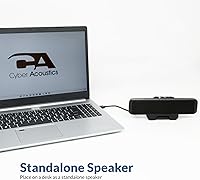
The Cyber Acoustics CA-2890BT Bluetooth USB Speaker Bar is a compact, no-nonsense audio solution designed specifically for home office and remote work setups. It clamps directly to the bottom of your monitor, keeping the desk surface clear while putting sound right at ear level. What genuinely sets this monitor speaker bar apart at this price is the ability to stay connected to your PC via USB and your smartphone via Bluetooth 5.0 simultaneously — no toggling, no re-pairing. Sound quality is honest rather than impressive, so if you are expecting rich music playback, set those expectations aside early. This is a voice-first device, and it makes no pretense otherwise.

Features & Benefits

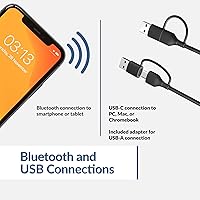
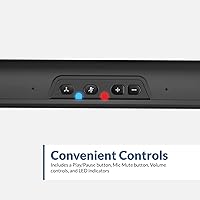
The CA-2890BT's standout feature is its simultaneous dual connection — USB to the PC and Bluetooth 5.0 to your phone, both active at the same time. When a call comes in on your smartphone, you can pick it up through the speaker without fumbling with cables or re-pairing. The built-in speakerphone pairs with a mic mute LED indicator, so you always know your status at a glance during video calls. Touch controls handle volume, source switching, and mute directly on the bar. Rated at 5W with a 10W peak, output is adequate for near-field desk listening. The included USB-C adapter ensures compatibility with modern laptops right out of the box.

Best For

This desk speaker is a natural fit for remote workers who constantly switch between PC meetings and smartphone calls — that live dual connection removes a genuine daily irritation rather than just sounding good on a spec sheet. It is equally well-suited to anyone serious about clearing desk clutter, since the monitor mount eliminates the footprint of a traditional speaker pair entirely. Students or light users who prioritize voice clarity on Zoom or Teams over audiophile-grade music will find real value here. Setup takes under two minutes with no drivers needed. Where it falls short is casual music listening; buyers wanting stereo sound or richer audio should look at other options.

User Feedback

With well over 2,800 ratings, the overall picture is positive but instructive. Most buyers highlight the plug-and-play setup, clear call audio, and the practical convenience of a speaker that lives on the monitor frame instead of the desk. The recurring criticisms worth knowing before you buy center on two things: the mono output leaves music sounding noticeably flat compared to even an inexpensive stereo pair, and the built-in microphone can pick up room echo in larger or more reverberant spaces. A smaller group reports the clamp struggles with unusually thin or oversized monitor bezels. On durability, long-term owners generally describe the unit as reliable through typical daily office use.

Pros

  • Connects to your PC via USB and smartphone via Bluetooth at the same time — no switching required.
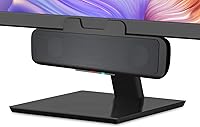
  • Clamps directly to the monitor frame, completely eliminating desktop speaker footprint.
  • Plug-and-play setup works out of the box on Windows, Mac, and Chrome OS with no driver install.
  • Built-in speakerphone with a mic mute LED makes it a practical upgrade for daily video calls.
  • Six-foot USB cable gives enough reach for most desk and tower configurations.
  • Includes a USB-A to USB-C adapter, so it works on both older and newer laptops immediately.
  • Bluetooth 5.0 offers a reliable connection range of up to 66 feet from paired devices.
  • Touch controls for volume, source, and mute are responsive and easy to reach mid-call.
  • Consistent reliability reported across a large base of long-term users in office environments.
  • USB bus-powered design means no wall adapter cluttering your power strip.

Cons

  • Mono audio output makes music sound flat and lacks the stereo separation most listeners expect.
  • The built-in microphone picks up room echo noticeably in larger or harder-surfaced spaces.
  • Clamp mount does not fit securely on monitors with unusually thin or very thick bezels.
  • Sound volume may feel insufficient for open-plan or noisy environments even at maximum output.
  • Plastic build quality feels utilitarian and does not hold up visually on premium desk setups.
  • No optical or 3.5mm audio input limits compatibility with TVs, gaming consoles, or older devices.
  • No carrying case or travel-friendly design despite being marketed as suitable for portable use.
  • Single-source Bluetooth pairing means quickly switching between two Bluetooth devices is not supported.

Ratings

The scores below were generated by our AI after analyzing thousands of verified buyer reviews for the Cyber Acoustics CA-2890BT Bluetooth USB Speaker Bar worldwide, with spam, bot submissions, and incentivized feedback actively filtered out before any scoring took place. Every category reflects the real distribution of praise and frustration found across that reviewer base, not a sanitized average that buries legitimate complaints. Strengths are credited where they are earned, and recurring pain points are scored accordingly.

Dual Connectivity
91%
The ability to stay connected to a PC over USB and a smartphone over Bluetooth 5.0 simultaneously is the single most praised aspect of this monitor speaker bar across the entire review base. Work-from-home users specifically highlight how it removes the daily friction of switching audio sources when a phone call interrupts a PC meeting.
A small but consistent group of buyers notes that the Bluetooth side only supports one paired device at a time, so switching between a phone and a tablet requires re-pairing each time, which breaks the otherwise smooth dual-connection experience.
Speakerphone Clarity
78%
22%
For typical home office conditions — a quieter room, seated at normal desk distance — the built-in microphone delivers voice pickup that is clearly a step above any laptop's integrated mic. Zoom and Teams users consistently describe the other party hearing them cleanly without needing to lean toward the device.
In rooms with hard floors, bare walls, or open layouts, the microphone picks up echo and room ambience in a way that noticeably affects call quality. Users working in larger spaces or shared offices flag this as a recurring frustration that stops the speakerphone from feeling truly reliable.
Ease of Setup
96%
Plug-and-play is not an exaggeration here — every supported operating system recognizes the CA-2890BT immediately over USB with zero driver installation, and Bluetooth pairing completes in seconds. Non-technical buyers and first-time external-speaker users rate this aspect exceptionally highly, often describing it as the easiest peripheral they have ever set up.
The only friction reported at setup involves the USB-C adapter, which a handful of users found slightly loose in certain laptop ports, occasionally causing an intermittent connection. It is a minor issue but worth knowing if your laptop relies exclusively on USB-C.
Monitor Mount Design
82%
18%
The clamp-on monitor mount is genuinely well-executed for the majority of standard desktop displays, holding the bar steady throughout the workday without wobble or slippage. Buyers with crowded desks consistently praise the way the mount reclaims surface space entirely, describing it as one of those rare design decisions that solves a real problem.
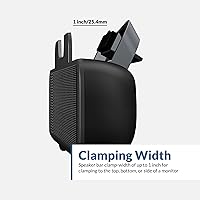
Monitors with unusually thin bezels or very thick frames sit outside the clamp's comfortable grip range, and a meaningful subset of reviewers reports that the unit either does not stay securely attached or simply will not close around their specific display. There is no adjustable padding or secondary securing mechanism to compensate.
Sound Quality
58%
42%
For voice content — calls, podcasts, spoken-word lectures — the output is clean and intelligible at comfortable listening volumes, which is exactly what this desk speaker was designed to prioritize. Users who evaluate it strictly as a voice-first communication tool rather than a music speaker tend to rate it reasonably well within those expectations.
Music playback through a mono output with 5W dynamic drivers exposes the limits of this form factor quickly. Buyers who expected usable stereo music alongside their work calls are consistently disappointed, and the lack of low-end presence makes even casual background music sound noticeably thin and two-dimensional.
Volume Output
67%
33%
At a standard office desk in a quiet room, the maximum volume from the 5W output is more than sufficient for the intended near-field use case, and most users confirm they rarely need to push it to full to hear calls and notifications clearly.
In open-plan environments, louder shared spaces, or any scenario requiring the speaker to project beyond the immediate desk area, the output runs out of headroom quickly. Users expecting to fill a room or overcome significant background noise will find the ceiling volume underwhelming.
Build Quality
63%
37%
The plastic housing is lightweight by design, which actually works in the product's favor for a monitor-mounted unit where excess weight could stress the clamp over time. Long-term owners generally describe the construction as durable enough for stationary desk use over one to two years without hardware failure.
The overall feel in hand is firmly budget-tier — the plastic flexes slightly under pressure and the touch-control surface attracts fingerprints readily. Buyers used to more premium desk peripherals will notice the material quality immediately, and the aesthetic does not hold up well next to higher-end monitor setups.
Touch Controls
74%
26%
Having volume, mute, and source switching directly on the bar rather than routed through software or a separate dongle is a practical advantage during live calls, where reaching for keyboard shortcuts wastes time. The mic mute LED indicator in particular draws consistent praise for eliminating that anxious moment of not knowing whether you are live.
The touch sensitivity is occasionally described as inconsistent — requiring a firm deliberate tap rather than a light touch, which can feel clunky mid-conversation. A few users also note that the source button requires a noticeable press-and-hold to switch, which is not immediately intuitive.
Bluetooth Range
83%
The 66-foot Bluetooth 5.0 range is practically more than most users will ever use, but it does mean the connection stays solid even when the paired smartphone is in a bag across the room or charging on a nearby shelf rather than sitting directly on the desk.
A small number of users report occasional Bluetooth dropouts when multiple competing wireless devices are active nearby, which is a known environmental issue with 2.4GHz spectrum congestion rather than a flaw specific to this unit but worth acknowledging for dense wireless home setups.
Value for Money
84%
Measured against what the CA-2890BT actually does — simultaneous USB and Bluetooth, a working speakerphone, monitor mounting, and plug-and-play setup — the price-to-utility ratio for voice-focused home office use is strong. Buyers who evaluate it on those specific terms, rather than as a music speaker, reliably describe it as money well spent.
For buyers who discover post-purchase that the mono output does not suit their use case, the value perception drops sharply. The lack of stereo audio at this price point is available from competing desktop speakers, making the CA-2890BT feel like a poor deal specifically for anyone who needs audio versatility beyond calls.
Cable Management
71%
29%
The 6-foot USB cable gives most desk configurations enough reach without requiring an extension, and the bus-powered design eliminates the need for a second power cable entirely. Buyers who value minimal cable runs specifically call out the single-cable setup as one of the neatest aspects of the installation.
The cable exits from a fixed point on the bar and cannot be routed or tucked along the monitor arm easily, which leaves a visible cable drop on setups where clean cable management matters aesthetically. There is no cable clip or routing groove built into the clamp mount to help guide it.
OS Compatibility
89%
Verified support across Windows 7 and later, Mac OS X 10.0 and later, and Chrome OS 6.0 and later means this monitor speaker bar functions reliably across the full range of typical work and school computing environments without any compatibility surprises.
A small number of Chromebook users have noted that certain touch-control functions — particularly source switching — behave differently than expected under Chrome OS, suggesting the firmware was primarily optimized for Windows and Mac environments.
Long-Term Reliability
77%
23%
The pattern across long-term reviewers is encouraging: units used as stationary office fixtures for over a year consistently hold up without hardware failure, and the clamp mechanism in particular shows no reported loosening or fatigue over extended use when fitted to a compatible monitor.
The touch-sensitive control surface is the component most frequently mentioned in durability concerns, with a subset of long-term owners reporting reduced sensitivity or inconsistent response after eighteen months or more of daily use. This is not universal but is a recurring enough theme to flag.
Portability
44%
56%
At 11.2 ounces and with a reasonably compact footprint, the bar is light enough to be physically moved between locations without difficulty, and the USB bus-power requirement means no charger hunting when using it with a laptop in different rooms.
The clamp-first design and attached cable are fundamentally awkward for travel, and there is no carry case, cable wrap solution, or compact packing configuration included. Users who purchased this expecting a genuinely portable speaker for on-the-go use consistently express disappointment with how impractical it is outside a fixed desk setup.

Suitable for:

The Cyber Acoustics CA-2890BT Bluetooth USB Speaker Bar is purpose-built for remote workers and home office setups where desk space is limited and call clarity matters more than audio depth. If your workday involves jumping between a PC meeting on Teams and a phone call coming in on your smartphone, the live dual connection here solves a genuinely annoying problem without requiring you to unplug or re-pair anything. It is also a strong pick for students and budget-conscious buyers who simply need something better than their laptop's built-in speakers for Zoom calls and online classes. The monitor clamp design means this desk speaker adds zero footprint to your workspace, which makes it especially practical for compact desks or shared spaces. Anyone who dreads tech setup will appreciate that it is truly plug-and-play — no drivers, no configuration, no learning curve.

Not suitable for:

The Cyber Acoustics CA-2890BT Bluetooth USB Speaker Bar is not the right choice for anyone who listens to music at their desk and cares about how it sounds — the mono output and modest 5W drivers simply cannot reproduce the width and warmth that even an entry-level stereo speaker pair delivers. Audiophiles or anyone who uses their desk speaker primarily for movies, gaming, or background music will likely feel shortchanged within the first listening session. The speakerphone microphone, while functional, struggles in larger or more reverberant rooms where echo becomes a problem for the other party on a call. Buyers with very thin-framed monitors or unusually thick bezels should also verify compatibility before purchasing, as the clamp has known fit issues at both extremes. Finally, if you need any form of stereo separation or plan to use this as a secondary sound system for entertainment, the CA-2890BT is not the device to stretch toward.

Specifications

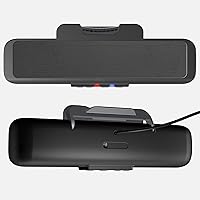
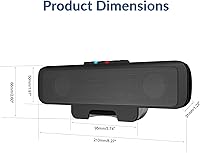
  • Dimensions: The speaker bar measures 10.6″ wide, 3.5″ deep, and 3″ tall, making it compact enough to sit along the base of most standard monitors.
  • Weight: At 11.2 ounces, the unit is light enough that the monitor clamp holds it securely without straining the display frame.
  • Power Output: Rated at 5W continuous with a 10W peak output through dual dynamic drivers powered entirely over USB.
  • Audio Mode: Output is mono, meaning audio from both drivers combines into a single channel rather than producing true left-right stereo separation.
  • Connectivity: Supports simultaneous connection via USB to a PC or Mac and Bluetooth 5.0 to a smartphone or tablet at the same time.
  • Bluetooth Range: Bluetooth 5.0 maintains a stable connection at distances of up to 66 feet between the speaker bar and the paired device.
  • Power Source: Fully USB bus-powered at 5 volts DC, requiring no external power adapter or wall outlet beyond the connected host device.
  • Cable Length: The included USB cable measures 6 feet, providing comfortable reach between the speaker and most desktop or tower PC setups.
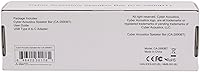
  • Included Adapters: A USB-A to USB-C adapter is included in the box to ensure compatibility with newer laptops that lack full-size USB-A ports.
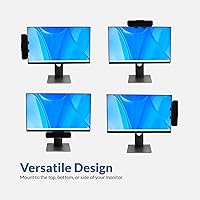
  • Mounting Type: A built-in clamp attaches the unit to the bottom edge of a monitor bezel, keeping the desk surface completely clear.
  • Controls: Touch-sensitive buttons on the bar handle volume up and down, mic mute, source switching, and play or pause functions.
  • Mic Mute Indicator: An LED indicator light shows mic mute status at a glance, so users always know whether their microphone is active during calls.
  • Driver Type: The unit uses dynamic audio drivers, which are well-suited for voice reproduction and near-field speech clarity at this output level.
  • Compatible OS: Works with Windows 7 and later, Mac OS X 10.0 and later, and Chrome OS 6.0 and later with no driver installation required.
  • Material: The housing is constructed from black plastic, keeping the unit lightweight while maintaining a low-profile appearance on the monitor.
  • Speakerphone: An integrated microphone enables hands-free calling and virtual meeting participation directly through the speaker bar without a separate headset.
  • Frequency Response: The frequency response extends up to 20,000 Hz, covering the full range of human speech and most mid-range audio content.
  • Warranty: Cyber Acoustics covers this product under a limited warranty; buyers should confirm current warranty terms directly with the manufacturer.
  • Water Resistance: The unit carries no water resistance rating and is intended exclusively for indoor, dry-environment use only.
  • OS Setup: No software installation is needed on any supported operating system; the device is recognized and ready to use immediately upon connection.

Related Reviews
Cyber Acoustics CA-3810 2.1 Speaker System
82%
87%
Sound Quality
90%
Bass Performance
92%
Ease of Setup
91%
Value for Money
88%
Compact Design
More
Cyber Acoustics CA-3908 2.1 Speaker System
84%
88%
Sound Quality
91%
Bass Performance
84%
Volume Control Ease
87%
Setup & Installation
76%
Connectivity Options
More
Cyber Acoustics CA-2016 2.0 Stereo Speakers
83%
78%
Sound Quality
94%
Ease of Setup
83%
Build Quality
85%
Design & Aesthetics
92%
Value for Money
More
Bazooka 36-inch G2 Party Bar Bluetooth Speaker
74%
86%
Sound Output & Volume
81%
Build Quality
67%
Waterproofing & Weather Resistance
83%
Bluetooth Connectivity
88%
Mounting System
More
Cyber Acoustics WC-2000 1080p Webcam

73%
78%
Video Call Clarity
71%
Auto-Focus Performance
63%
Low-Light Correction
54%
Built-In Microphone
82%
Privacy Shield
More
Acoustic Audio AA2170 Bluetooth 2.1 Speaker System
76%
83%
Bass Performance
88%
Value for Money
91%
Ease of Setup
79%
Connectivity Range
61%
Satellite Speaker Quality
More
Acoustic Audio AA5102 Bluetooth Powered 5.1 Speaker System
83%
86%
Sound Quality
92%
Value for Money
78%
Bluetooth Connectivity
88%
Ease of Setup
70%
Bass Performance
More
Bazooka 24-inch G2 Party Bar Speaker
74%
86%
Build Quality
81%
Sound Volume & Projection
57%
Bass Performance
84%
Bluetooth Connectivity
52%
Mobile App Experience
More
Cyber Acoustics WC-3000 USB Webcam
75%
74%
Video Quality
61%
Low-Light Performance
82%
Autofocus
77%
Microphone Quality
91%
Privacy Shield
More
Acoustic Audio AAT5005 5.1 Tower Speaker System
72%
83%
Value for Money
67%
Sound Quality
74%
Bass Performance
88%
Setup & Installation
54%
Build Quality
More

FAQ

Yes, the simultaneous dual connection is genuine and is honestly one of the most practical things about this speaker bar. You can have your PC connected over USB for meetings and your smartphone paired over Bluetooth at the same time. When a call comes in on your phone, you answer it through the speaker without unplugging or re-pairing anything.

The clamp is designed to fit the bottom bezel of most standard monitors, and the majority of users have no trouble with it. That said, if your monitor has a very thin bezel or an unusually thick frame, a small number of users have reported that the clamp does not grip securely. It is worth checking your monitor bezel thickness against the clamp opening before purchasing.

It works on both without any extra steps. The bar is plug-and-play on Mac OS X 10.0 and later, Windows 7 and later, and Chrome OS 6.0 and later. No drivers, no software — just plug in the USB cable and your system recognizes it automatically.

For a typical home office setup — a reasonably quiet room, normal desk distance — the built-in microphone handles Zoom and Teams calls well. The call clarity is consistently praised in user feedback. The one caveat is that in larger rooms or spaces with hard surfaces, the mic can pick up noticeable echo, which may be distracting for others on the call.

It is mono. Both drivers in the bar output the same combined channel, so there is no left-right stereo separation. For voice calls and spoken-word content this is fine, but if you plan to use this desk speaker primarily for music or movies, the flat mono output will likely disappoint you. That is not a flaw so much as a design choice suited to a voice-first device.

It runs entirely off USB bus power at 5 volts — no wall adapter or power brick needed. Whatever device it is plugged into, whether a desktop PC, laptop, or USB hub, supplies all the power it needs. This keeps cable clutter minimal and makes the setup genuinely clean.

Yes, Cyber Acoustics includes a USB-A to USB-C adapter in the box specifically for this. The main cable is USB-A, but the adapter lets you plug straight into a USB-C port on newer laptops. It is a small but thoughtful inclusion that saves you hunting for an adapter separately.

At 5W rated output it gets comfortably loud for a quiet to moderately noisy personal workspace, but it was not designed to fill a room. If you are in an open-plan area with significant background noise, or if you sit far from the monitor, you may find the maximum volume falls short of what you need. Near-field desk use is where it performs best.

No. The Bluetooth connection supports pairing with one device at a time on the wireless side. You can have your PC connected over USB simultaneously with one Bluetooth device, but you cannot actively stream audio from two Bluetooth sources at once. Switching to a second Bluetooth device requires re-pairing.

Based on a large pool of long-term user feedback, the monitor speaker bar holds up reliably through everyday office use over at least one to two years. The plastic housing is not fragile, and users who treat it as a stationary desk fixture rather than a travel accessory tend to report no hardware issues over extended periods. It is not built for rugged or mobile use, but as a permanent desk fixture it appears dependable.