Overview

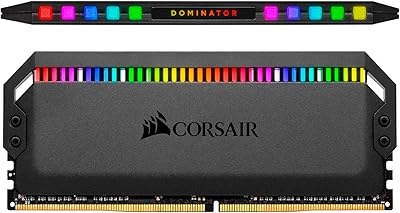
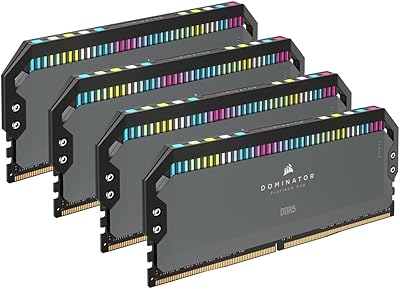
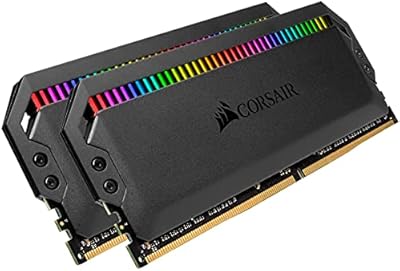
The Corsair Dominator Platinum RGB 32GB DDR5 RAM represents Corsair's top-tier push into DDR5 territory, arriving in mid-2022 when the platform was still finding its footing. Running at 6200MHz in dual-channel configuration across two 16GB sticks, this kit targets builders who refuse to compromise on either raw throughput or visual presentation. The DOMINATOR PLATINUM name carries real weight among enthusiasts — it has historically signaled Corsair's highest-grade components, not just a premium price tag. Worth noting upfront: this is strictly a desktop-only kit built around Intel XMP 3.0, so AMD platform users should look elsewhere before getting excited.
Features & Benefits

At 6200MHz with CL36 latency, this Corsair DDR5 kit delivers bandwidth that makes a noticeable difference in memory-intensive workloads like 4K video rendering or large Photoshop files — though everyday gaming gains are more modest. One genuinely useful feature is the onboard PMIC voltage regulator, which handles power delivery on the module itself rather than relying on your motherboard. That means tighter, more predictable overclocking headroom. The DHX cooling system is not cosmetic either — it actively pulls heat from both the chips and the circuit board beneath them. Add iCUE XMP 3.0 profile saving, and you can dial in separate memory settings for different use cases without touching the BIOS every time.

Best For

The Dominator Platinum RGB makes most sense for builders on Intel 12th or 13th Gen platforms who want to push XMP profiles to their limits. Content creators handling video timelines or batch photo exports will get more practical benefit from the 6200MHz bandwidth than most gamers will. It also suits those building a cohesive Corsair setup — if your case fans, AIO cooler, and keyboard already run iCUE, the synchronized RGB lighting becomes a genuine plus rather than pure vanity. Overclockers wanting fine-grained voltage control without modding their board will appreciate the onboard regulation, and long-term builders investing in a DDR5 platform that still has room to grow will find it a sensible foundation.

User Feedback

Across 221 ratings averaging 4.7 stars, this high-speed memory kit has earned a reputation for consistency rather than hype. Buyers frequently highlight the build quality and RGB implementation as genuinely premium, and most report XMP profiles loading reliably on first boot. The iCUE setup draws mixed reactions — users already in the Corsair ecosystem find it intuitive, while newcomers occasionally describe it as one more software layer to manage. The recurring sticking point is value: some feel the price premium over comparable 5600MHz or 6000MHz DDR5 kits is hard to justify on gaming workloads alone. Non-Intel users are occasionally caught off guard by the XMP-only compatibility, which is worth confirming before purchase.

Pros

  • XMP 3.0 profiles load reliably on compatible Intel boards with minimal BIOS configuration needed.
  • Onboard voltage regulation gives overclockers more precise and stable control than typical motherboard-dependent setups.
  • The DHX cooling system actively manages heat across both chips and the PCB, not just surface-level dissipation.
  • 32GB across two sticks in dual-channel is a strong capacity sweet spot for creative and professional workloads.
  • iCUE software lets you save custom XMP profiles per application, which is genuinely useful for mixed-use rigs.
  • Build quality is consistently praised — the heatspreader feels substantial and the RGB diffusion is smooth and even.
  • A 4.7-star average across over 200 purchases signals strong manufacturing consistency, not just a few lucky units.
  • 6200MHz bandwidth delivers real-world advantages in memory-intensive tasks like video rendering and large file processing.
  • The Dominator Platinum RGB integrates cleanly into full Corsair iCUE setups for unified lighting control.
  • DDR5 architecture provides a higher bandwidth ceiling that gives this kit longevity as platform software matures.

Cons

  • AMD platform users cannot use XMP profiles and may face instability or degraded performance without extensive manual tuning.
  • The price premium over 6000MHz DDR5 alternatives is hard to justify for gaming-only builds where differences are minimal.
  • iCUE software adds complexity for users outside the Corsair ecosystem and can feel bloated on a clean install.
  • Tall heatspreaders may cause clearance issues with large tower air coolers in tighter cases.
  • Performance gains over slower DDR5 kits are workload-dependent — everyday use rarely reveals the speed difference.
  • No AMD EXPO support is a hard limitation that Corsair has not addressed in this product line.
  • Running at full 6200MHz requires a motherboard that reliably supports XMP 3.0, which not all Z-series boards do equally well.
  • The kit is desktop-only, leaving small form factor and USFF builders with no compatible option here.

Ratings

The scores below reflect AI-driven analysis of verified global buyer reviews for the Corsair Dominator Platinum RGB 32GB DDR5 RAM, with spam, incentivized, and bot-flagged submissions actively filtered out before scoring. Each category is weighted against real-world usage patterns reported by confirmed purchasers across enthusiast, creative, and gaming communities. Both consistent strengths and recurring frustrations are transparently factored into every score.

Memory Performance
88%
Users building on Intel 12th and 13th Gen platforms consistently report smooth, reliable operation at the full 6200MHz XMP frequency, with content creators in particular noting faster export times in video editing software compared to their previous DDR4 setups. The bandwidth headroom at this speed tier is a genuine advantage for multi-application workloads.
For gaming-only use cases, the performance gap over slower 6000MHz DDR5 kits is narrow enough that most buyers would struggle to notice it in frame rates. The score reflects that real-world gains are workload-dependent and not universally transformative.
Build Quality
93%
The heatspreader construction consistently draws praise for feeling genuinely premium rather than cosmetic — buyers describe a solid, weighty feel that stands out even compared to other high-end DDR5 kits. The DHX dual-path design covers both the chips and the PCB, which users note keeps the modules cool even during extended overclocking sessions.
The tall heatspreader profile, at 2.2 inches, creates clearance problems for some large tower air coolers, and a handful of users report needing to reposition their cooler fan or switch mounting orientation to fit. It is a minor but recurring installation friction point.
RGB Lighting Quality
91%
The addressable RGB diffusion across the top of each module is widely regarded as among the smoothest in the desktop memory segment — no visible hotspots or uneven zones under normal viewing angles. Users who run full Corsair iCUE setups describe the synchronization between RAM, fans, and coolers as working reliably without manual tinkering.
Users outside the Corsair ecosystem find the RGB less compelling since iCUE software is required to unlock full control, and some describe it as a heavier software install than they expected just to manage two sticks of RAM. Without iCUE, lighting options are limited to basic static modes.
XMP Compatibility
84%
On validated Intel Z690 and Z790 boards, XMP 3.0 profiles activate cleanly with a single BIOS toggle, and buyers report the kit posting at rated speeds on first boot without additional tuning. The ability to save custom profiles via iCUE is a practical bonus for users who shift between gaming and rendering workloads regularly.
A subset of users with mid-range Z-series boards report occasional training instability at 6200MHz, requiring them to drop to a lower XMP sub-profile or manually tighten timings. Compatibility is genuinely strong but not universal across every Intel board in the market.
Overclocking Headroom
82%
18%
The onboard PMIC voltage regulation gives experienced overclockers more granular and stable voltage control than motherboard-dependent DDR4 setups, and enthusiasts report pushing beyond rated speeds with reasonable stability on premium boards. This is a feature set that genuinely serves its intended audience rather than existing purely on paper.
Casual users who simply enable XMP and move on will never interact with the overclocking capabilities, making this a niche advantage. Those expecting significant headroom beyond 6200MHz on standard Z690 boards may find the ceiling lower than anticipated without a premium motherboard pairing.
Thermal Management
86%
Even under sustained all-core workloads and extended overclocking stress tests, buyers report module temperatures staying within comfortable ranges thanks to the DHX heatspreader design addressing both IC heat and PCB ground-plane dissipation. Users running the kit in warm cases describe no throttling or stability issues related to heat.
The cooling advantage is most noticeable during heavy sustained workloads — in lighter desktop use, the thermal performance difference over simpler heatspreader designs is minimal. The added height that comes with effective cooling remains the persistent trade-off for users with compact or dense builds.
Software Experience
67%
33%
For committed Corsair iCUE users, the software integration works as intended — RGB synchronization, custom XMP profile management, and system monitoring all operate from a single interface. Users already running iCUE for other peripherals report the RAM integration as seamless within that existing setup.
Buyers new to the Corsair ecosystem frequently describe iCUE as resource-heavy and occasionally prone to updates that temporarily break lighting sync. Several reviewers note that the software feels overbuilt for the specific task of managing memory lighting and profiles, and a few switched to third-party RGB tools instead.
Installation Experience
89%
Most buyers describe physical installation as straightforward, with the dual-stick configuration slotting into standard A2 and B2 positions without issue on compatible boards. The BIOS XMP activation step is simple enough that even first-time builders report getting the kit running at rated speeds without confusion.
The tall heatspreader occasionally conflicts with first-slot clearance on boards where the CPU cooler fan overhangs the memory area, forcing users to rearrange their cooling setup before the system will close properly. It is an intermittent issue rather than a widespread one, but it surfaces consistently enough in reviews to be worth flagging.
Value for Money
63%
37%
For content creators and overclockers who genuinely stress memory bandwidth, the combination of 6200MHz speed, onboard voltage regulation, premium cooling, and polished RGB in a single kit represents a coherent premium package. Buyers who use the full feature set tend to feel the price is justified by what they are actually getting.
For gamers or general desktop users, the cost premium over solid 6000MHz DDR5 alternatives is difficult to rationalize given the narrow real-world performance difference. A recurring theme in buyer feedback is that the kit is excellent but carries a price that only makes sense for a specific type of build.
Aesthetic Design
92%
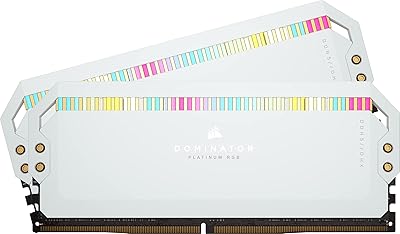
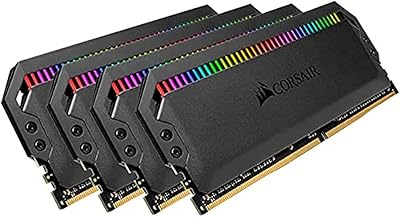
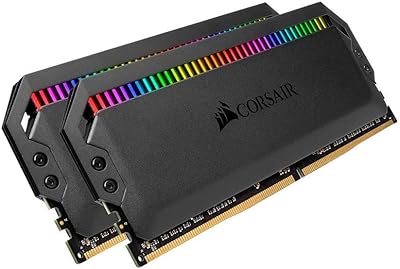
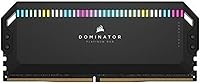
The DOMINATOR PLATINUM visual identity — tall profile, clean aluminum heatspreader, and smooth RGB bar — is consistently described as one of the most visually striking memory designs available, particularly in windowed cases where the kit is on full display. The black colorway integrates cleanly into dark-themed builds without clashing.
The design is deliberately tall and bold, which means it draws attention in ways that do not suit every aesthetic. Builders going for a minimalist or all-white build may find the proportions or color options limiting compared to lower-profile alternatives on the market.
Platform Compatibility
58%
42%
On supported Intel XMP 3.0 platforms, compatibility is broad and well-tested across Asus, MSI, and Gigabyte Z-series boards, with Corsair's QVL list covering a wide range of validated motherboard pairings. Buyers on those platforms rarely encounter fundamental compatibility issues.
The hard exclusion of AMD EXPO support is the most cited limitation in negative reviews, with several buyers discovering the incompatibility only after purchase. The kit runs on AMD hardware at base JEDEC speeds, but reaching anywhere near 6200MHz manually on AMD is unreliable and unsupported by Corsair.
Packaging & Unboxing
79%
21%
Buyers generally describe the unboxing experience as matching the premium positioning — modules are well-protected, presentation is clean, and the kit arrives without rattling or loose components. The packaging gives an appropriate first impression for a high-end product.
There are no included accessories beyond the modules themselves, and some buyers noted the absence of even a basic installation guide for first-time DDR5 builders. At this price point, a few reviewers expected slightly more in the box.
Long-Term Reliability
87%
With a limited lifetime warranty backing the kit and a strong track record across over 200 verified purchases, buyers report very few instances of module failure or degradation under normal use. The Corsair DOMINATOR line has a longstanding reputation for durability that holds up in user feedback.
A small number of reviewers report modules that initially posted at rated speeds but required BIOS retraining after system updates or cold boot cycles, suggesting occasional memory training inconsistencies over time. These cases appear to be outliers rather than a widespread pattern.

Suitable for:

The Corsair Dominator Platinum RGB 32GB DDR5 RAM is built for a specific type of builder — one who is already committed to a high-end Intel platform and wants to extract every bit of performance the platform can offer. Intel 12th or 13th Gen users running XMP 3.0 compatible motherboards will get the most out of the 6200MHz speed, particularly in workloads like video editing, 3D rendering, or large multi-application workflows where memory bandwidth has a tangible impact. Content creators who regularly push timelines, export queues, or simulation tasks will notice the difference more than someone primarily gaming. Overclockers who want precise control over voltage without depending on their motherboard's VRM will appreciate the onboard power regulation. And if you are already invested in the Corsair iCUE ecosystem — fans, coolers, keyboards — the synchronized RGB lighting becomes a genuinely cohesive feature rather than just decoration.
Not suitable for:

The Corsair Dominator Platinum RGB 32GB DDR5 RAM is a poor fit for anyone building on an AMD platform, full stop — it uses Intel XMP 3.0 profiles and does not support AMD EXPO, meaning AMD users will either run it at base JEDEC speeds or risk instability chasing manual overclocks. Budget-conscious builders should also think carefully here: the performance delta between this kit and a solid 6000MHz DDR5 alternative is real but narrow, and for pure gaming use cases it rarely translates into frame rate gains you would notice during play. Laptop users and small form factor builders are excluded entirely since this is a desktop DIMM only. Anyone who finds RGB lighting or Corsair iCUE software unnecessary will be paying a noticeable premium for features they will never use. If your workload is primarily browsing, office tasks, or light gaming, the cost-to-benefit ratio simply does not hold up.

Specifications

  • Capacity: This kit provides 32GB of total memory across two 16GB DDR5 DIMM modules configured for dual-channel operation.
  • Memory Type: Uses DDR5 SDRAM architecture, which offers a higher bandwidth ceiling and improved onboard power efficiency compared to DDR4.
  • Speed: Rated at 6200MHz when running with an Intel XMP 3.0 compatible motherboard and profile enabled.
  • Latency: Operates at CL36 primary latency timings at its rated 6200MHz XMP frequency.
  • Voltage: Runs at 1.3V, with onboard PMIC regulation managing power delivery directly on the module rather than relying solely on the motherboard.
  • Form Factor: Standard DIMM format designed exclusively for desktop motherboards; not compatible with laptops or small form factor SO-DIMM slots.
  • Cooling: Features Corsair's patented DHX dual-path heatspreader that dissipates heat from both the memory ICs and the PCB ground plane simultaneously.
  • RGB Lighting: Equipped with iCUE-controlled addressable RGB lighting along the top of each module, synchronizable with other Corsair iCUE peripherals.
  • XMP Support: Supports Intel XMP 3.0 with the ability to create and save custom overclocking profiles via Corsair iCUE software.
  • Voltage Regulation: Onboard PMIC (Power Management Integrated Circuit) enables finer overclocking control independent of the motherboard's own voltage management.
  • Model Number: Identified by the model code CMT32GX5M2X6200C36, which specifies the capacity, module count, speed, and latency of this exact configuration.
  • Dimensions: Each module measures 5.31 x 0.31 x 2.2 inches, which is taller than standard-profile DIMMs and may affect cooler clearance.
  • Weight: The full kit weighs approximately 3.33 ounces total, which is typical for heatspreader-equipped dual-module DDR5 kits.
  • Platform Support: Compatible with Intel 12th and 13th Gen desktop platforms supporting XMP 3.0; not designed for AMD EXPO-based systems.
  • Software: Integrates with Corsair iCUE software for RGB control, XMP profile customization, and system monitoring on supported platforms.
  • Series: Part of Corsair's DOMINATOR PLATINUM RGB product line, which represents the brand's highest tier of consumer desktop memory.
  • Release Date: First made available in May 2022, placing it among the early consumer DDR5 kits released for Intel Alder Lake and later Raptor Lake platforms.
  • Retail Rating: Holds a 4.7 out of 5 star average based on 221 verified customer ratings, ranking at number 1118 in the Computer Memory category.

Related Reviews
Corsair Dominator Platinum RGB DDR5 32GB (2x16GB) 5200MHz
88%
92%
Performance
88%
RGB Lighting Customization
90%
Overclocking Capability
84%
Installation Ease
89%
Thermal Management (DHX Cooling)
More
Corsair Dominator Platinum RGB DDR5 32GB (2x16GB) 7200MHz
87%
94%
Performance
88%
Ease of Setup (XMP Profiles)
90%
RGB Lighting Customization
85%
Cooling Efficiency (DHX Technology)
87%
Overclocking Stability
More
Corsair Dominator Platinum RGB DDR5 32GB (2x16GB) 6000MHz
88%
94%
Performance
92%
Overclocking Stability
88%
RGB Customization
91%
Compatibility with Intel & AMD
89%
Cooling Efficiency
More
Corsair Dominator Platinum RGB 64GB DDR5 RAM
82%
88%
Performance at Rated Speed
93%
Build Quality
91%
RGB Lighting Quality
58%
Value for Money
89%
XMP Setup Experience
More
Corsair Dominator Platinum RGB 64GB DDR5 RAM
80%
91%
Build Quality & Aesthetics
89%
RGB Lighting
88%
Platform Compatibility
87%
Stability & Reliability
86%
Thermal Performance
More
Corsair Dominator Platinum RGB 32GB DDR4 Memory
84%
94%
RGB Lighting Quality
92%
Build Quality
83%
Performance & Speed
81%
Overclocking Headroom
71%
iCUE Software Integration
More
Corsair Dominator Platinum RGB 32GB DDR4 Memory
81%
88%
Performance at Speed
93%
RGB Lighting Quality
91%
Build Quality
86%
Overclocking Headroom
72%
Value for Money
More
Corsair Dominator Platinum RGB 32GB DDR4 RAM
81%
93%
Build Quality
91%
RGB Lighting Quality
84%
Performance at Rated Speed
77%
Overclocking Headroom
82%
Cooling Efficiency
More
Corsair Dominator Platinum RGB 64GB DDR5 RAM
82%
91%
Performance at Rated Speed
93%
Build Quality & Aesthetics
88%
RGB Lighting Quality
67%
iCUE Software Experience
86%
Thermal Management
More
Corsair Dominator Platinum RGB 32GB DDR4 Memory
83%
93%
AMD Platform Compatibility
94%
Build Quality
82%
Overclocking Headroom
91%
RGB Lighting Quality
88%
Thermal Performance
More

FAQ

Unfortunately, no. This kit is built around Intel XMP 3.0 and does not support AMD EXPO. You can technically install it in an AMD system, but it will default to slower base JEDEC speeds, and pushing it manually to 6200MHz is not guaranteed to be stable. If you are on AMD, look for a kit that explicitly lists EXPO compatibility.

Yes, one simple step is required. After installing the kit, enter your BIOS and enable the XMP profile — it is usually labeled XMP or Extreme Memory Profile in Intel-based boards. Once that is on, the system will automatically apply the 6200MHz speed and CL36 timings. If your board supports XMP 3.0, you can also use iCUE to save and switch between custom profiles.

It is genuinely one of the better RGB implementations in the memory market. The diffusion along the top of each stick is smooth and even rather than showing individual hotspots. If you are already using Corsair fans, a Corsair AIO, or Corsair peripherals with iCUE, the synchronization works well. If you have no other Corsair products, the iCUE software is an extra install just for two RAM sticks, which some people find unnecessary.

It depends on your cooler. Each module is 2.2 inches tall, which is on the larger side. Most closed-loop liquid coolers have no issue at all. Large tower air coolers like the Noctua NH-D15 or be quiet! Dark Rock Pro 4 can have clearance problems with the first DIMM slot if the cooler fan overhangs the memory area. Check your cooler manufacturer's specifications for memory clearance before purchasing.

You can physically install one stick, but you would be running in single-channel mode, which cuts available memory bandwidth significantly. The performance difference between single and dual-channel at this speed tier is meaningful. For best results, install both sticks together from the start in the correct paired slots as shown in your motherboard manual, usually slots A2 and B2.

Honestly, for pure gaming the difference is narrower than the price gap might suggest. Most current games do not fully saturate memory bandwidth at either speed. Where 6200MHz shows a clearer advantage is in content creation tasks like video exports, large Photoshop files, or 3D renders. If gaming is your primary use, a well-tuned 6000MHz kit from a reputable brand may offer similar practical performance at a lower cost.

No, the kit will function perfectly without iCUE installed. You just enable XMP in the BIOS and the memory runs at its rated speed automatically. iCUE is only needed if you want to control the RGB lighting or save custom XMP 3.0 profiles. Some users prefer to skip it entirely and use a lighting control alternative if they are not in the Corsair ecosystem.

Any Intel Z690 or Z790 motherboard with XMP 3.0 support is a solid match. High-end boards from Asus ROG, MSI MEG or Unify series, and Gigabyte Aorus boards have consistently shown good compatibility with fast DDR5 kits like this one. Budget Z690 boards technically support XMP but may have less refined memory training at 6000MHz and above, so pairing a premium kit with an entry-level board is not ideal.

Yes, Corsair covers this kit with a limited lifetime warranty, which is standard for their Dominator Platinum line. If a module fails under normal use conditions, Corsair's support process is generally straightforward. Keep your proof of purchase and register the product on Corsair's website to make any future claim easier to process.

For most users in 2024 and beyond, 32GB in dual-channel is comfortably sufficient — it handles gaming, streaming, browsing, and moderate content creation without issue. Where 64GB starts to make sense is in very heavy professional workflows like 8K video editing, large virtual machine setups, or RAM-hungry 3D scene rendering. If you are not regularly hitting memory limits at 16GB today, 32GB will give you solid headroom for the foreseeable future.

Where to Buy