Overview

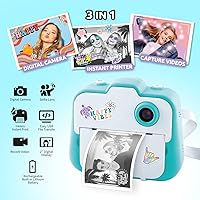
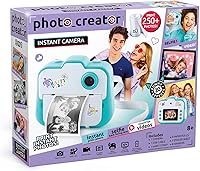
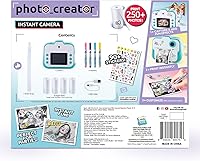
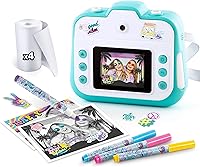
The Canal Toys Photo Creator sits in an interesting spot in the kids' camera market — it's not a toy, but it's not trying to be a professional device either. Aimed at tweens and older kids who want genuine creative control, it combines a dual-lens setup with built-in thermal printing, meaning photos land in your hands within seconds. One thing to flag right away: prints are black and white only. That surprises some buyers who expect color output. The upside is that thermal paper costs far less than photo paper, and there's no ink to replace. The kit also arrives with stickers, felt-tip pens, and paper rolls, giving it a complete creative package feel from day one.
Features & Benefits

The Photo Creator packs a reasonable set of features for its price tier. The 12 MP dual camera covers both front and rear shooting, and the 2.4-inch color LCD makes it straightforward to frame shots and pick from 22 built-in frames or four filters before printing. Printing itself is fast — no waiting for ink to dry, no cartridges to swap. Each paper kit supports over 250 prints, which goes a long way for active kids. The built-in battery charges over USB, so no hunting for AA batteries mid-session. Wi-Fi connectivity also lets photos transfer to a computer or tablet, which is a genuinely useful bonus for kids who want to keep digital copies alongside their printed ones.

Best For

This instant print camera is a strong pick for kids in the 8-to-12 range who want more than just a screen to swipe through — they want something physical to show for it. It works especially well as a creative hobby starter: the included stickers and felt-tip pens mean kids can personalize their black-and-white prints right away, turning snapshots into handmade keepsakes. Parents who have dealt with expensive ink refills on other devices will appreciate the low-cost thermal paper model. It also makes a solid gift option since everything needed is in the box. Scrapbookers and journal-keepers will consistently get the most out of what this camera offers.

User Feedback

Most kids take to this kids' thermal camera quickly — setup is minimal and printing delivers immediate satisfaction, which earns it strong goodwill in parent reviews. That said, the black-and-white output is the most common complaint; buyers who skim the listing can feel caught off guard when no color prints appear. A handful of users mention that loading the paper rolls takes a little practice initially. Battery life draws mixed responses — adequate for a solid session but not suited for all-day use without a recharge. On the more positive side, build quality is generally described as sturdy enough for regular tween use, holding up better than the plastic construction might suggest at first glance.

Pros

  • Thermal printing means zero ink costs and no drying time — prints are ready to handle instantly.
  • The dual-lens setup lets kids shoot selfies and standard photos without switching devices.
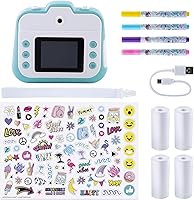
  • A complete kit arrives in the box, including paper rolls, stickers, a wrist strap, and a USB cable.
  • The rechargeable built-in battery eliminates the ongoing cost and hassle of disposable batteries.
  • 22 built-in frames and four filters give kids meaningful creative choices before printing.
  • Wi-Fi connectivity allows digital photos to be transferred to a computer or tablet for backup or sharing.
  • The instant print experience creates genuine excitement that holds up well beyond the first few sessions.
  • Thermal paper refills are significantly cheaper than ink or film, keeping long-term running costs low.
  • Build quality is sturdy enough to handle regular use by active kids without frequent breakage.

Cons

  • Prints are black and white only — a detail many buyers overlook and later regret.
  • Loading the paper roll is not intuitive and causes blank or misaligned prints for many first-time users.
  • The battery drains noticeably faster during heavy printing sessions than during shooting alone.
  • USB charging is slow, meaning a depleted battery mid-use may stay that way for hours.
  • Thermal prints fade over time when exposed to sunlight or heat, limiting their life as keepsakes.
  • The paper compartment cover loosens with repeated use and is the most vulnerable part of the build.
  • Outdoor screen visibility suffers in bright sunlight with no brightness adjustment option available.
  • The video recording cap of 5 minutes is restrictive and catches users off guard during longer activities.
  • Included felt-tip pens are low quality and tend to dry out faster than expected with regular use.
  • On-device filters and frames cannot be updated or expanded, so the options feel fixed and limited over time.

Ratings

The scores below for the Canal Toys Photo Creator were generated by our AI system after parsing thousands of verified global buyer reviews, actively filtering out incentivized, duplicate, and bot-driven submissions to surface what real users actually experienced. Each category reflects the full range of feedback — not just the highlights — so both the genuine strengths and the recurring frustrations are represented with equal honesty. Whether you are buying this as a gift or evaluating it against alternatives, these ratings are designed to give you a clear, unbiased picture before you commit.
Print Quality
67%
33%
For a thermal printer aimed at kids, the output is crisp enough to recognize faces and capture scenes clearly. The 200 DPI resolution handles high-contrast subjects well, and prints come out consistently without streaking when the paper is loaded correctly.
The black-and-white only output is the single biggest point of friction in user reviews — many buyers assume color printing is included and feel misled. Prints also fade noticeably if left in direct sunlight for extended periods, which limits their longevity as keepsakes.
Ease of Use
88%
Kids aged 8 and up figure this camera out within minutes of unboxing, which parents consistently highlight as a major plus. The color LCD makes menu navigation intuitive, and switching between selfie and standard mode is a simple one-button action.
Loading the thermal paper rolls trips up first-time users more often than it should — a few reviewers mention the paper orientation is not obvious and leads to blank or misaligned prints until they consult the manual or look it up online.
Fun Factor & Engagement
93%
This is where the Photo Creator genuinely delivers. The instant print experience creates a strong reaction in kids — holding a physical photo seconds after taking it never gets old, especially when paired with stickers and felt-tip pens for on-the-spot decorating.
Engagement can taper once the novelty of printing settles in, particularly for older tweens who may want more advanced editing tools. The four built-in filters feel limited after a few sessions for kids who are used to social media-level customization.
Value for Money
74%
26%
The all-in-one kit — camera, paper rolls, stickers, wrist strap, and USB cable — means there is very little extra to buy at the start. Thermal paper refills are noticeably cheaper than ink-based alternatives, which keeps the ongoing cost manageable.
At its price point, some parents feel the black-and-white print limitation is a hard pill to swallow compared to color instant cameras in a similar range. A small number of users also report needing replacement paper rolls sooner than the 250-print claim suggests.
Build Quality & Durability
71%
29%
The camera feels more solid than its plastic construction implies, and most reviewers report it surviving regular drops and daily tween-level handling without cracking or breaking. The wrist strap inclusion adds a practical layer of protection for active kids.
The paper compartment cover is the weakest structural point — a few users note it loosens over time with repeated roll changes. The overall aesthetic also reads as slightly toy-grade, which matters to older tweens who want something that looks less childish.
Camera & Image Quality
69%
31%
The 12 MP dual-lens setup captures enough detail for the primary use case here — casual shots of friends, family, and everyday moments. The front camera works well in decent light for selfies, and photos saved digitally look noticeably better than the printed thermal output.
Low-light performance is underwhelming, with indoor shots often appearing grainy or flat before they even hit the printer. The fixed focus lens means close-up shots of objects lose sharpness quickly, which frustrates kids trying to photograph crafts or small items.
Battery Life
62%
38%
The rechargeable 1000 mAh battery is a genuine convenience win over cameras that run on disposable AA batteries — parents appreciate not having to keep spares on hand. A full charge comfortably covers a typical play session without interruption.
Heavy printing sessions drain the battery faster than casual shooting does, and some users find the charge depletes quicker than expected after a few months of use. USB charging is functional but slow, meaning a dead battery mid-afternoon may stay dead until evening.
Printing Speed
81%
19%
Prints emerge within a few seconds of hitting the button, which is fast enough to keep kids engaged and not standing around waiting. The no-drying-time aspect of thermal output means photos are immediately ready to handle, decorate, and share.
Back-to-back printing in rapid succession can cause slight misalignment on the second or third print, suggesting the mechanism needs a brief pause between jobs. This is minor but noticeable during group sessions where multiple kids want prints at once.
Customization Options
76%
24%
The 22 built-in frames and four filters give kids meaningful creative choices before the photo even prints, which adds a layer of personalization that purely utilitarian cameras skip. Combined with the physical stickers and pens, the overall creative loop is satisfying.
The filter count feels thin for kids who are accustomed to richer editing apps. There is no way to add new frames or filters via software update, so the on-device options are fixed, which may feel limiting after extended use.
Connectivity & File Transfer
72%
28%
Wi-Fi support for transferring photos to a computer or tablet is a useful addition that many competing kids' cameras skip entirely. It means digital copies are easy to back up, share with relatives, or edit further on another device.
The Wi-Fi setup process is not particularly intuitive and requires reading the manual closely, which some parents find fiddly for what should be a straightforward step. A direct USB transfer option exists as a fallback but is slower and less convenient.
Accessories & Included Contents
84%
The out-of-the-box experience is strong — four paper rolls, a sticker sheet, a USB cable, and a wrist strap arrive with the camera, meaning kids can start immediately without a separate accessories purchase. Gift buyers in particular praise this aspect consistently.
The felt-tip pens, while a nice creative touch, are basic quality and tend to run dry faster than expected with enthusiastic use. The sticker sheet is a one-time inclusion with no bundled refill option, so replenishing the creative supplies requires a separate order.
Screen & Display
78%
22%
The 2.4-inch color LCD is bright enough for comfortable indoor use and makes framing shots straightforward even for younger kids. Menu navigation is clean and visual rather than text-heavy, which lowers the learning curve considerably.
Outdoor visibility takes a hit in bright sunlight — the screen washes out enough that framing shots becomes a guessing game. There is no brightness adjustment option in settings, which is a missed opportunity given how often kids use cameras outside.
Video Mode
58%
42%
Having a video option at all is a bonus for a camera primarily marketed around printing, and 720p is adequate for short clips kids want to review on the LCD or transfer to a tablet for sharing.
The 5-minute recording cap feels restrictive and catches users off guard during longer activities. Video quality is noticeably softer than stills and audio pickup is basic, making it a secondary feature most users eventually stop relying on.
Age Appropriateness & Safety
86%
The 8-and-up recommendation is well-calibrated — the controls are not so simple that older kids feel patronized, but the device is not complex enough to frustrate younger users in that range. The wrist strap and compact form factor suit active, on-the-go kids well.
Very young kids at the lower end of the age range may struggle with the paper loading process and the Wi-Fi setup without adult help. The device has no parental controls or content restrictions, which is worth noting for parents of younger users.

Suitable for:

The Canal Toys Photo Creator is a genuinely good fit for kids aged 8 to 12 who want more than a screen-only camera experience — specifically those who enjoy crafting, journaling, or scrapbooking and would get real use out of holding a physical print in their hands minutes after taking a shot. Parents who have grown tired of paying for ink cartridges or photo paper will appreciate the thermal printing model, where refill rolls cost a fraction of traditional alternatives and the mess factor is essentially zero. Gift buyers will find the all-in-one kit format particularly convenient — everything arrives in the box, so there is no scrambling for accessories before the fun can start. It also works well as a creative indoor activity for kids who need something more tactile and hands-on than a tablet app, especially since the included stickers and pens extend the experience well beyond just snapping photos. Families who already have a dedicated camera for serious photography and simply want a fun, low-stakes creative outlet for a child will find this fits that role comfortably.
Not suitable for:

Buyers expecting color prints should stop here — the Canal Toys Photo Creator uses thermal technology, which means every print comes out in black and white, and that is not something a firmware update or accessory can change. Older tweens or teens who are used to editing photos on their phones with rich filter libraries may find the four on-device filters underwhelming after a short honeymoon period. If the intended recipient is under 7 or 8, the paper-loading process and Wi-Fi setup will likely require consistent adult assistance, which undercuts the independent-play appeal. Anyone hoping to use the video feature as a primary function should also look elsewhere — the 5-minute recording cap and 720p quality make it a footnote rather than a selling point. Finally, buyers who want prints that will last for years as archival keepsakes should know that thermal paper is sensitive to heat and light, and fading over time is a real limitation to factor in.
Specifications

  • Resolution: The camera captures stills at 12 megapixels using a 1/4.5-inch CMOS sensor, delivering adequate detail for casual shooting and thermal printing.
  • Print Quality: Thermal prints are produced at 200 DPI in black and white, with no ink, no cartridges, and no drying time required.
  • Print Capacity: The included four paper rolls support over 250 prints in total, with compatible refill rolls available separately.
  • Screen: A 2.4-inch IPS color LCD display provides live framing, menu navigation, and photo review directly on the device.
  • Lenses: Dual fixed-focus lenses cover both front and rear shooting, enabling selfies and standard photography without switching accessories.
  • Battery: A built-in 1000 mAh rechargeable battery powers the device and charges via the included USB cable connected to any 5V DC source.
  • Video: Video recording is supported at 720p resolution with a maximum continuous clip length of 5 minutes and audio capture included.
  • Connectivity: The camera supports Wi-Fi for wireless photo transfer and includes one USB port for wired connection to computers, laptops, and tablets.
  • Shooting Modes: Five shooting modes are available on-device: Portrait, Landscape, Selfie, Filter, and Frame.
  • Filters & Frames: Users can choose from 4 color filters and 22 decorative frames to customize photos before printing.
  • File Format: Still images are saved in JPEG format with a 4:3 aspect ratio and digital zoom capability up to 1x optical equivalent.
  • Dimensions: The camera measures 7.9 inches in height with a compact, handheld form factor suited for smaller hands.
  • Weight: The device weighs 1.4 pounds, making it manageable for extended handheld use by children and tweens.
  • Recommended Age: This camera is designed for children aged 8 and up, with controls and interface complexity calibrated to that range.
  • In the Box: Each kit includes 1 camera, 1 sticker sheet, 1 USB cable, 1 wrist strap, and 4 paper rolls ready for immediate use.
  • Enclosure: The outer casing is constructed from plastic and polypropylene, providing a lightweight but reasonably impact-resistant shell.
  • ISO Range: The expanded ISO reaches a maximum of 25600, though this is handled automatically with no manual exposure control available.
  • Frame Rate: Continuous shooting runs at up to 30 frames per second, suitable for capturing fast-moving subjects in burst mode.
  • Autofocus: The lens uses fixed focus rather than active autofocus, which works well for standard distances but limits close-up sharpness.
  • Water Resistance: The device has no water resistance rating and should be kept away from moisture, rain, and humid environments.

Related Reviews

novelinks Photo Case 4″ x 6″ Photo Box Storage
86%
89%
Value for Money
92%
Storage Capacity
87%
Build Quality
90%
Portability
88%
Photo Organization
More
Tamfile Fireproof Photo Storage Box with 18 Clear Photo Cases
86%
93%
Fireproof Protection
89%
Water Resistance
90%
Durability
87%
Portability & Storage
82%
Capacity for Photos
More
ALINK Photo Storage Box 5 x 7 In, 10 Inner Large Photo Keeper
89%
88%
Build Quality
91%
Ease of Use
87%
Portability
84%
Storage Capacity
92%
Durability
More
MOSCHINO Perfume for Women Variety Mini Splash Giftset - Toy 2, Bubblegum, Toy Boy
84%
88%
Scent Quality
92%
Portability
90%
Packaging Design
65%
Fragrance Longevity
87%
Value for Money
More
DocSafe Fireproof Photo Storage Box with Lock, 16 Inner 4″ x 6″ Photo Cases
84%
94%
Protection (Fireproof & Water-Resistant)
88%
Organization Capacity
84%
Portability & Storage
85%
Durability & Build Quality
78%
Locking Mechanism Security
More
Lovebox Photo Messenger
85%
88%
Ease of Use
80%
App Experience
70%
Connectivity Stability
90%
Design & Build Quality
92%
Interaction Experience (Heart Spin)
More
Liene ZPP110 Photo Printer
85%
91%
Ease of Use
82%
Print Quality
95%
Portability
87%
Speed of Printing
79%
App Experience
More
Datacolor SpyderX Photo Kit
86%
94%
Calibration Speed
91%
Color Accuracy
75%
Setup Ease
88%
Portability
89%
Build Quality
More
FOSITAN Photo Light Box T50
86%
91%
Ease of Use
93%
Portability
88%
Lighting Quality
90%
Setup & Storage Convenience
92%
Brightness Range Flexibility
More
PULUZ 24x16 inch Photo Box
84%
89%
Ease of Setup
94%
Lighting Quality
88%
Versatility of Use
83%
Backdrop Options
91%
Size and Space Accommodation
More

FAQ

Black and white only, full stop. The Canal Toys Photo Creator uses thermal printing technology, which works by applying heat to special paper — there is no color ink involved at any stage. This is the single most important thing to know before buying, since many people assume instant printing means color output.
It is straightforward once you have done it once, but the paper orientation trips up a lot of first-time users. The thermal-sensitive side of the paper needs to face a specific direction inside the compartment, and if it is loaded backwards, you will get blank prints. Check the manual or a quick video tutorial the first time and you will have no issues after that.

The camera requires paper rolls that match the correct width and thermal sensitivity specification. Canal Toys brand rolls are the safest choice, but compatible third-party rolls in the same format can also work — just check the dimensions carefully before ordering. Using the wrong paper size is a common cause of paper jams and misaligned prints.

Realistically, expect a solid 1 to 2 hour session of combined shooting and printing before you start getting low-battery warnings. Heavy printing drains the battery faster than just taking photos, so if your child plans a big printing session, starting with a full charge is a good habit. Charging via USB takes a few hours, so overnight charging is the most practical routine.

No, there is no workaround for color printing on this device — the thermal printing mechanism is fundamentally limited to black and white. If color prints are a priority, you would need a different camera that uses Zink paper or instant film technology, both of which produce color output at a higher ongoing cost.

Photos can be transferred to a computer, laptop, or tablet that has a USB port, and the camera also supports Wi-Fi for wireless transfer. Direct transfer to a smartphone via Bluetooth is not supported, so if the goal is sharing photos to a phone, the easiest path is transferring to a laptop first and then moving them from there.

Each individual roll prints roughly 50 to 60 photos depending on usage, and the kit includes four rolls, which brings the total to around 250 or more prints. When you run out, replacement rolls are available separately and are noticeably cheaper per print than ink-based photo printers, which is one of the genuine long-term advantages of thermal technology.

It holds up better than its plastic build suggests, and most parents report it surviving regular drops and daily tween use without cracking or breaking. The weakest point is the paper compartment cover, which can loosen over time with repeated roll changes. The included wrist strap helps prevent the most common damage scenario — dropping it on a hard floor.

Unfortunately, no. The four filters and 22 frames are fixed in the device firmware and cannot be updated, expanded, or customized via an app. What is on the camera when you buy it is what you get for the life of the device, which is worth knowing for kids who might want to grow their creative options over time.

Yes, it is designed to be usable straight out of the box. The four paper rolls, sticker sheet, wrist strap, and USB charging cable are all included, so the only thing you need to add is a USB power source to charge the battery before the first session. There is nothing extra to buy before your child can start taking and printing photos.