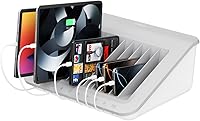
Belkin B2B074 10-Device Laptop Charging Station
Belkin B2B074 10-Device Laptop Charging Station — image 1
Belkin B2B074 10-Device Laptop Charging Station — image 2
Belkin B2B074 10-Device Laptop Charging Station — image 3
Belkin B2B074 10-Device Laptop Charging Station — image 4

Belkin B2B074 10-Device Laptop Charging Station — image 5

Belkin B2B074 10-Device Laptop Charging Station — image 6
Belkin B2B074 10-Device Laptop Charging Station — image 7
75%
25%

Overview

The Belkin B2B074 10-Device Laptop Charging Station is the kind of workhorse that IT coordinators and classroom teachers rely on without much fanfare. Positioned at the mid-to-premium tier, it signals a focus on institutional durability rather than cutting-edge consumer features. Physically, it's a solid unit — 18 by 14 by 7 inches, just over 9 pounds — designed to sit on a standard AV cart or mount flat to a desk or table. It has been around since 2011, which says something about its staying power in a market that churns fast. Just be clear: this is a charging and organization tool, not a fast-charger.

Features & Benefits

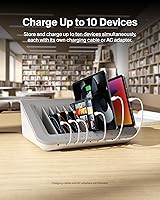
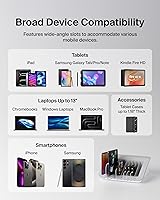
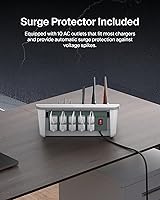
The Belkin 10-device dock runs on a straightforward premise: 10 AC outlets, each ready to accept whatever wall adapter a given device needs. That flexibility matters in mixed-device environments where you might have iPads next to Chromebooks next to e-readers. The wide-angle slots handle devices up to 1.18 inches thick, so most tablets in cases fit without a struggle. Built-in surge protection covers all outlets automatically — worth noting for any IT manager who has watched a voltage spike take out a cart full of student devices. At 45W per outlet, it handles tablets and smaller Chromebooks well, but larger laptops with power-hungry adapters may charge more slowly than expected.

Best For

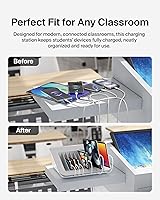
This classroom charging hub earns its keep in institutional settings more than anywhere else. K-12 schools running shared device programs are the obvious fit — whether that means overnight charging or quick between-class top-ups. Corporate IT teams managing device pools in training rooms will also find it practical, and libraries or coworking spaces with rotating users benefit from its wide compatibility across tablet brands and Chromebook models. Keep in mind, however, that compatibility starts to thin out beyond 13-inch laptops. For buyers focused on organized, surge-protected charging across a full fleet of lighter devices, this hub delivers on its core promise reliably.

User Feedback

Across verified buyer reviews, the praise clusters around long-term reliability and the tangible difference this charging station makes to day-to-day classroom organization — some users report running the same unit for five or more years without issues. That says a lot. The honest criticisms focus on cable management: bulkier laptop power bricks can crowd the slots and tangle badly, since the design clearly favors slimmer tablet adapters. Compatibility gaps with devices over 13 inches also come up regularly. The overall 4.4-star rating from verified institutional buyers reflects a hub that consistently does what it promises, as long as you understand its physical limits going in.

Pros

  • Charges up to 10 tablets, Chromebooks, or e-readers at the same time without needing a power strip.
  • Built-in surge protection covers all 10 outlets automatically, reducing risk to expensive shared devices.
  • Wide-angle slots fit devices in most protective cases up to 1.18 inches thick — no case removal needed.
  • Compatible with virtually any brand of tablet or 13-inch Chromebook, making mixed fleets manageable.
  • Mounts to desks or sits flat on AV carts, giving IT teams real flexibility in how they deploy it.
  • Proven long-term durability — multiple buyers report reliable use across five or more years of classroom service.
  • The corded AC outlet design means any existing wall adapter works, avoiding proprietary cable lock-in.
  • Reduces cable clutter in high-traffic shared spaces, which makes a real difference in day-to-day device management.

Cons

  • Bulky laptop power bricks crowd the charging bays and can make cable management messier than advertised.
  • The 45W per-outlet limit means larger laptops may charge slowly or not keep pace under heavy use.
  • No USB-C or Power Delivery ports, so devices that have dropped AC adapters are not well served here.
  • Strictly limited to devices 13 inches or smaller — a growing constraint as Chromebooks and tablets trend larger.
  • At over 9 pounds, moving this hub between rooms frequently is more of a chore than the word portable implies.
  • The design has not evolved significantly since 2011, leaving it behind on modern charging standards.
  • No individual slot locks or security features, which can be a concern in unsupervised shared environments.
  • Replacement cables and internal components are not user-serviceable, so a single failure can sideline the whole unit.

Ratings

The scores below were generated by AI after systematically analyzing verified buyer reviews for the Belkin B2B074 10-Device Laptop Charging Station from institutional purchasers worldwide, with spam, incentivized, and bot-flagged submissions actively filtered out. The result is an honest, weighted snapshot of real classroom, office, and lab experiences — strengths and friction points included. Nothing has been smoothed over to make the product look better than it performs in daily use.

Build Quality
88%
IT coordinators and teachers consistently note that this hub holds up surprisingly well under the daily grind of shared-space use. Multiple verified buyers mention running the same unit for four or five years without structural failures, which is not something you can say about many charging accessories at any price point.
A small number of users report that the plastic slot dividers can develop minor cracks after prolonged heavy use, particularly in environments where devices are loaded and unloaded dozens of times a day. It is durable, but not indestructible under the harshest institutional conditions.
Device Compatibility
74%
26%
For environments running iPads, Samsung tablets, Kindle e-readers, and Chromebooks under 13 inches, the compatibility story is genuinely strong. The wide-angle slots handle most protective cases without requiring removal, which saves real time when students are handing devices in and out between classes.
Compatibility starts to break down quickly once you move beyond 13-inch devices. Buyers managing fleets that include newer 14-inch or 15-inch laptops have found that some units simply do not fit the slots, making this a progressively harder sell as device sizes in schools and offices trend upward.
Charging Speed
61%
39%
For overnight classroom charging routines where devices are plugged in at the end of the school day and retrieved fully charged the next morning, the 45W per outlet is entirely adequate. Tablets and Chromebooks reach full charge comfortably within that window, and most users in those scenarios have no complaints.
Anyone expecting fast or even moderate-speed charging during active sessions will be disappointed. Larger laptops plugged in during use may barely maintain their battery level rather than gaining charge, and the hub has no USB-C or Power Delivery capability, which is an increasingly relevant gap for modern device fleets.
Cable Management
63%
37%
In tablet-heavy environments where every device uses a slim, lightweight adapter, the built-in cable routing channels do a reasonable job of keeping cords organized and untangled. Teachers running iPad carts in particular tend to appreciate the reduction in daily cable chaos compared to unmanaged power strips.
The cable management design clearly had slim tablet chargers in mind. Bulkier laptop power bricks crowd the outlet bay and refuse to route cleanly through the available channels, leaving a tangle of cords that partially defeats the organizational purpose. This is one of the most repeated frustrations across verified buyer reviews.
Surge Protection
91%
Automatic surge protection across all 10 outlets is one of the genuinely standout aspects of this hub, and institutional buyers treat it as a serious line of defense for expensive shared device fleets. IT managers in particular cite it as a key reason for choosing this unit over bare power strips in school and lab environments.
There is no user-visible indicator showing whether the surge protection is still active or has been consumed by a prior spike event, which is a known limitation of passive surge protection design. Buyers who want that kind of monitoring transparency may need to budget for a separate power conditioning device alongside this hub.
Ease of Setup
86%
Most buyers describe setup as refreshingly straightforward — plug it in, load the devices, and it works. There is no software, no pairing process, and no configuration required, which matters a lot to teachers and office managers who need to hand it off to non-technical staff without writing an instruction sheet.
The mounting hardware setup requires a bit more effort and the instructions are considered bare-bones by some reviewers. A few buyers also note that figuring out the optimal cable routing for their specific mix of adapters takes some trial and error before everything sits neatly.
Portability
71%
29%
The design fits neatly onto standard AV carts, and schools that share the hub between multiple classrooms throughout the day find the cart-based mobility genuinely useful. The form factor was clearly thought through for institutional rolling-cart workflows rather than being an afterthought.
At 9.2 pounds without any devices loaded, carrying this charging station by hand between rooms is uncomfortable for longer distances. It is portable in the sense that it moves easily on a cart, but it is not something you would want to lift and carry regularly without a proper transport solution.
Mountability
78%
22%
The option to bolt this hub down to a desk or table surface is genuinely valued in environments where security and stability matter, such as library lending stations or corporate device checkout points. Once mounted, the unit stays firm and does not shift when devices are inserted or removed.
The mounting is limited to horizontal surfaces only, which rules out wall-mount configurations that some buyers expected given the price. A handful of reviewers also note that the mounting hardware included in the box feels underspec'd relative to the overall weight of a fully loaded unit.
Organizational Design
82%
18%
The angled slot design lets you see and access all 10 devices at a glance without having to dig through a pile, which genuinely speeds up the process of handing devices out to students or colleagues. IT coordinators managing high-turnover shared device environments consistently highlight this as a practical day-to-day benefit.
The slots are not individually labeled or numbered out of the box, which creates tracking headaches in environments where specific devices need to be assigned to specific users. Some buyers have resorted to adding their own labels, which is a minor but recurring complaint.
Value for Money
69%
31%
For K-12 schools and IT departments that need a proven, durable hub that will reliably charge a tablet fleet for years, the cost per device slot is defensible — especially when you factor in the surge protection and Belkin's institutional track record. Buyers who understand the intended use case rarely feel overcharged.
Individual consumers or small teams charging fewer than five devices will find the price hard to justify relative to what they actually need. Newer competitors have also entered this space offering USB-C and Power Delivery support at comparable price points, making the cost-to-feature ratio less compelling than it was when this unit launched.
Longevity
87%
The longevity data from long-term institutional buyers is one of the most positive signals in the entire review set. Units purchased five or more years ago are frequently still in active service, which is a strong endorsement for a product that sees heavy daily use in demanding shared environments.
Because the internal components are not user-serviceable, a single outlet failure eventually means replacing the entire unit rather than repairing it. This is not a frequent occurrence, but when it does happen, the replacement cost stings more than it would for a modular or repairable design.
Noise & Heat
83%
The Belkin 10-device dock operates silently — no fans, no audible hum under normal load — which matters in quiet classroom and library settings where background noise from equipment is genuinely distracting. Surface heat under a full 10-device load stays at a reasonable level that does not concern most users.
In warmer rooms or enclosed AV cart cabinets with limited airflow, a small number of buyers note that the unit runs noticeably warmer than expected. This is not reported as a safety concern, but it is worth factoring in if the hub will be used in a cabinet or storage unit with restricted ventilation.
Modern Standard Support
42%
58%
For environments that have not yet transitioned away from AC adapter-based devices, the all-AC outlet design actually keeps things simple — every device uses its own familiar charger, and there are no proprietary port limitations to work around. That straightforwardness has a real operational value in mixed-brand institutional settings.
The complete absence of USB-C, USB-A fast charging, or Power Delivery support is the single biggest structural weakness of this hub in 2024. As schools and offices continue rolling out newer Chromebooks and tablets that charge primarily via USB-C, this classic charging station becomes less compatible with each passing device refresh cycle.

Suitable for:

The Belkin B2B074 10-Device Laptop Charging Station was built with institutional buyers in mind, and that focus shows in every design decision. K-12 IT coordinators managing shared classroom device fleets will get the most out of it — whether the routine is overnight charging, between-period top-ups, or simply keeping 30 students from hunting for loose cables every morning. School librarians, corporate trainers, and coworking space managers running rotating device pools will find the wide device compatibility and built-in surge protection genuinely useful rather than just a box-ticking feature. If your environment runs primarily on tablets, iPads, e-readers, or Chromebooks up to 13 inches, this hub handles that mix without the need for custom adapters or workarounds. For anyone who has watched a tangled, unsecured cart of devices devolve into a daily logistical headache, this charging station offers a practical, durable fix.

Not suitable for:

The Belkin B2B074 10-Device Laptop Charging Station is not the right tool for everyone, and it is worth being direct about where it falls short. If your device fleet includes modern 14-inch or 15-inch laptops with high-wattage power bricks, the physical slots and 45W per-outlet ceiling will cause real friction — larger adapters crowd the bay and charging times stretch out. Home users or small teams looking to charge just two or three personal devices will find the footprint and price point hard to justify for their scale. This hub also lacks USB-C or any direct fast-charging ports, so if your devices have moved away from AC adapters entirely, the core design becomes a mismatch. It has been on the market since 2011, and while the build holds up, buyers expecting modern cable management features or USB Power Delivery support should look at newer alternatives. Essentially, if your needs skew toward fewer, larger, or newer-standard devices, a different solution will serve you better.

Specifications

  • Brand: Manufactured by Belkin, a well-established brand in connectivity and power management solutions for institutional and consumer markets.
  • Model Number: This unit is identified by the model number B2B074, part of Belkin's Store and Charge product line.
  • Device Capacity: Holds and charges up to 10 devices simultaneously, each using its own individual AC adapter or charging cable.
  • Outlet Type: Equipped with 10 standard AC outlets, designed to accept most wall adapters and device-specific chargers without modification.
  • Wattage: Delivers up to 45W per outlet, which is sufficient for tablets, e-readers, and smaller Chromebooks but may be limiting for power-hungry laptops.
  • Surge Protection: Automatic built-in surge protection is active across all 10 outlets, guarding connected devices against unexpected voltage spikes.
  • Dimensions: The unit measures 18″ in length, 14″ in width, and 7″ in height, fitting comfortably on most standard AV carts.
  • Weight: Weighs 9.2 pounds, making it portable enough to move between rooms but not particularly lightweight for frequent transport.
  • Slot Clearance: Each device slot accommodates items up to 1.18 inches thick, meaning most tablets and e-readers in protective cases fit without removal.
  • Max Device Size: Designed to support laptops and Chromebooks up to 13 inches in screen size; larger devices may not fit securely in the slots.
  • Compatible Devices: Works with all iPad generations, Samsung tablets, e-readers, Chromebooks, and compatible laptops across major brands, provided they fit within the physical slot dimensions.
  • Mounting Options: Can be secured to a desk, table, or other horizontal surface via mounting hardware, or used freestanding on a compatible AV cart.
  • Power Source: Draws power via a standard corded electric connection, requiring a nearby grounded wall outlet for operation.
  • Color: Available in grey, a neutral finish suited to classroom, office, and lab environments.
  • Availability: First made available in March 2011 and not discontinued by the manufacturer as of the most recent product data, indicating ongoing production and support.

Related Reviews

Prosumer's Choice Bamboo Multi Device Charging Station
87%
88%
Design & Build Quality
91%
Cable Management
93%
Eco-Friendliness
85%
Charging Performance
82%
Capacity & Space
More
Brydge Stone CORE USB-C Docking Station
80%
88%
Value for Money
91%
Port Selection & Variety
74%
Dual Monitor Support
86%
Power Delivery Performance
83%
Display Output Quality
More
TobenONE UDS047 Dual Monitor Laptop Docking Station
82%
91%
Dual Monitor Output Quality
88%
Build Quality & Sturdiness
86%
Vertical Laptop Stand Design
84%
USB Data Transfer Speed
78%
Power Delivery Performance
More
YAMTION Laptop Backpack with USB Charging Port
87%
87%
Overall Durability
90%
Comfort & Ergonomics
85%
USB Charging Port Convenience
73%
Laptop Compartment Protection
92%
Water Resistance
More
Sonnet R14-14 Alarm Clock Charging Station

76%
88%
Alarm Effectiveness
83%
Charging Functionality
91%
Value for Money
86%
Ease of Setup
79%
Display Readability
More
NTONPOWER GAN Ultra 65W Travel Power Strip
83%
89%
Charging Speed
86%
Port Versatility
93%
Portability & Size
82%
Cruise Compatibility
88%
Heat Management
More
Vari Power Hub Desk Mount Charging Station
79%
96%
Ease of Installation
88%
Build Quality
93%
Clamp Stability
84%
Outlet Layout & Design
67%
USB Charging Performance
More
MOMILLA Smart Sunrise Alarm Clock
74%
88%
Sunrise Wake Simulation
83%
Sunset Sleep Aid
79%
White Noise Quality
72%
Wireless Charging Performance
67%
App & Smart Controls
More
Ankyery 30L 17-Inch Laptop Travel Backpack
78%
93%
Value for Money
88%
Storage & Organization
79%
Laptop Protection
62%
Build Quality
74%
Comfort & Ergonomics
More
Jgstkcity 45W Desk Clamp Power Strip
87%
91%
Build Quality
87%
USB-C Charging Speed
68%
Installation Versatility
84%
Outlet Layout
92%
Cable Management
More

FAQ

Yes, this charging station provides the AC outlets and physical storage slots, but it does not come with device-specific cables or adapters. You will need to supply the appropriate charger for each device you plan to store and charge.

It will, as long as each device is connected via its own wall adapter. The 10 AC outlets accept virtually any standard charger, so mixing iPad adapters with Android tablet chargers in the same unit is not a problem at all.

The Belkin B2B074 10-Device Laptop Charging Station is rated for devices up to 13 inches, so a 13-inch MacBook Air should physically fit. That said, the 45W per-outlet limit means a MacBook that prefers 65W or more may charge slowly or struggle to keep up under active use. Larger 14-inch and 15-inch laptops are likely to have clearance and power issues.

Yes, it is fully automatic and requires no setup. All 10 outlets are covered the moment the unit is plugged in, protecting connected devices from voltage spikes without any manual intervention from the user.

The slots are designed to accommodate devices up to 1.18 inches thick, which covers most standard protective and rugged cases used in K-12 settings. It is worth measuring your specific case before purchasing if you are using an unusually bulky model.

Yes, the Belkin 10-device dock is designed to mount onto a desk or other horizontal surface for a more permanent installation. It is not designed for vertical wall mounting, so keep that in mind when planning your setup.

The station includes built-in cable management features to help keep cords organized, but real-world users note that bulkier laptop power bricks can still create crowding around the outlet bay. For environments using slim tablet adapters, the cable routing works well; for larger adapters, a bit of manual organization may still be needed.

For tablet-heavy and Chromebook-based environments, absolutely. The core use case has not changed much, and the build quality has proven itself over years of institutional use. Where it starts to show its age is in the lack of USB-C or Power Delivery support, which matters more if your fleet has shifted away from traditional AC adapters.

It is specifically designed to fit standard AV carts, so moving it between classrooms is a supported use case. At just over 9 pounds with devices loaded in it, you will want a cart with a lip or strap to keep it stable during transit.

Unfortunately, the internal components are not user-serviceable, so a failed outlet typically means the unit needs to be replaced rather than repaired. That said, long-term users consistently report multi-year reliability with few failure reports, so this is not a common concern in normal institutional use.