Overview

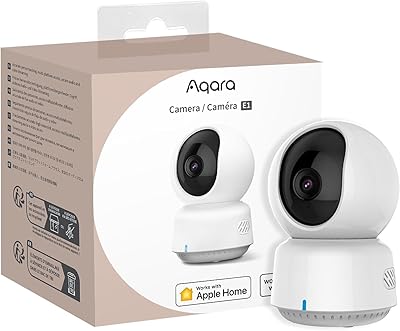
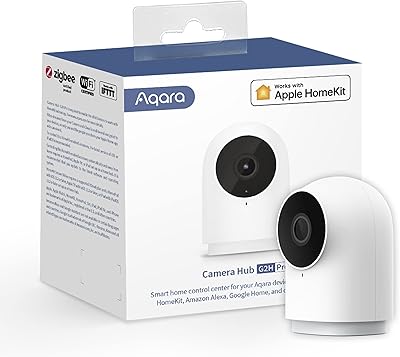
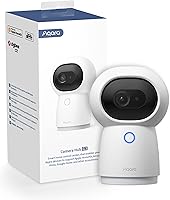
The Aqara 2K Security Indoor Camera Hub G3 is a versatile and intelligent home security solution. This Wi-Fi connected camera hub offers a range of powerful features, including 2K resolution for crisp video capture and a 360° field of view. As a Zigbee 3.0 hub, it can seamlessly integrate with Aqara’s home automation devices, expanding your smart home capabilities. The camera supports integration with popular voice assistants like Alexa, Google Assistant, and Apple HomeKit, making it a convenient choice for users who seek advanced home security with smart functionality.

Features & Benefits

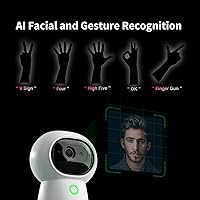
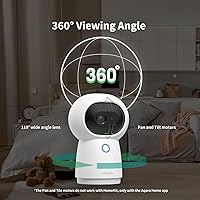
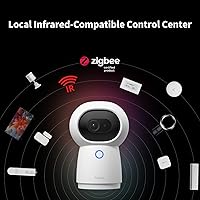
This indoor camera hub stands out with its AI-powered recognition capabilities, offering facial, pet, and gesture recognition. It can automatically detect who or what is in view, helping to filter important alerts. With its automatic pan and tilt feature, this camera provides full coverage by rotating up to 340°, eliminating blind spots. It also supports local infrared control, allowing you to automate smart home devices without requiring an internet connection. The camera ensures that your data is safe with secure encryption and a hardware privacy mode, which gives users peace of mind.

Best For

This camera hub is ideal for tech-savvy users who want a powerful, AI-enhanced security solution. Smart home enthusiasts will appreciate how it integrates with Aqara’s ecosystem, allowing for seamless control of multiple devices. Homeowners looking for an easy-to-use, secure system will find this product to be a practical choice. Additionally, it suits those who need a reliable, high-quality indoor security camera with advanced features that work smoothly with Alexa and HomeKit.

User Feedback

Users have generally praised the Aqara 2K Security Indoor Camera Hub G3 for its clear video quality and wide field of view, making it easy to monitor large areas. The AI recognition, particularly for facial and pet detection, is frequently highlighted as a valuable feature. However, some have noted challenges with initial setup, particularly around Wi-Fi connectivity and app compatibility. A few users reported occasional issues with app performance, but overall, many appreciate the convenience of its smart home integration and reliable performance.

Pros

  • The 2K resolution provides crisp video quality, making it easy to identify details even in low light.
  • Wide 360° field of view ensures complete coverage of the area, reducing blind spots.
  • Automatic pan and tilt with 340° rotation improves monitoring of larger spaces.
  • AI facial and pet recognition features work effectively, enhancing security and automation.
  • Smart home integration with Alexa, Google Assistant, and HomeKit is seamless, allowing easy voice control.
  • Built-in Zigbee hub supports up to 128 Aqara devices, making it ideal for expanding smart home setups.

Cons

  • Some users reported difficulty setting up Wi-Fi connections, particularly in areas with weak signals.
  • App compatibility issues have been noted, with occasional crashes or unresponsiveness.
  • Occasional delay in AI recognition features, especially in crowded or high-traffic areas.
  • The camera relies on a constant power source, limiting placement flexibility compared to battery-operated models.
  • No mobile data support, meaning remote access requires a stable Wi-Fi connection.
  • The setup process might be challenging for users unfamiliar with smart home technology.

Ratings

The scores for the Aqara 2K Security Indoor Camera Hub G3 are based on a thorough analysis of verified user reviews from various global platforms. Only authentic, high-quality feedback was considered, ensuring the results reflect real-world performance. Both the strengths and pain points of this device are captured, providing a balanced and insightful summary for potential buyers across multiple languages and regions.

Video Quality
91%
Many users rave about the clear 2K video quality this device provides, which offers detailed, sharp images even in low light. The 360° field of view ensures broad coverage, making it easier to monitor multiple areas of the room simultaneously. Overall, the video clarity is praised for enhancing security and peace of mind.
Some users noted that the camera’s performance can degrade in extremely bright lighting or if the camera is positioned at an angle where objects obstruct the lens. While most were happy with the quality, a few reported occasional pixelation during high-motion scenarios.
AI Recognition Accuracy
87%
Buyers were impressed with the facial, pet, and gesture recognition features, which enhance security by minimizing false alerts. Users noted that the AI performs well in distinguishing between humans, pets, and other movements, improving the device's overall effectiveness. The AI also helps automate responses, making it an excellent choice for smart home integration.
Some users experienced occasional misidentifications, particularly with pets or unfamiliar faces. A few reported that the AI occasionally missed certain gestures or incorrectly identified objects, which led to minor annoyances in certain settings.
Smart Home Integration
93%
The seamless integration with Alexa, Google Assistant, and Apple HomeKit was highlighted as a standout feature. Users loved the ability to control the camera and other connected devices with simple voice commands. The device fits perfectly into existing smart home ecosystems, making it an appealing option for those who already use Aqara or other smart home devices.
While integration with major smart home platforms was generally smooth, a few users found the setup process to be a bit tedious, especially when syncing with more complex home automation systems. Some also reported occasional lag in voice command responses when connected to certain devices.
Ease of Setup
79%
21%
Most users found the setup process fairly straightforward, especially if they're already familiar with smart home devices. The camera's mobile app is user-friendly, allowing quick installation and connection. Once set up, the camera is easy to adjust and customize to suit specific needs.
However, several buyers mentioned issues with initial Wi-Fi setup, requiring multiple attempts before successful connection. Some also pointed out that the app could be more intuitive for those who aren't tech-savvy, with occasional errors during the setup process.
Field of View
90%
The camera’s 360° field of view is one of its most appreciated features. Users found that it provides comprehensive coverage, eliminating the need for multiple cameras in larger rooms. This wide-angle vision helps monitor larger spaces effectively, offering users a complete view of their environment with minimal blind spots.
Despite its impressive range, a few buyers noted that the camera sometimes struggles to maintain focus when panning quickly. The 340° rotation is effective but not always smooth, which may slightly affect performance during fast movements or if there's a lot of activity in the room.
Pan/Tilt Functionality
85%
Users generally appreciated the automatic pan and tilt capabilities, which allow the camera to cover a wider area. The 340° rotation ensures that no corner of the room is left out, and many users found this feature particularly useful in large spaces or rooms with many moving parts.
A few users noted that the pan/tilt functionality can be a bit slow or inconsistent at times. While it's good for covering a wide area, some reported slight delays or lack of precision when the camera was tracking fast-moving objects.
App Performance
75%
25%
The app that controls this device is generally well-received for its layout and functionality. Users can easily access live video feeds, adjust settings, and control the camera remotely. The interface is clear and provides useful options for customization, such as privacy modes and notification settings.
However, some users experienced lag or delays when using the app, particularly when switching between cameras or adjusting settings. A few also encountered app crashes or connection issues that hindered the overall experience, which slightly impacted satisfaction.
Privacy and Security Features
94%
Buyers highly value the strong encryption and privacy protection this device offers. The hardware privacy mode, which can be toggled manually or automatically, provides an extra layer of security that helps prevent unauthorized access. This focus on data security and privacy reassures many users concerned about smart home vulnerabilities.
Though the privacy features are highly rated, some users felt that the privacy mode could be more intuitive and accessible. A few buyers also mentioned that they had to dig into the settings to fully activate some security features, which may not be ideal for beginners.
Build Quality
88%
Users consistently mention that the build quality of this device is solid and well-constructed. The camera feels sturdy, and the materials used are high-quality, giving the impression of a long-lasting product. The sleek design also blends well with most home interiors, offering both durability and style.
A small number of users reported concerns about the camera's mounting system, especially when it comes to securing it in certain locations. Some found that the wall mount options were not as flexible as they had hoped, requiring additional accessories or adjustments for optimal placement.
Reliability
84%
For the most part, users found this device to be reliable, with consistent performance over time. The camera delivers solid video quality, effective AI recognition, and reliable smart home integrations. Once set up, most users didn’t encounter frequent issues.
However, there were occasional reports of connectivity problems, especially with Wi-Fi. Some users noted intermittent signal drops or trouble reconnecting to the camera after temporary disconnections, which slightly hindered the overall reliability of the device in some homes.
Customer Support
76%
24%
A few users reported that customer support was responsive and helpful when issues arose. They were able to provide troubleshooting steps for setup problems and promptly offer solutions to common issues like connectivity.
Despite some positive experiences, a number of buyers had mixed feedback regarding the support team's effectiveness. Some struggled with long wait times for assistance, while others reported that responses to more technical issues were not as thorough as they expected.
Overall Value
89%
Most users agree that the Aqara camera offers excellent value for money, considering its high-end features like AI recognition, 2K resolution, and smart home integration. It’s a versatile security solution that provides reliable performance without breaking the bank. Many buyers feel the investment is justified by the wide range of features it offers.
While the overall value is strong, a few users felt that the price could be slightly lower, especially considering occasional minor issues with setup and app performance. Some mentioned that other cameras in the same price range offered similar features but with fewer hiccups.

Suitable for:

The Aqara 2K Security Indoor Camera Hub G3 is ideal for tech-savvy users who prioritize high-quality video and AI-powered security. Those already invested in smart home ecosystems like Alexa, Google Assistant, or Apple HomeKit will find it especially useful, as it seamlessly integrates with these platforms. Homeowners or renters who need a comprehensive, all-in-one security solution will appreciate the camera’s 360° field of view, automatic pan and tilt, and reliable facial and pet recognition features. Additionally, users seeking advanced privacy protection and strong data encryption will benefit from its secure setup, ensuring peace of mind about their data safety.

Not suitable for:

This camera may not be the best fit for users who are not familiar with smart home technology or those who prefer a more straightforward, plug-and-play device. Some users mentioned difficulty with Wi-Fi setup and occasional app performance issues, which could frustrate less tech-savvy buyers. Additionally, those with limited Wi-Fi coverage or in larger homes where connection stability is critical might find occasional signal drops or delays in performance. If you're looking for a simple security camera without the need for advanced features or complicated integrations, this device may feel overly complex for your needs.

Specifications

  • Camera Type: Indoor security camera designed for home surveillance.
  • Resolution: Supports 2K resolution (1296p) for clear and detailed video capture.
  • Field of View: Offers a 360° field of view to cover a wide area without blind spots.
  • Pan/Tilt: Automatic pan and tilt functionality with 340° rotation for full room coverage.
  • AI Recognition: Features AI-powered facial, pet, and gesture recognition for enhanced security.
  • Smart Home Compatibility: Works seamlessly with Alexa, Google Assistant, and Apple HomeKit for smart home integration.
  • Zigbee Hub: Acts as a Zigbee 3.0 hub, supporting up to 128 Aqara devices for home automation.
  • Infrared Control: Supports local infrared control, allowing operation of smart devices without an internet connection.
  • Encryption: Utilizes secure data encryption with WPA3 support for enhanced data security.
  • Privacy Mode: Includes hardware privacy protection, with both manual and automatic privacy mode options.
  • Wi-Fi Support: Supports both 2.4 GHz and 5 GHz Wi-Fi bands for stable internet connectivity.
  • Power Source: Powered by a corded electric connection, ensuring continuous operation.
  • Mounting: Wall-mountable design for flexible installation in various indoor spaces.
  • Included Accessories: Comes with a power adapter, power cable, user manual, and a cat ears accessory.
  • Smart App: Controlled via the Aqara Home app for easy setup and management.
  • Audio: Built-in two-way audio for communication through the camera.
  • Video Storage: Supports cloud and local storage options for recorded footage.
  • Dimensions: Compact design with approximate dimensions of 3.5 x 3.5 x 5 inches.
  • Weight: Weighs approximately 0.7 lbs, making it lightweight and easy to install.

FAQ

To set up the Aqara 2K Security Indoor Camera Hub G3, simply connect it to a power source and follow the instructions in the Aqara Home app. The camera will guide you through Wi-Fi connection and integration with Alexa, Google Assistant, or Apple HomeKit for easy voice control.

The Aqara 2K Security Indoor Camera Hub G3 supports 2K resolution (1296p), providing clear and detailed video capture. This ensures you get high-quality footage for better security monitoring.

Yes, this device supports local infrared control for smart home integration even without internet access. However, some features like cloud storage and remote viewing do require an active internet connection.

The Aqara 2K Security Indoor Camera Hub G3 is compatible with Alexa, Google Assistant, and Apple HomeKit, allowing easy integration into existing smart home ecosystems for voice control and automation.

This camera uses advanced AI to recognize faces, pets, and specific gestures, helping you automate home security. For example, it can alert you when a familiar face is detected or track a pet’s movement around your home.

The Aqara camera provides a 360° field of view, which covers the entire room and eliminates blind spots. It also features automatic pan and tilt with 340° rotation for enhanced coverage.

The Aqara 2K Security Indoor Camera Hub G3 acts as a Zigbee 3.0 hub, allowing you to connect and control up to 128 Aqara devices. Simply add compatible devices in the Aqara Home app for seamless integration.

This camera includes secure data encryption and a hardware privacy mode, ensuring that your footage is protected. The privacy mode can be manually or automatically activated to protect your privacy when needed.

Yes, the Aqara 2K Security Indoor Camera Hub G3 is wall-mountable, allowing you to position it for optimal coverage of your home. It comes with the necessary mounting hardware for easy installation.

Some users have reported occasional difficulties with Wi-Fi setup or app compatibility. However, these issues are generally solvable through troubleshooting or app updates. It's recommended to ensure a stable Wi-Fi connection for the best performance.