Overview

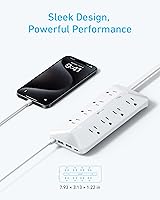
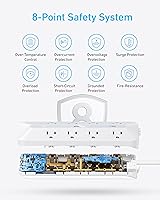
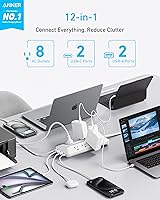
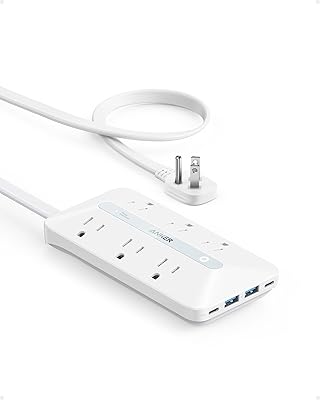
The Anker 12-in-1 Flat Plug USB-C Power Strip is the kind of desk accessory that solves a problem you didn't fully realize was annoying you until it's gone. That problem is the bulky right-angle or straight plug that juts out from the wall, blocking a neighboring outlet or forcing furniture to sit awkwardly far from the baseboard. This strip keeps a low profile in every sense — the plug lies flat against the wall, the body is slim, and the white housing blends into most home or office environments. Backed by TÜV certification and 900J surge protection, it's not just tidy; it's genuinely safe. The 5-foot cord covers most desk and nightstand configurations comfortably.
Features & Benefits

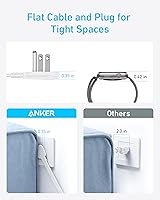
The flat plug design is the headline feature, and it earns that status. Because the plug sits parallel to the wall rather than perpendicular, this Anker charging station tucks neatly behind a desk or nightstand without pushing furniture out or covering a second outlet. The eight AC outlets handle the heavy-duty stuff — monitors, desk lamps, external drives — while the four USB ports take care of everything else. The USB-C1 port delivers up to 20W on its own and handles fast charging impressively well, though it's worth noting that wattage gets distributed when multiple USB ports are active simultaneously. The 100–240V input range is a quiet but practical bonus for anyone who travels internationally.

Best For

This flat plug power strip is a natural fit for home office desks where every outlet counts and cable clutter is the enemy. Students in dorm rooms will appreciate how the flat plug avoids the awkward conflict of a standard strip blocking a shared wall outlet. Remote workers or frequent travelers get extra mileage from the wide voltage support and the fact that it handles both USB-C laptops and older USB-A devices without needing separate adapters. It's also a solid choice for anyone replacing an older, chunkier strip under a standing desk. If your current setup involves a tangle of individual chargers occupying three or four outlets, consolidating into this Anker charging station makes immediate practical sense.

User Feedback

With a 4.8-star average across more than 870 ratings for a product launched in mid-2024, the reception has been notably strong. Most buyers single out the flat plug convenience as the primary reason they chose it and confirm it lives up to the promise. Build quality also gets consistent praise — the housing feels solid, not hollow. On the critical side, some users note that the five-foot cord falls short in larger rooms, and a handful flag that USB charging speeds drop noticeably when several ports are loaded at once, which is expected behavior but worth knowing upfront. Heat during sustained multi-device use is mentioned occasionally, though nothing alarming. Overall, complaints are few and minor relative to the positive response.

Pros

  • The flat plug design eliminates the frustrating gap between furniture and the wall caused by bulky standard plugs.
  • Eight AC outlets is a generous count for a strip this slim, handling a full desk's worth of gear.
  • TÜV certification and 900J surge protection make this a credible choice for protecting valuable equipment.
  • The built-in USB-C and USB-A ports remove the need for several separate wall adapters cluttering up your outlets.
  • A connected equipment guarantee of up to $200,000 backs the surge protection claim with real financial accountability.
  • The wide 100–240V input range on the USB module means this Anker charging station travels internationally without an adapter.
  • At roughly one pound, the strip is light enough to toss in a laptop bag for travel or co-working spaces.
  • The 18-month warranty is a reasonable assurance for an accessory that will run continuously under a desk.
  • Early buyer ratings skew very positively, with most praise focused on build quality and practical design rather than just novelty.
  • The slim white housing fits unobtrusively into home office and bedroom environments without drawing attention.

Cons

  • USB charging speeds drop noticeably when three or four USB ports are used at the same time, which is easy to overlook at purchase.
  • The five-foot cord can fall short in larger rooms or setups where the nearest outlet is far from the desk.
  • USB-C fast charging is limited to the primary port; the secondary USB-C port tops out at 15W, which is easy to mix up.
  • No individual outlet switches mean you cannot cut power to a single device without unplugging it entirely.
  • The strip lacks a built-in cable management solution, so cord tidiness still depends on what you add separately.
  • Some users report mild warmth during extended full-load sessions, which is worth monitoring in enclosed desk setups.
  • There is no USB-C port capable of delivering the higher wattages that larger laptops require for anything faster than trickle charging.
  • The white finish, while clean-looking, shows dust and scuffs more readily than a matte dark alternative would.

Ratings

Our AI rating system analyzed verified global buyer reviews for the Anker 12-in-1 Flat Plug USB-C Power Strip, actively filtering out incentivized, duplicate, and bot-generated submissions to surface what real users consistently experience. The scores below reflect both the genuine strengths that keep this strip near the top of its category and the honest trade-offs that a small but vocal group of buyers has flagged. Nothing here is rounded up to make the product look better than it performs in daily use.

Plug & Cable Design
93%
The flat plug is the single most praised feature across verified reviews, and for good reason — it solves a real frustration that most buyers didn't even realize had a fix. Users consistently note that furniture can now sit flush against the wall, and that the second outlet on a standard wall plate stays free for other use.
A small number of buyers working with unusually tight outlet placements report that even the flat plug can feel snug depending on the surrounding wall trim or baseboard height. The cord itself, while tidy, is not braided or fabric-wrapped, which some users in aesthetically minded home office setups find slightly underwhelming.
Port Variety & Count
91%
Having eight AC outlets alongside two USB-C and two USB-A ports on a single strip genuinely reduces outlet competition at a busy desk. Home office users in particular appreciate not having to choose between plugging in a monitor power brick and keeping a USB-C hub connected at the same time.
The four USB ports share a wattage pool, so if you are simultaneously charging a laptop on USB-C1, a tablet on USB-C2, and two phones on USB-A, each device gets a reduced share. Buyers who did not read the shared-power detail before purchasing occasionally express disappointment when charging slows unexpectedly during heavy multi-port use.
USB-C Charging Speed
78%
22%
For charging a phone or a smaller laptop like a 13-inch MacBook Air, the USB-C1 port performs noticeably well when used on its own, delivering up to 20W with real-world speed that satisfies most light-to-moderate laptop users. Several reviewers specifically mention using it overnight for a MacBook without any complaints about slow top-up times.
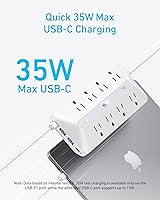
The 20W ceiling on USB-C1 — and only 15W on USB-C2 — is a genuine limitation for anyone charging a larger or more power-hungry laptop who expects speeds closer to what a dedicated 65W or 96W charger delivers. The marketing language around 35W has caused some confusion, as that figure describes a combined peak scenario rather than what a single port reliably outputs.
Surge Protection
89%
The 900-joule surge rating places this strip comfortably above the minimum threshold that most electrical engineers recommend for protecting computers and monitors. The added $200,000 connected equipment guarantee gives buyers a meaningful safety net that goes beyond what most competitors at this price tier offer, and the TÜV certification adds independent credibility to those claims.
Surge protection joule ratings degrade over time with each absorbed spike, and the strip provides no indicator light or alert to tell users when the protection has been exhausted — a limitation shared by many strips in this category but still worth noting for buyers who plan to use it long-term in areas with frequent power fluctuations.
Build Quality
88%
The housing feels solid and consistent in hand, with no creaking or flex when plugging in heavier AC adapters. Verified buyers across multiple markets describe it as noticeably sturdier than similarly priced alternatives they have owned, and the outlet sockets have a firm, reassuring grip on plugs rather than the loose fit some budget strips exhibit.
The white finish, while clean-looking in a modern home office context, accumulates scuffs and light discoloration around frequently used outlet edges after several months of daily use. A handful of buyers mention that the surface attracts fingerprints and desk dust more visibly than a matte dark finish would.
Cord Length
71%
29%
For most standard desk configurations where the outlet is within reasonable reach — roughly a mid-sized home office desk or a dorm room nightstand — the 5-foot cord lands in a comfortable range without excess slack cluttering the floor. Users who set this strip up on a desktop directly adjacent to a wall outlet almost universally find the length adequate.
In larger rooms, open-plan home offices, or any setup where the nearest outlet is across the room or behind a cabinet, 5 feet consistently shows up in reviews as the primary frustration. There is no longer-cord variant currently available, so buyers with bigger spaces need to factor in an extension cord, which somewhat undermines the clean-desk aesthetic the strip is designed to support.
Heat Management
74%
26%
Under moderate daily loads — a monitor, a laptop charger, a desk lamp, and one or two USB devices — the strip stays at a comfortable ambient temperature and draws no attention to itself thermally. Most buyers who use it in open-desk environments report no heat concerns whatsoever over extended periods.
When all four USB ports and several AC outlets are running simultaneously for extended sessions, a subset of buyers notes that the strip becomes noticeably warm to the touch near the USB module. This is not unusual behavior for a multi-port charging hub, but it is worth avoiding enclosed or confined placement when the strip is under heavy load.
Ease of Setup
96%
There is genuinely nothing to configure — plug it in, connect your devices, and the strip works immediately. Buyers who are not technically inclined specifically call out how straightforward the experience is, with no app, pairing process, or mode-switching required for any of the ports.
The only friction some buyers encounter is figuring out which USB-C port is which when trying to optimize for faster charging, since the ports are not labeled in a way that is immediately obvious without referencing the manual or the product page.
Value for Money
86%
Relative to what buyers would spend purchasing a separate surge protector, a standalone USB-C fast charger, and a multi-port USB hub individually, consolidating all of that into this Anker charging station at its mid-range price point represents a clear efficiency gain. Buyers who previously owned cheaper strips without USB ports are especially vocal about feeling the upgrade was worth it.
Budget-focused shoppers can find power strips with a similar AC outlet count at a lower price, and for buyers who have no need for USB charging ports, the value equation becomes less compelling. The premium here is largely for the flat plug design and the USB integration, so buyers who don't specifically need those features may feel they are paying for things they won't use.
Compatibility
87%
The mix of USB-C and USB-A ports means this strip works with virtually every device a typical home or office user owns right now, from newer MacBooks and Android flagships to older accessories that still rely on USB-A cables. The wide 100–240V USB module input extends that compatibility to international contexts as well.
The AC outlets are standard North American Type A/B sockets, so users who need to plug in internationally purchased devices with different plug types will still need a separate adapter for the AC side. Additionally, oversized transformer bricks can physically block one or two neighboring AC outlets on the strip, which reduces the effective outlet count in real-world use.
Aesthetics & Form Factor
83%
The slim profile and clean white finish read as intentionally designed rather than purely functional, which matters to buyers who keep their workspace visible during video calls or care about the overall look of their desk setup. The low-profile body sits unobtrusively on a desk surface or tucks tidily beneath it.
Color options are currently limited to white, which will clash with darker or wood-toned desk setups. The strip also lacks any cable management slots or tie-down points, so the tidiness of the final setup still depends on how organized the user keeps their own cabling.
Brand Reliability
92%
Anker has built a reputation over years of consistent product performance in the charging accessories category, and buyers frequently cite that brand familiarity as a key reason they chose this strip over lesser-known alternatives. The 18-month warranty and responsive customer support history add concrete reassurance beyond just name recognition.
Some longtime Anker customers note that the brand's rapid product expansion means quality control can be more variable than it once was, and the occasional report of a defective unit — while not dominant in the reviews — is a reminder that brand trust alone is not a substitute for checking individual unit quality upon arrival.

Suitable for:

The Anker 12-in-1 Flat Plug USB-C Power Strip was clearly designed with real-world desk setups in mind, and it shows. It's an ideal match for home office workers who are tired of juggling multiple wall adapters and need one strip to handle a monitor, a laptop charger, a desk lamp, and a phone simultaneously. Dorm room residents benefit especially from the flat plug, since shared wall outlets are scarce and a traditional protruding plug often blocks a neighbor's side entirely. Remote workers who carry gear between locations will appreciate having a single, lightweight hub that covers both USB-C and USB-A devices without packing separate chargers. The broad 100–240V input range is a quiet but meaningful advantage for anyone who occasionally works or travels abroad. Anyone who has ever shoved furniture awkwardly away from a baseboard just to accommodate a chunky power strip will immediately understand the value here.
Not suitable for:

The Anker 12-in-1 Flat Plug USB-C Power Strip is a strong all-rounder, but it has real limits that certain buyers should weigh carefully before purchasing. If you need to charge power-hungry USB-C devices like a 15-inch or 16-inch laptop at full speed, the USB output wattage — which caps at 20W on the primary port and drops further when multiple USB ports are active — will disappoint. Users who need more than five feet of reach, such as those working in larger rooms or setting up a TV console away from the nearest outlet, may find the cord length genuinely restrictive. Heavy workshop or garage users who need high-amperage draws from multiple AC outlets at once should look for a strip rated for that kind of sustained load. This strip is also not the right choice if you need more than eight AC outlets, since no USB port can substitute for a grounded three-prong socket when dealing with desktop computers or large monitors with their own bricks.
Specifications

  • Model Number: This power strip is manufactured by Anker under model number A91F4.
  • Total Ports: The unit provides 12 ports in total: 8 grounded AC outlets, 2 USB-C ports, and 2 USB-A ports.
  • Dimensions: The strip body measures 7.93 × 3.13 × 1.22 inches (201.5 × 79.5 × 31 mm), keeping it compact enough for most desk surfaces.
  • Weight: The unit weighs 16.62 oz (471g), light enough to carry in a laptop bag without adding meaningful bulk.
  • Cord Length: The attached power cord measures 5 feet, suitable for most desk, nightstand, and dorm room configurations.
  • AC Rating: The strip is rated at 125V~, 60Hz, 15A, with a maximum total load of 1875W across all AC outlets combined.
  • USB-C Output: USB-C1 delivers up to 20W when used alone, while USB-C2 provides up to 15W; combined USB port wattage is distributed across active ports.
  • USB-A Output: Both USB-A ports share a combined maximum of 12W, which is sufficient for phones and smaller accessories but not for fast-charging laptops.
  • Surge Protection: The strip provides 900 joules of surge protection to guard connected devices against power spikes and voltage fluctuations.
  • Equipment Guarantee: Anker backs the surge protection with a connected equipment guarantee covering up to $200,000 in damages for the product's full service life.
  • Input Voltage: The AC input operates at 125V primary, while the USB charging module supports a wide 100–240V range for international compatibility.
  • Certifications: The strip carries TÜV certification, confirming it has passed independent third-party electrical safety testing.
  • Warranty: Anker includes an 18-month manufacturer warranty covering defects in materials and workmanship from the date of purchase.
  • Plug Design: The plug sits flat and parallel to the wall surface, allowing furniture to sit closer to the baseboard without blocking adjacent outlets.
  • Color: The strip is available in white, with a slim housing designed to blend into home office and bedroom environments.
  • Availability Date: This product was first made available in August 2024, making it a relatively recent addition to Anker's power strip lineup.

Related Reviews
Anker A91F2 10-in-1 Flat Plug Power Strip
82%
96%
Flat Plug Design
91%
Outlet Count & Layout
83%
USB-C Charging Speed
61%
USB-A Charging Speed
88%
Build Quality & Materials
More
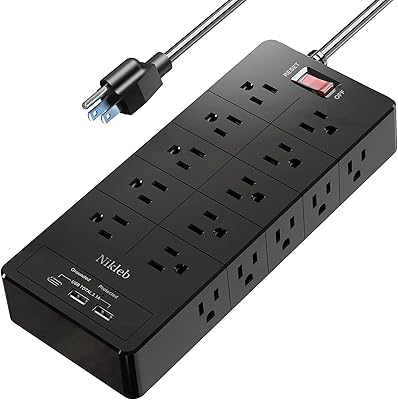
Nikleb Power Strip 23 in 1 with 20 Outlets, 2 USB, 1 USB-C, 6ft Extension Cord
86%
94%
Surge Protection Effectiveness
89%
Usability and Convenience
92%
Build Quality and Durability
87%
Value for Money
93%
Port Availability (Outlets + USB)
More
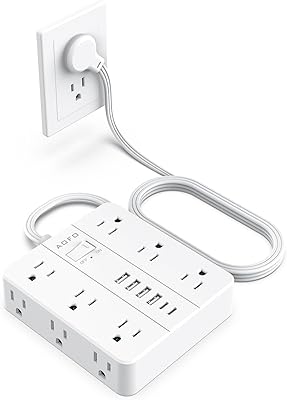
AOFO 12-Outlet Flat Plug Power Strip
81%
93%
Plug Design
88%
Outlet Count & Layout
61%
USB Charging Performance
84%
Surge Protection
78%
Build Quality
More
TenTrend TS3-WT-5 10FT Power Strip Tower
84%
94%
Space Efficiency
97%
Plug Accessibility & Clearance
78%
USB Charging Capabilities
91%
Cord Length & Quality
82%
Stability & Gripping
More
VPSUN Power Strip with USB C 35W, 10-in-1
86%
91%
Charging Performance
88%
Space-saving Design
89%
Safety Features
82%
Build Quality
85%
Port Selection
More
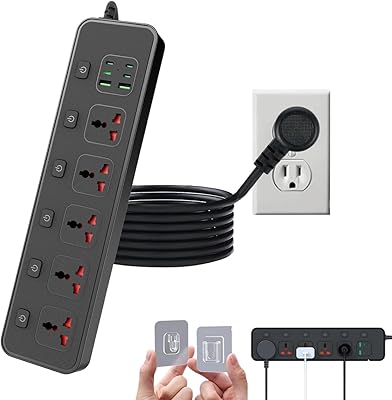
Jumpso 6ft Flat Plug Universal Power Strip
81%
91%
Outlet Design & Spacing
93%
Flat Plug Functionality
88%
International Compatibility
83%
USB-C Port Performance
74%
Build Quality & Materials
More
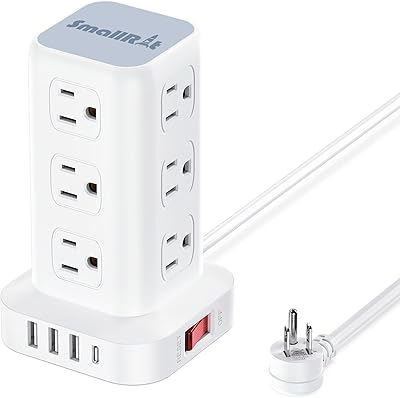
SMALLRT yun-dong-199 Tower Surge Protector
86%
92%
Outlet Spacing & Layout
89%
Space Efficiency
81%
USB Charging Capabilities
94%
Plug & Cord Design
86%
Safety & Surge Protection
More
GEEK FULLY PD-110 13-in-1 Charging Station
81%
88%
Charging Speed
91%
Port Variety & Count
76%
Build Quality
82%
Surge Protection
87%
Cable Length & Quality
More
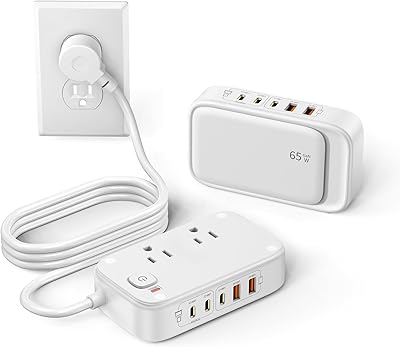
KWRNVO 7-in-1 Power Strip with 65W PD USB-C Charging
86%
92%
Charging Performance
85%
Build Quality
88%
Ease of Use
90%
Portability
84%
Safety Features
More
PLUGTUL Surge Protector Power Strip 10FT 12 Outlets USB-C 20W
87%
93%
Surge Protection Performance
89%
USB-C Charging Speed
88%
Ease of Use
85%
Build Quality
80%
Cord Length & Flexibility
More

FAQ

Yes, but with an important caveat. The USB-C1 port delivers up to 20W on its own, which will charge most MacBook Air models — just more slowly than a dedicated 30W or 67W charger would. If you only have the USB-C1 port active, charging is reasonably quick, but running multiple USB ports simultaneously will reduce the available wattage further. For a MacBook Pro or any larger laptop, think of it as a top-up solution rather than a primary fast charger.

It makes a genuine difference in the right situations. If your furniture sits close to a baseboard outlet, a standard protruding plug forces you to push the furniture out several inches. The flat plug eliminates that entirely, and it also tends to avoid covering the second outlet on a standard dual-socket wall plate. People who have dealt with this annoyance before tend to appreciate the design immediately.

All 8 AC outlets can be used simultaneously, subject to the 1875W total load limit across the strip — so as long as your combined device draw stays under that ceiling, you're fine. The USB ports share their wattage pool, so charging four USB devices at once will result in each getting less power than it would alone. For typical desk setups with a monitor, laptop charger, lamp, and a few USB devices, you won't hit any hard limits.

For a standard desk or nightstand next to a wall outlet, 5 feet is generally comfortable. Where it can feel short is in larger rooms where the nearest outlet is across the room, or in setups where the strip needs to reach from the floor to a desk surface. If you have a specific longer-reach need, you may want to measure your space before buying.

The USB charging module supports 100–240V input, so the USB ports will work internationally with just a plug adapter. However, the AC outlets themselves are standard North American Type A/B sockets, so plugging foreign-plug devices directly into the AC outlets won't work without an additional adapter. It's most useful internationally for its USB ports rather than its AC side.

Some warmth during sustained multi-device use is normal for any power strip, and this one is no exception. A small number of users have noted that it gets mildly warm when fully loaded for extended periods, which is worth keeping in mind if it will live in an enclosed space. Under normal desk conditions with typical device loads, heat has not been flagged as a significant issue in the majority of user reports.

The 8 AC outlets are spaced to accommodate standard plugs, but oversized transformer bricks — the kind that cover two outlets on a standard wall plate — can block adjacent sockets on the strip. This is a common limitation across most power strips at this size. If most of your AC adapters are compact, you should have no issues using all 8 outlets.

TÜV is an independent German testing and certification body that evaluates products for electrical safety, quality, and reliability. When a power strip carries TÜV certification, it means the design and components have been tested by a third party — not just self-certified by the manufacturer. For a device that will run continuously under your desk or behind furniture, that kind of independent verification is a meaningful signal of build quality.

If your current strip is a basic model without USB ports, this is a meaningful upgrade — you gain USB-C and USB-A charging without sacrificing AC outlets, and the surge protection credentials are solid. If your old strip had individual outlet switches or a longer cord, those are features this model doesn't include, so it depends on whether you actively use them.

Anker provides an 18-month warranty from the date of purchase, which covers manufacturing defects. Anker's customer support is generally well-regarded, and the brand has a reputation for handling replacement requests without excessive friction. The $200,000 connected equipment guarantee is a separate protection specifically tied to surge-related damage to devices plugged into the strip, and filing a claim would require documentation of the damage and the surge event.