Overview

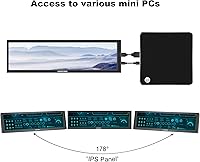
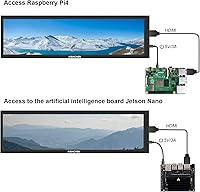
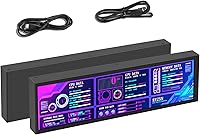
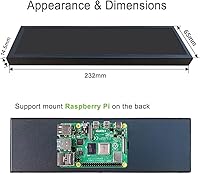
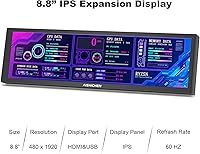
The AISHICHEN 8.8-Inch PC Temperature Display is a compact yet powerful real-time monitor designed for tracking your computer's performance. This touch-screen display provides detailed system stats, including CPU, RAM, and GPU usage, as well as temperature readings. Compatible with Windows, Mac, and Raspberry Pi, this versatile unit can be easily integrated into your setup. Whether placed inside or outside the case, it offers flexibility and convenience for users looking to enhance their monitoring experience. With its clear, vibrant display, it’s a great addition to any tech enthusiast’s workspace.
Features & Benefits

The AISHICHEN monitor offers a variety of features that cater to users looking for customizable PC monitoring. The IPS touch-screen allows for clear visuals from multiple angles, while the resolution of 1920 x 480 ensures sharp detail. The display also supports a broad range of data types, including network speed, date, and time, giving users a complete overview of their system's performance. Adjustability is another key feature, with a brightness range of 300cd-600cd to protect your eyes during long usage sessions. Furthermore, the quick response time and 60Hz refresh rate provide a smooth, lag-free experience.

Best For

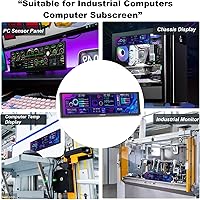
This system monitoring screen is ideal for a range of users. PC enthusiasts and gamers will appreciate its ability to track real-time performance metrics like CPU and GPU usage. It’s also perfect for those who need a secondary display to monitor system health without interrupting their main screen. Users looking for a customizable and user-friendly interface will find the AISHICHEN display an excellent fit. Finally, tech-savvy individuals seeking a compact, reliable diagnostic tool will find this product to be a versatile addition to their setup.

User Feedback

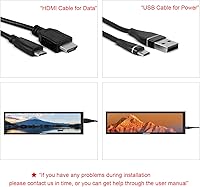
Many users praise the AISHICHEN 8.8-Inch PC Temperature Display for its ease of setup and customizable display options. The included HDMI and power cables make installation straightforward, and the intuitive interface is appreciated by beginners and pros alike. However, some have noted that the absence of a stand can make it difficult to position the screen in certain setups. Despite this, the monitor’s clear visibility and real-time performance tracking have earned it high marks, making it a valuable tool for anyone looking to enhance their PC monitoring capabilities.
Pros

  • The 8.8-inch touch-screen display provides a clear view of system stats in real-time.
  • Customization options allow users to adjust the layout and themes to suit their needs.
  • The display supports a wide range of data types, including CPU, GPU, RAM usage, and temperature.
  • Its compact design makes it versatile enough to be placed inside or outside a computer case.
  • The IPS screen offers great clarity and accurate colors from various angles.
  • Easy setup process, with all necessary cables included for quick installation.
  • Ideal for gamers and PC enthusiasts who need immediate access to system diagnostics.
  • Compatible with Windows, Mac, and Raspberry Pi, making it highly versatile for different systems.

Cons

  • Some users note that the display lacks a built-in stand, limiting its placement options.
  • Brightness range may not be sufficient for use in brightly lit environments.
  • The small size may not be practical for users who require a larger, more detailed display.
  • While customizable, the interface can be a bit complicated for users unfamiliar with tech setups.
  • Not all users find the contrast ratio strong enough for detailed or high-precision monitoring.
  • Lack of touchscreen responsiveness under certain conditions has been reported by a few users.

Ratings

The AISHICHEN 8.8-Inch PC Temperature Display has garnered a wide range of user feedback from verified reviews worldwide, including various languages and platforms. After filtering out any spam, bot-generated, or exaggerated reviews, we’ve gathered a comprehensive set of scores that reflect both the strengths and drawbacks reported by actual users. From setup to display quality, the results show a mixed but generally positive reception for this device, with notable attention paid to its user-friendly interface and customization options.
Display Quality
88%
Users love the crisp, vibrant display that enhances system monitoring. The IPS touch-screen technology ensures vivid colors and great clarity, even from various angles, making it easy to track real-time data at a glance. Many also appreciate the high resolution, which ensures clear, readable stats for users with detailed performance needs.
Some users feel the brightness levels could be more consistent, especially in low-light environments. A few also mentioned that while the display is sharp, it's not as bright as expected in direct sunlight or well-lit rooms, which may affect readability during daytime use.
Ease of Setup
85%
The setup process is straightforward and well-supported by the included HDMI and power cables. Many buyers note that the installation was quick, with no need for complicated software installation. It’s a plug-and-play experience for most, making it convenient for users of all experience levels.
A small number of users mentioned some initial confusion regarding the proper configuration for certain systems, especially when adjusting the resolution for optimal display. The lack of a stand was also pointed out, which adds a bit of complexity when positioning the monitor, especially inside a PC case.
Customization Options
91%
The customizable screen layout is a standout feature. Users are able to create personalized themes or use the built-in options to tailor the display according to their needs. Whether adjusting the layout for performance stats or changing the background, the flexibility provided ensures it meets a wide range of user preferences.
While customization is generally well-received, some users expressed frustration with the limited selection of built-in themes. They felt that more options could make the setup process even easier, and a few noted that creating custom themes via the visual editor required some learning time.
Build Quality
79%
21%
The overall build quality of the monitor is decent, with a lightweight yet sturdy feel. Many users appreciate the compact form factor, which fits well in most setups, whether placed inside a PC case or on a desk. The device’s materials seem durable enough to handle typical wear and tear.
However, some buyers feel that the build could be improved in terms of sturdiness, particularly in the casing. A few mentioned that it feels somewhat flimsy, especially when compared to higher-end monitors. This is especially noticeable for users mounting it inside their cases, where extra durability would be appreciated.
Screen Brightness
84%
The brightness range offers flexibility, making it suitable for different environments. Users found the screen bright enough for indoor settings, and the ability to adjust the brightness helps reduce eye strain over long periods of use, which is highly appreciated for those using it as a secondary display.
While the brightness is suitable for most indoor use, some users mentioned that it struggles in bright rooms or under direct sunlight. A few even noted that the higher brightness levels could cause the display to heat up more than expected, which may be a concern for extended use in hot environments.
Compatibility
90%
One of the major positives is the wide compatibility with different systems. Whether it's Windows, Mac, or Raspberry Pi, users found that the device easily integrates with their existing setups. This cross-platform compatibility ensures that it works seamlessly with a variety of computers and operating systems, offering great flexibility for diverse users.
A few users with older operating systems reported occasional issues with resolution adjustments, which could cause some inconvenience during initial setup. While the device supports a broad range of platforms, users may need to troubleshoot occasionally to achieve optimal settings.
Software Interface
87%
The software interface is intuitive and easy to navigate, making it accessible to both beginners and more advanced users. The user-friendly controls allow for quick adjustments to display settings and real-time monitoring data. The software offers sufficient options to manage system stats and configure the display to suit specific needs.
Some users felt that the software could be more polished, as certain features were a bit more complex than expected. A few also pointed out that updates for the software could improve performance, as there were occasional bugs reported with the display not syncing correctly to the monitoring data.
Real-Time Monitoring Accuracy
92%
The device excels in real-time system monitoring, with users praising its ability to accurately track important stats like CPU, RAM, and GPU usage. Many buyers found the temperature readings and performance stats to be highly reliable, making it a valuable tool for diagnosing and monitoring system health.
There were minor complaints about occasional fluctuations in the readings, especially under heavy load or while running resource-intensive tasks. However, these issues were rare and did not significantly detract from the overall performance monitoring capabilities.
Mounting Flexibility
80%
20%
Users appreciate the flexibility in mounting options, whether it's inside a PC case or placed externally. This versatility is especially beneficial for users who want a clean and organized setup. Many found that it was easy to position the display in different ways depending on their preferences and available space.
However, some noted that the lack of a stand made positioning more challenging, especially for those who prefer a more traditional desk setup. Without a stand, users had to rely on DIY solutions or mounting kits, which added extra time and effort to the installation process.
User-Friendliness
86%
The device's interface is simple to use, with clear instructions provided in the user manual. Many users found it easy to access essential features, and the touch-screen functionality was responsive and intuitive. This ease of use made the AISHICHEN monitor a great choice for both beginners and experienced PC enthusiasts.
Some users reported that while the device is user-friendly, there is a learning curve when it comes to advanced features like theme customization and detailed data tracking. While not difficult, the additional time spent learning these features detracted slightly from the overall ease of use for some customers.
Customer Support
75%
25%
The product comes with a decent level of customer support, with users mentioning that they were able to get help quickly for installation and troubleshooting issues. Some also appreciated the detailed FAQ section available online, which addressed common concerns and setup issues.
However, several users felt that customer support could be more responsive. Some had to wait longer than expected for answers to their inquiries, and a few noted that their issues were not fully resolved, which led to some frustration.
Long-Term Durability
72%
28%
In general, the AISHICHEN monitor holds up well with regular use, with no major complaints regarding its longevity. The screen and touch functionality remain reliable over time, and the device performs consistently for most users, making it a solid addition to any system setup.
A few users expressed concerns about the long-term durability of the product, especially when exposed to high heat environments inside PC cases. Some felt that the build quality could be improved for greater longevity, particularly for those planning to keep the display in use for extended periods.

Suitable for:

The AISHICHEN 8.8-Inch PC Temperature Display is ideal for PC enthusiasts, gamers, and tech users who need real-time performance monitoring. It offers a customizable display layout, making it perfect for anyone who wants to monitor system stats like CPU, RAM, and GPU usage in a visually appealing way. This device is particularly useful for those building or upgrading their systems, or anyone wanting to keep track of temperature and performance metrics. Gamers, for example, can benefit from the display's ability to track real-time data, while PC builders can easily integrate it into their setup, whether inside or outside the case. Its compatibility with Windows, Mac, and Raspberry Pi also makes it a versatile choice for a wide range of users.
Not suitable for:

However, the AISHICHEN 8.8-Inch PC Temperature Display may not be the best fit for users who need a robust, stand-alone display for primary tasks. It lacks a built-in stand, which could be a limitation for those who want to use it as a traditional desktop monitor or for non-technical purposes. Users who expect a high level of brightness in all lighting conditions may find it underwhelming, especially in bright rooms or under direct sunlight. Additionally, while it offers some customization, those looking for a more comprehensive or advanced customization experience may be disappointed by its limited options and the learning curve associated with some features.
Specifications

  • Screen Size: The display measures 8.8 inches diagonally, providing a compact viewing area for system monitoring.
  • Display Type: Features an IPS touch-screen, offering responsive touch control and wide viewing angles.
  • Resolution: The display has a resolution of 1920 x 480, providing clear and detailed system stats.
  • Refresh Rate: Supports a 60Hz refresh rate, ensuring smooth real-time updates of system data.
  • Response Time: The display has a 30-second response time, providing quick updates of system stats.
  • Brightness Range: Adjustable brightness from 300cd to 600cd, allowing for eye-friendly customization.
  • Contrast Ratio: The contrast ratio is 800:1, delivering sharp and clear visuals for various data types.
  • Compatibility: Compatible with Windows, Mac, and Raspberry Pi systems for versatile integration.
  • Data Types: Supports a variety of system data types including CPU, GPU, RAM usage, temperature, network speed, and time.
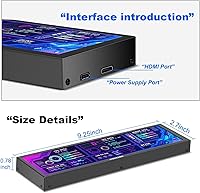
  • Mounting Options: Can be placed inside or outside a computer case, offering flexibility in positioning.
  • Included Accessories: The package includes the display, an HDMI cable, a power cable, and a user manual.
  • Touchscreen Interface: The touch interface enables intuitive control for navigating the display and adjusting settings.
  • Power Supply: Powered via a standard power cable included in the box, providing reliable operation.
  • Dimensions: The compact form factor makes it ideal for small spaces, whether inside or outside a computer case.
  • Mounting Flexibility: Supports flexible mounting for both internal and external setups, accommodating different user preferences.
  • Usage Tracking: Real-time tracking of system performance ensures that users can monitor critical system stats continuously.
  • Software Requirements: No special software required; the monitor connects via HDMI and works immediately with compatible systems.
  • Viewing Angles: The IPS display ensures clear viewing from multiple angles, ideal for shared use or varied workspace setups.
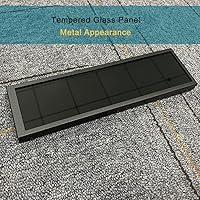
  • Design: The design is sleek and compact, making it easy to integrate into any computer setup without taking up much space.

Related Reviews
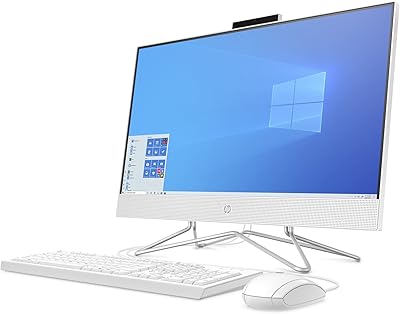
HP All-in-One Desktop PC 24-dp1250, 11th Gen Intel Core i3, 8GB RAM, 512GB SSD, 23.8-inch Full HD Display
85%
89%
Performance
92%
Display Quality
85%
Design & Build Quality
91%
Value for Money
94%
Ease of Setup
More
AHBLQD Motorized Rotating Display Stand 8-inch
85%
88%
Rotation Performance
91%
Build Quality
89%
Value for Money
94%
Quiet Operation
68%
Size Versatility
More
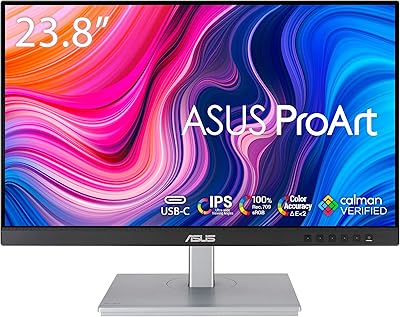
ASUS ProArt Display PA247CV 23.8-inch Monitor
86%
94%
Color Accuracy
89%
Display Quality
91%
Ergonomics and Comfort
87%
Connectivity Options
63%
Brightness in Well-Lit Environments
More
Bosgladek Motorized Rotating Display Stand 11.8-inch 300lbs Load
85%
91%
Ease of Use
88%
Rotation Performance
87%
Build Quality
85%
Noise Level
93%
Load Capacity
More
HP 23.8″ All-in-One Desktop 24-cr0030
85%
94%
Setup Simplicity
91%
Aesthetic Design
86%
Display Quality
82%
System Responsiveness
93%
Privacy & Security
More
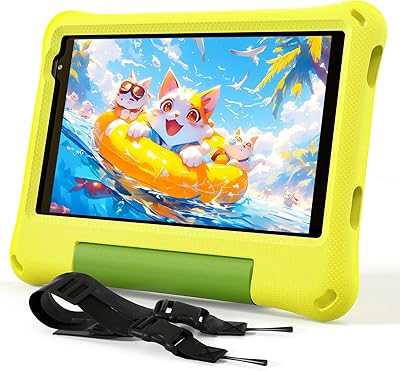
CALLSKY-NOTE Cpad 8 Kids Tablet 8-inch 64GB
87%
91%
Value for Money
88%
Build Quality/Durability
92%
Ease of Setup
89%
Educational App Experience
83%
Screen Quality
More
JERDON Rectangular Tabletop Vanity Mirror - 5-inch x 8-inch with 3X Magnification
85%
88%
Ease of Use
92%
Magnification Quality
85%
Adjustable Tilt Feature
90%
Design & Aesthetic
87%
Portability
More
CT Sounds TROPO-8-D2 8 Inch Car Subwoofer Dual 2 Ohm
84%
88%
Bass Performance
92%
Value for Money
80%
Installation Ease
85%
Sound Clarity
78%
Durability
More
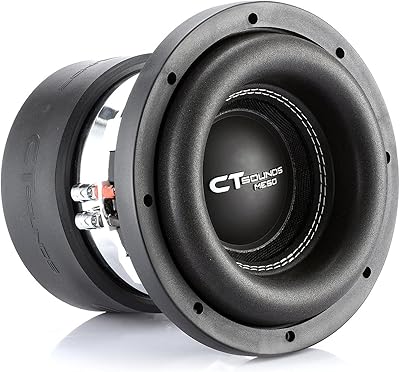
CT Sounds MESO-8-D4 8-Inch Dual 4 Ohm Car Subwoofer
87%
94%
Bass Performance
91%
Build Quality
88%
Sound Clarity at High Volumes
93%
Power Handling
84%
Ease of Integration
More
ALLDOCUBE iPlay 70 mini Ultra 8.8-inch Tablet, 20GB RAM, 256GB Storage
85%
89%
Performance
92%
Battery Life
85%
Display Quality
91%
Portability
87%
Gaming Experience
More

FAQ

This is a small, touch-screen display designed to monitor your PC's real-time stats like CPU, RAM, and GPU usage. It can show other information such as temperature, network speed, and time. You can customize its layout and use it inside or outside your computer case.

Setting up the display is straightforward. Simply connect it to your PC using the included HDMI and power cables. Once connected, the monitor will show the system stats. The touch interface makes it easy to navigate through settings and customize the layout.

Yes, the display is compatible with Windows, Mac, and Raspberry Pi systems. This makes it versatile and useful for a variety of setups, whether you're gaming, working, or tinkering with your PC.

Yes, the monitor is designed to be placed both inside and outside a computer case. It’s compact and portable, so you can easily mount it on your desk or on a stand, depending on your preference.

The display has a customizable layout with built-in themes that allow you to tailor the monitor's appearance to fit your needs. You can change the data shown on the screen, adjusting it to monitor specific system stats like CPU temperature, network speed, and more.

The display offers a brightness range of 300cd to 600cd, which helps to prevent eye strain, especially when used for extended periods. You can adjust the brightness to suit different lighting conditions, whether in a dimly lit room or a brightly lit environment.

Yes, this display has a 30-second response time and a 60Hz refresh rate, which ensures smooth, real-time updates of system statistics. It’s especially useful for monitoring your system's performance while gaming or during heavy workloads.

No special software or drivers are required to use this display. It works with standard HDMI and USB connections, so once connected to your PC, it should automatically display system stats. You can then adjust settings through the touch screen interface.

Some users have pointed out that the monitor does not include a stand, which may limit its placement flexibility. Additionally, while the display is clear, the small size may not be ideal for those who prefer larger screens for monitoring multiple system metrics at once.

This display is perfect for PC enthusiasts, gamers, and tech users who want a compact, customizable monitor to keep track of their system’s performance. It’s especially useful for those looking for a secondary display to monitor real-time stats without taking up much space.