Overview

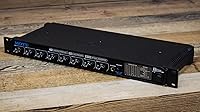
The MOTU 8pre Firewire Audio Interface is a compact yet powerful solution for those seeking to expand their studio capabilities. With 8 mic preamps and 16 inputs, it offers impressive routing flexibility for a variety of recording setups. This Firewire interface is designed to be fully compatible with both Windows and macOS, making it a versatile choice for different platforms. Whether you're working in a small home studio or a mid-sized setup, this device fits comfortably into your workflow, providing the essential tools for professional-quality recordings.
Features & Benefits

This audio interface is equipped with 24-bit, 96 kHz converters that ensure high-quality sound, capturing every nuance of your recordings. Each of its 8 mic preamps comes with individually switchable 48-volt phantom power, offering great flexibility for different setups. For users who need to monitor live or recorded audio with minimal delay, the CueMix DSP offers near-zero latency, making it ideal for professional-grade performances. The front-panel input trims provide quick adjustments, ensuring easy control over input levels during recording or mixing sessions.

Best For

The MOTU 8pre is perfect for musicians and producers who require a lot of mic preamps in their setup. Its 16 inputs and 12 outputs provide plenty of connectivity options, making it a solid choice for small studios or personal workspaces. Audio engineers will appreciate the low-latency monitoring capabilities, especially when working with multiple instruments or microphones. It's also a reliable interface for live recording setups, providing the stability and flexibility that professionals need to handle a range of performance environments.

User Feedback

Users consistently praise this Firewire interface for its easy setup and solid performance, even with complex routing. Many appreciate the multiple input options, which allow for clean sound with minimal noise. However, some users have noted that newer computers with limited Firewire support can present compatibility issues. Despite this, feedback is overwhelmingly positive when it comes to the quality of the preamps and DSP monitoring, with many highlighting how well the device handles live recordings and multi-mic setups.

Pros

  • This audio interface offers excellent sound quality with 24-bit, 96 kHz converters.
  • The eight mic preamps make it an ideal choice for small to medium-sized studios.
  • Users appreciate the ease of setup and reliable performance, even in live recording scenarios.
  • CueMix DSP provides near-zero latency monitoring, which is crucial for real-time audio work.
  • Its compatibility with both Windows and macOS ensures flexibility for a wide range of setups.
  • The front-panel input trims allow for quick and precise control of input levels.

Cons

  • The Firewire connectivity may be limiting for those with newer computers lacking Firewire ports.
  • Some users have found that the interface feels a bit fragile under heavy use.
  • Despite offering 16 inputs and 12 outputs, it's not suitable for very large recording setups.
  • No direct support for USB or Thunderbolt connections, which might be a dealbreaker for some users.
  • The compact design, while convenient, may not be ideal for heavy touring or on-the-go use.
  • A few users reported issues with compatibility on newer operating system versions.

Ratings

The MOTU 8pre Firewire Audio Interface has received widespread feedback from users across multiple languages and platforms. After analyzing verified, high-quality reviews, we've compiled the aggregated scores, considering both strengths and user-reported pain points. The reviews reflect the device's solid performance in home and studio environments, although some users have highlighted Firewire compatibility issues with newer computers. The scores presented here account for real experiences and genuine opinions from users worldwide, filtered to exclude spam, duplicates, and exaggerated claims.
Sound Quality
92%
Many users praise the high-definition sound clarity and depth offered by this device. The 24-bit, 96 kHz converters ensure professional-level audio output, making it ideal for both recording and mixing. Musicians and producers frequently comment on the clean, accurate representation of instruments and vocals.
A few users have noted that, while the sound quality is excellent, it can occasionally be affected by external interference in noisy environments. Some report needing extra precautions with grounding for optimal performance, especially in certain studio setups.
Build Quality
88%
This audio interface is built to last, with a sturdy and compact design that fits perfectly in most desktop setups. Users appreciate the solid construction, especially considering its portable nature. The interface feels robust and capable of withstanding regular use in both studio and live environments.
Despite its solid build, a few users have reported that the front-panel knobs feel a bit fragile. Some have expressed concerns about potential wear and tear with frequent adjustments over time, though this doesn't seem to be a widespread issue.
Compatibility with Windows and macOS
90%
A standout feature of this interface is its seamless compatibility with both Windows and macOS systems. Users report a smooth installation process and stable performance across both platforms. The versatile connectivity makes it a great choice for users switching between different operating systems.
While most users have had positive experiences, a small number report occasional driver-related issues when using newer OS versions. Some users on macOS have experienced minor stability issues after system updates, though these seem to be resolved with regular driver updates.
Ease of Setup
94%
Setup is praised for being incredibly easy, with most users reporting that the interface worked right out of the box. Many appreciate the simple plug-and-play functionality, which is ideal for both beginners and professionals who need quick, reliable results. The user-friendly design ensures hassle-free configuration.
While the setup process is generally straightforward, a few users noted that some of the bundled software could have clearer installation instructions. A small subset of users encountered difficulties getting the software to recognize the device on initial setup, but these were usually resolved by restarting or reinstalling the drivers.
Latency and DSP Monitoring
87%
Users consistently highlight the near-zero latency provided by CueMix DSP, which is essential for real-time monitoring during recording. This low-latency performance is particularly valued by musicians and audio engineers who require precise synchronization. The flexible routing options are also seen as a significant benefit for studio setups.
Some users have reported that the DSP monitoring occasionally has slight delays when used with certain DAWs or after prolonged use. A few have mentioned that while latency is low, there are occasional hiccups during intensive, multi-track sessions, requiring adjustments to buffer settings.
Input and Output Options
89%
The 16 inputs and 12 outputs provide ample routing flexibility, which is ideal for larger recording setups. Users who require multiple microphones or instruments at once appreciate the versatility this interface offers. The ability to handle both line-level and mic-level sources adds extra flexibility.
Some users noted that the Firewire connectivity could be a limitation for those with newer computers that lack Firewire ports. Additionally, while the interface offers a good number of inputs and outputs, those with even larger setups may find the interface somewhat limiting in terms of simultaneous connections.
Software and Driver Support
82%
18%
The bundled software suite is a strong addition for users who need professional-grade tools for mixing and recording. Many users have praised the intuitive design and functionality of the software, which enhances the overall user experience. The drivers also perform well on most systems.
However, there are occasional complaints about the software being difficult to configure in certain environments. Some users report that certain features in the software do not work as expected on specific operating systems, requiring additional troubleshooting or updates. A few have also mentioned the lack of some advanced features found in competing interfaces.
Price/Value for Money
85%
Given its performance and build quality, many users find this interface to be a great value for money. It offers excellent sound quality, multiple inputs, and low latency at a competitive price point. For home studio owners and professionals alike, it’s a cost-effective solution that doesn’t skimp on features.
Some users feel that the price could be lower, especially considering the Firewire connectivity may limit compatibility with newer devices. While the interface offers great features, a few have suggested that other USB-based interfaces at a similar price point may offer more up-to-date technology.
Firewire Connectivity
70%
30%
Firewire provides stable and reliable data transfer, which ensures consistent performance during sessions. For users with systems that support Firewire, the connection is highly dependable, offering fast data throughput with minimal interruptions during recording.
However, the Firewire connection is becoming outdated, with fewer newer computers supporting it. Some users have found that their newer laptops and desktops require additional adapters, which can be cumbersome. This limits the device’s future-proof appeal, especially as USB and Thunderbolt interfaces dominate the market.
Portability and Size
80%
20%
The compact design makes this interface easy to fit into smaller studios or mobile setups. It’s light enough for musicians and producers who need a portable solution for live performances or on-the-go recording sessions. The sleek design doesn't take up much space, making it a great option for tight workspaces.
While the compact size is an advantage, some users feel that the device could benefit from additional sturdiness for long-term durability in touring or heavy-duty use. A few have expressed concerns about the interface being slightly too light, which can lead to it feeling flimsy when traveling or during constant adjustments.
User Interface and Controls
91%
The intuitive front-panel controls, including the easily accessible input trims, allow for quick adjustments without fumbling through menus. Many users appreciate how responsive and easy-to-use the interface is during recording and mixing. The design makes it clear and simple to get the settings just right.
While the controls are easy to use, a small group of users feels that the lack of physical buttons for some settings makes it harder to make adjustments in fast-paced environments. Some also mention that they would have preferred more on-screen feedback directly on the interface, especially in live situations.
Customer Support
75%
25%
Many users find the customer support to be responsive, offering helpful troubleshooting advice and resolving issues quickly. When problems arise, the support team is willing to provide clear guidance, especially with setup or installation concerns.
However, there are some complaints about slow response times and occasional difficulties in reaching the support team. A few users also mentioned that the support didn’t always provide effective solutions to more complex technical issues, requiring them to search for third-party help.

Suitable for:

The MOTU 8pre Firewire Audio Interface is an excellent choice for musicians, producers, and audio engineers who require high-quality sound and versatile routing options. Its eight mic preamps make it a solid option for home studios and small to medium-sized setups, where multiple inputs are often needed. The interface's low-latency performance, driven by CueMix DSP, is ideal for real-time recording and monitoring, making it well-suited for live recording scenarios. Its compatibility with both Windows and macOS systems ensures it can seamlessly integrate into various workflows, whether you're a beginner or an experienced professional. If you're someone who values ease of setup, a compact design, and reliable performance, this audio interface will fit well into your studio or mobile setup.

Not suitable for:

However, the MOTU 8pre Firewire Audio Interface may not be the best fit for those with newer computers that lack Firewire connectivity. The interface's reliance on Firewire can cause compatibility issues for users with modern laptops or desktops, requiring additional adapters or workarounds. Additionally, while it offers 16 inputs and 12 outputs, users with larger recording setups or those needing more simultaneous channels may find this product somewhat limiting. Some users have also noted that, despite the solid build, the interface can feel a bit fragile under heavy use, which might not be ideal for those looking for a more rugged, touring-ready solution. If you're seeking an interface with cutting-edge connectivity like USB-C or Thunderbolt, this might not meet your needs.
Specifications

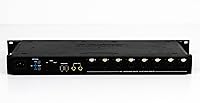
  • Inputs: 16 total inputs, including 8 microphone preamps and 8 line-level sources.
  • Outputs: 12 outputs, providing flexibility for routing audio to various devices.
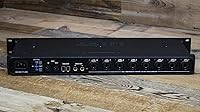
  • Mic Preamps: 8 mic preamps with individually switchable 48-volt phantom power for each channel.
  • Firewire Connectivity: Connects via Firewire for fast, reliable data transfer to compatible computers.
  • Audio Quality: Supports 24-bit, 96 kHz converters for high-resolution, professional-grade audio.
  • CueMix DSP: Provides near-zero latency monitoring through CueMix DSP for real-time audio processing.
  • Front Panel Trims: Front-panel input trims allow easy adjustment of individual input levels.
  • Phantom Power: Switchable 48-volt phantom power for all mic preamps, ideal for condenser microphones.
  • Compatibility: Compatible with both macOS and Windows systems for versatile use in various setups.
  • Form Factor: Compact desktop design, making it suitable for space-constrained environments like home studios.
  • Bus Power: Powered through Firewire, eliminating the need for an additional power supply in most cases.
  • Latency Monitoring: Low-latency performance ideal for live recording, ensuring no noticeable delays in audio output.
  • Software Support: Supports most major DAWs, including Pro Tools, Logic, Ableton Live, and others.
  • Durability: Constructed for reliable use in studio environments, though it may not be as rugged for heavy touring.
  • Size: Compact size (1U rackmountable), suitable for both desktop and small studio rack setups.
  • Line-Level Inputs: Supports multiple line-level inputs for additional devices like keyboards or external effects.
  • Windows Drivers: Includes dedicated drivers for Windows to ensure seamless integration with PCs.
  • Mac Drivers: Includes dedicated drivers for macOS, ensuring smooth operation on Apple systems.

FAQ

This audio interface is compact yet powerful, offering 8 mic preamps and 16 inputs, making it perfect for small to medium-sized studios. Its flexible routing options and easy setup make it a great choice for musicians and producers looking to expand their recording capabilities.

Setting up this device is straightforward. Simply connect it via Firewire to your computer, install the required drivers for either macOS or Windows, and configure it within your DAW. The interface will automatically be recognized once the software installation is complete.

The MOTU 8pre features 8 mic preamps with individually switchable 48-volt phantom power, 16 inputs, and 12 outputs. It supports 24-bit, 96 kHz converters for high-quality sound, and includes CueMix DSP for near-zero latency monitoring, which is essential for real-time performance.

Unfortunately, this audio interface relies on Firewire connectivity, which could pose compatibility issues with newer computers lacking Firewire ports. You may need a Firewire-to-USB or Firewire-to-Thunderbolt adapter, but performance may vary.

CueMix DSP enables near-zero latency monitoring, which is critical for live recording and studio environments. It allows for direct monitoring of your audio without delays, ensuring a smooth recording experience even with multiple channels running simultaneously.

Yes, this device is fully compatible with both macOS and Windows operating systems, making it versatile for different studio setups. You just need to download the corresponding drivers from the MOTU website for your OS.

While the interface is designed for consistent, reliable use in small to medium studios, some users have noted that its build feels somewhat lightweight. For professional, high-demand environments, you might want to be cautious with handling, especially on the road.

This audio interface offers 8 mic preamps, which is ideal for smaller setups. If you need more mic inputs for larger bands or studio setups, you might want to explore interfaces with more than 8 preamps. However, the 8pre provides excellent quality and flexibility for most home studios and live recording environments.

Yes, this interface is well-suited for live recording setups. Its multiple inputs, clean sound, and low-latency monitoring with CueMix DSP make it a great choice for musicians performing live or recording in real-time.

Some users have mentioned compatibility issues with newer Firewire ports on certain computers, and occasional driver conflicts with newer macOS versions. However, most users praise the interface for its reliability and ease of use once set up.