

Overview

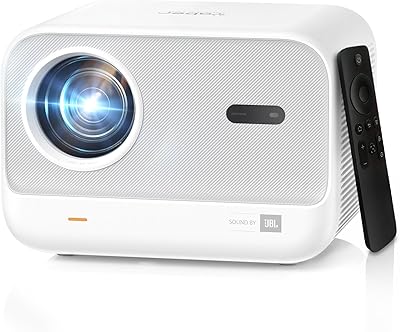
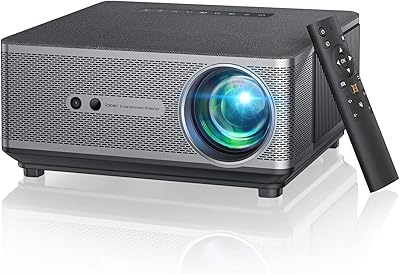
The Yaber L2 Plus 1080P Smart Projector enters a crowded mid-range market with one genuinely useful advantage: you don't need a Roku stick, Fire TV, or any external dongle to start streaming. It carries an officially licensed Netflix integration — something surprisingly rare among projectors at this price tier — alongside YouTube, Prime Video, Hulu, and Disney+ all baked in. Yaber also partnered with JBL for the audio, which at least signals they weren't cutting corners on sound. It's not a mini projector — at 5.4 pounds it has real presence on a shelf — but compact enough to move room to room. Home theater beginners, outdoor movie fans, and casual gamers are squarely in its wheelhouse.

Features & Benefits

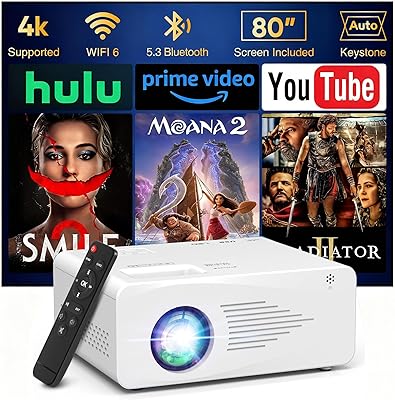
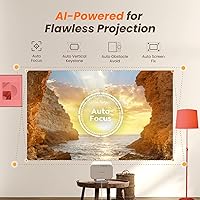
The L2 Plus runs at native 1080P — crisp and detailed for its class. It does accept 4K input and downscales it, but to be clear: this is not a true 4K projector, and buyers expecting otherwise will be let down. Where it really earns points is the auto focus and keystone system: point it roughly at a wall and it sorts itself out in seconds, no menu-diving required. WiFi 6 dual-band connectivity means buffering is largely a non-issue when using native apps. The JBL speakers deliver noticeably better sound than the tinny built-ins found on cheaper units, though dedicated audiophiles will still want an external soundbar. Mounting options — desktop, tripod, or ceiling — add real flexibility.

Best For

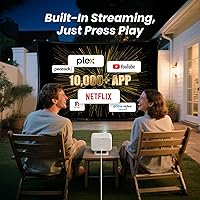
This home projector is a natural fit for renters who want a big-screen experience without drilling anything into a wall. It works well for backyard movie nights too — just know you'll need a power cable or portable power station since there's no battery included. Families rotating between streaming and gaming will appreciate the flexibility, especially since the wide projection range suits everything from tight bedrooms to open living rooms. It's also well-matched for anyone who dreads complicated AV setups, since the auto-correction features handle most of the calibration work. Those who enjoy manually fine-tuning picture settings, however, may find the options here a bit limited.

User Feedback

Owners consistently praise how quickly they got the L2 Plus running — the auto setup features seem to work as advertised, which isn't always guaranteed at this price point. Native app performance, including Netflix, draws positive reactions with no login workarounds required. On the less favorable side, brightness in lit rooms is a recurring complaint; 460 ISO lumens performs well in a dark space but fades against ambient light. A handful of users note that phone screen mirroring compresses the image noticeably versus using the native apps directly. Speaker quality generally exceeds expectations for this category, though a few outdoor users wished for a bit more volume in open-air settings.

Pros

  • Officially licensed Netflix runs natively — no login workarounds or external sticks required.
  • Auto focus and keystone correction handle image alignment in seconds with minimal user input.
  • WiFi 6 dual-band connectivity keeps streaming smooth and largely buffer-free on native apps.
  • JBL speakers sound noticeably better than the built-ins on most projectors in this price range.
  • Supports desktop, tripod, and ceiling mounting, giving real flexibility across different spaces.
  • The built-in app ecosystem covers Netflix, YouTube, Prime Video, Hulu, and Disney+ out of the box.
  • Tilt-adjustable base means usable projection angles even from low furniture positions.
  • HDMI ARC support allows connection to compatible soundbars without a separate audio cable.
  • At 5.4 pounds, the L2 Plus is portable enough to move between rooms or take to a backyard setup.

Cons

  • Native display is 1080P only — 4K input is downscaled, not rendered in true 4K resolution.
  • Brightness struggles in lit rooms; best results require a reasonably dark environment.
  • No built-in battery means outdoor use always depends on a nearby power source or power station.
  • Third-party app installation is restricted, limiting flexibility beyond the pre-loaded streaming options.
  • Mobile screen mirroring compresses the image noticeably compared to using native apps directly.
  • At 5.4 pounds and roughly 8 inches across, it is bulkier than compact or pico projector alternatives.
  • Speaker output can feel underpowered in open-air outdoor settings where sound disperses quickly.
  • Wi-Fi stability has occasional inconsistencies reported by users further from their router.

Ratings

Our AI scoring engine analyzed verified global buyer reviews for the Yaber L2 Plus 1080P Smart Projector, actively filtering out incentivized, bot-generated, and duplicate submissions to surface only genuine user sentiment. The scores below reflect a transparent look at where this smart projector genuinely delivers and where real buyers have run into frustration. Both the strengths and the trade-offs are represented honestly across every category.

Ease of Setup
93%
Auto focus, keystone correction, and obstacle avoidance work together in a way that genuinely impressed first-time projector buyers — most report being up and watching within five minutes of unboxing. Users setting it up in a bedroom or living room repeatedly praised not having to fiddle with manual adjustments.
A small number of users noted that the auto-keystone occasionally needed a manual override when the projector was placed at steeper angles beyond the recommended range, requiring a quick settings tweak to get the image fully squared.
Picture Quality
78%
22%
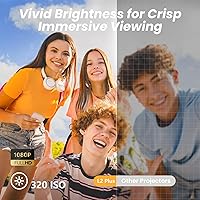
In a properly darkened room, the native 1080P image is sharp and detailed enough to satisfy most casual home theater viewers watching movies or streaming shows on a large wall surface. Colors are described as vibrant rather than washed out, which is a step above many competing units at this price tier.
The 4K support is a downscaling feature, not true 4K output, which disappointed buyers who assumed otherwise. Sharpness-focused users comparing it to a 4K TV will find the image softer than expected, particularly in high-contrast action sequences.
Brightness Performance
61%
39%
In a dark or dim environment — a blacked-out bedroom, a basement setup, or an evening backyard screening — the image looks punchy and watchable. Users running late-night movie sessions consistently gave the picture positive marks when ambient light was controlled.
Daylight or bright-room use is where this home projector consistently draws criticism. Even moderate room lighting causes the image to fade significantly, and multiple reviewers noted that afternoon sunlight effectively renders it unwatchable without blackout curtains.
Built-in Streaming Apps
89%
Having a genuinely licensed Netflix app — not a browser workaround — is the single feature that separates the L2 Plus from a crowded field. Buyers who previously dealt with sideloaded or unauthorized Netflix installs on other projectors were noticeably relieved, and the addition of YouTube, Prime Video, Hulu, and Disney+ covers the vast majority of daily streaming needs.
The app ecosystem has real limits beyond the pre-installed titles. Users who rely on niche or regional streaming services found the built-in app store lacking, and some apps available elsewhere simply are not accessible on this platform.
Audio Quality
74%
26%
The JBL-branded dual speakers deliver noticeably cleaner, fuller sound than the generic built-ins found on similarly priced projectors — dialogue clarity in movies is a consistent highlight, and casual listeners find the volume more than adequate for indoor rooms up to medium size.
Outdoors or in larger open spaces, the speakers lose presence quickly. Audiophiles and anyone hosting a proper movie night with a crowd will likely want to pair an external Bluetooth speaker or soundbar, as the built-in audio reaches its ceiling in those contexts.
WiFi & Connectivity
82%
18%
WiFi 6 dual-band support is a meaningful upgrade from the older single-band WiFi found in competing projectors — streaming on native apps runs smoothly, and users on 5GHz networks report virtually no buffering during HD playback, even with other devices on the same network.
A recurring complaint involves users placed further from their router or separated by dense walls, where the connection becomes inconsistent. The projector also lacks an ethernet port, which would have been a practical failsafe for users in tricky WiFi environments.
Screen Mirroring
63%
37%
Mirroring works reliably for basic use cases — presentations, casual browsing, or showing photos — and the WiFi 6 connection keeps the lag minimal for users on a strong local network. iOS mirroring via AirPlay is generally plug-and-play once both devices share the same network.
Video mirroring quality noticeably degrades compared to using native apps, with compression artifacts visible during fast-moving content. Several Android users also reported occasional drops mid-session, making it less reliable as a primary streaming method.
Build & Design
76%
24%
The chassis feels solid and well-assembled for the price — users do not report creaking or flimsy plastic. The tilt-adjustable base is a practical design touch that lets you angle the image upward from a low coffee table position without propping the unit on books.
At 5.4 pounds and roughly 8 inches wide, it is bulkier than buyers expecting a compact portable unit. Some users noted the design prioritizes function over portability, making it better suited as a semi-permanent room fixture than a truly grab-and-go device.
Mounting Flexibility
81%
19%
Support for desktop, tripod, and ceiling mounting gives this smart projector genuine versatility across different living situations. Renters especially appreciate the tripod compatibility, which avoids any wall drilling while still achieving a clean, stable setup.
Ceiling installation requires removing the base stand first, and a compatible ceiling bracket is not included in the box — buyers need to source that separately. First-time ceiling installers reported a moderate learning curve without clear in-box instructions.
Outdoor Usability
58%
42%
Evening outdoor screenings in a backyard or on a patio get consistently positive feedback when the setup is properly planned. The image size flexibility up to 150″ and the wide range of mounting options make it adaptable to many outdoor environments.
The complete absence of a built-in battery is the single biggest outdoor limitation — every use case requires a power cable or portable power station, which adds cost and logistical planning. Buyers who assumed wireless outdoor use was possible out of the box were frequently caught off guard.
App Ecosystem Depth
67%
33%
For the majority of mainstream streamers, the pre-loaded lineup of major apps covers daily needs without requiring any workarounds. Users who only use Netflix, YouTube, and Prime Video regularly described the experience as essentially TV-like in convenience.
The built-in app store is limited, and several popular international or niche platforms are absent with no clear path to installation. Users who regularly use services beyond the pre-installed set may find the ecosystem frustrating over time.
Value for Money
84%
Buyers consistently reference the licensed Netflix integration and JBL audio partnership as features that justify the price over generic alternatives with similar specs on paper. The overall package — smart OS, auto-correction, WiFi 6 — compares favorably to what competitors charge for less.
Users who primarily want 4K picture quality or outdoor battery-powered use may feel the value proposition weakens once those limitations are factored in. For those specific needs, spending more on a purpose-built alternative makes more practical sense.
Remote & Interface
72%
28%
The Smart TV OS interface is clean and familiar enough that users with any smart TV experience navigate it intuitively from day one. The remote covers the essentials and the focus adjustment shortcut is frequently called out as a convenient touch.
A few users described the remote as feeling lightweight and plasticky relative to the overall product quality. Voice control and smart home integration features are also absent, which stands out as a gap against TV-based competitors at a similar price.
Gaming Performance
69%
31%
Casual gaming sessions — sports titles, party games, or retro content via HDMI — are described as enjoyable at this screen size, and the large projected image adds genuine fun to couch co-op gaming. Users gaming via HDMI input report acceptable latency for non-competitive play.
Input lag is not low enough for fast-paced competitive gaming, and hardcore gamers accustomed to dedicated gaming monitors will notice the difference immediately. There is no dedicated game mode listed, so latency-sensitive titles should be tested before committing.

Suitable for:

The Yaber L2 Plus 1080P Smart Projector is a strong match for renters and apartment dwellers who want a large-screen experience without committing to a wall-mounted TV. If your living situation changes frequently, being able to pack this up and set it somewhere new in minutes is a genuine practical advantage. Families who rotate between movie nights, casual gaming, and weekend backyard screenings will find the built-in app lineup covers most bases without needing extra hardware. It also makes a lot of sense for anyone who has been burned by clunky projector setups before — the auto focus and keystone correction handle the fiddly alignment work automatically, so you spend less time troubleshooting and more time watching. First-time projector buyers who find AV jargon overwhelming will appreciate that this one is largely point-and-play.

Not suitable for:

The Yaber L2 Plus 1080P Smart Projector is not the right call for buyers expecting true 4K output — it accepts 4K source signals but displays everything at native 1080P, which is an important distinction if picture sharpness is your top priority. Anyone planning to use it outdoors in daylight or in a bright living room should also temper expectations; the brightness level performs well in dark environments but noticeably washes out with ambient light competing against it. This home projector lacks a built-in battery entirely, so truly off-grid outdoor use requires hauling a portable power station along — a real logistical consideration for campers or tailgaters. Audiophiles who take sound seriously will likely still want an external speaker setup, as the built-in JBL speakers are solid for casual viewing but not a substitute for a proper sound system. Finally, users who want deep manual control over picture calibration may find the settings options here fairly limited compared to higher-end alternatives.

Specifications

  • Native Resolution: The projector displays at 1920x1080 (Full HD 1080P) natively across all content sources.
  • 4K Support: 4K input signals are accepted and downscaled to native 1080P for playback — this is not a true 4K display.
  • Brightness: Rated at 460 ISO lumens, which performs well in dark or dim rooms but noticeably fades in bright ambient light.
  • Projection Size: Supports image sizes ranging from 40″ to 150″ depending on throw distance and room setup.
  • Speakers: Equipped with two 8W JBL-branded drivers with Dolby Audio support for stereo playback.
  • Connectivity: Supports WiFi 6 on both 2.4GHz and 5GHz bands, plus Bluetooth for wireless audio output or speaker pairing.
  • Ports: Includes HDMI (ARC-compatible), USB, and a 3.5mm audio output for wired peripheral connections.
  • Smart OS: Runs a Smart TV OS with officially licensed Netflix, YouTube, Prime Video, Hulu, and Disney+ pre-installed.
  • Auto Correction: Features automatic focus, keystone correction, screen alignment, and obstacle avoidance for hands-free image calibration.
  • Tilt Range: The adjustable base tilts up to 20°, with auto-focus and keystone optimized for angles within ±15°.
  • Mount Options: Compatible with desktop placement, standard tripod mounting, and ceiling installation via screw mount (base must be removed for ceiling use).
  • Zoom: Supports up to 50% zoom adjustment for fine-tuning image size without physically repositioning the unit.
  • Dimensions: The unit measures 8″ long by 7.24″ wide by 8.93″ tall — compact but not a pocket-sized mini projector.
  • Weight: Weighs 5.4 pounds, making it portable enough to move between rooms or transport for outdoor use.
  • Power Source: Requires a wired power connection; there is no built-in battery, so a power outlet or portable power station is needed for all use cases.
  • Wireless Mirroring: Supports screen mirroring from iOS and Android devices over WiFi, though mirrored streams may compress compared to native app playback.
  • HDMI ARC: The HDMI port supports ARC, allowing compatible soundbars or AV receivers to be connected and controlled through a single cable.
  • Model Number: Official model designation is L2 Plus, manufactured by Yaber Projector (ASIN: B0FB3HY2Y6).

Related Reviews
Boldever BE-BD001SX Mini Projector
78%
83%
Image Clarity
64%
Brightness & Room Performance
89%
Autofocus & Setup Speed
78%
Smart Platform & App Access
91%
Portability & Form Factor
More
Haqdl HA03 1080P Smart Projector
85%
91%
Value for Money
87%
Image Quality
92%
Wireless Connectivity
88%
Portability
89%
Setup & Installation
More
UVISION AllPlay Smart Projector 1080p
83%
89%
Portability
91%
Ease of Setup
87%
Visual Quality
82%
Sound Quality
93%
Streaming Compatibility
More
YABER Pro V9 Native 1080P Projector
78%
83%
Image Clarity
89%
Auto Setup & Keystone Correction
61%
Brightness & Ambient Light Performance
74%
WiFi Connectivity
71%
Bluetooth Audio
More
JMGO PicoPlay 1080P Smart Portable Projector
85%
88%
Image Quality
94%
Portability
65%
Audio Quality
78%
Battery Life
91%
Ease of Setup
More
Futuzen 1080P Smart Projector with WiFi6 and Bluetooth
83%
89%
Value for Money
85%
Image Quality
93%
Ease of Setup
80%
Portability
86%
Bluetooth Audio Functionality
More
WEMI LumeCube 300 Smart Mini Projector
72%
78%
Image Clarity
54%
Brightness
87%
Setup Experience
91%
Portability
73%
Smart Features & Apps
More
Yaber L2S 1080P Projector with WiFi 6 and Bluetooth
85%
88%
Image Quality
85%
Sound Quality
92%
Setup & Installation
90%
Portability
91%
Connectivity (WiFi & Bluetooth)
More
YABER K1 Projector
YABER K1 Projector
84%
88%
Image Quality
91%
Ease of Setup
85%
Portability
75%
Sound Quality
82%
Wireless Connectivity
More
GKLPO 1080P Projector
86%
88%
Image Quality
92%
Wi-Fi Connectivity
89%
Bluetooth Connectivity
90%
Portability
85%
Setup & Ease of Use
More

FAQ

The Yaber L2 Plus 1080P Smart Projector has a genuinely licensed Netflix app built directly into its Smart TV OS — no external stick or workaround required. You log in with your existing account and it works the same way it does on a TV. This is actually less common than you'd think among projectors at this price, so it's a real practical advantage.

Honestly, it does best in a dim or dark environment. In a fully darkened room the picture looks great, but if you have sunlight coming through windows or overhead lights on, the image will wash out noticeably. For daytime use, you'll want blackout curtains or to wait until evening.

It's real but limited — the L2 Plus can accept a 4K input signal from a device like an Apple TV or Blu-ray player, but it downscales that signal to display at native 1080P. So you won't see true 4K sharpness on screen. For most casual viewers watching at typical living room distances, 1080P looks great; just don't go in expecting genuine 4K picture quality.

Most users get a watchable picture within a few minutes. The auto focus and keystone correction do most of the heavy lifting — you point it roughly at the wall or screen, and it adjusts itself. You'll spend a bit more time the first time connecting to WiFi and logging into your streaming accounts, but mechanically the setup is very quick.

You can, but you'll need a portable power station since the L2 Plus has no built-in battery. A reasonably capable power bank rated for AC devices will run it for a movie or two. Just factor that into your outdoor kit — it's not a detail that's obvious from the product listing.

They're genuinely better than the built-in audio you get on most projectors in this category. For casual movie watching in a normal-sized room, they hold up well. That said, if you're planning to use this outside or you're particular about audio quality, an external Bluetooth speaker or soundbar will serve you better — the JBL branding here signals competence, not audiophile performance.

There is an app store built into the OS, but your options are limited. Netflix, YouTube, and Prime Video are all officially licensed and run natively. Other streaming services like Hulu and Disney+ are also included. Third-party apps outside those can be hit or miss — some install fine, others simply aren't available through the built-in store. If a specific app is critical to you, it's worth confirming availability before buying.

Screen mirroring uses AirPlay over your local WiFi network. The setup is straightforward — connect both devices to the same network and use the iOS Screen Mirror option. The practical caveat is that mirrored content is compressed compared to using a native app directly on the projector, so you may notice a slight drop in picture quality. For the best results, use the built-in apps whenever the content is available there.

Ceiling mounting is supported, but you'll need to remove the base stand before installing it. Yaber recommends searching for their installation guide videos online if you're doing it for the first time. You'll also need a standard projector ceiling mount bracket, which is not included. For most home setups, desktop or tripod placement is easier and more flexible.

The sweet spot for a clear, room-filling image is roughly 6 to 12 feet from the projection surface. At that range you can comfortably hit image sizes between 80″ and 120″ depending on the room. The supported range technically goes from 4.5 feet up to about 16 feet, so there's flexibility for tighter spaces as well. Auto focus keeps the image sharp across that range without manual adjustment.

Where to Buy