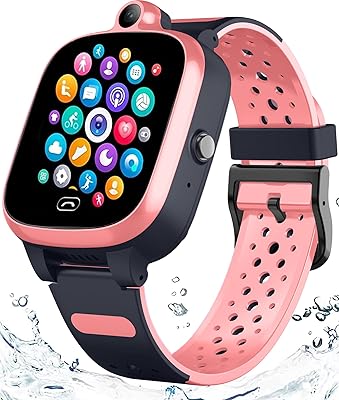
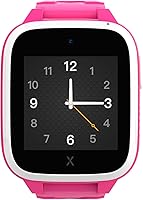

Overview

The XPLORA XGO 3 Kids GPS Watch Phone sits in a practical sweet spot for parents who want their child connected without handing over a full smartphone. Built on Android but stripped back to just the essentials, this kids watch phone is about staying in touch and knowing where your child is — not entertainment or app browsing. It targets roughly ages 5 to 12 and comes in several colors. One thing worth knowing upfront: a minimum 12-month subscription is required to use the cellular features, which adds meaningfully to the total cost of ownership and should factor into your decision from the start.

Features & Benefits

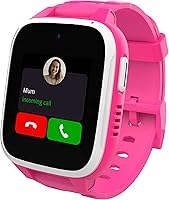
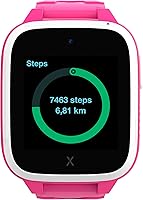
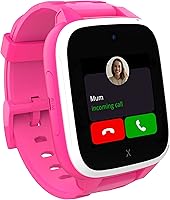
The GPS location tracking is where this children's smartwatch earns its keep — parents can check real-time location and set up Safety Zones around home, school, or anywhere else that matters, receiving an alert if the watch crosses those boundaries. The SOS button is a genuine safety net: one press sends the child's location to pre-saved emergency contacts. Communication is intentionally locked down to a parent-approved contact list, so there is no risk of random calls or messages creeping in. School Mode lets you schedule blackout windows during class hours, keeping distractions at bay. A basic camera and pedometer round things out, and 4G with an included SIM card makes initial setup straightforward.

Best For

This kids watch phone makes the most sense for parents caught between giving a child nothing and handing them a full smartphone. If your child is between roughly 5 and 12, spends time at school or activities without you nearby, and you want a reliable way to reach each other in an emergency, this fits the brief well. It is also a strong option for families who want scheduled usage controls and GPS visibility without worrying about social media or unrestricted browsing. That said, the ongoing subscription means it suits households prepared to budget for a monthly connected device cost on top of the upfront hardware price.

User Feedback

Parents generally respond well to the Xplora XGO 3 — setup gets consistently positive marks, GPS accuracy holds up in everyday conditions, and kids tend to wear it without fuss. Durability on the playground comes up favorably in owner reports, which matters when you are putting a piece of tech on an active youngster. The main sticking points are battery life on heavy-use days, where some users report needing a nightly charge, and the subscription cost, which a notable number of buyers felt was not clear enough at the time of purchase. Rural connectivity gets flagged occasionally, and the companion parent app works well for most but has drawn some criticism for intermittent lag.

Pros

  • Real-time GPS tracking gives parents a reliable way to check their child's location throughout the day.
  • Safety Zones send automatic alerts when the watch crosses a boundary, adding a useful layer of passive monitoring.
  • The SOS button is simple enough for young children to use confidently in a stressful situation.
  • School Mode lets parents schedule blackout windows so the watch does not become a classroom distraction.
  • Communication is limited to a parent-approved contact list, removing the risk of unwanted contact entirely.
  • Setup is relatively straightforward, especially with the included SIM card option that avoids carrier hunting.
  • Kids tend to wear the Xplora XGO 3 willingly, which matters more than many parents expect.
  • The device holds up well to everyday playground activity and general rough handling by younger children.
  • A built-in camera and step counter give kids something fun to engage with beyond calls and messages.
  • 4G connectivity keeps the watch responsive in most urban and suburban environments.

Cons

  • The mandatory subscription adds a meaningful ongoing cost that the upfront price alone does not reflect.
  • Battery life can fall short on busy days, making a nightly charging habit essentially non-negotiable.
  • GPS and cellular performance can be unreliable in rural areas or buildings with poor signal penetration.
  • The companion parent app has received criticism for occasional lag and inconsistent real-time updates.
  • The 1.3-inch screen is small enough that reading messages or navigating menus can feel fiddly for younger children.
  • Older kids in the 11 to 12 age range may quickly outgrow the limited feature set and find it frustrating.
  • The subscription pricing structure is not always clearly communicated at the point of purchase, catching some buyers off guard.
  • There is no option to add third-party apps, which limits the device but also means no workarounds for parental controls.

Ratings

Our AI rating system analyzed thousands of verified global reviews for the XPLORA XGO 3 Kids GPS Watch Phone, actively filtering out incentivized, duplicate, and bot-generated submissions to surface what real parents and caregivers actually experienced. The scores below reflect both the genuine strengths that earned repeat recommendations and the recurring pain points that frustrated buyers — nothing is glossed over. Whether this children's smartwatch fits your family comes down to a handful of factors, and the scorecards below break each one down honestly.

GPS Accuracy
83%
Parents consistently report that the GPS holds up well during school runs, after-school pickups, and neighborhood outings, giving them a reliable enough read on their child's location for everyday peace of mind. In well-connected urban and suburban areas, location updates come through at a frequency that most families find genuinely useful.
Signal accuracy drops noticeably in rural settings or in areas with weak 4G infrastructure, which limits how much parents in those environments can rely on it. A handful of reviewers also noted occasional delays in location updates that made real-time tracking feel slightly behind during critical moments.
Safety Features
91%
The SOS button is consistently one of the most praised features — it is physical, easy for a child to find under stress, and immediately sends location data to pre-approved contacts without requiring the child to navigate any menus. Parents who have actually had their child use it in an unexpected situation describe it as working exactly as advertised.
SOS functionality depends entirely on having an active cellular connection, so in areas with poor coverage the alert may not send reliably. A few parents also wished there was a louder audible confirmation for the child when the SOS is triggered, to reassure them that help has been notified.
Parental Controls
88%
The locked contact list and School Mode are genuinely well-implemented — parents can approve every number the child can reach, and scheduled blackout windows during school hours work without requiring daily manual input. Families dealing with screen time battles find the structured restrictions a significant relief.
Some parents reported that changes made in the companion app took longer than expected to sync to the watch itself, which created brief windows where settings were not yet active on the device. The controls are effective but not instantaneous, and that gap frustrated a subset of technically cautious parents.
Value for Money
58%
42%
The upfront hardware cost sits at an accessible mid-range price point, and for families who fully use the GPS, SOS, and calling features daily, the monthly subscription cost can feel justified given the safety utility it delivers. Parents who evaluated the total package against the alternative of an entry-level smartphone often found it reasonable.
The mandatory minimum 12-month subscription is the single biggest source of buyer dissatisfaction across reviews — many parents did not realize the ongoing commitment at the point of purchase and felt the total annual cost was not transparent enough. For families who use the features less intensively, the monthly fee starts to feel difficult to justify over time.
Battery Life
62%
38%
On lighter days — a few calls, some messaging, and background GPS — the 850 mAh battery is sufficient to last from morning drop-off through evening pickup without needing a mid-day top-up. Parents who build nightly charging into the routine rarely report issues.
Heavy use days, particularly when GPS polling is frequent or the child is making multiple calls, can see the battery drain before the end of the school day. The battery capacity is on the lower end for a device that is meant to be a safety tool, and the lack of a battery-saving mode was flagged as a gap by several reviewers.
Ease of Setup
84%
The included SIM card removes one of the most common friction points for parents setting up a connected device for the first time, and most reviewers describe the initial configuration through the parent app as taking well under 30 minutes. The process is approachable even for parents who do not consider themselves technically confident.
A subset of users ran into activation hiccups specifically related to the SIM or account registration steps, with support response times drawing some criticism during busy periods. Setup is smooth the majority of the time, but when something goes wrong, resolving it can be more cumbersome than the initial experience suggests.
Build & Durability
79%
21%
Owner feedback on physical durability is broadly positive — the watch survives playground falls, bag throws, and the general punishment that active kids in the 6 to 10 age range inflict on wearables without showing obvious damage. Several parents mentioned their child had been wearing it for over a year without structural issues.
The watch is not marketed with a formal ruggedized or waterproof rating, and a portion of reviewers reported screen scratches appearing relatively quickly with daily outdoor use. Parents of particularly rough-and-tumble children might find themselves wishing for a more explicitly hardened build.
Companion App
67%
33%
The parent-facing app covers the essential bases well — contact management, location viewing, Safety Zone setup, and School Mode scheduling are all accessible without requiring technical knowledge. Parents who use it for daily check-ins describe the core functionality as reliable and logically laid out.
Intermittent lag in the app is a recurring complaint, particularly around real-time location refreshes and notification delivery. A portion of Android users also reported more frequent sync issues than iOS users, and some parents noted the app had not received meaningful updates to address known bugs for extended periods.
Child Wearability
81%
19%
Kids in the target age range tend to wear this children's smartwatch willingly, which is a non-trivial factor — several parents specifically mentioned that their child asks to put it on, which makes the whole safety system actually function as intended. The color options and watch-style form factor help it feel like an accessory rather than a tracking device.
The watch is on the heavier side for very young or small-wristed children, and a few parents of 5 and 6 year olds noted it slid around on the wrist. The 1.3-inch square screen also makes touch interaction slightly fiddly for younger fingers navigating menus.
Communication Quality
76%
24%
Call quality in good signal areas is clear enough for a child to communicate comfortably, and the voice message feature is particularly popular with younger kids who find typing on a small screen frustrating. The emoji and image messaging options make the experience feel age-appropriate without opening up uncontrolled communication.
Call quality degrades noticeably in low-signal environments, and a handful of parents reported that calls dropped more frequently than expected in certain areas. The communication feature set, while intentionally limited, also lacks the ability for children to initiate a call to a parent not on the pre-approved list in a non-SOS context.
School Mode Reliability
77%
23%
When School Mode activates on schedule, parents and teachers alike appreciate that the watch becomes effectively non-disruptive during class hours while still retaining the SOS function for genuine emergencies. Teachers at several schools noted the watch caused fewer interruptions than anticipated once School Mode was properly configured.
The primary frustration with School Mode is the sync lag — if a parent updates the schedule in the app, the change does not always propagate to the watch immediately, which can result in the watch being active during class for a window after a schedule change. This is more of an app infrastructure issue than a conceptual flaw, but it matters in practice.
Subscription Transparency
43%
57%
For parents who did their research before purchasing, the subscription model is clear and the monthly plans are straightforward to manage through the Xplora account portal. Families who understood the commitment going in rarely complained about the process of managing or renewing the plan itself.
This is arguably the most consistent source of frustration in user reviews — the subscription requirement and its minimum 12-month commitment are not prominent enough in the purchase journey, and a significant number of buyers felt misled about the true cost. The gap between the hardware price and the total annual spend catches many families off guard post-purchase.
GPS Zone Alerts
74%
26%
Safety Zones work reliably in well-covered areas and give parents a low-effort way to get notified when their child arrives at or leaves school, a grandparent's house, or a sports practice location without having to actively check the app. Families who use this passively say it becomes a seamless part of their daily routine.
Alert delivery can lag by several minutes in practice, which slightly undermines the sense of real-time awareness. A small number of parents also found the zone-setup interface in the app required more precision than expected, with overlapping or incorrectly sized zones causing false alerts until manually corrected.

Suitable for:

The XPLORA XGO 3 Kids GPS Watch Phone is a solid fit for parents of children roughly between 5 and 12 who need a safe, controlled way to stay in touch without the risks that come with a full smartphone. If your child walks to school, attends after-school activities, or spends time at a friend's house, the combination of real-time GPS tracking and a one-press SOS alert offers genuine reassurance without requiring constant check-in calls. Families who want to set firm boundaries around screen time will appreciate School Mode and the locked contact list, which means kids stay reachable without access to social media, browsers, or strangers. It also works well as a first connected device for children who are not yet ready for the responsibility of a smartphone but old enough to benefit from some independence. Parents who are already comfortable managing app-based parental controls and are willing to factor in an ongoing monthly subscription will get the most out of what this device offers.

Not suitable for:

The XPLORA XGO 3 Kids GPS Watch Phone is not the right choice for families hoping to avoid recurring costs — a mandatory minimum 12-month subscription is baked into the experience, and when you add that up over a year or more, the total spend climbs well beyond the sticker price of the hardware. Older kids, particularly those 12 and up, will likely find the feature set too restrictive and the interface too basic compared to what their peers are using. If you live in a rural area or a region with patchy 4G coverage, the cellular and GPS reliability may disappoint, since the device depends on network connectivity to deliver its core safety features. This children's smartwatch is also not a substitute for a full smartwatch in terms of health tracking, app support, or display quality — anyone expecting Apple Watch-level polish will be let down. Finally, parents who prefer a one-time hardware purchase with no strings attached should look elsewhere, as the subscription is not optional.

Specifications

  • Connectivity: The watch uses 4G LTE for calls and data, with additional Wi-Fi and Bluetooth support for flexible connectivity options.
  • Screen Size: The square-shaped display measures 1.3 inches, providing a compact but readable interface suitable for children.
  • Battery Capacity: A built-in 850 mAh lithium-ion battery powers the device and is included in the box.
  • Operating System: The watch runs on Android, configured as a locked-down environment without access to the standard app store or open browsing.
  • GPS Tracking: Location is determined using multi-service GPS, allowing real-time positioning that can be monitored by parents through the companion app.
  • SOS Function: A dedicated SOS button sends an emergency alert along with the device's current location to pre-saved contacts with a single press.
  • Safety Zones: Parents can define custom geo-fenced areas such as home or school and receive automatic notifications when the watch enters or exits those zones.
  • School Mode: School Mode allows parents to schedule time windows during which calls, messages, and other features are temporarily disabled on the device.
  • Communication: The watch supports voice calls, incoming texts, emojis, images, and voice messages, all restricted to a parent-managed approved contact list.
  • Camera: A built-in camera is included on the device, allowing children to take photos without access to any external sharing platforms.
  • Pedometer: An integrated step counter tracks daily physical activity, giving children a basic fitness-tracking feature on the wrist.
  • SIM Card: The device ships with a pre-installed Xplora Connect SIM card, though compatible third-party SIMs can also be used in supported markets.
  • Subscription: Active use of cellular features requires a minimum 12-month service subscription, available from the manufacturer starting at a monthly rate.
  • Device Weight: The watch body weighs approximately 200 grams, which is on the heavier side for smaller-wristed children under age 6.
  • Body Shape: The casing is square in form factor, giving it a watch-like appearance that fits naturally on a child's wrist.
  • Bluetooth: Bluetooth connectivity is supported for pairing with other compatible devices or for use in certain app-based features.
  • Battery Type: The device uses a lithium-ion battery cell that is built-in and non-removable by the user.
  • Platform App: Parental management, including contact approval, location viewing, and School Mode scheduling, is handled through the dedicated Xplora companion app.

Related Reviews
Spodus G50002 Kids Watch with GPS Tracker 4G Smart Watch
84%
88%
GPS & Location Accuracy
81%
Battery Life
78%
Voice & Video Call Quality
90%
Ease of Use
85%
Build Quality
More
COROS PACE 3 GPS Sport Watch
79%
91%
GPS Accuracy
94%
Battery Life
93%
Comfort & Wearability
83%
Build Quality
88%
Training Features
More
TOPUSER TB0081 4G GPS Kids Smartwatch
71%
72%
GPS Accuracy
83%
4G Connectivity
67%
Battery Life
81%
Voice & Video Calling
88%
SOS & Safety
More
MJVV TB0073 4G GPS Kids Smartwatch
63%
71%
GPS Tracking Accuracy
78%
Call Quality
83%
SOS Emergency Feature
54%
Battery Life
49%
SIM Compatibility
More
CMF by Nothing Watch 3 Pro Smartwatch
79%
88%
Display Quality
76%
GPS Accuracy
71%
Battery Life
82%
Health Tracking
84%
Build Quality
More
Taopodo Kids Smart Watch
83%
91%
Build Quality & Durability
85%
Health & Fitness Tracking Accuracy
88%
Battery Life
89%
Ease of Use
83%
Educational & Entertainment Value
More
Seculife Kids GPS Tracker
73%
88%
Ease of Setup
67%
GPS Tracking Accuracy
91%
SOS Button & Emergency Alerts
74%
Two-Way Calling Quality
82%
Geofencing & Zone Alerts
More
JOYELE Kids Smart Watch
74%
88%
Value for Money
86%
Ease of Setup
54%
Battery Life
67%
Fitness Tracking Accuracy
71%
Build Quality
More
MOFGDNI S16G Kids Smart Watch
84%
89%
Value for Money
84%
Build Quality
91%
Ease of Use
87%
Entertainment Features
78%
Battery Life
More
CANMORE TW411 Golf GPS Watch
71%
78%
GPS Accuracy
86%
Course Database
63%
Battery Life
89%
Value for Money
84%
Ease of Use
More

FAQ

The watch ships with an Xplora Connect SIM pre-installed, and the company recommends using it for the best experience. That said, compatible third-party SIMs can work in supported markets, though some features may behave differently depending on the carrier and plan you choose.

The XPLORA XGO 3 Kids GPS Watch Phone requires a minimum 12-month service subscription to activate the cellular features — things like calls, GPS updates, and messages all depend on it. Pricing starts at around 9.99 per month before tax, so over a year you are looking at roughly 120 dollars on top of what you paid for the hardware. It is worth factoring that in before purchasing, since a few buyers have been surprised by the ongoing commitment.

No, and that is actually the point. The watch runs a locked-down version of Android that does not give children access to a browser, app store, or social media. It is intentionally limited to calls, messages, GPS, the camera, and a few built-in tools.

In urban and suburban areas with good network coverage, the GPS tends to be reliable enough for everyday use — checking whether your child arrived at school or is still at the park. In rural areas or places with weak 4G signal, accuracy and update frequency can suffer, so if you live somewhere with patchy coverage it is worth keeping that in mind.

Pressing the SOS button sends an alert with the watch's current location to the emergency contacts you have pre-approved in the parent app. It is designed to be simple enough for a young child to use under stress, which is really the whole idea behind making it a dedicated physical button rather than a menu option.

For most average use days — a few calls, some messages, and background GPS — the battery generally gets through the day. Where things get tighter is on heavier use days with lots of GPS polling and active use of features, and several parents report that a nightly charge is essentially a habit they have had to build in.

Owner feedback on durability is generally positive — it holds up well to playground use and the kind of knocks and drops you would expect from an active child. It is not marketed as ruggedized or waterproof, so you would want to check the official water resistance rating before letting younger kids wear it in the pool or rain.

The sweet spot is roughly 5 to 12 years old. Younger children may find the screen a bit small to interact with easily, and older kids in the 11 to 12 range sometimes find the feature set too limited compared to what their peers have. It works best as a first connected device for kids in the middle of that range.

Everything is managed through the Xplora parent app on your phone. You add and approve contacts there, and those are the only numbers the watch can call or receive calls from. It is a straightforward process for most parents, though a small number of users have reported occasional sync delays between the app and the watch.

Yes, that is exactly what School Mode is for. You set a schedule in the parent app — say, 8am to 3pm on weekdays — and during those hours the watch's features are locked down so it does not become a distraction. Your child can still use the SOS button during School Mode, which is an important safety detail.

Where to Buy