Overview

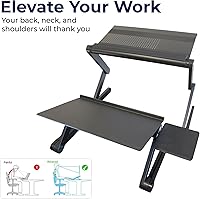
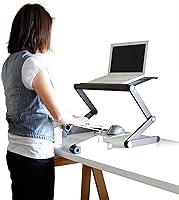
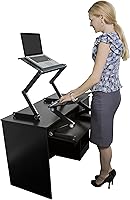
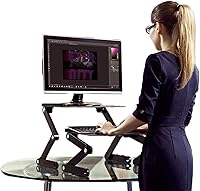
The Uncaged Ergonomics WorkEZ Standing Desk Converter is a two-piece aluminum sit-stand riser built for laptop users and anyone running a single lightweight monitor. Its core ergonomic idea is straightforward: the monitor stand and keyboard tray adjust independently, so you can put your screen at eye level while keeping your hands at elbow height at the same time — something most one-piece risers simply cannot offer. The whole thing rests on top of any existing desk with no tools or mounting required. One thing to establish early: this standing desk riser supports loads up to 13 lbs, so heavy monitors and all-in-ones are out of the picture. It carries a 90-day limited warranty.
Features & Benefits

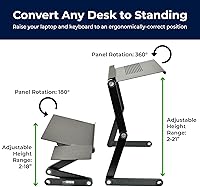
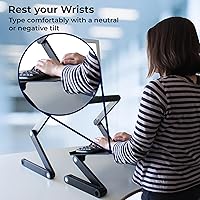
The monitor riser climbs from 2 to 21 inches in height and rotates a full 360° in 15-degree steps, giving precise control over screen angle. The aluminum panel is vented, which passively draws heat away from a laptop — a genuinely useful touch if your machine runs warm. The keyboard tray measures roughly 18 by 11 inches and adjusts both height and tilt independently, including a negative tilt that reduces wrist strain during long sessions. A small mouse pad shelf attaches to either side and stays level with the keyboard surface. Beyond passive cooling, the WorkEZ converter also packs two active fans and three USB ports, handling connectivity needs without extra adapters. The whole unit folds flat when not in use.

Best For

This sit-stand converter is a solid fit for remote workers and students who want to alternate between sitting and standing without investing in a full electric desk. Laptop users get the most out of it — the independent screen and keyboard positioning is exactly what ergonomic laptop use demands. It also makes sense for anyone dealing with tight desk space, since the footprint is compact and the unit removes entirely when you prefer a clear surface. If you move between home and office or share a workspace, the tool-free setup and collapsible design make that genuinely practical. The firm boundary: this standing desk riser is not built for heavy monitors or iMacs, so dedicated desktop users should look elsewhere.

User Feedback

With a 3.0-star average across over 350 reviews, the WorkEZ converter sits squarely in mixed-verdict territory — and the split is fairly predictable once you look at the patterns. Laptop users who stayed within the 13 lb limit generally praised the easy assembly, the genuine height range, and the practical value of having an independently adjustable keyboard tray. Criticism clusters around two recurring points: noticeable wobble when the monitor stand is pushed near its maximum height, and a flimsy feel for anyone who used it with a heavier desktop screen. The mouse pad was also flagged as undersized by several buyers. The honest takeaway is that satisfaction tracks closely with whether buyers matched this sit-stand converter to its actual intended use.

Pros

  • Independent monitor and keyboard tray adjustment means your screen and hands can each sit at the correct ergonomic height simultaneously.
  • The monitor riser reaches up to 21 inches tall, which is enough clearance to work comfortably standing for most adults.
  • Vented aluminum panel passively cools a laptop without any extra accessories or power draw.
  • Two built-in active fans add a second layer of cooling for machines that run hot under sustained workloads.
  • Three integrated USB ports reduce cable clutter and eliminate the need for a separate hub on most desks.
  • Assembly requires no tools and no permanent mounting, making setup and removal genuinely quick.
  • The whole unit folds flat, so storage or transport between home and office is straightforward.
  • Keyboard tray supports negative tilt, which is a meaningful comfort detail for users prone to wrist fatigue.
  • The removable mouse pad shelf mounts to either the left or right side, accommodating both handedness preferences.
  • For a sit-stand entry point at this price, the height range and dual-adjustment system offer strong value for laptop-primary users.

Cons

  • Noticeable wobble near maximum height makes the riser feel unstable during active typing sessions.
  • The 13 lb weight cap is easy to accidentally exceed with even a mid-size external monitor and its mount.
  • The mouse pad shelf measures under 7 inches wide, which is too small for anyone using a standard or extended mouse mat.
  • Build rigidity feels lightweight in practice — users expecting a solid, hefty structure are likely to be disappointed.
  • The 90-day warranty is short compared to competitors in the same price bracket, offering limited long-term coverage.
  • No cable management features are included, so cord clutter around the riser can become an issue quickly.
  • The keyboard tray height range tops out at 18 inches, which may not be sufficient for taller users standing at full height.
  • Fan noise, while not loud, is audible in quiet environments and may be distracting during calls or focused work.

Ratings

The scores below for the Uncaged Ergonomics WorkEZ Standing Desk Converter were generated by AI after analyzing verified global user reviews, with spam, bot-submitted, and incentivized feedback actively filtered out. The result is a transparent, pattern-based picture of where this sit-stand converter genuinely delivers and where real buyers have run into friction. Both the strengths and the recurring frustrations are reflected honestly in every category.
Ergonomic Adjustability
83%
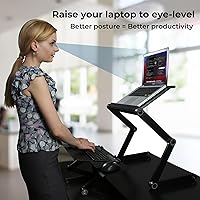
The independent adjustment of the monitor riser and keyboard tray is the feature users praise most consistently. Being able to raise your screen to eye level while keeping the keyboard at elbow height simultaneously is a meaningful ergonomic advantage that most one-piece risers simply cannot offer.
At or near the monitor's maximum height, some taller users find the range just barely sufficient, and the adjustment mechanism can feel imprecise when trying to dial in an exact position. A few users noted that fine-tuning both pieces independently takes more trial and error than expected.
Build Quality
58%
42%
The aluminum panel construction gives the unit a reasonably professional look, and the powder-coated steel base holds up well under normal daily use. Users running laptops within the intended weight range generally report no structural failures over months of use.
The overall rigidity is the most divisive aspect of this riser. Multiple buyers describe a flex in the monitor stand that becomes increasingly noticeable at higher positions, and the feel of the joints and locking mechanisms does not inspire long-term confidence for users accustomed to sturdier office equipment.
Stability
54%
46%
At low to mid-range heights with a laptop sitting well within the 13 lb limit, the WorkEZ converter stays reasonably steady during normal typing. Users who work at moderate standing heights and avoid pushing the monitor stand near its upper limit tend to report an acceptable experience.
Wobble at maximum height is the single most cited complaint across the review pool. Any vibration from typing or desk bumps transfers visibly to the screen, which is distracting during video calls or reading. This is a real limitation that affects a meaningful portion of buyers.
Value for Money
72%
28%
For laptop-primary workers who need a genuine sit-stand option without spending several hundred dollars on a full electric desk, the price-to-function ratio is hard to argue with. The inclusion of USB ports and built-in fans at this price point adds practical value that competitors at a similar cost often skip.
Buyers who expected build quality to match the price were frequently let down, and the 90-day warranty feels thin relative to the investment. If the unit develops a wobble or mechanical issue after the warranty window, there is no coverage to fall back on.
Setup & Assembly
91%
Almost every reviewer who mentioned setup commented positively — the two-piece system requires no tools, no drilling, and no permanent modification to your desk. Most users reported being fully up and running within a few minutes of opening the box, which is exactly what this type of product should deliver.
The lack of any cable management solution means that once you add a power connection for the fans and plug in USB peripherals, wire clutter around the base becomes an immediate issue. A few users also noted that the instruction sheet could be clearer on how the mouse pad shelf attaches.
Laptop Cooling
77%
23%
The vented aluminum panel does a credible job of passively dissipating heat from the laptop base during normal workloads, and the two active fans provide an additional layer of airflow when things heat up. Users running demanding applications noted a genuine improvement in thermal comfort compared to a flat desk surface.
The fan noise, while not loud, is noticeable in quiet home office environments and has been flagged as distracting during calls or focused reading sessions. The fans are also powered via USB, which occupies one of the three available ports if you need active cooling running simultaneously with other peripherals.
Keyboard Comfort
74%
26%
The tray's support for negative tilt is a genuinely useful ergonomic feature that most budget risers omit entirely, and the 18-inch width accommodates the majority of full-size keyboards without issue. Users who type for long stretches reported noticeably reduced wrist strain after switching to a negative tilt setup.
The height range of the keyboard tray tops out at 18 inches, which leaves taller users at a slight ergonomic compromise when standing at full height. The surface itself also offers no padding or grip material, so keyboards without rubber feet can shift slightly during heavy typing sessions.
Mouse Pad Usability
44%
56%
The shelf mounts quickly to either side of the keyboard tray without tools and does stay reasonably level as you adjust the keyboard height. For users with compact mice and small mouse pads, it functions adequately as a raised mousing surface.
At 6.75 by 7 inches, the mouse pad shelf is simply too small for the majority of modern mouse pads and any user who needs extended mouse travel. This is one of the most consistent complaints in the review pool, and it is a real functional limitation rather than a minor inconvenience.
Portability
86%
The collapsible two-piece design is one of the more practical aspects of this standing desk riser for users who move between home and office or frequently reconfigure their workspace. Neither component is heavy, and both fit easily into a bag or a desk drawer when not in use.
Because it is two separate pieces rather than a single integrated unit, transporting it requires keeping track of both components plus the mouse pad shelf. A few users mentioned that the pieces do not nest together particularly neatly when packed, which makes organized storage slightly awkward.
Monitor Compatibility
61%
39%
The 360-degree panel rotation and generous height range make it easy to dial in the right viewing angle for most laptop screens and small external monitors. Users with 13-inch and 15-inch laptops consistently reported a good fit both physically and ergonomically.
The strict 13 lb weight cap eliminates a large portion of the desktop monitor market, and users who underestimated their monitor's weight experienced both stability problems and visible stress on the stand. The platform is simply not designed for anything approaching a standard 24-inch or 27-inch external display.
Desk Space Efficiency
79%
21%
The footprint is compact relative to many standing desk converters, and the fact that neither component requires permanent mounting means the entire setup can be cleared away quickly when you need the full desk surface. This flexibility is genuinely appreciated by users in shared or multi-use workspaces.
While compact, the two-piece layout still requires a reasonable depth of desk surface to place both the monitor stand and the keyboard tray in a natural working configuration. On very shallow desks under 20 inches of depth, the arrangement can feel cramped and force an uncomfortable reach.
USB Port Utility
71%
29%
Having three USB ports built directly into the riser is a practical convenience that keeps peripheral cables routed upward rather than trailing across the desk to a separate hub. For users with a keyboard, mouse, and one additional device, the three ports cover most everyday connectivity needs.
The USB ports are standard Type-A and do not include any faster USB-C connections, which limits their utility for users with newer peripherals or who need to charge modern devices quickly. Using the active fans simultaneously reduces the available ports to two, which is tight for a full desk setup.
Warranty & Support
39%
61%
The manufacturer, Uncaged Ergonomics, is a known brand in the ergonomic accessories space with an established product line, which provides some basic confidence that support channels exist. Buyers who registered their purchase promptly reported a reasonably responsive process for warranty claims within the covered window.
A 90-day warranty is noticeably short for a desk accessory expected to withstand daily use over years. Several reviewers who experienced wobble or mechanical loosening after the three-month mark had no recourse, which contributes meaningfully to the mixed overall satisfaction score.

Suitable for:

The Uncaged Ergonomics WorkEZ Standing Desk Converter is genuinely well-suited to laptop users who spend long hours at a fixed desk and want a low-commitment way to start alternating between sitting and standing. Remote workers and students working from home will appreciate that it requires no permanent installation — it simply sits on top of whatever desk you already own and comes apart just as easily. If your primary machine is a laptop or a single lightweight monitor under 13 lbs, the independent height and tilt adjustments for the screen and keyboard tray offer a real ergonomic step up from a flat desk surface. People who share a workspace or rotate between locations will also find the collapsible, tool-free design practical rather than a novelty. For anyone who wants to test a sit-stand workflow before committing to a full electric desk, this standing desk riser is a reasonable and affordable starting point.
Not suitable for:

The Uncaged Ergonomics WorkEZ Standing Desk Converter draws a firm line at 13 lbs, which immediately rules out anyone running a heavy external monitor, an ultrawide display, or an all-in-one machine like an iMac. Users who rely on a multi-monitor setup will also find this riser too limited — it is built around a single screen, full stop. If you need rock-solid stability for precision work like photo editing or drawing on a display tablet, the wobble that some users report at or near maximum height could genuinely frustrate you. The mouse pad shelf is also quite small, so anyone who uses a larger mouse mat or needs wide mouse travel will likely find it cramped. Buyers expecting premium build rigidity for the price should recalibrate expectations; this is a functional, lightweight aluminum tool, not a heavy-duty workstation upgrade.
Specifications

  • Monitor Height: The monitor riser adjusts from 2 to 21 inches in height to position screens at eye level for most adults.
  • Monitor Rotation: The monitor panel rotates a full 360° in 15-degree increments, allowing precise control over viewing angle.
  • Monitor Panel Size: The monitor support panel measures 18 inches wide by 10 inches deep, accommodating most laptop bases and small monitors.
  • Keyboard Tray Size: The keyboard tray surface is approximately 18 inches wide by 11 inches deep, fitting most full-size and tenkeyless keyboards.
  • Keyboard Height: The keyboard tray adjusts independently from 0 to 18 inches in height to keep hands at elbow level while standing or sitting.
  • Mouse Pad Shelf: The removable mouse pad shelf measures 6.75 by 7 inches and mounts to either the left or right side of the keyboard tray.
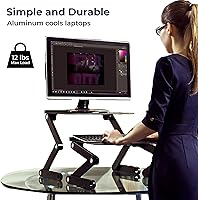
  • Weight Capacity: The monitor stand supports a maximum load of 13 lbs, suitable for laptops and lightweight single desktop monitors only.
  • Active Cooling: Two built-in active fans provide supplemental airflow to help prevent heat buildup under the laptop or monitor panel.
  • USB Ports: Three integrated USB ports are built into the unit, allowing peripheral connections without a separate hub.
  • Frame Material: The base is constructed from powder-coated alloy steel, while the monitor and keyboard panels are made from aluminum.
  • Finish: The unit features a black powder-coated finish on the steel base components for durability and a consistent appearance.
  • Packed Dimensions: When collapsed, the overall footprint of the unit is 18″ deep by 21″ wide by 10″ high.
  • Assembly: No tools, drilling, or permanent mounting are required; both components rest directly on top of any existing desk surface.
  • Portability: The two-piece design is fully collapsible, making it practical to store flat or transport between workspaces.
  • Warranty: The product is covered by a 90-day limited manufacturer warranty from Uncaged Ergonomics.
  • Compatibility: Designed for use with laptops and single lightweight desktop monitors; not recommended for heavy monitors, ultrawide displays, or all-in-one computers.
  • Keyboard Tilt: The keyboard tray supports both neutral and negative tilt angles to reduce wrist extension during extended typing sessions.
  • Mouse Pad Mounting: The mouse pad shelf is removable and can be positioned on either the left or right side of the keyboard tray to suit handedness.

Related Reviews
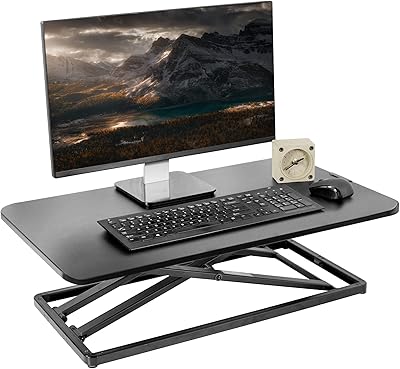
VIVO DESK-V000U 29-inch Standing Desk Converter
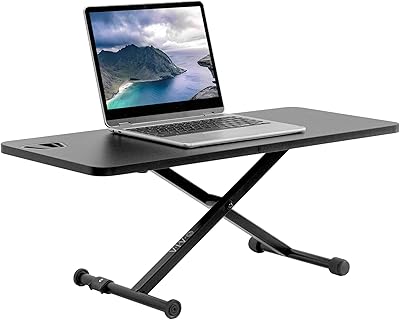
81%
93%
Ease of Use
96%
Assembly & Setup
81%
Build Quality & Sturdiness
78%
Height Range & Adjustability
67%
Surface Area & Workspace
More
VIVO DESK-V011F 28″ Standing Desk Riser
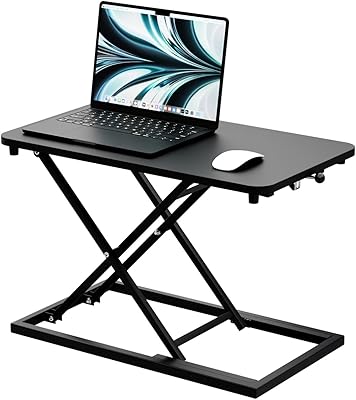
77%
96%
Ease of Setup
83%
Stability at Low to Mid Height
78%
Height Adjustment Range
61%
Weight Capacity
74%
Build Quality
More
Vaydeer Portable Aluminum Standing Desk Converter
79%
88%
Build Quality
82%
Stability
84%
Height Range
86%
360° Rotation
41%
Heat Management
More
Almirantra 23.6″ Stand Up Desk Converter
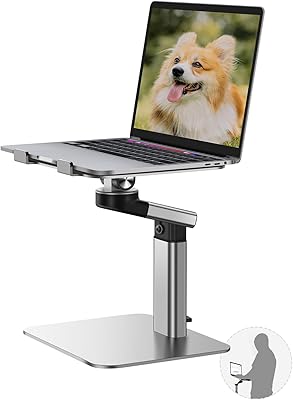
73%
78%
Value for Money
83%
Ease of Use
62%
Stability & Sturdiness
54%
Height Range
71%
Build Quality
More
Mount-It! MI-7952 Electric Standing Desk Converter
85%
94%
Ease of Use
90%
Build Quality
88%
Stability
85%
Ergonomics
82%
Assembly Process
More
FlexPro Hero 32 Inch Standing Desk Converter
85%
91%
Ease of Assembly
89%
Ergonomics/Comfort
94%
Height Adjustment Smoothness
85%
Build Quality
75%
Weight Capacity
More
Rocelco 32″ Height Adjustable Standing Desk Converter
87%
87%
Ergonomics and Comfort
95%
Ease of Setup
88%
Stability and Durability
91%
Surface Area and Workspace Organization
93%
Height Adjustment Mechanism
More
Mount-It! MI-7983 Triple Monitor Electric Desk Converter
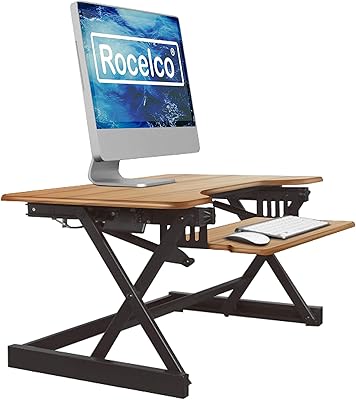
69%
74%
Build Quality & Stability
82%
Electric Height Adjustment
86%
Monitor Arm Flexibility
47%
Assembly Experience
61%
Footprint & Desk Compatibility
More
Ergotron WorkFit-A Dual Monitor Standing Desk Converter
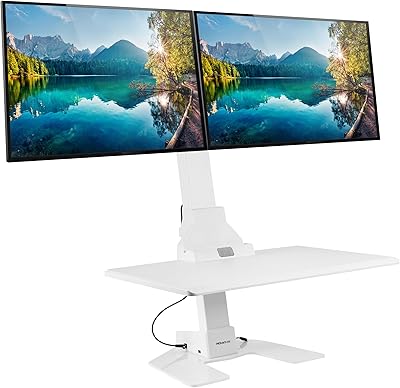
85%
92%
Ergonomics & Comfort
89%
Ease of Assembly
85%
Sturdiness & Build Quality
91%
Height Adjustment Mechanism
88%
Monitor Compatibility
More
VIVO 36-inch V Series Desk Converter
77%
88%
Lift Mechanism Smoothness
84%
Surface Stability When Locked
86%
Desktop Work Surface Size
67%
Keyboard Tray Usability
91%
Assembly Experience
More

FAQ

It can technically work with a single lightweight desktop monitor, but the 13 lb weight cap is the key constraint. Many common desktop monitors, especially anything 24 inches or larger, will exceed that limit. If your monitor is on the lighter side and falls under 13 lbs, it should be fine, but you will want to verify your monitor's weight before assuming it qualifies.

At low to mid-range heights, most users find it acceptably stable for everyday typing. The wobble complaints that come up in user reviews tend to happen when the monitor stand is raised close to its maximum 21-inch height. If you plan to use it mostly at moderate standing heights, stability is generally not a problem, but it is not as rigid as a one-piece converter.

Yes, the keyboard tray is sized to fit most standard external keyboards, including full-size layouts. You can absolutely use it as a raised platform for any keyboard and mouse combination, regardless of whether your computer is a laptop or a desktop tower sitting under the desk.

These are two separate cooling features. The vented aluminum panel is passive — it simply allows heat to escape from the underside of your laptop through the material itself, without any power. The two built-in fans are active and use power to push air more aggressively. Most users will find the passive venting sufficient for light workloads, while the fans help during heavier tasks that generate more sustained heat.

Yes, the shelf is designed to tilt and compensate so it stays roughly level with the keyboard surface as you adjust height. It is a small shelf though, so if you use a larger mouse mat, it will overhang or not fit at all — it is sized for compact mouse pads only.

The collapsed footprint is 21 inches wide and 18 inches deep, which is fairly compact for a sit-stand converter. As long as your desk has at least that much clear surface area, the riser itself will fit. Keep in mind that the keyboard tray sits separately from the monitor stand, so you need enough depth to place both comfortably in your normal workflow position.

Very minimal. There are no tools required and nothing to bolt together permanently. Both pieces are essentially ready to use out of the box — you adjust heights and angles using the built-in mechanisms, and the mouse pad shelf clicks onto the keyboard tray without tools. Most users have it set up and functional within a few minutes.

It needs to rest on a firm, level surface to stay stable. A padded standing mat placed under your feet is fine, but you would not want to put the riser itself on a soft or uneven surface — that would add to the wobble. It should sit directly on your desk surface.

The tray measures about 18 inches wide, which fits most standard full-size keyboards including those with a number pad. Very large or extended keyboards with extra macro keys on the side may be tight or slightly overhang the edges, so if you have an unusually wide keyboard, measuring it first is worth doing.

Honestly, 90 days is on the shorter end for accessories in this category. Many competitors offer one-year coverage as standard. It is not a dealbreaker, but it does mean you have a relatively narrow window to identify any defects or mechanical issues after purchase. If you can, register your purchase with the manufacturer right away so there is a clear record of your purchase date.

Where to Buy