
Overview

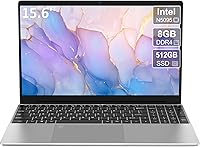
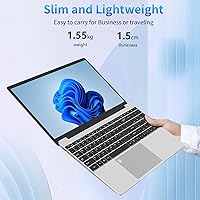
The Trygood T152A 15.6-inch Laptop landed on the market in late 2024 as a straightforward Windows 11 option built for students and everyday office users — not for anyone chasing performance benchmarks. What catches your attention right away is the metal shell construction, which feels out of place at this price point in the best way possible. Most budget laptops this affordable lean on flimsy plastic, so the sturdier build is a welcome surprise. The Intel Celeron N5095 processor inside is firmly entry-level, and you should go in knowing that. If your needs center around light daily tasks like browsing, word processing, and video calls, the larger 15.6-inch screen makes it a practical and comfortable pick.

Features & Benefits

The 1080p anti-glare display is genuinely comfortable for long sessions — whether you are drafting reports or sitting through back-to-back lectures, the screen holds up well under office lighting or near a window. Connectivity is another area where this budget laptop punches a bit above its category: dual-band WiFi covering both 2.4GHz and 5GHz bands means fewer dropped connections compared to older single-band machines. Storage is surprisingly generous, with 512GB of SSD space and a TF card slot that accepts up to 256GB more. The backlit keyboard and fingerprint reader are the features that tend to surprise people at this price — both feel like extras you would expect to pay more for. The numeric keypad is a quiet but useful addition for anyone who handles data entry regularly.

Best For

This entry-level machine is best suited to a fairly specific kind of user, and knowing that upfront saves a lot of frustration. Students and remote workers who primarily write papers, browse the web, and hop on video calls will find it handles those tasks without complaint. Home-office users who live in email and spreadsheets will appreciate the full-size numeric keypad and the larger screen real estate. It also works well as a secondary device — something to leave at a desk or lend to a family member. Where it struggles is anywhere demanding: video editing, gaming, and heavy multitasking will hit the N5095's performance ceiling quickly. If those are your primary use cases, this machine is not the right fit, regardless of the price.

User Feedback

Since the Trygood T152A only hit shelves in late 2024, the pool of long-term reviews is still thin — worth keeping in mind when reading any ratings. Early buyers tend to highlight screen clarity and keyboard comfort as genuine standouts for the price, with several noting that both felt better than expected on an entry-level machine. The recurring battery complaint comes up often: real-world usage consistently lands around three hours, not the five hours listed in the specs, and that gap matters if you work away from an outlet. A handful of users mention the fingerprint reader can be slow to respond on first unlock. Fan noise appears manageable during basic tasks but picks up noticeably under sustained load.

Pros

  • Metal shell construction adds genuine durability that is rare and unexpected at this budget price tier.
  • The 1080p anti-glare display is comfortable for extended reading, writing, and video calling sessions.
  • Dual-band 5GHz WiFi delivers noticeably more stable connections than the single-band radios found in competing budget machines.
  • A backlit keyboard and fingerprint reader are both included — two conveniences you rarely find at this price.
  • The full-size numeric keypad is a practical advantage for anyone who regularly works with spreadsheets or data entry.
  • 512GB of SSD storage, plus a TF card expansion slot, gives ample room for everyday files and installed software.
  • Weighing just 3.5 pounds, this budget laptop is easy to carry without adding meaningful strain to a daily bag.
  • Windows 11 comes preinstalled, removing any setup barrier for first-time buyers or less tech-savvy users.
  • A one-year manufacturer warranty from Trygood provides at least a baseline safety net for a lesser-known brand.

Cons

  • The N5095 Celeron processor struggles noticeably with multitasking — anything beyond a few light apps at once slows it down.
  • Real-world battery life averages around three hours, well short of the five-hour figure listed in the specs.
  • The integrated GPU rules out any meaningful graphics work, including casual gaming and basic video editing.
  • Trygood is a relatively unknown brand with no substantial long-term reliability track record yet established.
  • Fan noise increases noticeably under sustained workloads, which can become distracting in quiet work environments.
  • The fingerprint reader has been flagged by some early users as inconsistent, particularly on the first unlock attempt.
  • The Mini HDMI port requires a separate adapter for standard external monitors, an easy-to-overlook additional cost.
  • With 8GB of RAM and a Celeron chip, the machine offers limited headroom as software requirements grow over time.

Ratings

The scores below for the Trygood T152A 15.6-inch Laptop were generated by AI after systematically analyzing verified buyer reviews sourced globally, with bot-generated, incentivized, and spam submissions actively identified and filtered out before any scoring was applied. Each category reflects what real users actually experienced over time — not what the spec sheet promises — so both the genuine strengths and the recurring frustrations are represented with equal transparency. If a category scores low, it is because buyers consistently said so; if it scores high, they said that too.

Value for Money
81%
19%
For a machine that bundles a 1080p anti-glare screen, backlit keyboard, fingerprint reader, and numeric keypad into a single affordable package, the feature-to-price ratio genuinely surprises. Students and first-time buyers who compare this to similarly priced options from established names often find it offers noticeably more on paper for the same spend.
The value equation shifts quickly if your needs push beyond basic productivity tasks. Users who unknowingly bought this expecting mid-range performance found the N5095's ceiling ate into what felt like a good deal, making the initial savings feel less meaningful over a few months of use.
Build Quality
74%
26%
The metal shell is the standout surprise — at a price point where most competitors ship flimsy plastic that flexes under light pressure, the sturdier chassis here gives the machine a genuinely more trustworthy feel in daily handling. Users carrying it between home and class noted it absorbed minor bumps better than they expected from something at this price.
Look closely and the budget origins remain visible in the hinge mechanism and some port placements, which feel less refined than the shell alone suggests. A few users noted the lid can flex slightly when fully extended, which undercuts an otherwise solid first impression.
Display Quality
76%
24%
The 1080p anti-glare panel earns consistent praise from students working in brightly lit classrooms or near windows, where cheaper glossy screens become nearly unusable. Colors are reasonably accurate for document work and standard streaming, and text stays sharp enough for extended reading or writing sessions without obvious strain.
This is not a color-calibrated display, and anyone doing graphic design or photo editing will hit its limits quickly. Viewing angles are acceptable but not wide, and peak brightness falls just short of comfortable for outdoor use in direct sunlight.
Performance
47%
53%
For genuinely basic tasks — browsing two or three tabs, drafting documents, attending a video call — the N5095 does its job without obvious hesitation. Users who went in with realistic expectations found it perfectly adequate as a dedicated light-use or single-purpose machine for note-taking or email.
Open more than a handful of applications at once and the cracks appear fast — sluggish tab switching, stuttering during background downloads, and noticeable lag when moving between heavier apps are recurring complaints. Anyone arriving from a machine with an Intel Core i5 or AMD Ryzen 5 will feel the gap immediately.
Battery Life
43%
57%
The battery charges quickly, reaching full capacity in roughly 2 hours, which is useful for users who can plug in between sessions at home or in a cafe. For desk-bound users who stay close to an outlet, the battery covers short unplugged stints without becoming an issue.
The advertised 5-hour figure is consistently misleading — real-world users report around 3 hours under standard brightness and normal workloads, and less when the keyboard backlight is on or multiple apps are running. Anyone hoping to get through a full school day or a long flight without a charger will come up short.
Keyboard & Touchpad
78%
22%
The full-size layout with a dedicated numeric keypad is a meaningful advantage for home-office users who work daily with spreadsheets or data entry tools. The backlit keys offer adequate travel and a confident feel, and buyers upgrading from cramped budget keyboards consistently note the improvement.
The touchpad lacks the precision of mid-range machines and can feel sluggish for anyone doing detailed cursor work. Several users reported the trackpad surface picks up fingerprints quickly and occasional unintended cursor drift, making an external mouse a practical recommendation for productivity-heavy sessions.
Connectivity
77%
23%
Dual-band WiFi with 5GHz support is a real, noticeable upgrade over the single-band radios found in comparable budget machines. Users in busy shared households or student accommodations noted meaningfully fewer dropped connections during video calls when connected to the faster band.
Bluetooth 4.2 is aging technology — users trying to pair newer Bluetooth 5.0 devices occasionally reported slightly reduced range or stability. There is also no RJ45 Ethernet port, which is a gap for users who rely on wired connections for consistent, low-latency internet access.
Storage & Expandability
79%
21%
512GB of SSD storage is genuinely generous at this tier — most students and remote workers with standard document libraries, installed apps, and light media collections will not run out of space quickly. The TF card slot for up to 256GB of additional capacity makes it easy to offload larger files without purchasing an external drive.
Internal storage upgrades beyond the microSD slot are not a realistic or user-friendly option, and attempting them risks voiding the warranty. Users who store large video libraries, photo archives, or software-heavy project files will hit practical limits faster than lighter users.
Portability & Weight
72%
28%
At 3.5 pounds and under an inch thick, it is genuinely manageable for daily carry in a backpack. Students walking between campus buildings or commuting on public transit found it did not become a burden by midday, which matters more in practice than the spec sheet makes clear.
A 15.6-inch footprint is noticeably larger than the ultrabooks many students compare it against, and it does not slide neatly into bags designed for 13-inch or 14-inch machines. Buyers hoping for something that disappears into a tote or slim sleeve will find the size more awkward than expected.
Thermal Management
54%
46%
During light, routine use — word processing, browsing, and standard video calls — heat stays well-managed and the palm rest surface remains comfortable throughout a long session. The fan handles these workloads quietly, which covers the majority of tasks this machine is actually designed for.
Push the processor even moderately beyond those baseline tasks and the fan climbs to an audible level that some users found distracting during quiet library sessions or late-night study. The chassis also warms noticeably around the upper keyboard area under sustained load, which is typical for the chip class but worth knowing before buying.
Security Features
61%
39%
The fingerprint reader adds a layer of convenience that most buyers at this price do not expect — skipping the password screen each session feels like a feature borrowed from a much pricier machine. Users who store work documents or personal files on the device appreciated having at least a baseline biometric layer.
Early buyers have flagged inconsistency in real use, particularly on the first unlock attempt after a cold boot or extended sleep — the reader sometimes requires a second or third scan before responding. Once the device is warmed up it performs better, but it is not as reliable or fast as the fingerprint readers found on premium machines.
Port Selection
58%
42%
Two USB 3.0 ports handle the most common connection needs — a mouse, an external drive, or a USB hub — without complication. The 3.5mm audio jack and TF card slot add useful everyday utility, and the overall combination works adequately for standard home-office or student setups.
The Mini HDMI port catches buyers off guard — most monitors and TVs use standard full-size HDMI, meaning an adapter or separate cable is required before connecting an external display. There is no USB-C port and no dedicated full-size SD card reader, which limits flexibility for users with broader peripheral needs.
Brand & Warranty Trust
52%
48%
The one-year warranty from Trygood is a meaningful safeguard that gives first-time buyers a reasonable short-term safety net. Early buyers who contacted seller support through the Trygood store reported acceptable response times, which is an encouraging early signal for a brand still building its reputation.
Trygood is not an established name in the laptop market, and that introduces genuine uncertainty around long-term parts availability, driver support, and post-warranty repairs. Since this entry-level machine only launched in late 2024, there is simply not enough field data yet to assess multi-year reliability with any real confidence.

Suitable for:

The Trygood T152A 15.6-inch Laptop is a practical fit for anyone whose daily computing stays comfortably within the basics — students writing essays, following online lectures, and joining video calls will find it handles those tasks without friction. Remote workers and home-office users who live primarily in email, spreadsheets, and a browser will appreciate the combination of a full-size keyboard with numeric keypad and a spacious screen that reduces eye strain over a long session. First-time laptop buyers looking for a functional machine without a steep upfront commitment will find real value here, especially given the surprisingly solid metal construction. It also doubles well as a secondary device — a reliable workhorse to set up at a spare desk, share within a household, or carry to a library without anxiety about damaging an expensive machine. For anyone whose computing needs are genuinely light and predictable, this entry-level machine delivers on what it promises.

Not suitable for:

Anyone expecting mid-range performance should look carefully past the Trygood T152A 15.6-inch Laptop before getting excited about the feature list — the Celeron N5095 is an entry-level chip, and the gap between it and a modern Intel Core or AMD Ryzen processor is significant and felt in everyday use. Creative professionals and content creators who regularly edit photos or video will hit hard limits almost immediately. Gamers can rule it out entirely, as the integrated GPU handles no meaningful modern titles, casual or otherwise. Battery life compounds the issue for mobile users — expect roughly three hours of real-world use, not the five hours listed on the spec sheet, which limits how long you can work comfortably without a power source nearby. Buyers who value brand reputation and proven reliability may also hesitate, since Trygood has a limited track record and the device has only been on the market since late 2024, leaving very little field data to draw confidence from.

Specifications

  • Processor: The Intel Celeron N5095 is a quad-core chip with a base clock of 2.0GHz, boosting up to 2.9GHz under load.
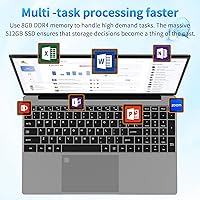
  • RAM: 8GB of DDR4 memory is installed, providing adequate headroom for everyday multitasking and standard productivity applications.
  • Storage: A 512GB solid-state drive delivers faster read and write speeds than a traditional hard drive, with no moving parts to fail.
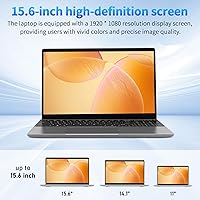
  • Display: The 15.6-inch panel outputs at 1920x1080 (Full HD) resolution and features an anti-glare coating to reduce reflections in varied lighting conditions.
  • Operating System: Windows 11 Home comes preinstalled and is ready to use without any additional setup or separate licensing fees.
  • WiFi: Dual-band WiFi supports both 2.4GHz and 5GHz bands, offering more stable and faster connections than older single-band budget machines.
  • Bluetooth: Bluetooth 4.2 is built in for pairing wireless peripherals such as mice, headphones, and external keyboards.
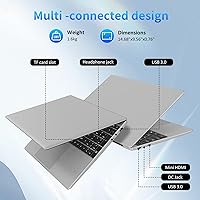
  • Ports: Connectivity includes two USB 3.0 ports, one Mini HDMI output, one 3.5mm audio jack, and one TF (microSD) card slot.
  • Battery: The 6000mAh battery is rated for up to 5 hours of use, though real-world sessions typically run closer to 3 hours under normal conditions.
  • Weight: The laptop weighs 3.5 pounds (approximately 1.6kg), which is manageable for daily transport in a bag or backpack.
  • Dimensions: The chassis measures 14 x 9 x 0.7 inches, keeping the overall profile slim relative to the 15.6-inch display it houses.
  • Graphics: Display output is handled by the N5095's integrated Intel UHD GPU, which is sufficient for everyday tasks and basic media playback only.
  • Keyboard: The full-size keyboard includes a dedicated numeric keypad on the right side, with backlighting toggled via the Fn + F5 key combination.
  • Fingerprint Reader: A built-in fingerprint reader supports Windows Hello, allowing users to log in without entering a password each session.
  • Storage Expansion: The TF card slot accepts microSD cards and supports up to 256GB of additional storage beyond the built-in SSD.
  • Power Adapter: The included adapter operates at DC 12V/2.5A and is rated to bring the battery to a full charge in approximately 2 hours.
  • Warranty: Trygood provides a one-year warranty covering the device, with customer support available directly through the Trygood seller store.

Related Reviews

HP 15.6-inch Laptop 15-ef0021nr, Ryzen 3 3200U, 8GB RAM, 256GB SSD

82%
92%
Value for Money
85%
Performance
83%
Build Quality
89%
Portability
81%
Battery Life
More
Dell Inspiron 3593 15.6-inch Laptop
68%
74%
Everyday Performance
81%
SSD Speed & Storage
52%
Display Quality
63%
Battery Life
57%
Build Quality
More
Bluboon 15.6-inch Women's Laptop Backpack
75%
88%
Storage & Organization
81%
Laptop Protection
67%
Build Quality & Materials
72%
Comfort & Ergonomics
69%
Water Resistance
More
Vonxury 16L Water-Resistant Laptop Backpack
79%
93%
Value for Money
91%
Organization Layout
88%
Laptop Protection
89%
Weight & Portability
74%
Water Resistance
More
Liokesa 15.6-Inch Laptop Backpack
86%
89%
Value for Money
87%
Comfort and Ergonomics
84%
Durability and Build Quality
92%
Storage and Organization
90%
Water Resistance
More
Taygeer 35L Travel Laptop Backpack
80%
91%
Storage & Organization
88%
Carry-On Compliance
86%
Laptop Protection
93%
Weight & Portability
89%
TSA & Security Experience
More
MOMUVO Laptop Backpack for Women 15.6 Inch
86%
88%
Value for Money
85%
Durability
90%
Ease of Use
93%
Portability
87%
Comfort
More
WANDF 15.6-Inch Women's Laptop Backpack
80%
88%
Organization & Layout
83%
Comfort & Ergonomics
79%
Airline Compatibility
86%
Anti-Theft Security
74%
Water Resistance
More
VANKEAN V8001 15.6-inch Laptop Backpack
81%
89%
Storage & Organization
83%
Laptop & Tablet Protection
81%
USB Charging Convenience
76%
Build Quality & Materials
64%
Hardware Durability
More
MATEIN Rolling Laptop Bag with Lunch Box
77%
86%
Rolling Mobility
91%
Storage & Organization
88%
Laptop Protection
78%
Lunch Box Utility
74%
Handle System
More
BAGSMART 15.6-Inch College Laptop Backpack

80%
93%
Visual Design
88%
Laptop Protection
79%
Build Quality
82%
Organizational Layout
76%
Comfort & Ergonomics
More

FAQ

For the most common academic tasks — writing papers, doing online research, running Office or Google Docs, and joining video calls — this budget laptop handles things comfortably. Where it starts to struggle is anything heavier, like keeping many browser tabs open simultaneously while streaming and downloading in the background. If your coursework stays within standard academic software, it should serve you well.

The spec sheet lists up to 5 hours, but most users report something closer to 3 hours under normal conditions with the screen at a reasonable brightness level. If you plan to work away from a power outlet for more than a couple of hours, it is worth bringing the charger. Battery life is the most honest trade-off at this price point.

Yes, both work comfortably. Microsoft 365 apps like Word, Excel, and PowerPoint all open and operate without significant lag, and browser-based tools like Google Docs are equally smooth. Just avoid opening several large files across many windows at the same time.

Yes, the built-in webcam and dual-band WiFi make video calls on Zoom, Google Meet, and Teams work reliably under normal conditions. The 5GHz band in particular helps keep the connection steady if your router supports it, which is a genuine advantage over cheaper single-band laptops.

Many buyers describe the keyboard as a pleasant surprise at this price — the layout is full-size with a dedicated numeric keypad, and the keys have reasonable travel for a thin machine. The backlight is a useful addition for dim environments, though you need to use the Fn + F5 shortcut to activate it. For document-heavy work, it holds up well over an extended session.

The Trygood T152A 15.6-inch Laptop does not advertise user-upgradeable RAM slots, so it is safest to treat the 8GB DDR4 configuration as fixed. On the storage side, the TF card slot accepts microSD cards up to 256GB, which is a practical way to expand space for documents and media files. If internal capacity is a concern, confirm upgrade options with the seller before purchasing.

Streaming on Netflix, YouTube, or similar services looks genuinely good — the 1080p anti-glare panel is one of this machine's stronger points and holds up well in varied lighting. Plugging in headphones via the 3.5mm jack also noticeably improves the experience over the built-in speakers. Just keep battery expectations realistic if you are watching away from an outlet.

Under light workloads — browsing, writing, casual streaming — the fan stays quiet and is barely noticeable. During sustained tasks that push the processor harder, it does spin up, and some users have found it mildly distracting in very quiet environments. It is not unusually loud compared to other machines in this category, but it is not silent under load.

Trygood is a smaller brand without the established track record of names like Lenovo or Acer, and that is worth factoring into your decision. The device does come with a one-year warranty and seller support through the Trygood store, which offers a reasonable safety net. Since the laptop only launched in late 2024, there is simply not much long-term ownership data available yet — something to keep in mind if long-term reliability is a priority.

Yes, through the Mini HDMI port — but note it is Mini HDMI, not the standard full-size port found on most displays and TVs, so you will need a Mini HDMI to HDMI cable or a small adapter. These are inexpensive and easy to find online, but worth picking up before your first day of use if you plan to work with an external screen regularly.